
CSS 常见问题笔记
CSS 常见问题
布局
一、盒模型宽度计算
问题:div1 的 offsetWidth 是多少?
<style>

    #div1 {

        width: 100px;

        padding: 10px;

        border: 1px solid #ccc;

        margin: 10px;

    }

</style>

<div id="div1">

</div>
div1 的盒模型:
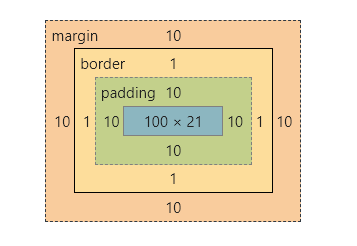
offsetWidth = (内容宽度 + 内边距 + 边框),无外边框。
offsetWidth = 100 + 10 + 1 * 2 = 122

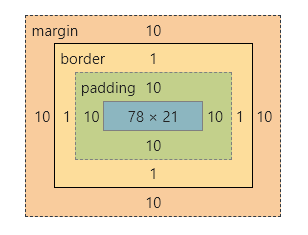
如果让 offsetWidth = 100,可以给 div 加一个样式 box-sizing: border-box;
<style>

    #div2 {

        width: 100px;

        padding: 10px;

        border: 1px solid #ccc;

        margin: 10px;

        box-sizing: border-box;

    }

</style>

<div id="div2">

</div>
div2 的盒模型:

二、margin 纵向重叠的问题
问题:AAA 和 BBB 之间的距离是多少?
<style>

    p {

        font-size: 16px;

        /*

        	line-height 为数字的话

        	行高为 字体 * 该数字

        	当前行高为 16px

        */

        line-height: 1;

        margin-top: 10px;

        margin-bottom: 15px;

    }

</style>

<p>AAA</p>

<p></p>

<p></p>

<p>BBB</p>
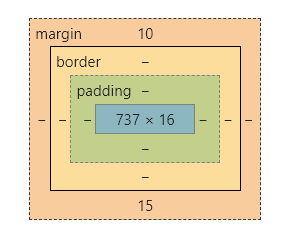
- 相邻元素的 margin-top 和 margin-bottom 是会重叠的。
- 空白内容也会被重叠。
AAA 和 BBB 之间的距离是 15px
AAA 和 BBB 的盒模型是一样的:
三、margin 负值的问题
问题:对 margin 的 top left right bottom 设置负值,是什么效果?
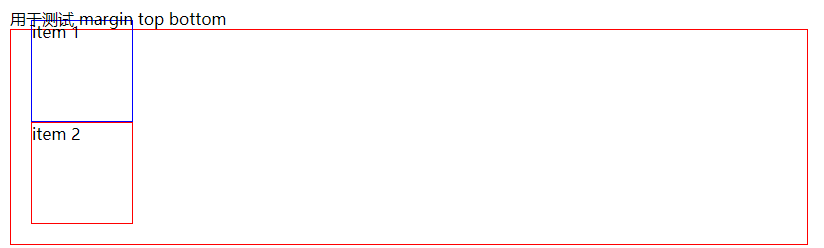
- margin-top:该元素向上移动
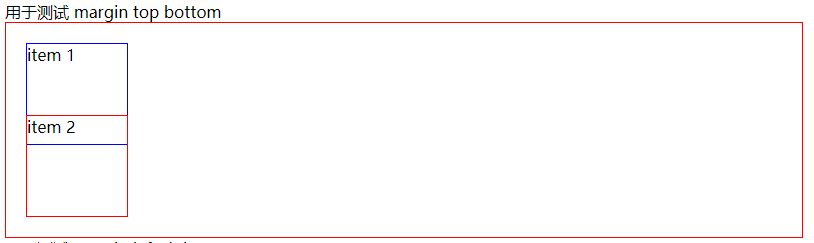
- margin-bottom:该元素不受影响,该元素下面的元素上移
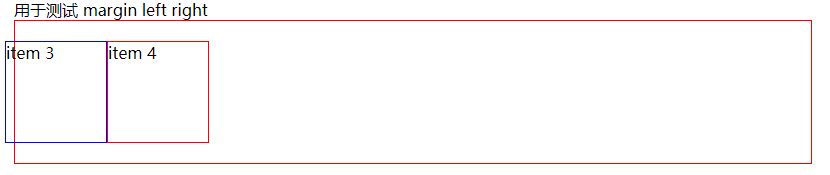
- margin-left:该元素向左移动
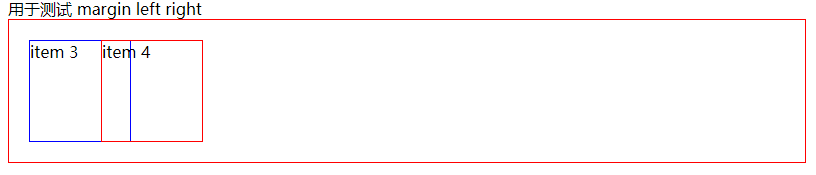
- margin-right:该元素不受影响,该元素右侧的元素左移
代码演示:
<style>

    body {

        margin: 20px;

    }

    .box {

        border: 1px solid red;

        padding: 20px;

    }

    .box-blue {

        width: 100px;

        height: 100px;

        border: 1px solid blue;

    }

    .box-red {

        width: 100px;

        height: 100px;

        border: 1px solid red;

    }

    .clearfix::after {

        content: '';

        display: table;

        clear: both;

    }

    .float-left {

        float: left;

    }

    .top {

        margin-top: -30px;

    }

    .bottom {

        margin-bottom: -30px;

    }

    .left {

        margin-left: -30px;

    }

    .right {

        margin-right: -30px;

    }

</style>

<div>用于测试 margin top bottom</div>

<div class="box">

    <div class="box-blue">item 1</div>

    <div class="box-red">item 2</div>

</div>

<div>用于测试 margin left right</div>

<div class="box clearfix">

    <div class="float-left box-blue">item 3</div>

    <div class="float-left box-red">item 4</div>

</div>
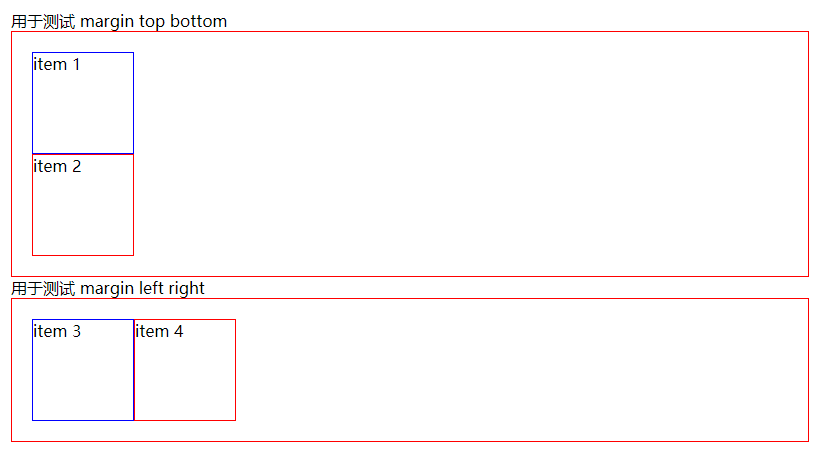
- 测试 margin-top:给 item1 添加 margin-top
- 测试 margin-bottom:给 item1 添加 margin-bottom
- 测试 margin-left:给 item3 添加 margin-left
- 测试 margin-right:给 item3 添加 margin-right
四、BFC 的理解与应用
问题:什么是 BFC? 如何应用?
BFC:Block format context,块级格式化上下文
一块独立渲染区域,内部元素的渲染不会影响边界以外的元素
形成 BFC 的常见条件:
- float 不是 none
- position 是 absolute 或 fixed
- overflow 不是 visible
- display 是 flex、inline-block 等
<style>

    .box {

        background-color: #ccc;

    }

    .left {

        float: left;

    }

    .bfc {

        /* 触发 bfc */

        overflow: hidden;

    }

</style>

<div class="box">

    <img src="https://raw.githubusercontent.com/codeEgret/picBed/master/%E4%BB%99%E5%A5%B3%E6%A3%92.png" alt=""

         class="left" style="width: 100px">

    <p>这是一段文字......</p>

</div>
因为给 img 设置了 float ,图片完全跑出了容器,并没有撑开容器

给 div 添加一个 class="bfc",用于触发 bfc,这样图片就不会脱离文档流。

五、float 布局
问题:如何实现圣杯布局和双飞翼布局?
圣杯布局和双飞翼布局的目的:
- 三栏布局,中间一栏最先加载和渲染(内容最重要)
- 两侧内容固定,中间内容随着宽度自适应
- 一般用于 PC 网页
圣杯布局的实现:
- 先创建好大概的内容
<style>

    body {

        min-width: 550px;

    }

    header {

        text-align: center;

        background-color: #ccc;

    }

    .col {

        float: left;

    }

    .main {

        width: 100%;

        background-color: pink;

    }

    .left {

        width: 190px;

        background-color: skyblue;

    }

    .right {

        width: 100px;

        background-color: cyan;

    }

    footer {

        text-align: center;

        background-color: #ccc;

        clear: both;

    }

</style>

</head>

<body>

    <header>header</header>

    <div class="content">

        <div class="main col">main</div>

        <div class="left col">left</div>

        <div class="right col">right</div>

    </div>

    <footer>footer</footer>

</body>

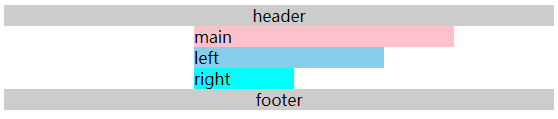
- 给外层容器添加左右内边距,padding-left、padding-right
<style>

    .content {

        padding-left: 190px;

        padding-right: 100px;

    }

</style>
- 将 left 移动到左侧,给 left 添加 margin 负值,left 需要使用定位才能实现。
<style>

    .left {

        width: 190px;

        backgroud-color: skyblue;

        display: relative;

        left: -190px;

        margin: -100%;

    }

</style>

- 将 right 移动到右侧,给 right 设置 margin-right 负值,这个负值为 right 的宽度,这样right 的内容就被覆盖了,就移动上去了。
<style>

    .right {

        width: 100px;

        background-color: cyan;

        margin-right: -100px;

    }

</style>

双飞翼布局的实现:
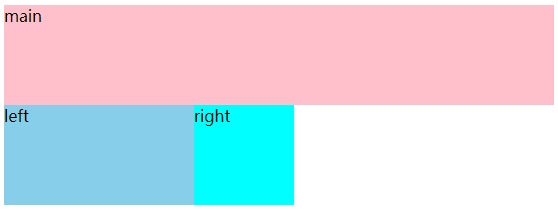
- 先创建好大概的内容
<style>

    body {

        min-width: 550px;

    }

    .col {

        float: left;

    }

    .main {

        width: 100%;

        height: 100px;

        background-color: pink;

    }

    .left {

        width: 190px;

        height: 100px;

        background-color: skyblue;

    }

    .right {

        width: 100px;

        height: 100px;

        background-color: cyan;

    }

</style>

<body>

    <div class="main col">

        <div class="main-wrapper">main</div>

    </div>

    <div class="left col">left</div>

    <div class="right col">right</div>

</body>
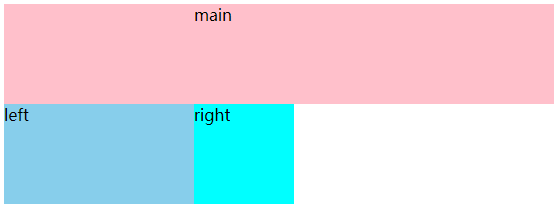
- 设置 main-wrapper 的左右外边距
<style>

    .main-wrapper {

        margin-left: 190px;

        margin-right: 100px;

    }

</style>
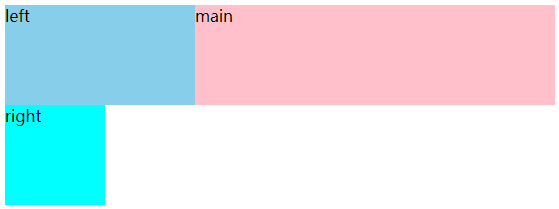
- 使用 margin-left 负值的方法,将 left 移上去,100% 代表的是 mian 的宽度。
<style>

    .left {

        width: 190px;

        height: 100px;

        background-color: skyblue;

        margin-left: -100%;

    }

</style>
- 使用 margin-left 负值的方法,将 right 移上去,100px 代表 right 的宽度。
<style>

    .right {

        width: 100px;

        height: 100px;

        background-color: cyan;

        margin-left: -100px;

    }

</style>

圣杯布局和双飞翼布局的技术总结:
- 使用 float 布局
- 两侧使用 margin 负值,以便和中间内容横向重叠
- 防止中间内容被两次覆盖,一个用 padding,一个用 margin
问题:手写 clearfix
在圣杯布局中的 footer 使用了 clear: both; 来清除浮动,我们可以手写一个 clearfix 来实现清除浮动。
.clearfix::after {

    content: '';

    display: table;

    clear: both;

}

/* 兼容 IE */

.clearfix {

    *zoom: 1;

}
六、flex 布局
常用语法:
- flex-direction:属性决定主轴的方向(项目的排列方向)
- row(默认值): 主轴为水平方向,起点在左端。
- row-reverse: 主轴为水平方向,起点在右端。
- column: 主轴为垂直方向,起点在上沿。
- column-reverse: 主轴为垂直方向,起点在下沿。
- justify-content:主轴上的对齐方式
- flex-start(默认值):左对齐
- flex-end:右对齐
- center:居中对齐
- space-between:两端对齐,间隔相等
- space-around: 每个项目两侧的间隔相等。所以,项目之间的间隔比项目与边框的间隔大一倍。
- align-items: 交叉轴上如何对齐
- flex-start: 交叉轴的起点对齐。
- flex-end: 交叉轴的终点对齐。
- center: 交叉轴的中点对齐。
- baseline: 第一行文字的基线对齐
- stretch (默认值):如果项目未设置高度或设为auto,将占满整个容器的高度。
- flex-wrap:是否换行
- nowrap(默认):不换行
- wrap:换行,第一行在上方
- wrap-reverse:换行,第一行在下方
- align-self:允许单个元素有不一样的对齐方式,比 align-items 多一个 auto 元素。
- auto(默认值):表示继承父元素的属性,如果没有符元素,等同于 stretch。
问题:flex 实现骰子的六个面
<style>

    .box1,

    .box2,

    .box3,

    .box4,

    .box5,

    .box6 {

        display: flex;

        float: left;

        margin: 10px;

        width: 300px;

        height: 300px;

        border: 1px solid #000;

        border-radius: 10px;

    }

    .item {

        width: 40px;

        height: 40px;

        border-radius: 50%;

        background: #ccc;

    }

    .box1 {

        justify-content: center;

        align-items: center;

    }

    .box2 {

        flex-direction: column;

        justify-content: space-around;

        align-items: center;

    }

    .box3 {

        justify-content: space-around;

        align-items: center;

    }

    .box3 .item:nth-child(1) {

        align-self: flex-start;

        transform: translateY(30px);

    }

    .box3 .item:nth-child(3) {

        align-self: flex-end;

        transform: translateY(-30px);

    }

    .box4 {

        flex-direction: column;

    }

    .box4-wrap {

        display: flex;

        justify-content: space-around;

        align-items: center;

        height: 150px;

    }

    .box5 {

        flex-direction: column;

    }

    .box5-wrap {

        display: flex;

        justify-content: space-around;

        align-items: center;

        height: 100px;

    }

    .box6 {

        flex-direction: column;

    }

    .box6-wrap {

        display: flex;

        justify-content: space-around;

        align-items: center;

        height: 100px;

    }

</style>

<body>

    <div class="box1">

        <div class="item"></div>

    </div>

    <div class="box2">

        <div class="item"></div>

        <div class="item"></div>

    </div>

    <div class="box3">

        <div class="item"></div>

        <div class="item"></div>

        <div class="item"></div>

    </div>

    <div class="box4">

        <div class="box4-wrap">

            <div class="item"></div>

            <div class="item"></div>

        </div>

        <div class="box4-wrap">

            <div class="item"></div>

            <div class="item"></div>

        </div>

    </div>

    <div class="box5">

        <div class="box5-wrap">

            <div class="item"></div>

            <div class="item"></div>

        </div>

        <div class="box5-wrap">

            <div class="item"></div>

        </div>

        <div class="box5-wrap">

            <div class="item"></div>

            <div class="item"></div>

        </div>

    </div>

    <div class="box6">

        <div class="box6-wrap">

            <div class="item"></div>

            <div class="item"></div>

        </div>

        <div class="box6-wrap">

            <div class="item"></div>

            <div class="item"></div>

        </div>

        <div class="box6-wrap">

            <div class="item"></div>

            <div class="item"></div>

        </div>

    </div>

</body>
定位
一、absolute 和 relative 分别依据什么定位?
- relative:他是依据自身定位的
- absolute:他是依据第一个定位父元素定位
二、居中对齐有哪些实现方式?
问题:水平居中
- inline 元素:text-centent: center;
- block 元素:margin: 0 auto;
- absolute 元素:left: 50% + margin-left: 负值
问题:垂直居中
- inline 元素:line-height 的值等于 height 的值
- absolute 元素:top: 50% + margin-top: 负值
- absolute 元素:transform(-50%, -50%)
- absolute 元素:top,left,right,bottom = 0 + margin: auto
第一种和第二种需要知道盒子的大小,不知道盒子大小的时候,可以使用第三种和第四种
图文样式
问题:line-height 如何继承
- 写具体数值,如 100px,则直接继承该值
- 写比例,如 2,则继承该比例
- 写百分比,如 200%,则继承计算出来的值
<style>

    .box1 {

        font-size: 20px;

        line-height: 30px;

        background-color: pink;

    }

    .box2 {

        font-size: 20px;

        line-height: 2;

        background-color: skyblue;

    }

    .box3 {

        font-size: 20px;

        line-height: 200%;

        background-color: cyan;

    }

    p {

        font-size: 25px;

    }

</style>

<div class="box1">

    <p>高度为30px</p>

</div>

<div class="box2">

    <p>高度为50px</p>

</div>

<div class="box3">

    <p>高度为40px</p>

</div>
CSS 常见问题笔记的更多相关文章
- CSS学习笔记
CSS学习笔记 2016年12月15日整理 CSS基础 Chapter1 在console输入escape("宋体") ENTER 就会出现unicode编码 显示"%u ...
- HTML+CSS学习笔记 (7) - CSS样式基本知识
HTML+CSS学习笔记 (7) - CSS样式基本知识 内联式css样式,直接写在现有的HTML标签中 CSS样式可以写在哪些地方呢?从CSS 样式代码插入的形式来看基本可以分为以下3种:内联式.嵌 ...
- HTML+CSS学习笔记 (6) - 开始学习CSS
HTML+CSS学习笔记 (6) - 开始学习CSS 认识CSS样式 CSS全称为"层叠样式表 (Cascading Style Sheets)",它主要是用于定义HTML内容在浏 ...
- HTML+CSS学习笔记(5)- 与浏览者交互,表单标签
HTML+CSS学习笔记(5)- 与浏览者交互,表单标签 1.使用表单标签,与用户交互 网站怎样与用户进行交互?答案是使用HTML表单(form).表单是可以把浏览者输入的数据传送到服务器端,这样服务 ...
- HTML+CSS学习笔记(4) - 认识标签(3)
HTML+CSS学习笔记(4) - 认识标签(3) 1.使用<a>标签,链接到另一个页面 使用<a>标签可实现超链接,它在网页制作中可以说是无处不在,只要有链接的地方,就会有这 ...
- HTML+CSS学习笔记(3)- 认识标签(2)
HTML+CSS学习笔记(3)- 认识标签(2) 1.使用ul,添加新闻信息列表 在浏览网页时,你会发现网页上有很多信息的列表,如新闻列表.图片列表, 这些列表就可以使用ul-li标签来完成.ul-l ...
- HTML+CSS学习笔记(2) - 认识标签(1)
HTML+CSS学习笔记(2) - 认识标签(1) 1.语义化,让你的网页更好的被搜索引擎理解 标签的用途: 我们学习网页制作时,常常会听到一个词,语义化.那么什么叫做语义化呢,说的通俗点就是:明白每 ...
- HTML+CSS学习笔记(1) - Html介绍
HTML+CSS学习笔记(1) - Html介绍 1.代码初体验,制作我的第一个网页 <!DOCTYPE HTML> <html> <head> <meta ...
- CSS常见问题及兼容性
CSS常见问题 1 (IE6,7)H5标签兼容 解决方法1:(只显示核心代码) 1<script> ; ; ; ;;;};;;;;;;; ...
随机推荐
- 子域名查询、DNS记录查询
目录 子域名信息查询 Layer子域名爆破机 subDomainBrute 利用google查询 HTTP证书查询 DNS记录查询脚本 IP转换为经纬度 利用网页获取对方经纬度信息 首先关于DNS域名 ...
- XCTF-FlatScience
FlatScience 题目描述 啥描述也没有 解题过程 页面有好多链接,除了论文pdf之外,还有子目录下的index.html, 比如:/1/index.html,/1/3/index.html 扫 ...
- SpringBoot日志输出定义
在application.yml配置文件中添加 logging: level: root: INFO #根日志输出级别 com.juyss.dao: DEBUG #自定义包的日志输出级别 file: ...
- 基于虹软人脸识别,实现RTMP直播推流追踪视频中所有人脸信息(C#)
前言 大家应该都知道几个很常见的例子,比如在张学友的演唱会,在安检通道检票时,通过人像识别系统成功识别捉了好多在逃人员,被称为逃犯克星:人行横道不遵守交通规则闯红灯的路人被人脸识别系统抓拍放在大屏上以 ...
- spring为何要注入接口,而注入接口的实现类就会报错
首先说明,注入的对象确实为实现类的对象.(并不是实现类的代理对象,注入并不涉及代理) 如果只是单纯注入是可以用实现类接收注入对象的,但是往往开发中会对实现类做增强,如事务,日志等,实现增强的AOP技术 ...
- [算法] O(nlogn)和O(n^2)算法性能比较
选择排序.插入排序.归并排序 main.cpp 1 #include <iostream> 2 #include "Student.h" 3 #include &quo ...
- Docker——Jenkins + Git + Registry构建自动化持续集成环境(CI/CD)
前言 在互联网时代,对于每一家公司,软件开发和发布的重要性不言而喻,目前已经形成一套标准的流程,最重要的组成部分就是持续集成(CI)及持续部署.交付(CD). 本文基于Jenkins+Docker+G ...
- Ansible_变量管理与设置
一.Ansible变量管理 1.变量概述 Ansible支持利用变量来存储值,并在Ansible项目的所有文件中重复使用这些值.这可以简化项目的创建和维护,并减少错误的数量 通过变量,可以轻松地在An ...
- ELK学习实验014:Nginx日志JSON格式收集
1 Kibana的显示配置 https://demo.elastic.co/app/kibana#/dashboard/welcome_dashboard 环境先处理干净 安装nginx和httpd- ...
- rpm包名详解-rpm命令使用方法
linux软件包管理-rpm mount # 挂载 1.将光盘镜像插入光驱 2.创建挂载目录 mkdir /guangqu 3.挂载到/guangqu [root@gong ~]# mount /de ...