
nginx服务跳转
1.什么是页面跳转
- 将URL信息做改变
- 将URI信息做改变
- 完成伪静态配置
2.实现页面跳转的方法
http://nginx.org/en/docs/http/ngx_http_rewrite_module.html#rewrite
2.1rewrite跳转
Syntax:	rewrite     regex              replacement           [flag];

                 匹配需要跳转的信息     跳转成什么地址       标记

Default:	—

Context:	server, location, if
标记:
- last:
- break:
- redirect: 临时跳转,状态码为302
- permanent:永久跳转,状态码为301
2.2return跳转
Syntax:    return code [text];

return code URL;

return URL;

Default:    —

Context:    server, location, if
2.3页面跳转实践操作
01.跳转配置中last与break区别对比
[root@web01-172.16.1.7 /html]# vim /etc/nginx/conf.d/rewrite.conf

server{

  listen 80;

  server_name rewrite.shuai.com;

  root    /html;

  location ~ ^/break/ {

     rewrite  ^/break/  /test/  break;

}

  location ~ ^/last/ {

     rewrite  ^/last/  /test/  last;

}

  location ~ /test/ {

     default_type  application/json;

     return 200 'ok';

}

}

~
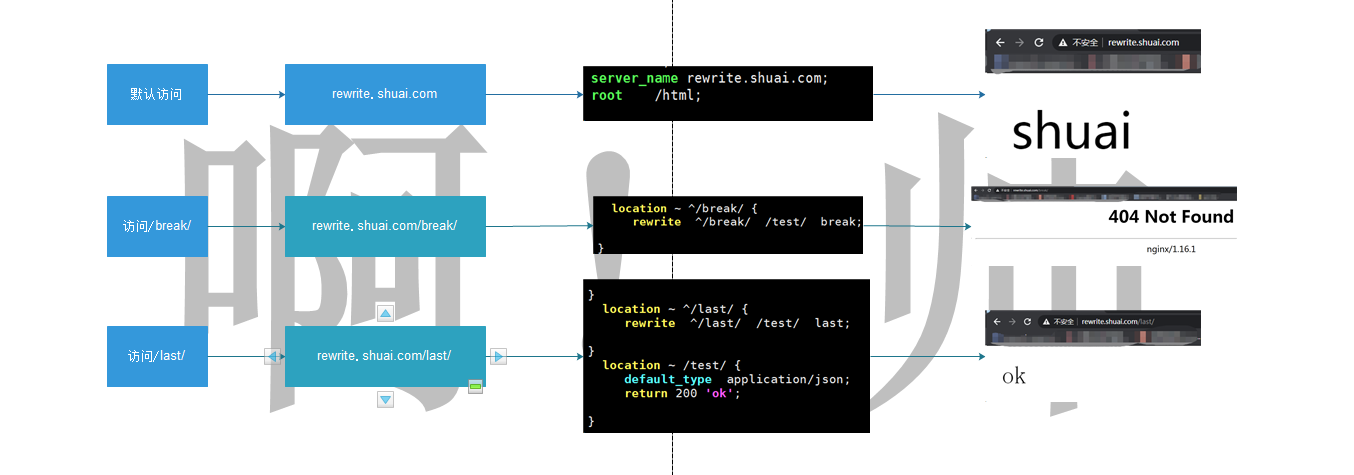
02.break和last区别
break:一旦跳转完毕,就会停止后续操作过程,不会在显示跳转页面地址,没有跳转目录
last:一旦跳转完毕,会继续访问后端页面
2.4常见跳转示例情况测试说明
例一:用户访问/abc/1.html实际上真实访问的是/ccc/bbb/2.html
#http://rewrite.shuai.com/abc/1.html>>http://rewrite.shuai.com/ccc/bbb/2.html
01.准备路径
[root@web01-172.16.1.7 ~]# mkdir /html/ccc/bbb -p

[root@web01-172.16.1.7 ~]# echo "ccc_bbb_2" > /html/ccc/bbb/2.html
02.配置nginx跳转
[root@web01-172.16.1.7 ~]# cat /etc/nginx/conf.d/ccbb.conf

server {

  listen 80;

  server_name rewrite.shuai.com;

  location / {

   root /html;

   index index.html;

  }

  location /abc {

  rewrite (.*) /ccc/bbb/2.html redirect;

  #return 302 /ccc/bbb/2.html;

  }

}

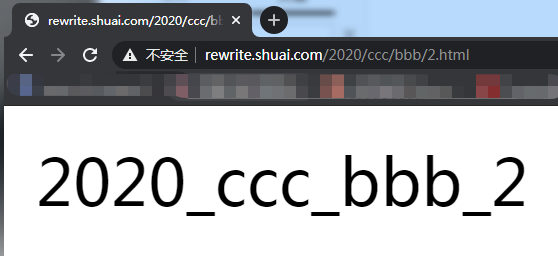
例二:用户访问/2019/ccc/bbb/2.html实际上访问的是/2020/ccc/bbb/2.html
http://rewrite.shuai.com/2019/ccc/bbb/2.html>>http://rewrite.shuai.com/2020/ccc/bbb/2.html
01.准备路径
[root@web01-172.16.1.7 ~]# mkdir /html/2020/ccc/bbb -p

[root@web01-172.16.1.7 ~]# echo "2020_ccc_bbb_2" > /html/2020/ccc/bbb/2.html
02.配置nginx跳转
[root@web01-172.16.1.7 ~]# vim /etc/nginx/conf.d/ccbb.conf

server {

  listen 80;

  server_name rewrite.shuai.com;

  location / {

   root /html;

   index index.html;

  }

  location /2019 {

  rewrite ^/2019/(.*)$ /2020/$1 redirect;

  return 302 /2020/ccc/bbb/2.html;

  }

}
例三:用户访问/test目录下的任何内容,实际上是访问http://rewrite.shuai.com
01.准备路径
[root@web01-172.16.1.7 ~]# mkdir /html/test/1.jpg
02.配置nginx跳转
[root@web01-172.16.1.7 /html]# cat /etc/nginx/conf.d/caca.conf

server {

  listen 80;

  server_name rewrite.shuai.com;

  location / {

   root /html;

   index  1.jpg  index.html;

  }

  location /test {

   rewrite (.*) http://rewrite.shuai.com  redirect;

  }

}

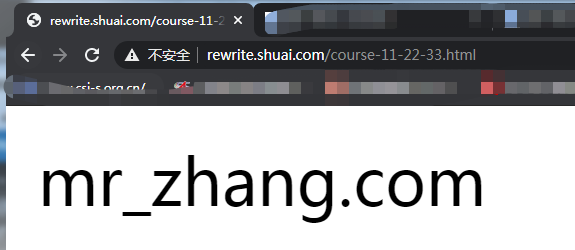
例四:用户访问course-11-22-33.html实际上真实访问是/course/11/22/33/course_33.html
http://rewrite.shuai.com/course-11-22-33.html>>http://rewrite.shuai.com/html/11/22/33/course_33.html
01.准备路径
[root@web01-172.16.1.7 ~]# mkdir /html/coures/11/22/33 -p

[root@web01-172.16.1.7 /html/coures]# echo "mr_zhang.com">/html/coures/11/22/33/course_33.html
02.配置nginx跳转
[root@web01-172.16.1.7 /html/coures]# vim  /etc/nginx/conf.d/ccbb.conf

server {

  listen 80;

  server_name rewrite.shuai.com;

  location / {

   root /html;

   index index.html;

   rewrite ^/course-(.*)-(.*)-(.*).html$ /coures/$1/$2/$3/course_$3.html break; #动态

   rewrite ^/course-(.*)  /coures/11/22/33/course_33.html redirect; #静态

  }

}
说明:last/break做跳转不会显示跳转的地址信息
3.基于URL跳转
rewrite.shuai.com>>www.ashuai.com
3.1修改dns解析
10.0.0.7 rewrite.shuai.com www.ashuai.com
3.2配置nginx跳转
[root@web01-172.16.1.7 /etc/nginx/conf.d]# cat ccbb.conf

server {

  listen 80;

  server_name rewrite.shuai.com;

  rewrite ^/(.*) http://www.jd.com/$1  permanent;

}

server {

  listen 80;

  server_name www.jd.com;

  location / {

   root /html;

   index index.html;

  }

}

##################################################或

server {

  listen 80;

  server_name    rewrite.shuai.com   www.jd.com;

  location / {

   root /html;

   index index.html;

   if ($http_host ~*  ^rewrite.shuai.com){

       rewrite ^/(.*) http://www.jd.com/$1  permanent;

     }

  }

}

4.将http请求,跳转至https
4.1创建https访问
4.1.1nginx安装ssl模块
4.1.2安装证书,黑户证书,实际环境不可用
openssl genrsa -idea -out server.key 2048

openssl req -days 36500 -x509 -sha256 -nodes -newkey rsa:2048 -keyout server.key -out server.crt
4.1.3修改nginx配置文件
[root@web01-172.16.1.7 /etc/nginx/conf.d]# cat blog.conf

server{

    listen        443  ssl;

    server_name   blog.ashuai.com;

    fastcgi_buffers  512  64k;

    ssl_certificate     /etc/nginx/server.crt;

    ssl_certificate_key /etc/nginx/server.key;

    location / {

        root  /blog/wordpress;

        index  index.php;

    }

     location ~ \.php$ {

        root /blog/wordpress;

        fastcgi_index index.php;

        fastcgi_param SCRIPT_FILENAME $document_root$fastcgi_script_name;

        fastcgi_pass  127.0.0.1:9000;

        include fastcgi_params;

   }

}
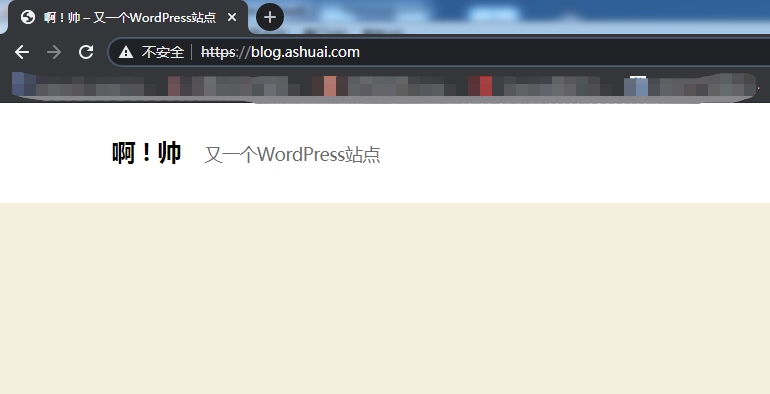
4.2实现http跳转为https
[root@web01-172.16.1.7 /etc/nginx/conf.d]# cat blog.conf

server{

   listen     80;

   server_name blog.ashuai.com;

   rewrite (.*) https://$server_name$1 redirect;

}

server{

    listen    443 ssl;

    server_name   blog.ashuai.com;

    fastcgi_buffers  512  64k;

    ssl_certificate     /etc/nginx/server.crt;

    ssl_certificate_key /etc/nginx/server.key;

    location / {

        root  /blog/wordpress;

        index  index.php;

    }

     location ~ \.php$ {

        root /blog/wordpress;

        fastcgi_index index.php;

        fastcgi_param SCRIPT_FILENAME $document_root$fastcgi_script_name;

        fastcgi_pass  127.0.0.1:9000;

        include fastcgi_params;

   }

}
nginx服务跳转的更多相关文章
- 9. nginx服务实验笔记
LNMP安装与配置 Nginx与apache.lighttp性能综合对比,如下图: 一.系统需求: CentOS/RHEL/Fedora/Debian/Ubuntu系统 需要3GB以上硬盘 ...
- nginx服务部署 说明
第1章 常用的软件 1.1 常用来提供静态服务的软件 Apache :这是中小型Web服务的主流,Web服务器中的老大哥, Nginx :大型网站Web服务的主流,曾经Web服务器中的初生牛犊 ...
- 【实战分享】又拍云 OpenResty / Nginx 服务优化实践
2018 年 11 月 17 日,由 OpenResty 主办的 OpenResty Con 2018 在杭州举行.本次 OpenResty Con 的主题涉及 OpenResty 的新开源特性.业界 ...
- nginx服务企业应用
1.1 常用来提供静态服务的软件 Apache :这是中小型Web服务的主流,Web服务器中的老大哥, Nginx :大型网站Web服务的主流,曾经Web服务器中的初生牛犊,现已长大. Nginx 的 ...
- Nginx服务优化
1.1Nginx.conf配置文件基本参数优化 1.1.1 隐藏nginx header内版本号信息 一些特定的系统及服务漏洞一般都和特定的软件及版本号有关,我们应尽量隐藏服务器的敏感信息(软件名称 ...
- 企业级Nginx服务基础到架构优化详解
1.隐藏nginx header版本号 2.更改源码隐藏软件名称 3.更改nginx默认用户及用户组 4.配置nginx worker进程个数 5.根据CPU核数进行nginx进程优化 6.nginx ...
- Nginx服务的地址重写
调整Nginx服务器配置,实现: 1.所有访问a.html的请求,重定向到b.html; 2.所有访问Nginx服务器(192.168.4.1)的请求重定向至www.baidu.com: 3.所有访问 ...
- Nginx服务部署
1 企业常用网站服务 处理静态资源:nginx.apache.Lighttpd处理动态资源:tomcat(java语言编写).php(php语言编写).python(python语言编写)nginx网 ...
- 【Linux】nginx服务配置
一. 部署LNMP环境 准备工作 Linux系统准备 设置IP 关闭防火墙 yum源配置 安装: 传输软件包 1. tar -zxvf lnmp1.2-full.tar.gz cd lnmp1.2-f ...
随机推荐
- Linux 操作系统(一)命令&用户&权限
以下实例均在Centos7下验证 Centos7 查看命令帮助 man xxx 常用命令 ls / cd - #切到上次目录 cd #回家 cat cat f1 f2 cat f1 f2>f3 ...
- Linux_WEB服务基础概念
一.HTTPD简介 1️⃣:httpd是Apache超文本传输协议(HTTP) 服务器的主程序.被设计为一个独立运行的后台进程,它会建立一个处理请求的子进程或线程的池. 2️⃣:通常,httpd不应该 ...
- 树莓派 PICO基础教程(基于MicroPython)
目录 1 树莓派 PICO 简介 1.1 简介 1.2 配置 [^2] 1.3 引脚图 1.4 尺寸 2 安装 2.1 烧录固件 2.2 安装IDE(Thonny IDE) 2.3 离线运行程序 3 ...
- Nginx的配置参数中文说明
Nginx的配置参数中文说明 前言 Nginx是一款轻量级的Web 服务器/反向代理服务器及电子邮件(IMAP/POP3)代理服务器,在BSD-like 协议下发行.其特点是占有内存少,并发能力强 ...
- MLPerf结果证实至强® 可有效助力深度学习训练
MLPerf结果证实至强 可有效助力深度学习训练 核心与视觉计算事业部副总裁Wei Li通过博客回顾了英特尔这几年为提升深度学习性能所做的努力. 目前根据英特尔 至强 可扩展处理器的MLPerf结果显 ...
- 英特尔 i5-9400F,或将成为本年最高性价比的游戏处理器
英特尔 i5-9400F,或将成为本年最高性价比的游戏处理器 一直以来,每一代英特尔 i5 系列都是很多游戏玩家主要的选购对象,它和任何一款显卡似乎都能够很好的搭配起来.可凡事都有美中不足的地方,比如 ...
- 【.NET 与树莓派】温度/湿度传感器——SHT30
SHT3XX 系列的传感,常见的有三种:SHT 30.SHT 31.SHT 35.其中,比较便宜性价比较愉快的是 SHT 30. DHT 11 模块也是检测温度.湿度的,但SHT 11 使用的不是我们 ...
- 笔记-13-多线程 Thread方法 线程安全 生产者和消费者 死锁和阻塞 练习
题目1 编写程序,创建两个线程对象,一根线程循环输出"播放背景音乐",另一根线程循环输出"显示画面";要求: 1: 1个线程使用Runnable接口的匿名内部类 ...
- Java 并发基础知识
一.什么是线程和进程? 进程: 是程序的一次执行过程,是系统运行程序的基本单元(就比如打开某个应用,就是开启了一个进程),因此进程是动态的.系统运行一个程序即是一个程序从创建.运行到消亡的过程. 在 ...
- 实验1、初入Flask
实验介绍 1. 实验内容 Flask是一个用Python编写的Web应用程序框架.Armin Ronacher带领一个名为Pocco的国际Python爱好者团队开发了Flask.Flask基于Werk ...