
css3弹性盒子模型——回顾。
1.box-flex属性规定框的子元素是否可伸缩其尺寸。
父元素必须要声明display:box;子元素才可以用box-flex。
语法:box-flex:value;
示例:
<style>
.test_box {display: -moz-box;display: -webkit-box;display:box;width: 800px;margin: 40px auto;padding: 20px;
background: #f0f3f9;}
.list {padding: 0 1em; font: bold 36px/200px monaco;text-shadow: 1px 1px #eee;}
.list_one { -moz-box-flex: 1;-webkit-box-flex: 1;box-flex: 1;background-color: yellow;}
.list_two{-moz-box-flex: 2;-webkit-box-flex: 2;box-flex: 2;background-color: #99CC00;}
.list_three {-moz-box-flex: 1;-webkit-box-flex: 1;box-flex: 1;background-color: paleturquoise;}
</style>
<div class="test_box">
<div class="list list_two">1</div>
<div class="list list_one">2</div>
<div class="list list_three">3</div>
</div>
结果: 图片
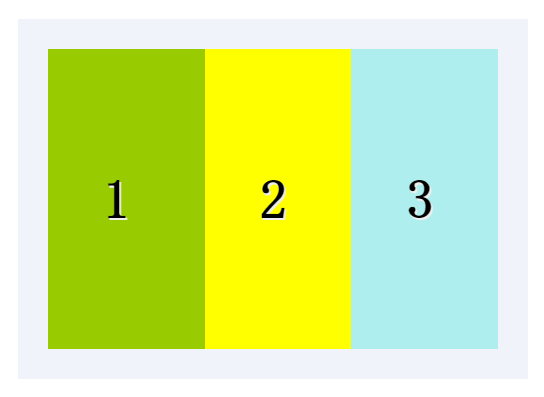
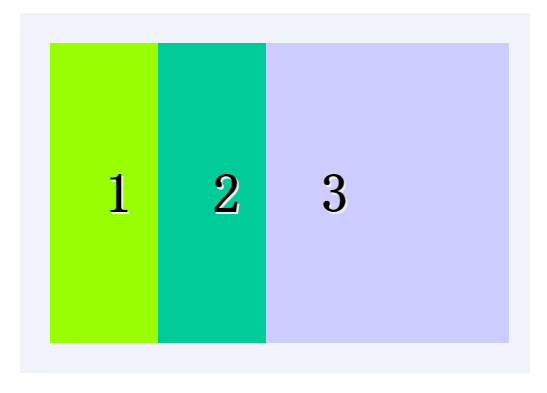
可以指定某个子元素的宽度,剩下的部分平分。
示例:
<style>
.test_box {display: -moz-box;display: -webkit-box;display: box;width: 800px;margin: 40px auto;padding: 20px;
background: #f0f3f9;}
.list {padding: 0 1em;font: bold 36px/200px monaco;
text-shadow: 1px 1px #eee;}
.list_one {-moz-box-flex: 1;-webkit-box-flex: 1;box-flex: 1;background: #00CC99;}
.list_two {-moz-box-flex: 2;-webkit-box-flex: 2;box-flex: 2;background: #99FF00;}
.list_w300 { width: 300px; background: #CCCCFF}
</style>
<div class="test_box">
<div class="list list_two">1</div>
<div class="list list_one">2</div>
<div class="list list_w300">3</div>
</div>
结果: 图片
2.box-orient
用来确定子元素的方向,是横着还是竖着。
可选值:horizontal | vertical | inline-axis | box-axis | inherit inline-axis是默认的 horizonta inline-axis 是一样的让元素横着 vertical
box-axis 是一样的让元素纵列。
示例:
<style>
.test_box {width: 300px; margin: 0 auto;display: -moz-box;
display: -webkit-box;display: box;box-orient:horizontal;padding: 20px;background: #f0f3f9;}
.list{padding: 0 1em;font: bold 36px/120px monaco; text-shadow: 1px 1px #eee;-webkit-box-flex: 1;}
.one{background: #99FF00;}
.two{background: #00CC99}
.three{background:#CCCC00}
</style>
<div class="test_box">
<div class="list one">1</div>
<div class="list two">2</div>
<div class="list three">3</div>
</div>
结果:如图

3.box-direction
用来确定子元素的排列顺序。可选值:
onrmal | revers | inherit onrmal是默认值按着正常顺序排列,从左到右
从前到后,revers表示反转。
示例:
<style>
.test_box {display: -moz-box;display: -webkit-box;display: box;-moz-box-direction:reverse;-webkit-box-direction:reverse;
box-direction:reverse;width: 300px;margin: 20px auto;padding: 10px;background: #f0f3f9;}
.list {padding: 0 1em;font: bold 36px/150px monaco;text-shadow: 1px 1px #eee;}
.list_one {-moz-box-flex: 1;-webkit-box-flex: 1;box-flex: 1;background: yellow;}
.list_two{-moz-box-flex: 2;-webkit-box-flex: 2;box-flex: 2;background: #99CC00;}
.three{background: #CCCCFF}
</style>
<div class="test_box">
<div class="list list_two">1</div>
<div class="list list_one">2</div>
<div class="list list_one three">3</div>
</div>
结果: 如图

4.box-align与box-pack
决定盒子内部剩余空间怎么使用,行为效果为对齐方式。
box-align 为垂直方向上的空间利用,box-pack 为水平方向上的空间利用。
box-align 可选参数: start | end | center | baseline | stretch
stretch为默认父标签的高度有多高,子元素就有多高。start表示底边对齐
end 为底部对齐,center居中对齐,baseline 基线对齐。
示例:
<style>
.test_box {margin: 0 auto;display: -moz-box;display: -webkit-box;
display: -o-box;display: box;-moz-box-align:end;
-webkit-box-align:end; -o-box-align:end; box-align:end;
width: 300px;height: 200px;padding: 20px;background: #f0f3f9;}
.list {padding: 0 1em;font: bold 36px/120px monaco;text-shadow: 1px 1px #eee;}
.one{background: #99FF00;}
.two{background: #00CC99}
.three{background:#CCCC00}
</style>
<div class="test_box">
<div class="list one">1</div>
<div class="list two" style="line-height:200px;">2</div>
<div class="list three">3</div>
</div>
结果:如图

box-pack可选值: start | end | center | justify
start为默认值, justify表示两端对齐。
示例:
<style>
.test_box {margin: 0 auto;display: -moz-box;display: -webkit-box;
display: -o-box;display: box;-moz-box-pack:justify;
-webkit-box-pack:justify; -o-box-pack:justify; box-pack:justify;
width: 300px;height: 200px;padding: 20px;background: #f0f3f9;}
.list {padding: 0 1em;font: bold 36px/120px monaco;
text-shadow: 1px 1px #eee;}
.one{background: #99FF00;}
.two{background: #00CC99}
.three{background:#CCCC00}
</style>
<div class="test_box">
<div class="list one">1</div>
<div class="list two" style="line-height:200px;">2</div>
<div class="list three">3</div>
</div>
结果:如图

5.box-lines
用来决定子元素是否可以换行显示,有两个可以选的值:single | mutiple
single 默认值,不换行。mutiple 换行多行显示。
示例:
<style>
.test_box {margin: 0 auto;display: -moz-box;display: -webkit-box;
display: -o-box;display: box;-moz-box-lines:multiple;
-webkit-box-lines:multiple;-o-box-lines:multiple;
box-lines:multiple; width: 300px;
height: 200px;padding: 20px;background: #f0f3f9;}
.list {padding: 0 1em;font: bold 36px/120px monaco;text-shadow: 1px 1px #eee;}
.one{background: #99FF00;}
.two{background: #00CC99}
.three{background:#CCCC00}
</style>
<div class="test_box">
<div class="list one">1</div>
<div class="list two" style="line-height:200px;">2</div>
<div class="list three">3</div>
</div>
结果:如图

6.box-ordinal-group
改变子元素的顺序,值为数字,数字越小越排在前面。
示例:
<style>
.test_box {display: -moz-box;display: -webkit-box;display: box;
width: 300px;margin: 40px auto;padding: 20px;background: #f0f3f9;}
.list {padding: 0 1em;font: bold 36px/200px monaco;text-shadow: 1px 1px #eee;}
.list_one {-moz-box-flex: 1;-webkit-box-flex: 1; box-flex: 1;
-moz-box-ordinal-group: 1;-webkit-box-ordinal-group: 1;box-ordinal-group: 1;background: #99CC00;}
.list_two{-moz-box-flex: 2;-webkit-box-flex: 2;box-flex: 2;-moz-box-ordinal-group: 2;-webkit-box-ordinal-group: 2;
box-ordinal-group: 2;background: #CC33CC;}
.three{ background: #CCCC00}
</style>
<div class="test_box">
<div class="list list_two">1</div>
<div class="list list_one">2</div>
<div class="list list_one three">3</div>
</div>
结果:如图

demo下载https://github.com/ningmengxs/css3.git
css3弹性盒子模型——回顾。的更多相关文章
- css3弹性盒子模型之box-flex
css3弹性盒子模型之box-flex 浏览器支持 目前没有浏览器支持 box-flex 属性. Firefox 支持替代的 -moz-box-flex 属性. Safari.Opera 以及 Chr ...
- css3弹性盒子模型
当下各种手机,平板尺寸不一,如果盒模型只能固定尺寸,不能随意压缩,将不能很好的迎合这个时代.所以css3推出了新的盒模型——弹性盒子模型(Flexible Box Model). 弹性盒模型可以水平布 ...
- CSS3中的弹性盒子模型
介绍 在css2当中,存在标准模式下的盒子模型和IE下的怪异盒子模型.这两种方案表示的是一种盒子模型的渲染模式.而在css3当中,新增加了弹性盒子模型,弹性盒子模型是一种新增加的强大的.灵活的布局方案 ...
- CSS3弹性盒模型flexbox布局基础版
原文链接:http://caibaojian.com/using-flexbox.html 最近看了社区上的一些关于flexbox的很多文章,感觉都没有我这篇文章实在,最重要的兼容性问题好多人都没有提 ...
- css3基础教程:CSS3弹性盒模型
今天给大家分享一篇关于CSS3基础教程 文章,主要是讲CSS3弹性盒模型.弹性布局的主要思想是让容器有能力来改变项目的宽度和高度,以填满可用空间(主要是为了容纳所有类型的显示设备和屏幕尺寸)的能力. ...
- CSS3弹性盒模型布局模块介绍
来源:Robert’s talk原文:http://robertnyman.com/2010/12/02/css3-flexible-box-layout-module-aka-flex-box-in ...
- flexbox弹性盒子模型
这几天在做移动端的web开发,遇到了一些问题,之前没有折腾过这方面的东西,这次好好吸收下 css3的flexbox--弹性盒子模型,这个盒模型决定了一个盒子在其他盒子中的分布方式及如何处理可用的空间. ...
- CSS box-flex属性,然后弹性盒子模型简介
今天做项目的时候发现一个css3的新属性flex 一.什么是flex 它的作用是能够按照设置好的规则来排列容器内的项目,而不必去计算每一个项目的宽度和边距.甚至是在容器的大小发生改变的时候,都可以重新 ...
- CSS box-flex属性,然后弹性盒子模型简介(转)
一.淡淡的开头语 昨天趁着不想工作的时间间隙闲逛24ways,在My CSS Wish List一文中,见到了个新鲜的CSS属性,就是题目中的box-flex,以前没有见过,顿生疑惑,不知是骡子还是马 ...
随机推荐
- EM算法--第一篇
在统计计算中,最大期望(EM)算法是在概率(probabilistic)模型中寻找参数最大似然估计或者最大后验估计的算法,其中概率模型依赖于无法观测的隐藏变量(LatentVariable).最大期望 ...
- python+django+bootstrap
python install django 置环境变量,将这个目录添加到系统环境变量中: C:\Python36\Lib\site-packages\django\ cmd下测试: 1.输入pytho ...
- Building Your First EDM
1 文件--新建--项目 控制台应用程序,填写信息,确定: 2 在解决方案管理器中,选中AmyConsoleApp,添加新项, 选择ADO.NET 实体数据模型,添加: 3 在选择模型内容中选择“从数 ...
- (中等) POJ 2482 Stars in Your Window,静态二叉树。
Description Here comes the problem: Assume the sky is a flat plane. All the stars lie on it with a l ...
- #Pragma Pack(n)与内存分配
#pragma pack(n) 解释一: 每个特定平台上的编译器都有自己的默认"对齐系数"(也叫对齐模数).程序员可以通过预编译命令#pragma pack(n),n=1,2,4, ...
- jquery之选项卡效果
<!DOCTYPE html PUBLIC "-//W3C//DTD XHTML 1.0 Transitional//EN" "http://www.w3.org/ ...
- VMVare 桥接上网
桥接模式设置小解: 第1步 虚拟机下fedora安装好后,打开VM虚拟机的菜单栏,单击编辑------虚拟网络编辑器,选择“主机虚拟网络 映射”标签,然后把VMnet0 手动选择为你本地的物理网卡(要 ...
- MongoDB和Java-PHP
一.java操作mongoDB 配置环境: 1.下mongodb JDBC驱动mongo-java-driver-3.2.2.jar,并包含在classpath中 步骤: 1.连接数据库 // 连接到 ...
- web前端好学吗?
最近这段时间许多学生讨论关于WEB前端工程师这个职位的问题.比如:关于前端难不难?好不好找工作?有没有用?好不好学?待遇好不好?好不好转其他的职位? 针对这个问题,课工场露露老师想跟大家谈谈自己对前端 ...
- Jquery知识小点备注
jQuery siblings() 方法返回被选元素的所有同胞元素,并且可以使用可选参数来过滤对同胞元素的搜索. 实例演示:点击某个li标签后将其设置为红色,而其所有同胞元素去除红色样式 创建Html ...