
单点登录实现(spring session+redis完成session共享)
一、前言
项目中用到的SSO,使用开源框架cas做的。简单的了解了一下cas,并学习了一下 单点登录的原理,有兴趣的同学也可以学习一下,写个demo玩一玩。
二、工程结构
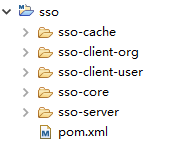
我模拟了 sso的客户端和sso的服务端, sso-core中主要是一些sso需要的过滤器和工具类,缓存和session共享的一些XML配置文件,还有springmvc需要的一下jar包的管理。sso-cache中配置了redis缓存策略。
三、单点登录原理图
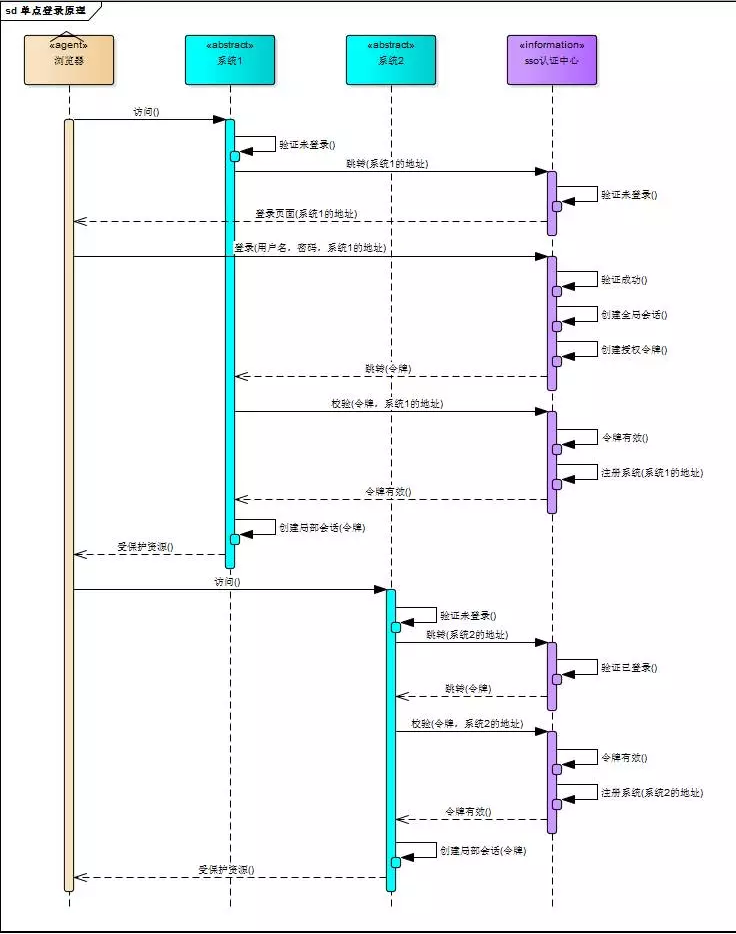
简单描述:
用户访问系统1的受保护资源,系统1发现用户未登录,跳转至sso认证中心,并将自己的地址作为参数
sso认证中心发现用户未登录,将用户引导至登录页面
用户输入用户名密码提交登录申请
sso认证中心校验用户信息,创建用户与sso认证中心之间的会话,称为全局会话,同时创建授权令牌
sso认证中心带着令牌跳转会最初的请求地址(系统1)
系统1拿到令牌,去sso认证中心校验令牌是否有效
sso认证中心校验令牌,返回有效,注册系统1
系统1使用该令牌创建与用户的会话,称为局部会话,返回受保护资源
用户访问系统2的受保护资源
系统2发现用户未登录,跳转至sso认证中心,并将自己的地址作为参数
sso认证中心发现用户已登录,跳转回系统2的地址,并附上令牌
系统2拿到令牌,去sso认证中心校验令牌是否有效
sso认证中心校验令牌,返回有效,注册系统2
系统2使用该令牌创建与用户的局部会话,返回受保护资源
四、单点登录实现
1.SSOFilter.java(sso client filter实现)
import java.io.IOException;

import javax.servlet.Filter;

import javax.servlet.FilterChain;

import javax.servlet.FilterConfig;

import javax.servlet.ServletException;

import javax.servlet.ServletRequest;

import javax.servlet.ServletResponse;

import javax.servlet.http.HttpServletRequest;

import javax.servlet.http.HttpServletResponse;

import javax.servlet.http.HttpSession;

import org.slf4j.Logger;

import org.slf4j.LoggerFactory;

import com.alibaba.fastjson.JSONObject;

import com.hjz.sso.utils.RestTemplateUtil;

public class SSOFilter implements Filter{

    public static Logger logger = LoggerFactory.getLogger(SSOFilter.class);

    private String SSO_SERVER_URL;

    private String SSO_SERVER_VERIFY_URL;

    @Override

    public void init(FilterConfig filterConfig) throws ServletException {

        SSO_SERVER_URL = filterConfig.getInitParameter("SSO_SERVER_URL");

        SSO_SERVER_VERIFY_URL = filterConfig.getInitParameter("SSO_SERVER_VERIFY_URL");

        if(SSO_SERVER_URL == null) logger.error("SSO_SERVER_URL is null.");

        if(SSO_SERVER_VERIFY_URL == null) logger.error("SSO_SERVER_VERIFY_URL is null.");

    }

    @Override

    public void doFilter(ServletRequest req, ServletResponse res,

            FilterChain chain) throws IOException, ServletException {

         HttpServletRequest request = (HttpServletRequest) req;

         HttpServletResponse response = (HttpServletResponse) res;

         //请求中带有token,去sso-server验证token是否有效

         String authority = null;

         if(request.getParameter("token") != null) {

            boolean verifyResult = this.verify(request, SSO_SERVER_VERIFY_URL, request.getParameter("token"));

            if (verifyResult) {

                chain.doFilter(req, res);

                return;

            } else {

                authority = "token->" + request.getParameter("token") + " is invalidate.";

            }

         }

         HttpSession session = request.getSession();

         if (session.getAttribute("login") != null && (boolean)session.getAttribute("login") == true) {

            chain.doFilter(req, res);

            return;

         }

         //跳转至sso认证中心

         String callbackURL = request.getRequestURL().toString();

         StringBuilder url = new StringBuilder();

         url.append(SSO_SERVER_URL).append("?callbackURL=").append(callbackURL);

         if(authority != null) {

             url.append("&authority=").append(authority);

         }

         response.sendRedirect(url.toString());

    }

    private boolean verify(HttpServletRequest request, String verifyUrl, String token) {

        String result = RestTemplateUtil.get(request, verifyUrl + "?token=" + token, null);

        JSONObject ret = JSONObject.parseObject(result);

        if("success".equals(ret.getString("code"))) {

            return true;

        }

        logger.error(request.getRequestURL().toString() + " : " + ret.getString("msg"));

        return false;

    }

    @Override

    public void destroy() {

    }

}
2.LoginController.java(sso server登录controller)
import java.util.UUID;

import javax.servlet.http.HttpSession;

import org.slf4j.Logger;

import org.slf4j.LoggerFactory;

import org.springframework.stereotype.Controller;

import org.springframework.ui.Model;

import org.springframework.web.bind.annotation.RequestMapping;

import org.springframework.web.bind.annotation.RequestMethod;

import org.springframework.web.bind.annotation.RequestParam;

@Controller

@RequestMapping("sso")

public class LoginController {

    private Logger logger = LoggerFactory.getLogger(LoginController.class);

    @RequestMapping(value="login", method={RequestMethod.GET, RequestMethod.POST})

    public String login(HttpSession session, Model model,

            @RequestParam(value="name", required=false) String name,

            @RequestParam(value="password", required=false) String password) {

        if(name == null && password == null) return "login";

        if("admin".equals(name) && "admin".equals(password)) {

            String token = UUID.randomUUID().toString();

            session.setAttribute("login", true);

            session.setAttribute("token", token);

            return "index";

        } else {

            model.addAttribute("error", true);

            model.addAttribute("message", "用户名或密码错误。");

            return "login";

        }

    }

}
3.ValidateController.java(sso server验证token controller)
import javax.servlet.http.HttpServletRequest;

import javax.servlet.http.HttpSession;

import org.springframework.stereotype.Controller;

import org.springframework.web.bind.annotation.RequestMapping;

import org.springframework.web.bind.annotation.RequestParam;

import org.springframework.web.bind.annotation.ResponseBody;

import com.alibaba.fastjson.JSONObject;

@Controller

@RequestMapping("sso")

public class ValidateController {

    @RequestMapping("verify")

    @ResponseBody

    public JSONObject verify(HttpServletRequest request, @RequestParam String token) {

        HttpSession session = request.getSession();

        JSONObject result = new JSONObject();

        if(session.getAttribute("token") != null && token.equals(session.getAttribute("token"))) {

            result.put("code", "success");

            result.put("msg", "认证成功");

        } else {

            result.put("code", "failure");

            result.put("msg", "token已失效,请重新登录!");

        }

        return result;

    }

}
4.在sso client工程中加上SSOFilter(web.xml部分配置)
<filter>

    <filter-name>ssoFilter</filter-name>

    <filter-class>com.hjz.sso.filter.SSOFilter</filter-class>

    <init-param>

        <param-name>SSO_SERVER_URL</param-name>

        <param-value>http://localhost:8088/sso-server/sso/login</param-value>

    </init-param>

    <init-param>

        <param-name>SSO_SERVER_VERIFY_URL</param-name>

        <param-value>http://localhost:8088/sso-server/sso/verify</param-value>

    </init-param>

</filter>

<filter-mapping>

    <filter-name>ssoFilter</filter-name>

    <url-pattern>/*</url-pattern>

</filter-mapping>
基本模型已经出来了,启动sso-client 和 sso-server(本人都部署到了同一个tomcat下),试图去验证单点登录。测试的时候,从浏览器中的cookie中查看,可以看到 localhost域下有多个JSESSIONID。这也难怪, Tomcat中的每一个application都会创建自己的session会话。那接下来的事情就是解决 session 共享的问题,这样我们就可以完成我们的单点登陆了。
为完成 session共享,这里推荐两种方案。一个是 tomcat+redis实现session共享,一个是 spring session+redis实现session共享。我这里采用了第二种方案,详情请接着看下面的步骤。
5.为每个工程的web.xml中增加spring session代理filter的配置
<!-- session 代理 -->

<filter>

    <filter-name>springSessionRepositoryFilter</filter-name>

    <filter-class>org.springframework.web.filter.DelegatingFilterProxy</filter-class>

</filter>

<filter-mapping>

    <filter-name>springSessionRepositoryFilter</filter-name>

    <url-pattern>/*</url-pattern>

</filter-mapping>
6.在sso-core中加入 缓存和spring session的xml配置(cache-config.xml)
<?xml version="1.0" encoding="UTF-8"?>

<beans xmlns="http://www.springframework.org/schema/beans"

       xmlns:xsi="http://www.w3.org/2001/XMLSchema-instance"

       xmlns:context="http://www.springframework.org/schema/context"

       xsi:schemaLocation="http://www.springframework.org/schema/beans http://www.springframework.org/schema/beans/spring-beans-4.0.xsd

        http://www.springframework.org/schema/context http://www.springframework.org/schema/context/spring-context-4.0.xsd"

       default-lazy-init="false">

    <description>Cache公共配置</description>

    <bean id="cookieSerializer" class="org.springframework.session.web.http.DefaultCookieSerializer">

        <property name="cookiePath" value="/"></property>

    </bean>

    <bean class="com.sso.cache.config.CacheConfig"/>

    <bean class="org.springframework.session.data.redis.config.annotation.web.http.RedisHttpSessionConfiguration">

        <property name="maxInactiveIntervalInSeconds" value="1800"></property>

    </bean>

</beans>
这里说一下为什么有定义一个 cookieSerializer 这个bean。参看RedisHttpSessionConfiguration的源码,发现它继承了SpringHttpSessionConfiguration,继续查看源码,发现SpringHttpSessionConfiguration中实现了我们配置的spring session代理filter,如下所示。
SpringHttpSessionConfiguration.java

@Bean

public <S extends ExpiringSession> SessionRepositoryFilter<? extends ExpiringSession> springSessionRepositoryFilter(

        SessionRepository<S> sessionRepository) {

    SessionRepositoryFilter sessionRepositoryFilter = new SessionRepositoryFilter(sessionRepository);

    sessionRepositoryFilter.setServletContext(this.servletContext);

    if (this.httpSessionStrategy instanceof MultiHttpSessionStrategy) {

        sessionRepositoryFilter.setHttpSessionStrategy((MultiHttpSessionStrategy) this.httpSessionStrategy);

    } else {

        sessionRepositoryFilter.setHttpSessionStrategy(this.httpSessionStrategy);

    }

    return sessionRepositoryFilter;

}
查看源码,可以发现 SpringHttpSessionConfiguration使用的默认会话策略(httpSessionStrategy)是CookieHttpSessionStrategy。继续查看CookieHttpSessionStrategy的源码,如新建session写入cookie。
public void onNewSession(Session session, HttpServletRequest request, HttpServletResponse response) {

    Set sessionIdsWritten = getSessionIdsWritten(request);

    if (sessionIdsWritten.contains(session.getId())) {

        return;

    }

    sessionIdsWritten.add(session.getId());

    Map sessionIds = getSessionIds(request);

    String sessionAlias = getCurrentSessionAlias(request);

    sessionIds.put(sessionAlias, session.getId());

    String cookieValue = createSessionCookieValue(sessionIds);

    this.cookieSerializer.writeCookieValue(new CookieSerializer.CookieValue(request, response, cookieValue));

}
cookieSerializer 默认是 DefaultCookieSerializer。查看DefaultCookieSerializer 的 writeCookieValue方法如下。
public void writeCookieValue(CookieSerializer.CookieValue cookieValue) {

    HttpServletRequest request = cookieValue.getRequest();

    HttpServletResponse response = cookieValue.getResponse();

    String requestedCookieValue = cookieValue.getCookieValue();

    String actualCookieValue = requestedCookieValue + this.jvmRoute;

    Cookie sessionCookie = new Cookie(this.cookieName, actualCookieValue);

    sessionCookie.setSecure(isSecureCookie(request));

    sessionCookie.setPath(getCookiePath(request));

    String domainName = getDomainName(request);

    if (domainName != null) {

        sessionCookie.setDomain(domainName);

    }

    if (this.useHttpOnlyCookie) {

        sessionCookie.setHttpOnly(true);

    }

    if ("".equals(requestedCookieValue)) {

        sessionCookie.setMaxAge(0);

    } else {

        sessionCookie.setMaxAge(this.cookieMaxAge);

    }

    response.addCookie(sessionCookie);

}
sessionCookie.setPath(getCookiePath(request));这块有一个问题,看一下getCookiePath方法的实现,如下。
private String getCookiePath(HttpServletRequest request) {

    if (this.cookiePath == null) {

        return request.getContextPath() + "/";

    }

    return this.cookiePath;

}
如果要实现单点登录,就不要使用默认的 cookiePath 的值。所以,我定义了一个 cookieSerializer 的bean,并指定了 cookiePath 的值。 SpringHttpSessionConfiguration中如下方法可以自动装配 我们配置的cookieSerializer,而不是使用默认的。
@Autowired(required = false)

public void setCookieSerializer(CookieSerializer cookieSerializer) {

    this.defaultHttpSessionStrategy.setCookieSerializer(cookieSerializer);

}
7.在每个工程中的spring公共配置文件中增加如下配置。
<import resource="classpath*:cache-config.xml"/>
8.后端之间rest请求传递 session ID。
private static ResponseEntity<String> request(ServletRequest req, String url, HttpMethod method, Map<String, ?> params) {

    HttpServletRequest request = (HttpServletRequest) req;

    //获取header信息

    HttpHeaders requestHeaders = new HttpHeaders();

    Enumeration<String> headerNames = request.getHeaderNames();

    while (headerNames.hasMoreElements()) {

      String key = (String) headerNames.nextElement();

      String value = request.getHeader(key);

      requestHeaders.add(key, value);

    }

    HttpEntity<String> requestEntity = new HttpEntity<String>(params != null ? JSONObject.toJSONString(params) : null, requestHeaders);

    ResponseEntity<String> rss = restTemplate.exchange(url, method, requestEntity, String.class);

    return rss;

}
使用RestTemplate发送rest请求,发送之前复制request中的header信息,保证session ID可以传递。
9.最后,启动工程,测试结果如下。
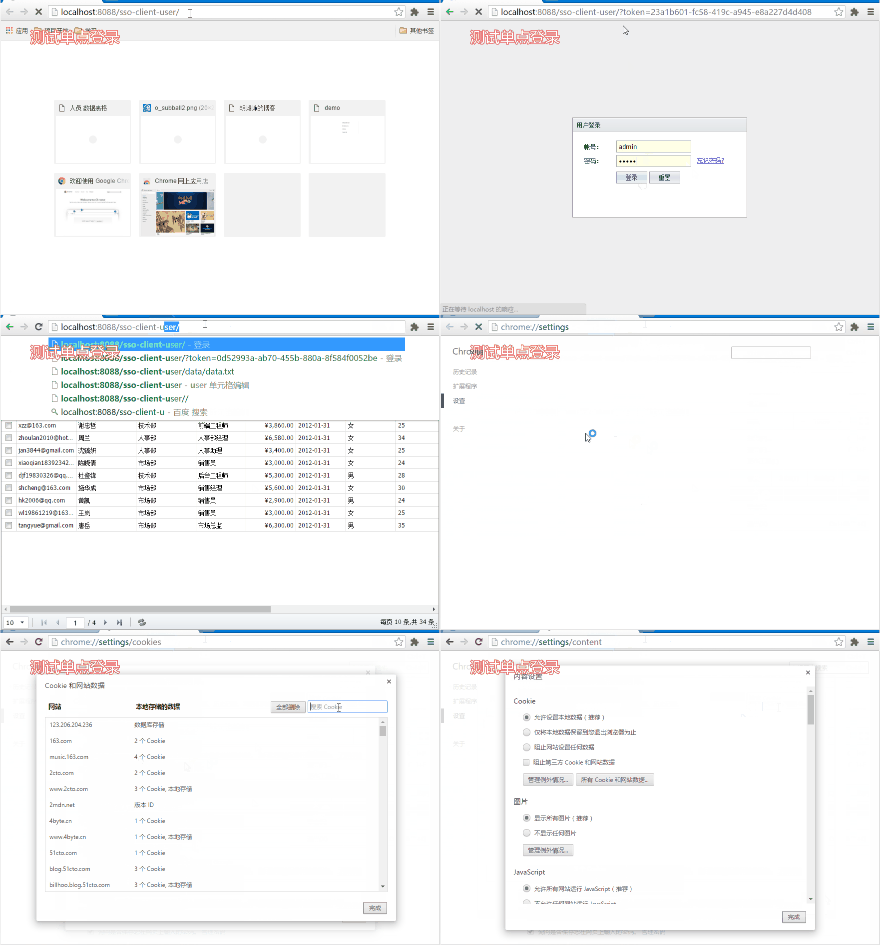
http://study.hujunzheng.cn:8000/sso-client-user/ 和 http://study.hujunzheng.cn:8000/sso-client-org/ 切换访问工程。
五、完整项目地址
六、项目演示地址
http://study.hujunzheng.cn:8000/sso-client-user/
单点登录实现(spring session+redis完成session共享)的更多相关文章
- Nginx+Tomcat搭建集群,Spring Session+Redis实现Session共享
小伙伴们好久不见!最近略忙,博客写的有点少,嗯,要加把劲.OK,今天给大家带来一个JavaWeb中常用的架构搭建,即Nginx+Tomcat搭建服务集群,然后通过Spring Session+Redi ...
- spring boot + redis 实现session共享
这次带来的是spring boot + redis 实现session共享的教程. 在spring boot的文档中,告诉我们添加@EnableRedisHttpSession来开启spring se ...
- Spring Boot+redis存储session,满足集群部署、分布式系统的session共享
本文讲述spring-boot工程中使用spring-session机制进行安全认证,并且通过redis存储session,满足集群部署.分布式系统的session共享. 原文链接:https://w ...
- CAS单点登录和spring securtiy集成
说明:本文章主要建立在spring-security早已集成在系统中的前提下: 1.需要创建一个spring-security.xml文件并关联在applicationContext.xml文件中:& ...
- spring boot + session+redis解决session共享问题
自己没有亲自试过,不过看了下这个例子感觉靠谱,以后做了测试,在加以说明. PS:后期经验证,上面例子可行.我们平时存session里面的值,直接存在了redis里面了.
- [更新]一份包含: 采用RSA JWT(Json Web Token, RSA加密)的OAUTH2.0,HTTP BASIC,本地数据库验证,Windows域验证,单点登录的Spring Security配置文件
没有任何注释,表怪我(¬_¬) 更新: 2016.05.29: 将AuthorizationServer和ResourceServer分开配置 2016.05.29: Token获取采用Http Ba ...
- JAVAEE——宜立方商城10:使用freemarker实现网页静态化、ActiveMq同步生成静态网页、Sso单点登录系统分析
1. 学习计划 1.使用freemarker实现网页静态化 2.ActiveMq同步生成静态网页 2. 网页静态化 可以使用Freemarker实现网页静态化. 2.1. 什么是freemarker ...
- 【SSO】单点登录系统
一.单点登录系统介绍 对于一个开发项目来说,每个项目都必不可少要有登录的这个功能.但是随着项目的变大,变大,再变大.系统可能会被拆分成多个小系统,咱们就拿支付宝和淘宝来说,咱们在淘宝上购物,然后就可以 ...
- 单点登录系统---SSO
1.------------------SSO介绍--------------------------------- 有什么卵用?搞什么飞机的? 大家看看这个图,一个系统是没有问题.如果是分布式的系统 ...
随机推荐
- Java编译时出现No enclosing instance of type XXX is accessible.
今天在编译Java程序的时候出现以下错误: No enclosing instance of type Main is accessible. Must qualify the allocation ...
- web前端好学吗?
最近这段时间许多学生讨论关于WEB前端工程师这个职位的问题.比如:关于前端难不难?好不好找工作?有没有用?好不好学?待遇好不好?好不好转其他的职位? 针对这个问题,课工场露露老师想跟大家谈谈自己对前端 ...
- UVa 10033 - Interpreter
题目大意:模拟题,有一些寄存器和随机访问内存,给你一些指令以及它们代表的操作,模拟操作即可. #include <cstdio> #include <cstring> #def ...
- php实现MD5加密16位(不要默认的32位)
使用substr函数截取: substr(md5("admin"),8,16); // 16位MD5加密 md5("admin"); // 32位MD5加密
- Reactive 手机网络状态
RAC([UIApplication sharedApplication], networkActivityIndicatorVisible)
- Mysql中主从复制的原理、配置过程以及实际案例
Mysql中主从复制的原理.配置过程以及实际案例1.什么是主从复制?原理:主从分离,什么意思呢?我们不妨画个图看看.如图1所示: 2.准备工作:预备两台服务器,我这里使用虚拟机安装了两个Centos6 ...
- Selenium2(java)selenium常用API 四
WebElement相关方法 1.点击操作 WebElement button = driver.findElement(By.id("login")); button.click ...
- hdu-3790-最短路径问题(dijkstra算法)
题目链接:http://acm.hdu.edu.cn/showproblem.php?pid=3790 这题cin会超时i 关于解决cin超时的问题 在main函数开头加上 ios::sync_wit ...
- NodeMCU之旅(一):构建、刷入固件,上传代码
扬帆起航 本系列文章将试图实现,使用Web页面远程点亮led.具体包括: 在NodeMCU上搭建HTTP服务器,使其可以通过Web页面配置要接入的网络. 在配置页面可以显示附近中英网络名与信号强度. ...
- 读取SQLServer数据库存储过程列表及参数信息
得到数据库存储过程列表: select * from dbo.sysobjects where OBJECTPROPERTY(id, N'IsProcedure') = 1 order by name ...