
HTTP文件下载JAVA后台的实现
HTTP文件的下载后台JAVA代码
1、使用org.apache.http.impl.client.CloseableHttpClient
先上代码:
    public String downloadFile(String src_file, String dest_file) throws Throwable {

        String fileName = getFileName(src_file);

        try (CloseableHttpClient httpclient = HttpClients.createDefault()) {

                    HttpGet httpget = new HttpGet(src_file);

                    httpget.setConfig(RequestConfig.custom() //

                            .setConnectionRequestTimeout(downloadTimeout) //

                            .setConnectTimeout(downloadTimeout) //

                            .setSocketTimeout(downloadTimeout) //

                            .build());

                    try (CloseableHttpResponse response = httpclient.execute(httpget)) {

                        org.apache.http.HttpEntity entity = response.getEntity();

                        File desc = new File(dest_file+File.separator+fileName);

                        File folder = desc.getParentFile();

                        folder.mkdirs();

                        try (InputStream is = entity.getContent(); //

                                OutputStream os = new FileOutputStream(desc)) {

                            StreamUtils.copy(is, os);

                        }

                    }catch(Throwable e){

                        throw new Throwable("文件下载失败......", e);

                    }

                }

            return dest_file+File.separator+fileName;

        }
另外:添加header代码如下:httpget.addHeader("X-Auth-Token",token);
2、使用curl:
windows系统中使用需要下载CURL,下载地址:https://curl.haxx.se/download.html 选择windows版;
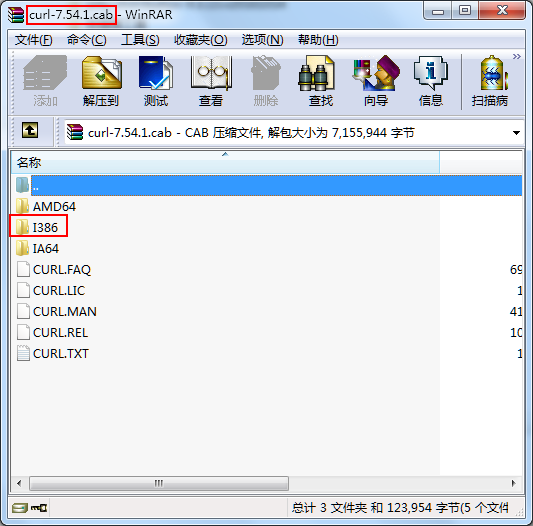
使用命令行下载文件java代码:
package com.test.download;

import java.io.IOException;

public class TestDownload {

    public static void main(String[] args) {

        String curlPath = "D:\\curl\\I386\\CURL.EXE";

        String destPath = "D:\\2.jpg";

        String fileUrl = "http://i0.hdslb.com/bfs/archive/5a08e413f479508ab78bb562ac81f40ad28a4245.jpg";

        dowloadFile(curlPath,destPath,fileUrl);

    }

    private static void dowloadFile(String curlPath ,String filePath, String url) {

        long start = System.currentTimeMillis();

        String token = "12345678901234567890";

        System.out.println("执行命令==="+curlPath + " -o "+ filePath +" \"" + url +"\""

                + " -H \"X-Auth-Token:"+token+"\" -X GET");

        try {

            Runtime.getRuntime().exec(curlPath + " -o "+ filePath +" \"" + url +"\""

                    + " -H \"X-Auth-Token:"+token+"\" -X GET");

        } catch (IOException e) {

            e.printStackTrace();

        }

        System.out.println("下载成功,耗时(ms):"+(System.currentTimeMillis()-start));

    }

}
具体的CURL命令行使用可以看帮助:curl -h
3、Servlet文件下载:
public void downloadNet(HttpServletResponse response) throws MalformedURLException {

        int bytesum = 0;

        int byteread = 0;

        URL url = new URL("http://img.baidu.com/logo.gif");

        try {

            URLConnection conn = url.openConnection();

            InputStream inStream = conn.getInputStream();

            FileOutputStream fs = new FileOutputStream("c:/abc.gif");

            byte[] buffer = new byte[1204];

            int length;

            while ((byteread = inStream.read(buffer)) != -1) {

                bytesum += byteread;

                System.out.println(bytesum);

                fs.write(buffer, 0, byteread);

            }

        } catch (FileNotFoundException e) {

            e.printStackTrace();

        } catch (IOException e) {

            e.printStackTrace();

        }

    }

    public void downLoad(String filePath, HttpServletResponse response, boolean isOnLine) throws Exception {

        File f = new File(filePath);

        if (!f.exists()) {

            response.sendError(404, "File not found!");

            return;

        }

        BufferedInputStream br = new BufferedInputStream(new FileInputStream(f));

        byte[] buf = new byte[1024];

        int len = 0;

        response.reset(); // 非常重要

        if (isOnLine) { // 在线打开方式

            URL u = new URL("file:///" + filePath);

            response.setContentType(u.openConnection().getContentType());

            response.setHeader("Content-Disposition", "inline; filename=" + f.getName());

            // 文件名应该编码成UTF-8

        } else { // 纯下载方式

            response.setContentType("application/x-msdownload");

            response.setHeader("Content-Disposition", "attachment; filename=" + f.getName());

        }

        OutputStream out = response.getOutputStream();

        while ((len = br.read(buf)) > 0)

            out.write(buf, 0, len);

        br.close();

        out.close();

    }
download
4、添加两个文件复制的代码:
private static void nioTransferCopy(File source, File target) {

    FileChannel in = null;

    FileChannel out = null;

    FileInputStream inStream = null;

    FileOutputStream outStream = null;

    try {

        inStream = new FileInputStream(source);

        outStream = new FileOutputStream(target);

        in = inStream.getChannel();

        out = outStream.getChannel();

        in.transferTo(0, in.size(), out);

    } catch (IOException e) {

        e.printStackTrace();

    } finally {

        close(inStream);

        close(in);

        close(outStream);

        close(out);

    }

}

private static void nioBufferCopy(File source, File target) {

    FileChannel in = null;

    FileChannel out = null;

    FileInputStream inStream = null;

    FileOutputStream outStream = null;

    try {

        inStream = new FileInputStream(source);

        outStream = new FileOutputStream(target);

        in = inStream.getChannel();

        out = outStream.getChannel();

        ByteBuffer buffer = ByteBuffer.allocate(4096);

        while (in.read(buffer) != -1) {

            buffer.flip();

            out.write(buffer);

            buffer.clear();

        }

    } catch (IOException e) {

        e.printStackTrace();

    } finally {

        close(inStream);

        close(in);

        close(outStream);

        close(out);

    }

}
添加一个文件下载的RestTemplate的实现:
public void downloadLittleFileToPath(String url, String target) {

        Instant now = Instant.now();

        RestTemplate template = new RestTemplate();

        ClientHttpRequestFactory clientFactory = new HttpComponentsClientHttpRequestFactory();

        template.setRequestFactory(clientFactory);

        HttpHeaders header = new HttpHeaders();

        List<MediaType> list = new ArrayList<MediaType>();

        // 指定下载文件类型

        list.add(MediaType.APPLICATION_OCTET_STREAM);

        header.setAccept(list);

        HttpEntity<byte[]> request = new HttpEntity<byte[]>(header);

        ResponseEntity<byte[]> rsp = template.exchange(url, HttpMethod.GET, request, byte[].class);

        logger.info("[下载文件] [状态码] code:{}", rsp.getStatusCode());

        try {

            Files.write(Paths.get(target), Objects.requireNonNull(rsp.getBody(), "未获取到下载文件"));

        } catch (IOException e) {

            logger.error("[下载文件] 写入失败:", e);

        }

        logger.info("[下载文件] 完成,耗时:{}", ChronoUnit.MILLIS.between(now, Instant.now()));

    }

     public void downloadBigFileToPath(String url, String target) {

            Instant now = Instant.now();

            try {

                RestTemplate template = new RestTemplate();

                ClientHttpRequestFactory clientFactory = new HttpComponentsClientHttpRequestFactory();

                template.setRequestFactory(clientFactory);

              //定义请求头的接收类型

              RequestCallback requestCallback = request -> request.getHeaders()

                      .setAccept(Arrays.asList(MediaType.APPLICATION_OCTET_STREAM, MediaType.ALL));

              // getForObject会将所有返回直接放到内存中,使用流来替代这个操作

              ResponseExtractor<Void> responseExtractor = response -> {

                // Here I write the response to a file but do what you like

                Files.copy(response.getBody(), Paths.get(target));

                return null;

              };

              template.execute(url, HttpMethod.GET, requestCallback, responseExtractor);

            } catch (Throwable e) {

                logger.error("[下载文件] 写入失败:", e);

            }

            logger.info("[下载文件] 完成,耗时:{}", ChronoUnit.MILLIS.between(now, Instant.now()));

          }
RestTemplate下载文件
HTTP文件下载JAVA后台的实现的更多相关文章
- Java 后台创建word 文档
---恢复内容开始--- Java 后台创建 word 文档 自己总结 网上查阅的文档 分享POI 教程地址:http://www.tuicool.com/articles/emqaEf6 方式一. ...
- Java后台处理框架之struts2学习总结
Java后台处理框架之struts2学习总结 最近我在网上了解到,在实际的开发项目中struts2的使用率在不断降低,取而代之的是springMVC.可能有很多的朋友看到这里就会说,那还不如不学str ...
- pagebean pagetag java 后台代码实现分页 demo 前台标签分页 后台java分页
java 后台代码实现分页 demo 实力 自己写的 标签分页 package com.cszoc.sockstore.util; import java.util.HashMap;import ja ...
- ajax提交数据到java后台,并且返回json格式数据前台接收处理值
1.前台html页面.有一段代码如下: 账 户: <input type="text" name="userName" id="userN& ...
- java后台对前端输入的特殊字符进行转义
转自:http://www.cnblogs.com/yangzhilong/p/5667165.html java后台对前端输入的特殊字符进行转义 HTML: 常见的帮助类有2个:一个是spring的 ...
- java后台获取Access_token的工具方法
本方法主要通过java后台控制来获取Access_token,需要你已经知道自己的ID跟密码 因为微信的权限设置大概每天可以获取两千条,每条有效时间为2小时 /** * 输入自己的id跟密码,获取微信 ...
- js前台加密,java后台解密实现
参考资料: JS前台加密,java后台解密实现
- java后台异步任务执行器TaskManager
java后台异步任务执行器TaskManager 此方式基于MVC方式: 一,使用任务: @Resource private TaskManager taskManager; public strin ...
- fastJson java后台转换json格式数据
什么事JSON? JSON(JavaScript Object Notation) 是一种轻量级的数据交换格式. 易于人阅读和编写.同时也易于机器解析和生成. 它基于JavaScript Progra ...
随机推荐
- DELPHI XE8 远程调试
最近公司项目遇到问题需要远程调试搜索了一下怎么用 发现网上能找到最新的是XE2上的说明现在已经有一些不同了 按照上面的方法不能调试成功 经过测试XE8的方法如下:1.项目编译设置:2.在被调试电脑上运 ...
- JavaScript面向对象轻松入门之抽象(demo by ES5、ES6、TypeScript)
抽象的概念 狭义的抽象,也就是代码里的抽象,就是把一些相关联的业务逻辑分离成属性和方法(行为),这些属性和方法就可以构成一个对象. 这种抽象是为了把难以理解的代码归纳成与现实世界关联的概念,比如小狗这 ...
- python爬虫番外篇(一)进程,线程的初步了解
一.进程 程序并不能单独和运行只有将程序装载到内存中,系统为他分配资源才能运行,而这种执行的程序就称之为进程.程序和进程的区别在于:程序是指令的集合,它是进程的静态描述文本:进程是程序的一次执行活动, ...
- ssh别名登录密钥登录
在centos上使用别名和是用密钥登录: vim /root/.ssh/config #输入下列内容 Host * User root #以root登录 ServerAliveInterval ...
- 【基础】Asp.Net操作Cookie总结
一.什么是Cookie? Cookie是存储在客户端文件系统的文本文件或客户端浏览器对话的内存中的少量数据.它主要用来跟踪数据设置,例如:当我们要访问一个网站网页的时候,用户请求网页时,应用程序可能会 ...
- Cordova各个插件使用介绍系列(三)—$cordovaImagePicker从手机图库选择多张图片
详情链接地址:http://www.ncloud.hk/%E6%8A%80%E6%9C%AF%E5%88%86%E4%BA%AB/cordova-3-cordovaimagepicker/ 这是能从手 ...
- epoll的ET和LT模式比较 - 源码分析
eventpoll是一种文件,它实现了一种机制利用一条rdllist队列来避免阻塞地进行poll.eventpoll归根到底还是在使用poll.而ET比LT高效,并不在于是否使用了poll,更不能说是 ...
- oracle表空间自增长
方式一:通过修改oracle database control 修改 第一步,点击开始--所有程序--Oracle - OraDb11g_home1--Database Control 第二步,通过g ...
- Discuz开发帮助
http://ishare.iask.sina.com.cn/f/33819255.html Discuz二次开发手册(下载) http://dev.discuz.org/wiki/index.php ...
- Normalize.css源码注释翻译&浏览器css兼容问题的理解
版本v5.0.0源码地址: https://necolas.github.io/normalize.css/5.0.0/normalize.css 翻译版: /*! normalize.css v5. ...