
SVG渐变
前面的话
给SVG元素应用填充和描边,除了使用纯色外,还可以使用渐变。本文将详细介绍SVG渐变
线性渐变
有两种类型的渐变:线性渐变和径向渐变。必须给渐变内容指定一个id属性,否则文档内的其他元素不能引用它。为了让渐变能被重复使用,渐变内容需要定义在<defs>标签内部,而不是定义在形状上面
线性渐变沿着直线改变颜色,要插入一个线性渐变,需要在SVG文件的defs元素内部,创建一个<linearGradient> 节点
<svg height="70" version="1.1" xmlns="http://www.w3.org/2000/svg">

  <defs>

      <linearGradient id="Gradient1">

        <stop offset="0%" stop-color="#05a"/>

        <stop offset="100%" stop-color="#0a5"/>

      </linearGradient>

  </defs>

  <rect id="rect1" x="10" y="10" rx="15" ry="15" width="50" height="50" fill="url(#Gradient1)"/>

</svg>
结果如下所示,默认情况下实现的是水平方向的渐变
<stop>元素一共有3个属性,包括offset,stop-color,stop-opacity
offset用来设置色标位置

stop-color用来设置色标颜色

stop-opacity用来设置色标的透明度
下面是一个例子
<svg height="70" version="1.1" xmlns="http://www.w3.org/2000/svg">

  <defs>

      <linearGradient id="Gradient1">

        <stop offset="0%" stop-color="#05a"/>

        <stop offset="50%" stop-color="#50a" stop-opacity="0.5"/>

        <stop offset="100%" stop-color="#0a5"/>

      </linearGradient>

  </defs>

  <rect id="rect1" x="10" y="10" rx="15" ry="15" width="50" height="50" fill="url(#Gradient1)"/>

</svg>
【x1、x2、y1、y2】
线性渐变包括x1、x2、y1、y2这四个属性,用来控制渐变的大小和方向。取值为0-100%,或者0-1的小数。默认地,x1=y1=y2=0、x2=1
如果变成垂直方向的渐变,则需要设置为x1=x2=y1=0、y2=1
<svg height="70" version="1.1" xmlns="http://www.w3.org/2000/svg">

  <defs>

      <linearGradient id="Gradient1" x1=0 x2=0 y1=0 y2=1>

        <stop offset="0%" stop-color="#05a"/>

        <stop offset="100%" stop-color="#0a5"/>

      </linearGradient>

  </defs>

  <rect id="rect1" x="10" y="10" rx="15" ry="15" width="50" height="50" fill="url(#Gradient1)"/>

</svg>
如果将y2或x2设置为50%,则50%-100%这一部分区域填充为最后一个色标的纯色
<svg height="70" version="1.1" xmlns="http://www.w3.org/2000/svg">

  <defs>

      <linearGradient id="Gradient1" x1=0 x2=50% y1=0 y2=50%>

        <stop offset="0%" stop-color="#05a"/>

        <stop offset="100%" stop-color="#0a5"/>

      </linearGradient>

  </defs>

  <rect id="rect1" x="10" y="10" rx="15" ry="15" width="50" height="50" fill="url(#Gradient1)"/>

</svg>
当然了,可以有多个色标
<svg height="70" version="1.1" xmlns="http://www.w3.org/2000/svg">

  <defs>

      <linearGradient id="Gradient1" x1=0 x2=1 y1=0 y2=1>

        <stop offset="0%" stop-color="#05a"/>

        <stop offset="20%" stop-color="#50a"/>

        <stop offset="40%" stop-color="#5a0"/>

        <stop offset="60%" stop-color="#a05"/>

        <stop offset="80%" stop-color="#a50"/>

        <stop offset="100%" stop-color="#0a5"/>

      </linearGradient>

  </defs>

  <rect id="rect1" x="10" y="10" rx="15" ry="15" width="50" height="50" fill="url(#Gradient1)"/>

</svg>
渐变除了可以作为填充,也可以作为描边
<svg height="70" version="1.1" xmlns="http://www.w3.org/2000/svg">

  <defs>

      <linearGradient id="Gradient1" x1=0 x2=1 y1=0 y2=1>

        <stop offset="0%" stop-color="#05a"/>

        <stop offset="20%" stop-color="#50a"/>

        <stop offset="40%" stop-color="#5a0"/>

        <stop offset="60%" stop-color="#a05"/>

        <stop offset="80%" stop-color="#a50"/>

        <stop offset="100%" stop-color="#0a5"/>

      </linearGradient>

  </defs>

  <rect id="rect1" x="10" y="10" rx="15" ry="15" width="50" height="50" fill="transparent" stroke-width="10" stroke="url(#Gradient1)"/>

</svg>
【xlink:href】
xlink:href属性用于在一个渐变中引用另一个渐变,被引用的渐变的属性是可继承的,也可以被重写
下面的例子中,Gradient2引用了Gradient1的渐变,并重写了渐变的方向
<svg height="70" version="1.1" xmlns="http://www.w3.org/2000/svg">

  <defs>

      <linearGradient id="Gradient1" x1=0 x2=1 y1=0 y2=1>

        <stop offset="0%" stop-color="#05a"/>

        <stop offset="50%" stop-color="#50a"/>

        <stop offset="100%" stop-color="#0a5"/>

      </linearGradient>

      <linearGradient id="Gradient2" xlink:href="#Gradient1" x1=0 x2=0 y1=0 y2=1>

      </linearGradient>

  </defs>

  <rect id="rect1" x="10" y="10" rx="15" ry="15" width="50" height="50" fill="url(#Gradient2)"/>

</svg>
【gradientUnits】
gradientUnits有两个的值,userSpaceOnUse和objectBoundingBox,这用于决定渐变是否随着引用它的元素进行缩放。也就是说它决定了x1、y1、x2、y2的缩放
userSpaceOnUse: x1、y1、x2、y2表示当前用户坐标系统的坐标。也就是说渐变中的值都是绝对值
objectBoundingBox: x1, y1, x2, y2表示应用渐变的元素创建的边界坐标系统。也就是说渐变随着应用的元素进行了缩放
如果不设置,默认取值是objectBoundingBox
<svg height="70" version="1.1" xmlns="http://www.w3.org/2000/svg">

  <defs>

      <linearGradient id="Gradient1" gradientUnits="objectBoundingBox">

        <stop offset="0%" stop-color="#05a"/>

        <stop offset="50%" stop-color="#50a"/>

        <stop offset="100%" stop-color="#0a5"/>

      </linearGradient>

  </defs>

  <rect id="rect1" x="10" y="10" rx="15" ry="15" width="50" height="50" fill="url(#Gradient1)"/>

</svg>
如果设置为userSpaceOnUse,则x1、x2、y1、y2需要设置为用户坐标系的坐标绝对值
<svg height="70" version="1.1" xmlns="http://www.w3.org/2000/svg">

  <defs>

      <linearGradient id="Gradient1" gradientUnits="userSpaceOnUse" x1="10" x2="60" y1="0" y2="0">

        <stop offset="0%" stop-color="#05a"/>

        <stop offset="50%" stop-color="#50a"/>

        <stop offset="100%" stop-color="#0a5"/>

      </linearGradient>

  </defs>

  <rect id="rect1" x="10" y="10" rx="15" ry="15" width="50" height="50" fill="url(#Gradient1)"/>

</svg>
【spreadMethod】
spreadMethod可以接受三个值,pad,reflect,repeat,它定义了渐变如何开始和结束,当cx和cy的值是在0%到100%里面的时候
pad:(默认值)使用开始和结束位置的颜色结点来填充剩余的部分

reflect: 反射渐变图案,从开始->结束,再从结束->开始,然后开始->结束,往复直到空间都填满

repeat: 从start-to-end重复渐变图案,直到空间填满
pad为默认值
<svg height="70" version="1.1" xmlns="http://www.w3.org/2000/svg" >

  <defs>

      <linearGradient id="Gradient1" spreadMethod=pad x1=0.4 x2=0.6>

        <stop offset="0%" stop-color="#05a"/>

        <stop offset="100%" stop-color="#0a5"/>

      </linearGradient>

  </defs>

  <rect id="rect1" x="10" y="10" rx="15" ry="15" width="50" height="50" fill="url(#Gradient1)"/>

</svg>
下面是reflect的效果
<svg height="70" version="1.1" xmlns="http://www.w3.org/2000/svg" >

  <defs>

      <linearGradient id="Gradient1" spreadMethod=reflect x1=0.4 x2=0.6>

        <stop offset="0%" stop-color="#05a"/>

        <stop offset="100%" stop-color="#0a5"/>

      </linearGradient>

  </defs>

  <rect id="rect1" x="10" y="10" rx="15" ry="15" width="50" height="50" fill="url(#Gradient1)"/>

</svg>
下面是repeat的效果
<svg height="70" version="1.1" xmlns="http://www.w3.org/2000/svg" >

  <defs>

      <linearGradient id="Gradient1" spreadMethod=repeat x1=0.4 x2=0.6>

        <stop offset="0%" stop-color="#05a"/>

        <stop offset="100%" stop-color="#0a5"/>

      </linearGradient>

  </defs>

  <rect id="rect1" x="10" y="10" rx="15" ry="15" width="50" height="50" fill="url(#Gradient1)"/>

</svg>
径向渐变
径向渐变与线性渐变相似,只是它是从一个点开始发散绘制渐变。创建径向渐变需要在文档的defs中添加一个<radialGradient>元素
<svg height="70" version="1.1" xmlns="http://www.w3.org/2000/svg">

  <defs>

      <radialGradient id="Gradient1">

        <stop offset="0%" stop-color="#05a"/>

        <stop offset="50%" stop-color="#50a" stop-opacity="0.5"/>

        <stop offset="100%" stop-color="#0a5"/>

      </radialGradient>

  </defs>

  <rect id="rect1" x="10" y="10" rx="15" ry="15" width="50" height="50" fill="url(#Gradient1)"/>

</svg>
【cx、cy、r、fx、fy】
与线性渐变的x1、y1、x2、y2属性不同,径向渐变使用cx、cy、r、fx、fy这五个属性来设置渐变
r 设置圆的半径

cx、cy 定义渐变的中心点坐标

fx、fy  定义渐变的焦点坐标
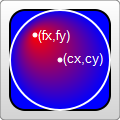
如果不设置,r默认0.5,即元素宽度或高度的一半;cx、cy默认为0.5;fx、fy默认为0.5
<svg height="70" version="1.1" xmlns="http://www.w3.org/2000/svg">

  <defs>

      <radialGradient id="Gradient1"  r=0.5 cx=0.5 cy=0.5 fx=0.5 fy=0.5>

        <stop offset="0%" stop-color="#05a"/>

        <stop offset="50%" stop-color="#50a" stop-opacity="0.5"/>

        <stop offset="100%" stop-color="#0a5"/>

      </radialGradient>

  </defs>

  <rect id="rect1" x="10" y="10" rx="15" ry="15" width="50" height="50" fill="url(#Gradient1)"/>

</svg>
巧妙地设置焦点坐标,可以实现聚光灯的效果
<svg height="70" version="1.1" xmlns="http://www.w3.org/2000/svg">

  <defs>

      <radialGradient id="Gradient1"  r=0.5 cx=0.5 cy=0.5 fx=0.8 fy=0.8>

        <stop offset="0%" stop-color="#05a"/>

        <stop offset="50%" stop-color="#50a" stop-opacity="0.5"/>

        <stop offset="100%" stop-color="#0a5"/>

      </radialGradient>

  </defs>

  <rect id="rect1" x="10" y="10" rx="15" ry="15" width="50" height="50" fill="url(#Gradient1)"/>

</svg>
【xlink:href】
xlink:href属性用于在一个渐变中引用另一个渐变,被引用的渐变的属性是可继承的,也可以被重写
下面的例子中,Gradient2引用了Gradient1的渐变,并重写了渐变的方向
<svg height="70" version="1.1" xmlns="http://www.w3.org/2000/svg">

  <defs>

      <radialGradient id="Gradient1">

        <stop offset="0%" stop-color="#05a"/>

        <stop offset="50%" stop-color="#50a" stop-opacity="0.5"/>

        <stop offset="100%" stop-color="#0a5"/>

      </radialGradient>

      <radialGradient id="Gradient2" xlink:href="#Gradient1" fx=0.6>

  </defs>

  <rect id="rect1" x="10" y="10" rx="15" ry="15" width="50" height="50" fill="url(#Gradient2)"/>

</svg>
【gradientUnits】
gradientUnits有两个的值,userSpaceOnUse和objectBoundingBox,这用于决定渐变是否随着引用它的元素进行缩放。也就是说它决定了cx、cy、fx、fy、r的缩放
userSpaceOnUse: cx、cy、fx、fy、r表示当前用户坐标系统的坐标。也就是说渐变中的值都是绝对值
objectBoundingBox: cx、cy、fx、fy、r表示应用渐变的元素创建的边界坐标系统。也就是说渐变随着应用的元素进行了缩放
如果不设置,默认取值是objectBoundingBox
<svg height="70" version="1.1" xmlns="http://www.w3.org/2000/svg">

  <defs>

      <radialGradient id="Gradient1" gradientUnits="objectBoundingBox">

        <stop offset="0%" stop-color="#05a"/>

        <stop offset="50%" stop-color="#50a" stop-opacity="0.5"/>

        <stop offset="100%" stop-color="#0a5"/>

      </radialGradient>

  </defs>

  <rect id="rect1" x="10" y="10" rx="15" ry="15" width="50" height="50" fill="url(#Gradient1)"/>

</svg>
如果设置为userSpaceOnUse,则cx、cy、fx、fy、r需要设置为用户坐标系的坐标绝对值
<svg height="70" version="1.1" xmlns="http://www.w3.org/2000/svg">

  <defs>

      <radialGradient id="Gradient1" gradientUnits="userSpaceOnUse" cx=35 cy=35 fx=35 fy=35 r=25>

        <stop offset="0%" stop-color="#05a"/>

        <stop offset="50%" stop-color="#50a" stop-opacity="0.5"/>

        <stop offset="100%" stop-color="#0a5"/>

      </radialGradient>

  </defs>

  <rect id="rect1" x="10" y="10" rx="15" ry="15" width="50" height="50" fill="url(#Gradient1)"/>

</svg>
【spreadMethod】
和线性渐变一样。它可以接受三个值,pad,reflect,repeat,它定义了渐变如何开始和结束,当cx和cy的值是在0%到100%里面的时候
pad:(默认值)使用开始和结束位置的颜色结点来填充剩余的部分

reflect: 反射渐变图案,从开始->结束,再从结束->开始,然后开始->结束,往复直到空间都填满

repeat: 从start-to-end重复渐变图案,直到空间填满
pad为默认值
<svg height="70" version="1.1" xmlns="http://www.w3.org/2000/svg">

  <defs>

      <radialGradient id="Gradient1" r=0.2 spreadMethod=pad>

        <stop offset="0%" stop-color="#05a"/>

        <stop offset="50%" stop-color="#50a" stop-opacity="0.5"/>

        <stop offset="100%" stop-color="#0a5"/>

      </radialGradient>

  </defs>

  <rect id="rect1" x="10" y="10" rx="15" ry="15" width="50" height="50" fill="url(#Gradient1)"/>

</svg>
下面是reflect的效果
<svg height="70" version="1.1" xmlns="http://www.w3.org/2000/svg">

  <defs>

      <radialGradient id="Gradient1" r=0.2 spreadMethod=reflect>

        <stop offset="0%" stop-color="#05a"/>

        <stop offset="50%" stop-color="#50a" stop-opacity="0.5"/>

        <stop offset="100%" stop-color="#0a5"/>

      </radialGradient>

  </defs>

  <rect id="rect1" x="10" y="10" rx="15" ry="15" width="50" height="50" fill="url(#Gradient1)"/>

</svg>
下面是repeat的效果
<svg height="70" version="1.1" xmlns="http://www.w3.org/2000/svg">

  <defs>

      <radialGradient id="Gradient1" r=0.2 spreadMethod=repeat>

        <stop offset="0%" stop-color="#05a"/>

        <stop offset="50%" stop-color="#50a" stop-opacity="0.5"/>

        <stop offset="100%" stop-color="#0a5"/>

      </radialGradient>

  </defs>

  <rect id="rect1" x="10" y="10" rx="15" ry="15" width="50" height="50" fill="url(#Gradient1)"/>

</svg>
SVG渐变的更多相关文章
- 学习SVG系列(5):SVG渐变
SVG渐变 渐变是一种从一种颜色到另一种颜色的平滑过渡,可以把多个颜色的过渡应用到同一个元素. 渐变有两种: Linear Redial 线性渐变-<linearGradient> lin ...
- 走进SVG
什么是SVG?也许现在很多人都听说过SVG的人比较多,但不一定了解什么是SVG:SVG(Scalable Vector Graphics 一大串看不懂的英文)可伸缩矢量图形,它是用XML格式来定义用于 ...
- svg矢量图
svg简介 Scalable Vector Graphics 可缩放矢量图形 SVG 图像在放大或改变尺寸的情况下其图形质量不会有所损失 svg知识点 svg如何绘图 svg和cnavas区别 svg ...
- SVG介绍
SVG介绍 SVG是指可缩放矢量图(Scalable Vector Graphics).SVG使用XML格式来定义图形.SVG可以直接嵌入到HTML页面中. 位图和矢量图 位图(Bitmap)是由很多 ...
- svg基础知识体系建立
一.简介:SVG 是使用 XML 来描述二维图形和绘图程序的语言. SVG 指可伸缩矢量图形 (Scalable Vector Graphics) SVG 用来定义用于网络的基于矢量的图形 SVG 使 ...
- SVG和canvas画图,js求数组最大最小值
windows命令行的内容怎么复制,右键选择标记,选中内容后再点击鼠标右键就复制了. 安装Node.js后再用npm install命令会出现如下warn:saveError ENOENT: no s ...
- HTML5 可缩放矢量图形(1)—SVG基础
参考文档1 SVG基础 SVG介绍 概念:SVG 是使用 XML 来描述二维图形和绘图程序的语言.(理解就是一个在网页上使用笔画图的过程) 什么是SVG SVG 指可伸缩矢量图形 (Scalable ...
- 关于 CSS 反射倒影的研究思考
原文地址:https://css-tricks.com/state-css-reflections 译者:nzbin 友情提示:由于演示 demo 的兼容性,推荐火狐浏览.该文章篇幅较长,内容庞杂,有 ...
- CSS遮罩——如何在CSS中使用遮罩
Css遮罩是2008年4月由苹果公司添加到webkit引擎中的.遮罩提供一种基于像素级别的,可以控制元素透明度的能力,类似于png24位或png32位中的alpha透明通道的效果. 图像是由rgb三个 ...
随机推荐
- FFmpeg任意文件读取漏洞分析
这次的漏洞实际上与之前曝出的一个 CVE 非常之类似,可以说是旧瓶装新酒,老树开新花. 之前漏洞的一篇分析文章: SSRF 和本地文件泄露(CVE-2016-1897/8)http://static. ...
- log4g 使用教程
日志是应用软件中不可缺少的部分,Apache的开源项目log4j是一个功能强大的日志组件,提供方便的日志记录.在apache网站:jakarta.apache.org/log4j 可以免费下载到Log ...
- 20. leetcode 171. Excel Sheet Column Number
Given a column title as appear in an Excel sheet, return its corresponding column number. For exampl ...
- ue4(c++) 按钮中的文字居中的问题
.Content() [ SNew(SOverlay) + SOverlay::Slot().HAlign(HAlign_Center).VAlign(VAlign_Center) [ SNew( ...
- 移动端https抓包那些事--进阶篇
上一次和大家介绍了手机端https抓包的初级篇,即在手机未root或者未越狱的情况下如何抓取https流量,但是当时分析应用时会发现,好多应用的https的流量还是无法抓取到,这是为什么呢? 主要原因 ...
- vue指令v-show示例解析
v-show控制元素显示或者隐藏: <div id="app"> <p v-show="isShow">this is a messag ...
- 如何开发自己的搜索帝国之ES图形化Kibana安装与使用
在如何开发自己的搜索帝国之Elasticsearch中已经介绍安装好了ES,下面就Kibana对ES的查询监控作介绍,就是常提到的大数据日志处理组件ELK里的K. 什么是Kibana?现引用园友的一段 ...
- js数组去重方法分析与总结
数组去重经常被人拿来说事,虽然在工作中不常用,但他能够很好的考察js基础知识掌握的深度和广度,下面从js的不同阶段总结一下去重的方法. ES3阶段 该阶段主要通过循环遍历数组从而达到去重的目的 多次循 ...
- 使用Spring Boot快速构建基于SQLite数据源的应用
为了提供一个单包易部署的服务器应用,考虑使用Spring Boot,因为其集成了Apache Tomcat,易于运行,免去绝大部分了服务器配置的步骤. 项目初始化 首先从mvn archetype:g ...
- 从SAP顾问猝死事件谈顾问加班
今天朋友圈盛传一则消息,说是南瑞集团的一名名为牛耕耘的SAP顾问因为工作强度大,连续不分昼夜加班而猝死在工作岗位上,遗留下年迈的父母.体弱的妻子.刚满周岁的孩子和巨额的债务.我无法证实该消息的真伪,但 ...