
以太坊系列之十六: 使用golang与智能合约进行交互
以太坊系列之十六: 使用golang与智能合约进行交互
官方提供的使用web3来进行智能合约的部署,调用等,实际上使用go也是可以的,这样更接近geth源码,更多的库可以使用.
此例子的目录结构
方便大家对照使用
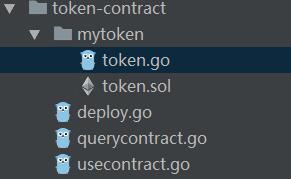
我是在windows下进行的,在linux以及mac下都差不多,只需要更改里面的ipc地址即可
token contract
这是官方提供的一个智能合约的例子,比较简单,是一个典型的基于智能合约的代币.代码位于:
token源码.
智能合约的golang wrapper
go直接和智能合约交互,有很多琐碎的细节需要照顾到,比较麻烦.以太坊专门为我们提供了一个abigen的工具,他可以根据sol或者abi文件生成
特定语言的封装,方便进行交互,支持golang,objc,java三种语言.
abigen --sol token.sol --pkg mytoken --out token.go
token.go地址
可以看到里面把合约里面所有导出的函数都进行了封装,方便调用.
部署合约
使用go进行部署合约思路上和web3都差不多,首先需要启动geth,然后通过我们的程序通过ipc连接到geth进行操作.
直接上代码,然后解释
package main

import (

	"fmt"

	"log"

	"math/big"

	"strings"

	"time"

	"github.com/ethereum/go-ethereum/accounts/abi/bind"

	"github.com/ethereum/go-ethereum/ethclient"

	"token-contract/mytoken"

)

const key = `

{

  "address": "1a9ec3b0b807464e6d3398a59d6b0a369bf422fa",

  "crypto": {

    "cipher": "aes-128-ctr",

    "ciphertext": "a471054846fb03e3e271339204420806334d1f09d6da40605a1a152e0d8e35f3",

    "cipherparams": {

      "iv": "44c5095dc698392c55a65aae46e0b5d9"

    },

    "kdf": "scrypt",

    "kdfparams": {

      "dklen": 32,

      "n": 262144,

      "p": 1,

      "r": 8,

      "salt": "e0a5fbaecaa3e75e20bccf61ee175141f3597d3b1bae6a28fe09f3507e63545e"

    },

    "mac": "cb3f62975cf6e7dfb454c2973bdd4a59f87262956d5534cdc87fb35703364043"

  },

  "id": "e08301fb-a263-4643-9c2b-d28959f66d6a",

  "version": 3

}

`

func main() {

	// Create an IPC based RPC connection to a remote node and an authorized transactor

	conn, err := ethclient.Dial("\\\\.\\pipe\\geth.ipc")

	if err != nil {

		log.Fatalf("Failed to connect to the Ethereum client: %v", err)

	}

	auth, err := bind.NewTransactor(strings.NewReader(key), "123")

	if err != nil {

		log.Fatalf("Failed to create authorized transactor: %v", err)

	}

	// Deploy a new awesome contract for the binding demo

	address, tx, token, err := mytoken.DeployMyToken(auth, conn, big.NewInt(9651), "Contracts in Go!!!", 0, "Go!")

	if err != nil {

		log.Fatalf("Failed to deploy new token contract: %v", err)

	}

	fmt.Printf("Contract pending deploy: 0x%x\n", address)

	fmt.Printf("Transaction waiting to be mined: 0x%x\n\n", tx.Hash())

	startTime := time.Now()

	fmt.Printf("TX start @:%s", time.Now())

	ctx := context.Background()

	addressAfterMined, err := bind.WaitDeployed(ctx, conn, tx)

	if err != nil {

		log.Fatalf("failed to deploy contact when mining :%v", err)

	}

	fmt.Printf("tx mining take time:%s\n", time.Now().Sub(startTime))

	if bytes.Compare(address.Bytes(), addressAfterMined.Bytes()) != 0 {

		log.Fatalf("mined address :%s,before mined address:%s", addressAfterMined, address)

	}

	name, err := token.Name(&bind.CallOpts{Pending: true})

	if err != nil {

		log.Fatalf("Failed to retrieve pending name: %v", err)

	}

	fmt.Println("Pending name:", name)

}
1.账户问题
部署合约是需要有以太坊账户的,账户一般位于/home/xxx/.eth/geth/keystore 目录里面,找到一个账户,然后把内容直接粘贴到key里面即可.

因为部署合约是要消耗以太币的,所以必须保证里面有以太币,并且在`bind.NewTransactor(strings.NewReader(key), "123")`时,还需提供密码.
2. 连接到geth
`ethclient.Dial("\\\\.\\pipe\\geth.ipc")`就是连接到本地的geth,你可以通过http等通道,要是使用http通道,记得geth启动的时候要加上

`--rpcapi "eth,admin,web3,net,debug" `,否则很多rpc api是无法使用的
3. 部署合约
真正的部署合约反而是比较简单,因为有了token的golang封装,就像直接调用构造函数一样. 只不过多了两个参数,第一个是auth,也就是账户的封装;

第二个是ethclient的连接.
4. 测试部署结果
在testrpc或者其他模拟区块链上,因为合约部署不需要花时间,所以`name, err := token.Name(&bind.CallOpts{Pending: true})`是可以获取到name的,

但是在真实的区块链上有一个比较大的延时,所以运行结果会是:
Contract pending deploy: 0xa9b61a3cc7cc1810e133174caa7ead7ef909d701

Transaction waiting to be mined: 0xf832802f6f262677f02eca761ffe65ae21bbe41e983ceeb6cf645166073f4eb5

TX start @:2017-09-04 11:13:57.217 +0800 CSTtx mining take time:34.009s

Pending name: Contracts in Go!!!
5. 等待成功部署到区块链上
这里的成功可能不是真正的成功,大家都知道区块链稳定下来要等至少12个周期.不过通过`bind.WaitDeployed`

基本上可以确定该合约已经进入了区块链,并且可以在上面进行操作了.
golang 查询合约
前一个例子中我们借助remix查询到已经到账了,实际上golang完全可以做到,并且做起来也很简单.
先看代码,再做解释.
func main() {

	// Create an IPC based RPC connection to a remote node and instantiate a contract binding

	conn, err := ethclient.Dial("\\\\.\\pipe\\geth.ipc")

	if err != nil {

		log.Fatalf("Failed to connect to the Ethereum client: %v", err)

	}

	token, err := mytoken.NewMyToken(common.HexToAddress("0x5e300171d7dc10e43f959877dba98a44df5d1466"), conn)

	if err != nil {

		log.Fatalf("Failed to instantiate a Token contract: %v", err)

	}

	contractName, err := token.Name(nil)

	if err != nil {

		log.Fatalf("query name err:%v", err)

	}

	fmt.Printf("MyToken Name is:%s\n", contractName)

	balance, err := token.BalanceOf(nil, common.HexToAddress("0x8c1b2e9e838e2bf510ec7ff49cc607b718ce8401"))

	if err != nil {

		log.Fatalf("query balance error:%v", err)

	}

	fmt.Printf("0x8c1b2e9e838e2bf510ec7ff49cc607b718ce8401's balance is %s\n", balance)

}
运行结果:
MyToken Name is:Contracts in Go!!!

0x8c1b2e9e838e2bf510ec7ff49cc607b718ce8401's balance is 387
token.Name,token.BalanceOf就是读取合约上的数据,因为这些操作并不会修改合约的状态,所以不会发起tx,也不需要auth.
读取合约的第一个参数是bind.CallOpts,定义如下:
// CallOpts is the collection of options to fine tune a contract call request.

type CallOpts struct {

	Pending bool           // Whether to operate on the pending state or the last known one

	From    common.Address // Optional the sender address, otherwise the first account is used

	Context context.Context // Network context to support cancellation and timeouts (nil = no timeout)

}
大多数时候直接使用nil即可,我们不需要特殊指定什么.
调用合约
这里说调用实际上指的是要发生tx,这里举的例子就是token中进行转账操作,因为这个操作修改了合约的状态,所以它必须是一个tx(事务).

先看完整的例子
func main() {

	// Create an IPC based RPC connection to a remote node and instantiate a contract binding

	conn, err := ethclient.Dial("\\\\.\\pipe\\geth.ipc")

	if err != nil {

		log.Fatalf("Failed to connect to the Ethereum client: %v", err)

	}

	token, err := mytoken.NewMyToken(common.HexToAddress("0xa9b61a3cc7cc1810e133174caa7ead7ef909d701"), conn)

	if err != nil {

		log.Fatalf("Failed to instantiate a Token contract: %v", err)

	}

	toAddress := common.HexToAddress("0x8c1b2e9e838e2bf510ec7ff49cc607b718ce8401")

	val, _ := token.BalanceOf(nil, toAddress)

	fmt.Printf("before transfer :%s\n", val)

	// Create an authorized transactor and spend 1 unicorn

	auth, err := bind.NewTransactor(strings.NewReader(key), "123")

	if err != nil {

		log.Fatalf("Failed to create authorized transactor: %v", err)

	}

	tx, err := token.Transfer(auth, toAddress, big.NewInt(387))

	if err != nil {

		log.Fatalf("Failed to request token transfer: %v", err)

	}

	ctx := context.Background()

	receipt, err := bind.WaitMined(ctx, conn, tx)

	if err != nil {

		log.Fatalf("tx mining error:%v\n", err)

	}

	val, _ = token.BalanceOf(nil, toAddress)

	fmt.Printf("after transfere:%s\n", val)

	fmt.Printf("tx is :%s\n", tx)

	fmt.Printf("receipt is :%s\n", receipt)

}
执行结果:
before transfer :0

after transfere:387

tx is :

	TX(3028e06dbe037731f05c7c73c4694080df72460cf39a70bdb8df76e771800958)

	Contract: false

	From:     1a9ec3b0b807464e6d3398a59d6b0a369bf422fa

	To:       a9b61a3cc7cc1810e133174caa7ead7ef909d701

	Nonce:    29

	GasPrice: 0x430e23400

	GasLimit  0x8e73

	Value:    0x0

	Data:     0xa9059cbb0000000000000000000000008c1b2e9e838e2bf510ec7ff49cc607b718ce84010000000000000000000000000000000000000000000000000000000000000183

	V:        0x1b

	R:        0xbb57f25039d5e33c1f74607f4d1733cd77ecf99dc6ffff5a7ac90404f6208ea2

	S:        0x1e6685f69d51654d30cae14207f74f6858a9ffb9ccc5f1d3d9c852027d49f6c3

	Hex:      f8a91d850430e23400828e7394a9b61a3cc7cc1810e133174caa7ead7ef909d70180b844a9059cbb0000000000000000000000008c1b2e9e838e2bf510ec7ff49cc607b718ce840100000000000000000000000000000000000000000000000000000000000001831ba0bb57f25039d5e33c1f74607f4d1733cd77ecf99dc6ffff5a7ac90404f6208ea2a01e6685f69d51654d30cae14207f74f6858a9ffb9ccc5f1d3d9c852027d49f6c3

receipt is :receipt{med=5c0564d6b6568328a4407dfd86da58c1a8d26b38f93cbbd2b8c7cca13b3a792b cgas=36466 bloom=00000000000000000000000000000000001000000000000000000000000000000000000000010000000000000010000000000000000000000000000000200000000000000000000000000008000000000000000000000000000000000000000000000000000000000000000000000000400000000000000000000010000000000000000000000000000000000000000000000000000000000000000000000000000000000000000000000000000000000000000000000000000000000000000000000002000000000000000000008000000000000000000000000000000000020000000000000000000000000000000000400000000000000040000000000000 logs=[log: a9b61a3cc7cc1810e133174caa7ead7ef909d701 [ddf252ad1be2c89b69c2b068fc378daa952ba7f163c4a11628f55a4df523b3ef 0000000000000000000000001a9ec3b0b807464e6d3398a59d6b0a369bf422fa 0000000000000000000000008c1b2e9e838e2bf510ec7ff49cc607b718ce8401] 0000000000000000000000000000000000000000000000000000000000000183 3028e06dbe037731f05c7c73c4694080df72460cf39a70bdb8df76e771800958 0 ccb6f7f26ddcb2d1438f98f51046e3115b8eb27cfab9ffcbc3bd259b68e73d11 0]}
首先同样要连接到geth,然后才能进行后续操作.
1. 直接构造合约
因为合约已经部署到区块链上了,我们直接基于地址构造合约就可以了.

`token, err := mytoken.NewMyToken(common.HexToAddress("0x5e300171d7dc10e43f959877dba98a44df5d1466"), conn)`

这次我们不需要auth,因为这个操作实际上是仅读取区块链上的内容.
2. 创建账户
进行转账修改了合约的状态,必须需要auth,和上次一样创建即可.
3.进行转账(函数调用)
转账操作`token.Transfer(auth, common.HexToAddress("0x8c1b2e9e838e2bf510ec7ff49cc607b718ce8401"), big.NewInt(387))`,是要给账户

0x8c1b2e9e838e2bf510ec7ff49cc607b718ce8401转387个代币,这实际上是调用了sol中的
    /* Send coins */

    function transfer(address _to, uint256 _value) {

        if (balanceOf[msg.sender] < _value) throw;           // Check if the sender has enough

        if (balanceOf[_to] + _value < balanceOf[_to]) throw; // Check for overflows

        balanceOf[msg.sender] -= _value;                     // Subtract from the sender

        balanceOf[_to] += _value;                            // Add the same to the recipient

        Transfer(msg.sender, _to, _value);                   // Notify anyone listening that this transfer took place

    }
可以看出,和在sol中是差不多的,只不过多了一个auth,他实际上起到的作用就是要对这个事务进行签名.
4. 等待tx完成
可以通过bind.WaitMined来等待事务真正被矿工处理完毕,这时候通过条用BalanceOf就可以查询到转账前后的数值变化.
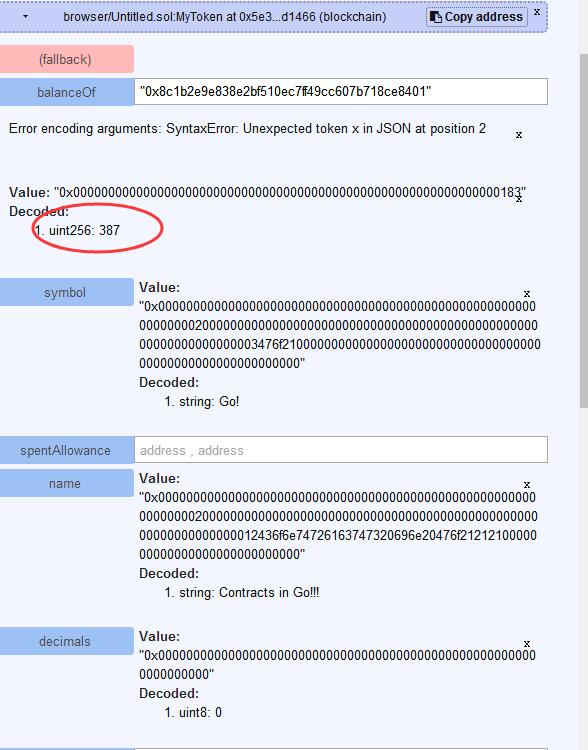
5.通过remix来查询结果
转账是一个tx,必须等待矿工挖矿,提交到区块链中以后才能查询到结果,除了在程序中等待一段时间进行查询,也可以自己等待一会儿,然后直接在remix中进行查询了.

    #### (1) 打开http://ethereum.github.io/browser-solidity/#version=soljson-v0.4.16+commit.d7661dd9.js

    #### (2) 粘贴token.sol的内容

    #### (3) 切换到Web3 Provider

    #### (4) 使用At Address创建合约

        这是因为我们合约已经创建完毕了,通过指定地址就可以直接与我们的合约进行交互了

        然后可以调用balanceof来查询已经到账了.截图如下:
以太坊系列之十六: 使用golang与智能合约进行交互的更多相关文章
- 以太坊系列之十六:golang进行智能合约开发
以太坊系列之十六: 使用golang与智能合约进行交互 以太坊系列之十六: 使用golang与智能合约进行交互 此例子的目录结构 token contract 智能合约的golang wrapper ...
- 以太坊系列之十八: 百行go代码构建p2p聊天室
百行go代码构建p2p聊天室 百行go代码构建p2p聊天室 1. 上手使用 2. whisper 原理 3. 源码解读 3.1 参数说明 3.1 连接主节点 3.2 我的标识 3.2 配置我的节点 3 ...
- 以太坊系列之十四: solidity特殊函数
solidity中的特殊函数 括号里面有类型和名字的是参数,只有类型是返回值. block.blockhash(uint blockNumber) returns (bytes32): hash of ...
- 以太坊系列之十二: solidity变量存储
solidity中变量的存储 变量存储主要分为两个区域,一个是storage(对应指定是SLOAD,SSTORE),一个是Memory(MLOAD,MSTORE), 这和普通编程语言的内存模型是不一样 ...
- 以太坊系列之十七: 使用web3进行合约部署调用以及监听
以太坊系列之十七: 使用web3进行智能合约的部署调用以及监听事件(Event) 上一篇介绍了使用golang进行智能合约的部署以及调用,但是使用go语言最大的一个问题是没法持续监听事件的发生. 比如 ...
- Web 前端开发人员和设计师必读精华文章【系列二十六】
<Web 前端开发精华文章推荐>2014年第5期(总第26期)和大家见面了.梦想天空博客关注 前端开发 技术,分享各类能够提升网站用户体验的优秀 jQuery 插件,展示前沿的 HTML5 ...
- OSGi 系列(十六)之 JDBC Service
OSGi 系列(十六)之 JDBC Service compendium 规范提供了 org.osgi.service.jdbc.DataSourceFactory 服务 1. 快速入门 1.1 环境 ...
- Unity3D脚本中文系列教程(十六)
Unity3D脚本中文系列教程(十五) ◆ function OnPostprocessAudio (clip:AudioClip):void 描述:◆ function OnPostprocess ...
- SQL注入之Sqli-labs系列第二十六关(过滤空格、注释符、逻辑运算符注入)和第二十六A
开始挑战第二十六关(Trick with comments and space) 0x1看看源代码 (1)过滤了# or and /**/ / \ ,通过判断也过滤了空格 (2)这样一来只能看 ...
随机推荐
- 【NOIP模拟】table(动态规划)
题目背景 SOURCE:NOIP2016-RZZ-2 T2 题目描述 给定一个 n×m 的矩阵,行列均从 1 开始标号. 一个矩阵被认为是稳定的,当且仅当对于任意的 2≤i≤n,第 i 行的数的和不小 ...
- UVALive - 5107 - A hard Aoshu Problem
题目链接:https://vjudge.net/problem/UVALive-5107 题目大意:用ABCDE代表不同的数字,给出形如ABBDE___ABCCC = BDBDE的东西: 空格里面可以 ...
- HDOJ2012-素数判定
Problem Description 对于表达式n^2+n+41,当n在(x,y)范围内取整数值时(包括x,y)(-39<=x<y<=50),判定该表达式的值是否都为素数. I ...
- 【Apache】 VirtualHost配置
主要配置两点: 1)配置vhost ,可单独建文件,也可直接在http.conf添加内容 如果单独建文件,查看http.conf 中Include 配置文件的路径,并在对应路径新建http_vhost ...
- ServletAPI的获取
Action中获取ServletAPI,三种方式 (1)通过ActionContext获取(只是获取并操作了域空间,并不是真正的ServletAPI对象) 在struts2框架中,通过Action的执 ...
- 7. leetcode 104. Maximum Depth of Binary Tree
Given a binary tree, find its maximum depth. The maximum depth is the number of nodes along the long ...
- 实例甜点 Unreal Engine 4迷你教程(5)之函数中的静态变量
本小节的教程无前置教程,可直接学习,篇幅很短. 本教程浓缩起来就是一句话:函数中的静态变量在调试过程中保留值.所以需要谨慎对待. 什么意思?请先不要一步一步对着做,而整体地看一遍下面的过程: 第一步: ...
- div模拟textarea文本域轻松实现高度自适应
<!doctype html> <html lang="en"> <head> <meta charset="UTF-8&quo ...
- window.settimeout用法与window.setInterval用法的区别
setTimeout 和setInterval的功能都是经过某一个时间段后发生某件指定的事件或者方法. window.setTimeout方法是定时程序,也就是在某时间以后干什么, window.se ...
- Appium环境搭建(Windows版)
Appium介绍 Appium是一个开源.跨平台的测试框架,可以用来测试原生及混合的移动端应用.Appium支持iOS.Android及FirefoxOS平台.Appium使用WebDriver的js ...