
QConf简要搭建过程
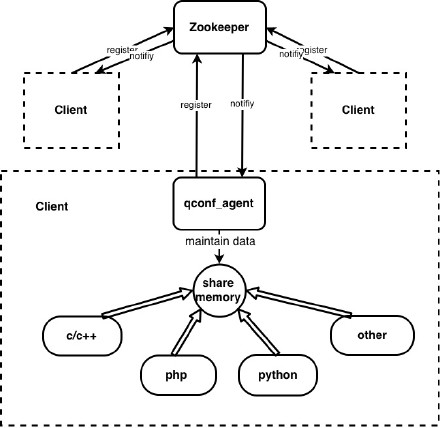
QConf的组件:
ZooKeeper as the server, restore all configurations, so the limit data size of single configuration item is 1MB, since the size limit of Znode.
qconf_agent is a daemon run on client machine, maintain data in share memory.
share memory, QConf use share memory as the local cache of all configuration items needed by current client.
interface in different programming languages, chose your language for accessing of QConf.
1、准备环境
#yum install -y cmake

#yum install -y gdbm gdbm-devel

#yum install -y automake-devel autoconf m4 perl perl-devel gcc-c++
2、拉取代码,编译安装
# git clone https://github.com/Qihoo360/QConf.git

# cd QConf

# mkdir build && cd build

# cmake .. -DCMAKE_INSTALL_PREFIX=/opt/qconf

# make

# make install
3、在QConf 配置文件中配置Zookeeper集群地址
#vim /opt/qconf/conf/idc.conf

# all the zookeeper host configuration.

#[zookeeper]

zookeeper.stg=172.40.0.215:2181,172.40.0.216:2181,172.40.0.217:2181
4、在QConf配置文件中指定本地机房
#vim /opt/qconf/conf/localidc.conf

stg
5、启动QConf
# cd /opt/qconf/bin && bash agent-cmd.sh start

# ps -ef | grep qconf

	root     17703     1  0 13:30 ?        00:00:00 /opt/qconf/bin/qconf_agent

	root     17704 17703  0 13:30 ?        00:00:08 /opt/qconf/bin/qconf_agent
6、尝试用shell取值
qconf usage: qconf command key [idc]

command: can be one of below commands:

                get_conf: get configure value

                get_host: get one service

                get_allhost: get all services available

                get_batch_keys: get all children keys

       key: the path of your configure items

       idc: query from current idc if be omitted

# ln -sv /opt/qconf/bin/qconf /usr/bin/

# qconf get_batch_keys configs

	activity-backend

	activity-front

	backend-3.0

	backend-card

	backend-core

	backend-credit

	backend-franchisee

	backend-member

	backend-mobile

	dfb-front

	foo

	front-agent

	front-franchisee

	msgcenter-backend

	msgcenter-front

# qconf get_conf /configs/backend-3.0/dfb3Service
QConf简要搭建过程的更多相关文章
- 【转】Nginx windows下搭建过程
Nginx windows下搭建过程 内容列表: 简要介绍 下载安装 配置测试 一.简要介绍 Nginx ("engine x") 是一个高性能的 HTTP 和 反向代理 服务器, ...
- Maven多模块,Dubbo分布式服务框架,SpringMVC,前后端分离项目,基础搭建,搭建过程出现的问题
现互联网公司后端架构常用到Spring+SpringMVC+MyBatis,通过Maven来构建.通过学习,我已经掌握了基本的搭建过程,写下基础文章为而后的深入学习奠定基础. 首先说一下这篇文章的主要 ...
- Access应用笔记<四>-一个完整的自动化报表搭建过程
距离之前的三篇日志已经很久啦,今天终于完成了一个比较完整的自动化报表搭建过程 基于公司数据保密原则,样板就不放到网上来了,简单说一下背景: 这次access实现的功能包括: 1)为部门整体搭建了一个员 ...
- iOS---XMPP环境搭建过程
什么是即时通信? 即时通信是目前Internet上最为流行的通讯方式, 各种各样的即时通讯软件也层出不穷, 服务提供商也提供了越来越枫木的通讯服务功能. 即时通讯有多重实现方式, XMPP就是其中一种 ...
- 最简单的SVN环境搭建过程
本文简单描述最简单的SVN环境搭建过程 搭建环境:windows (个人验证了windows2003,windows xp) 使用软件:Setup-Subversion-1.6.17 //Serve ...
- cocos2d-x3.9 NDK android 环境搭建过程中遇到的错误
编译环境:Mac OS, NDK r9d 错误:arm-linux-androideabi-gcc: error trying to exec '/media/Project/adt-bundle-l ...
- 懒人记录 Hadoop2.7.1 集群搭建过程
懒人记录 Hadoop2.7.1 集群搭建过程 2016-07-02 13:15:45 总结 除了配置hosts ,和免密码互连之外,先在一台机器上装好所有东西 配置好之后,拷贝虚拟机,配置hosts ...
- mercurial(Hg) Server 搭建 过程记录
mercurial(Hg) Server 搭建 过程记录 1. 环境说明 只是测试搭建,环境为本机开发环境:win 8.1 + IIS8.5 软件准备: 2. 软件安装 先安装Python2.7, ...
- PXE简要配置过程
目录 1.所需服务 2.简要配置过程 1.dhcp服务 2.tftp服务 3.提供pxelinux.0配置文件 4.提供系统所需文件 1.所需服务: dhcp服 ...
随机推荐
- 一个web应用的诞生(6)--用户账户
之前登录注册的功能都已经完成,但是登录成功回到首页发现还是白茫茫的一片,对的,title一直都写得博客,那么最终目的也是写出一个轻博客来,但是,在发表文章之前是不是要先记录一下登录状态呢? 用户登录 ...
- UE4中的单映射:TMap容器
一.TMap<T>是么 TMap<T>是UE4中的一种关联容器,每个键都关联着一个值,形成了单映射关系.因此你可以通过键名来快速查找到值.此外,单映射要求每个键都是唯一的.类似 ...
- JavaScript中值类型和引用类型的区别
JavaScript的数据类型分为两类:原始类型和对象类型.其中,原始类型包括:数字.字符串和布尔值.此外,JavaScript中还有两个特殊的原始值:null和undefined,它们既不是数字也不 ...
- HTTP各状态消息说明
200:请求已成功,请求所希望的响应头或数据体将随此响应返回. 302:请求的资源临时从不同的 URI 响应请求.由于这样的重定向是临时的,客户端应当继续向原有地址发送以后的请求.只有在 Cache- ...
- apk反编译方式
一.Apk反编译得到Java源代码 下载上述反编译工具包,打开apk2java目录下的dex2jar-0.0.9.9文件夹,内含apk反编译成java源码工具,以及源码查看工具. apk反编译工具de ...
- css修炼宝典
前端岗位目前确实十分火热,但是就业压力也很大:前一段时间与大学同学交谈,他向我哭诉说去一个机构学习了前端工程师,我心底里为他高兴,因为他马上就可以月薪突破10K了,可是不幸的是他说去北京面试一个月,还 ...
- Spring Data JPA: 实现自定义Repository
一.前言 由于项目中的 实体(entity)默认都是继承一个父类(包含一些公共的属性,比如创建时间,修改时间,是否删除,主键id).为了实现逻辑删除,一般会自己实现RepositoryFactoryB ...
- TP框架 基础1
php框架 一.真实项目开发步骤: 多人同时开发项目,协作开发项目.分工合理.效率有提高(代码风格不一样.分工不好) 测试阶段 上线运行 对项目进行维护.修改.升级(单个人维护项目,十分困难,代码风格 ...
- 图片流量节省大杀器:基于腾讯云CDN的sharpP自适应图片技术实践
目前移动端运营素材大部分依赖图片,基于对图片流量更少,渲染速度更快的诉求,我们推动CDN,X5内核,即通产品部共同推出了一套业务透明,无痛接入的CDN图片优化方案:基于CDN的sharpP自适应图片无 ...
- 【2-24】for循环嵌套,跳转语句,异常语句,穷举法、迭代法
For循环嵌套与if嵌套相似,是在for中再套for,其结构如下: For(;;) { For(;;){} }经典题型为打印星星例: Console.Write("请输入一个奇数:" ...