
通过geotools读写shp文件
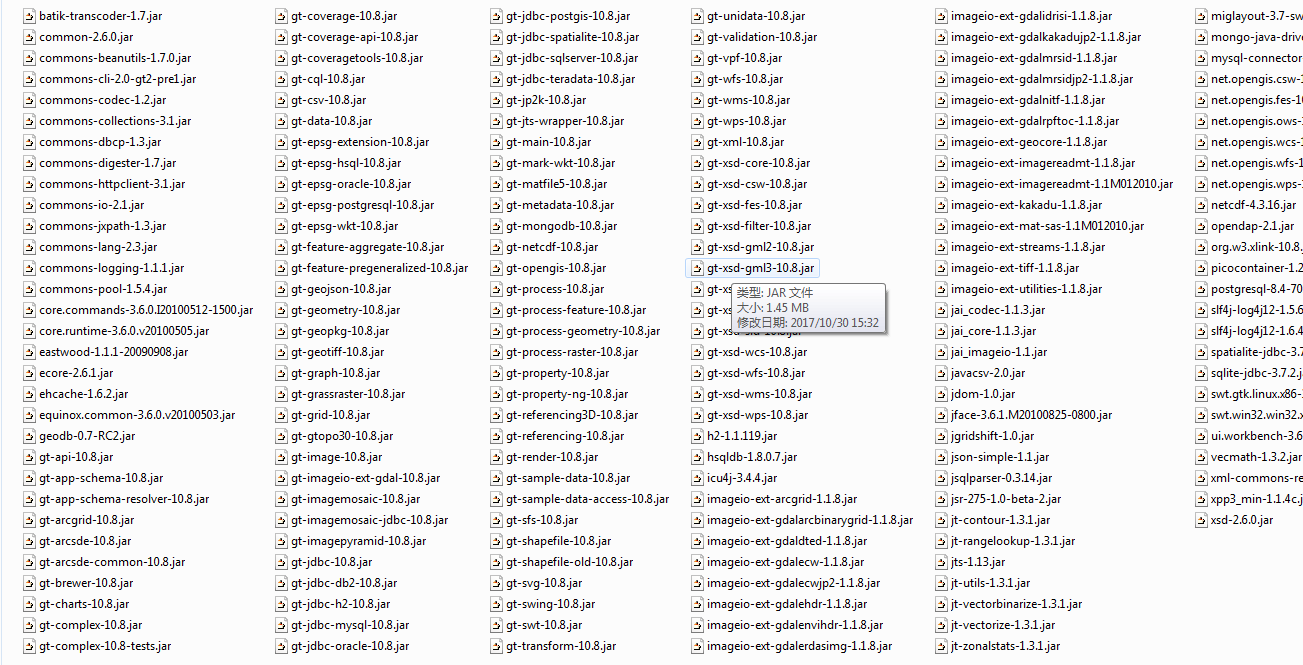
依赖jar包
读取shp
	public static void main(String[] path) {

		DbaseFileReader reader = null;

		try {

			reader = new DbaseFileReader(new ShpFiles("C:\\Users\\lilei3774\\Desktop\\wuhan\\1\\split-hanzi\\poi.shp"), false,

					Charset.forName("utf-8"));

			DbaseFileHeader header = reader.getHeader();

			int numFields = header.getNumFields();

			while (reader.hasNext()) {

				try {

					Object[] entry = reader.readEntry();

					for (int i = 0; i < numFields; i++) {

						String title = header.getFieldName(i);

						Object value = entry[i];

						System.out.println(title + "=" + value);

					}

				} catch (Exception e) {

					e.printStackTrace();

				}

			}

		} catch (Exception e) {

			e.printStackTrace();

		} finally {

			if (reader != null) {

				try {

					reader.close();

				} catch (Exception e) {

				}

			}

		}

	}
	public static void main(String[] args) {

		// TODO Auto-generated method stub

		 ShapefileDataStore shpDataStore = null;

		    try{

		        shpDataStore = new ShapefileDataStore(new File("C:\\Users\\lilei3774\\Desktop\\wuhan\\1\\split-hanzi\\poi.shx").toURI().toURL());

//		        shpDataStore.setStringCharset(Charset.forName("GBK"));

		        shpDataStore.setCharset(Charset.forName("utf-8"));

		        String typeName = shpDataStore.getTypeNames()[0];

		        FeatureSource<SimpleFeatureType, SimpleFeature> featureSource = null;

		        featureSource = (FeatureSource<SimpleFeatureType, SimpleFeature>)shpDataStore.getFeatureSource(typeName);

		        FeatureCollection<SimpleFeatureType, SimpleFeature> result = featureSource.getFeatures();

		        System.out.println(result.size());

		        FeatureIterator<SimpleFeature> itertor = result.features();

		        while(itertor.hasNext()){

		            SimpleFeature feature = itertor.next();

		            Collection<Property> p = feature.getProperties();

		            Iterator<Property> it = p.iterator();

		            while(it.hasNext()) {

		                Property pro = it.next();

		                if (pro.getValue() instanceof Point) {

		                    System.out.println("PointX = " + ((Point)(pro.getValue())).getX());

		                    System.out.println("PointY = " + ((Point)(pro.getValue())).getY());

		                } else {

		                    System.out.println(pro.getName() + " = " + pro.getValue());

		                }

		            }

		        }

		        itertor.close();

		    } catch (MalformedURLException e) {

		        e.printStackTrace();

		    } catch(IOException e) { e.printStackTrace(); }

	}
写shp
	public static void main(String[] args) {

	    try{

	    	 File file = new File("C:\\Users\\lilei3774\\Desktop\\wuhan\\1\\split-hanzi\\self.shp");

	         Map<String, Serializable> params = new HashMap<String, Serializable>();

	         params.put( ShapefileDataStoreFactory.URLP.key, file.toURI().toURL() );

	         ShapefileDataStore ds = (ShapefileDataStore) new ShapefileDataStoreFactory().createNewDataStore(params);

	         //定义图形信息和属性信息

	         SimpleFeatureTypeBuilder tb = new SimpleFeatureTypeBuilder();

	         tb.setCRS(DefaultGeographicCRS.WGS84);

	         tb.setName("shapefile");

	         tb.add("the_geom", Point.class);

	         tb.add("POIID", Long.class);

	         tb.add("NAMEC", String.class);

	         ds.createSchema(tb.buildFeatureType());

	         ds.setCharset(Charset.forName("utf-8"));

	         //设置Writer

	         FeatureWriter<SimpleFeatureType, SimpleFeature> writer = ds.getFeatureWriter(ds.getTypeNames()[0], Transaction.AUTO_COMMIT);

	         //写下一条

	         SimpleFeature feature = writer.next();

	         feature.setAttribute("the_geom", new GeometryFactory().createPoint(new Coordinate(116.123, 39.345)));

	         feature.setAttribute("POIID", 1234567890l);

	         feature.setAttribute("NAMEC", "某兴趣点1");

	         feature = writer.next();

	         feature.setAttribute("the_geom", new GeometryFactory().createPoint(new Coordinate(116.456, 39.678)));

	         feature.setAttribute("POIID", 1234567891l);

	         feature.setAttribute("NAMEC", "某兴趣点2");

	         writer.write();

	         writer.close();

	         ds.dispose();

	    } catch (Exception e) {

	        e.printStackTrace();

	    }

	}
通过geotools读写shp文件的更多相关文章
- GeoJson的生成与解析,JSON解析,Java读写geojson,geotools读取shp文件,Geotools中Geometry对象与GeoJson的相互转换
GeoJson的生成与解析 一.wkt格式的geometry转成json格式 二.json格式转wkt格式 三.json格式的数据进行解析 四.Java读写geojson 五.geotools读取sh ...
- geotools导入shp文件到Oracle数据库时表名带下划线的问题解决
问题: 最近在做利用geotools导入shp文件到Oracle表中,发现一个问题Oracle表名带下划线时导入失败,问题代码行: dsOracle.getFeatureWriterAppend(or ...
- python GDAL 读写shp文件
gdal包用于处理栅格数据,ogr用于处理矢量数据. 1 #!C:\Program Files\pythonxy\python\python.exe 2 #-*- coding:gb2312 -*- ...
- C#、C++用GDAL读shp文件(转载)
C#.C++用GDAL读shp文件 C#用GDAL读shp文件 (2012-08-14 17:09:45) 标签: 杂谈 分类: c#方面的总结 1.目前使用开发环境为VS2008+GDAL1.81 ...
- Android GIS开发系列-- 入门季(13)Gdal简单写个shp文件
Gdal是用来读写栅格与矢量数据的,在Gdal官网,可以下载相关的资源进行平台的编译.其实Arcgis底层也是用Gdal来读取shp文件的,那在Android中可以直接读写shp文件吗,是可以的.这里 ...
- shp系列(一)——利用C++进行shp文件的读(打开)与写(创建)开言
博客背景和目的 最近在用C++写一个底层的东西,需要读取和创建shp文件.虽然接触shp文件已经几年了,但是对于shp文件内到底包含什么东西一直是一知半解.以前使用shp文件都是利用软件(如ArcGI ...
- JAVA用geotools读写shape格式文件
转自:http://toplchx.iteye.com/blog/1335007 JAVA用geotools读写shape格式文件 (对应geotools版本:2.7.2) (后面添加对应geotoo ...
- 简析服务端通过geotools导入SHP至PG的方法
文章版权由作者李晓晖和博客园共有,若转载请于明显处标明出处:http://www.cnblogs.com/naaoveGIS/ 1.背景 项目中需要在浏览器端直接上传SHP后服务端进行数据的自动入PG ...
- GDAL1.11版本号对SHP文件索引加速測试
GDAL库中对于矢量数据的读取中能够设置一些过滤器来对矢量图形进行筛选.对于Shapefile格式来说.假设数据量太大,设置这个过滤器时间慢的简直无法忍受.好在GDAL1.10版本号開始支持读取Sha ...
随机推荐
- html表格宽度设置失效
问题描述: 我在写一个网页table时,table宽度超过了我预想的宽度,我想把它设置小一点,但总是没效果.改到怀疑人生!代码如下: 经过多次调试后发现一个问题,table可以改变大小,但是会有一个最 ...
- wireshark数据包分析实战 第二章
1,监听网络线路:即嗅探器的位置确定. 2,混杂模式:将网卡设置成混杂模式,网卡可以接受经过网卡的所有数据报,包括目的地址不是本网卡的数据报.这些数据都会发送给cpu处理,这样,wireshark就能 ...
- eclipse建立一个jsp项目遇到的问题及解决
打开eclipse 在workplace 区域空白处,右键 填写好Project name,之后,点击finished 即可. 选中webcontent,新建一个文件夹,并新建一个jsp 文件 新建 ...
- Jmeter的安装和启动时出现unable to access jarfile apachejmeter.jar error value=1错误处理
Jmeter是纯Java开发的, 能够运行Java程序的系统一般都可以运行Jmeter, 如:Windows. Linux. mac等. 由于是由Java开发,所以自然需要jdk环境. Windows ...
- Hibernate Mapping Exception:-9
if("true".equals(map.get("isAudited"))){ isAudited="=";//已审核 }else{ is ...
- python检查IP地址正确性
一.自动动手,丰衣足食 #encoding=utf-8 import os,sys def check_ip(ipaddr): addr = ipaddr.strip().split('.') #切割 ...
- 即时通信系统Openfire分析之六:路由表 RoutingTable
还是从会话管理说起 上一章,Session经过预创建.认证之后,才正常可用.认证时,最重要的操作,就是将Session加入到路由表,使之拥用了通信功能. 添加到至路由表的操作,是在SessionMan ...
- [置顶]
一个demo学会c#
学习了c#4.5高级编程这本书,自己喜欢边学边总结边写demo,所以写了这篇文章,包含了大部分的c#编程知识.让你一个demo掌握c#编程,如果有问题可以留言. 此demo主要包括五个文件:Stude ...
- Hibernate 学习笔记 - 2
五.映射一对多关联关系 1. 单向多对一 即 单向 n-1 1)单向 n-1 关联只需从 n 的一端可以访问 1 的一端 ① 域模型: 从 Order 到 Customer 的多对一单向关联需要在Or ...
- Cygwin - windows系统下运行linux操作 --代替linux虚拟机安装、双系统的繁琐
我把Cygwin视为Windows用户熟练linxu系统操作的良好途径.它不需要虚拟机.双系统等安装对电脑知识.硬件的要求,只需要基本的软件安装操作即可.以下是安装步骤供小白同胞参考. Cygwin安 ...