
通过geotools读写shp文件
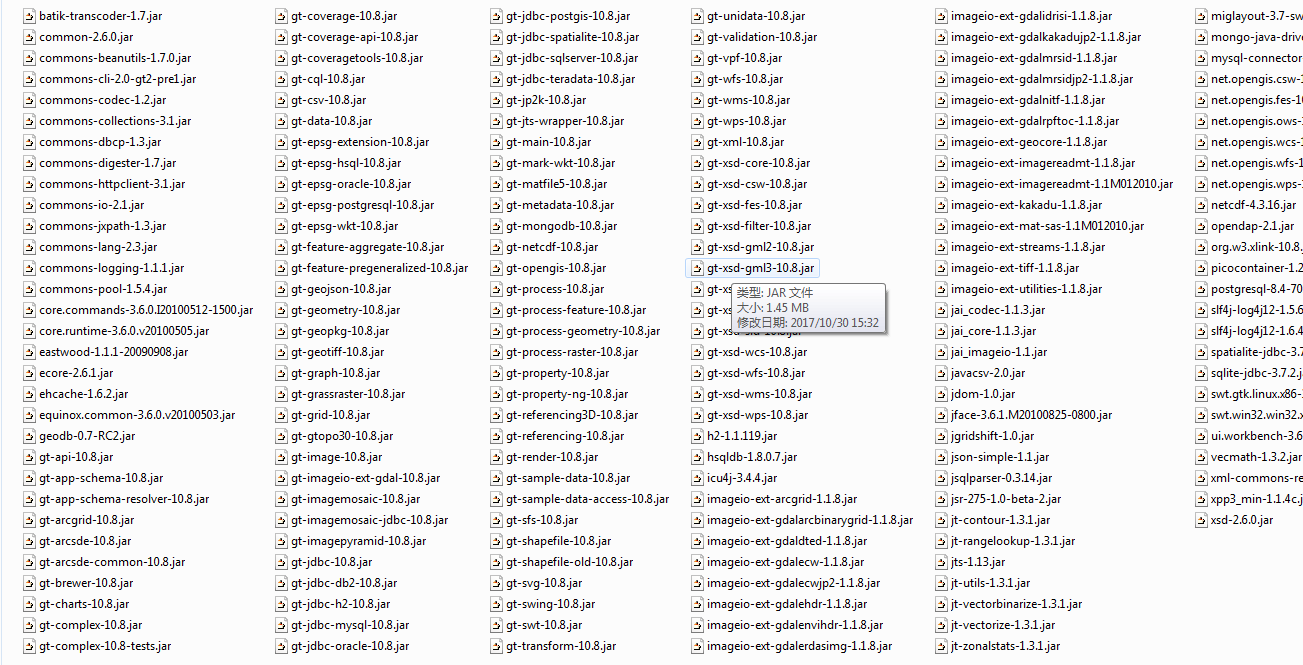
依赖jar包
读取shp
	public static void main(String[] path) {

		DbaseFileReader reader = null;

		try {

			reader = new DbaseFileReader(new ShpFiles("C:\\Users\\lilei3774\\Desktop\\wuhan\\1\\split-hanzi\\poi.shp"), false,

					Charset.forName("utf-8"));

			DbaseFileHeader header = reader.getHeader();

			int numFields = header.getNumFields();

			while (reader.hasNext()) {

				try {

					Object[] entry = reader.readEntry();

					for (int i = 0; i < numFields; i++) {

						String title = header.getFieldName(i);

						Object value = entry[i];

						System.out.println(title + "=" + value);

					}

				} catch (Exception e) {

					e.printStackTrace();

				}

			}

		} catch (Exception e) {

			e.printStackTrace();

		} finally {

			if (reader != null) {

				try {

					reader.close();

				} catch (Exception e) {

				}

			}

		}

	}
	public static void main(String[] args) {

		// TODO Auto-generated method stub

		 ShapefileDataStore shpDataStore = null;

		    try{

		        shpDataStore = new ShapefileDataStore(new File("C:\\Users\\lilei3774\\Desktop\\wuhan\\1\\split-hanzi\\poi.shx").toURI().toURL());

//		        shpDataStore.setStringCharset(Charset.forName("GBK"));

		        shpDataStore.setCharset(Charset.forName("utf-8"));

		        String typeName = shpDataStore.getTypeNames()[0];

		        FeatureSource<SimpleFeatureType, SimpleFeature> featureSource = null;

		        featureSource = (FeatureSource<SimpleFeatureType, SimpleFeature>)shpDataStore.getFeatureSource(typeName);

		        FeatureCollection<SimpleFeatureType, SimpleFeature> result = featureSource.getFeatures();

		        System.out.println(result.size());

		        FeatureIterator<SimpleFeature> itertor = result.features();

		        while(itertor.hasNext()){

		            SimpleFeature feature = itertor.next();

		            Collection<Property> p = feature.getProperties();

		            Iterator<Property> it = p.iterator();

		            while(it.hasNext()) {

		                Property pro = it.next();

		                if (pro.getValue() instanceof Point) {

		                    System.out.println("PointX = " + ((Point)(pro.getValue())).getX());

		                    System.out.println("PointY = " + ((Point)(pro.getValue())).getY());

		                } else {

		                    System.out.println(pro.getName() + " = " + pro.getValue());

		                }

		            }

		        }

		        itertor.close();

		    } catch (MalformedURLException e) {

		        e.printStackTrace();

		    } catch(IOException e) { e.printStackTrace(); }

	}
写shp
	public static void main(String[] args) {

	    try{

	    	 File file = new File("C:\\Users\\lilei3774\\Desktop\\wuhan\\1\\split-hanzi\\self.shp");

	         Map<String, Serializable> params = new HashMap<String, Serializable>();

	         params.put( ShapefileDataStoreFactory.URLP.key, file.toURI().toURL() );

	         ShapefileDataStore ds = (ShapefileDataStore) new ShapefileDataStoreFactory().createNewDataStore(params);

	         //定义图形信息和属性信息

	         SimpleFeatureTypeBuilder tb = new SimpleFeatureTypeBuilder();

	         tb.setCRS(DefaultGeographicCRS.WGS84);

	         tb.setName("shapefile");

	         tb.add("the_geom", Point.class);

	         tb.add("POIID", Long.class);

	         tb.add("NAMEC", String.class);

	         ds.createSchema(tb.buildFeatureType());

	         ds.setCharset(Charset.forName("utf-8"));

	         //设置Writer

	         FeatureWriter<SimpleFeatureType, SimpleFeature> writer = ds.getFeatureWriter(ds.getTypeNames()[0], Transaction.AUTO_COMMIT);

	         //写下一条

	         SimpleFeature feature = writer.next();

	         feature.setAttribute("the_geom", new GeometryFactory().createPoint(new Coordinate(116.123, 39.345)));

	         feature.setAttribute("POIID", 1234567890l);

	         feature.setAttribute("NAMEC", "某兴趣点1");

	         feature = writer.next();

	         feature.setAttribute("the_geom", new GeometryFactory().createPoint(new Coordinate(116.456, 39.678)));

	         feature.setAttribute("POIID", 1234567891l);

	         feature.setAttribute("NAMEC", "某兴趣点2");

	         writer.write();

	         writer.close();

	         ds.dispose();

	    } catch (Exception e) {

	        e.printStackTrace();

	    }

	}
通过geotools读写shp文件的更多相关文章
- GeoJson的生成与解析,JSON解析,Java读写geojson,geotools读取shp文件,Geotools中Geometry对象与GeoJson的相互转换
GeoJson的生成与解析 一.wkt格式的geometry转成json格式 二.json格式转wkt格式 三.json格式的数据进行解析 四.Java读写geojson 五.geotools读取sh ...
- geotools导入shp文件到Oracle数据库时表名带下划线的问题解决
问题: 最近在做利用geotools导入shp文件到Oracle表中,发现一个问题Oracle表名带下划线时导入失败,问题代码行: dsOracle.getFeatureWriterAppend(or ...
- python GDAL 读写shp文件
gdal包用于处理栅格数据,ogr用于处理矢量数据. 1 #!C:\Program Files\pythonxy\python\python.exe 2 #-*- coding:gb2312 -*- ...
- C#、C++用GDAL读shp文件(转载)
C#.C++用GDAL读shp文件 C#用GDAL读shp文件 (2012-08-14 17:09:45) 标签: 杂谈 分类: c#方面的总结 1.目前使用开发环境为VS2008+GDAL1.81 ...
- Android GIS开发系列-- 入门季(13)Gdal简单写个shp文件
Gdal是用来读写栅格与矢量数据的,在Gdal官网,可以下载相关的资源进行平台的编译.其实Arcgis底层也是用Gdal来读取shp文件的,那在Android中可以直接读写shp文件吗,是可以的.这里 ...
- shp系列(一)——利用C++进行shp文件的读(打开)与写(创建)开言
博客背景和目的 最近在用C++写一个底层的东西,需要读取和创建shp文件.虽然接触shp文件已经几年了,但是对于shp文件内到底包含什么东西一直是一知半解.以前使用shp文件都是利用软件(如ArcGI ...
- JAVA用geotools读写shape格式文件
转自:http://toplchx.iteye.com/blog/1335007 JAVA用geotools读写shape格式文件 (对应geotools版本:2.7.2) (后面添加对应geotoo ...
- 简析服务端通过geotools导入SHP至PG的方法
文章版权由作者李晓晖和博客园共有,若转载请于明显处标明出处:http://www.cnblogs.com/naaoveGIS/ 1.背景 项目中需要在浏览器端直接上传SHP后服务端进行数据的自动入PG ...
- GDAL1.11版本号对SHP文件索引加速測试
GDAL库中对于矢量数据的读取中能够设置一些过滤器来对矢量图形进行筛选.对于Shapefile格式来说.假设数据量太大,设置这个过滤器时间慢的简直无法忍受.好在GDAL1.10版本号開始支持读取Sha ...
随机推荐
- python中strip函数的用法
python中往往使用剥除函数strip()来对用户的输入进行清理.strip函数的最一般形式为: str.strip('序列') 其中,序列是一段字符串,该函数表示从头或者从尾部开始进行扫描,如果扫 ...
- 关于python中的pickle函数
8-7参考阅读 - 读文件.写文件.异常处理.文件保存游戏.pickle数据转成文本的过程又被称为"序列化",即将对象状态转换为可保持或传输的格式的过程.对应的,从序列化的格式中解 ...
- CPU 分类
Single Core :单核CPU Dual Core :双核CPU Quad Core :四核CPU Hexa Core :六核CPU Octa Core :八核CPU 参考: htt ...
- FPGA多时钟处理应用
FPGA项目设计中,通常会遇到多时钟处理.即一个PLL输出多个时钟,根据条件选择合适的时钟用作系统时钟.方案一: 外部晶振时钟进入PLL,由PLL输出多个时钟,MUX根据外部条件选择时钟输出做为系统使 ...
- ConvertUtils.register注册转换器
当用到BeanUtils的populate.copyProperties方法或者getProperty,setProperty方法其实都会调用convert进行转换 但Converter只支持一些基本 ...
- 提取多层嵌套Json数据
在.net 2.0中提取这样的json {"name":"lily","age":23,"addr":{"ci ...
- 1.ElasticSearch介绍及基本概念
一.ElasticSearch介绍 一个采用RESTful API标准的高扩展性的和高可用性的实时性分析的全文搜索工具 基于Lucene[开源的搜索引擎框架]构建 ElasticSearch是一个面向 ...
- Java设计模式(四)——再谈观察者模式
在本系列的上一篇文章中,我们讨论了JDK对于观察者模式的一套实现.今天我们将要从另一个角度来探索Tomcat中是如何利用观察者模式加载各个组件.不过今天的任务不是解释Tomcat,所以我会单独把重点抽 ...
- ubuntu下codeblocks安装与中文化
什么是Code::Blocks Code::Blocks是一个免费.开源.跨平台的集成开发环境,使用C++开发,并且使用wxWidgets做为GUI库.Code::Blocks使用了插件架构,其功能可 ...
- APP在模拟器崩溃,提示__gcd_queue_item_enqueue_hook_block_invoke
libBacktraceRecording.dylib`__gcd_queue_item_enqueue_hook_block_invoke: libBacktraceRecording.dylib` ...