
用python做小说网站
html头部
{% extends 'base.html' %}
{% load static %}
{% block title %}小说首页{% endblock %}

{% block content %}

    <div id="headerbox">
        <h1 class="logo left"><a href="#"><img src="{% static 'imgs/logo.png' %}">
            <p>免费小说网</p></a></h1>
        <ul class="nav right">
            <li><a href="" data-toggle="modal" data-target="#myModal">
                登录
            </a></li>
            <li><a href="" data-toggle="modal" data-target="#myModal">
                注册
            </a></li>
            <li><a href="" data-toggle="modal" data-target="#myModal">
                充值
            </a></li>
        </ul>
    </div>
    <div class="nav1">
        <ul>
            <li><a href="#">在线书库</a>
                <ul>
                    <li><a href="#">绝地求生之冷面枪神</a></li>
                    <li><a href="#">生死狙击之实验的末日</a></li>
                    <li><a href="#">午夜电视机</a></li>
                    <li><a href="#">医神的美女军团</a></li>
                </ul>
            </li>
            <li><a href="#">VIP小说</a>
                <ul>
                    <li><a href="#">漫威之我是大蛇</a></li>
                    <li><a href="#">百岁之后系统才激活</a></li>
                    <li><a href="#">末日之神级充钱系统</a></li>
                    <li><a href="#">重生乾隆王朝</a></li>
                </ul>
            </li>
            <li><a href="#">下载书库</a>
                <ul>
                    <li><a href="#">修真之异界金仙</a></li>
                    <li><a href="#">柯南之白枫</a></li>
                    <li><a href="#">僵尸的摄魂笔记</a></li>
                    <li><a href="#">重生炎尊</a></li>
                    <li><a href="#">鸿蒙创世决</a></li>
                </ul>
            </li>
            <li><a href="#">包月书库</a>
                <ul>
                    <li><a href="#">龙神系列之火凤天下</a></li>
                    <li><a href="#">炮灰的腹黑重生</a></li>
                    <li><a href="#">相守一生</a></li>
                    <li><a href="#">十二殿之乱世殇</a></li>
                    <li><a href="#">云之界幻云使</a></li>
                </ul>
            </li>
            <li><a href="#">排行榜</a>
                <ul>
                    <li><a href="#">小说人气排行榜</a></li>
                    <li><a href="#">小说鲜花排行榜</a></li>
                    <li><a href="#">小说收藏排行榜</a></li>
                    <li><a href="#">小说字数排行榜</a></li>
                </ul>
            </li>
        </ul>
    </div>
    <!-- 模态框(Modal) -->
    <div class="modal fade" id="myModal" tabindex="-1" role="dialog" aria-labelledby="myModalLabel" aria-hidden="true">
        <div class="modal-dialog">
            <div class="modal-content">
                <div class="modal-header">
                    <button type="button" class="close" data-dismiss="modal" aria-hidden="true">×</button>
                    <h4 class="modal-title" id="myModalLabel"></h4>
                </div>
                <div class="modal-body">
                    <form class="form-horizontal" role="form">
                        <div class="form-group">
                            <label for="firstname" class="col-sm-2 control-label">昵称</label>
                            <div class="col-sm-10">
                                <input type="text" class="form-control" id="firstname" placeholder="请输入昵称">
                            </div>
                        </div>
                        <div class="form-group">
                            <label for="lastname" class="col-sm-2 control-label">密码</label>
                            <div class="col-sm-10">
                                <input type="text" class="form-control" id="lastname" placeholder="请输入密码">
                            </div>
                        </div>
                        <div class="form-group">
                            <div class="col-sm-offset-2 col-sm-10">
                                <div class="checkbox">
                                    <label>
                                        <input type="checkbox">记住密码
                                    </label>
                                </div>
                            </div>
                        </div>
                        <div class="form-group">
                            <div class="col-sm-offset-2 col-sm-10">
                                <button type="submit" class="btn btn-default">登录</button>
                                <button type="submit" class="btn btn-default">注册</button>
                            </div>
                        </div>
                    </form>
                </div>
                <div class="modal-footer">
                    <button type="button" class="btn btn-default" data-dismiss="modal">关闭</button>
                </div>
            </div><!-- /.modal-content -->
        </div><!-- /.modal-dialog -->
    </div>
{% endblock %}

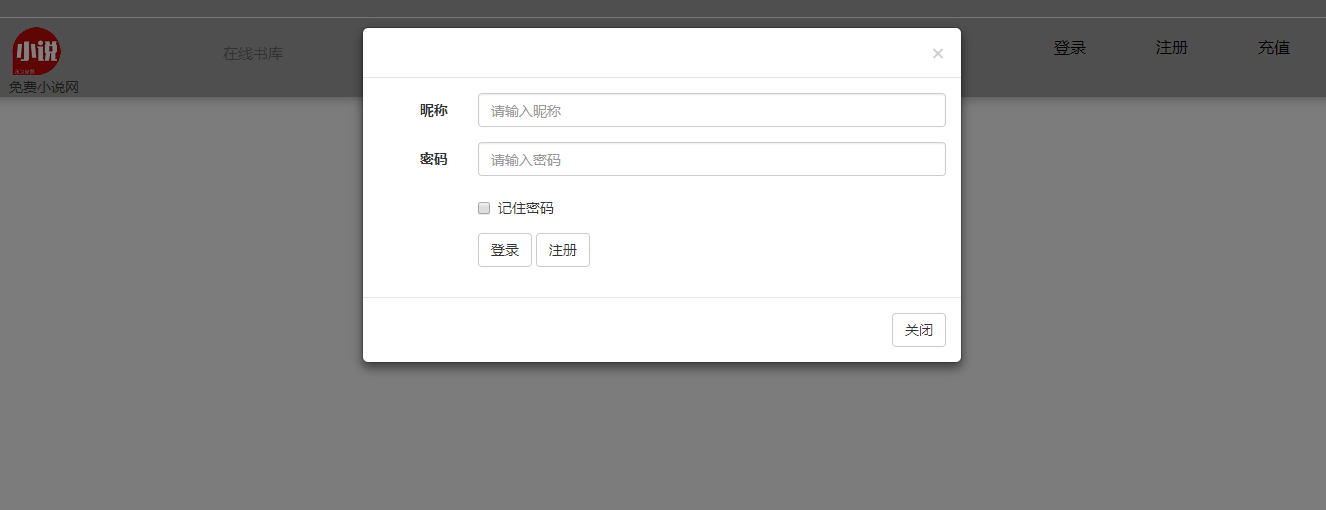
css样式
/*@charset "gb2312";*/
/**
+------------------------------------------------------------------------------
* 开始网站样式重写(初始化)
+------------------------------------------------------------------------------
*/
html {
-webkit-text-size-adjust: none; /*解决chrome浏览器下字体不能小于12px*/
}
body {
color: #333;
font-family: "微软雅黑", Verdana, Arial, Helvetica, sans-serif;
background-color: #f8f8f8
}
a {
outline: none;
text-decoration: none;
color: #333
}
a:hover {
text-decoration: none;
color: #4581e6
}
a:active {
star: expression(this.onFocus=this.blur());
}
a:focus {
outline: 0;
}
html {
zoom: 1;
}
html * {
outline: 0;
zoom: 1;
}
html button::-moz-focus-inner {
border-color: transparent !important;
}
body {
font-size: 14px;
}
body, div, dl, dt, dd, ul, ol, li, h1, h2, h3, h4, h5, h6, pre, code, form, fieldset, legend, input, textarea, p, blockquote, th, td {
margin: 0;
padding: 0;
}
table {
/*border-collapse:collapse;border-spacing:0;*/
}
fieldset, a img {
border: 0;
}
address, caption, cite, code, dfn, em, th, var {
font-style: normal;
font-weight: normal;
}
li {
list-style: none;
}
caption, th {
text-align: left;
}
h1, h2, h3, h4, h5, h6 {
font-size: 100%;
font-weight: normal;
}
q:before, q:after {
content: '';
}
input[type="submit"], input[type="reset"], input[type="button"], button {
-webkit-appearance: none; /*去掉苹果的默认UI来渲染按钮*/
}
em, i {
font-style: normal;
}
/**
+------------------------------------------------------------------------------
* 结束网站样式重写(初始化)
+------------------------------------------------------------------------------
*/
/**
+------------------------------------------------------------------------------
* Public Class
+------------------------------------------------------------------------------
*/
.clearfix:after {
content: ".";
display: block;
height: 0;
clear: both;
visibility: hidden;
}
.clearfix {
display: block;
}
.clear {
clear: both;
}
/* 清除浮动*/
.colwrapper {
overflow: hidden;
zoom: 1 /*for ie*/;
margin: 5px auto;
}
.strong {
font-weight: bold;
}
.left {
float: left;
display: inline;
}
.right {
float: right;
display: inline;
}
.center {
margin: 0 auto;
text-align: center;
}
.show {
display: block;
visibility: visible;
}
.hide {
display: none;
visibility: hidden;
}
.block {
display: block;
}
.inline {
display: inline;
}
.transparent {
filter: alpha(opacity=50);
-moz-opacity: 0.5; /** Firefox 3.5即将原生支持opacity属性,所以本条属性只在Firefox3以下版本有效 ***/
-khtml-opacity: 0.5;
opacity: 0.5;
}
.break {
word-wrap: break-word;
overflow: hidden; /*word-break:break-all;*/
}
.tal {
text-align: left
}
.tar {
text-align: right;
}
/*文字两侧对齐*/
.justify {
text-align: justify;
text-justify: distribute-all-lines; /*ie6-8*/
text-align-last: justify; /* ie9*/
-moz-text-align-last: justify; /*ff*/
-webkit-text-align-last: justify; /*chrome 20+*/
}
.toe {
/*超出省略号*/
word-break: keep-all;
white-space: nowrap;
overflow: hidden;
text-overflow: ellipsis;
}
@media screen and (-webkit-min-device-pixel-ratio: 0) {
/* chrome*/
.justify:after {
content: ".";
display: inline-block;
width: 100%;
overflow: hidden;
height: 0;
}
}
em {
font-style: italic !important;
}
strike {
text-decoration: line-through !important;
}
strong {
font-weight: bold !important;
text-indent: 0;
}
u {
text-decoration: underline !important;
}
#headerbox {
float: right;
position: absolute;
z-index: -1; /*有position属性,越大越å 在顶上*/
top: 0;
left: 0;
right: 0;
height: 100px;
background-color: #9E9E9E;
box-shadow: 0 0 20px #999 /*æ·»åŠ é˜´å½±*/
}
#headerbox .logo {
padding: 30px;
}
#headerbox .nav li {
float: left;
line-height: 80px;
margin-right: 40px;
}
#headerbox .nav li a {
color: black;
font-size: 16px;
background-color: #9e9e9e;
}
/*#headerbox .nav li button {*/
/*background-color: #9e9e9e;*/
/*border: none;*/
/*color: black;*/
/*padding: 3px;*/
/*text-align: center;*/
/*text-decoration: none;*/
/*display: inline-block;*/
/*font-size: 15px;*/
/*}*/
.nav1 {
position: absolute;
border-right: none;
overflow: hidden;
float: left;
margin: -10px -10px -10px 200px;
font-size: 15px;
}
.nav1 ul li {
float: left;
}
.nav1 ul li a {
width: 150px;
height: 60px;
text-align: center;
line-height: 50px;
display: block;
border-right: 2px solid #9e9e9e;
color: #666;
}
.nav1 ul li a:hover {
color: #f00;
}
.nav1 ul li ul {
position: fixed;
display: none;
}
.nav1 ul li ul li {
float: none;
}
.nav1 ul li ul li a {
border-right: none;
}
.nav1 ul li:hover ul {
display: block;
}
base
<!DOCTYPE html>
{% load static %}
<html>
<head>
    <meta charset="utf-8">
    <title>{% block title %}Django 登录与注册{% endblock %}</title>

    <link rel="stylesheet" type="text/css" href="{% static 'css/bootstrap.min.css' %}">
    <link rel="stylesheet" type="text/css" href="{% static 'css/style.css' %}">
    <script type="text/javascript" src="{% static 'js/jquery.min.js' %}"></script>
    <script type="text/javascript" src="{% static 'js/bootstrap.min.js' %}"></script>
    <script type="text/javascript" src="{% static 'js/layer/layer.js' %}"></script>
    <script type="text/javascript" src="{% static 'js/myscript.js' %}"></script>

</head>
<body>

{#    {% if user.is_authenticated %}#}
{#        <a href="{% url 'logout' %}">登出</a>#}
{#    {% else %}#}
{#        <a href="{% url 'login' %}">登录</a> / <a href="{% url 'register' %}">登出</a>#}
{#    {% endif %}#}
<hr>
    {% block content %}
    {% endblock %}
</body>
</html>
框架的url
"""novelnet URL Configuration

The `urlpatterns` list routes URLs to views. For more information please see:
    https://docs.djangoproject.com/en/1.11/topics/http/urls/
Examples:
Function views
    1. Add an import:  from my_app import views
    2. Add a URL to urlpatterns:  url(r'^$', views.home, name='home')
Class-based views
    1. Add an import:  from other_app.views import Home
    2. Add a URL to urlpatterns:  url(r'^$', Home.as_view(), name='home')
Including another URLconf
    1. Import the include() function: from django.conf.urls import url, include
    2. Add a URL to urlpatterns:  url(r'^blog/', include('blog.urls'))
"""
from django.conf.urls import url
from django.conf.urls import include
from django.contrib import admin

urlpatterns = [
    url(r'^admin/', admin.site.urls),
    url(r'^novelnet1/',include('novelnet1.urls'))
]
模块的url
from django.conf.urls import url
from django.contrib.auth import views as auth_views
from django.views.generic.base import TemplateView
from novelnet1 import views as core_views
from . import views

# app_name = 'app1'

urlpatterns = [

    # start login
    url(r'^$', TemplateView.as_view(template_name='home.html'), name='home'),

    url(r'^login/$', auth_views.login, {'template_name': 'login.html'}, name='login'),
    url(r'^logout/$', auth_views.logout, {'template_name': 'logged_out.html'}, name='logout'),
    # end login

    # start register
    url(r'^register/$', core_views.register, name='register'),
    # end register

    url(r'^testform/$', views.testform, name='testform'),

]
用python做小说网站的更多相关文章
- 我用Python实现了一个小说网站雏形
前言 前段时间做了一个爬取妹子套图的小功能,小伙伴们似乎很有兴趣,为了还特意组建了一个Python兴趣学习小组,来一起学习.十个python九个爬,在大家的印象中好像Python只能做爬虫.然而并非如 ...
- python爬虫之小说网站--下载小说(正则表达式)
python爬虫之小说网站--下载小说(正则表达式) 思路: 1.找到要下载的小说首页,打开网页源代码进行分析(例:https://www.kanunu8.com/files/old/2011/244 ...
- 初次尝试python爬虫,爬取小说网站的小说。
本次是小阿鹏,第一次通过python爬虫去爬一个小说网站的小说. 下面直接上菜. 1.首先我需要导入相应的包,这里我采用了第三方模块的架包,requests.requests是python实现的简单易 ...
- 使用django+mysql+scrapy制作的一个小说网站
小说网站用的程序都是千篇一律的,jieqi + guanguang,无聊时间学习python+django,也做了一个小说网站,下面说一说做这个网站一些过程, 制作这种采集站,最要紧的是要有一个好的采 ...
- React + Python 七月小说网 启程(一)
一.为啥要做这个网站 很久没有写技术相关的博客了,最近几个月忙飞,各种工作,技术根本学不完,很难受. 趁着春节期间,终于有空闲时间做自己爱做的事情了,美滋滋. 热爱技术,热爱小说,于是诞生了个这么玩意 ...
- 12岁的少年教你用Python做小游戏
首页 资讯 文章 频道 资源 小组 相亲 登录 注册 首页 最新文章 经典回顾 开发 设计 IT技术 职场 业界 极客 创业 访谈 在国外 - 导航条 - 首页 最新文章 经典回顾 开发 ...
- python urllib2 模拟网站登陆
python urllib2 模拟网站登陆 1. 可用浏览器先登陆,然后查看网页源码,分析登录表单 2. 使用python urllib2,cookielib 模拟网页登录 import urllib ...
- python爬虫小说代码,可用的
python爬虫小说代码,可用的,以笔趣阁为例子,python3.6以上,可用 作者的QQ:342290433,汉唐自远工程师 import requests import refrom lxml i ...
- What exactly can you do with Python? Here are Python’s 3 main applications._你能用Python做什么?下面是Python的3个主要应用程序。
原文链接 Github地址 一.陈述 1,我到底能用Python做什么? 我观察注意到Python三个主要流行的应用: 网站开发: 数据科学——包括机器学习,数据分析和数据可视化: 做脚本语言. 二. ...
随机推荐
- java集合系列——Set之HashSet和TreeSet介绍(十)
一.Set的简介 Set是一个不包含重复元素的 collection.更确切地讲,set 不包含满足 e1.equals(e2) 的元素.对 e1 和 e2,并且最多包含一个为 null 的元素. S ...
- 探索Java NIO
什么是NIO? java.nio全称java non-blocking IO,是指jdk1.4 及以上版本里提供的新api(New IO),NIO提供了与标准IO不同的IO工作方式. 核心部分: Ch ...
- 浪潮之巅——IT产业的三大定律
说实话除了小说以外,从来没有什么书能让我一口气看完,更不用说IT界的书了.但是吴军老师的<浪潮之巅>这本书除外,电子版的洋洋洒洒五百多页,我一下午就将其看完了.全书通过介绍AT&T ...
- Gate One——用web展示Terminal(安装)
Gate One可以用web来展示Terminal,虽然存在一些小缺陷,基本功能都还可以的,有兴趣的可以折腾一下. 安装环境: 系统:RHEL 6.1 ,系统自带python 2.6.6 下载需要安装 ...
- 聊聊Java语言中的单例
package com.xinke.mybatis.test; public class TestSingleton { private static TestSingleton ts = null; ...
- Javascript/Jquery操作数组,增删改查以及动态创建HTML元素
<html> <head> <title> New Document </title> <script src="~/Scripts/j ...
- Linux目录结构详解(一)
Linux目录结构,在逻辑上所有目录只有一个顶点,即/(根目录),是所有目录的起点.根下面类似于一个倒挂着的树的结构. Linux目录按照类别组织: 应用程序 /usr/bin 数据文件,帮助/usr ...
- git学习整理(1)git clone 理解
1.git clone 的理解 git clone默认会把远程仓库整个给clone下来 ,只能clone远程库的master分支并在本地默认创建一个master分支 ,无法clone所有分支,若想要其 ...
- 简述static关键字、void与void *(void指针)、函数指针
static关键字1.修饰局部变量,延长局部变量的生命周期.使变量成为静态局部变量,在编译时就为变量分配内存,直到程序退出才释放存储单元.2.修饰全局变量,限制全局变量的使用范围为本文件中.全局变量默 ...
- pm2用法详解+ecosystem.config
对于后台进程的管理,常用的工具是crontab,可用于两种场景:定时任务和常驻脚本.关于常驻脚本,今天介绍一款更好用的工具:pm2,基于nodejs开发的进程管理器,适用于后台常驻脚本管理,同时对no ...