
gRPC官方快速上手学习笔记(c#版)
上手前准备工作
支持操作系统:windows、OS X、Linux。实例采用.net、.net core sdk。
- The .NET Core SDK command line tools.
- The .NET framework 4.5 (for OS X and Linux, the open source .NET Framework implementation, “Mono”, at version 4+, is suitable)
- Git (to download the sample code)
在windows系统开发环境, 采用 Visual Studio开发工具, 需要满足以下要求:
- .NET Framework 4.5+
- Visual Studio 2013 or 2015.
- Git (to download the sample code)
在OS X 系统开发环境, 采用Xamarin Studio开发工具, 需要满足以下要求:
- Mono 4.4.2+ (or Mono 4+ is sufficient if you manually update NuGet to version 2.12+)
- Xamarin Studio 6.0+
- Git (to download the sample code)
在 Linux 系统开发环境, 采用 the Monodevelop IDE,需要满足以下要求 :
- Mono 4.4.2+ (or Mono 4+ is sufficient if you manually update nuget to version 2.12+)
- MonoDevelop 5.9+
- A NuGet executable, at version 2.12+ (you’ll need to restore NuGet package dependencies from the command line)
- Git (to download the sample code)
下载官方demo
git clone -b v1.6.x https://github.com/grpc/grpc
- 打开下载的demo文
C:\Users\YPF\Desktop\grpc - 进入目录
examples/csharp/helloworld
Build the example
- 使用Visual Studio打开
Greeter.sln - 在该项目的解决右键
重新生成解决方案
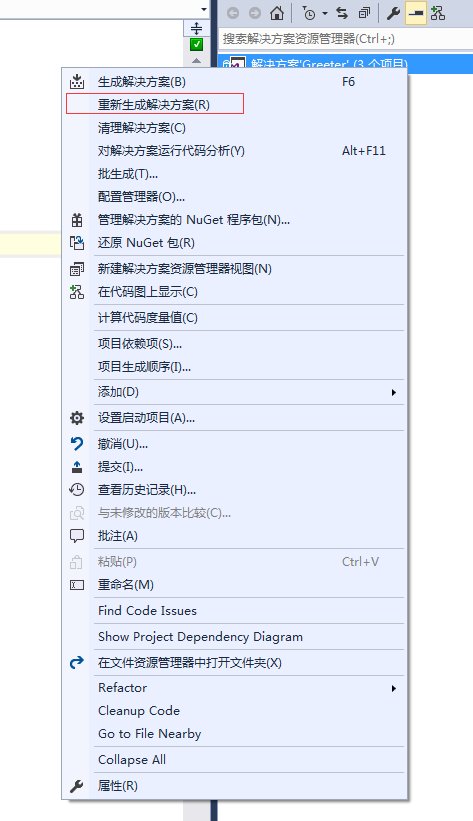
项目会自动使用NuGet进行必要的package的安装。
运行 a gRPC application
- 运行服务
> cd GreeterServer/bin/Debug

> GreeterServer.exe
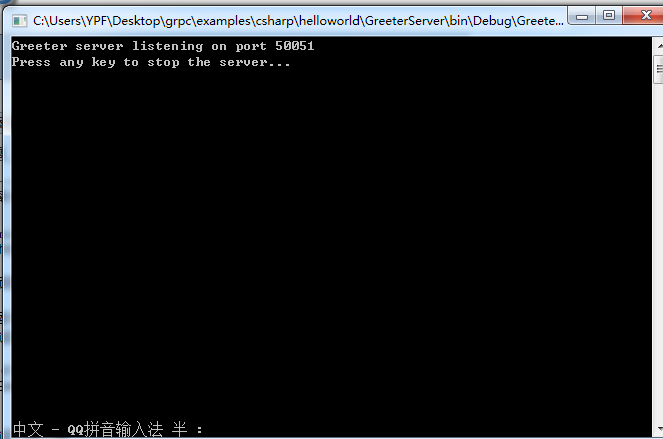
- 运行客户端
> cd GreeterClient/bin/Debug

> GreeterClient.exe

更新 a gRPC service
打开目录examples/protos/helloworld.proto
将原来的文件修改为如下并保存:
// The greeting service definition.

service Greeter {

  // Sends a greeting

  rpc SayHello (HelloRequest) returns (HelloReply) {}

  // Sends another greeting

  rpc SayHelloAgain (HelloRequest) returns (HelloReply) {}

}

// The request message containing the user's name.

message HelloRequest {

  string name = 1;

}

// The response message containing the greetings

message HelloReply {

  string message = 1;

}
生成 gRPC code
在demo的根目录(examples/csharp/helloworld)下执行如下命令:
packages\Grpc.Tools.1.6.1\tools\windows_x86\protoc.exe -I../../protos --csharp_out Greeter --grpc_out Greeter ../../protos/helloworld.proto --plugin=protoc-gen-grpc=packages/Grpc.Tools.1.6.1/tools/windows_x86/grpc_csharp_plugin.exe

这里的
Grpc.Tools.1.6.1这个命令必须是跟项目中使用NuGet安装的版本一致,否则会报错。
更新并从新运行
修改服务端代码
GreeterServer/Program.cs
class GreeterImpl : Greeter.GreeterBase

{

    // Server side handler of the SayHello RPC

    public override Task<HelloReply> SayHello(HelloRequest request, ServerCallContext context)

    {

        return Task.FromResult(new HelloReply { Message = "Hello " + request.Name });

    }

    // Server side handler for the SayHelloAgain RPC

    public override Task<HelloReply> SayHelloAgain(HelloRequest request, ServerCallContext context)

    {

        return Task.FromResult(new HelloReply { Message = "Hello again " + request.Name });

    }

}
修改服务端代码
GreeterClient/Program.cs
public static void Main(string[] args)

{

    Channel channel = new Channel("127.0.0.1:50051", ChannelCredentials.Insecure);

    var client = new Greeter.GreeterClient(channel);

    String user = "you";

    var reply = client.SayHello(new HelloRequest { Name = user });

    Console.WriteLine("Greeting: " + reply.Message);

    var secondReply = client.SayHelloAgain(new HelloRequest { Name = user });

    Console.WriteLine("Greeting: " + secondReply.Message);

    channel.ShutdownAsync().Wait();

    Console.WriteLine("Press any key to exit...");

    Console.ReadKey();

}
运行 a gRPC application
- 运行服务
cd GreeterServer/bin/Debug
GreeterServer.exe
- 运行客户端
cd GreeterClient/bin/Debug
GreeterClient.exe
参考文章:
gRPC官方快速上手学习笔记(c#版)的更多相关文章
- [Docker]Docker快速上手学习笔记
0. 学习的一些疑问 如何热更新镜像(images)?(你可以快速启动或者销毁容器.这种时间几乎是实时的) 如何热更新游戏服? 好处在于各个应用之间环境相互独立,即使某一个容器崩溃也不会影响到其它容器 ...
- Sass简单、快速上手_Sass快速入门学习笔记总结
Sass是世界上最成熟.稳定和强大的专业级css扩展语言 ,除了Sass是css的一种预处理器语言,类似的语言还有Less,Stylus等. 这篇文章关于Sass快速入门学习笔记. 资源网站大全 ht ...
- FWT快速沃尔什变换学习笔记
FWT快速沃尔什变换学习笔记 1.FWT用来干啥啊 回忆一下多项式的卷积\(C_k=\sum_{i+j=k}A_i*B_j\) 我们可以用\(FFT\)来做. 甚至在一些特殊情况下,我们\(C_k=\ ...
- 【原创】SpringBoot & SpringCloud 快速入门学习笔记(完整示例)
[原创]SpringBoot & SpringCloud 快速入门学习笔记(完整示例) 1月前在系统的学习SpringBoot和SpringCloud,同时整理了快速入门示例,方便能针对每个知 ...
- Java基础及JavaWEB以及SSM框架学习笔记Xmind版
Java基础及JavaWEB以及SSM框架学习笔记Xmind版 转行做程序员也1年多了,最近开始整理以前学习过程中记录的笔记,以及一些容易犯错的内容.现在分享给网友们.笔记共三部分. JavaSE 目 ...
- Netty学习笔记-入门版
目录 Netty学习笔记 前言 什么是Netty IO基础 概念说明 IO简单介绍 用户空间与内核空间 进程(Process) 线程(thread) 程序和进程 进程切换 进程阻塞 文件描述符 文件句 ...
- 官方教程Stealth学习笔记(一)
今天開始要更新官方教程stealth的学习笔记啦, 我将会记录和解说一个小游戏基本的流程和关键地方的技巧. 我会依照官方教程的顺序来更新. ...
- ASP.NET Core快速入门--学习笔记系列文章索引目录
课程链接:http://video.jessetalk.cn/course/explore 良心课程,大家一起来学习哈! 抓住国庆假期的尾巴完成了此系列课程的学习笔记输出! ASP.NET Core快 ...
- Python快速入门学习笔记(二)
注:本学习笔记参考了廖雪峰老师的Python学习教程,教程地址为:http://www.liaoxuefeng.com/wiki/001374738125095c955c1e6d8bb49318210 ...
随机推荐
- InvalidateRect和UpdateWindow
The UpdateWindow function updates the client area of the specified window by sending a WM_PAINT mess ...
- KVM+Qemu+Libvirt实战
上一篇的文章是为了给这一篇文件提供理论的基础,在这篇文章中我将带大家一起来实现在linux中虚拟出ubuntu的server版来 我们需要用KVM+Qemu+Libvirt来进行kvm全虚拟化,创建虚 ...
- sed修炼系列(四):sed中的疑难杂症
本文目录:1 sed中使用变量和变量替换的问题2 反向引用失效问题3 "-i"选项的文件保存问题4 贪婪匹配问题5 sed命令"a"和"N" ...
- mac系统webstorm快捷键
WebStorm 是jetbrains公司旗下一款JavaScript 开发工具.被广大中国JS开发者誉为"Web前端开发神器"."最强大的HTML5编辑器". ...
- Zookeeper的安装的配置
详见:http://blog.yemou.net/article/query/info/tytfjhfascvhzxcyt192 安装和配置详解 本文介绍的 Zookeeper 是以 3.2.2 这个 ...
- java中super关键字
1.子类的构造函数如果要引用super的话,必须把super放在函数的首位,如果想用super继承父类构造的方法,但是没有放在第一行的话,那么在super之前的语句,肯定是为了满足自己想要完成某些行为 ...
- 03-TypeScript中的强类型
在js中不能定义类型,而是根据赋值后,js运行时推断类型.在ts中支持强类型,强类型包括string.number(浮点型,不是整型).boolean.any(任意类型).Array<T> ...
- mysql时间戳的获取
时间戳函数:current_timestamp() 在此位置添加时间戳函数. 然后整体的写法就是下图这样: 根据当前时间戳更新有没有打钩将决定你的时间是什么时间(一个是数据完成写入的时间,一个时间戳回 ...
- ionic项目ios真机部署(不需开发者账号)
ionic项目ios真机部署(不需开发者账号) 安装ionic和cordova npm install -g ionic npm install -g cordova 创建一个新项目 ionic st ...
- 个人作业3——个人总结(Alpha阶段)
个人总结 Alpha阶段总结: 起初关于手机app的开发真的一无所知,选了一条较远的路走(使用 Android Studio 来开发 Android 应用更加方便,而我们选用 Eclipse 开发 A ...