
WPF中使用ReportViewer报表
本篇博客将介绍如何在WPF中使用ReportViewer控件。
1. 环境准备:下载安装最新版ReportViewer(PS:需要安装Microsoft SQL Server System CLR Types package);如果您的开发工具是Visual Studio 2015,记得安装Microsoft SQL Server Tools,因为需要安装ReportViewer报表设计器。
2. 下面我们通过一个例子(示例图书品种报表)来演示,
1). 新建一个WPF项目WPFBooksReport,
2). 添加Entities文件夹,并添加Book类,
    public class Book

    {

        public string Name { get; set; }

        public string Author { get; set; }

        public string ISBN { get; set; }

        public decimal Price { get; set; }

    }
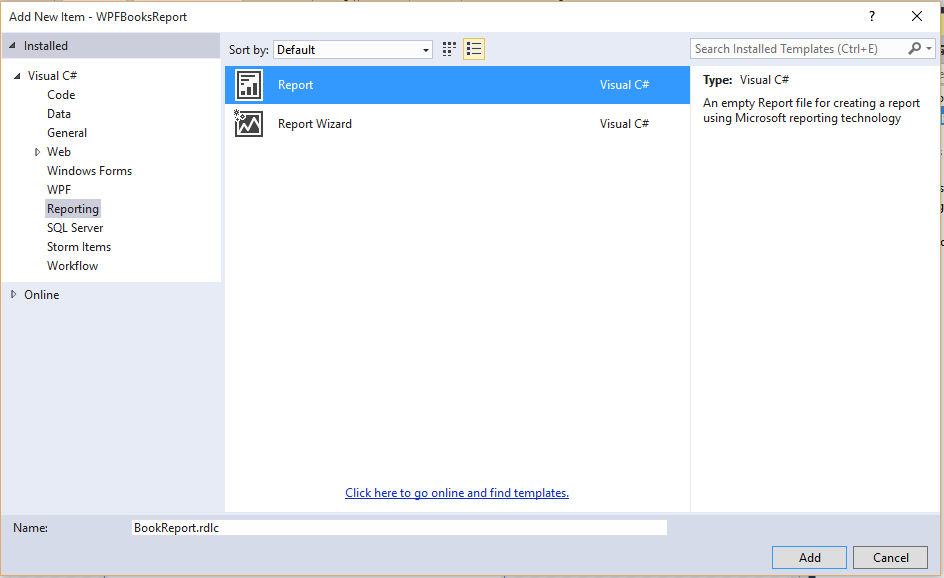
3). 添加名称为BookReport的RDLC报表,
报表设计器主界面

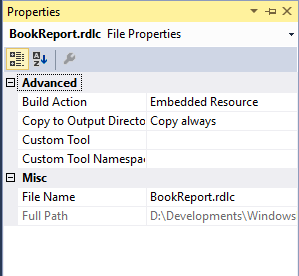
修改报表属性:
4. 新建DataSet,名称BookDataSet,然后新建DataSource,DataSource的数据来源于Object,因为在示例程序中为了降低复杂度,直接使用Book类作为数据来源了。
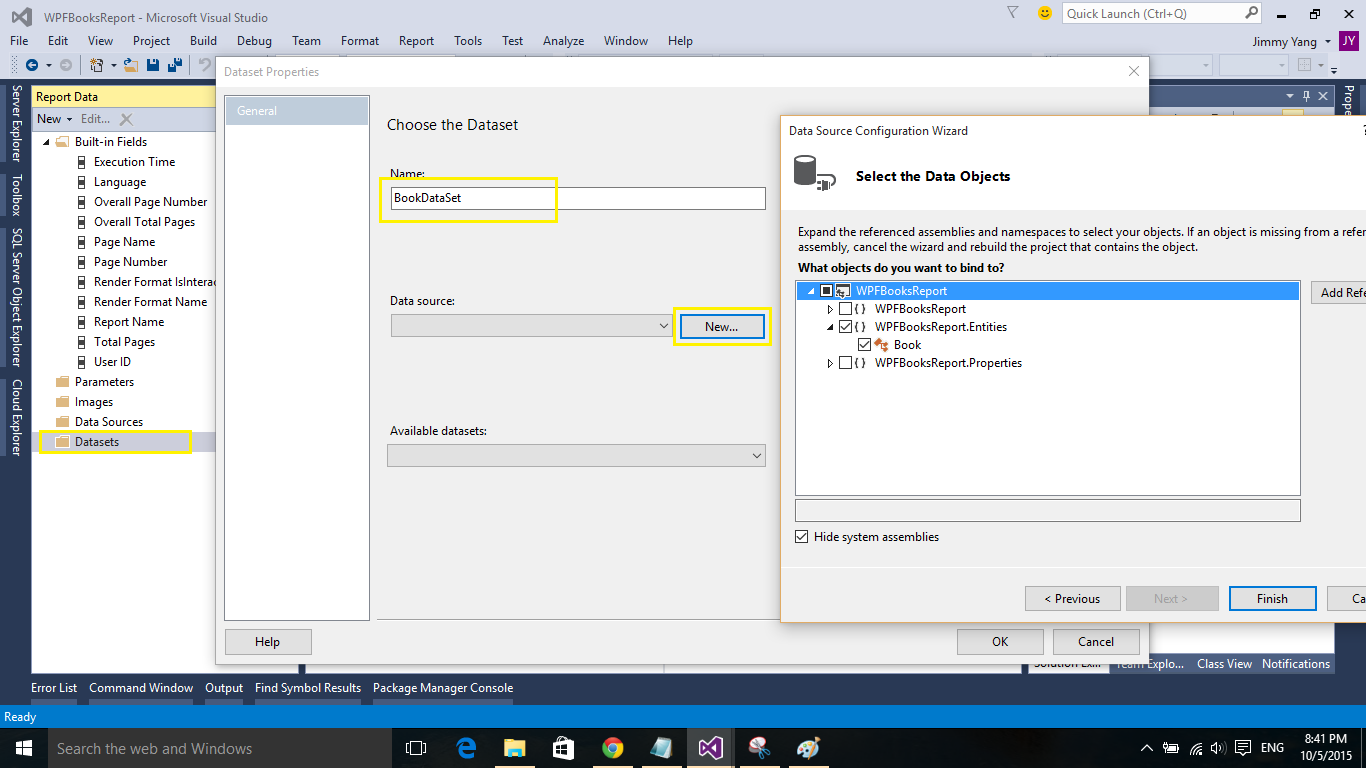
这样,RDLC报表的数据源便设置成功了。下一步设计报表的样子。
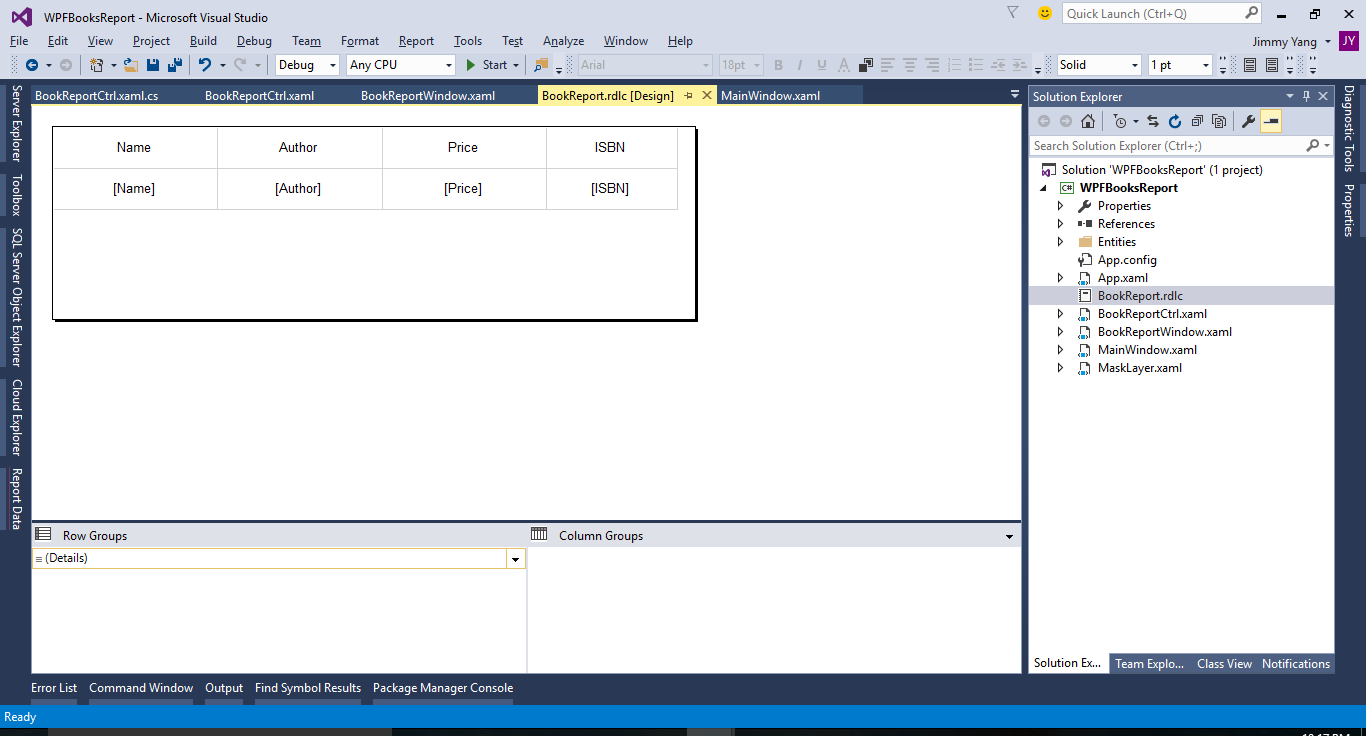
5). 在报表中插入一个Table,然后设置数据源,
6). 新建WPF UserControl,BookReportCtrl.xaml,在项目中添加Microsoft.ReportViewer.WinForms和WindowsFormsIntegration引用
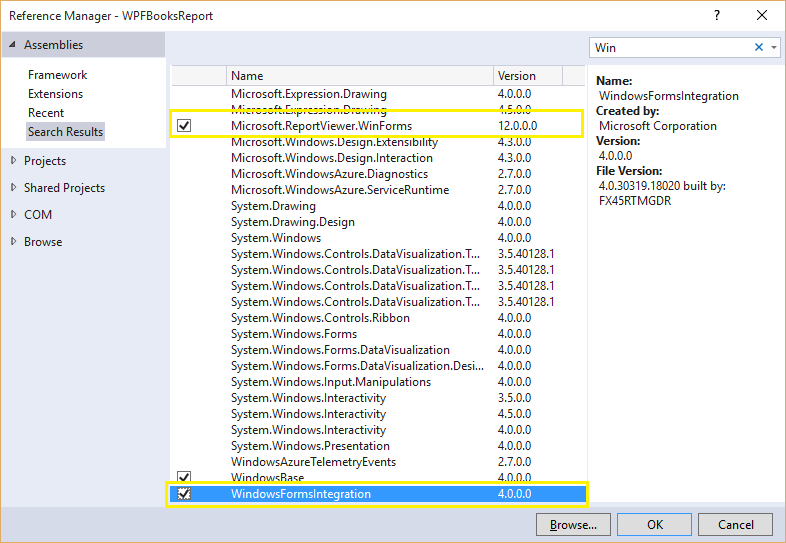
BookReportCtrl.xaml
<UserControl x:Class="WPFBooksReport.BookReportCtrl"

             xmlns="http://schemas.microsoft.com/winfx/2006/xaml/presentation"

             xmlns:x="http://schemas.microsoft.com/winfx/2006/xaml"

             xmlns:mc="http://schemas.openxmlformats.org/markup-compatibility/2006"

             xmlns:d="http://schemas.microsoft.com/expression/blend/2008"

             xmlns:rv="clr-namespace:Microsoft.Reporting.WinForms;assembly=Microsoft.ReportViewer.WinForms"

             xmlns:local="clr-namespace:WPFBooksReport"

             mc:Ignorable="d"

             d:DesignHeight="300" d:DesignWidth="300">

    <Grid>

        <WindowsFormsHost>

            <rv:ReportViewer x:Name="bookReportViewer"/>

        </WindowsFormsHost>

        <local:MaskLayer x:Name="maskLayer" Visibility="Collapsed"/>

    </Grid>

</UserControl>
Code:
        public BookReportCtrl()

        {

            InitializeComponent();

            this.Loaded += BookReportCtrl_Loaded;

            this.bookReportViewer.RenderingComplete += BookReportViewer_RenderingComplete;

        }

        private void BookReportCtrl_Loaded(object sender, RoutedEventArgs e)

        {

            maskLayer.Visibility = Visibility.Visible;

            // 模拟一个DataTable

            DataTable dt = new DataTable();

            dt.Columns.Add("Name", typeof(string));

            dt.Columns.Add("Author", typeof(string));

            dt.Columns.Add("Price", typeof(decimal));

            dt.Columns.Add("ISBN", typeof(string));

            DataRow dr = dt.NewRow();

            dr["Name"] = "C# In Depth";

            dr["Author"] = "Jon Skeet";

            dr["Price"] = 72.0m;

            dr["ISBN"] = "B3456123";

            dt.Rows.Add(dr);

            ReportDataSource reportDataSource = new ReportDataSource();

            reportDataSource.Name = "BookDataSet";

            reportDataSource.Value = dt;

            bookReportViewer.LocalReport.ReportPath = Directory.GetCurrentDirectory() + "\\BookReport.rdlc";

            bookReportViewer.LocalReport.DataSources.Add(reportDataSource);

            bookReportViewer.RefreshReport();

        }

        private void BookReportViewer_RenderingComplete(object sender, Microsoft.Reporting.WinForms.RenderingCompleteEventArgs e)

        {

            maskLayer.Visibility = Visibility.Collapsed;

        }
6. 新建BookReportWindow.xaml来承载报表。
7. 运行程序,
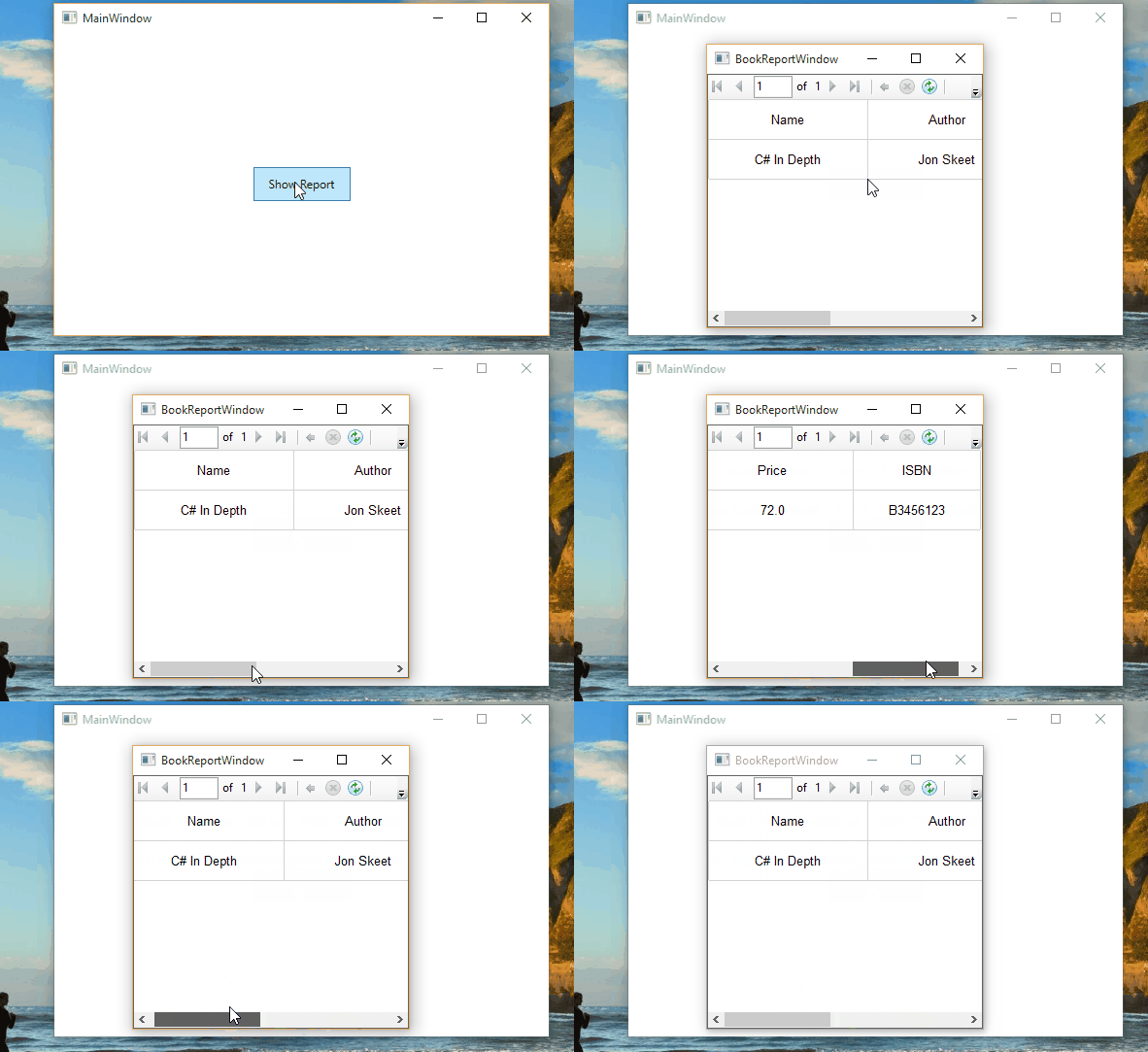
到这里,这个示例程序就完成了。
代码点击这里下载。
感谢您的阅读。
WPF中使用ReportViewer报表的更多相关文章
- 在 ReportViewer 报表中使用表达式
from:http://www.cnblogs.com/jobin/articles/1152213.html 有些表达式在报表中很常用.其中包括更改报表中的数据外观的表达式.计算总数的表达式和更改报 ...
- [转]逐步解說:在 WPF 應用程式中使用 ReportViewer 显示 rdlc
本文转自:http://msdn.microsoft.com/zh-tw/library/hh273267 若要在 WPF 應用程式中使用 ReportViewer 控制項,您需要將 ReportVi ...
- 在VS2012后的版本中做数据报表时,提示尚未指定报表“Report1”的报表定义
有一群的朋友在用VS2012做数据报表时,老是提示 本地报表处理期间出错. 尚未指定报表“Report1”的报表定义 未将对象引用设置到对象的实例. 我看了一下,步骤没错,我用VS2010做了一下,一 ...
- ASP.NETserver控件使用之Reportviewer 报表
1. Reportviewer 报表 1.1. Reportviewer控件 注:本教程附2个事例: l 演练:在本地处理模式下将数据库数据源与 ReportViewer W ...
- VSTO 学习笔记(六)在 Excel 2010中使用RDLC报表
原文:VSTO 学习笔记(六)在 Excel 2010中使用RDLC报表 Excel具有强大的图表显示.分析功能,这点毋庸置疑,但是如果将常规MIS系统中的数据以报表的形式在Excel中显示,却并不那 ...
- 在Bootstrap开发框架中使用Grid++报表
之前在随笔<在Winform开发中使用Grid++报表>介绍了在Winform环境中使用Grid++报表控件,本篇随笔介绍在Bootstrap开发框架中使用Grid++报表,也就是Web环 ...
- 在mvc视图中实现rdlc报表展示(补充)
上篇: 在mvc视图中实现rdlc报表展示 在上一遍中,由于不知道如何在aspx.cs后台中实例化abp的IxxxAppService.cs的接口,我采取的方式是在视图页中把查询出的数据存储到aspx ...
- 在mvc视图中实现rdlc报表展示
需求:在view视图页面中嵌入rdlc报表,rdlc的xml为动态传入的xml字符串.本项目是基于abp框架 可能出现问题: 1.rdlc报表是由asp.net的服务器控件ReportViewer来支 ...
- 在WPF中使用依赖注入的方式创建视图
在WPF中使用依赖注入的方式创建视图 0x00 问题的产生 互联网时代桌面开发真是越来越少了,很多应用都转到了浏览器端和移动智能终端,相应的软件开发上的新技术应用到桌面开发的文章也很少.我之前主要做W ...
随机推荐
- Linux--多网卡的7种Bond模式
网卡bond是通过把多张网卡绑定为一个逻辑网卡,实现本地网卡的冗余,带宽扩容和负载均衡.在应用部署中是一种常用的技术,我们公司基本所有的项目相关服务器都做了bond,这里总结整理,以便待查. bond ...
- FreeRTOS--删除任务
FreeRTOS学习笔记——任务删除 vTaskDelete() API - liyan728的专栏 - 博客频道 - CSDN.NET http://blog.csdn.net/liyan728/a ...
- 基于隐马尔科夫模型(HMM)的地图匹配(Map-Matching)算法
文章目录 1. 1. 摘要 2. 2. Map-Matching(MM)问题 3. 3. 隐马尔科夫模型(HMM) 3.1. 3.1. HMM简述 3.2. 3.2. 基于HMM的Map-Matchi ...
- mysql创建用户
mysql创建用户 创建用于localhost连接的用户并指定密码 mysql> create user 'pcom'@'localhost' identified by 'aaa7B2249' ...
- backup daily
#!/bin/bash # #This is a test in book.thanks for Richard Blum. #Please put this file to crontab,than ...
- 【leetcode】Palindrome Partitioning II(hard) ☆
Given a string s, partition s such that every substring of the partition is a palindrome. Return the ...
- IOS - 屏幕适配
原文:Beginning Auto Layout Tutorial in iOS 7: Part 1 感谢翻译小组成员@answer-huang(博客)热心翻译.如果您有不错的原创或译文,欢迎提交给我 ...
- struts2响应AJAX
1发送ajax请求使用stream进行响应 Result的type属性的stream取值. 1.1定义Action public class UserAction { private String u ...
- 生成Geometry
// 由一组点集生成一张三角面片网格Geometry osg::Geometry* createTRIANGLESGeometry(MyMesh &mesh) { osg::ref_ptr&l ...
- 构建新版本APP上传流程
//既然是构建新版本的 APP,那么所有的证书都是已经存在了的,因此以下不再重复描述证书申请过程,如有需要请自行 Google 相关流程. 1)更改版本号: 2)去掉工程内的全局断点,同时关闭僵尸调试 ...