
[转][MVC] 剖析 NopCommerce 的 Theme 机制
前言
目前开源的CMS、Blog或者电子商务站点,他们都有一个共同的亮点,无疑就是可任意切换皮肤,并且定制和扩展能力都非常强。在这方面PHP可以说做的是最好的。那么我们如何能够在我们的ASP.NET MVC站点下面实现任意切换皮肤呢?我立马想到最近流行的NopCommerce—开源的 ASP.NET MVC 电子商务站点。它提供了强大的换肤功能,可通过一键切换皮肤。那接下来,我们就一起去寻找换肤的秘诀,让我们的ASP.NET MVC站点也具有一键换肤的功能吧。让我们的ASP.NET MVC 站点可以随意 变 变 变!
换肤试用
先试用下Nop站点的换肤效果吧,打开Nop的源码,下载地址:http://nopcommerce.codeplex.com, 按照官方的Theme制作方法:http://www.nopcommerce.com/docs/72/designers-guide.aspx,拷贝默认的皮肤DarkOrange,并做相应处理。此处略去500字…

运行站点,首先呈现的是默认皮肤:

切换成我们刚才制作的皮肤:

换肤后的思考?
我们刚才制作皮肤的时候,将默认的皮肤文件夹下所有的文件拷贝到新的皮肤文件夹下面,并做了样式和HTML结构的修改。Nop应该是根据客户选择的皮肤定位到相应的皮肤文件夹下面,去找到View并加载出来。那实现换肤功能的关键就是: 根据用户选择的皮肤,ASP.NET MVC动态定位到皮肤文件夹下的View,并呈现出来。
做过ASP.NET MVC开发的朋友都知道,如果在Controller里面新建一个Action,但View不存在,页面肯定会报如下错误:
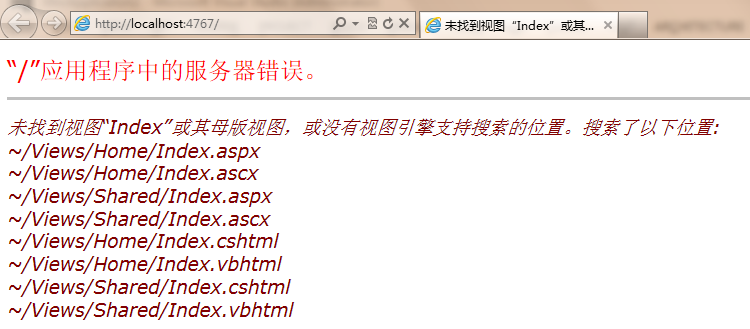
从异常信息可以看出,ASP.NET MVC内部有一种加载View的机制。如果我们能够扩展这种内部的加载View的机制,去按照我们的自定义逻辑根据不同的皮肤加载不同的View,那我们的站点就能够实现换肤功能了。实现这个功能的核心就是IViewEngine,资料介绍:http://www.cnblogs.com/answercard/archive/2011/05/07/2039809.html。该接口定义如下:

/// <summary>

/// Defines the methods that are required for a view engine.

/// </summary>

public interface IViewEngine

{

    /// <summary>

    /// Finds the specified partial view by using the specified controller context.

    /// </summary>

    ViewEngineResult FindPartialView(ControllerContext controllerContext, string partialViewName, bool useCache);

    /// <summary>

    /// Finds the specified view by using the specified controller context.

    /// </summary>

    ViewEngineResult FindView(ControllerContext controllerContext, string viewName, string masterName, bool useCache);

    /// <summary>

    /// Releases the specified view by using the specified controller context.

    /// </summary>

    /// <param name="controllerContext">The controller context.</param><param name="view">The view.</param>

    void ReleaseView(ControllerContext controllerContext, IView view);

}
深入Nop,找到幕后黑手
那我们就到Nop的源代码中去寻找 IViewEngine 的实现类,看看运气如何? 运气不错,找到了3个Themeable****ViewEngine. 从名字就可以断定该类是用来实现Theme的。

(Tips: 借助Reshareper可轻松的查找某个接口的实现类,此外Reshareper还有其它的高级功能,谁用谁知道…)
先看看离接口IViewEngine最近的类—ThemeableVirtualPathProviderViewEngine,该类重写了FindView 和 FindPartialView 2个方法。我们以FindView为例进行研究吧,实际上FindPartialView跟FindView都差不多。
public override ViewEngineResult FindView(ControllerContext controllerContext, string viewName, string masterName, bool useCache)

{

    var mobileDeviceHelper = EngineContext.Current.Resolve<IMobileDeviceHelper>();

    bool useMobileDevice = mobileDeviceHelper.IsMobileDevice(controllerContext.HttpContext)

        && mobileDeviceHelper.MobileDevicesSupported()

        && !mobileDeviceHelper.CustomerDontUseMobileVersion();

    string overrideViewName = useMobileDevice ?

        string.Format("{0}.{1}", viewName, _mobileViewModifier)

        : viewName;

    ViewEngineResult result = FindThemeableView(controllerContext, overrideViewName, masterName, useCache, useMobileDevice);

    // If we're looking for a Mobile view and couldn't find it try again without modifying the viewname

    if (useMobileDevice && (result == null || result.View == null))

        result = FindThemeableView(controllerContext, viewName, masterName, useCache, false);

    return result;

}
查找View的重担放到了内部方法FindThemeableView中完成的,看看该方法的实现吧:
protected virtual ViewEngineResult FindThemeableView(ControllerContext controllerContext, string viewName, string masterName, bool useCache, bool mobile)

{

    string[] strArray;

    string[] strArray2;

    if (controllerContext == null)

    {

        throw new ArgumentNullException("controllerContext");

    }

    if (string.IsNullOrEmpty(viewName))

    {

        throw new ArgumentException("View name cannot be null or empty.", "viewName");

    }

    var theme = GetCurrentTheme(mobile);

    string requiredString = controllerContext.RouteData.GetRequiredString("controller");

    string str2 = this.GetPath(controllerContext, this.ViewLocationFormats, this.AreaViewLocationFormats, "ViewLocationFormats", viewName, requiredString, theme, "View", useCache, mobile, out strArray);

    string str3 = this.GetPath(controllerContext, this.MasterLocationFormats, this.AreaMasterLocationFormats, "MasterLocationFormats", masterName, requiredString, theme, "Master", useCache, mobile, out strArray2);

    if (!string.IsNullOrEmpty(str2) && (!string.IsNullOrEmpty(str3) || string.IsNullOrEmpty(masterName)))

    {

        return new ViewEngineResult(this.CreateView(controllerContext, str2, str3), this);

    }

    if (strArray2 == null)

    {

        strArray2 = new string[0];

    }

    return new ViewEngineResult(strArray.Union<string>(strArray2));

}
这段代码读起来有点费力,又一次告诉大家命名的重要性,当然你不想让别人看懂你的代码那就是另外一回事哈。str2实际上是ViewPath,str3是MasterPagePath。其中内部方法GetPath是用来获取View的实际路径。我们来研究下GetPath的参数吧,其中最关键的是属性ViewLocationFormats和AreaViewLocationFormats。由于ThemeableVirtualPathProviderViewEngine是抽象类,我们看看派生自该类的ThemeableRazorViewEngine吧:
public ThemeableRazorViewEngine()

{

    AreaViewLocationFormats = new[]

                                  {

                                      //themes

                                      "~/Areas/{2}/Themes/{3}/Views/{1}/{0}.cshtml",

                                      "~/Areas/{2}/Themes/{3}/Views/{1}/{0}.vbhtml",

                                      "~/Areas/{2}/Themes/{3}/Views/Shared/{0}.cshtml",

                                      "~/Areas/{2}/Themes/{3}/Views/Shared/{0}.vbhtml",

                                      //default

                                      "~/Areas/{2}/Views/{1}/{0}.cshtml",

                                      "~/Areas/{2}/Views/{1}/{0}.vbhtml",

                                      "~/Areas/{2}/Views/Shared/{0}.cshtml",

                                      "~/Areas/{2}/Views/Shared/{0}.vbhtml"

                                  };

    AreaMasterLocationFormats = new[]

                                    {

                                        //themes

                                        "~/Areas/{2}/Themes/{3}/Views/{1}/{0}.cshtml",

                                        "~/Areas/{2}/Themes/{3}/Views/{1}/{0}.vbhtml",

                                        "~/Areas/{2}/Themes/{3}/Views/Shared/{0}.cshtml",

                                        "~/Areas/{2}/Themes/{3}/Views/Shared/{0}.vbhtml",

                                        //default

                                        "~/Areas/{2}/Views/{1}/{0}.cshtml",

                                        "~/Areas/{2}/Views/{1}/{0}.vbhtml",

                                        "~/Areas/{2}/Views/Shared/{0}.cshtml",

                                        "~/Areas/{2}/Views/Shared/{0}.vbhtml"

                                    };

    AreaPartialViewLocationFormats = new[]

                                         {

                                             //themes

                                            "~/Areas/{2}/Themes/{3}/Views/{1}/{0}.cshtml",

                                            "~/Areas/{2}/Themes/{3}/Views/{1}/{0}.vbhtml",

                                            "~/Areas/{2}/Themes/{3}/Views/Shared/{0}.cshtml",

                                            "~/Areas/{2}/Themes/{3}/Views/Shared/{0}.vbhtml",

                                            //default

                                            "~/Areas/{2}/Views/{1}/{0}.cshtml",

                                            "~/Areas/{2}/Views/{1}/{0}.vbhtml",

                                            "~/Areas/{2}/Views/Shared/{0}.cshtml",

                                            "~/Areas/{2}/Views/Shared/{0}.vbhtml"

                                         };

    ViewLocationFormats = new[]

                              {

                                    //themes

                                    "~/Themes/{2}/Views/{1}/{0}.cshtml",

                                    "~/Themes/{2}/Views/{1}/{0}.vbhtml",

                                    "~/Themes/{2}/Views/Shared/{0}.cshtml",

                                    "~/Themes/{2}/Views/Shared/{0}.vbhtml",

                                    //default

                                    "~/Views/{1}/{0}.cshtml",

                                    "~/Views/{1}/{0}.vbhtml",

                                    "~/Views/Shared/{0}.cshtml",

                                    "~/Views/Shared/{0}.vbhtml",

                                    //Admin

                                    "~/Administration/Views/{1}/{0}.cshtml",

                                    "~/Administration/Views/{1}/{0}.vbhtml",

                                    "~/Administration/Views/Shared/{0}.cshtml",

                                    "~/Administration/Views/Shared/{0}.vbhtml",

                              };

    MasterLocationFormats = new[]

                                {

                                    //themes

                                    "~/Themes/{2}/Views/{1}/{0}.cshtml",

                                    "~/Themes/{2}/Views/{1}/{0}.vbhtml",

                                    "~/Themes/{2}/Views/Shared/{0}.cshtml",

                                    "~/Themes/{2}/Views/Shared/{0}.vbhtml",

                                    //default

                                    "~/Views/{1}/{0}.cshtml",

                                    "~/Views/{1}/{0}.vbhtml",

                                    "~/Views/Shared/{0}.cshtml",

                                    "~/Views/Shared/{0}.vbhtml"

                                };

    PartialViewLocationFormats = new[]

                                     {

                                         //themes

                                        "~/Themes/{2}/Views/{1}/{0}.cshtml",

                                        "~/Themes/{2}/Views/{1}/{0}.vbhtml",

                                        "~/Themes/{2}/Views/Shared/{0}.cshtml",

                                        "~/Themes/{2}/Views/Shared/{0}.vbhtml",

                                        //default

                                        "~/Views/{1}/{0}.cshtml",

                                        "~/Views/{1}/{0}.vbhtml",

                                        "~/Views/Shared/{0}.cshtml",

                                        "~/Views/Shared/{0}.vbhtml",

                                        //Admin

                                        "~/Administration/Views/{1}/{0}.cshtml",

                                        "~/Administration/Views/{1}/{0}.vbhtml",

                                        "~/Administration/Views/Shared/{0}.cshtml",

                                        "~/Administration/Views/Shared/{0}.vbhtml",

                                     };

    FileExtensions = new[] { "cshtml", "vbhtml" };

}
看到这里你是否了解有些明白了?这里就是定义的查找View的路径的模版,程序(Nop和MVC默认实现都是相同的策略)会按照顺序依次查找View是否存在。
再来看看GetPath的实现吧:
protected virtual string GetPath(ControllerContext controllerContext, string[] locations,

            string[] areaLocations, string locationsPropertyName, string name,

            string controllerName, string theme, string cacheKeyPrefix,

            bool useCache, bool mobile, out string[] searchedLocations)

{

    searchedLocations = _emptyLocations;

    if (string.IsNullOrEmpty(name))

    {

        return string.Empty;

    }

    string areaName = GetAreaName(controllerContext.RouteData);

    //little hack to get nop's admin area to be in /Administration/ instead of /Nop/Admin/ or Areas/Admin/

    if (!string.IsNullOrEmpty(areaName) && areaName.Equals("admin", StringComparison.InvariantCultureIgnoreCase))

    {

        //admin area does not support mobile devices

        if (mobile)

        {

            searchedLocations = new string[0];

            return string.Empty;

        }

        var newLocations = areaLocations.ToList();

        newLocations.Insert(0, "~/Administration/Views/{1}/{0}.cshtml");

        newLocations.Insert(0, "~/Administration/Views/{1}/{0}.vbhtml");

        newLocations.Insert(0, "~/Administration/Views/Shared/{0}.cshtml");

        newLocations.Insert(0, "~/Administration/Views/Shared/{0}.vbhtml");

        areaLocations = newLocations.ToArray();

    }

    bool flag = !string.IsNullOrEmpty(areaName);

    List<ViewLocation> viewLocations = GetViewLocations(locations, flag ? areaLocations : null);

    if (viewLocations.Count == 0)

    {

        throw new InvalidOperationException(string.Format(CultureInfo.CurrentCulture, "Properties cannot be null or empty.", new object[] { locationsPropertyName }));

    }

    bool flag2 = IsSpecificPath(name);

    string key = this.CreateCacheKey(cacheKeyPrefix, name, flag2 ? string.Empty : controllerName, areaName, theme);

    if (useCache)

    {

        var cached = this.ViewLocationCache.GetViewLocation(controllerContext.HttpContext, key);

        if (cached != null)

        {

            return cached;

        }

    }

    if (!flag2)

    {

        return this.GetPathFromGeneralName(controllerContext, viewLocations, name, controllerName, areaName, theme, key, ref searchedLocations);

    }

    return this.GetPathFromSpecificName(controllerContext, name, key, ref searchedLocations);

}
这里明显使用了缓存,所以大家不用担心每次读取View都要依次去进行IO操作去查找View引起的性能问题。
最后我们再来看看GetPathFromGeneralName的具体实现吧:
protected virtual string GetPathFromGeneralName(ControllerContext controllerContext,

    List<ViewLocation> locations, string name, string controllerName, string areaName,

    string theme, string cacheKey, ref string[] searchedLocations)

{

    string virtualPath = string.Empty;

    searchedLocations = new string[locations.Count];

    for (int i = 0; i < locations.Count; i++)

    {

        string str2 = locations[i].Format(name, controllerName, areaName, theme);

        if (this.FileExists(controllerContext, str2))

        {

            searchedLocations = _emptyLocations;

            virtualPath = str2;

            this.ViewLocationCache.InsertViewLocation(controllerContext.HttpContext, cacheKey, virtualPath);

            return virtualPath;

        }

        searchedLocations[i] = str2;

    }

    return virtualPath;

}
该方法会将参数Theme、Controller和Action传入上文提到的View路径模版,生成实际的路径,如果文件不存在,继续尝试下一个View路径模版。直到找到View存在的实际路径。
偷梁换柱,让MVC使用自定义的ViewEngine
Nop是通过在Global文件的事件Application_Start中注入以下代码:
//remove all view engines

ViewEngines.Engines.Clear();

//except the themeable razor view engine we use

ViewEngines.Engines.Add(new ThemeableRazorViewEngine());
总结
到这里,你是否已经知道了Nop实现Theme的奥秘?但又觉得过于复杂?其实Nop实现Theme的同时,还为Mobile和Admin管理后台做了很多特殊处理,所以代码看起来有点乱。那我们就来自己动手打造一个轻量级的ThemeViewEngine吧。预知后事,且听下回分解。
下一篇:[ASP.NET MVC 下打造轻量级的 Theme 机制]
[转][MVC] 剖析 NopCommerce 的 Theme 机制的更多相关文章
- 剖析Qt的事件机制原理
版权声明 请尊重原创作品.转载请保持文章完整性,并以超链接形式注明原始作者“tingsking18”和主站点地址,方便其他朋友提问和指正. QT源码解析(一) QT创建窗口程序.消息循环和WinMai ...
- asp.net core mvc剖析:启动流程
asp.net core mvc是微软开源的跨平台的mvc框架,首先它跟原有的MVC相比,最大的不同就是跨平台,然后又增加了一些非常实用的新功能,比如taghelper,viewcomponent,D ...
- 本版本延续MVC中的统一验证机制~续的这篇文章,本篇主要是对验证基类的扩展和改善(转)
本版本延续MVC中的统一验证机制~续的这篇文章,本篇主要是对验证基类的扩展和改善 namespace Web.Mvc.Extensions { #region 验证基类 /// <summary ...
- Spring MVC的工作原理和机制
Spring MVC的工作原理和机制 参考: springMVC 的工作原理和机制 - 孤鸿子 - 博客园https://www.cnblogs.com/zbf1214/p/5265117.html ...
- net core mvc剖析:启动流程
net core mvc剖析:启动流程 asp.net core mvc是微软开源的跨平台的mvc框架,首先它跟原有的MVC相比,最大的不同就是跨平台,然后又增加了一些非常实用的新功能,比如taghe ...
- 定制Asp.NET 5 MVC内建身份验证机制 - 基于自建SQL Server用户/角色数据表的表单身份验证
背景 在需要进行表单认证的Asp.NET 5 MVC项目被创建后,往往需要根据项目的实际需求做一系列的工作对MVC 5内建的身份验证机制(Asp.NET Identity)进行扩展和定制: Asp.N ...
- 深度剖析JDK动态代理机制
摘要 相比于静态代理,动态代理避免了开发人员编写各个繁锁的静态代理类,只需简单地指定一组接口及目标类对象就能动态的获得代理对象. 代理模式 使用代理模式必须要让代理类和目标类实现相同的接口,客户端通过 ...
- MVC特性路由的提供机制
回顾:传统路由是如何提供的? 我们知道最终匹配的路由数据是保存在RouteData中的,而RouteData通常又是封装在RequestContext中的,他们是在哪里被创建的呢?没错,回到了UrlR ...
- NopCommerce添加事务机制
NopCommerce现在最新版是3.9,不过依然没有事务机制.作为一个商城,我觉得事务也还是很有必要的.以下事务代码以3.9版本作为参考: 首先,IDbContext接口继承IDisposable接 ...
随机推荐
- 分享一个我的JavaScript版GridView多功能表格
GridView是什么? GridView是由Mr.Co开发的一套开源的多功能表格插件,主要用于让页面开发者在开发中节省拼接Table表格和操作Table表格相关复杂操作的开发成本与时间.开发人员可以 ...
- UITableViewDataSource协议
前言: 在iOS开发中,表视图UITableView 是我们做UI界面设计时的重要视图. 那么,使用表视图UITableView 需要遵守哪些协议呢? <UITableViewDataSourc ...
- 如何更好的通过Inflate layout的方式来实现自定义view
本篇文章讲的是如何用现有控件产生一个组合控件的方法,十分简单实用.现在开始! 一.需求 我们要实现一个有红点和文字的按钮控件,就像下面这样: 二.实现 我的思路是让一个button和一个textvie ...
- 数据持久化(一)--NSKeyedArchiver
数据持久化: 将内存中的数据按某种格式存进磁盘 数据的种类: 1,结构化的数据 2, 字节流数据 结构化的数据 字节流 内存中结构化的数据 -> 磁盘, 叫: 归档 字 ...
- 【读书笔记】iOS-GCD-GCD与perfomSelector系方法比较
一,GCD是导师步执行任务的技术之一.一般将应用程序中记述的线程管理用的代码在系统级中实现.开发者只需要定义想执行的任务并追加到适当的Dispatch Queue中,CGD就能生成必要的线程并计划执行 ...
- win10_x64更新错误解决: 安装一些更新时出现问题,但我们稍后会重试。如果持续出现这些问题,并且你想要搜索Web或联系支持人员以获取相关信息,以下信息可能会对你有帮助:
可能的原因: 1.windows 服务没打开 win+r,打开[运行]对话框 输入 [service.msc] 找到 [Windows Firewall]和[Internet connection s ...
- Java基础知识学习(二)
Java语法基础 数据类型.类型转换.运算符.逻辑运算符.参考C#,基本一致 输入输出 输出 System.out.print("abc"); System.out.printf( ...
- 深入理解Angular中的$Apply()以及$Digest()
$apply()和$digest()在AngularJS中是两个核心概念,但是有时候它们又让人困惑.而为了了解AngularJS的工作方式,首先需要了解$apply()和$digest()是如何工作的 ...
- CentOS 6.3下MySQL 5.6源码安装
Linux操作系统:CentOS 6.3 1:下载:当前mysql版本到了5.6.10 下载地址:http://dev.mysql.com/downloads/mysql/5.6.html#downl ...
- Mysql hql字符串字段中是否包含某个字符串,用 find_in_set
有这样一个需求,在Mysql数据库字符串字段(权限)中,有范围在 1 到 N 之间代表不同权限的值,分别被','分开,现在要取出具有某权限的所有成员列表. 创建表: 1 CREATE TABLE us ...