
windows 下的tcping 小插件
如果把插件放在根目录 就要能过cmd切换到根目录
cd \
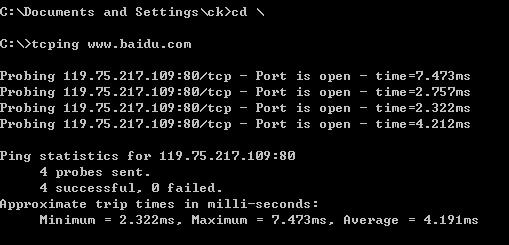
c:\>tcping -d -t -i 0.06 www.baidu.com
将文件放在c:\WINDOWS\system32目录下,就可以直接使用了:
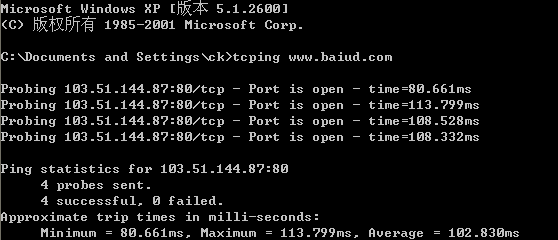
查询命今:
C:\Documents and Settings\ck>tcping /?

--------------------------------------------------------------

tcping.exe by Eli Fulkerson

Please see http://www.elifulkerson.com/projects/ for updates.

--------------------------------------------------------------

Usage: tcping [-flags] server-address [server-port]

Usage (full): tcping [-t] [-d] [-i interval] [-n times] [-w ms] [-b n] [-r

] [-s] [-v] [-j] [--tee filename] [-h] [-u] [--post] [--head] [-f] server-

s [server-port]

 -t     : ping continuously until stopped via control-c  #是让命令一直运行ping

 -n    : for instance, send  pings

 -i    : for instance, ping every  seconds

 -w 0.5 : for instance, wait 0.5 seconds for a response

 -d     : include date and time on each line #是显示时间

 -b    : enable beeps ( for on-down,  for on-up,

                         for on-change,  for always)

 -r    : for instance, relookup the hostname every  pings

 -s     : automatically exit on a successful ping

 -v     : print version and exit

 -j [] : include jitter.  Optional argument controls rolling average size

 --tee  : mirror output to a filename specified after '--tee'

 -     : prefer ipv4

 -     : prefer ipv6

HTTP Options:

 -h     : HTTP mode (use url without http:// for server-address)

 -u     : include target URL on each line

 --post : use POST rather than GET (may avoid caching)

 --head : use HEAD rather than GET

 --proxy-server : specify a proxy server

 --proxy-port   : specify a proxy port

Debug Options:

 -f     : force tcping to send at least one byte

        If you don't pass server-port, it defaults to 80.
windows 下的tcping 小插件的更多相关文章
- windows下使用火狐浏览器插件AutoProxy+MyEnTunnel+SSH访问海外站点(转)
windows下使用火狐浏览器插件AutoProxy+MyEnTunnel+SSH访问海外站点 平时需要查阅一些技术资料,光走VPN太浪费流量,所以这儿教大家一种使用火狐浏览器的插件 AutoPr ...
- windows下用eclipse+goclipse插件+gdb搭建go语言开发调试环境
windows下用eclipse+goclipse插件+gdb搭建go语言开发调试环境 http://rongmayisheng.com/post/windows%E4%B8%8B%E7%94%A ...
- 在windows下用eclipse + pydev插件来配置python的开发环境
在windows下用eclipse + pydev插件来配置python的开发环境 一.安装 python 可以到网上下个Windows版的python,官网为:https://www.python. ...
- windows下Eclipse安装Perl插件教程
windows下Eclipse安装Perl插件教程 想用eclipse编写perl.网上看了很多资料.但EPIC插件的下载连接都失效了.无奈,只好自己动手写个教程记录一下. 准备工作: 安装好Ecli ...
- Windows下ElasticSearch及相关插件的安装
(1)在官网下载ElasticSearch压缩包.这里我下载的是elasticsearch-1.7.1(下载地址:https://download.elastic.co/elasticsearch/e ...
- ElasticSearch(二):windows下ElasticSearch6.3.2插件Head的安装
前言 上一篇我们记录了如何安装ElasticSearch,这一篇我们来记录下如何安装Head插件 正文 方法总计有三种,但是安装ElasticSearch6.x的时候,只有一种完成了. 第一种:直接使 ...
- windows下编译基于nginx插件的rtmp流媒体服务nginx-rtmp
1 概述 rtmp流媒体服务器,开源方案有多种,包括srs,red5,crtmpserver,fms,nginx插件等.本文描述了基于nginx插件的方式来实现rtmp流媒体服务器nginx-rtmp ...
- jmeter在Windows下安装(含插件安装)
[准备环境] jdk1.8 jmeter的安装包下载 [步骤] 1 把下载下来的压缩包解压,点击jmeter.bat 启动,启动后是英文界面 2 修改默认的英文界面,打开jmeter.properti ...
- Windows下 flex + bison 小例子
.下载flex和bison,网址是http://gnuwin32.sourceforge.net/packages/flex.htm 和http://gnuwin32.sourceforge.net/ ...
随机推荐
- ios7 ios8导航栏透明
自动调整scrollview的insets为0, 然后scrollview就不会向下偏移64px self.automaticallyAdjustsScrollViewInsets = NO; 导航栏 ...
- Distinct Subsequences Leetcode
Given a string S and a string T, count the number of distinct subsequences of T in S. A subsequence ...
- Android学习笔记(一)——新建一个项目
//此系列博文是<第一行Android代码>的学习笔记,如有错漏,欢迎指正! 1.打开Android Studio时出现以下界面,点击”start a new Android Studio ...
- mysql日期加减<转>
1. MySQL 为日期增加一个时间间隔:date_add() set @dt = now(); select date_add(@dt, interval 1 day); - 加1天 select ...
- BZOJ 1004: [HNOI2008]Cards
Description 给你一个序列,和m种可以使用多次的置换,用3种颜色染色,求方案数%p. Sol Burnside定理+背包. Burnside定理 \(N(G,\mathbb{C})=\fra ...
- net-snmp源码VS2013编译添加加密支持(OpenSSL)
net-snmp源码VS2013编译添加加密支持(OpenSSL) snmp v3 协议使用了基于用户的安全模型,具有认证和加密两个模块. 认证使用的算法是一般的消息摘要算法,例如MD5/SHA等.这 ...
- hdu1054 树形dp&&二分图
B - Strategic Game Time Limit:10000MS Memory Limit:32768KB 64bit IO Format:%I64d & %I64u ...
- 3.3---集合栈(CC150)
思路:注意一下别写错add还是remove public class SetOfStacks { public static ArrayList<ArrayList<Integer> ...
- PHP 知识点链接
PHP 1.PHP中的危险函数全解析 http://www.php100.com/html/webkaifa/PHP/PHPyingyong/2009/0216/333 ...
- C# 复制(深拷贝、浅拷贝)
Object.MemberwiseClone 方法 创建当前 Object 的浅表副本. protected Object MemberwiseClone() MemberwiseClone 方法创建 ...