
Jquery.Datatables 基本创建方法
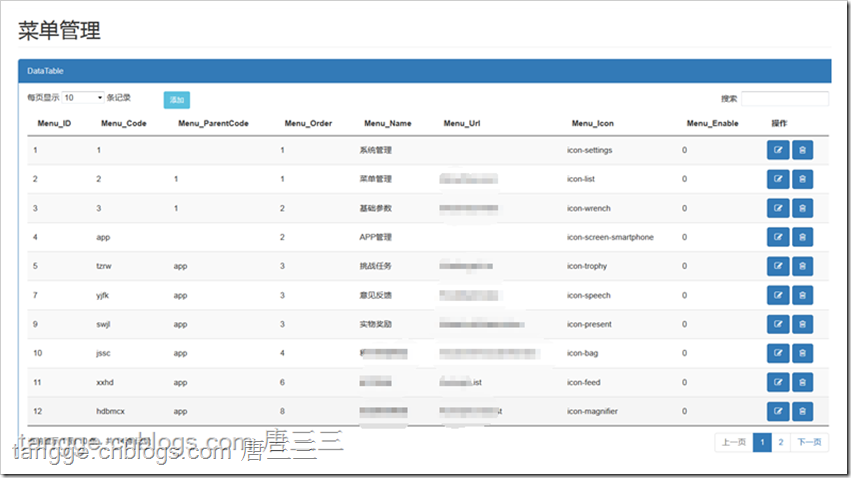
基本创建
<!--定义操作列按钮模板-->
<script id="tpl" type="text/x-handlebars-template">
{{#each func}}
<button type="button" class="btn btn-{{this.type}} btn-sm" onclick="{{this.fn}}">{{this.name}}</button>
{{/each}}
</script> <div class="row">
<div class="col-lg-12">
<h1 class="page-header">菜单管理</h1>
</div>
</div>
<!-- /.col-lg-12 -->
<!-- /.row -->
<div class="row">
<div class="col-lg-12">
<div class="panel panel-primary">
<div class="panel-heading">
DataTable
</div>
<!-- /.panel-heading -->
<div class="panel-body">
<div class="dataTable_wrapper">
<table id="dataTables-example" class="display" cellspacing="0" width="100%">
<thead>
<tr>
<th>Menu_ID</th>
<th>Menu_Code</th>
<th>Menu_ParentCode</th>
<th>Menu_Order</th>
<th>Menu_Name</th>
<th>Menu_Url</th>
<th>Menu_Icon</th>
<th>Menu_Enable</th>
<th>操作</th>
</tr>
</thead>
</table>
</div>
</div>
</div>
</div>
</div> <!-- Modal -->
<div class="modal fade" id="myModal" tabindex="-1" role="dialog" aria-labelledby="myModalLabel" aria-hidden="true">
<div class="modal-dialog">
<div class="modal-content">
<div class="modal-header">
<button type="button" class="close" data-dismiss="modal" aria-label="Close">
<span
aria-hidden="true">×</span></button>
<h4 class="modal-title" id="myModalLabel">新增</h4>
</div>
<div class="modal-body">
<div class="form-group">
<input type="text" class="form-control" id="name" placeholder="姓名">
</div>
<div class="form-group">
<input type="text" class="form-control" id="position" placeholder="位置">
</div>
<div class="form-group">
<input type="text" class="form-control" id="salary" placeholder="薪资">
</div>
<div class="form-group">
<input type="text" class="form-control" id="start_date" placeholder="时间"
data-date-format="yyyy/mm/dd">
</div>
<div class="form-group">
<input type="text" class="form-control" id="office" placeholder="工作地点">
</div>
<div class="form-group">
<input type="text" class="form-control" id="extn" placeholder="编号">
</div>
</div>
<div class="modal-footer">
<button type="button" class="btn btn-info" id="initData">添加模拟数据</button>
<button type="button" class="btn btn-default" data-dismiss="modal">关闭</button>
<button type="button" class="btn btn-primary" id="save">保存</button>
</div>
</div>
</div>
</div> <script>
$("div.toolbar").html('<b style="color:red">自定义文字、图片等等</b>'); //创建datatables
$('#dataTables-example').DataTable({
//"autoWidth": true,//自适应宽度
"jQueryUI": true,
responsive: true,
"processing": true,
"bSort": false, //是否支持排序功能
"oLanguage": {
"sLengthMenu": "每页显示 _MENU_ 条记录",
"sZeroRecords": "对不起,查询不到任何相关数据",
"sInfo": "当前显示 _START_ 到 _END_ 条,共 _TOTAL_ 条记录",
"sInfoEmtpy": "找不到相关数据",
"sInfoFiltered": "数据表中共为 _MAX_ 条记录)",
"sProcessing": "正在加载中...",
"sSearch": "搜索",
"sUrl": "", //多语言配置文件,可将oLanguage的设置放在一个txt文件中,例:Javascript/datatable/dtCH.txt
"oPaginate": {
"sFirst": "第一页",
"sPrevious": " 上一页 ",
"sNext": " 下一页 ",
"sLast": " 最后一页 "
}
}, //多语言配置
//"ajax": '/Menu/LoadMenuList',
"ajax": {
"type": "post",
"url": '/Menu/LoadMenuList',
},
columns: [
{ data: 'Menu_ID' },
{ data: 'Menu_Code' },
{ data: 'Menu_ParentCode' },
{ data: 'Menu_Order' },
{ data: 'Menu_Name' },
{ data: 'Menu_Url' },
{ data: 'Menu_Icon' },
{ data: 'Menu_Enable' },
{ data: null },
],
//设置定义列的初始属性
"columnDefs": [{
"targets": -1,//编辑
"data": null,
"defaultContent": "<button id='editrow' class='btn btn-primary' type='button'><i class='fa fa-edit'></i></button> " +
"<button id='delrow' class='btn btn-primary' type='button'><i class='fa fa-trash-o'></i></button>"
}, ],
//定义datables布局
"dom": "<'row'<'col-xs-2'l><'#mytool.col-xs-4'><'col-xs-6'f>r>" +
"t" +
"<'row'<'col-xs-6'i><'col-xs-6'p>>",
//初始化结束后的回调函数
initComplete: function () {
$("#mytool").append('<button type="button" class="btn btn-info btn-sm" data-toggle="modal" data-target="#myModal">添加</button>');
$("#datainit").on("click", initData);
}
}); // 数据删除
$('#dataTables-example tbody').on('click', 'button#delrow', function () {
var data = tables.row($(this).parents('tr')).data();
$.ajax({
url: 'deltable',
type: 'POST',
dataType: 'json',
data: { id: data[0] },
})
.done(function (data) {
if (data == "success") {
tables.ajax.reload();
};
})
.fail(function () {
alert("error");
});
}); // 数据编辑
$('#dataTables-example tbody').on('click', 'button#editrow', function () {
//var data = tables.row($(this).parents('tr')).data();
//var fields = $("#add-form").serializeArray();
//jQuery.each(fields, function (i, field) {
// //jquery根据name属性查找
// $(":input[name='" + field.name + "']").val(data[i]);
//});
//$(":input[name='mark']").val("edit");
$("#myModal").modal("show");//弹出框show });
</script>
Jquery.Datatables 基本创建方法的更多相关文章
- Jquery datatables 重载数据方法
参考这里 { RefreshTable('#table-example', '/BlogManage/GetLabelData'); } function RefreshTable(tableId, ...
- jQuery的无new创建方法
一般我们去写一个框架,会采用什么样的设计呢?比如设计一个jQuery框架,一般我们会创建一个函数对象 function jQuery(params){ //构造函数 }jQuery.prototype ...
- jQuery中动态创建、添加元素的方法总结
<input type="button" value="创建元素" id="btn"> <div id="box ...
- jquery datatables api (转)
学习可参考:http://www.guoxk.com/node/jquery-datatables http://yuemeiqing2008-163-com.iteye.com/blog/20069 ...
- 最全的jquery datatables api 使用详解
学习可参考:http://www.guoxk.com/node/jquery-datatables http://yuemeiqing2008-163-com.iteye.com/blog/20069 ...
- jquery datatables api
原文地址 学习可参考:http://www.guoxk.com/node/jquery-datatables http://yuemeiqing2008-163-com.iteye.com/blog/ ...
- [jQuery]jQuery DataTables插件自定义Ajax分页实现
前言 昨天在博客园的博问上帮一位园友解决了一个问题,我觉得有必要记录一下,万一有人也遇上了呢. 问题描述 园友是做前端的,产品经理要求他使用jQuery DataTables插件显示一个列表,要实现分 ...
- jquery常用函数与方法
1.delay(duration,[queueName]) 设置一个延时来推迟执行队列中之后的项目.jQuery 1.4新增.用于将队列中的函数延时执行.他既可以推迟动画队列的执行,也可以用于自定义队 ...
- jQuery Mobile 中创建按钮
在 jQuery Mobile 中创建按钮 jQuery Mobile 中的按钮可通过三种方法创建: 使用 <button> 元素 使用 <input> 元素 使用 data- ...
随机推荐
- nhibernat4.0.0.4000 bug
//类 NHibernate.Loader.Loader 中 protected virtual string[] ResultRowAliases { get { return null; } } ...
- leetcode 153. Find Minimum in Rotated Sorted Array
Suppose a sorted array is rotated at some pivot unknown to you beforehand. (i.e., 0 1 2 4 5 6 7 migh ...
- 导致页面顶部空白一行解决方法
模板文件生成html文件之后会在body开头处加入一个可见的控制符,导致页面头部会出现一个空白行.原因是页面的编码是UTF-8 + BOM. 这种编码方式一般会在windows操 ...
- EXT Grid celleditor列编辑,动态控制某一单元格只读
listeners : { beforeedit:function(editor, context, eOpts) { if(context.record.data.hasRatio == " ...
- wav转aac
//调用neroAacEnc.exe STARTUPINFO si={}; PROCESS_INFORMATION pi={};//隐藏窗口 si.cb=sizeof(si); si.dwFlags= ...
- Tomcat 7最大并发连接数的正确修改方法
这是个很简单的问题,但是搜了一圈,发现大家都写错了.所以这里总结一下: 几乎所有的中文网页都介绍,要修改Tomcat的默认最大并发连接数,应该进行如下设置(实际上这些步骤是错误的): -------- ...
- Split Array Largest Sum
Given an array which consists of non-negative integers and an integer m, you can split the array int ...
- NGUI研究院之在Unity中使用贝塞尔曲线(六)[转]
鼎鼎大名的贝塞尔曲线相信大家都耳熟能详.这两天因为工作的原因需要将贝塞尔曲线加在工程中,那么MOMO迅速的研究了一下成果就分享给大家了哦.贝塞尔曲线的原理是由两个点构成的任意角度的曲线,这两个点一个是 ...
- android课件和源代码
ppt.rar 代码.rar 也可以自己从这里下载http://pan.baidu.com/share/link?shareid=1287391506&uk=2634355140
- java web 学习 --第一天(Java三级考试)
1.Servlet servlet是运行在web server或 application server端的Java程序,主要用于在服务器端产生动态内容. servlet 在服务器端主要有以下作用 读取 ...