
Android中Service(服务)详解
http://blog.csdn.net/ryantang03/article/details/7770939
 分类:
分类:

Service是Android中四大组件之一,在Android开发中起到非常重要的作用,先来看一下官方对Service的定义:
Service翻译过来就是:Service(服务)是一个没有用户界面的在后台运行执行耗时操作的应用组件。其他应用组件能够启动Service,并且当用户切换到另外的应用场景,Service将持续在后台运行。另外,一个组件能够绑定到一个service与之交互(IPC机制),例如,一个service可能会处理网络操作,播放音乐,操作文件I/O或者与内容提供者(content provider)交互,所有这些活动都是在后台进行。
Service有两种状态,“启动的”和“绑定”
A service is "started" when an application component (such as an activity) starts it by calling startService(). Once started, a service can run in the background indefinitely, even if the component that started it is destroyed. Usually, a started service performs a single operation and does not return a result to the caller. For example, it might download or upload a file over the network. When the operation is done, the service should stop itself.
A service is "bound" when an application component binds to it by calling bindService(). A bound service offers a client-server interface that allows components to interact with the service, send requests, get results, and even do so across processes with interprocess communication (IPC). A bound service runs only as long as another application component is bound to it. Multiple components can bind to the service at once, but when all of them unbind, the service is destroyed.
通过startService()启动的服务处于“启动的”状态,一旦启动,service就在后台运行,即使启动它的应用组件已经被销毁了。通常started状态的service执行单任务并且不返回任何结果给启动者。比如当下载或上传一个文件,当这项操作完成时,service应该停止它本身。
还有一种“绑定”状态的service,通过调用bindService()来启动,一个绑定的service提供一个允许组件与service交互的接口,可以发送请求、获取返回结果,还可以通过夸进程通信来交互(IPC)。绑定的service只有当应用组件绑定后才能运行,多个组件可以绑定一个service,当调用unbind()方法时,这个service就会被销毁了。
另外,在官方的说明文档中还有一个警告:
意思是service与activity一样都存在与当前进程的主线程中,所以,一些阻塞UI的操作,比如耗时操作不能放在service里进行,比如另外开启一个线程来处理诸如网络请求的耗时操作。如果在service里进行一些耗CPU和耗时操作,可能会引发ANR警告,这时应用会弹出是强制关闭还是等待的对话框。所以,对service的理解就是和activity平级的,只不过是看不见的,在后台运行的一个组件,这也是为什么和activity同被说为Android的基本组件。
Service生命周期中的一些方法:

通过这个图可以看到,两种启动service的方式以及他们的生命周期,bind service的不同之处在于当绑定的组件销毁后,对应的service也就被kill了。service的声明周期相比与activity的简单了许多,只要好好理解两种启动service方式的异同就行。
service生命周期也涉及一些回调方法,这些方法都不用调用父类方法,具体如下:
- <span style="font-family:Comic Sans MS;font-size:18px;">public class ExampleService extends Service {
- int mStartMode; // indicates how to behave if the service is killed
- IBinder mBinder; // interface for clients that bind
- boolean mAllowRebind; // indicates whether onRebind should be used
- @Override
- public void onCreate() {
- // The service is being created
- }
- @Override
- public int onStartCommand(Intent intent, int flags, int startId) {
- // The service is starting, due to a call to startService()
- return mStartMode;
- }
- @Override
- public IBinder onBind(Intent intent) {
- // A client is binding to the service with bindService()
- return mBinder;
- }
- @Override
- public boolean onUnbind(Intent intent) {
- // All clients have unbound with unbindService()
- return mAllowRebind;
- }
- @Override
- public void onRebind(Intent intent) {
- // A client is binding to the service with bindService(),
- // after onUnbind() has already been called
- }
- @Override
- public void onDestroy() {
- // The service is no longer used and is being destroyed
- }
- }</span>
public class ExampleService extends Service {

    int mStartMode;       // indicates how to behave if the service is killed

    IBinder mBinder;      // interface for clients that bind

    boolean mAllowRebind; // indicates whether onRebind should be used

    @Override

    public void onCreate() {

        // The service is being created

    }

    @Override

    public int onStartCommand(Intent intent, int flags, int startId) {

        // The service is starting, due to a call to startService()

        return mStartMode;

    }

    @Override

    public IBinder onBind(Intent intent) {

        // A client is binding to the service with bindService()

        return mBinder;

    }

    @Override

    public boolean onUnbind(Intent intent) {

        // All clients have unbound with unbindService()

        return mAllowRebind;

    }

    @Override

    public void onRebind(Intent intent) {

        // A client is binding to the service with bindService(),

        // after onUnbind() has already been called

    }

    @Override

    public void onDestroy() {

        // The service is no longer used and is being destroyed

    }

}
关于Service生命周期还有一张比较易懂的图(来源于网络)
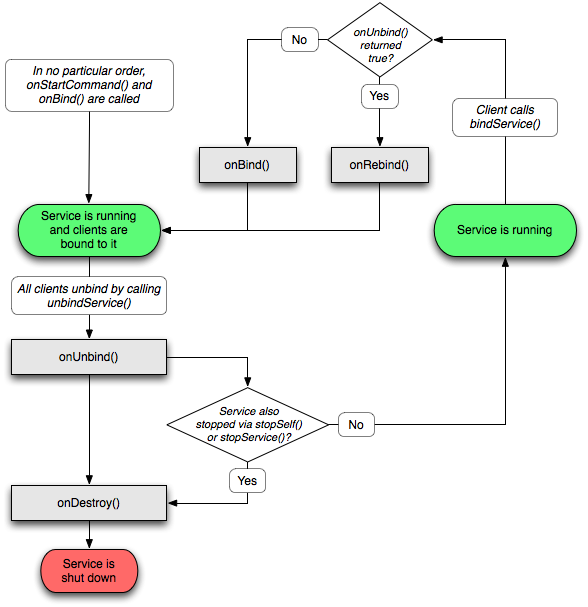
另外,这里要说明Service的一个子类,IntentService,首先看下官方文档的说明:
IntentServiceThis is a subclass of Service that uses a worker thread to handle all start requests, one at a time. This is the best option if you don't require that your service handle multiple requests simultaneously. All you need to do is implement onHandleIntent(), which receives the intent for each start request so you can do the background work.
IntentService使用队列的方式将请求的Intent加入队列,然后开启一个worker thread(线程)来处理队列中的Intent,对于异步的startService请求,IntentService会处理完成一个之后再处理第二个,每一个请求都会在一个单独的worker thread中处理,不会阻塞应用程序的主线程,这里就给我们提供了一个思路,如果有耗时的操作与其在Service里面开启新线程还不如使用IntentService来处理耗时操作。而在一般的继承Service里面如果要进行耗时操作就必须另开线程,但是使用IntentService就可以直接在里面进行耗时操作,因为默认实现了一个worker thread。对于异步的startService请求,IntentService会处理完成一个之后再处理第二个。
看下IntentService的具体实现:
- <span style="font-family:Comic Sans MS;font-size:18px;color:#222222;">public class HelloIntentService extends IntentService {
- /**
- * A constructor is required, and must call the super IntentService(String)
- * constructor with a name for the worker thread.
- */
- public HelloIntentService() {
- super("HelloIntentService");
- }
- /**
- * The IntentService calls this method from the default worker thread with
- * the intent that started the service. When this method returns, IntentService
- * stops the service, as appropriate.
- */
- @Override
- protected void onHandleIntent(Intent intent) {
- // Normally we would do some work here, like download a file.
- // For our sample, we just sleep for 5 seconds.
- long endTime = System.currentTimeMillis() + 5*1000;
- while (System.currentTimeMillis() < endTime) {
- synchronized (this) {
- try {
- wait(endTime - System.currentTimeMillis());
- } catch (Exception e) {
- }
- }
- }
- }
- }</span>
public class HelloIntentService extends IntentService {

  /**

   * A constructor is required, and must call the super IntentService(String)

   * constructor with a name for the worker thread.

   */

  public HelloIntentService() {

      super("HelloIntentService");

  }

  /**

   * The IntentService calls this method from the default worker thread with

   * the intent that started the service. When this method returns, IntentService

   * stops the service, as appropriate.

   */

  @Override

  protected void onHandleIntent(Intent intent) {

      // Normally we would do some work here, like download a file.

      // For our sample, we just sleep for 5 seconds.

      long endTime = System.currentTimeMillis() + 5*1000;

      while (System.currentTimeMillis() < endTime) {

          synchronized (this) {

              try {

                  wait(endTime - System.currentTimeMillis());

              } catch (Exception e) {

              }

          }

      }

  }

}
关于停止Service,如果service是非绑定的,最终当任务完成时,为了节省系统资源,一定要停止service,可以通过stopSelf()来停止,也可以在其他组件中通过stopService()来停止,绑定的service可以通过onUnBind()来停止service。
关于Service还有很多知识,这里就不再一一列举,可以参考 http://developer.android.com/guide/components/services.html
加入我们的QQ群或微信公众账号请查看:Ryan's zone公众账号及QQ群
欢迎关注我的新浪微博和我交流:@唐韧_Ryan
Android中Service(服务)详解的更多相关文章
- Android中Service 使用详解(LocalService + RemoteService)
Service 简介: Service分为本地服务(LocalService)和远程服务(RemoteService): 1.本地服务依附在主进程上而不是独立的进程,这样在一定程度上节约了资源,另外L ...
- Android中Intent组件详解
Intent是不同组件之间相互通讯的纽带,封装了不同组件之间通讯的条件.Intent本身是定义为一个类别(Class),一个Intent对象表达一个目的(Goal)或期望(Expectation),叙 ...
- WCF中队列服务详解
WCF中队列服务详解 一.引言 在前面的WCF服务中,它都要求服务与客户端两端都必须启动并且运行,从而实现彼此间的交互.然而,还有相当多的情况希望一个面向服务的应用中拥有离线交互的能力.WCF通过服务 ...
- 【转载】Android Studio Service AIDL 详解
公司产品之前IM这块存在很多问题,消息到达率低,加上协议上有些问题,丢消息频繁,所以需要重构IM,AIDL不能解决以上问题.好吧!那AIDL可以解决什么问题?什么是AIDL? 什么是AIDL? AID ...
- Android中mesure过程详解
我们在编写layout的xml文件时会碰到layout_width和layout_height两个属性,对于这两个属性我们有三种选择:赋值成具体的数值,match_parent或者wrap_conte ...
- Android中的动画详解系列【4】——Activity之间切换动画
前面介绍了Android中的逐帧动画和补间动画,并实现了简单的自定义动画,这一篇我们来看看如何将Android中的动画运用到实际开发中的一个场景--Activity之间跳转动画. 一.定义动画资源 如 ...
- [Android] Service服务详解以及如何使service服务不被杀死
排版上的细节有些不好看,主要是我用的MarkDown编辑器预览和这里的不一样,在那个上面的样式很舒服.这里要改的地方太多就不想改了,将就看吧.下次写的时候注意.还有看到错误给我提啊. 本文链接:htt ...
- Kubernetes K8S之Service服务详解与示例
K8S之Service概述与代理说明,并详解所有的service服务类型与示例 主机配置规划 服务器名称(hostname) 系统版本 配置 内网IP 外网IP(模拟) k8s-master Cent ...
- Android中shape属性详解
一.简单使用 刚开始,就先不讲一堆标签的意义及用法,先简单看看shape标签怎么用. 1.新建shape文件 首先在res/drawable文件夹下,新建一个文件,命名为:shape_radius.x ...
随机推荐
- PHP Java 设置cookie方法
Java Cookie cookie = new Cookie(COOKIE_NAME, encrypt_cookieV); cookie.setMaxAge(60 * 60); cookie.s ...
- UE4在C++中使用OnComponentBeginOverlap之类的时间
首先说明一下,官方文档是错的,在4.10版本下,绑定函数在角色类的构造函数中不起作用.2016.2.12 这里角色类为例 首先在头文件中添加: UFUNCTION() void OnOverlapBe ...
- Python3 安装bulitwith 和urllib2包
# 背景 最近在看PACKT的Python Web Scraping, 书上用的是Python 2.X,但是自己电脑上却用的Python 3.4. 版本升级没什么好说的,只是很多的工具包并没有跟着升级 ...
- 【转】敏捷开发 Scrum 总结
转:http://www.open-open.com/lib/view/open1330413325514.html 最近把之前学习 Scrum 的资料整理为一篇文档,在接下来的团队和项目开发中,根据 ...
- Activiti工作流引擎参考资料
Activiti工作流引擎使用 工作流-Activiti核心API介绍 传智播客Activiti工作流视频教程(企业开发实例讲解) 工作流引擎Activiti演示项目 http://www.kafei ...
- Grunt vs Gulp
grunt vs gulp 虽然gulp已经出来很久了,但是一直没有去使用过.得益于最近项目需要,就尝试了一下,以下从几个要点讲一下grunt和gulp使用的区别,侧重讲一下在使用gulp过程中发现的 ...
- hdu 2160 母猪的故事
Problem Description 话说现在猪肉价格这么贵,著名的ACBoy 0068 也开始了养猪生活.说来也奇怪,他养的猪一出生第二天开始就能每天中午生一只小猪,而且生下来的竟然都是母猪.不过 ...
- js 性能基准测试工具-告别可能、也许、大概这样更快更省
平时写js经常遇到这样做是不是更快点?但又没有具体简单可测试的工具,最近也倒序看博客园司徒正美 js分类下的文章 [ps:去年灵光一闪,发现看博客园排名前100的博客.按照文章分类倒序看是学习最快的方 ...
- Bug:播放页面自动跳到首页
一,经历: 1.第一感觉就是从直播间中收到了通知,然后通知得知了用户未登录,直播间便 pop 退出了. 2.由于这个问题是很难复现的,研究了快一个星期后,才发现是直播间底部的我的历史页面中接收到了直播 ...
- ASP.NET中Web DataGrid的使用指南
DataGrid/DataList在ASP.NET非常重要,凡显示Table类型的数据,大多会使用这两个控件. 一.方法 1.DataBind很简单.最常用的方法.绑定数据用.需要注意的只有一点:执行 ...