
20161209pod search 'fmdb'提示[!] Unable to find a pod with name, author, summary, or description matching `fmdb`
从SVN上更新工程之后运行工程提示错误:
The sandbox is not in sync with the Podfile.lock. Run 'pod install' or update your CocoaPods installation.`
平时只要在终端输入pod install就好,但是今天却出错了,提示[!] Unable to find a specification for `FMDB`
 然后我在终端输入pod search fmdb,结果竟然提示:[!] Unable to find a pod with name, author, summary, or description matching `fmdb`

接着我就输入pod setup手动安装,先出现Setting up CocoaPods master repo,但是它又提示错误:
fatal: ambiguous argument 'HEAD': unknown revision or path not in the working tree.
Use '--' to separate paths from revisions, like this:
'git <command> [<revision>...] -- [<file>...]'
fatal: ambiguous argument 'HEAD': unknown revision or path not in the working tree.
Use '--' to separate paths from revisions, like this:
'git <command> [<revision>...] -- [<file>...]'
fatal: ambiguous argument 'HEAD': unknown revision or path not in the working tree.
Use '--' to separate paths from revisions, like this:
'git <command> [<revision>...] -- [<file>...]'
$ /usr/bin/git -C /Users/lv/.cocoapods/repos/master pull --ff-only
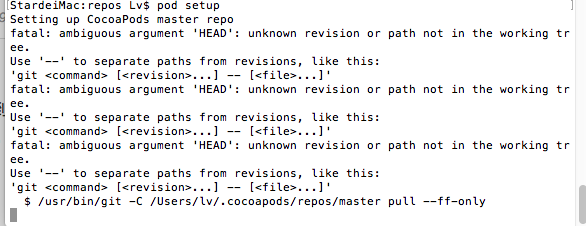
真的是无语了,然后在github上找到了答案.
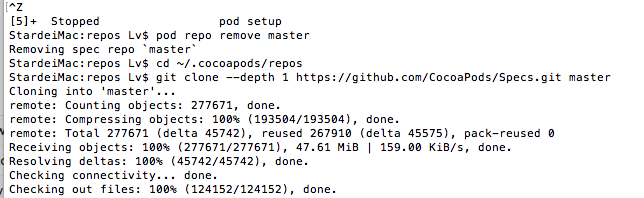
先移除掉本地的master,在终端输入pod repo remove master
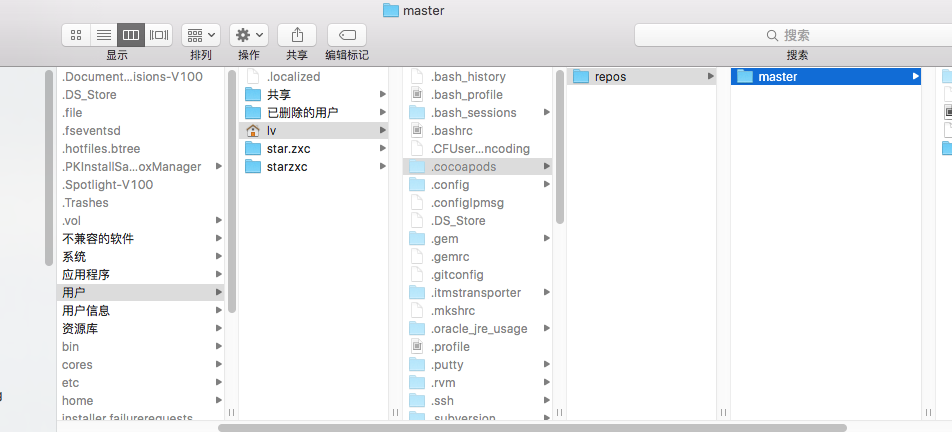
然后转到路径下,在终端输入cd ~/.cocoapods/repos
再把github上的spec下载下来,替换路径~/.cocoapods/repos目录下的master
接着在终端输入命令:git clone --depth 1 https://github.com/CocoaPods/Specs.git master,等待下载完毕
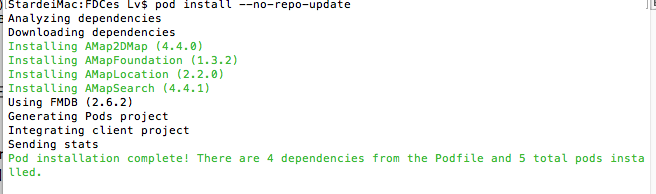
OK,现在再执行pod install --no-repo-update就能够正确更新这些第三方库了.
但是再次输入pod search fmdb依然是提示找不到,是因为之前pod search的时候生成了search_index.json,把它删除掉即可输入命令:rm ~/Library/Caches/CocoaPods/search_index.json回车
然后再次输入pod search fmdb会提示
Creating search index for spec repo 'master'..
然后等待即可,最终会出现相关的第三方库,并显示
Creating search index for spec repo 'master'.. Done!

整个过程参考了以下资源,感谢
20161209pod search 'fmdb'提示[!] Unable to find a pod with name, author, summary, or description matching `fmdb`的更多相关文章
- cocoapods [!] Unable to find a pod with name, author, summary, or description matching `xx`
pod search MJRefresh的时候报错 [!] Unable to find a pod with name, author, summary, or description matchi ...
- [!] Unable to find a pod with name, author, summary, or description matching `AFNetworking`
大量的答案是删除~/Library/Caches/CocoaPods/search_index.json 没有起作用 有用答案: https://blog.csdn.net/qq_35827461/ ...
- android studio提示unable to run mksdcard sdk
如题,android studio提示unable to run mksdcard sdk sudo apt-
- 问题-FireDAC连接Sqlite3提示“unable to open database file”
相关资料:http://www.dfwlt.com/forum.php?mod=viewthread&tid=1497&extra= 问题现象:FireDAC连接Sqlite3在开发电 ...
- 分布式进阶(八)Linux提示Unable to locate package该如何处理?
Linux提示Unable to locate package该如何处理? 当你在修改Linux软件源的时候,提示Unable to locate package错误,这是由什么原因导致的呢?又该如何 ...
- CentOS 6.x下wget 下载提示 Unable to locally verify the issuer’s authority 完美解决方案
CentOS 6.x下wget 下载提示 Unable to locally verify the issuer’s authority 完美解决方案 栏目:Linux 作者:小天 点击: 1,453 ...
- Python 解决Python安装包时提示Unable to find vcvarsall.bat的问题
解决Python安装包时提示Unable to find vcvarsall.bat的问题 by:授客 QQ:1033553122 问题 Python安装包时,提示Unable to find v ...
- proftpd启动失败提示unable to determine IP address of “xxx.com”
proftpd启动失败提示unable to determine IP address of “xxx.com”这种proftpd启动失败的原因是无法解析后面主机的IP地址,解决方法是在DNS列表中增 ...
- springboot项目打包提示Unable to find a single main class from the following candidates错误
提示Unable to find a single main class from the following candidates错误的原因是会从所有代码里面扫描包括main方法的类,找到多个类就报 ...
随机推荐
- Java抽象语法树AST,JCTree 分析
JCTree简要分析文章目录JCTree简要分析JCAnnotatedTypeJCAnnotationJCArrayAccessJCArrayTypeTreeJCAssertJCAssignJCAss ...
- python高级特性-迭代器
凡是可作用于for循环的对象都是Iterable类型: 凡是可作用于next()函数的对象都是Iterator类型,它们表示一个惰性计算的序列: 集合数据类型如list.dict.str等是Itera ...
- DevExpress GridControl 使用瀑布加载方式加载数据
从事winform开发已经快三年了,这三年中两年使用DevExpress控件进行winform系统开发,对Dev控件有自己的一些思考,下面就常用的表格控件GridControl的分页进行一些讨论. 在 ...
- 51nod 1657 电子龟
电子龟的行动,是沿着直线左右走动的.他能够接受两种指令,“T”(向后转,即如果面向左,改成向右:否则就向左)和“F”(向当前面朝的方向往前移动一个单位距离). 现在给出一串指令,让电子龟来执行.你必须 ...
- 容错(Fault-tolerance)
Spark Streaming的容错包括了三个地方的容错: 1.Executor失败容错:Executor的失败会重新启动一个新的Executor,这个是Spark自身的特性.如果Receiver所在 ...
- 集成腾讯Bugly日志- Android(1)
Bugly 是腾讯公司为移动开发者开放的服务之一,这里主要指 Crash 监控.崩溃分析等质量跟踪服务. 一.登录BUGLY官网 1.登录BUGLY官网以后,选择新建产品,选择IOS或ADNROID平 ...
- 后端程序员常用的linux命令
1. windows ctrl+ - 终端窗口变小 ctrl + shift + = 终端窗口变大 1. mac command+ - 终端窗口变小 command ...
- Logparser
http://www.microsoft.com/en-us/download/details.aspx?id=24659 Logparser 的用法 https://www.cnblogs.com/ ...
- PHP CURL 错误码说明
curl_setopt($ci, CURLOPT_HEADERFUNCTION, array($this, 'getHeader'));//一般不加 <?php return [ '1'=> ...
- 洛谷 P2032 扫描 题解
P2032 扫描 题目描述 有一个 1 ∗ n 的矩阵,有 n 个正整数. 现在给你一个可以盖住连续的 k 的数的木板. 一开始木板盖住了矩阵的第 1 ∼ k 个数,每次将木板向右移动一个单位,直到右 ...