
Python中遍历整个列表及注意点(参考书籍Python编程从入门到实践)
1. 利用for循环遍历整个列表
magicians = ['alice', 'dsvid', 'carolina']

# 遍历整个列表

for magician in magicians:

    print(magician)
2. 使得打印结果变得更加有实际意义
for magician in magicians:

    print(magician.title() + ', that was a great trick!')
运行结果:
Alice, that was a great trick!

Dsvid, that was a great trick!

Carolina, that was a great trick!
for代码行后边缩进的代码块都是循环的一部分,继续增加打印语句:
for magician in magicians:

    print(magician.title() + ', that was a great trick!')

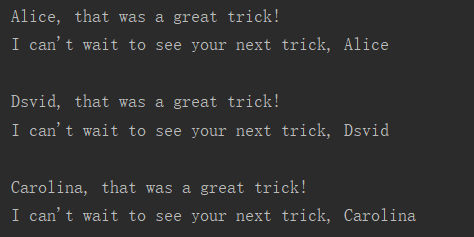
    print("I can't wait to see your next trick, " + magician.title() + "\n")
运行结果:
3. 对于for循环后边的属于循环模块的代码行一定要缩进。
3.1 若没有缩进:
for magician in magicians:

print(magician.title() + ', that was a great trick!')
运行结果会报错:
IndentationError: expected an indented block
3.2 若有缩进的,有没有缩进的:
for magician in magicians:

    print(magician.title() + ', that was a great trick!')

print("I can't wait to see your next trick, " + magician.title() + "\n")
程序运行不会出错,但是没有缩进的代码将在循环结束之后执行一次,只打印出有关列表最后一个元素的信息:
Alice, that was a great trick!

Dsvid, that was a great trick!

Carolina, that was a great trick!

I can't wait to see your next trick, Carolina
3.3 若缩进了本应在循环结束之后执行的代码,则这些代码将针对每个元素循环执行一次,程序不会报错。
4. 对于for循环还要注意的一点是——for语句的末尾千万不要忘了冒号(太容易忘了,太容易忘了,太容易忘了。。。)。
SyntaxError: invalid syntax
Python中遍历整个列表及注意点(参考书籍Python编程从入门到实践)的更多相关文章
- python学习第八讲,python中的数据类型,列表,元祖,字典,之字典使用与介绍
目录 python学习第八讲,python中的数据类型,列表,元祖,字典,之字典使用与介绍.md 一丶字典 1.字典的定义 2.字典的使用. 3.字典的常用方法. python学习第八讲,python ...
- python学习第七讲,python中的数据类型,列表,元祖,字典,之元祖使用与介绍
目录 python学习第七讲,python中的数据类型,列表,元祖,字典,之元祖使用与介绍 一丶元祖 1.元祖简介 2.元祖变量的定义 3.元祖变量的常用操作. 4.元祖的遍历 5.元祖的应用场景 p ...
- python学习第六讲,python中的数据类型,列表,元祖,字典,之列表使用与介绍
目录 python学习第六讲,python中的数据类型,列表,元祖,字典,之列表使用与介绍. 二丶列表,其它语言称为数组 1.列表的定义,以及语法 2.列表的使用,以及常用方法. 3.列表的常用操作 ...
- Python中多个列表与字典的合并方法
Python中多个列表与字典的合并方法 1多列表的合并 1)a+=b a=['] b = ['] a += b print(a) >>>['] 2) a.extend(b) a=[' ...
- python中如何删除列表中的所有元素
今天写代码的时候遇到一个小问题,Python中要删除列表中的所有元素.Python本身就提供了pop.remove.del这些删除的函数.我想着用循环实现,结果很麻烦.几番周折上了stackoverf ...
- Python编程从入门到实践笔记——操作列表
Python编程从入门到实践笔记——操作列表 #coding=utf-8 magicians = ['alice','david','carolina'] #遍历整个列表 for magician i ...
- Python编程从入门到实践笔记——列表简介
Python编程从入门到实践笔记——列表简介 #coding=utf-8 #列表——我的理解等于C语言和Java中的数组 bicycles = ["trek","cann ...
- Python编程从入门到实践笔记——用户输入和while循环
Python编程从入门到实践笔记——用户输入和while循环 #coding=utf-8 #函数input()让程序暂停运行,等待用户输入一些文本.得到用户的输入以后将其存储在一个变量中,方便后续使用 ...
- Python编程从入门到实践笔记——字典
Python编程从入门到实践笔记——字典 #coding=utf-8 #字典--放在{}中的键值对:跟json很像 #键和值之间用:分隔:键值对之间用,分隔 alien_0 = {'color':'g ...
随机推荐
- shell脚本实例,通向shell脚本大师的必经之路
概述 读书百遍其义自见,shell脚本也是,只要例子看得多了,自然就知道怎么写了.这里主要整理了20几个例子,因为内容比较多,所以分了几次来做介绍了.下面的实例最好先自己思考怎么去实现,然后再看下实现 ...
- Java 面向对象(十五)
Lambda表达式 1. 函数式编程思想概述 在数学中,函数就是有输入量.输出量的一套计算方案,也就是"拿什么东西做什么事情".相对而言,面向对象过分强调"必须通过对象的 ...
- VS2008下LibTomCrypt 1.17的编译和使用《转》
文章出处:http://blog.csdn.net/delphiwcdj/article/details/6298820 具体步骤如下: (1) 下载tomcrypt tomcrypt 1.17 VS ...
- MySQL两地三中心方案初步设计【转】
整体内容会按照如下的方式来进行设计: 首先说下方案的背景,我参考了一些资料(参见附件). 方案背景 随着互联网业务快速发展,多IDC的业务支撑能力和要求也逐步提升,行业内的“两地三中心”方案较为流行. ...
- (转)darknet 训练心得
1. 安装darknet 使用Git克隆源码 git clone https://github.com/pjreddie/darknet 我们可能需要修改Makefile,主要修改前三行,配置使用GP ...
- flutter Form表单
import 'package:flutter/material.dart'; class FormDemo extends StatelessWidget { @override Widget bu ...
- pytorch 想在一个优化器中设置多个网络参数的写法
使用tertools.chain将参数链接起来即可 import itertools ... self.optimizer = optim.Adam(itertools.chain(self.enco ...
- Qt 操作excel报错
onecore\com\combase\catalog\catalog.cxx(2376)\combase.dll!00007FFF1DF823CB: (caller: 00007FFF1DED3A1 ...
- vscode片段
参考资料 https://blog.csdn.net/maokelong95/article/details/54379046 "狂客注释": { "prefix&quo ...
- php 验证rsa公钥和私钥是否正确
<?php /** * RSA加密 * * @param string $data 待加密数据 * @param string $publicKey 公钥 * @return string|fa ...