
Gerrit - 代码评审工具Gerrit简介与安装
1 - 前言
Code Review 代码评审是指在软件开发过程中,对源代码的系统性检查,改进代码质量,查找系统缺陷,保证软件总体质量和提高开发者自身水平。
简单的说,Code Review是用来确认方案设计和代码实现的质量保证机制。
2 - Gerrit简介
Gerrit 是建立在Git版本控制系统之上并且基于Web的一个免费开源的轻量级代码审查工具。
作为开发者和Git之间的一层屏障,不允许直接将本地修改内容同步到远程仓库中。
与Jenkins集成后,可以在每次提交代码后,人工审核代码前,通过Jenkins任务自动运行单元测试、构建以及自动化测试,如果Jenkins任务失败,会自动打回本次提交。
一般Git、Gerrit和Jenkins集成后的使用流程
- 开发者提交代码到Gerrit
- 触发对应的Jenkins任务,通过以后Verified加1
- 人工审核,审核通过后code review加2,触发对应的Jenkins任务
- 通过以后确认本次提交,Gerrit执行与Git仓库的代码同步操作
- 代码进入Git仓库
2.1 官网信息
- HomePage:https://www.gerritcodereview.com/
- Downloads:https://gerrit-releases.storage.googleapis.com/index.html
- Docs:https://gerrit-review.googlesource.com/Documentation/
- Quickstart:https://gerrit-review.googlesource.com/Documentation/linux-quickstart.html
- Issues List:https://bugs.chromium.org/p/gerrit/issues/list
2.2 Training Slides
The following slides explain Git and Gerrit concepts and workflows and are meant for self-studying how Git and Gerrit work:
- Git explained: Git Concepts and Workflows:https://docs.google.com/presentation/d/1IQCRPHEIX-qKo7QFxsD3V62yhyGA9_5YsYXFOiBpgkk/
- Gerrit explained: Gerrit Concepts and Workflows:https://docs.google.com/presentation/d/1C73UgQdzZDw0gzpaEqIC6SPujZJhqamyqO1XOHjH-uk/
3 - 安装准备
A Unix-based server, including any Linux flavor, MacOS, or Berkeley Software Distribution (BSD).
Java SE Runtime Environment version 1.8. Gerrit is not compatible with Java 9 or newer yet.
3.1 Linux、Java、Git
[Anliven@mt101 ~]$ cat /etc/system-release

CentOS Linux release 7.5.1804 (Core)

[Anliven@mt101 ~]$

[Anliven@mt101 ~]$ uname -a

Linux mt101 3.10.0-957.el7.x86_64 #1 SMP Thu Nov 8 23:39:32 UTC 2018 x86_64 x86_64 x86_64 GNU/Linux

[Anliven@mt101 ~]$

[Anliven@mt101 ~]$ java -version

openjdk version "1.8.0_161"

OpenJDK Runtime Environment (build 1.8.0_161-b14)

OpenJDK 64-Bit Server VM (build 25.161-b14, mixed mode)

[Anliven@mt101 ~]$

[Anliven@mt101 ~]$ git --version

git version 1.8.3.1

[Anliven@mt101 ~]$
3.2 创建Gerrit账户
[Anliven@mt101 ~]$ sudo adduser gerrit

[Anliven@mt101 ~]$ sudo passwd gerrit

Changing password for user gerrit.

New password:

Retype new password:

passwd: all authentication tokens updated successfully.

[Anliven@mt101 ~]$ su - gerrit

Password:

[gerrit@mt101 ~]$ git config --global core.quotepath false

[gerrit@mt101 ~]$ git config --global i18n.logoutputencoding utf8

[gerrit@mt101 ~]$ git config --global i18n.commitencoding utf8

[gerrit@mt101 ~]$ git config --list

core.quotepath=false

i18n.logoutputencoding=utf8

i18n.commitencoding=utf8

[gerrit@mt101 ~]$

[gerrit@mt101 ~]$ exit

logout

[Anliven@mt101 ~]$

[Anliven@mt101 ~]$ sudo visudo

[Anliven@mt101 ~]$ sudo cat /etc/sudoers |grep gerrit

gerrit    ALL=(ALL)    NOPASSWD: ALL

[Anliven@mt101 ~]$
4 - Gerrit安装
4.1 官网信息
- https://gerrit-releases.storage.googleapis.com/gerrit-3.1.0.war
- https://gerrit-documentation.storage.googleapis.com/Documentation/3.1.0/index.html
- Quickstart for Installing Gerrit on Linux:https://gerrit-documentation.storage.googleapis.com/Documentation/3.1.0/linux-quickstart.html
4.2 安装并启动
以java -jar gerrit-3.1.0.war init -d $GERRIT_SITE方式,将会逐个出现配置选项,填写如下选项配置,其余默认。
- Authentication method [openid/?]: HTTP
- Listen on address [*]: 192.168.16.101
- Listen on port [8080]: 8083
后续可以通过配置文件($GERRIT_SITE/etc/gerrit.config)来更新配置。
[gerrit@mt101 ~]$ pwd
/home/gerrit
[gerrit@mt101 ~]$ ll
total 67552
-rw-r--r-- 1 gerrit gerrit 69172528 Dec 10 13:04 gerrit-3.1.0.war
[gerrit@mt101 ~]$
[gerrit@mt101 ~]$ sudo java -jar gerrit-3.1.0.war init -d $GERRIT_SITE
Using secure store: com.google.gerrit.server.securestore.DefaultSecureStore
[2019-12-10 14:42:35,778] [main] INFO com.google.gerrit.server.config.GerritServerConfigProvider : No /home/gerrit/gerrit_testsite/etc/gerrit.config; assuming defaults
*** Gerrit Code Review 3.1.0
***
Create '/home/gerrit/gerrit_testsite' [Y/n]?
*** Git Repositories
***
Location of Git repositories [git]:
*** Index
***
Type [lucene]:
*** User Authentication
***
Authentication method [openid/?]: HTTP
Get username from custom HTTP header [y/N]?
SSO logout URL :
Enable signed push support [y/N]?
*** Review Labels
***
Install Verified label [y/N]?
*** Email Delivery
***
SMTP server hostname [localhost]:
SMTP server port [(default)]:
SMTP encryption [none/?]:
SMTP username :
*** Container Process
***
Run as [root]:
Java runtime [/usr/lib/jvm/java-1.8.0-openjdk-1.8.0.161-2.b14.el7.x86_64/jre]:
Copy gerrit-3.1.0.war to /home/gerrit/gerrit_testsite/bin/gerrit.war [Y/n]?
Copying gerrit-3.1.0.war to /home/gerrit/gerrit_testsite/bin/gerrit.war
*** SSH Daemon
***
Listen on address [*]:
Listen on port [29418]:
Generating SSH host key ... rsa... ed25519... ecdsa 256... ecdsa 384... ecdsa 521... done
*** HTTP Daemon
***
Behind reverse proxy [y/N]?
Use SSL (https://) [y/N]?
Listen on address [*]: 192.168.16.101
Listen on port [8080]: 8083
Canonical URL [http://192.168.16.101:8083/]:
*** Cache
***
*** Plugins
***
Installing plugins.
Install plugin codemirror-editor version v3.1.0 [y/N]?
Install plugin commit-message-length-validator version v3.1.0 [y/N]?
Install plugin delete-project version v3.1.0 [y/N]?
Install plugin download-commands version v3.1.0 [y/N]?
Install plugin gitiles version v3.1.0 [y/N]?
Install plugin hooks version v3.1.0 [y/N]?
Install plugin plugin-manager version v3.1.0 [y/N]?
Install plugin replication version v3.1.0 [y/N]?
Install plugin reviewnotes version v3.1.0 [y/N]?
Install plugin singleusergroup version v3.1.0 [y/N]?
Install plugin webhooks version v3.1.0 [y/N]?
Initializing plugins.
No plugins found with init steps.
Initialized /home/gerrit/gerrit_testsite
Init complete, reindexing projects with: reindex --site-path /home/gerrit/gerrit_tesReindexing projects: 100% (2/2)
Reindexed 2 documents in projects index in 0.2s (11.0/s)
Executing /home/gerrit/gerrit_testsite/bin/gerrit.sh start
Starting Gerrit Code Review: OK
Waiting for server on 192.168.16.101:8083 ... OK
Opening http://192.168.16.101:8083/#/admin/projects/ ...OK
[gerrit@mt101 ~]$
[gerrit@mt101 ~]$ ll
total 67552
-rw-r--r-- 1 gerrit gerrit 69172528 Dec 10 13:04 gerrit-3.1.0.war
drwxr-xr-x 14 root root 150 Dec 10 13:09 gerrit_testsite
[gerrit@mt101 ~]$
[gerrit@mt101 ~]$ ll
total 67552
-rw-r--r-- 1 gerrit gerrit 69172528 Dec 10 13:04 gerrit-3.1.0.war
drwxr-xr-x 14 root root 150 Dec 10 14:44 gerrit_testsite
[gerrit@mt101 ~]$
[gerrit@mt101 ~]$ ll gerrit_testsite/
total 8
drwxr-xr-x 2 root root 84 Dec 10 14:43 bin
drwxr-xr-x 2 root root 4096 Dec 10 14:44 cache
drwxr-xr-x 2 root root 6 Dec 10 14:42 data
drwxr-xr-x 2 root root 78 Dec 10 14:44 db
drwxr-xr-x 3 root root 4096 Dec 10 14:43 etc
drwxr-xr-x 4 root root 51 Dec 10 14:43 git
drwxr-xr-x 6 root root 114 Dec 10 14:43 index
drwxr-xr-x 2 root root 6 Dec 10 14:42 lib
drwxr-xr-x 2 root root 106 Dec 10 14:44 logs
drwxr-xr-x 2 root root 6 Dec 10 14:42 plugins
drwxr-xr-x 2 root root 6 Dec 10 14:42 static
drwx------ 2 root root 6 Dec 10 14:43 tmp
[gerrit@mt101 ~]$
4.3 查看状态
[gerrit@mt101 ~]$ sudo netstat -ltpn |grep -i gerrit

tcp6       0      0 :::29418                :::*                    LISTEN      8968/GerritCodeRevi

tcp6       0      0 192.168.16.101:8083     :::*                    LISTEN      8968/GerritCodeRevi

[gerrit@mt101 ~]$

[gerrit@mt101 ~]$ sudo ps -au |grep -i gerrit

root      2909  0.0  0.0 234388  4224 pts/0    S    13:02   0:00 su - gerrit

gerrit    2912  0.0  0.0 116748  3568 pts/0    S    13:02   0:01 -bash

root      8968  9.5  5.8 4693148 464716 pts/0  Sl   14:43   0:27 GerritCodeReview -Dflogger.backend_factory=com.google.common.flogger.backend.log4j.Log4jBackendFactory#getInstance -Dflogger.logging_context=com.google.gerrit.server.logging.LoggingContext#getInstance -jar /home/gerrit/gerrit_testsite/bin/gerrit.war daemon -d /home/gerrit/gerrit_testsite --run-id=1575960233.8922

gerrit    9183  0.0  0.0 112704  1000 pts/0    S+   14:48   0:00 grep --color=auto -i gerrit

[gerrit@mt101 ~]$
4.4 防火墙开放端口
[gerrit@mt101 ~]$ sudo firewall-cmd --zone=public --permanent --add-port=8083/tcp

success

[gerrit@mt101 ~]$ sudo firewall-cmd --reload

success

[gerrit@mt101 ~]$ sudo firewall-cmd --list-all

public (active)

  target: default

  icmp-block-inversion: no

  interfaces: enp0s3 enp0s8

  sources:

  services: ssh dhcpv6-client

  ports: 8083/tcp

  protocols:

  masquerade: no

  forward-ports:

  source-ports:

  icmp-blocks:

  rich rules:

[gerrit@mt101 ~]$
5 - 通过Nginx设置反向代理
5.1 安装Nginx
官网步骤:http://nginx.org/en/linux_packages.html#RHEL-CentOS
[gerrit@mt101 ~]$ sudo vim /etc/yum.repos.d/nginx.repo
[gerrit@mt101 ~]$ sudo cat /etc/yum.repos.d/nginx.repo
[nginx-stable]
name=nginx stable repo
baseurl=http://nginx.org/packages/centos/$releasever/$basearch/
gpgcheck=1
enabled=1
gpgkey=https://nginx.org/keys/nginx_signing.key
module_hotfixes=true
[nginx-mainline]
name=nginx mainline repo
baseurl=http://nginx.org/packages/mainline/centos/$releasever/$basearch/
gpgcheck=1
enabled=0
gpgkey=https://nginx.org/keys/nginx_signing.key
module_hotfixes=true
[gerrit@mt101 ~]$
[gerrit@mt101 ~]$ sudo yum -y install nginx
Loaded plugins: fastestmirror, langpacks
Loading mirror speeds from cached hostfile
* base: mirrors.aliyun.com
* extras: mirrors.aliyun.com
* updates: mirrors.aliyun.com
nginx-stable | 2.9 kB 00:00:00
nginx-stable/7/x86_64/primary_db | 50 kB 00:00:09
Resolving Dependencies
--> Running transaction check
---> Package nginx.x86_64 1:1.16.1-1.el7.ngx will be installed
--> Finished Dependency Resolution
Dependencies Resolved
====================================================================================
Package Arch Version Repository Size
====================================================================================
Installing:
nginx x86_64 1:1.16.1-1.el7.ngx nginx-stable 766 k
Transaction Summary
====================================================================================
Install 1 Package
Total download size: 766 k
Installed size: 2.7 M
Downloading packages:
warning: /var/cache/yum/x86_64/7/nginx-stable/packages/nginx-1.16.1-1.el7.ngx.x86_64.rpm: Header V4 RSA/SHA1 Signature, key ID 7bd9bf62: NOKEY
Public key for nginx-1.16.1-1.el7.ngx.x86_64.rpm is not installed
nginx-1.16.1-1.el7.ngx.x86_64.rpm | 766 kB 00:02:29
Retrieving key from https://nginx.org/keys/nginx_signing.key
Importing GPG key 0x7BD9BF62:
Userid : "nginx signing key <signing-key@nginx.com>"
Fingerprint: 573b fd6b 3d8f bc64 1079 a6ab abf5 bd82 7bd9 bf62
From : https://nginx.org/keys/nginx_signing.key
Running transaction check
Running transaction test
Transaction test succeeded
Running transaction
Installing : 1:nginx-1.16.1-1.el7.ngx.x86_64 1/1
----------------------------------------------------------------------
Thanks for using nginx!
Please find the official documentation for nginx here:
* http://nginx.org/en/docs/
Please subscribe to nginx-announce mailing list to get
the most important news about nginx:
* http://nginx.org/en/support.html
Commercial subscriptions for nginx are available on:
* http://nginx.com/products/
----------------------------------------------------------------------
Verifying : 1:nginx-1.16.1-1.el7.ngx.x86_64 1/1
Installed:
nginx.x86_64 1:1.16.1-1.el7.ngx
Complete!
[gerrit@mt101 ~]$
5.2 配置Nginx
添加关于gerrit的配置:/etc/nginx/conf.d/gerrit.conf
- listen:监听的端口
- auth_basic:用于登录时弹出验证对话框所显示的内容
- auth_basic_user_file:验证用户名和密码是否匹配的文件
- location 部分:表示当用户访问83端口时,nginx直接将此请求代理到8083端口上,也就是“反向代理”
并添加如下内容
    location = /favicon.ico {

        log_not_found off;

        access_log off;

    }
[gerrit@mt101 ~]$ sudo vim /etc/nginx/conf.d/gerrit.conf
[gerrit@mt101 ~]$ sudo cat /etc/nginx/conf.d/gerrit.conf
server {
listen *:83;
server_name 192.168.16.101;
allow all;
deny all;
auth_basic "Welcom to Gerrit Code Review Site!";
auth_basic_user_file /home/gerrit/gerrit.password;
location / {
proxy_pass http://192.168.16.101:8083;
proxy_set_header X-Forwarded-For $remote_addr;
proxy_set_header Host $host;
}
    location = /favicon.ico {

        log_not_found off;

        access_log off;

    }
}
[gerrit@mt101 ~]$
修改Nginx配置文件/etc/nginx/nginx.conf中user参数,修改为root
[gerrit@mt101 ~]$ sudo vim /etc/nginx/nginx.conf
[gerrit@mt101 ~]$ sudo cat /etc/nginx/nginx.conf
user root;
worker_processes 1;
error_log /var/log/nginx/error.log warn;
pid /var/run/nginx.pid;
events {
worker_connections 1024;
}
http {
include /etc/nginx/mime.types;
default_type application/octet-stream;
log_format main '$remote_addr - $remote_user [$time_local] "$request" '
'$status $body_bytes_sent "$http_referer" '
'"$http_user_agent" "$http_x_forwarded_for"';
access_log /var/log/nginx/access.log main;
sendfile on;
#tcp_nopush on;
keepalive_timeout 65;
#gzip on;
include /etc/nginx/conf.d/*.conf;
}
[gerrit@mt101 ~]$
修改/etc/nginx/conf.d/default.conf,添加如下内容
location = /favicon.ico {
log_not_found off;
access_log off;
}
[gerrit@mt101 ~]$ sudo vim /etc/nginx/conf.d/default.conf
[gerrit@mt101 ~]$ sudo cat /etc/nginx/conf.d/default.conf
server {
listen 80;
server_name localhost;
#charset koi8-r;
#access_log /var/log/nginx/host.access.log main;
location / {
root /usr/share/nginx/html;
index index.html index.htm;
}
location = /favicon.ico {
log_not_found off;
access_log off;
}
#error_page 404 /404.html;
# redirect server error pages to the static page /50x.html
#
error_page 500 502 503 504 /50x.html;
location = /50x.html {
root /usr/share/nginx/html;
}
# proxy the PHP scripts to Apache listening on 127.0.0.1:80
#
#location ~ \.php$ {
# proxy_pass http://127.0.0.1;
#}
# pass the PHP scripts to FastCGI server listening on 127.0.0.1:9000
#
#location ~ \.php$ {
# root html;
# fastcgi_pass 127.0.0.1:9000;
# fastcgi_index index.php;
# fastcgi_param SCRIPT_FILENAME /scripts$fastcgi_script_name;
# include fastcgi_params;
#}
# deny access to .htaccess files, if Apache's document root
# concurs with nginx's one
#
#location ~ /\.ht {
# deny all;
#}
}
[gerrit@mt101 ~]$
5.3 防火墙
[gerrit@mt101 ~]$ sudo firewall-cmd --zone=public --permanent --add-port=80/tcp

success

[gerrit@mt101 ~]$ sudo firewall-cmd --zone=public --permanent --add-port=83/tcp

success

[gerrit@mt101 ~]$ sudo firewall-cmd --reload

success

[gerrit@mt101 ~]$ sudo firewall-cmd --list-all

public (active)

  target: default

  icmp-block-inversion: no

  interfaces: enp0s3 enp0s8

  sources:

  services: ssh dhcpv6-client

  ports: 8083/tcp 80/tcp 83/tcp

  protocols:

  masquerade: no

  forward-ports:

  source-ports:

  icmp-blocks:

  rich rules:

[gerrit@mt101 ~]$

[gerrit@mt101 ~]$ sudo cat /etc/selinux/config |grep "SELINUX="

# SELINUX= can take one of these three values:

SELINUX=disabled

[gerrit@mt101 ~]$
6 - 更改目录权限和创建用户
[gerrit@mt101 ~]$ chmod 755 /home/gerrit/

[gerrit@mt101 ~]$

[gerrit@mt101 ~]$ ll

total 67552

-rw-r--r--  1 gerrit gerrit 69172528 Dec 10 13:04 gerrit-3.1.0.war

drwxr-xr-x 14 root   root        150 Dec 10 14:44 gerrit_testsite

[gerrit@mt101 ~]$

[gerrit@mt101 ~]$ sudo htpasswd -c /home/gerrit/gerrit.password admin

New password:

Re-type new password:

Adding password for user admin

[gerrit@mt101 ~]$

[gerrit@mt101 ~]$ sudo htpasswd -m /home/gerrit/gerrit.password testdemo

New password:

Re-type new password:

Adding password for user testdemo

[gerrit@mt101 ~]$

[gerrit@mt101 ~]$ sudo chmod 755 gerrit.password

[gerrit@mt101 ~]$

[gerrit@mt101 ~]$ ll

total 67556

-rw-r--r--  1 gerrit gerrit 69172528 Dec 10 13:04 gerrit-3.1.0.war

-rwxr-xr-x  1 root   root         91 Dec 10 14:52 gerrit.password

drwxr-xr-x 14 root   root        150 Dec 10 14:44 gerrit_testsite

[gerrit@mt101 ~]$

[gerrit@mt101 ~]$ cat gerrit.password

admin:$apr1$fQB7h4KA$uhYXP/fEeyfA8GDyA18781

testdemo:$apr1$ETlmCKcz$L5unhKCEx1HRnad7SmPSv.

[gerrit@mt101 ~]$

[gerrit@mt101 ~]$ sudo service nginx restart

Redirecting to /bin/systemctl restart nginx.service

[gerrit@mt101 ~]$
7 - 确认Gerrit配置并重启服务
主配置文件$GERRIT_SITE/etc/gerrit.config
- Gerrit Server监听 8083端口
- 认证方式为 HTTP
[gerrit@mt101 ~]$ sudo vim gerrit_testsite/etc/gerrit.config

[gerrit@mt101 ~]$ sudo cat gerrit_testsite/etc/gerrit.config

[gerrit]

    basePath = git

    canonicalWebUrl = http://192.168.16.101:8083/

    serverId = 0b911b9e-195a-46b0-a5cd-b407b776b344

[container]

    javaOptions = "-Dflogger.backend_factory=com.google.common.flogger.backend.log4j.Log4jBackendFactory#getInstance"

    javaOptions = "-Dflogger.logging_context=com.google.gerrit.server.logging.LoggingContext#getInstance"

    user = root

    javaHome = /usr/lib/jvm/java-1.8.0-openjdk-1.8.0.161-2.b14.el7.x86_64/jre

[index]

    type = lucene

[auth]

    type = HTTP

[receive]

    enableSignedPush = false

[sendemail]

    smtpServer = localhost

[sshd]

    listenAddress = *:29418

[httpd]

    listenUrl = http://192.168.16.101:8083/

[cache]

    directory = cache

[gerrit@mt101 ~]$

[gerrit@mt101 ~]$ sudo gerrit_testsite/bin/gerrit.sh restart

Stopping Gerrit Code Review: OK

Starting Gerrit Code Review: OK

[gerrit@mt101 ~]$
8 - 登录页面
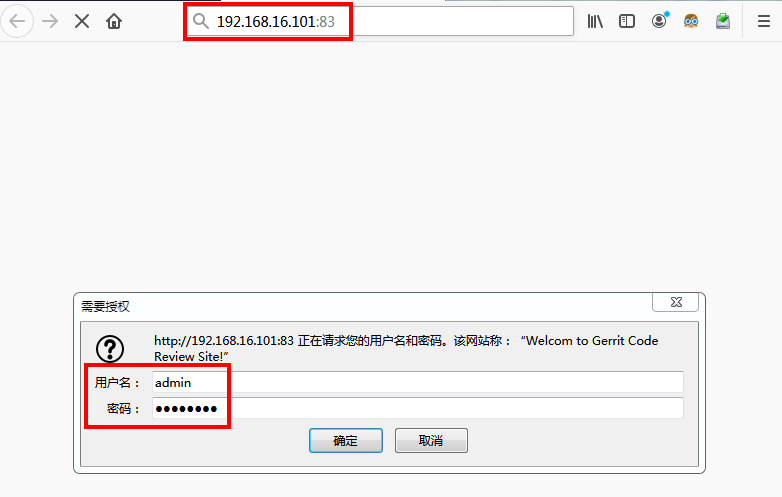
Basic HTTP认证模式不支持Sign Out。
需要先Sign Out退出账号,关闭浏览器后再登录,才能出现HTTP验证密码对话框。
http://192.168.16.101:83
8.1 admin用户

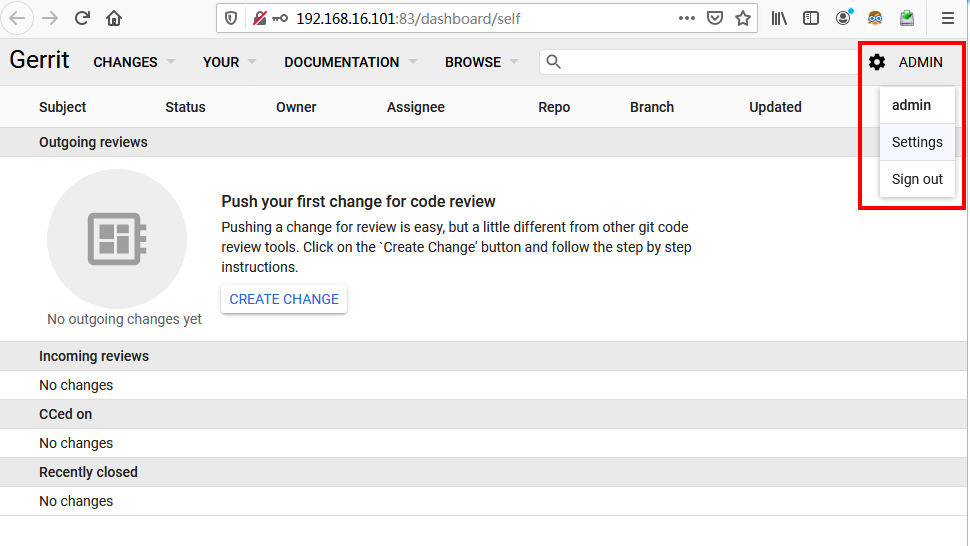
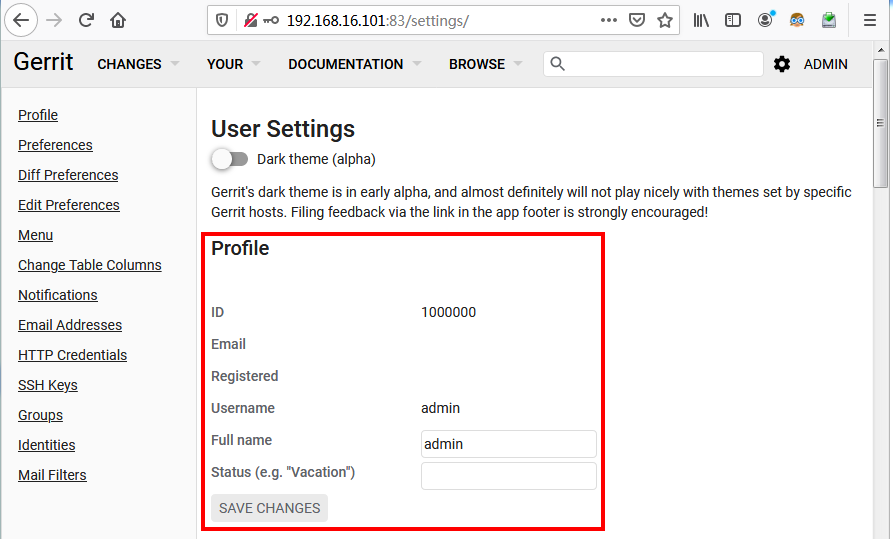
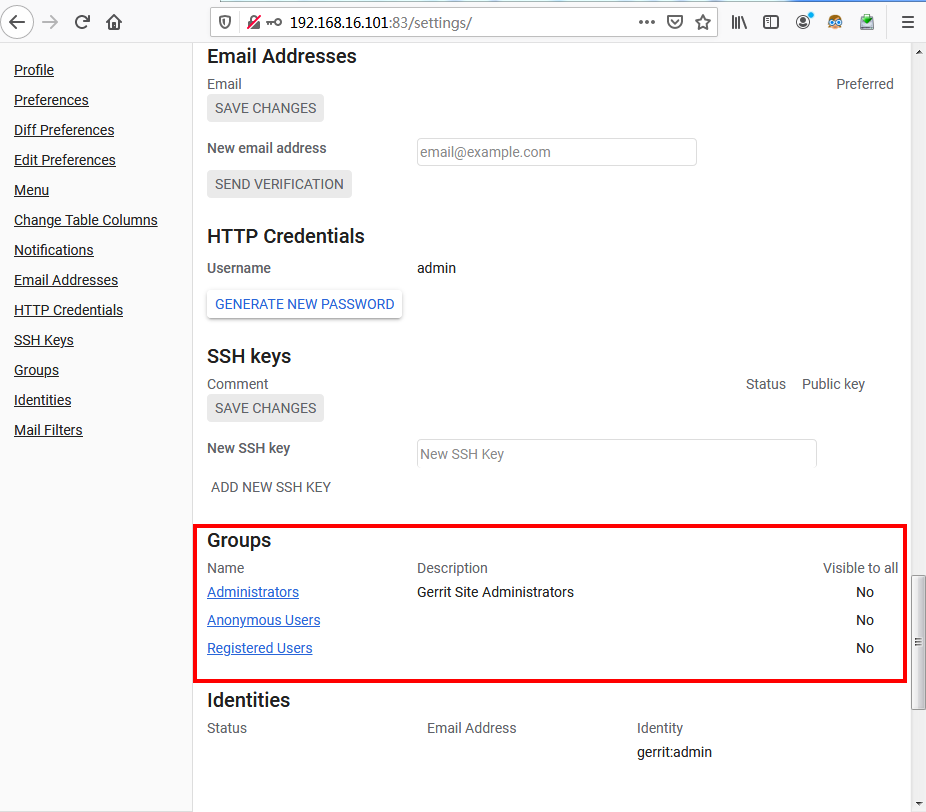
第一个登录的Gerrit用户为管理员,ID为1000000。
8.2 普通用户
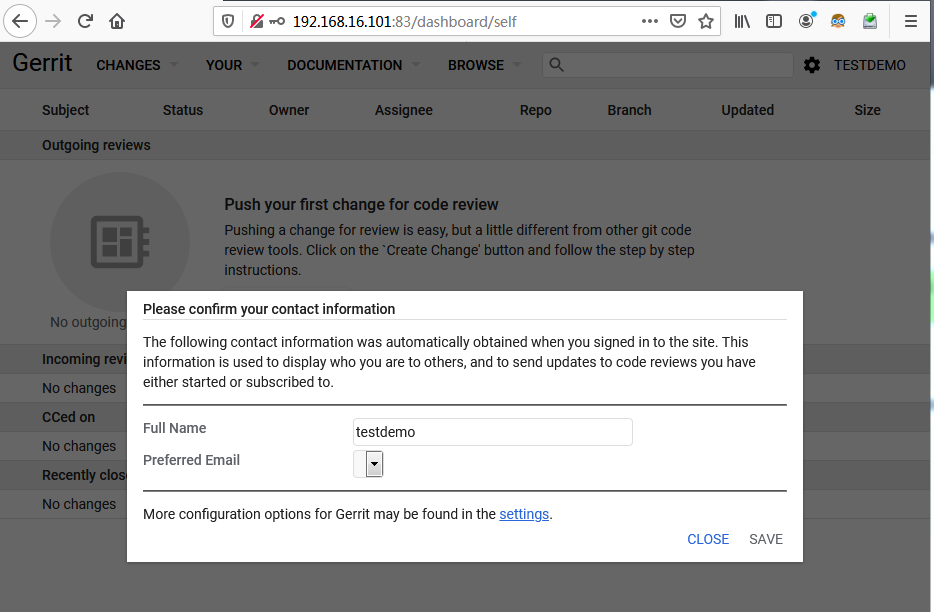

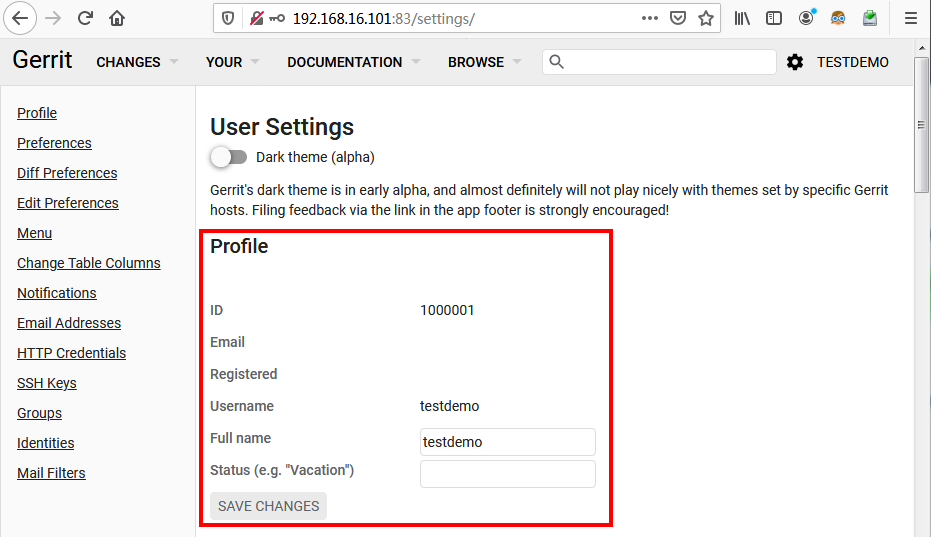

Gerrit - 代码评审工具Gerrit简介与安装的更多相关文章
- gerrit代码审核工具之“error unpack failed error Missing unknown”错误解决思路
使用gerrit代码审核工具时遇到error: unpack failed: error Missing unknown d6d7c89bd1d77f44c5c8e99437aaffbfc0684e7 ...
- Gerrit代码评审流程
Gerrit代码评审流程 作者:尹正杰 版权声明:原创作品,谢绝转载!否则将追究法律责任. 一.代码评审流程(如下图所示) 第一步:贡献者报建一个提交,并通过之前从gerrit下载的commit-ms ...
- SonarQube代码评审工具简介
SonarQube是一个代码评审工具,可以完成对多种类型代码的扫描,并生成报告.本文是一个简单的扫描Java代码的使用说明. 该工具主要分为两个部分: 服务端:用来保存和展示扫描结果. 客户端:或者说 ...
- Java静态代码分析工具——FindBugs插件的安装与使用
1 什么是FindBugs FindBugs 是一个静态分析工具,它检查类或者 JAR 文件,将字节码与一组缺陷模式进行对比以发现可能的问题.有了静态分析工具,就可以在不实际运行程序的情况对软件进行分 ...
- GitLab - 代码仓库管理工具GitLab简介
1 - GitLab 基于git的开源的仓库管理系统项目,使用git作为代码管理工具,并在此基础上搭建web服务,拥有与Github类似的功能. 社区版(Community Edition,CE) 企 ...
- 【转】Mac端包管理工具——Homebrew简介及安装
Homebrew官网 http://brew.sh/index_zh-cn.html Homebrew是神马 linux系统有个让人蛋疼的通病,软件包依赖,好在当前主流的两大发行版本都自带了解决方案, ...
- 静态代码分析工具sonarqube+sonar-runner的安装配置及使用
配置成功后的代码分析页面: 可以看到对复杂度.语法使用.重复度等等都做了分析,具体到了每一个方法和每一句代码. 四种使用方式: sonarqube + sonar-runner sonarqube + ...
- 2017.4.18 静态代码分析工具sonarqube+sonar-runner的安装配置及使用
配置成功后的代码分析页面: 可以看到对复杂度.语法使用.重复度等等都做了分析,具体到了每一个方法和每一句代码. 四种使用方式: sonarqube + sonar-runner sonarqube + ...
- 批量装机工具cobbler简介及其安装使用
前言:如果仅有几台机器的话,使用U盘或者光盘装起来还不是很费事,一旦数量到了一定程度,使用手动方法就是一件费时费力的事,PXE+kistart就可以解决这个问题,降低难度,加快速度,而cobbler更 ...
随机推荐
- wordpress搜索结果排除某个分类如何操作
我们知道wordpress的搜索结果页search.php和分类页category.php是一样的,但是客户的网站是功能比较多的系统,有新闻又有产品,如果搜索结果只想展示产品要如何操作呢?随ytkah ...
- Go语言 - 包(package)
在工程化的Go语言开发项目中,Go语言的源码复用是建立在包(package)基础之上的.本文介绍了Go语言中如何定义包.如何导出包的内容及如何导入其他包. Go语言的包(package) 包介绍 包( ...
- Ansible自动部署tomcat
1.首先准备3台机器 ansible机器:192.168.52.34 目标主机:192.168.52.35 目标主机:192.168.52.36 2.关闭防火墙 [root@localhost ~]# ...
- bzoj3073: [Pa2011]Journeys 线段树优化建图
bzoj3073: [Pa2011]Journeys 链接 BZOJ 思路 区间和区间连边.如何线段树优化建图. 和单点连区间类似的,我们新建一个点,区间->新点->区间. 又转化成了单点 ...
- Zookeeper循环注册监听器
Zookeeper中的监听器只执行一次,需要在watcher类中重写process方法,以达到重复注册监听器的效果 /** * 连接zk服务器 * */ public static void conn ...
- SpringSecurity匿名用户访问权限
在SpringSecurity中定义一个匿名访问权限,实现未登录用户可以访问默写页面 <http use-expressions="false" entry-point-re ...
- python: str()
tx1 = '中国' tx2 = u'中国' print tx1 print tx2 print type(tx1) print type(tx2) #<type 'str'> str() ...
- Spring 注解@Value详解
一.spring(基础10) 注解@Value详解[1] 一 配置方式 @value需要参数,这里参数可以是两种形式: [html] view plain copy @Value("#{co ...
- Flask纪要
flask学习过程 1框架基础 2redis高性能key-value数据库 3视图具有装饰器的路由函数 4模板html文件 面向对象操作数据库orm 5蓝图 6单元测试 7GitHub 8项目 学习的 ...
- sensor【学习笔记】
高通sensor相关介绍不错的文章:https://www.cnblogs.com/linhaostudy/archive/2018/03/16/8578414.html 高通sensor的校准流程: ...