
66-Flutter移动电商实战-会员中心_编写ListTile的通用方法
1、界面分析
通过下图我们可以拆分成 4 部分,头部、订单标题区域、订单列表区域、ListTitle同用部分。
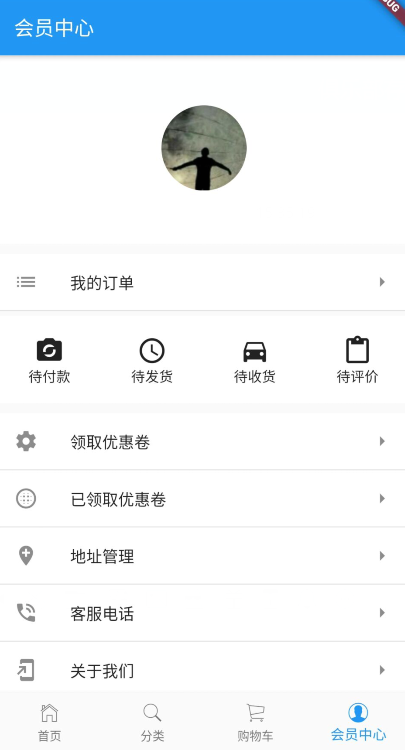
2、UI编写
2.1、头部
主要用到了圆形头像裁剪组件-ClipOval
顶部头像区域
Widget _topHeader(){
  return Container(
    width: ScreenUtil().setWidth(750),
    padding: EdgeInsets.all(20),
    color: Colors.white,
    child: Column(
      children: <Widget>[
        Container(
          margin: EdgeInsets.only(top: 30),
          width: ScreenUtil().setWidth(155),
          child: ClipOval(
              child:Image.network('https://profile.csdnimg.cn/6/4/0/1_niceyoo')
          ),
        ),
        Container(
          margin: EdgeInsets.only(top: 10),
          child: Text(
            'niceyoo',
            style: TextStyle(
              fontSize: ScreenUtil().setSp(36),
              color: Colors.white
            ),
          ),
        )
      ],
    ),
  );
}
2.2、订单标题区域
使用 ListTile 编写,如下是关于 ListTile 组件属性说明:
const ListTile({
    Key key,
    this.leading,左侧widget
    this.title,标题
    this.subtitle,副标题
    this.trailing,右侧widget
    this.isThreeLine = false,是否默认3行高度,subtitle不为空时才能使用
    this.dense,设置为true后字体变小
    this.contentPadding,
    this.enabled = true,能否被点击
    this.onTap,
    this.onLongPress,
    this.selected = false,展示是否默认显示选中
})
我的订单标题代码部分:
Widget _orderTitle(){
    return Container(
      margin: EdgeInsets.only(top: 10),
      decoration: BoxDecoration(
        color: Colors.white,
        border: Border(
          bottom: BorderSide(
            width: 1,
            color: Colors.black12
          )
        )
      ),
      child: ListTile(
        leading: Icon(Icons.list),
        title: Text('我的订单'),
        trailing: Icon(Icons.arrow_right),
      ),
    );
}
2.3、订单列表区域
同样使用 ListTile 组件堆起来的:
Widget _orderType(){
    return Container(
      margin: EdgeInsets.only(top: 5),
      width: ScreenUtil().setWidth(750),
      height: ScreenUtil().setHeight(150),
      padding: EdgeInsets.only(top: 20),
      color: Colors.white,
      child: Row(
        children: <Widget>[
          Container(
            width: ScreenUtil().setWidth(187),
            child: Column(
              children: <Widget>[
                Icon(
                  Icons.party_mode,
                  size: 30,
                ),
                Text('待付款')
              ],
            ),
          ),

          Container(
            width: ScreenUtil().setWidth(187),
            child: Column(
              children: <Widget>[
                Icon(
                  Icons.query_builder,
                  size: 30,
                ),
                Text('待发货')
              ],
            ),
          ),

          Container(
            width: ScreenUtil().setWidth(187),
            child: Column(
              children: <Widget>[
                Icon(
                  Icons.directions_car,
                  size: 30,
                ),
                Text('待收货')
              ],
            ),
          ),

          Container(
            width: ScreenUtil().setWidth(187),
            child: Column(
              children: <Widget>[
                Icon(
                  Icons.content_paste,
                  size: 30,
                ),
                Text('待评价')
              ],
            ),
          )
        ],
      ),
    );
  }
2.4、ListTitle同用部分
由于这一块内容格式基本一致,组装一下 ListTile 的子项:
Widget _myListTile(Icon icon,String title){
    return Container(
      decoration: BoxDecoration(
        color: Colors.white,
        border: Border(
          bottom: BorderSide(width: 1,color: Colors.black12)
        )
      ),
      child: ListTile(
        leading: icon,
        title: Text(
            title,
            textAlign: TextAlign.left,
        ),
        trailing: Icon(Icons.arrow_right),
      ),
    );
}
组合 List 布局:
Widget _actionList(){
    return Container(
      margin: EdgeInsets.only(top: 10),
      child: Column(
        children: <Widget>[
          _myListTile(Icon(Icons.settings),'领取优惠卷'),
          _myListTile(Icon(Icons.blur_circular),'已领取优惠卷'),
          _myListTile(Icon(Icons.add_location),'地址管理'),
          _myListTile(Icon(Icons.phone_in_talk),'客服电话'),
          _myListTile(Icon(Icons.add_to_home_screen),'关于我们'),
        ],
      ),
    );
}
66-Flutter移动电商实战-会员中心_编写ListTile的通用方法的更多相关文章
- Flutter实战视频-移动电商-66.会员中心_编写ListTile通用方法
66.会员中心_编写ListTile通用方法 布局List里面嵌套一个ListTile的布局效果 里面有很多条记录,以后可能还会增加,所以这里我们做一个通用的组件 通用组件方法 这里使用Column布 ...
- Flutter实战视频-移动电商-64.会员中心_顶部头像UI布局
64.会员中心_顶部头像UI布局 会员中心的样式 member.dart 清除原来的代码生成一个基本的结构 默认返回一个scaffold脚手架工具,body里面布局使用ListView,这样不会出现纵 ...
- Flutter实战视频-移动电商-65.会员中心_订单区域UI布局
65.会员中心_订单区域UI布局 我的订单区域 member.dart写我的标题的方法 布局使用瓦片布局 先做修饰,decoration颜色的背景,下边线的样式 //我的订单标题 Widget _or ...
- Flutter移动电商实战 --(1)项目学习记录
1.项目相关截图 2.项目知识点梳理图 Dio2.0: Dio是一个强大的 Dart Http 请求库,支持 Restful API.FormData.拦截器.请求取消等操作. Swiper: Swi ...
- Flutter移动电商实战 --(24)Provide状态管理基础
Flutter | 状态管理特别篇 —— Provide:https://juejin.im/post/5c6d4b52f265da2dc675b407?tdsourcetag=s_pcqq_aiom ...
- Flutter移动电商实战 --(16)切换后页面状态的保持AutomaticKeepAliveClientMixin
底栏切换每次都重新请求是一件非常恶心的事,flutter 中提供了AutomaticKeepAliveClientMixin 帮我们完成页面状态保存效果. 1.AutomaticKeepAliveCl ...
- Flutter移动电商实战 --(4)打通底部导航栏
关于界面切换以及底栏的实现可参考之前写的一篇文章:Flutter实 ViewPager.bottomNavigationBar界面切换 1.新建4个基本dart文件 在pages目录下,我们新建下面四 ...
- Flutter移动电商实战 --(3)底部导航栏制作
1.cupertino_IOS风格介绍 在Flutter里是有两种内置风格的: material风格: Material Design 是由 Google 推出的全新设计语言,这种设计语言是为手机.平 ...
- Flutter移动电商实战 --(30)列表页_商品列表UI界面布局
小程序里面的布局方式 小程序的图片上这里使用的是warp布局,因为首页里面火爆专区,已经用过了warp来布局了. 所以这里我们没有必要再讲一遍,这里我们使用ListView,我们把它布局成下图这种形式 ...
随机推荐
- pytest_全局变量的使用
这里重新阐述下PageObject设计模式: PageObject设计模式是selenium自动化最成熟,最受欢迎的一种模式,这里用pytest同样适用 这里直接提供代码: 全局变量 conftest ...
- 『7.3 NOIP模拟赛题解』
T1 gift Description 夏川的生日就要到了.作为夏川形式上的男朋友,季堂打算给夏川买一些生日礼物. 商店里一共有种礼物.夏川每得到一种礼物,就会获得相应喜悦值Wi(每种礼物的喜 ...
- 【LeetCode】633. Sum of Square Numbers
Difficulty: Easy More:[目录]LeetCode Java实现 Description https://leetcode.com/problems/sum-of-square-n ...
- SQL Server 事务日志截断、回绕与收缩(转载)
每个 SQL Server 数据库都具有事务日志,用于记录所有事务以及每个事务对数据库所做的修改. 必须定期截断事务日志以避免它被填满. 但是,一些因素可能延迟日志截断,因此监视日志大小很重要. 某些 ...
- ABP 使用cache缓存
using Abp.Application.Services.Dto; using Abp.Runtime.Caching; using Microsoft.Extensions.Configurat ...
- DataTable求列的最大值、最小值、平均值和样本数
与sql聚合函数相似,会屏蔽null table.Compute("max(ColumnName)", "true"); table.Compute(" ...
- 一.Linux
1.常用命令 Linux 命令的语法格式命令[选项][参数] Ctrl + l #清屏 clear #清屏 Ctrl +c #结束命令 man su #查看su 帮助信息,q 退出 su --help ...
- [Linux] 树莓派编译python3.7.4
python3.7.4 源码编译后遇到ssl错误: pip is configured with locations that require TLS/SSL, however the ssl mod ...
- Beego 学习笔记二:第一个项目
第一个MVC项目 1> 使用beego命令,创建一个项目 首先切换到创建项目的位置,输入bee new firstweb命令,创建成功之后会出现一个名为firstweb的文件夹 2> ...
- vue学习整理
1.webpack+vue自定义路径别名 vue-cli 用的是webpack,也可以使用webpack自定义别名这个功能,自定义别名这个功能当你在多层文件夹嵌套的时候不必一层一层找路径,直接使用自定 ...