
66-Flutter移动电商实战-会员中心_编写ListTile的通用方法
1、界面分析
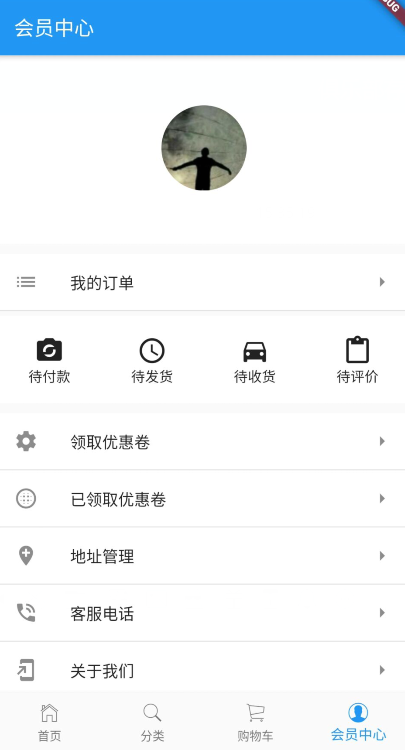
通过下图我们可以拆分成 4 部分,头部、订单标题区域、订单列表区域、ListTitle同用部分。
2、UI编写
2.1、头部
主要用到了圆形头像裁剪组件-ClipOval
顶部头像区域
Widget _topHeader(){
  return Container(
    width: ScreenUtil().setWidth(750),
    padding: EdgeInsets.all(20),
    color: Colors.white,
    child: Column(
      children: <Widget>[
        Container(
          margin: EdgeInsets.only(top: 30),
          width: ScreenUtil().setWidth(155),
          child: ClipOval(
              child:Image.network('https://profile.csdnimg.cn/6/4/0/1_niceyoo')
          ),
        ),
        Container(
          margin: EdgeInsets.only(top: 10),
          child: Text(
            'niceyoo',
            style: TextStyle(
              fontSize: ScreenUtil().setSp(36),
              color: Colors.white
            ),
          ),
        )
      ],
    ),
  );
}
2.2、订单标题区域
使用 ListTile 编写,如下是关于 ListTile 组件属性说明:
const ListTile({
    Key key,
    this.leading,左侧widget
    this.title,标题
    this.subtitle,副标题
    this.trailing,右侧widget
    this.isThreeLine = false,是否默认3行高度,subtitle不为空时才能使用
    this.dense,设置为true后字体变小
    this.contentPadding,
    this.enabled = true,能否被点击
    this.onTap,
    this.onLongPress,
    this.selected = false,展示是否默认显示选中
})
我的订单标题代码部分:
Widget _orderTitle(){
    return Container(
      margin: EdgeInsets.only(top: 10),
      decoration: BoxDecoration(
        color: Colors.white,
        border: Border(
          bottom: BorderSide(
            width: 1,
            color: Colors.black12
          )
        )
      ),
      child: ListTile(
        leading: Icon(Icons.list),
        title: Text('我的订单'),
        trailing: Icon(Icons.arrow_right),
      ),
    );
}
2.3、订单列表区域
同样使用 ListTile 组件堆起来的:
Widget _orderType(){
    return Container(
      margin: EdgeInsets.only(top: 5),
      width: ScreenUtil().setWidth(750),
      height: ScreenUtil().setHeight(150),
      padding: EdgeInsets.only(top: 20),
      color: Colors.white,
      child: Row(
        children: <Widget>[
          Container(
            width: ScreenUtil().setWidth(187),
            child: Column(
              children: <Widget>[
                Icon(
                  Icons.party_mode,
                  size: 30,
                ),
                Text('待付款')
              ],
            ),
          ),

          Container(
            width: ScreenUtil().setWidth(187),
            child: Column(
              children: <Widget>[
                Icon(
                  Icons.query_builder,
                  size: 30,
                ),
                Text('待发货')
              ],
            ),
          ),

          Container(
            width: ScreenUtil().setWidth(187),
            child: Column(
              children: <Widget>[
                Icon(
                  Icons.directions_car,
                  size: 30,
                ),
                Text('待收货')
              ],
            ),
          ),

          Container(
            width: ScreenUtil().setWidth(187),
            child: Column(
              children: <Widget>[
                Icon(
                  Icons.content_paste,
                  size: 30,
                ),
                Text('待评价')
              ],
            ),
          )
        ],
      ),
    );
  }
2.4、ListTitle同用部分
由于这一块内容格式基本一致,组装一下 ListTile 的子项:
Widget _myListTile(Icon icon,String title){
    return Container(
      decoration: BoxDecoration(
        color: Colors.white,
        border: Border(
          bottom: BorderSide(width: 1,color: Colors.black12)
        )
      ),
      child: ListTile(
        leading: icon,
        title: Text(
            title,
            textAlign: TextAlign.left,
        ),
        trailing: Icon(Icons.arrow_right),
      ),
    );
}
组合 List 布局:
Widget _actionList(){
    return Container(
      margin: EdgeInsets.only(top: 10),
      child: Column(
        children: <Widget>[
          _myListTile(Icon(Icons.settings),'领取优惠卷'),
          _myListTile(Icon(Icons.blur_circular),'已领取优惠卷'),
          _myListTile(Icon(Icons.add_location),'地址管理'),
          _myListTile(Icon(Icons.phone_in_talk),'客服电话'),
          _myListTile(Icon(Icons.add_to_home_screen),'关于我们'),
        ],
      ),
    );
}
66-Flutter移动电商实战-会员中心_编写ListTile的通用方法的更多相关文章
- Flutter实战视频-移动电商-66.会员中心_编写ListTile通用方法
66.会员中心_编写ListTile通用方法 布局List里面嵌套一个ListTile的布局效果 里面有很多条记录,以后可能还会增加,所以这里我们做一个通用的组件 通用组件方法 这里使用Column布 ...
- Flutter实战视频-移动电商-64.会员中心_顶部头像UI布局
64.会员中心_顶部头像UI布局 会员中心的样式 member.dart 清除原来的代码生成一个基本的结构 默认返回一个scaffold脚手架工具,body里面布局使用ListView,这样不会出现纵 ...
- Flutter实战视频-移动电商-65.会员中心_订单区域UI布局
65.会员中心_订单区域UI布局 我的订单区域 member.dart写我的标题的方法 布局使用瓦片布局 先做修饰,decoration颜色的背景,下边线的样式 //我的订单标题 Widget _or ...
- Flutter移动电商实战 --(1)项目学习记录
1.项目相关截图 2.项目知识点梳理图 Dio2.0: Dio是一个强大的 Dart Http 请求库,支持 Restful API.FormData.拦截器.请求取消等操作. Swiper: Swi ...
- Flutter移动电商实战 --(24)Provide状态管理基础
Flutter | 状态管理特别篇 —— Provide:https://juejin.im/post/5c6d4b52f265da2dc675b407?tdsourcetag=s_pcqq_aiom ...
- Flutter移动电商实战 --(16)切换后页面状态的保持AutomaticKeepAliveClientMixin
底栏切换每次都重新请求是一件非常恶心的事,flutter 中提供了AutomaticKeepAliveClientMixin 帮我们完成页面状态保存效果. 1.AutomaticKeepAliveCl ...
- Flutter移动电商实战 --(4)打通底部导航栏
关于界面切换以及底栏的实现可参考之前写的一篇文章:Flutter实 ViewPager.bottomNavigationBar界面切换 1.新建4个基本dart文件 在pages目录下,我们新建下面四 ...
- Flutter移动电商实战 --(3)底部导航栏制作
1.cupertino_IOS风格介绍 在Flutter里是有两种内置风格的: material风格: Material Design 是由 Google 推出的全新设计语言,这种设计语言是为手机.平 ...
- Flutter移动电商实战 --(30)列表页_商品列表UI界面布局
小程序里面的布局方式 小程序的图片上这里使用的是warp布局,因为首页里面火爆专区,已经用过了warp来布局了. 所以这里我们没有必要再讲一遍,这里我们使用ListView,我们把它布局成下图这种形式 ...
随机推荐
- 65 TCP连接中,流的关闭会造成Socket的关闭
转自:https://blog.csdn.net/u012525096/article/details/76924627 今天写安卓向服务器发送图片,过程为:客户端发送数据->服务器接收.处理数 ...
- Linux中历史命令
历史命令,即之前登录session会话中的在命令行键入的命令. 在Linux中可以有两种方式查询历史命令 history命令 当前用户目录中的隐藏文件.bash_history 一.history 作 ...
- oracle 根据字段分组取第一条数据及rank函数说明
当前有这样一个需求,根据外键对子表数据进行分组,取每组中的一条数据就行了,如图: 如:COMMANDID = 26的有两条,只取一条数据. sql语句: select * from(select SY ...
- powershell程序
powershell是一个命令行解释器.它输出一个字符,等待命令行的输入,然后执行这个命令.下面是powershell非常重要的命令:
- Advanced-REST-client 获取及安装
作为一个java开发人员,大家或多或少的要写或者接触一些http接口.而当我们需要本地调试接口常常会因为没有一款好用的工具而烦恼.今天要给大家介绍一款非常好用.实用且方便的http接口测试工具. 获取 ...
- 几何不变矩--Hu矩
[图像算法]图像特征: ---------------------------------------------------------------------------------------- ...
- 2019 找钢网java面试笔试题 (含面试题解析)
本人5年开发经验.18年年底开始跑路找工作,在互联网寒冬下成功拿到阿里巴巴.今日头条.找钢网等公司offer,岗位是Java后端开发,因为发展原因最终选择去了找钢网,入职一年时间了,也成为了面试官 ...
- Matlab备忘录模式
备忘录模式(Memento)用于保存一个对象的某个状态,以便在适当的时候恢复对象.备忘录模式属于行为型模式,主要包括源发器,备忘录以及负责人.源发器:普通类,可以创建备忘录,也可以使用备忘录恢复状态. ...
- 在safari上,解决fixed失效问题
一个页面中有头部.底部和中间内容区域,底部固定在屏幕底端. 头部header 内容main 底部footer 方法一.在main上使用fixed定位,加上overflow-y属性. .main { p ...
- error C4996: 'AVStream::codec': was declared deprecated
关闭VS的SDL检查 工程 属性=>C/C++ =>General=> SDL checks 改为 No(/sdl).