
Spring Boot 2.x实战之定时任务调度
在后端开发中,有些场景是需要使用定时任务的,例如:定时同步一批数据、定时清理一些数据,在Spring Boot中提供了@Scheduled注解就提供了定时调度的功能,对于简单的、单机的调度方案是足够了的。这篇文章准备用实际案例看下@Scheduled的用法。
开发实战
新建Spring Boot工程,主pom文件内容如下:
<?xml version="1.0" encoding="UTF-8"?>

<project xmlns="http://maven.apache.org/POM/4.0.0" xmlns:xsi="http://www.w3.org/2001/XMLSchema-instance"

	xsi:schemaLocation="http://maven.apache.org/POM/4.0.0 https://maven.apache.org/xsd/maven-4.0.0.xsd">

	<modelVersion>4.0.0</modelVersion>

	<parent>

		<groupId>org.springframework.boot</groupId>

		<artifactId>spring-boot-starter-parent</artifactId>

		<version>2.2.2.RELEASE</version>

		<relativePath/> <!-- lookup parent from repository -->

	</parent>

	<groupId>online.javaadu.schedule</groupId>

	<artifactId>scheduledemo</artifactId>

	<version>0.0.1-SNAPSHOT</version>

	<name>scheduledemo</name>

	<description>Demo project for Spring Boot</description>

	<properties>

		<java.version>1.8</java.version>

	</properties>

	<dependencies>

		<dependency>

			<groupId>org.springframework.boot</groupId>

			<artifactId>spring-boot-starter</artifactId>

		</dependency>

		<dependency>

			<groupId>org.projectlombok</groupId>

			<artifactId>lombok</artifactId>

			<optional>true</optional>

		</dependency>

		<dependency>

			<groupId>org.springframework.boot</groupId>

			<artifactId>spring-boot-starter-test</artifactId>

			<scope>test</scope>

			<exclusions>

				<exclusion>

					<groupId>org.junit.vintage</groupId>

					<artifactId>junit-vintage-engine</artifactId>

				</exclusion>

			</exclusions>

		</dependency>

	</dependencies>

	<build>

		<plugins>

			<plugin>

				<groupId>org.springframework.boot</groupId>

				<artifactId>spring-boot-maven-plugin</artifactId>

			</plugin>

		</plugins>

	</build>

</project>
新建定时任务组件,使用
@Scheduled注解修饰要调度的方法,在该方法中会打印当前的时间。package online.javaadu.schedule.scheduledemo; import org.slf4j.Logger;
import org.slf4j.LoggerFactory;
import org.springframework.scheduling.annotation.Scheduled;
import org.springframework.stereotype.Component; import java.text.SimpleDateFormat;
import java.util.Date; @Component
public class ScheduledTasks { private static final Logger log = LoggerFactory.getLogger(ScheduledTasks.class); private static final SimpleDateFormat dateFormat = new SimpleDateFormat("HH:mm:ss"); //第一次执行之前延后10秒钟;后续每隔5秒执行1次
@Scheduled(fixedRate = 5000, initialDelay = 10000)
public void reportCurrentTime() {
log.info("The time is now {}", dateFormat.format(new Date()));
}
}
在ScheduledemoApplication中开启定时调度能力——即开启
@Scheduled注解的定时调度功能,并在系统刚起来的时候打印一行日志,用来体现上一步中的initialDelay的作用。package online.javaadu.schedule.scheduledemo; import org.slf4j.Logger;
import org.slf4j.LoggerFactory;
import org.springframework.boot.SpringApplication;
import org.springframework.boot.autoconfigure.SpringBootApplication;
import org.springframework.scheduling.annotation.EnableScheduling; import java.text.SimpleDateFormat;
import java.util.Date; @SpringBootApplication
@EnableScheduling
public class ScheduledemoApplication { private static final Logger log = LoggerFactory.getLogger(ScheduledTasks.class);
private static final SimpleDateFormat dateFormat = new SimpleDateFormat("HH:mm:ss"); public static void main(String[] args) {
SpringApplication.run(ScheduledemoApplication.class, args);
log.info("---The time is now {}", dateFormat.format(new Date()));
} }
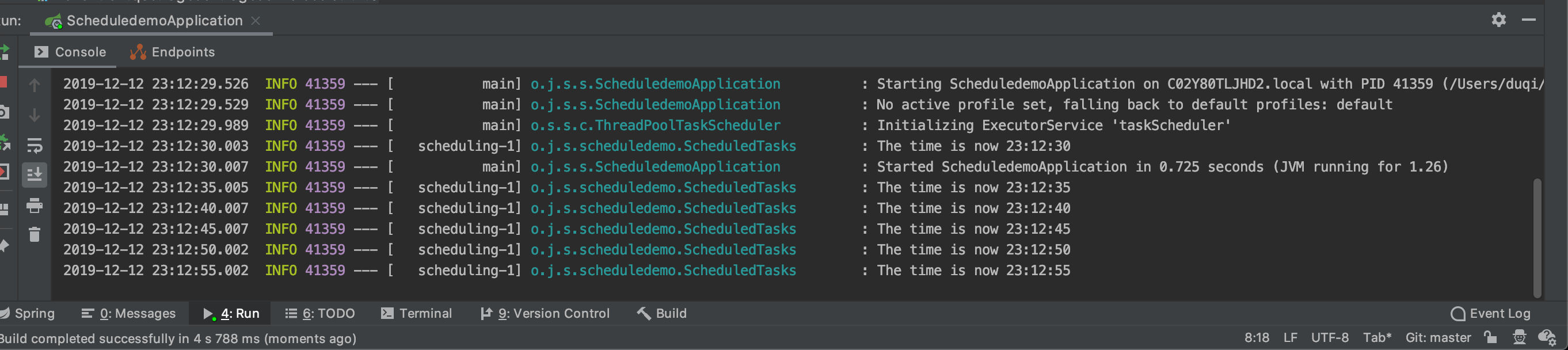
点击运行后,该demo的运行结果如下,可以看出,23:15:35应用启动,过了10秒钟定时调度任务才开始执行,然后是每隔5秒钟打印一次时间。
分析解释
我们一起来看下@Scheduled注解的源码,看看除了上面的例子里提供的案例,该注解还有哪些功能呢?
- cron,可以支持更复杂的时间复杂度
- zone,解析cron表达式的时候解析时区
- fixedDelay(和fixedDelayString),两次调度之间需要加一个固定的延迟
- fixedRate(和fixedRateString),没隔多久需要调度一次
- initialDelay(和initialDelayString),第一次调度之前需要延迟多久
@Target({ElementType.METHOD, ElementType.ANNOTATION_TYPE})

@Retention(RetentionPolicy.RUNTIME)

@Documented

@Repeatable(Schedules.class)

public @interface Scheduled {

	/**

	 * 特殊的cron表达式,如果设置成这个值,则表示将定时调度器关闭,不再调度。

	 */

	String CRON_DISABLED = ScheduledTaskRegistrar.CRON_DISABLED;

	/**

	 * cron表达式,可以支持复杂的定时调度需求

	 */

	String cron() default "";

	/**

	 * cron表达式解析的时候,解析依赖的时区

	 */

	String zone() default "";

	/**

	 * 两次调度触发之间暂停的毫秒数,Long类型

	 */

	long fixedDelay() default -1;

	/**

	 * 两次调度触发之间暂停的毫秒数,String类型

	 */

	String fixedDelayString() default "";

	/**

	 * 每隔几毫秒调度一次

	 */

	long fixedRate() default -1;

	/**

	 * 每隔几毫秒调度一次,String类型

	 */

	String fixedRateString() default "";

	/**

	 * 第一次执行之前,延迟多少毫秒

	 */

	long initialDelay() default -1;

	/**

	 * 第一次执行之前,延迟多少毫秒,String类型

	 */

	String initialDelayString() default "";

}
来源:吉林网站优化
Spring Boot 2.x实战之定时任务调度的更多相关文章
- Spring Boot 揭秘与实战 附录 - Spring Boot 公共配置
Spring Boot 公共配置,配置 application.properties/application.yml 文件中. 摘自:http://docs.spring.io/spring-boot ...
- Spring Boot 揭秘与实战 自己实现一个简单的自动配置模块
文章目录 1. 实战的开端 – Maven搭建 2. 参数的配置 - 属性参数类 3. 真的很简单 - 简单的服务类 4. 自动配置的核心 - 自动配置类 5. spring.factories 不要 ...
- Spring Boot 揭秘与实战 源码分析 - 工作原理剖析
文章目录 1. EnableAutoConfiguration 帮助我们做了什么 2. 配置参数类 – FreeMarkerProperties 3. 自动配置类 – FreeMarkerAutoCo ...
- Spring Boot 揭秘与实战 源码分析 - 开箱即用,内藏玄机
文章目录 1. 开箱即用,内藏玄机 2. 总结 3. 源代码 Spring Boot提供了很多”开箱即用“的依赖模块,那么,Spring Boot 如何巧妙的做到开箱即用,自动配置的呢? 开箱即用,内 ...
- Spring Boot 揭秘与实战(九) 应用监控篇 - 自定义监控端点
文章目录 1. 继承 AbstractEndpoint 抽象类 2. 创建端点配置类 3. 运行 4. 源代码 Spring Boot 提供的端点不能满足我们的业务需求时,我们可以自定义一个端点. 本 ...
- Spring Boot 揭秘与实战(九) 应用监控篇 - HTTP 健康监控
文章目录 1. 内置 HealthIndicator 监控检测 2. 自定义 HealthIndicator 监控检测 3. 源代码 Health 信息是从 ApplicationContext 中所 ...
- Spring Boot 揭秘与实战(九) 应用监控篇 - HTTP 应用监控
文章目录 1. 快速开始 2. 监控和管理端点3. 定制端点 2.1. health 应用健康指标 2.2. info 查看应用信息 2.3. metrics 应用基本指标 2.4. trace 基本 ...
- Spring Boot 揭秘与实战(八) 发布与部署 - 远程调试
文章目录 1. 依赖 2. 部署 3. 调试 4. 源代码 设置远程调试,可以在正式环境上随时跟踪与调试生产故障. 依赖 在 pom.xml 中增加远程调试依赖. <plugins> &l ...
- Spring Boot 揭秘与实战(八) 发布与部署 - 开发热部署
文章目录 1. spring-boot-devtools 实现热部署 2. Spring Loaded 实现热部署 3. 模板文件热部署 4. 源代码 Spring Boot 支持页面与类文件的热部署 ...
随机推荐
- 使用Python快速实现简单的人脸检测
最近有个比较要好的朋友问我能不能从监控视频里识别到从监控跟前经过的指定的人.因为他们单位的监控室经常要花大量的人力跟时间去找某个人在哪个位置出现过的证据.听起来像是一份比较有挑战性的任务,就答应他试试 ...
- PB Event ID 含义 内容浅析2 未公开的数据窗口事件
原网址:https://www.cnblogs.com/lenya/archive/2010/11/12/3706971.html (作者:Mark Brown) 到目前为止,P ...
- SQL Server 2012使用日常
SQL Server 2012个人使用日常(持续完善中) 1.查询筛选 2.修改数据
- 匿名对象序列化为XML
using System; using System.Collections.Generic; using System.Linq; using System.Text; using System.X ...
- Web应用和Web框架
一.Web应用 二.Web框架 三.wsgiref模块 一.Web应用 1.什么是Web应用? Web应用程序是一种可以通过Web访问的应用程序,特点是用户很容易访问,只需要有浏览器即可,不需要安装其 ...
- OO第四单元(UML)单元总结
OO第四单元(UML)单元总结 这是OO课程的第四个单元,也是最后一个单元.这个单元只有两次作业,相比前三个单元少一次作业.而且从内容上讲这个单元的作业目的以了解UML为主,所以相对前三个单元比较简单 ...
- 阿里企业邮箱smtp设置
阿里的邮箱没有SMTP授权码信息 SMTP服务器:smtp.mxhichina.com
- iOS - Base64转图片&&图片转Base64
记录一个小功能 app传base64位上去,服务器拿到后转图片保存,当app请求拿回用户图片时,服务器再把图片转base64字符串返回给app,app再转图片 // 64base字符串转图片 - (U ...
- ColdFusion 编写WebService 示例
1.开发 Web Services,编写cfcdemo.cfc组件,代码如下: <cfcomponent style ="document" namespace = &quo ...
- Qt环境搭建
下载 qtcreator:http://download.qt.io/official_releases/qtcreator/ 编译器(mingw):http://download.qt.io/dev ...