
ansible-playbook实例
准备前提
配置ansible主机详情:https://www.cnblogs.com/security-guard/
nginx的安装
编写nginx的自动部署文件nginx.yml hosts主机更改为自己定义的
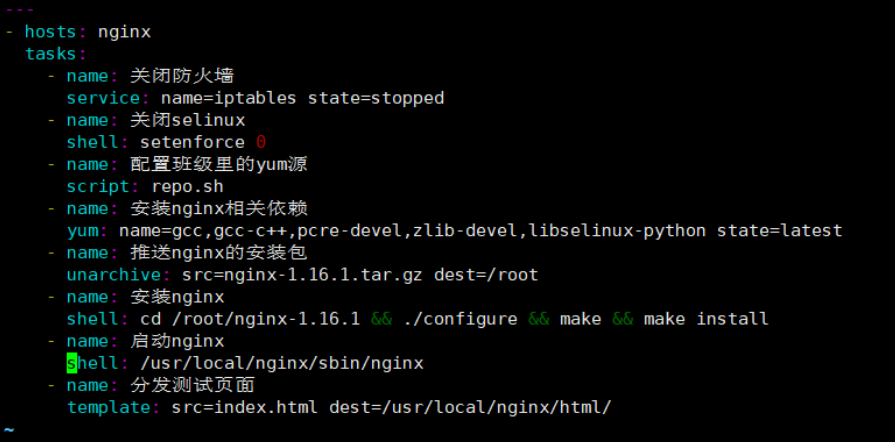
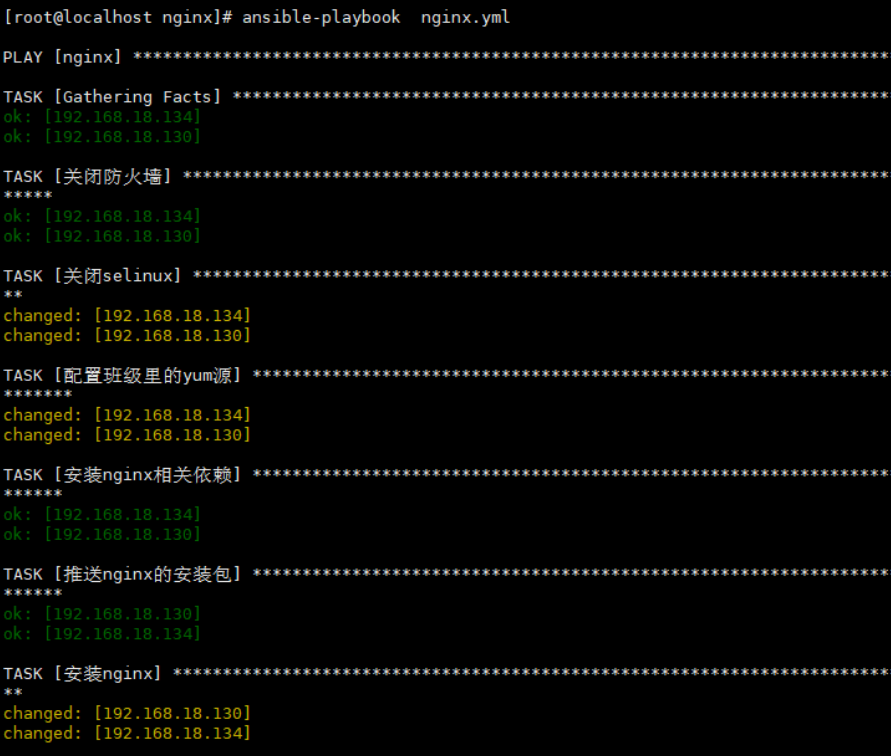
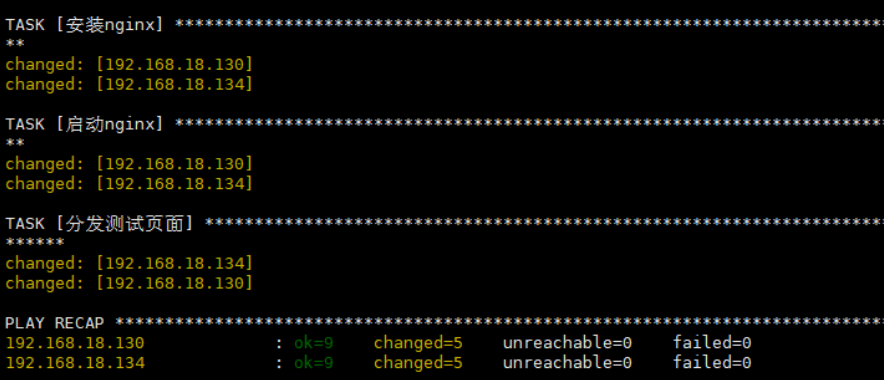
访问目标主机组的IP地址,查看测试页面
测试页面:显示的是本机ip
<h1>{{ansible_all_ipv4_addresses}}</h1>
lnmp架构自动部署
首先免密登录配置
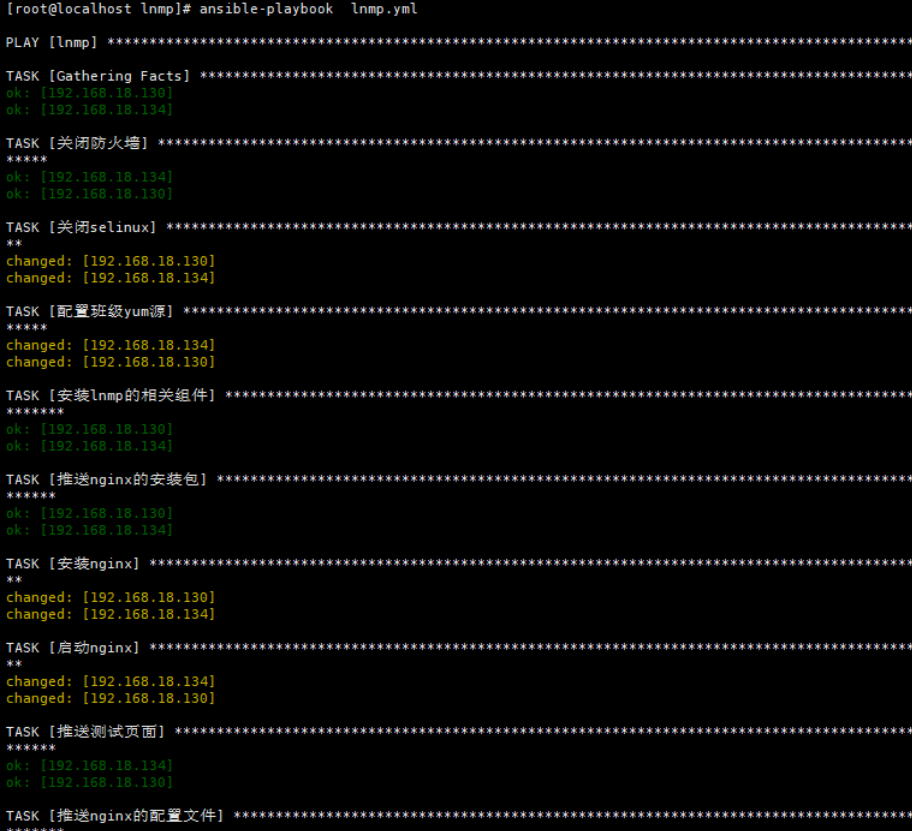
编写lnmp的脚本 lnmp.yml
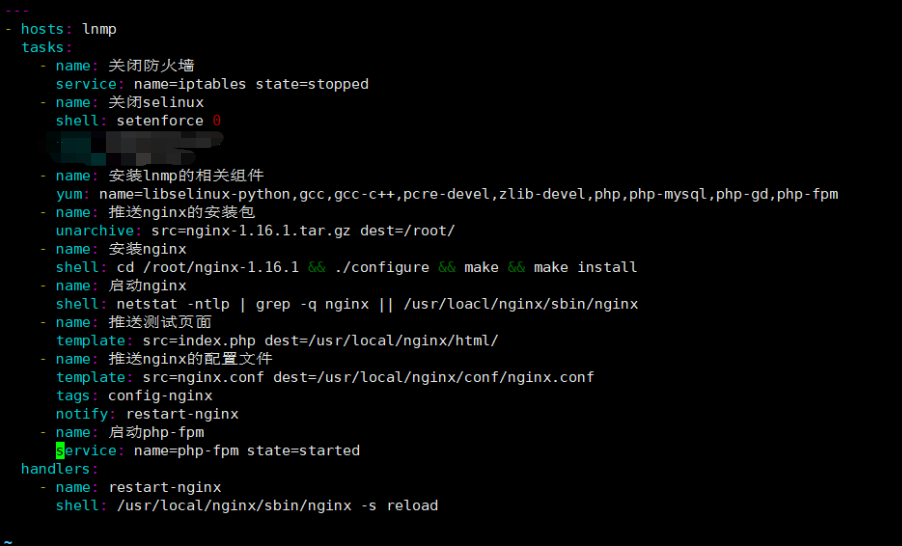
结果:

ansible自动部署tomcat
---

- hosts: tomcat

  tasks:

    - name: 关闭防火墙

      service: name=iptables state=stopped

    - name: 关闭selinux

      shell: setenforce 0

    - name: 安装所需的软件

      yum: name=tar,libselinux-python state=latest

    - name: 推送jdk java环境

      copy: src=jdk-8u131-linux-x64_.rpm dest=/root

    - name: 创建文件夹

      file: path=/opt/tomcat state=directory

    - name: 推送tomcat的压缩包

      unarchive: src=apache-tomcat-8.5.35.tar.gz dest=/opt/tomcat

    - name: 安装jdk

      yum: name=jdk-8u131-linux-x64_.rpm state=installed

    - name: 启动tomcat

      shell: nohup /opt/tomcat/apache-tomcat-8.5.35/bin/startup.sh &
Ansible自动部署lnmp架构+上线电商
---

- hosts: lnmp

  tasks:

    - name: 关闭防火墙

      service: name=iptables state=stopped

    - name: 关闭selinux

      shell: setenforce 0

    - name: 配置相关组件以及MySQL

      yum: name=zlib-devel,pcre-devel,gcc,gcc-c++,php,php-mysql,php-gd,php-fpm,libselinux-python,tar,vim,unzip state=latest

    - name: 推送nginx安装包

      unarchive: src=nginx-1.16.1.tar.gz dest=/root

    - name: 安装nginx

      shell: cd /root/nginx-1.16.1 && ./configure && make && make install

    - name: 启动nginx

      shell: netstat -ntlp | grep -q nginx || /usr/local/nginx/sbin/nginx

    - name: 推送ningx的配置文件

      template: src=nginx.conf dest=/usr/local/nginx/conf/nginx.conf

      tags: config-nginx

      notify: restart-nginx

    - name: 启动php-fpm

      service: name=php-fpm state=started

    - name: 安装mysql

      yum: name=mysql,mysql-server state=latest

    - name: 启动mysql

      service: name=mysqld state=started

    - name: 删除数据库如果存在

      shell: mysql -e "drop database if exists ds;"

    - name: 创建数据库

      shell: mysql -e "create database ds charset=utf8;"

    - name: 给用户授权

      shell: mysql -e "grant all on *.* to 'tom'@'%' identified by '123';"

    - name: 刷新权限

      shell: mysql -e "flush privileges;"

    - name: 推送电商的安装包并给予权限

      unarchive: src=tinyshopV2.5_data.zip dest=/usr/local/nginx/html/ mode=777

  handlers:

    - name: restart-nginx

      shell: /usr/local/nginx/sbin/nginx -s reload
Ansible自动部署Zabbix
要求操作系统:centos7
[root@localhost zabbix]# rpm -ivh http://repo.zabbix.com/zabbix/4.4/rhel/7/x86_64/zabbix-release-4.4-1.el7.noarch.rpm

获取http://repo.zabbix.com/zabbix/4.4/rhel/7/x86_64/zabbix-release-4.4-1.el7.noarch.rpm

警告:/var/tmp/rpm-tmp.MEfeuA: 头V4 RSA/SHA512 Signature, 密钥 ID a14fe591: NOKEY

准备中...                          ################################# [100%]

正在升级/安装...

   1:zabbix-release-4.4-1.el7         ################################# [100%]

[root@localhost ~]# yum -y install zabbix-server-mysql zabbix-web-mysql zabbix-apache-conf zabbix-agent

[root@localhost ~]# yum -y install mariadb mariadb-server

[root@localhost ~]# systemctl start mariadb

[root@localhost ~]# systemctl enable mariadb

[root@localhost ~]# mysql

Welcome to the MariaDB monitor.  Commands end with ; or \g.

Your MariaDB connection id is 2

Server version: 5.5.64-MariaDB MariaDB Server

Copyright (c) 2000, 2018, Oracle, MariaDB Corporation Ab and others.

Type 'help;' or '\h' for help. Type '\c' to clear the current input statement.

MariaDB [(none)]> create database zabbix charset=utf8;

Query OK, 1 row affected (0.00 sec)

MariaDB [(none)]> grant all on *.* to 'zabbix'@'localhost' identified by '123';

Query OK, 0 rows affected (0.00 sec)

MariaDB [(none)]> flush privileges;

Query OK, 0 rows affected (0.00 sec)

MariaDB [(none)]> exit

Bye

[root@localhost ~]# cd /usr/share/doc/zabbix-server-mysql-4.4.1/

[root@localhost zabbix-server-mysql-4.4.1]# ls

AUTHORS  ChangeLog  COPYING  create.sql.gz  NEWS  README

[root@localhost zabbix-server-mysql-4.4.1]# zcat create.sql.gz | mysql -uzabbix -p123 zabbix

[root@localhost ~]# vim /etc/zabbix/zabbix_server.conf

  DBName=zabbix  //创建的数据库的名字

  DBUser=zabbix  //用户

  DBPassword=123 //用户的密码

[root@localhost ~]# vim /etc/httpd/conf.d/zabbix.conf

  php_value date.timezone Asia/Shanghai

[root@localhost ~]# systemctl restart httpd zabbix-server zabbix-agent
ansible-playbook实例的更多相关文章
- 【Ansible】Playbook实例
Learn to build Ansible playbooks with our guide, one step at a time In our previous posts, we introd ...
- ansible playbook详解
ansible playbook是由yml语法书写,结构清晰,可读性强,所以必须掌握yml基础语法 语法 描述 缩进 YAML使用固定的缩进风格表示层级结构,每个缩进由两个空格组成,不能使用tabs键 ...
- Ansible playbook API 开发 调用测试
Ansible是Agentless的轻量级批量配置管理工具,由于出现的比较晚(13年)基于Ansible进行开发的相关文档较少,因此,这里通过一些小的实验,结合现有资料以及源码,探索一下Ansible ...
- ansible playbook实践(四)-如何调试写好的playbook文件
有时,我们写了一个长长,功能很强悍的yaml文件,但是,我们有可能会担心,写的yaml文件是否正确,是否有漏洞危机,毕竟是要修改线上的机器,那么,有可能我们可以从以下几个检查维度来进行,确保在大规模应 ...
- ansible playbook批量改ssh配置文件,远程用户Permission denied
最近手里的数百台服务器需要改/etc/ssh/sshd_config的参数,禁止root直接登陆,也就是说 [root@t0 ~]# cat /etc/ssh/sshd_config | grep R ...
- ansible笔记(11):初识ansible playbook(二)
ansible笔记():初识ansible playbook(二) 有前文作为基础,如下示例是非常容易理解的: --- - hosts: test211 remote_user: root tasks ...
- ansible笔记(10):初识ansible playbook
ansible笔记():初识ansible playbook 假设,我们想要在test70主机上安装nginx并启动,我们可以在ansible主机中执行如下3条命令 ansible test70 -m ...
- Ansible playbook 批量修改服务器密码 先普通后root用户
fsckzy Ansible playbook 批量修改服务器密码 客户的需求:修改所有服务器密码,密码规则为Rfv5%+主机名后3位 背景:服务器有CentOS6.7,SuSE9.10.11,r ...
- 写Ansible playbook添加zabbix被监控的对象
本主题达到的效果是能通过编写Ansible Playbook,创建zabbix主机组,把被监控的对象加入到zabbix监控系统中,同时链接到对象的模板. 1.准备工作 在zabbix服务器上面,我们需 ...
- Ansible playbook基础组件介绍
本节内容: ansible playbook介绍 ansible playbook基础组件 playbook中使用变量 一.ansible playbook介绍 playbook是由一个或多个“pla ...
随机推荐
- java json解析(转)
转自:https://www.cnblogs.com/sunnywindycloudy/p/8343013.html 给服务端发送请求后,服务端会返回一连串的数据,这些数据在大部分情况下都是XML格式 ...
- Python处理数据集-2
原数据集的数据格式: 每行为:(test_User, test_Item) negativeItem1 negativeItem2 negativeItem3 …… negativeItem99 即每 ...
- luogu P3853 [TJOI2007]路标设置 |二分
题目背景 B市和T市之间有一条长长的高速公路,这条公路的某些地方设有路标,但是大家都感觉路标设得太少了,相邻两个路标之间往往隔着相当长的一段距离.为了便于研究这个问题,我们把公路上相邻路标的最大距离定 ...
- linux搜索log文件的内容
日志一般是记载每天所做的工作.在计算机科学中,日志是指服务器等电脑设备或软件的运作记录(Server log).在电脑设备和软件出现问题时,日志是我们在排查问题的一个重要依据.查询日志是用户记录从客户 ...
- Deep Learning专栏--FFM+Recurrent Entity Network的端到端方案
很久没有写总结了,这篇博客仅作为最近的一些尝试内容,记录一些心得.FFM的优势是可以处理高维稀疏样本的特征组合,已经在无数的CTR预估比赛和工业界中广泛应用,此外,其也可以与Deep Networks ...
- 前端图片canvas,file,blob,DataURL等格式转换
将file转化成base64 方法一:利用URL.createObjectURL() <!DOCTYPE html> <html> <head> <title ...
- Git 核心概念
原文链接 Git的核心概念 聪聪的个人网站 本文不是Git使用教学篇,而是偏向理论方面,旨在更加深刻的理解Git,这样才能更好的使用它,让工具成为我们得力的助手. 版本控制系统 Git 是目前世界上最 ...
- P2352 队爷的新书(差分)
题目 P2352 队爷的新书 解析 题目意思是 给你n个区间,选择一个数x,使\(x\times覆盖x的区间个数\) 最大 和这个题差不多 差分,离散化一下,在区间的\(l\)处\(+1\),\(r+ ...
- day 48
目录 js BOM(浏览器对象模型) window对象 window子对象 弹出框 计时事件 DOM(文档对象模型) 查找标签 节点操作 事件 常用事件 绑定方式 jQuery jQuery介绍 jQ ...
- windows下搭建vue+webpack的开发环境
1. 安装git其右键git bash here定位比cmd的命令行要准确,接下来的命令都是利用git bash here.2. 安装node.js一般利用vue创建项目是要搭配webpack项目构建 ...