
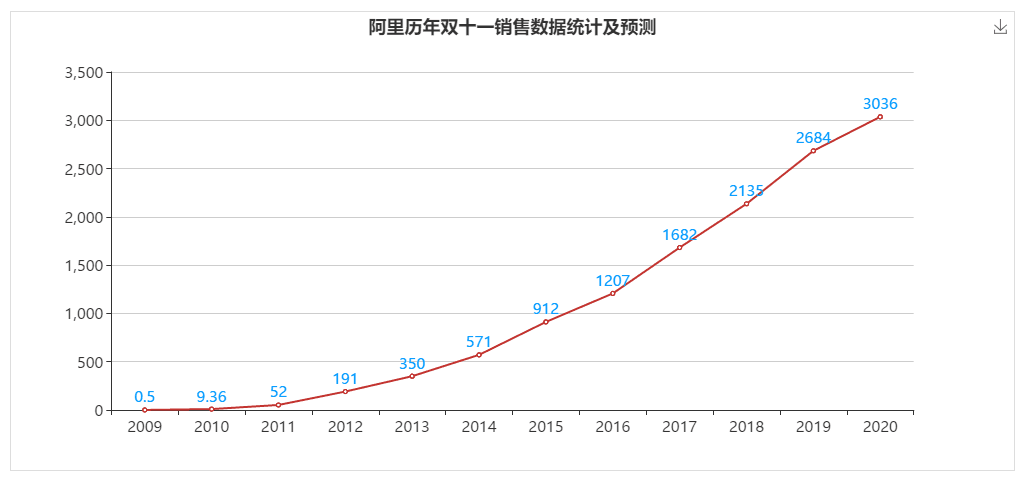
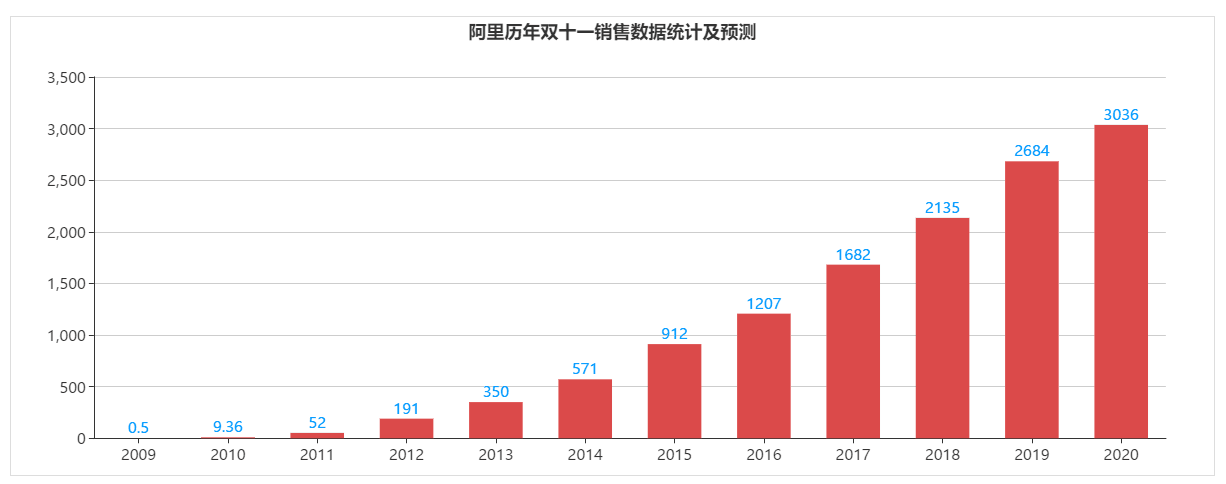
echarjs—阿里历年双十一销售数据统计及预测
阿里双十一数据统计
<!DOCTYPE html>

<html>

  <head>

  <title>阿里历年双十一销售数据统计及预测</title>


  <meta http-equiv="pragma" content="no-cache">

  <meta http-equiv="cache-control" content="no-cache">

  <meta http-equiv="expires" content="0">

  <meta http-equiv="keywords" content="keyword1,keyword2,keyword3">

  <meta http-equiv="description" content="This is my page">

  <link rel="stylesheet" href="css/bootstrap.min.css">


</head>

<body>

    <section class="hj-second-page-section">

      <div class="container-fluid">

        <div class="rows">

          <div class="col-xs-12 col-sm-12 col-md-12 col-lg-12">

            <div class="rows">

              <div class="col-xs-12 col-sm-12 col-md-12 col-lg-12 hj-jumbotron-div">

                <div class="panel panel-primary ng-scope">


                 <!-- pannel start -->

                 <div class="panel-body vc-pannel-body-toggle">

                     <div class="rows ng-scope">

                       <div class="panel-body vc-msg-panel-body">

                         <div class="row">


                          <div class="col-xs-12 col-sm-12 col-md-6 col-lg-6">

                             <div id="rt_chart1" style=""></div>

                          </div>


                         </div>

                      </div>

                     </div>


                 </div>


                 <!-- pannel end -->

                </div>

              </div>

            </div>

          </div>

        </div>

      </div>

    </section>


    <script src="js/echarts2.js"></script>

    <script src="js/jquery-2.2.3.min.js"></script>


    <script>

      /**

       * @description 绘制折线图

       * @date 2019-11-13

       * @param

       */

      function initChart1() {

        $("#rt_chart1").height(460);

        $("#rt_chart1").width(1005);

        $("#rt_chart1").css("border","1px solid #ddd");

        var myChart1 = echarts.init(document.getElementById("rt_chart1"));

        var option1 = {

                title: {

                    text: '阿里历年双十一销售数据统计及预测',

                    //subtext: '数据来源于网络',

                    sublink: '',

                    left: 'center'

                },

                tooltip : {

            trigger: 'axis'

          },

                toolbox: {

                    show: true,

                    feature: {

                        saveAsImage: {}

                    }

                },

                legend: {

            data:[2009,2010,2011,2012,2013,2014,2015,2016,2017,2018,2019,2020]

          },

                xAxis: {

                    type: 'category',

                    data: [2009,2010,2011,2012,2013,2014,2015,2016,2017,2018,2019,2020]

                },

                yAxis: {

                    type: 'value'

                },

                series: [{

                    itemStyle: {

                             normal: {

                                 label: {

                                     show: true,

                                     position: 'top',

                                     textStyle: {

                                         color: '#0099ff'

                                     }

                                 }

                            }

                       },

                    data: [0.5,9.36,52.0,191.0,350.0,571.0,912.0,1207.0,1682.0,2135.0,2684.0,3036.0],

                    type: 'line'

                }]

            };


        // 为echarts对象加载数据

        myChart1.setOption(option1);

      }

      initChart1();

    </script>

</body>

</html>
<!DOCTYPE html>

<html>

  <head>

  <title>阿里历年双十一销售数据统计及预测</title>


  <meta http-equiv="pragma" content="no-cache">

  <meta http-equiv="cache-control" content="no-cache">

  <meta http-equiv="expires" content="0">

  <meta http-equiv="keywords" content="keyword1,keyword2,keyword3">

  <meta http-equiv="description" content="This is my page">

  <link rel="stylesheet" href="css/bootstrap.min.css">


</head>

<body>

    <section class="hj-second-page-section">

      <div class="container-fluid">

        <div class="rows">

          <div class="col-xs-12 col-sm-12 col-md-12 col-lg-12">

            <div class="rows">

              <div class="col-xs-12 col-sm-12 col-md-12 col-lg-12 hj-jumbotron-div">

                <div class="panel panel-primary ng-scope">


                 <!-- pannel start -->

                 <div class="panel-body vc-pannel-body-toggle">

                     <div class="rows ng-scope">

                       <div class="panel-body vc-msg-panel-body">

                         <div class="row">


                          <div class="col-xs-12 col-sm-12 col-md-6 col-lg-6">

                             <div id="rt_chart1" style=""></div>

                          </div>


                         </div>

                      </div>

                     </div>


                 </div>


                 <!-- pannel end -->

                </div>

              </div>

            </div>

          </div>

        </div>

      </div>

    </section>


    <script src="js/echarts2.js"></script>

    <script src="js/jquery-2.2.3.min.js"></script>


    <script>

      /**

       * @description 绘制柱状图

       * @date 2019-11-13

       * @param

       */

      function initChart1() {

        $("#rt_chart1").height(460);

        $("#rt_chart1").width(1205);

        $("#rt_chart1").css("border","1px solid #ddd");

        var myChart1 = echarts.init(document.getElementById("rt_chart1"));

        //var option1 = {

            var  option1 = {

                    title : {

                        text: '阿里历年双十一销售数据统计及预测',

                        //subtext: '数据来源于网络',

                        left: 'center'

                    },

                    color: ['#DB4B4B'],

                    tooltip : {

                        trigger: 'axis',

                        axisPointer : {            // 坐标轴指示器,坐标轴触发有效

                            type : 'shadow'        // 默认为直线,可选为:'line' | 'shadow'

                        }

                    },

                    grid: {

                        left: '3%',

                        right: '4%',

                        bottom: '3%',

                        containLabel: true

                    },

                    xAxis : [

                        {

                            type : 'category',

                            data:[2009,2010,2011,2012,2013,2014,2015,2016,2017,2018,2019,2020],

                            axisTick: {

                                alignWithLabel: true

                            },

                            axisLabel: {

                                interval:0

                            }

                        }

                    ],

                    yAxis : [

                        {

                            type : 'value'

                        }

                    ],

                    series : [

                        {

                            itemStyle: {

                                     normal: {

                                         label: {

                                             show: true,

                                             position: 'top',

                                             textStyle: {

                                                 color: '#0099ff'

                                             }

                                         }

                                    }

                               },

                            name:'亿元',

                            type:'bar',

                            barWidth: '60%',

                            data:[0.5,9.36,52.0,191.0,350.0,571.0,912.0,1207.0,1682.0,2135.0,2684.0,3036.0]

                        }

                    ]

                };

        // 为echarts对象加载数据

        myChart1.setOption(option1);

      }

      initChart1();

    </script>

</body>

</html>
echarjs—阿里历年双十一销售数据统计及预测的更多相关文章
- 浅析 阿里 OceanBase 双十一 淘宝天猫 天量交易 承载能力 原理
我们先看看 这 2 篇文章: <秘诀!支付宝支撑双十一4200万次/秒的数据库请求峰值的技术实现> https://mp.weixin.qq.com/s?__biz=MzI3MzEzMD ...
- 阿里历年经典Java面试题汇总,想进BAT你还不快收藏!
转载:https://mp.weixin.qq.com/s/M8YyxloxZnMACH9QCQN7HA Volatile的特征: A.禁止指令重排(有例外) B.可见性 Volatile的内存语义: ...
- 阿里历年经典Java面试题汇总
Volatile的特征: A.禁止指令重排(有例外) B.可见性 Volatile的内存语义: 当写一个volatile变量时,JMM会把线程对应的本地内存中的共享变量值刷新到主内存. 当读一个vol ...
- iOS开发工具篇-AppStore统计工具 (转载)
随着iOS开发的流行,针对iOS开发涉及的方方面面,早有一些公司提供了专门的解决方案或工具.这些解决方案或工具包括:用户行为统计工具(友盟,Flurry,Google Analytics等), App ...
- 阿里云资深DBA专家罗龙九:云数据库十大经典案例分析【转载】
阿里云资深DBA专家罗龙九:云数据库十大经典案例分析 2016-07-21 06:33 本文已获阿里云授权发布,转载具体要求见文末 摘要:本文根据阿里云资深DBA专家罗龙九在首届阿里巴巴在线峰会的&l ...
- 2018年Android的保活方案效果统计
一.常见保活方案 1.监听广播:监听全局的静态广播,比如时间更新的广播.开机广播.解锁屏.网络状态.解锁加锁亮屏暗屏(3.1版本),高版本需要应用开机后运行一次才能监听这些系统广播,目前此方案失效.可 ...
- 教你用ActiveReports分析京东双十一数据的价值
随着双十一购物盛会落下帷幕,各大电商平台纷纷公布出自己今年的成绩.与其它同行不同的是,京东除了公布1598亿的线上下单金额,还公布了线上线下融合的战果. 面对京东线上.线下海量数据源,我们该如何进行整 ...
- iOS开发工具篇-AppStore统计工具
本文转载至 http://mobile.51cto.com/hot-418183.htm 随着iOS开发的流行,针对iOS开发涉及的方方面面,早有一些公司提供了专门的解决方案或工具.这些解决方案或工具 ...
- iOS开发工具篇-AppStore统计工具
苹果官方的iTunes Connect提供的销售数据统计功能比较弱,例如只能保存最近30天的详细销售数据,界面丑陋, 无法查看App的排名历史变化情况等. 早有一些公司提供了专门的解决方案或工具.这些 ...
随机推荐
- 无法将“ng”项识别为 cmdlet、函数、脚本文件或可运行程序的名称。 通用解决方案
1.找到你安装的路径 以@angular/cli 为例 (找到 ng.cmd 这个指令的具体位置) 2. 右键 这台电脑 添加路径到 系统变量的 Path中, 如下图 3.关闭所有的 cmd,并重新打 ...
- 【监控】jvisualvm之jmx远程连接 jar启动应用
一.Java -jar启动添加如下参数就可以了 -Dcom.sun.management.jmxremote -Djava.rmi.server.hostname=127.0.0.1 -Dcom.su ...
- k8s node节点部署(v1.13.10)
系统环境: node节点 操作系统: CentOS-7-x86_64-DVD-1908.iso node节点 IP地址: 192.168.1.204 node节点 hostname(主机名, 请和保持 ...
- Rendering in UE4
Intro Thinking performance. Identify the target framerate, aim your approach on hitting that target ...
- 项目Alpha冲刺 7
作业描述 课程: 软件工程1916|W(福州大学) 作业要求: 项目Alpha冲刺(团队) 团队名称: 火鸡堂 作业目标: 介绍第7天冲刺的项目进展.问题困难和心得体会 1.团队信息 队名:火鸡堂 队 ...
- myeclipse常用快捷(持续更新)
最近开始转用myeclipse,总结一下快捷方式:(我喜欢用的) [Ctrl+O] 显示类中方法和属性的大纲,能快速定位类的方法和属性,在查找Bug时非常有用. [Ctrl+M] 窗口最大 ...
- java SSM面试题
1. 谈谈你mvc的理解MVC是Model—View—Controler的简称.即模型—视图—控制器.MVC是一种设计模式,它强制性的把应用程序的输入.处理和输出分开.MVC中的模型.视图.控制器它们 ...
- php+tcpdf如何把生成的pdf文件保存在服务端
tcpdf组件目前应用得非常广泛,但是对于如何把生成的pdf文件自动保存在服务端却很少有人提及.让我们先来看看标准输出代码: //服务器存档模式 $pdf->Output('output.p ...
- CLR 调试体系结构
公共语言运行时 (CLR) 调试 API 专门用作操作系统内核的一部分. 在非托管代码中,当程序生成异常时,内核将暂停执行进程,并使用 Win32 调试 API 将异常信息传递给调试器. CLR 调试 ...
- telegraf 学习二 几个概念
telegraf 自身包好了自己处理metrics 的数据模型,以及出炉方法 metrics Telegraf指标是用于在处理期间对数据建模的内部表示.这些指标完全基于InfluxDB的数据模型,包含 ...