
cxf简单实例
CXF是一个基于 Servlet 技术的 SOA 应用开发框架,简单来说,就是WebService的轻量级实现。
1、下载开发包:http://cxf.apache.org/download.html,选择相应的版本。
2、在eclipse创建maven web工程。
3、打开开发包实例的:java_first_spring_support,将java,resources, webapp复制到工程。
4、复制pom.xml文件到工程,将工程名称修改成自己创建的工程,如:
<project xmlns="http://maven.apache.org/POM/4.0.0" xmlns:xsi="http://www.w3.org/2001/XMLSchema-instance"

xsi:schemaLocation="http://maven.apache.org/POM/4.0.0 http://maven.apache.org/maven-v4_0_0.xsd">

  <modelVersion>4.0.0</modelVersion>

  <groupId>jaxws</groupId>

  <artifactId>jaxws</artifactId>

  <version>0.0.1-SNAPSHOT</version>

  <name>jaxws Maven Webapp</name>

  <description>Spring HTTP Sample</description>

  <packaging>war</packaging>

   <properties>

        <cxf.version>${project.version}</cxf.version>

        <cxf.release.base>${basedir}/../..</cxf.release.base>

    </properties>

    <build>

        <plugins>

            <plugin>

                <artifactId>maven-war-plugin</artifactId>

                <version>2.1</version>

                <configuration>

                    <webXml>src/main/webapp/WEB-INF/web.xml</webXml>

                </configuration>

            </plugin>

        </plugins>

        <finalName>JavaFirstSpringSupport</finalName>

    </build>

    <profiles>

        <profile>

            <id>server</id>

            <build>

                <defaultGoal>test</defaultGoal>

                <plugins>

                    <plugin>

                        <groupId>org.codehaus.mojo</groupId>

                        <artifactId>exec-maven-plugin</artifactId>

                        <executions>

                            <execution>

                                <phase>test</phase>

                                <goals>

                                    <goal>java</goal>

                                </goals>

                                <configuration>

                                    <mainClass>demo.spring.service.Server</mainClass>

                                </configuration>

                            </execution>

                        </executions>

                    </plugin>

                </plugins>

            </build>

        </profile>

        <profile>

            <id>client</id>

            <build>

                <defaultGoal>test</defaultGoal>

                <plugins>

                    <plugin>

                        <groupId>org.codehaus.mojo</groupId>

                        <artifactId>exec-maven-plugin</artifactId>

                        <executions>

                            <execution>

                                <phase>test</phase>

                                <goals>

                                    <goal>java</goal>

                                </goals>

                                <configuration>

                                    <mainClass>demo.spring.client.Client</mainClass>

                                </configuration>

                            </execution>

                        </executions>

                    </plugin>

                </plugins>

            </build>

        </profile>

    </profiles>

    <dependencies>

        <dependency>

            <groupId>org.apache.cxf</groupId>

            <artifactId>cxf-rt-frontend-jaxws</artifactId>

            <version>2.7.16</version>

        </dependency>

        <dependency>

            <groupId>org.apache.cxf</groupId>

            <artifactId>cxf-rt-transports-http</artifactId>

            <version>2.7.16</version>

        </dependency>

        <dependency>

            <groupId>org.apache.cxf</groupId>

            <artifactId>cxf-rt-transports-http-jetty</artifactId>

            <version>2.7.16</version>

        </dependency>

        <dependency>

            <groupId>org.springframework</groupId>

            <artifactId>spring-context</artifactId>

            <version>3.0.7.RELEASE</version>

        </dependency>

        <dependency>

            <groupId>org.springframework</groupId>

            <artifactId>spring-web</artifactId>

            <version>3.0.7.RELEASE</version>

        </dependency>

        <dependency>

            <groupId>org.eclipse.jetty</groupId>

            <artifactId>jetty-webapp</artifactId>

            <version>8.1.5.v20120716</version>

        </dependency>

    </dependencies>

</project>
5、完成后目录结构如图: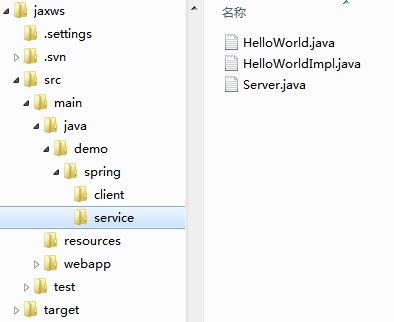
6、运行项目。
7、配置resouces中client_bean.xml中地址符合你本地的服务,运行Client.java,访问成功。
package demo.spring.client;

import org.springframework.context.support.ClassPathXmlApplicationContext;

import demo.spring.service.HelloWorld;

public final class Client {

    private Client() {

    }

    public static void main(String args[]) throws Exception {

        // START SNIPPET: client

        ClassPathXmlApplicationContext context

            = new ClassPathXmlApplicationContext(new String[] {"client-beans.xml"});

        HelloWorld client = (HelloWorld)context.getBean("client");

        String response = client.sayHi("Joe");

        System.out.println("Response: " + response);

        System.exit(0);

        // END SNIPPET: client

    }

}
cxf简单实例的更多相关文章
- Hibernate(二)__简单实例入门
首先我们进一步理解什么是对象关系映射模型? 它将对数据库中数据的处理转化为对对象的处理.如下图所示: 入门简单实例: hiberante 可以用在 j2se 项目,也可以用在 j2ee (web项目中 ...
- 最新 Eclipse IDE下的Spring框架配置及简单实例
前段时间开始着手学习Spring框架,又是买书又是看视频找教程的,可是鲜有介绍如何配置Spring+Eclipse的方法,现在将我的成功经验分享给大家. 本文的一些源代码来源于码农教程:http:// ...
- 修改js confirm alert 提示框文字的简单实例
修改js confirm alert 提示框文字的简单实例: <!DOCTYPE html> <html> <head lang="en"> & ...
- 利用navicat创建存储过程、触发器和使用游标的简单实例
利用navicat创建存储过程.触发器和使用游标的简单实例 标签: navicat存储过程触发器mysql游标 2013-08-03 21:34 15516人阅读 评论(1) 收藏 举报 分类: 数 ...
- 【转】Android Https服务器端和客户端简单实例
转载地址:http://blog.csdn.net/gf771115/article/details/7827233 AndroidHttps服务器端和客户端简单实例 工具介绍 Eclipse3.7 ...
- Centos7的安装、Docker1.12.3的安装,以及Docker Swarm集群的简单实例
目录 [TOC] 1.环境准备 本文中的案例会有四台机器,他们的Host和IP地址如下 c1 -> 10.0.0.31 c2 -> 10.0.0.32 c3 -> 10.0.0. ...
- vue路由的简单实例
vue2.0 和 vue1.0 路由的语法还是有点稍微的差别,下面介绍一下vue-router 2的简单实例: <!DOCTYPE html> <html lang="en ...
- Flume概述和简单实例
Flume概述 Flume是一个分布式.可靠.和高可用的海量日志采集.聚合和传输的系统.支持在日志系统中定制各类数据发送方,用于收集数据;同时,Flume提供对数据进行简单处理,并写到各种数据接受方( ...
- jsoup解析HTML及简单实例
jsoup 中文参考文献 http://www.open-open.com/jsoup/ 本文将利用jsoup,简单实现网络抓取的功能,并给出一个小实例,该实例效果为:获取作者本人在博客园写的所 ...
随机推荐
- java初级开发中的报错问题
1.典例1 错误原因:?useUnicode=true&characterEncoding=UTxF8 纠错:其中的? 是汉语的 2.典例2 纠错原因:数据库没有打开 纠错: 我的电脑-- ...
- 宽度的100%和auto的区别
前段时间做项目,发现分不清width设为100%和auto的区别,实在是太水了,就查了点资料,做个总结,有不对的地方欢迎大家指出. width:auto 块级元素默认的宽度值.看一下MDN上的解释:T ...
- 关于div 浮动在select,或table控件之上
<div style="position:absolute; display:none; z-index:99999" id="d3" onmouseov ...
- RedHat Install
1. 插入光盘1并从光盘启动加载镜像文件 2. 回车后进入安装流程 3. 选择语言 4. 选择键盘布局 5. 鼠标配置 6. 选择安装类型 7. 选择分区类型 8. 添加一个boot分区 9. 新建一 ...
- Python 字典(Dictionary) setdefault()方法
描述 Python 字典(Dictionary) setdefault() 函数和get()方法类似, 如果键不已经存在于字典中,将会添加键并将值设为默认值. 语法 setdefault()方法语法: ...
- JS学习第二课
<!DOCTYPE html> <html> <head> <meta charset="UTF-8"> <title> ...
- think in java 第四版读书笔记 第一章对象导论
很久没有碰过java了,为了项目需要以及以后找工作,还是有必要将think in java通读一遍.欢迎大家一起讨论学习 1.1抽象过程 面向对象语言的5个特性: 1.万物皆对象 任何事物都可以抽象为 ...
- OpenGL第6、7讲小结
因为内容比较多,所以只看了两讲(强行解释). 一讲讲了如何给各个面贴纹理,一讲讲了加光照和按键控制. 现在讲的都是给规则的面贴纹理,像正方形,刚好纹理图也是正方形,那像人物模型的衣服贴起来用代码控制得 ...
- Template_17_metaprogram
1,模板实例化机制是一种基本的递归语言机制,可以用于在编译期执行复杂计算.2,枚举值和静态常量在原来的C++编译器中,在类声明的内部,枚举值是声明"真常值"(常量表达式)的唯一方法 ...
- DB2&&oracle-培训内容
DB2 1 Data Sharing架构,高可用 2 DB2的对象主要有以下几类:database,storage group, Tablspace, indexspace, table,index ...