
Online Schema Upgrade in MySQL Galera Cluster using TOI Method
http://severalnines.com/blog/online-schema-upgrade-mysql-galera-cluster-using-toi-method
As a follow-up to the Webinar on Zero Downtime Schema Changes in Galera Cluster, we’ll now walk you through the detailed steps on how to update your schema. The two methods (TOI and RSU) have both their pros and cons, and given parameters like table size, indexes, key_buffer_size, disk speed, etc., it is possible to estimate the time taken for the schema to be upgraded. Also, please note that a schema change is non-transactional so it would not be possible to rollback the DDL if it fails midway. Therefore, it is always recommended to test the schema changes and ensure you have recoverable backups before performing this on your production clusters.
This post examines the way DDL changes are propagated in Galera, and outlines the steps to upgrade the schema using the TOI method with Percona’s pt-online-schema-change.
Schema Changes in MySQL
MySQL handle table altering by exporting the table data into a temporary table, changing the table structure, and then importing the data back into the table before finally rebuilding all the indexes. Thus, write blocking is the only choice to maintain data integrity. This stalls all the writes after the ALTER command has been issued, up until it completes.

Percona has built a tool to overcome this problem with its Percona Toolkit bundle called pt-online-schema-change. It allows altering of tables without locking them, and works in the following manner:
- Creates a shadow copy of target table
- Installs triggers in source table to forward updates to target table
- Copies source table data in small chunks to target table
- Renames target table to replace the source table
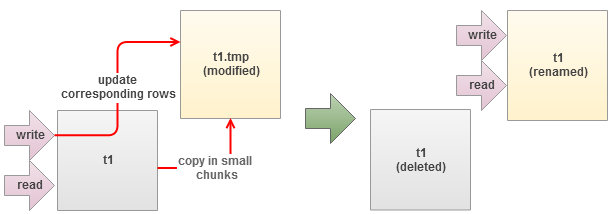
However, the tool will not work if any triggers are already defined on the table. For more detailed explanation about the tool, please refer to Percona Toolkit documentation page.
Schema Changes in Galera
DDL statements (ALTER, CREATE, RENAME, TRUNCATE, DROP) are replicated in statement level. Galera has two inbuilt methods in handling these statements:
- Total Order Isolation (TOI)
- Rolling Schema Upgrade (RSU)
Total Order Isolation
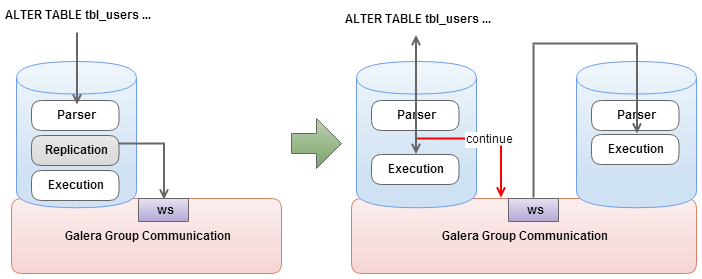
This is the default DDL replication method. Master node (node that originates the writeset) detects DDL at parsing time and sends out a replication event for the SQL statement before even starting the DDL processing. The DDL replication happens in STATEMENT format and every node in the cluster will process the replicated DDL at the same “slot” in the cluster transaction stream (comply to Total Order).
Rolling Schema Upgrade
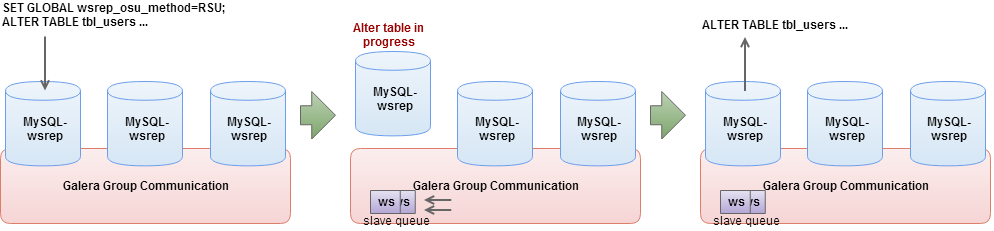
This method will desynchronize the node from replication for the duration of corresponding DDL command. All incoming replications are buffered and nothing will be replicated out of the node. When the DDL processing is over, the node will automatically join back in cluster and catch up missed transactions from the buffer (gcache). Adjust the gcache size big enough to contain the pending writesets and to allow IST after the DDL is over. Once the node has rejoined and caught up with the rest of the cluster, repeat the process on the next node in the cluster.
Comparison
| Total Order Isolation (TOI) | Rolling Schema Upgrade (RSU) | |
| Advantages |
|
|
| Disadvantages |
|
|
| Use Cases |
|
|
Performing Schema Upgrade
With respect to how Galera handles DDL statements, we have two categories of methods:
Instant method:
- TOI only – Perform schema upgrade to all nodes in the cluster. This method will lock the table similar to how default schema changes happened in MySQL.
- TOI with pt-online-schema-changes – Perform schema upgrade to all nodes in the cluster without locking up the table.
Rolling method:
- RSU with wsrep_desync and wsrep_on – Perform schema upgrade on the local node and keep receiving replication events but not sending out replication events. This method is good for non-conflicting operations and it will not slow down the cluster. Even though the upgraded node replicates writesets, in case of conflicts, note that the writeset will be aborted.
- RSU with node dropping – Perform schema upgrade on the local node in isolation mode where the designated node is taken out of the cluster. The node will not receiving/sending any replication events. When DDL is over, the node will automatically join the cluster and catch up on missed transactions from the buffer (gcache) . Joining the node back must only happen through IST.
Performing an online upgrade requires backward schema compatibility, whereby your application should be able to use both old and new schema. MySQL guarantees ROW replication event compatibility with some limitations:
- Source and target can have different number of columns
- Columns must be in the same order
- New columns in the end, and must have default values
- Some data type conversions are also supported
Newer MySQL versions tolerate more variation between source and target tables as described in details at MySQL Documentation page.
Step-by-step – Performing Online Schema Upgrade in Galera using TOI and pt-online-schema-change
Assume we have a table called tbl_points with 1.2 million of rows. We will add one column called remarks in the end using TOI method with pt-online-schema-changes. Here’s our table definition:
CREATE TABLE `tbl_points` (

  `id` int(11) NOT NULL AUTO_INCREMENT,

  `name` varchar(45) NOT NULL,

  `point` int(11) NOT NULL,

  `user_id` int(11) NOT NULL,

  PRIMARY KEY (`id`),

  KEY `fk_users_points_idx` (`user_id`),

  CONSTRAINT `fk_users_points` FOREIGN KEY (`user_id`) REFERENCES `tbl_users` (`id`) ON DELETE CASCADE ON UPDATE NO ACTION

) ENGINE=InnoDB AUTO_INCREMENT=3610262 DEFAULT CHARSET=latin1
1. Download and install Percona Toolkit on one of the DB node in primary component:
$ wget percona.com/get/percona-toolkit.rpm

$ rpm -Uhv percona-toolkit-2.2.5-2.noarch.rpm
2. Make sure wsrep_OSU_method value is TOI:
mysql> SHOW VARIABLES LIKE '%wsrep_osu%';

+------------------+-------+

| Variable_name    | Value |

+------------------+-------+

| wsrep_OSU_method | TOI   |

+------------------+-------+
3. Start the schema upgrade using pt-online-schema-change:
$ pt-online-schema-change -uroot -pMyR00tPassword --alter=”ADD COLUMN remarks VARCHAR(255)” D=mydb,T=tbl_points --execute

Operation, tries, wait:

  copy_rows, 10, 0.25

  create_triggers, 10, 1

  drop_triggers, 10, 1

  swap_tables, 10, 1

  update_foreign_keys, 10, 1

Altering `mydb`.`tbl_points`...

Creating new table...

Created new table mydb._tbl_points_new OK.

Altering new table...

Altered `mydb`.`_tbl_points_new` OK.

2013-12-10T10:09:44 Creating triggers...

2013-12-10T10:09:44 Created triggers OK.

2013-12-10T10:09:44 Copying approximately 1203656 rows...

...

Copying `mydb`.`tbl_points`:  97% 01:43 remain

Copying `mydb`.`tbl_points`:  98% 01:14 remain

Copying `mydb`.`tbl_points`:  98% 00:49 remain

Copying `mydb`.`tbl_points`:  99% 00:24 remain

2013-12-10T11:15:00 Copied rows OK.

2013-12-10T11:15:00 Swapping tables...

2013-12-10T11:15:01 Swapped original and new tables OK.

2013-12-10T11:15:01 Dropping old table...

2013-12-10T11:15:01 Dropped old table `mydb`.`_tbl_points_old` OK.

2013-12-10T11:15:01 Dropping triggers...

2013-12-10T11:15:01 Dropped triggers OK.

Successfully altered `mydb`.`tbl_points`.
The copy process is performed in small chunks of data, which are varied to attempt to make them execute in a specific amount of time. The tool also reports the remaining time for copying, which is especially helpful when estimating the operation time. At the same time, applications can still read/write to the old table while triggers transparently update the corresponding rows into the new table.
When the tool has finished copying data into the new table, it will rename the original and the new tables before finally dropping the original table. Take note that foreign key object name for this table has been changed slightly to avoid object name collisions in MySQL and InnoDB (fk_users_points → _fk_users_points).
In a next post, we will cover the steps on how to do schema changes using the RSU method.
References
- Webinar Replay & Slides: Galera Cluster Best Practices - Zero Downtime Schema Changes – http://www.severalnines.com/blog/webinar-replay-slides-galera-cluster-best-practices-zero-downtime-schema-changes
- Percona Toolkit Documentation page – http://www.percona.com/doc/percona-toolkit/2.2/
Online Schema Upgrade in MySQL Galera Cluster using TOI Method的更多相关文章
- 关于Oracle的rac集群和mysql Galera Cluster的想法
到了新公司,公司用的是rac,我比较熟悉mysql第三方的集群方案Galera Cluster这类多主集群, 下面是我参考了他人对rac的介绍,然后和mysql方案进行的臆测级别的分析对比. rac和 ...
- mysql galera cluster 集群的分裂与仲裁机制
集群的分裂 当集群由于网络原因分裂为几个单独的组时(一组可能是单节点,也可能是几个互联的节点),数据出现不一致,此时可能产生脑裂及数据不一致.这种情况 下,只有一组节点能够继续提供服务,这组节点的状态 ...
- Ubuntu16.04环境下搭建基于三台主机的mysql galera cluster集群(实测有效)
(注意: (1)文中红色字体部分不一定需要操作 (2)由于word文档编辑的原因,实际操作时部分命令需要手动输入!!直接复制粘贴会提示错误!! ) 一 搭建环境: 1 Ubuntu16.04版本(系 ...
- Ubuntu 下 Galera cluster for MySQL 集群安装
mysql galera cluster官网:http://galeracluster.com/documentation-webpages/ 相关安装教程:(不一定管用) http://blog.c ...
- Percona XtraDB Cluster vs Galera Cluster vs MySQL Group Replication
Percona XtraDB Cluster vs Galera Cluster vs MySQL Group Replication Overview Galera Cluster 由 Coders ...
- 从 MySQL+MMM 到 MariaDB+Galera Cluster : 一个高可用性系统改造
很少有事情比推出高可用性(HA)系统之后便经常看到的系统崩溃更糟糕.对于我们这个Rails运行机的团队来说,这个失效的HA系统是MySQL多主复制管理器(MMM). 我们已经找寻MMM的替代品有一段时 ...
- 【原】基于 HAproxy 1.6.3 Keeplived 在 Centos 7 中实现mysql mariadb galera cluster 集群分发读写 —— 上篇
前言 有一段时间没有写blogs,乘着周末开始整理下haproxy + keeplived 实现 mysql mariadb galera cluster 集群访问环境的搭建工作. 本文集中讲hapr ...
- Galera Cluster——一种新型的高一致性MySQL集群架构
原文链接:https://www.sohu.com/a/147032902_505779,最近被分配定位mysql的问题,学习下. 1. 何谓Galera Cluster 何谓Galera Clust ...
- Galera Cluster mysql+keepalived集群部署
1.卸载mysql 查找本机安装的mysqlrpm -qa | grep -i mysql --nodeps --force rpm -ev MySQL-server-5.6.15-1.el6.x86 ...
随机推荐
- slidingmenu + fragment 左右菜单滑动
content_frame.xml <?xml version="1.0" encoding="utf-8" ...
- HDU-1584 蜘蛛牌(dfs)
可以多看看. 蜘蛛牌 Time Limit: 10000/5000 MS (Java/Others) Memory Limit: 32768/32768 K (Java/Others) Tota ...
- KVO KVC
@interface FoodData : NSObject { NSString * foodName; float foodPrice; } @end ////////////////////// ...
- 《Python基础教程(第二版)》学习笔记 -> 第七章 更加抽象
对象的魔力 多态:意味着可以对不同类的对象使用同样的操作: 封装:对外部世界隐藏对象的工作细节: 继承:以普通的类为基础建立专门的类对象 多态① 多态和方法绑定到对象特性上面的函数称为方法(metho ...
- rfid 门卡系统和人体红外感应开发
今天忙了一天了,因为毕昇杯我发现如果不加把劲,可能寒假之前代码搞不出了,今天突击了两个模块,一个人体感应模块,和rfid刷卡模块,这两个模块谈不上自己编写代码,今天的任务也仅仅是看懂了代码,现在我总结 ...
- 在/proc文件系统中增加一个目录hello,并在这个目录中增加一个文件world,文件的内容为hello world
一.题目 编写一个内核模块,在/proc文件系统中增加一个目录hello,并在这个目录中增加一个文件world,文件的内容为hello world.内核版本要求2.6.18 二.实验环境 物理主机:w ...
- SVM:从理论到OpenCV实践
(转载请注明出处:http://blog.csdn.net/zhazhiqiang/ 未经允许请勿用于商业用途) 一.理论 参考网友的博客: (1)[理论]支持向量机1: Maximum Marg ...
- UTF编码问题小结
在编程当中经常出现乱码的问题,而由此一般会引发很多惨剧,如读文件不成功.用户名显示乱码等,所以端午节抽了一小点时间好好看了一下编码问题,以备遗忘. 首先是中文编码,除了台湾和香港常用的BIG5,国内大 ...
- android studio 中获取sha1
使用keytool 一.配置环境变量 由于要用到keytool工具,而keytool是jdk里的一个工具,首先将jdk/bin所在的目录加到环境变量的PATH中 看我的keytool所在位置 将所在路 ...
- C/C++:作用域、可见性与生存期
作用域 作用域是用来表示某个标识符在什么范围内有效. C++的作用域主要有四种:函数原型作用域.块作用域.类作用域和文件作用域. 由大到小:文件作用域>类作用域>块作用域>函数原型作 ...