
【ubuntu】更换下载源
ubuntu,我们在使用apt新装软件的时候,会使用官方的网站去下载软件,但是会因为国内的转接点太多,而导致下载的速度非常慢 ,我们可以通过换成一些中间的节点来进行下载,比如阿里源,中科大源,清华源等等,这样的网站,他们会定时和官方的源进行同步和更新,而我们直接同步他们,速度就会比直接同步官方的源快很多,这样能够大大增加我们的下载软件的速度。
一、ubuntu系统更换源
文件存放在apt文件夹内
所以先进入文件夹
cd /etc/apt
在修改之前对文件进行备份
sudo cp sources.list sources.list.bak
对文件进行修改
sudo vi sources.list
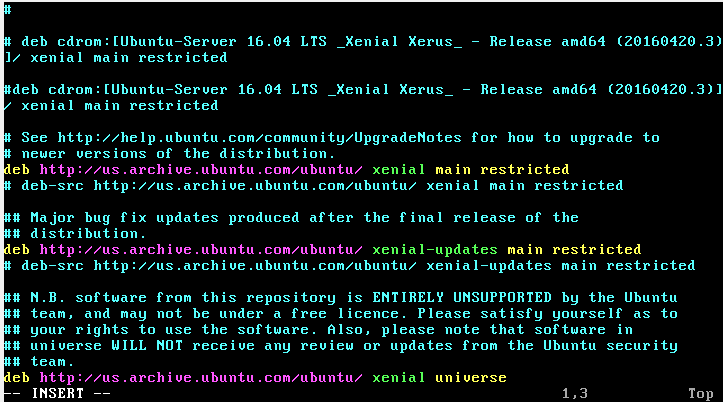
二、删除掉sources.list的其他内容,任意选择一种源的内容复制粘贴进去,保存,例如,选择阿里源
2.1阿里源
deb-src http://archive.ubuntu.com/ubuntu xenial main restricted #Added by software-properties

deb http://mirrors.aliyun.com/ubuntu/ xenial main restricted

deb-src http://mirrors.aliyun.com/ubuntu/ xenial main restricted multiverse universe #Added by software-properties

deb http://mirrors.aliyun.com/ubuntu/ xenial-updates main restricted

deb-src http://mirrors.aliyun.com/ubuntu/ xenial-updates main restricted multiverse universe #Added by software-properties

deb http://mirrors.aliyun.com/ubuntu/ xenial universe

deb http://mirrors.aliyun.com/ubuntu/ xenial-updates universe

deb http://mirrors.aliyun.com/ubuntu/ xenial multiverse

deb http://mirrors.aliyun.com/ubuntu/ xenial-updates multiverse

deb http://mirrors.aliyun.com/ubuntu/ xenial-backports main restricted universe multiverse

deb-src http://mirrors.aliyun.com/ubuntu/ xenial-backports main restricted universe multiverse #Added by software-properties

deb http://archive.canonical.com/ubuntu xenial partner

deb-src http://archive.canonical.com/ubuntu xenial partner

deb http://mirrors.aliyun.com/ubuntu/ xenial-security main restricted

deb-src http://mirrors.aliyun.com/ubuntu/ xenial-security main restricted multiverse universe #Added by software-properties

deb http://mirrors.aliyun.com/ubuntu/ xenial-security universe

deb http://mirrors.aliyun.com/ubuntu/ xenial-security multiverse
今天在用apt-get update更新时一直失败,报的错误为”Failed to fetch 404 Not Found”,因为我的镜像改为了mirrors.aliyun.com 我试着ping了一下发现能通,所以就在网上查找了下答案
大部分的解释是因为每个Ubuntu版本都有生命结束周期(EOL)时间;常规的Ubuntu发行版提供18个月的支持,而LTS(长期支持)版本则长达3年(服务器版本)和5年(桌面版本)。当某个Ubuntu版本达到生命结束周期时,其仓库就不能再访问了,你也不能再从Canonical获取任何维护更新和安全补丁。在撰写本文时,Ubuntu 13.04(急切的浣熊)已经达到了它的生命结束周期。
如果你所使用的Ubuntu系统已经被结束生命周期,你就会从apt-get或aptitude得到以下404错误,因为它的仓库已经被遗弃了。
解决方法为讲/etc/apt/sources.list路径下的源替换为旧版本仓库的源。
BUT,我的镜像是阿里云的镜像,貌似没有什么旧版本的路径,我就在/etc/apt/sources.list路径下删除,重新替换为下面的路径
deb http://mirrors.aliyun.com/ubuntu/ trusty main restricted universe multiverse

deb http://mirrors.aliyun.com/ubuntu/ trusty-security main restricted universe multiverse

deb http://mirrors.aliyun.com/ubuntu/ trusty-updates main restricted universe multiverse

deb http://mirrors.aliyun.com/ubuntu/ trusty-proposed main restricted universe multiverse

deb http://mirrors.aliyun.com/ubuntu/ trusty-backports main restricted universe multiverse

deb-src http://mirrors.aliyun.com/ubuntu/ trusty main restricted universe multiverse

deb-src http://mirrors.aliyun.com/ubuntu/ trusty-security main restricted universe multiverse

deb-src http://mirrors.aliyun.com/ubuntu/ trusty-updates main restricted universe multiverse

deb-src http://mirrors.aliyun.com/ubuntu/ trusty-proposed main restricted universe multiverse

deb-src http://mirrors.aliyun.com/ubuntu/ trusty-backports main restricted universe multiverse
之后再apt-get就可以了
2.2东北大学源
deb-src http://mirror.neu.edu.cn/ubuntu/ xenial main restricted #Added by software-properties

deb http://mirror.neu.edu.cn/ubuntu/ xenial main restricted

deb-src http://mirror.neu.edu.cn/ubuntu/ xenial restricted multiverse universe #Added by software-properties

deb http://mirror.neu.edu.cn/ubuntu/ xenial-updates main restricted

deb-src http://mirror.neu.edu.cn/ubuntu/ xenial-updates main restricted multiverse universe #Added by software-properties

deb http://mirror.neu.edu.cn/ubuntu/ xenial universe

deb http://mirror.neu.edu.cn/ubuntu/ xenial-updates universe

deb http://mirror.neu.edu.cn/ubuntu/ xenial multiverse

deb http://mirror.neu.edu.cn/ubuntu/ xenial-updates multiverse

deb http://mirror.neu.edu.cn/ubuntu/ xenial-backports main restricted universe multiverse

deb-src http://mirror.neu.edu.cn/ubuntu/ xenial-backports main restricted universe multiverse #Added by software-properties

deb http://archive.canonical.com/ubuntu xenial partner deb-src http://archive.canonical.com/ubuntu xenial partner

deb http://mirror.neu.edu.cn/ubuntu/ xenial-security main restricted

deb-src http://mirror.neu.edu.cn/ubuntu/ xenial-security main restricted multiverse universe #Added by software-properties

deb http://mirror.neu.edu.cn/ubuntu/ xenial-security universe

deb http://mirror.neu.edu.cn/ubuntu/ xenial-security multiverse
2.3清华大学源
deb http://mirrors.tuna.tsinghua.edu.cn/ubuntu/ xenial main restricted

deb http://mirrors.tuna.tsinghua.edu.cn/ubuntu/ xenial-updates main restricted

deb http://mirrors.tuna.tsinghua.edu.cn/ubuntu/ xenial universe

deb http://mirrors.tuna.tsinghua.edu.cn/ubuntu/ xenial-updates universe

deb http://mirrors.tuna.tsinghua.edu.cn/ubuntu/ xenial multiverse

deb http://mirrors.tuna.tsinghua.edu.cn/ubuntu/ xenial-updates multiverse

deb http://mirrors.tuna.tsinghua.edu.cn/ubuntu/ xenial-backports main restricted universe multiverse

deb http://mirrors.tuna.tsinghua.edu.cn/ubuntu/ xenial-security main restricted

deb http://mirrors.tuna.tsinghua.edu.cn/ubuntu/ xenial-security universe deb http://mirrors.tuna.tsinghua.edu.cn/ubuntu/ xenial-security multiverse
三、更新下载源
sudo apt-get update
四、输入过程中可能会出现的问题
root@ubuntu:/etc/apt# apt-get update
Err:1 http://mirrors.aliyun.com/ubuntu xenial InRelease
Temporary failure resolving 'mirrors.aliyun.com'
Err:2 http://mirrors.aliyun.com/ubuntu xenial-updates InRelease
Temporary failure resolving 'mirrors.aliyun.com'
Err:3 http://mirrors.aliyun.com/ubuntu xenial-backports InRelease
Temporary failure resolving 'mirrors.aliyun.com'
Err:4 http://mirrors.aliyun.com/ubuntu xenial-security InRelease
Temporary failure resolving 'mirrors.aliyun.com'
Err:5 http://archive.canonical.com/ubuntu xenial InRelease
Temporary failure resolving 'archive.canonical.com'
Err:6 http://archive.ubuntu.com/ubuntu xenial InRelease
Temporary failure resolving 'archive.ubuntu.com'
Reading package lists... Done
E: Failed to fetch http://security.ubuntu.com/ubuntu/pool/main/p/perl/perl-base_5.22.1-9ubuntu0.5_amd64.deb Temporary failure resolving 'us.archive.ubuntu.com'
E: Failed to fetch http://security.ubuntu.com/ubuntu/pool/main/p/perl/perl-modules-5.22_5.22.1-9ubuntu0.5_all.deb Temporary failure resolving 'us.archive.ubuntu.com'
E: Failed to fetch http://security.ubuntu.com/ubuntu/pool/main/g/glibc/libc6_2.23-0ubuntu10_amd64.deb Temporary failure resolving 'us.archive.ubuntu.com'
E: Failed to fetch http://security.ubuntu.com/ubuntu/pool/main/d/db5.3/libdb5.3_5.3.28-11ubuntu0.1_amd64.deb Temporary failure resolving 'us.archive.ubuntu.com'
E: Failed to fetch http://us.archive.ubuntu.com/ubuntu/pool/main/z/zlib/zlib1g_1.2.8.dfsg-2ubuntu4.1_amd64.deb Temporary failure resolving 'us.archive.ubuntu.com'
E: Failed to fetch http://us.archive.ubuntu.com/ubuntu/pool/main/i/init-system-helpers/init-system-helpers_1.29ubuntu4_all.deb Temporary failure resolving 'us.archive.ubuntu.com'
E: Failed to fetch http://us.archive.ubuntu.com/ubuntu/pool/main/i/init-system-helpers/init_1.29ubuntu4_amd64.deb Temporary failure resolving 'us.archive.ubuntu.com'
vim /etc/resolv.conf
nameserver 127.0.1.1

nameserver 192.168.23.1

nameserver 221.130.33.52

nameserver 169.95.1.1

nameserver 114.114.114.114
在Ubuntu操作系统中,使用apt-get命令安装所需的开发软件非常方便,但也有不少时候由于链接不上软件源而不能正常安装,于是很多人都会想到使用sudo apt-get update命令来更新软件源,而恰恰这时屋漏偏逢连夜雨,更新命令也不能正常工作,出现大量“Failed to fetch”的错误,出现failed to fetch一般来说是要去更新我们的DNS 再次执行 更新操作
sudo apt-get clean
sudo apt-get update
sudo apt-get upgrade
其他一些命令
sudo apt-get update  更新源

sudo apt-get install package 安装包

sudo apt-get remove package 删除包

sudo apt-cache search package 搜索软件包

sudo apt-cache show package  获取包的相关信息,如说明、大小、版本等

sudo apt-get install package --reinstall  重新安装包

sudo apt-get -f install  修复安装

sudo apt-get remove package --purge 删除包,包括配置文件等

sudo apt-get build-dep package 安装相关的编译环境

sudo apt-get upgrade 更新已安装的包

sudo apt-get dist-upgrade 升级系统

sudo apt-cache depends package 了解使用该包依赖那些包

sudo apt-cache rdepends package 查看该包被哪些包依赖

sudo apt-get source package  下载该包的源代码

sudo apt-get clean && sudo apt-get autoclean 清理无用的包

sudo apt-get check 检查是否有损坏的依赖
【ubuntu】更换下载源的更多相关文章
- Ubuntu 更换下载源
Ubuntu将下载官方源更换为国内源 由于某些原因,在国内更新软件都很慢,可以改源为国内源 1.备份原始文件 sudo cp /etc/apt/sources.list /etc/apt/source ...
- ubuntu更换软件源
ubuntu更换软件源 /etc/apt/source.list 163: deb http://mirrors.163.com/ubuntu/ trusty main restricted u ...
- Ubuntu更换科大源
更换科大源 方案一:在命令行输入 sudo gedit /etc/apt/sources.list ,打开系统自带源文件. 将文件内源删除,更换为以下科大源: deb http://mirrors.a ...
- ubuntu更新下载源问题
Q1:ubuntu14.04系统安装完之后无法跟新并安装插件 cd /var/lib/apt/lists sudo rm * -rf sudo apt-get clean;sudo apt-get u ...
- ubuntu更换阿里源
网上应该可以找到很多关于ubuntu源的设置方法,但是如果不搞清楚就随便设置的话,不仅不能起到应有的效果,还会由于一些问题导致apt不可用. 最正确的更换源的方法应该如系统提示的: ## a.) ad ...
- python pip更换下载源(转)
对于Python开发用户来讲,PIP安装软件包是家常便饭.但国外的源下载速度实在太慢,浪费时间.而且经常出现下载后安装出错问题.所以把PIP安装源替换成国内镜像,可以大幅提升下载速度,还可以提高安装成 ...
- Ubuntu更换镜像源
不同的源 当修改sources.list文件时,我们需要将下面任意一个镜像源的代码复制粘贴到该文件中. 阿里源 # 阿里镜像源 deb http://mirrors.aliyun.com/ubuntu ...
- pip更换下载源(提升下载速度)
经常在使用Python的时候需要安装各种模块,而pip是很强大的模块安装工具,但是由于国外官方pypi经常被墙,导致不可用,或者下载速度很慢,所以我们最好是将自己使用的pip源更换一下,这样就能解决被 ...
- Ubuntu16.04更换下载源
更新源的方法 进入/etc/apt/ cd /etc/apt 对 sources.list文件进行备份: sudo cp sources.list sources.list.bak 打开源列表文件 s ...
随机推荐
- IEnumerable、GetEnumerator、IEnumerator之间的关系。
了解了这些也就明白了遍历的原理,晚安. using System; using System.Collections; public class Person { public Person(stri ...
- 20165219第4次实验《Android程序设计》实验报告
20165219第4次实验<Android程序设计>实验报告 一.实验内容及步骤 (一)Android Stuidio的安装Hello world测试 要求 参考http://www.cn ...
- Unite Shanghai 2019全日程曝光(建议收藏)
https://mp.weixin.qq.com/s/KvAyXpDhqWROtTX1Ol3a4Q 5月10-12日,Unite Shanghai 2019即将在上海国际会议中心正式开幕.本次大会共设 ...
- kali linux之webshell
webacoo(web backdoor cookie) 类终端的shell 编码通信内容通过cookie头传输,隐蔽性较强 cm:base64编码的命令 cn:服务器用于返回数据的cookie头的名 ...
- node.js安装以及git 的使用说明
第一步:安装node.js: Node.js 是一个基于 Chrome V8 引擎的 JavaScript 运行环境. Node.js 使用了一个事件驱动.非阻塞式 I/O 的模型,使其轻量又高 ...
- 基于 Django 的手机管理系统
前段时间和小组一起完成数据库作业,觉得收获挺多的,分享到博客来. 一.概述 打算通过设计数据库,然后结合 Python 框架Django,实现在网页上对数据库的增删改查(本例以手机的管理为例,不考虑订 ...
- 【SSO单点系列】(6):CAS4.0 单点流程序列图(中文版)以及相关术语解释(TGT、ST、PGT、PT、PGTIOU)
CAS 相关的内容好久没写了,可能下周会继续更新一些内容吧. 在上一篇中的单点流程序列图由于是从官网直接下载来的,上面都是英文,可能有的朋友看不懂,因此修改成中文的. PS:只修改了一个,第二个图明天 ...
- dsp之BF531笔记
获得更多资料欢迎进入我的网站或者 csdn或者博客园 很久以前的BF531的笔记,觉得有用分享出来.摘自于open dsp 通用Gpio ADSP-BF53x 处理器上有16 个PF 接口,这些接口就 ...
- Python3之shutil模块
一. 简介 shutil 是高级的文件,文件夹,压缩包处理模块. 二. 使用 shutil.copyfileobj(fsrc, fdst[, length])将文件内容拷贝到另一个文件中 import ...
- 重写成员“MySql.Data.Entity.MySqlConnectionFactory.CreateConnection(System.String)”时违反了继承安全性规则。重写方法的安全可访问性必须与所重写方法的安全可访问性匹配。
1,程序中使用加载反射出现下面的问题: 无法加载一个或多个请求的类型.有关更多信息,请检索 LoaderExceptions 属性. 然后把代码改了一下, try { types.AddRange ...