
HTTP文件上传插件开发文档-JSP
版权所有 2009-2016 荆门泽优软件有限公司
保留所有权利
产品首页:http://www.ncmem.com/webplug/http-uploader2/index.asp
在线演示:http://www.ncmem.com/products/http-uploader2/index.asp,
升级日志:http://www.cnblogs.com/xproer/archive/2011/03/15/1985091.html
资源下载:cab安装包(x86),cab安装包(x64),crx安装包,crx(nat)安装包,xpi安装包,exe安装包,开发文档,VC运行库,证书补丁,
示例下载:ASP示例,ASP.NET示例,JSP示例,PHP示例,
联系信箱:1085617561@qq.com
联系QQ:1085617561
更新记录:
|
更新时间 |
描述 |
|
2012-05-29 |
更新JSP文件上传示例代码。 |
|
2012-08-30 |
增加创建文件夹和删除文件示例代码。 |
|
2012-09-10 |
增加验证本地文件是否存在的示例代码,更新创建文件夹示例代码。 |
|
2014-03-18 |
完善正式包布署章节 增加在本地运行DEMO章节 增加在测试服务器中运行DEMO章节 删除测试包布署说明章节。 新增ASP测试章节。 |
1. 在本地运行DEMO
1.1. JSP
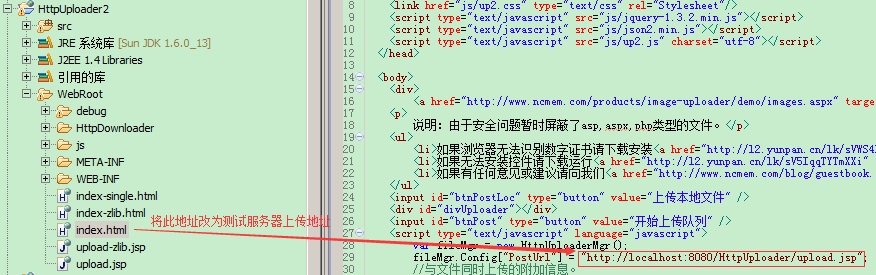
2. 在测试服务器中运行DEMO
说明:如果客户端能够正常访问互联网,则不用在测试服务器中布署控件包。
步骤如下:
1.将控件包(HttpUploader.cab,HttpUploader64.cab)布署在测试服务器中
HttpUploader.cab为IE(x86)浏览器控件安装包。
HttpUploader64.cab为IE(x64)浏览器控件安装包。
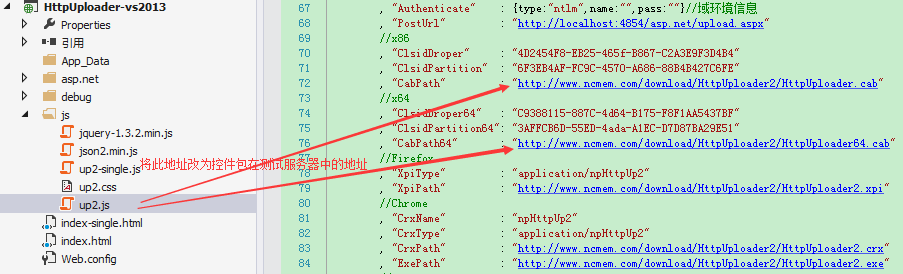
2.修改up2.js中的控件包地址。
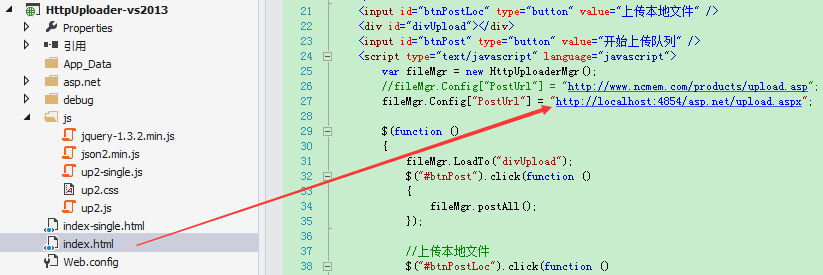
3.将上传地址改为测试服务器的上传地址。
3. 正式包布署说明
说明:在购买后我们会以邮件方式提供控件包文件。
1.将HttpUploader.cab,HttpUploader64.cab,HttpUploader2.xpi,HttpUploader2.crx,HttpUploader2.exe上传到正式服务器中。
HttpUploader.cab为IE(x86)浏览器控件安装包。
HttpUploader64.cab为IE(x64)浏览器控件安装包。
HttpUploader2.xpi为Firefox浏览器控件安装包。
HttpUploader2.crx为Chrome浏览器控件安装包。
HttpUploader2.exe为控件集成安装包。
2.修改up2.js文件中的配置信息。
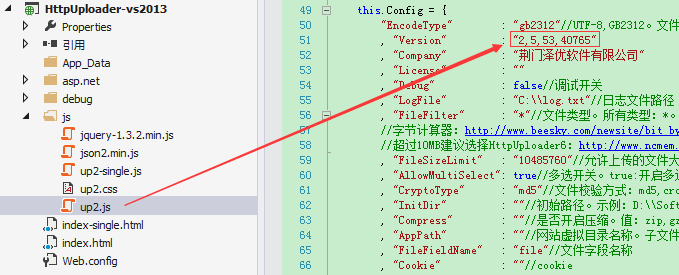
3.1. 修改版本号
3.2. 修改IE32控件Clsid值
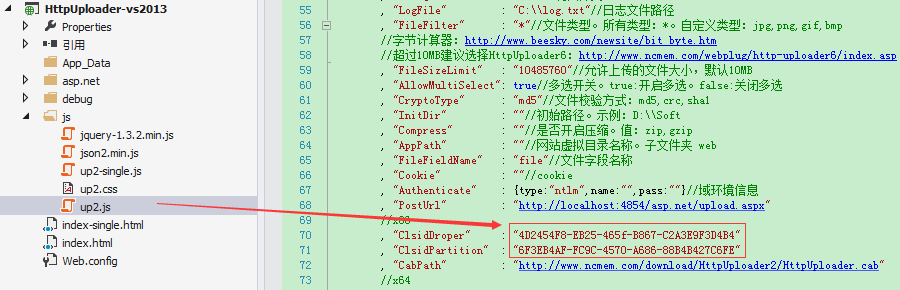
3.3. 修改IE32控件cab包地址
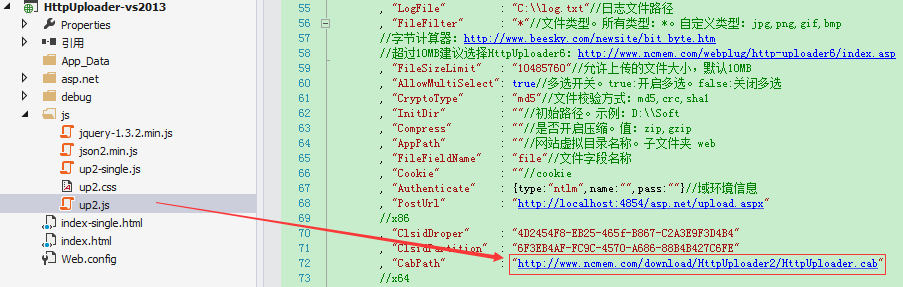
3.4. 修改IE64控件clsid值
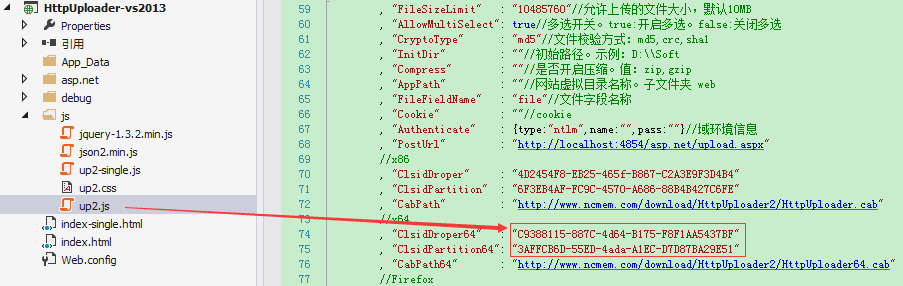
3.5. 修改IE64控件cab包地址
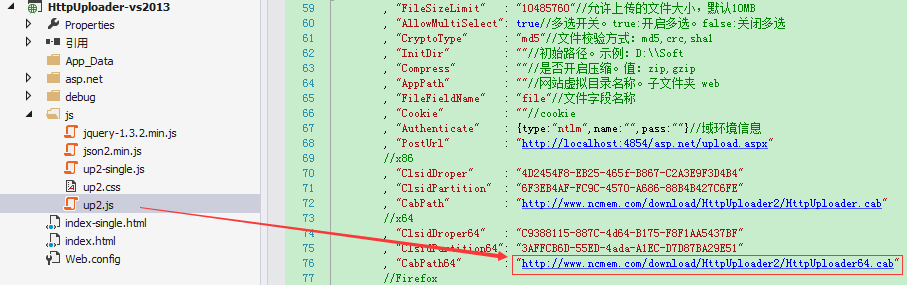
3.6. 修改IE32,IE64控件ProjID信息
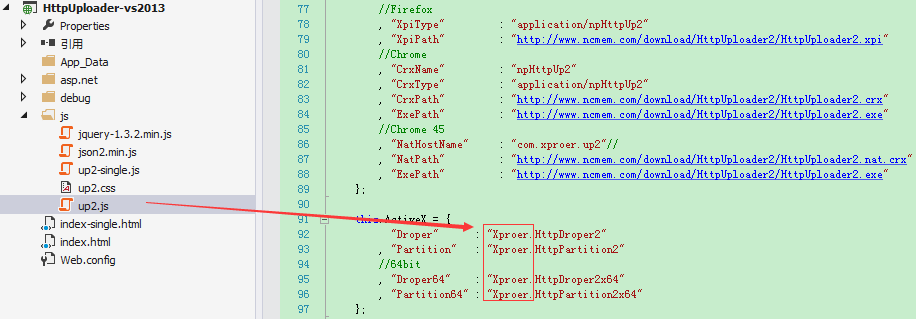
3.7. 修改Firefox控件XpiType值
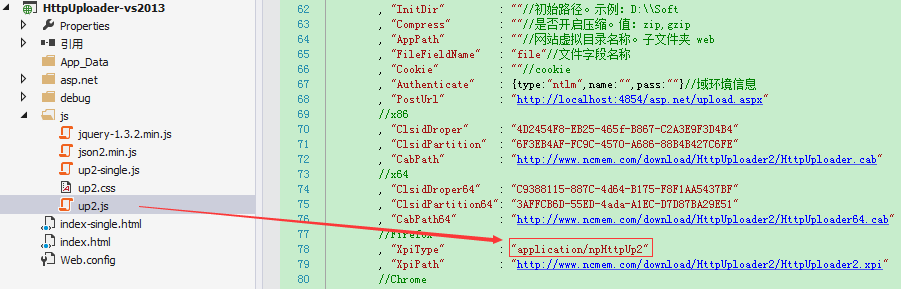
3.8. 修改Firefox控件xpi包地址
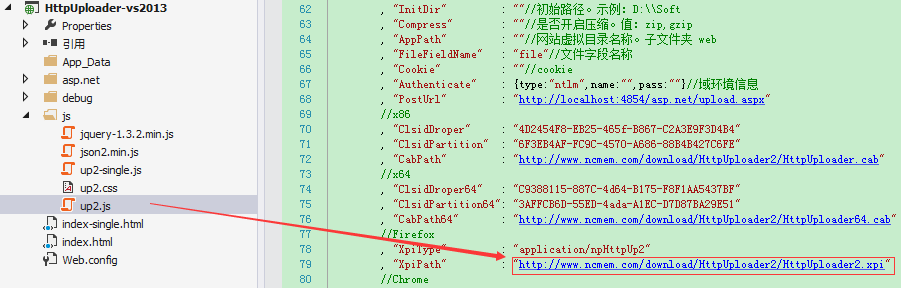
3.9. 修改chrome控件CrxType和CrxName值
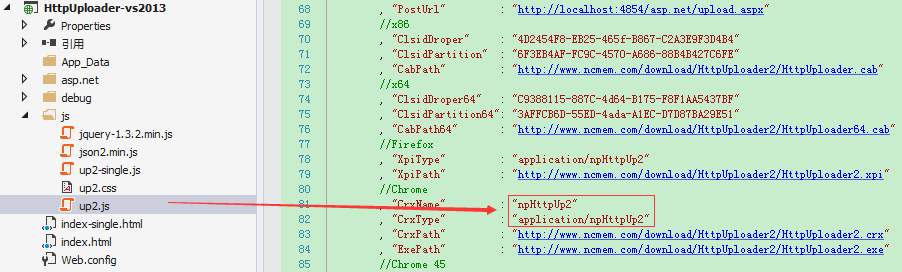
3.10. 修改Chrome控件crx包地址
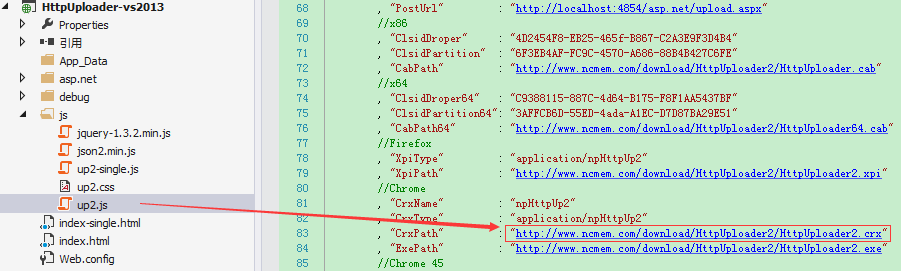
3.11. 修改exe包地址
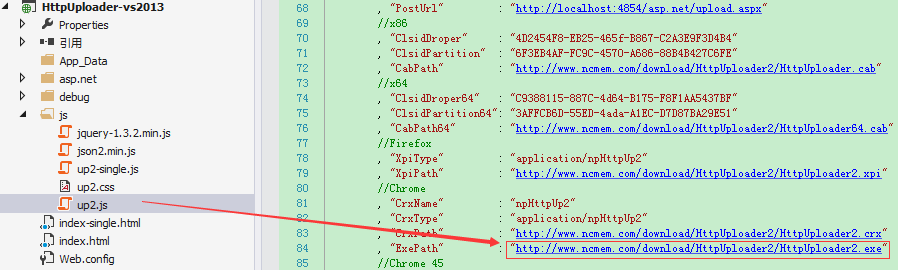
4. 整合到现有系统中
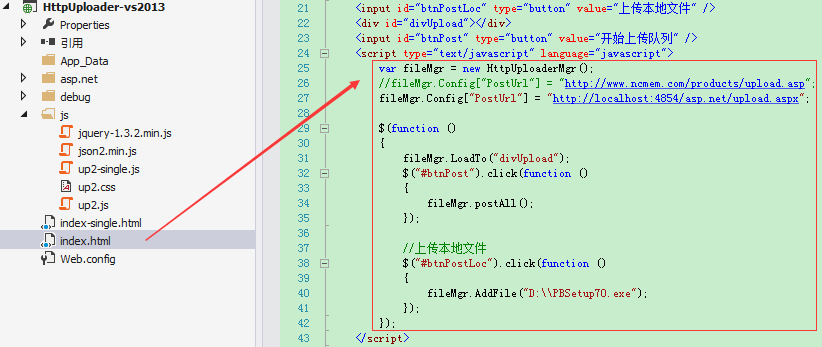
主要步骤:
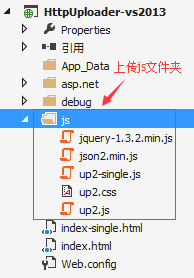
1.上传js文件夹,控件包
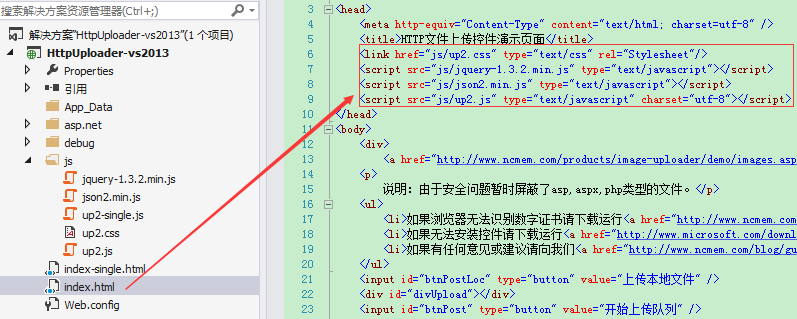
2.在引用页面添加js引用
3.在引用页面编写控件初始化代码,并设置上传地址。
1.上传js文件夹
2.在引用页面添加js引用
3.编写控件初始化代码
5. 自动拼接路径
如果域名会经常变动不是固定域名,可以使用自动拼接路径函数InitPath()来简化控件布署。InitPath()函数的主要作用就是帮助开发人员拼接字符串。开发人员也可以根据自已的业务逻辑情况来修改此函数。
以下示例演示如何使用自动拼接路径
修改HttpUploader.js中的路径
:在引用页面设置上传地址
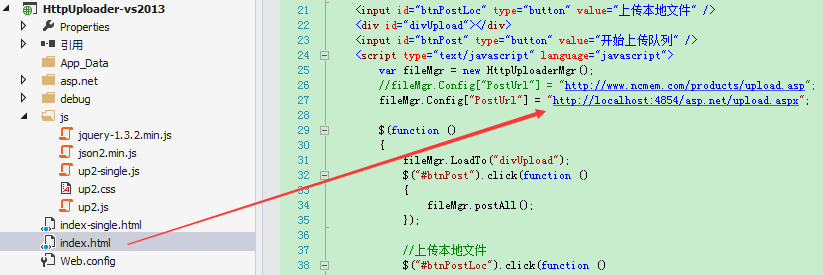
方法2:在up2.js中设置上传地址。
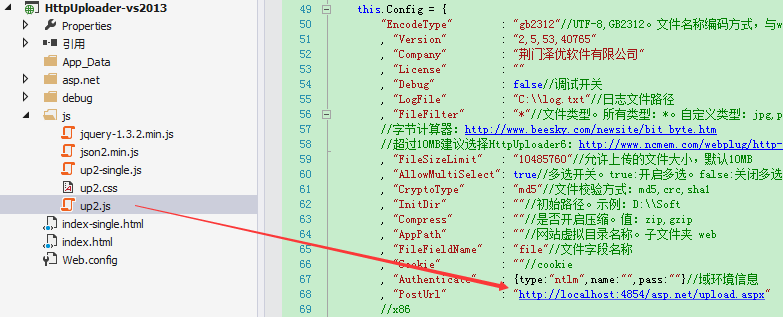
注意:如果同时在引用页面和up2.js中配置了上传地址,那么引用页面的设置将会覆盖up2.js中的设置,即只有引用页面的设置有效。
7.2. 设置服务器编码方式
<script -25 创建
*
*/
public class Uploader {
public PageContext m_pc;
String m_folder; //上传文件夹。D:\\webapps\\WordPaster\\upload\\
String m_curBasePath; //当前文件路径。http://localhost:8080/WordPaster/
String m_filePathRel; //文件在服务器中的相对路径。http://localhost:8080/WordPaster/upload/2012/05/24/
String m_fileName; //文件名称。11223344.png
/*
* 在JSP页面中构造。传入 pageContext
* */
public Uploader(PageContext pc,HttpServletRequest sr)
{
this.m_pc = pc;
String path = sr.getContextPath();
this.m_curBasePath = sr.getScheme()+"://" + sr.getServerName()+":" + sr.getServerPort() + path+"/";
}
/*
* 获取文件相对路径。
* 返回值:
* http://localhost:8080/WordPaster/upload/2012/05/24/11223344.png
* */
public String GetFilePathRel()
{
return this.m_filePathRel + this.m_fileName;
}
/*
* 创建上传文件夹
* 2012\\05\\24\\
* */
public void CreateFolder()
{
Date timeCur = new Date();
SimpleDateFormat fmtYY = new SimpleDateFormat("yyyy");
SimpleDateFormat fmtMM = new SimpleDateFormat("MM");
SimpleDateFormat fmtDD = new SimpleDateFormat("dd");
String strYY = fmtYY.format(timeCur);
String strMM = fmtMM.format(timeCur);
String strDD = fmtDD.format(timeCur);
//相对路径/2012/05/24/
String pathRel = "upload/" + strYY + "/" + strMM + "/" + strDD + "/";
String pathAbs = "upload\\" + strYY + "\\" + strMM + "\\" + strDD + "\\";
//文件路径
this.m_filePathRel = this.m_curBasePath + pathRel;
this.m_folder = this.m_pc.getServletContext().getRealPath("/") + pathAbs;
File f = new File(this.m_folder);
//文件夹不存在
if(!f.exists())
{
f.mkdirs();
}
}
/*
* 根据当前时间生成文件名称。
* 返回值:
* 年月日,时分秒
* 2012-05-24-16-06
* */
public String GenerateFileName()
{
Date timeCur = new Date();
SimpleDateFormat fmt = new SimpleDateFormat("HHmmssSSSS");
String timeStr = fmt.format(timeCur);
return timeStr;
}
//将文件保存到服务器中
public void SaveFile(FileItem upFile) throws IOException
{
String nameSvr = upFile.getName();
this.m_fileName = nameSvr;
int pos = nameSvr.indexOf('.');
String ext = nameSvr.substring(pos);
ext.toLowerCase();
this.CreateFolder();
String pathSvr = this.m_folder + nameSvr;
InputStream stream = upFile.getInputStream();
byte[] data = new byte[(int)upFile.getSize()];//128k
int readLen = stream.read(data);//实际读取的大小
stream.close();
RandomAccessFile raf = new RandomAccessFile(pathSvr,"rw");
//定位文件位置
raf.write(data);
raf.close();
}
public byte[] decompress(byte[] data) throws IOException,DataFormatException
{
Inflater inflater = new Inflater();
inflater.setInput(data);
ByteArrayOutputStream outputStream = new ByteArrayOutputStream(data.length);
byte[] buffer = new byte[1024];
while (!inflater.finished())
{
int count = inflater.inflate(buffer);
outputStream.write(buffer, 0, count);
}
outputStream.close();
byte[] output = outputStream.toByteArray();
return output;
}
public void SaveZipFile(FileItem f) throws IOException, DataFormatException
{
//11223344.png
String fileName = f.getName();
//如果控件是以UTF-8编码方式提交的数据则使用下面的方式对文件名称进行解码。
fileName = fileName.replaceAll("\\+","%20");
//客户端使用的是encodeURIComponent编码
fileName = URLDecoder.decode(fileName,"UTF-8");
int pos = fileName.indexOf('.');
String ext = fileName.substring(pos);
ext.toLowerCase();
this.m_fileName = this.GenerateFileName() + ext;
this.CreateFolder();
String filePath = this.m_folder + this.m_fileName;
InputStream stream = f.getInputStream();
byte[] dataCmp = new byte[(int)f.getSize()];//128k
int readLen = stream.read(dataCmp);//实际读取的大小
stream.close();
//解压
byte[] dataFile = this.decompress(dataCmp);
RandomAccessFile raf = new RandomAccessFile(filePath,"rw");
//定位文件位置
raf.write(dataFile);
raf.close();
}
public final static byte[] base64Encode(byte[] byteData) {
if (byteData == null)
return null;
int iSrcIdx; // index into source (byteData)
int iDestIdx; // index into destination (byteDest)
byte byteDest[] = new byte[((byteData.length + 2) / 3) * 4];
for (iSrcIdx = 0, iDestIdx = 0; iSrcIdx < byteData.length - 2; iSrcIdx += 3) {
byteDest[iDestIdx++] = (byte) ((byteData[iSrcIdx] >>> 2) & 077);
byteDest[iDestIdx++] =
(byte) ((byteData[iSrcIdx + 1] >>> 4) & 017 | (byteData[iSrcIdx] << 4) & 077);
byteDest[iDestIdx++] =
(byte) ((byteData[iSrcIdx + 2] >>> 6)
& 003
| (byteData[iSrcIdx + 1] << 2)
& 077);
byteDest[iDestIdx++] = (byte) (byteData[iSrcIdx + 2] & 077);
}
if (iSrcIdx < byteData.length) {
byteDest[iDestIdx++] = (byte) ((byteData[iSrcIdx] >>> 2) & 077);
if (iSrcIdx < byteData.length - 1) {
byteDest[iDestIdx++] =
(byte) ((byteData[iSrcIdx + 1] >>> 4) & 017 | (byteData[iSrcIdx] << 4) & 077);
byteDest[iDestIdx++] = (byte) ((byteData[iSrcIdx + 1] << 2) & 077);
} else
byteDest[iDestIdx++] = (byte) ((byteData[iSrcIdx] << 4) & 077);
}
for (iSrcIdx = 0; iSrcIdx < iDestIdx; iSrcIdx++) {
if (byteDest[iSrcIdx] < 26)
byteDest[iSrcIdx] = (byte) (byteDest[iSrcIdx] + 'A');
else
if (byteDest[iSrcIdx] < 52)
byteDest[iSrcIdx] = (byte) (byteDest[iSrcIdx] + 'a' - 26);
else
if (byteDest[iSrcIdx] < 62)
byteDest[iSrcIdx] = (byte) (byteDest[iSrcIdx] + '0' - 52);
else
if (byteDest[iSrcIdx] < 63)
byteDest[iSrcIdx] = (byte) '+';
else
byteDest[iSrcIdx] = (byte) '/';
}
for (; iSrcIdx < byteDest.length; iSrcIdx++)
byteDest[iSrcIdx] = (byte) '=';
return byteDest;
}
public final static String base64Encode(String strInput) {
if (strInput == null)
return null;
return base64Encode(strInput,"GB2312");
}
public final static String base64Encode(String strInput,String charSet) {
if (strInput == null)
return null;
String strOutput=null;
byte byteData[] = new byte[strInput.length()];
try {
//strInput.getBytes(0, strInput.length(), byteData, 0);
byteData = strInput.getBytes(charSet);
strOutput=new String(base64Encode(byteData),charSet);
//strOutput=new String(base64Encode(byteData),0);
} catch (UnsupportedEncodingException e) {
return null;
}
return strOutput;
}
/**
* 此处插入方法说明。
* 创建日期:(2000-11-4 18:27:35)
* @param steam java.io.InputStream
* @param charSet java.lang.String
*/
public final static String base64Encode(InputStream in, String charSet) {
try {
int c;
byte[] buff = new byte[1024];
ByteArrayOutputStream out = new ByteArrayOutputStream(2048);
while ((c = in.read(buff, 0, 1024)) != -1) {
out.write(buff, 0, c);
//index+=1024;
//out.write(c);
//attachContent+=ss;
}
in.close();
out.flush();
byte[] tmp2 = base64Encode(out.toByteArray());
out.close();
return new String(tmp2,charSet);
}
catch (IOException e) {
return "";
}
}
/**
* 此处插入方法说明。
* 创建日期:(2000-11-3 23:31:04)
* @return java.lang.String
* @param strIn java.lang.String
*/
public final static String chunkSplit(String strIn) {
return chunkSplit(strIn,76);
}
/**
* 此处插入方法说明。
* 创建日期:(2000-11-3 23:31:04)
* @return java.lang.String
* @param strIn java.lang.String
*/
public final static String chunkSplit(String strIn,int splitLen) {
int index=0;
String strOut="";
while(index+splitLen<strIn.length()){
strOut+=strIn.substring(index,index+splitLen)+"\n";
index+=splitLen;
}
if(index<strIn.length()){
strOut+=strIn.substring(index);
}
return strOut;
}
}
9.1.2. upload.jsp文件代码
<%@ page language="java" import="java.util.*" pageEncoding="utf-8"%><%@
page contentType="text/html;charset=utf-8"%><%@
page import = "Xproer.*" %><%@
page import="org.apache.commons.lang.StringUtils" %><%@
page import="org.apache.commons.fileupload.*" %><%@
page import="org.apache.commons.fileupload.disk.*" %><%@
page import="org.apache.commons.fileupload.servlet.*" %><%
/*
更新记录:
2013-01-25 取消对SmartUpload的使用,改用commons-fileupload组件。因为测试发现SmartUpload有内存泄露的问题。
*/
//String path = request.getContextPath();
//String basePath = request.getScheme()+"://"+request.getServerName()+":"+request.getServerPort()+path+"/";
String uname = "";// = request.getParameter("uid");
String upass = "";// = request.getParameter("fid");
String width = "";//图片宽度
String height = "";//图片高度
String remark = "";//图片描述
// Check that we have a file upload request
boolean isMultipart = ServletFileUpload.isMultipartContent(request);
FileItemFactory factory = new DiskFileItemFactory();
ServletFileUpload upload = new ServletFileUpload(factory);
//upload.setSizeMax(10485760);//10MB
List files = null;
try
{
files = upload.parseRequest(request);
}
catch (FileUploadException e)
{
out.println("upload file error:"+e.toString());
return;
}
FileItem imgFile = null;
// 得到所有上传的文件
Iterator fileItr = files.iterator();
// 循环处理所有文件
while (fileItr.hasNext())
{
// 得到当前文件
imgFile = (FileItem) fileItr.next();
// 忽略简单form字段而不是上传域的文件域(<input type="text" />等)
if(imgFile.isFormField())
{
String fn = imgFile.getFieldName();
String fv = imgFile.getString();
if(fn.equals("uname")) uname = fv;
if(fn.equals("upass")) upass = fv;
if(fn.equals("width")) width = fv;
if(fn.equals("height")) height = fv;
if(fn.equals("remark")) remark = fv;//如果是UTF-8需要进行Url解码
}
else
{
break;
}
}
Uploader up = new Uploader(pageContext,request);
up.SaveFile(imgFile);
out.write(up.GetFilePathRel());%>
HTTP文件上传插件开发文档-JSP的更多相关文章
- HTTP文件上传插件开发文档-ASP
版权所有 2009-2016 荆门泽优软件有限公司 保留所有权利 官方网站:http://www.ncmem.com/ 产品首页:http://www.ncmem.com/webplug/http-u ...
- 上传Text文档并转换为PDF(解决乱码)
前些日子,Insus.NET有分享一篇<上传Text文档并转换为PDF>http://www.cnblogs.com/insus/p/4313092.html 它是按最简单与默认方式来处理 ...
- 上传Text文档并转换为PDF
今天在ASP.NET MVC环境中学习一些PDF相关的知识,想法是上传文件成功时,并把文件转换为PDF文档. 打开你的专案,运行NuGet包管理器,下载一个叫iTextSharp的东东: 点击Inst ...
- Linux服务器 上传/下载 文档/目录
1.从服务器上下载文件 scp username@servername:/path/filename /var/www/local_dir(本地目录) 例如scp root@192.168.0.101 ...
- 微信小程序上传Word文档、PDF、图片等文件
<view class="main" style="border:none"> <view class="title"&g ...
- sahrepoint 上传到文档库
sharepoint学习笔记汇总 http://blog.csdn.net/qq873113580/article/details/20390149 /// <summary&g ...
- Bootstrap FileInput 多图上传插件 文档属性说明
Bootstrap FileInput 多图上传插件 原文链接:http://blog.csdn.net/misterwho/article/details/72886248?utm_source ...
- github的上传本地文档
自从使用github以来,一直都是在github网站在线上传文件到仓库中,但是有时因为网络或者电脑的原因上传失败.最重要的原因是我习惯本地编辑,完成以后再一起上传github.看过了几个教程,总结出最 ...
- C# 上传excel文档解析出里面数据
if (fileExt.ToUpper() == ".XLS" || fileExt.ToUpper() == ".XLSX" || fileExt.ToUpp ...
随机推荐
- Spring AOP声明式事务异常回滚
近日测试用例,发现这样一个现象:在业务代码中,有如下两种情况,比如:throw new RuntimeException("xxxxxxxxxxxx"); 事物回滚throw ne ...
- Des加解密(Java端和Js端配套)解析
一.什么是DES加密 des对称加密,对称加密,是一种比较传统的加密方式,其加密运算.解密运算使用的是同样的密钥,信息的发送者和信息的接收者在进行信息的传输与处理时,必须共同持有该密码( ...
- The type org.springframework.context.ConfigurableApplicationContext cannot be resolved问题解决
在搭建maven项目的时候,有时候会报这样的问题. The type org.springframework.context.ConfigurableApplicationContext cannot ...
- bzoj 2555 SubString——后缀自动机+LCT
题目:https://www.lydsy.com/JudgeOnline/problem.php?id=2555 要维护 right 集合的大小.因为 fa 会变,且 fa 构成一棵树,所以考虑用 L ...
- bzoj 2763 [JLOI2011]飞行路线——分层图
题目:https://www.lydsy.com/JudgeOnline/problem.php?id=2763 分层图两种方法的练习. 1.把图分成k+1层,本层去上面一层的边免费.但空间时间都不算 ...
- (转)Android代码混淆-添加了Gson遇到的问题
折腾了好久.....郁闷 -_- 1.首先,project.properties里的配置文件变了,之前的项目一直都是在project.properties这个文件中添加一行proguard.confi ...
- dubbox部署到jdk1.7环境,启动:java.lang.NoSuchMethodError: java.util.concurrent.ConcurrentHashMap.keySet()
本地用jdk1.8编译的服务提供端war包,部署到环境报错了: INFO: Initializing Spring root WebApplicationContext [16/08/17 05:14 ...
- 关于Homebrew出现GitHub API rate limit错误的解决方法
参考博文: http://havee.me/mac/2013-12/how-to-install-and-use-homebrew.html Error: GitHub API rate limit ...
- 2015 浙江省赛B Team Formation (技巧,动归)
Team Formation For an upcoming programming contest, Edward, the headmaster of Marjar University, is ...
- Java-Maven-Runoob:Maven 自动化部署
ylbtech-Java-Maven-Runoob:Maven 自动化部署 1.返回顶部 1. Maven 自动化部署 项目开发过程中,部署的过程包含需如下步骤: 将所的项目代码提交到 SVN 或者代 ...