
Linux匿名管道与命名管道
http://blog.chinaunix.net/uid-26000296-id-3408970.html
/*

 * \File

 *   main.c

 * \Descript

 *   father-process reads input file and sends to child-process by anonymous-pipe

 *   client-process transform and write into output file

 */

#include <stdio.h>

#include <stdlib.h>

#include <sys/types.h>

#include <sys/stat.h>

#include <fcntl.h>

#include <unistd.h>

#include <string.h>

FILE* fp_in = NULL;

FILE* fp_out = NULL;

#define TESTF_IN "test.dat"

#define TESTF_OUT "out.dat"

#define MAX_LINE 512

#define OP_LEN 100

/*

 * \File

 * trans.h

 * \Descript

 *

 */

#ifndef __TRANS_H__

#define __TRANS_H__

int trans_lower2upper(char* buf_in, char* buf_out, int len);

#endif

/*

 * \Func

 * main

 * \Descript

 *

 */

int main(char argc, char* argv[])

{

  int pidstatus;

  int fdfile_in, fdfile_out;

  int fdpipe_a[];

  int fdpipe_b[];

  int pid_trans = -, pid_write = -;

  /* Create anonymous-pipe */

  if( (pipe(fdpipe_a) < ) || (pipe(fdpipe_b) < ))   //创建两个管道

  {

    printf("open pipe failed.\n");

    exit();

  }

  if ( (fp_in = fopen(TESTF_IN, "r")) <  )  //打开test.dat文件,用于读

  {

    printf("open input file failed: %s\n", TESTF_IN);

    exit();

  }

  if ( (fp_out = fopen(TESTF_OUT, "w")) <  )   //新建out.dat文件,用于写

  {

    printf("open input file failed: %s\n", TESTF_OUT);

    exit();

  }

  if ( (pid_trans = fork()) && (pid_write = fork()) )    //创建两个子进程,父进程工作内容

  {

    /*

     * PARENT_PROCESS:

     * read data from in-file, write it into anonymos-pipe.

     */

     int s_read = , s_write;

     char bufparent[];

     while((s_read = fread(bufparent, sizeof(char), OP_LEN ,fp_in) ) ) //读test.dat文件

     {

       printf("***** %d, %s\n", s_read, bufparent);

       if ( (s_write = write(fdpipe_a[], bufparent, s_read)) <  )//向管道写

       {

         printf("write pipe failed.\n");

         exit();

       }

       memset(bufparent, , );

       if( feof(fp_in) !=  )  //检查文件是否结束

       {

         printf("\n***** read test.dat over ******\n");

         exit();

       }

     }

  }

  else if ( pid_trans ==  )

  {

    /*

     * TRANS_PROCESS:

     * read anonymous-pipe, transcode, write anonymos-pipe.

     */

    char buftrans_in[], buftrans_out[];

    int size_read, size_write;

    int ret;

    while(size_read = read(fdpipe_a[], buftrans_in, OP_LEN)) //读管道

    {

      ret = trans_lower2upper(buftrans_in, buftrans_out, size_read);

      if ( (size_write = write(fdpipe_b[], buftrans_out, size_read)) <  )  //写管道

      {

        printf("trans-process write failed.\n");

        exit();

       }

    }

  }

  else if ( pid_write ==  )

  {

    /*

     * WRITE_PROCESS:

     * read anonymous-pipe, write it into out-file

     */

    int s_read, s_write;

    char bufwrite[];

    while ( s_read = read(fdpipe_b[], bufwrite, OP_LEN) )  //读管道

    {

      if( (s_write = fwrite(bufwrite, sizeof(char), s_read, fp_out)) < ) //写out.dat文件

      {

        printf("..... write error.\n");

        exit();

      }

      if(s_read < OP_LEN)

      {

        break;

      }

    }

  }

  else

  {

      printf("fork process failed.\n");

      exit();

  }

  waitpid(pid_trans, &pidstatus, );

  waitpid(pid_write, &pidstatus, );

  fclose(fp_out);

  fclose(fp_in);

  int s_read2 = ;

  char bufparent2[];

  if ( (fp_out = fopen(TESTF_OUT, "r")) <  )   //新建out.dat文件,用于写

  {

    printf("open input file failed: %s\n", TESTF_OUT);

    exit();

  }

  s_read2 = fread(bufparent2, sizeof(char), OP_LEN ,fp_out);

  printf("***** %d, %s\n", s_read2, bufparent2);

  if( feof(fp_out) !=  )  //检查文件是否结束

       {

         printf("\n***** pirint out.dat over ******\n");

         exit();

       }

  fclose(fp_out);

  return ;

}

/*

 * \Func

 * trans_lower2upper

 * \Descript

 * Lowercase turn uppercase

 */

int trans_lower2upper(char* buf_in, char* buf_out, int buf_len) //逐个字符转换成大写字母

{

  int len = buf_len;

  char* cp_in = buf_in;

  char* cp_out = buf_out;

  char atom;

  char offset;

  while(len--)

  {

    atom = *(cp_in++);

    if( (atom >= 'a') && (atom <= 'z') )

    {

      offset = atom - 'a';

      atom = 'A' + offset;

    }

    *(cp_out++) = atom;

  }

  return ;

}
运行结果如下
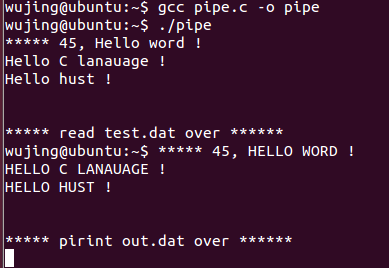
出现的问题是 打印out.dat文件内容时,打印了wujing@Ubuntu:$
http://www.cnblogs.com/biyeymyhjob/archive/2012/11/03/2751593.html
http://blog.csdn.net/ljianhui/article/details/10202699
Linux匿名管道与命名管道的更多相关文章
- 操作系统-进程通信(信号量、匿名管道、命名管道、Socket)
进程通信(信号量.匿名管道.命名管道.Socket) 具体的概念就没必要说了,参考以下链接. 信号量 匿名管道 命名管道 Socket Source Code: 1. 信号量(生产者消费者问题) #i ...
- shell 匿名管道和命名管道
管道的特点:如果管道中没有数据,那么取管道数据的操作就会滞留,直到管道内进入数据,然后读出后才会终止这一操作:同理,写入管道的操作如果没有读取管道的操作,这一动作也会滞留. 1,匿名管道 匿名管道使用 ...
- Linux环境进程间通信(一):管道及命名管道
linux下进程间通信的几种主要手段: 管道(Pipe)及有名管道(named pipe):管道可用于具有亲缘关系进程间的通信,有名管道克服了管道没有名字的限制,因此,除具有管道所具有的功能外,它还允 ...
- Linux系统编程之命名管道与共享内存
在上一篇博客中,我们已经熟悉并使用了匿名管道,这篇博客我们将讲述进程间通信另外两种常见方式--命名管道与共享内存. 1.命名管道 管道是使用文件的方式,进行进程之间的通信.因此对于管道的操作,实际上还 ...
- 【windows 操作系统】进程间通信(IPC)简述|无名管道和命名管道 消息队列、信号量、共享存储、Socket、Streams等
一.进程间通信简述 每个进程各自有不同的用户地址空间,任何一个进程的全局变量在另一个进程中都看不到,所以进程之间要交换数据必须通过内核,在内核中开辟一块缓冲区,进程1把数据从用户空间拷到内核缓冲区,进 ...
- Linux学习笔记25——命名管道(FIFO)
1 命名管道(FIFO) 管道应用的一个重大缺陷就是没有名字,因此只能用于亲缘进程之间的通信.后来从管道为基础提出命名管道(named pipe,FIFO)的概念,该限制得到了克服.FIFO不同于管道 ...
- Linux 命名管道
前文中笔者介绍了管道,本文接着介绍命名管道.文中演示所用环境为 Ubuntu 18.04 desktop. 命名管道(named pipe)又被称为先进先出队列(FIFO),是一种特殊的管道,存在于文 ...
- linux命名管道通信过程
前一个道,这节学习命名管道. 二命名管道 无名管道仅仅能用来在父子进程或兄弟进程之间进行通信,这就给没有亲缘关系的进程之间数据的交换带来了麻烦.解决问题就是本节要学习的还有一种管道通信:命名管道. 命 ...
- SQL Server 连接问题圣经-命名管道
SQL Server 连接问题圣经-命名管道 (1) APGC DSD Team 12 Jan 2011 1:24 AM 3 一.前言 在使用SQL Server 的过程中,用户遇到的最多的莫过于连接 ...
随机推荐
- zoj1665 dij变形
既然输入的是损坏率,那1-x就是剩余的.最后只要剩余的最大. #include<stdio.h> #include<string.h> #define Max 99999999 ...
- Java基础-常量池
在class文件中,“常量池”是最复杂也最值得关注的内容. Java是一种动态连接的语言,常量池的作用非常重要,常量池中除了包含代码中所定义的各种基本类型(如int.long等等)和对象型(如Stri ...
- 【UVA 11401】Triangle Counting
题 题意 求1到n长度的n根棍子(3≤n≤1000000)能组成多少不同三角形. 分析 我看大家的递推公式都是 a[i]=a[i-1]+ ((i-1)*(i-2)/2-(i-1)/2)/2; 以i 为 ...
- 【FE前端学习】第二阶段任务-基础
技能学习部分: 1.需要熟练掌握HTML标签以及CSS各个常用属性. 2.掌握CSS3 常用属性 3.掌握jquery的基本用法,对于JS基本逻辑语句需要熟练掌握 上文 [FE前端学习]第二阶段任务- ...
- 【poj3714】 Raid
http://poj.org/problem?id=3714 (题目链接) 现在才搞平面最近点对..感觉有点尴尬 题意 给出平面上两组点,每组n个,求两组点之间最短距离 Solution1 平面最近点 ...
- groovy-实现接口
Groovy提供了一些非常方便的方法来实现接口 使用闭包实现接口 只有一个方法的接口可以使用闭包来实现,例如 1 // a readable puts chars into a CharBuffer ...
- DLUTOJ #1394 Magic Questions
传送门 Time Limit: 3 Sec Memory Limit: 128 MB Description Alice likes playing games. So she will take ...
- HackerRank and MiniMax
传送门 Sherlock and MiniMax Authored by darkshadows on May 07 2014 Problem Statement Watson gives Sherl ...
- Extjs Form用法详解(适用于Extjs5)
Extjs Form是一个比较常用的控件,主要用来显示和编辑数据的,今天这篇文章将介绍Extjs Form控件的详细用法,包括创建Form.添加子项.加载和更新数据.验证等. 本文的示例代码适用于Ex ...
- mlecms v2.2版权
inc\tools\smarty 下的Smarty.class.php文件. 找到 187行左右 我们会发现原来的 $dopud =$_template->libfile($dopud);已经 ...