
使用SignalR构建一个最基本的web聊天室
What is SignalR
ASP.NET SignalR is a new library for ASP.NET developers that simplifies the process of adding real-time web functionality to your applications. Real-time web functionality is the ability to have server-side code push content to connected clients instantly as it becomes available.
You may have heard of the HTML5 WebSocket API that enables efficient bidirectional communication between the browser and server. SignalR uses Websockets when it is supported by the browser and the server, and gracefully falls back to other techniques and technologies when it is not. Either way, your application code stays the same.
SignalR provides a simple ASP.NET API for creating server-to-client remote procedure calls (RPC) that call JavaScript functions in client browsers from server-side .NET code. SignalR also includes API for connection management (for instance, connect and disconnect events), grouping connections, and authorization.
上面是http://www.asp.net/signalr 的介绍。
本人英文不太好,简单翻译一下就是:SignalR是一个新的类库,它为ASP.NET开发者提供一个更简单的途径实现实时在线功能。SignalR可以实现服务端推送内容到客户端的功能。SignalR通过HTML5的WebSocket来实现服务端跟浏览器的通信。如果浏览器不支持WebSocket 那么就用其他的技术来实现。不管哪种技术,最后都是同样的效果。SignalR提供一组简单的ASP.NET API去构建RPC功能。它可以通过服务端代码去调用前端的javascript方法。SignalR同样为连接管理,群组连接,权限等提供了API。
/*以下不是翻译*/
SignalR非常微软,它被微软封装的非常易用。不管是后台类库,还是前端javascript都已经被你封装好了。SignalR依赖JQuery。SignalR的实现原理类似WCF,使用javascript代理类来调用服务端的方法。废话不多了上代码吧。
后台:
新建一个空的MVC项目,添加一个最基本的View跟Controller这个就不废话了。
在Global.asax的Start方法下面添加:
RouteTable.Routes.MapHubs();
.csharpcode, .csharpcode pre
{
font-size: small;
color: black;
font-family: consolas, "Courier New", courier, monospace;
background-color: #ffffff;
/*white-space: pre;*/
}
.csharpcode pre { margin: 0em; }
.csharpcode .rem { color: #008000; }
.csharpcode .kwrd { color: #0000ff; }
.csharpcode .str { color: #006080; }
.csharpcode .op { color: #0000c0; }
.csharpcode .preproc { color: #cc6633; }
.csharpcode .asp { background-color: #ffff00; }
.csharpcode .html { color: #800000; }
.csharpcode .attr { color: #ff0000; }
.csharpcode .alt
{
background-color: #f4f4f4;
width: 100%;
margin: 0em;
}
.csharpcode .lnum { color: #606060; }
初始化hub。
在在解决方案下新建文件夹:Hub。添加一个类叫ChatHub:
  public class ChatHub : Microsoft.AspNet.SignalR.Hub

    {

        public void Send(string name, string message)

        {

            //send message to all pages

            Clients.All.SentMsgToPages(name, message);

        }

    }
啊,太简单了。只有一个方法一行代码。这个Send方法是提供给Client调用的。其中SentMsgToPages这是个动态方法,它表示前端的回调方法。也就是说Client调用Send方法把name跟message传回server,然后server会回调所有的连接的client的SentMsgToPages方法,把name跟message提供到client。
前台:
@{

    ViewBag.Title = "Index";

}

<script src="~/Scripts/jquery.signalR-1.1.2.js"></script>

<script src="~/signalr/hubs"></script>

<script type="text/javascript">

    var chat = $.connection.chatHub;

    chat.client.SentMsgToPages = function (name, message) {

        // Add the message to the page.

        $('#msgUl').append('<li><strong>' + name

            + '</strong>: ' + message + '</li>');

    };

    function sendMsg() {

        var userName = $("#userName").val();

        if (!userName) {

            $(".alert").show();

            return;

        }

        var msg = $('#messageBox').val();

        if (msg) {

            chat.server.send(userName, msg);

            $('#messageBox').val('').focus();

        }

    }

    $.connection.hub.start().done(

        function() {

            //设置按钮事件

            $("#btnSent").click(

                    sendMsg

            );

            $("#userName").focus(

                function () {

                    $(".alert").hide();

                }

            );

        }

        );

    $(document).ready(

        function () {

            //设置高度

            var msgListH = window.innerHeight - 150;

            $(".messageList").height(msgListH);

            $('#messageBox').keypress(

                function(e) {

                    var key = e.keyCode;

                    if (key == 13) {

                        sendMsg();

                    }

                }

                );

        }

    );

</script>

<h2>SignalR Chat Room</h2>

<div style="width: 99%;margin: 4px" id="outBoard" >

    <div  class="messageList" >

        <ul id="msgUl" class="unstyled">

        </ul>

    </div>

    <div class="form-inline">

        <input type="text" id="userName" placeholder="昵称" class="input-mini" />

        <input type="text" id="messageBox"  class="input-xxlarge"/>

        <input type="submit" value="发送" class="btn btn-info" id="btnSent" />

    </div>

      <div class="alert" style="display: none; width: 100px">

            必须输入昵称!

        </div>

</div>

前台除去HTML其实也很简单。最关键的也就3句话。
1 var chat = $.connection.chatHub;
客户端跟服务端建立连接。
2 chat.client.SentMsgToPages = function (name, message) { };
这就是服务端回调客户端的方法,给SentMsgToPages实现一个function表示如何处理返回值,这里当然是把message添加到聊天记录列表里。
3 chat.server.send(userName, msg);
客户端通过chat对象调用服务端的send方法,把数据传回到服务器。
效果:
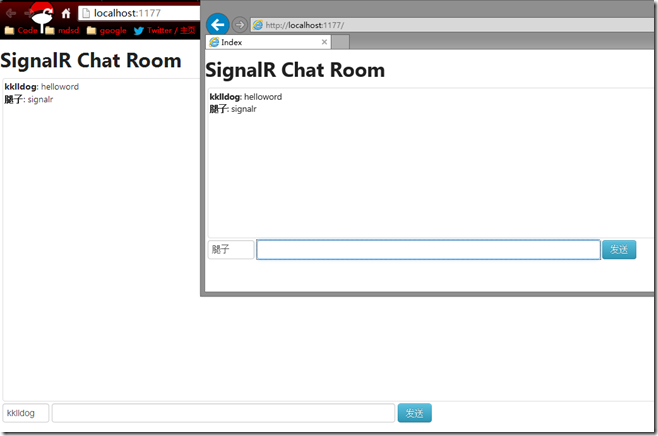
我们如此简单的就实现了一个最基本的聊天室,SignalR当然还可以做网页通知的推送,实时的进度条等等。这对ASP.NET程序员来说真是又一个神器。
.csharpcode, .csharpcode pre
{
font-size: small;
color: black;
font-family: consolas, "Courier New", courier, monospace;
background-color: #ffffff;
/*white-space: pre;*/
}
.csharpcode pre { margin: 0em; }
.csharpcode .rem { color: #008000; }
.csharpcode .kwrd { color: #0000ff; }
.csharpcode .str { color: #006080; }
.csharpcode .op { color: #0000c0; }
.csharpcode .preproc { color: #cc6633; }
.csharpcode .asp { background-color: #ffff00; }
.csharpcode .html { color: #800000; }
.csharpcode .attr { color: #ff0000; }
.csharpcode .alt
{
background-color: #f4f4f4;
width: 100%;
margin: 0em;
}
.csharpcode .lnum { color: #606060; }
.csharpcode, .csharpcode pre
{
font-size: small;
color: black;
font-family: consolas, "Courier New", courier, monospace;
background-color: #ffffff;
/*white-space: pre;*/
}
.csharpcode pre { margin: 0em; }
.csharpcode .rem { color: #008000; }
.csharpcode .kwrd { color: #0000ff; }
.csharpcode .str { color: #006080; }
.csharpcode .op { color: #0000c0; }
.csharpcode .preproc { color: #cc6633; }
.csharpcode .asp { background-color: #ffff00; }
.csharpcode .html { color: #800000; }
.csharpcode .attr { color: #ff0000; }
.csharpcode .alt
{
background-color: #f4f4f4;
width: 100%;
margin: 0em;
}
.csharpcode .lnum { color: #606060; }
使用SignalR构建一个最基本的web聊天室的更多相关文章
- .net core下使用FastHttpApi构建web聊天室
一般在dotnet core下构建使用web服务应用都使用asp.net core,但通过FastHttpApi组建也可以方便地构建web服务应用,在FastHttpApi功能的支持下构建多人聊天室是 ...
- Netty学习摘记 —— 简单WEB聊天室开发
本文参考 本篇文章是对<Netty In Action>一书第十二章"WebSocket"的学习摘记,主要内容为开发一个基于广播的WEB聊天室 聊天室工作过程 请求的 ...
- 构建一个用于产品介绍的WEB应用
为了让用户更好地了解您的产品功能,您在发布新产品或者升级产品功能的时候,不妨使用一个产品介绍的向导,引导用户熟悉产品功能和流程.本文将给您介绍一款优秀的用于产品介绍的WEB应用. 就像微博或邮箱这类W ...
- 如何构建一个多人(.io) Web 游戏,第 2 部分
原文:How to Build a Multiplayer (.io) Web Game, Part 2 探索 .io 游戏背后的后端服务器. 上篇:如何构建一个多人(.io) Web 游戏,第 1 ...
- ASP.NET SignalR 与 LayIM2.0 配合轻松实现Web聊天室(十二) 代码重构使用反射工厂解耦(一)缓存切换
前言 上一篇中,我们用了反射工厂来解除BLL和UI层耦合的问题.当然那是最简单的解决方法,再复杂一点的程序可能思路相同,但是在编程细节中需要考虑的就更多了,比如今天我在重构过程中遇到的问题.也是接下来 ...
- ASP.NET SignalR 与 LayIM2.0 配合轻松实现Web聊天室(零) 前言
前端时间听一个技术朋友说 LayIM 2.0 发布了,听到这个消息抓紧去官网看了一下.(http://layim.layui.com/)哎呀呀,还要购买授权[大家支持一下哦],果断买了企业版,喜欢钻研 ...
- ASP.NET SignalR 与 LayIM2.0 配合轻松实现Web聊天室(一) 之 基层数据搭建,让数据活起来(数据获取)
大家好,本篇是接上一篇 ASP.NET SignalR 与 LayIM2.0 配合轻松实现Web聊天室(零) 前言 ASP.NET SignalR WebIM系列第二篇.本篇会带领大家将 LayIM ...
- ASP.NET SignalR 与 LayIM2.0 配合轻松实现Web聊天室(二) 之 ChatServer搭建,连接服务器,以及注意事项。
上篇:ASP.NET SignalR 与 LayIM2.0 配合轻松实现Web聊天室(一) 之 基层数据搭建,让数据活起来(数据获取) 上一篇我们已经完成了初步界面的搭建工作,本篇将介绍IM的核心内容 ...
- ASP.NET SignalR 与 LayIM2.0 配合轻松实现Web聊天室(三) 之 实现单聊,群聊,发送图片,文件。
上篇讲解了如何搭建聊天服务器,以及客户端js怎么和layui的语法配合.服务器已经连接上了,那么聊天还会远吗? 进入正题,正如上一篇提到的我们用 Client.Group(groupId)的方法向客户 ...
随机推荐
- Codeforces Round #385 (Div. 2) A. Hongcow Learns the Cyclic Shift 水题
A. Hongcow Learns the Cyclic Shift 题目连接: http://codeforces.com/contest/745/problem/A Description Hon ...
- 动态生成Table内文字换行。
后台动态生成table,并把td内的文字进行换行. 前台: <body style="width:100%;height:540px;margin-left:0px;margin-to ...
- hive中grouping sets的使用
hive中grouping sets 数量较多时如何处理? 可以使用如下设置来 set hive.new.job.grouping.set.cardinality = 30; 这条设置的意义在于 ...
- Django 源码小剖: Django 对象关系映射(ORM)
引 从前面已经知道, 一个 request 的到来和一个对应 response 的返回的流程, 数据处理和数据库离不开. 我们也经常在 views.py 的函数定义中与数据库打交道. django O ...
- 用C#通过反射实现动态调用WebService 告别Web引用
我们都知道,调用WebService可以在工程中对WebService地址进行WEB引用,但是这确实很不方便.我想能够利用配置文件灵活调用WebService.如何实现呢? 用C#通过反射实现动态调用 ...
- .net微信公众号开发——群发消息
作者:王先荣 本文将介绍微信公众号开发中用于群发消息的类MassMessage,包括:(1)MassMessage类:(2)群发:(3)删除:(4)预览:(5)查询发送状态:(6)接收推送群发结 ...
- 关于移动App的五个提问
1.你的移动App利用了手机的哪些特性? 2.你们是否有用移动的角度和思维来考虑产品形态?还是简单的把Web照搬到手机上? 3.用户有什么特殊的动力去安装你们的App? 4.用户是否能很好的上手和使用 ...
- Python中的模块与包
标准库的安装路径 在import模块的时候,python是通过系统路径找到这些模块的,我们可以将这些路径打印出来: >>> pprint.pprint(sys.path) ['', ...
- android 开发 - 对图片进行虚化(毛玻璃效果,模糊)
概述 IPAD,IPHONE上首页背景的模糊效果是不是很好看,那么在 Android中如何实现呢.我通过一种方式实现了这样的效果. 开源库名称:anroid-image-blur 一个android ...
- 简化 Hadoop 2.4.1 Eclpse 插件编译【原创】
昨天折腾hadoop2X的eclipse插件,从https://github.com/winghc/hadoop2x-eclipse-plugin把源码搞下来后,很快搞定出来一个,但是...New H ...