
配置SharePoint使用ADFS
1. 如果网站应用程序没有使用声明式验证
$wpp = Get-SPWebApplication <URL>

$wpp.UseClaimsAuthentication  = 1

$wpp.Update()
2. 给网站应用程序配置SSL证书
进入到IIS服务器证书,申请域证书
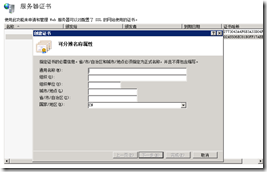
3. 配置SP服务器备用访问映射
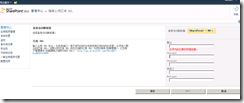
4. 安装ADFS

5. ADFS 2.0 Federation Server Configuration Wizard


6. 配置ADFS - 安装ADFS证书

Step 1 - Install to local Trusted Root


Step 2 - Export the Token Signing Cert


Step 3 - Grab the Web Cert for ADFS as well
While we are here, lets grab the ADFS Web Certificate as well, as we will need that. This certificate happens to be in the Personal store.

到这一步就比较关键了,需要到SharePoint服务器中执行
Step 4 - Install the Certs into the SharePoint Box Trusted Root
导入刚才导出的两个证书

SharePoint Trusted Provider
$certPath = “C:\Certificates\TokenSigningCert.cer”
$cert = New-Object System.Security.Cryptography.X509Certificates.X509Certificate2(“$certPath”)
$emailClaimMap = New-SPClaimTypeMapping -IncomingClaimType "http://schemas.xmlsoap.org/ws/2005/05/identity/claims/emailaddress" -IncomingClaimTypeDisplayName "EmailAddress" -SameAsIncoming
$upnClaimMap = New-SPClaimTypeMapping -IncomingClaimType "http://schemas.xmlsoap.org/ws/2005/05/identity/claims/upn" -IncomingClaimTypeDisplayName "UPN" -SameAsIncoming
$roleClaimMap = New-SPClaimTypeMapping -IncomingClaimType "http://schemas.microsoft.com/ws/2008/06/identity/claims/role" -IncomingClaimTypeDisplayName "Role" -SameAsIncoming
$sidClaimMap = New-SPClaimTypeMapping -IncomingClaimType "http://schemas.microsoft.com/ws/2008/06/identity/claims/primarysid" -IncomingClaimTypeDisplayName "SID" –SameAsIncoming
$realm = “urn:” + $env:ComputerName + “:adfs”
$signinurl = “https://xxx/adfs/ls/”
$ap = New-SPTrustedIdentityTokenIssuer -Name “ADFS20Server” -Description “ADFS 2.0 Federated Server” -Realm $realm -ImportTrustCertificate $cert -ClaimsMappings $emailClaimMap,$upnClaimMap,$roleClaimMap,$sidClaimMap -SignInUrl $signinurl -IdentifierClaim $emailClaimmap.InputClaimType
New-SPTrustedRootAuthority “Contoso ADFS Token Signing Trusted Root Authority” -Certificate $cert
$certPath = “C:\Certificates\ADFSWebCert.cer”

$cert = New-Object System.Security.Cryptography.X509Certificates.X509Certificate2(“$certPath”)

New-SPTrustedRootAuthority “DSDContosoDC web server” -Certificate $cert
配置ADFS信任关系

选择手动配置

选择信任SharePoint

Edit Claim Rules


配置SharePoint站点

参考文档
http://technet.microsoft.com/en-us/library/hh305235.aspx
配置SharePoint使用ADFS的更多相关文章
- 安装和配置SharePoint 2013 Workflow
SharePoint 2013中的工作流概述 在SharePoint 2013中,Workflow(建立在Windows Workflow Foundation 4.5)和WCF承载在Workflow ...
- 为已经存在的TFS团队项目配置SharePoint集成
配置好TFS团队项目集合与SharePoint站点集的集成后,就可以在新建TFS团队项目时集成SharePoint站点,也可以为已经存在的团队项目配置SharePoint站点的集成,如下图: Fi ...
- 【HOW】如何配置SharePoint传入/传出电子邮件设置
SharePoint 2010的传入和传出邮件配置选项都较简单,但由于需要DNS及Exchange等服务器互相配合,所以要正确配置并不容易. 在微软的官方文档中详细说明了配置步骤:配置传入电子邮件:h ...
- 配置SharePoint 2013 Search 拓扑结构
在单台服务器上安装了 SharePoint Server 2013,并且创建了具有默认搜索拓扑的 Search Service 应用程序.在默认搜索拓扑中,所有搜索组件都位于承载管理中心的服务器上.S ...
- [转]Win7下安装配置sharepoint server 2010
转自:http://blog.sina.com.cn/s/blog_5d93d7aa010151lp.html 要开发SharePoint 2010应用程序,开发人员必须构建一个SharePoint ...
- Sharepoint 2016 配置FBA(三)配置Sharepoint
编辑已经创建好的Web Applicaiton, SharePoint Central Administration -> Application Management -> Manage ...
- 配置Sharepoint之后。外网无法访问的问题
Sharepoint配置完成了,projectserver也已经配置完毕.突然遇到一个情况就是外网访问不了,这可麻烦了,费了半天事访问不了等于0啊.没办法,研究吧.在群里问了大神,终于解决了.现将解决 ...
- 配置SharePoint环境加域提示网络名不可用[已解决]
今天去客户给机器做备机,带着装好SharePoint07的机器跑过去了,先做个LAN,然后连上机器开始工作:首先当然是改ip地址,然后都改好了开始加域,加了好几次,发现都不行,提示"指定的网 ...
- ADFS3.0与SharePoint2013安装配置(原创)
现在越来越多的企业使用ADFS作为单点登录,我希望今天的内容能帮助大家了解如何配置ADFS和SharePoint 2013.安装配置SharePoint2013这块就不做具体描述了,今天主要讲一下怎么 ...
随机推荐
- SupportV7包中 SwipeRefreshLayout 修改下拉控件的距离
//修改下拉距离 ViewTreeObserver vto = mCategoryResults.mSwipeRefreshLayout.getViewTreeObserver(); vto.addO ...
- 【C语言】汉诺塔问题
之前遇见这个问题,非常费劲地理解了,并写出代码,然后过段时间,再遇见这个问题,又卡住了,如此反反复复两三次,才发现自己对递归的理解依然很肤浅.今天无聊,重温<算法:c语言实现>一书,又遇见 ...
- 关于welcome-file-list(欢迎页)不起作用的解决办法
今天我遇到了一个问题,就是直接输入http://localhost:8080/xxx-admin/,不是跳转到index.html,而是报404找不到的错误,根据错误信息看明显是没有跳转到index. ...
- 解决 -ERR Plaintext authentication disallowed on non-secure (SSL/TLS) connections 方案[sendmail, dovecot]
在linux下安装sendmail比较容易, 但是在配置sendmail时却是比较麻烦的, 特别是对于一些新手来说, 配置过程必须十分小心谨慎, 要知道, 错误是千奇百怪, 但是成功的结果就只有一个, ...
- ruby -- 问题解决(八)解决Paperclip::NotIdentifiedByImageMagickError
好吧!又见 Paperclip::NotIdentifiedByImageMagickError,之前遇过一次... 最近又遇到一次,解决了之后,忘了写博客,然后再次遇到的时候,有一种被车撞到的节奏. ...
- 随着ScrollView的滑动,渐渐的执行动画View
今天是实现了一个小功能的东西.看看效果图: 实现方式: 1.自定义ScrollView 复写onScrollChange方法,来计算滑动的位置. 2.自定义接口,通过接口来在ScrollView中 ...
- 云计算之路-阿里云上:消灭“黑色n秒”第二招——给w3wp进程指定CPU核
虽然昨天的第一招失败了,但是从失败中我们学到了与多核CPU相关的Processor Affinity(处理器关联)的知识. 既然我们可以让.NET程序的不同线程运行于指定的CPU核,那是不是也可以让I ...
- CSS3伪类和伪元素的特性和区别
前端er们大都或多或少地接触过CSS伪类和伪元素,比如最常见的:focus,:hover以及<a>标签的:link.visited等,伪元素较常见的比如:before.:after等. 其 ...
- [转载]SharePoint 2013 解决方案中使用JavaScript
作为在SharePoint应用程序中使用JavaScript的第一步,就是要知道如何将一个写好的.js文件,引用到页面上.嗯,你可能觉得这个话题太简单了,"引用一个.js文件不就是在页面上方 ...
- [mysql]去重:DISTINCT
SELECT DISTINCT name, age:去掉name字段重复的(需要先写去重的字段):如果想多个取出多个字段重复,需要用group by.