
android 之 spinner的简单使用
先看spinner的效果图:
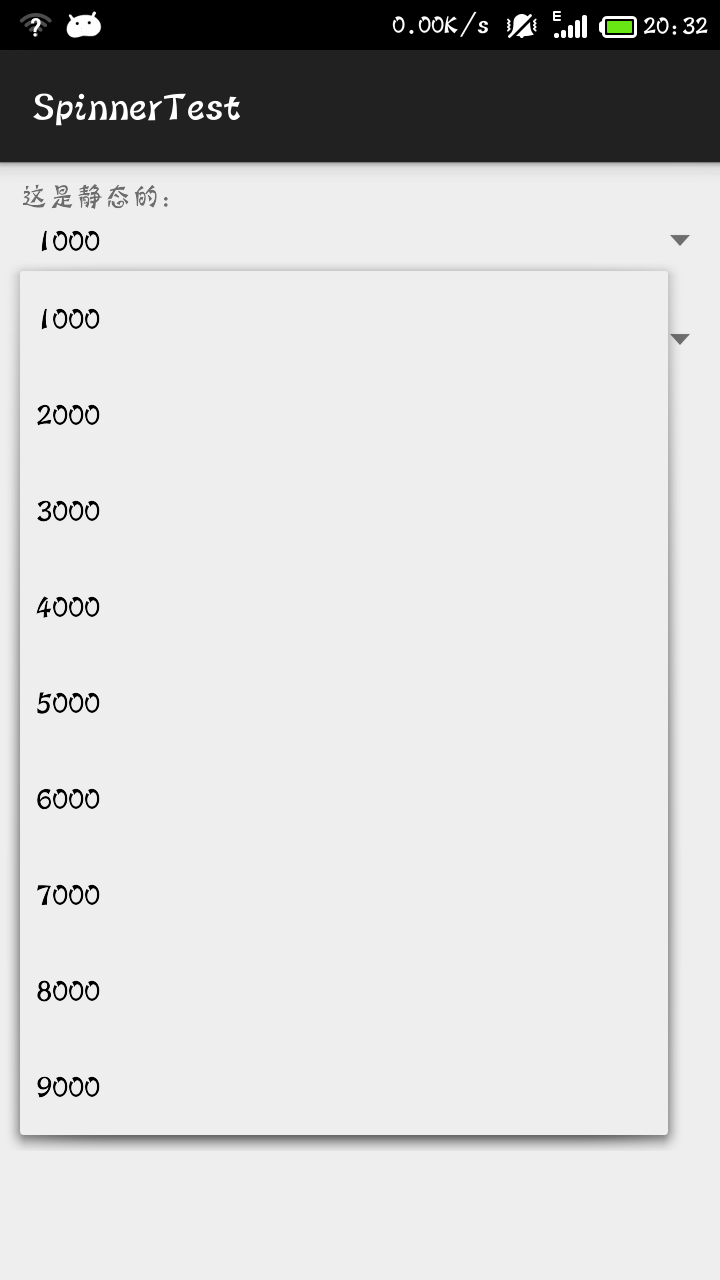
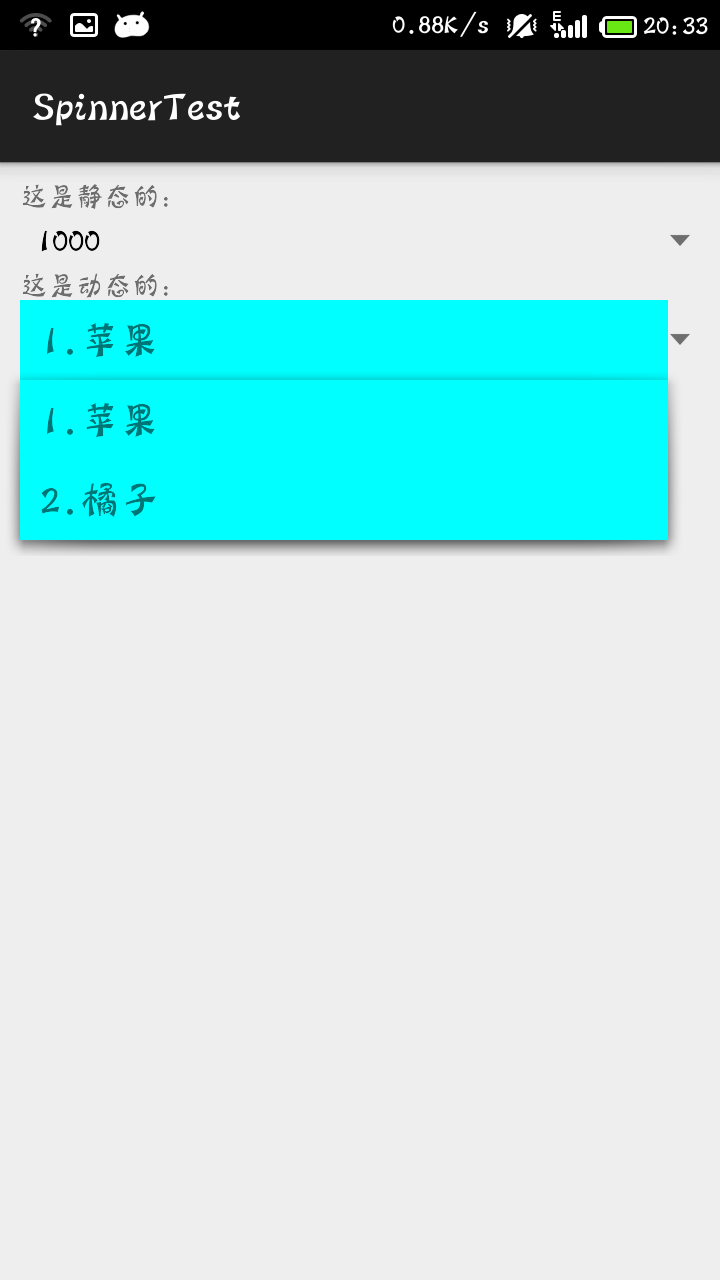
代码:
MainActivity
package com.mecury.spinnertest;

import java.util.ArrayList;

import android.support.v7.app.ActionBarActivity;

import android.os.Bundle;

import android.view.View;

import android.widget.AdapterView;

import android.widget.ArrayAdapter;

import android.widget.Spinner;

public class MainActivity extends ActionBarActivity {

    private Spinner spinnerButton;

    private Spinner spinner;

    @Override

    protected void onCreate(Bundle savedInstanceState) {

        super.onCreate(savedInstanceState);

        setContentView(R.layout.activity_main);

        spinnerButton = (Spinner) findViewById(R.id.spinnerButton);

        spinner = (Spinner) findViewById(R.id.spinner2);

        /*静态的显示下来出来的菜单选项,显示的数组元素提前已经设置好了

         * 第二个参数:已经编写好的数组

         * 第三个数据:默认的样式

         */

        ArrayAdapter<CharSequence> adapter =

        ArrayAdapter.createFromResource(this, R.array.number_array, android.R.layout.simple_spinner_item);

        //设置spinner中每个条目的样式,同样是引用android提供的布局文件

        adapter.setDropDownViewResource(android.R.layout.simple_spinner_dropdown_item);

        spinnerButton.setAdapter(adapter);

        spinnerButton.setPrompt("测试");

        spinnerButton.setOnItemSelectedListener(new spinnerListener());

        /*

         * 动态添显示下来菜单的选项,可以动态添加元素

         */

        ArrayList<String> list = new ArrayList<String>();

        list.add("1.苹果");

        list.add("2.橘子");

        /*

         * 第二个参数是显示的布局

         * 第三个参数是在布局显示的位置id

         * 第四个参数是将要显示的数据

         */

        ArrayAdapter adapter2 = new ArrayAdapter(this, R.layout.item, R.id.textview,list);

        spinner.setAdapter(adapter2);

        spinner.setOnItemSelectedListener(new spinner2Listener());

    }

    class spinnerListener implements android.widget.AdapterView.OnItemSelectedListener{

        @Override

        public void onItemSelected(AdapterView<?> parent, View view,

                int position, long id) {

            //将选择的元素显示出来

            String selected = parent.getItemAtPosition(position).toString();

        }

        @Override

        public void onNothingSelected(AdapterView<?> parent) {

            System.out.println("nothingSelect");

        }

    }

    class spinner2Listener implements android.widget.AdapterView.OnItemSelectedListener{

        @Override

        public void onItemSelected(AdapterView<?> parent, View view,

                int position, long id) {

            String selected = parent.getItemAtPosition(position).toString();

        }

        @Override

        public void onNothingSelected(AdapterView<?> parent) {

            System.out.println("nothingSelect");

        }

    }

}
main_activity的代码:
<LinearLayout xmlns:android="http://schemas.android.com/apk/res/android"

    xmlns:tools="http://schemas.android.com/tools"

    android:layout_width="match_parent"

    android:layout_height="match_parent"

    android:orientation="vertical"

    android:padding="10dp"

    tools:context="com.mecury.spinnertest.MainActivity" >

    <TextView

        android:layout_width="match_parent"

        android:layout_height="wrap_content"

        android:text="这是静态的:"/>

    <Spinner

        android:id="@+id/spinnerButton"

        android:layout_width="match_parent"

        android:layout_height="30dp"/>

    <TextView

        android:layout_width="match_parent"

        android:layout_height="wrap_content"

        android:text="这是动态的:"/>

    <Spinner

        android:id="@+id/spinner2"

        android:layout_width="match_parent"

        android:layout_height="wrap_content"/>

</LinearLayout>
因为第一种是静态的实现方法,我们需要事先设置好spinner要显示的内容。在String.xml文件中添加需要显示的内容:
    <string-array name="number_array">

        <item>1000</item>

        <item>2000</item>

        <item>3000</item>

        <item>4000</item>

        <item>5000</item>

        <item>6000</item>

        <item>7000</item>

        <item>8000</item>

        <item>9000</item>

    </string-array>
第二种是静态的实现方法,我们使用自己的显示布局item.xml。
<?xml version="1.0" encoding="utf-8"?>

<LinearLayout xmlns:android="http://schemas.android.com/apk/res/android"

    android:layout_width="match_parent"

    android:layout_height="match_parent"

    android:background="#00ffff"

    android:padding="10dp"

    android:orientation="vertical" >

    <TextView

        android:id="@+id/textview"

        android:layout_width="match_parent"

        android:layout_height="wrap_content"

        android:textSize="20dp"/>

</LinearLayout>
android 之 spinner的简单使用的更多相关文章
- Xamarin.Android之Spinner的简单探讨
一.前言 今天用了一下Spinner这个控件,主要是结合官网的例子来用的,不过官网的是把数据写在Strings.xml中的, 某种程度上,不是很符合我们需要的,比较多的应该都是从数据库读出来,绑定上去 ...
- Android基本控件Spinner的简单使用【转】
Android基本控件Spinner的简单使用 感谢大佬:https://blog.csdn.net/bingocoder/article/details/80469939 学习过了Textview, ...
- 在android的spinner中,实现取VALUE值和TEXT值。 ZT
在android的spinner中,实现取VALUE值和TEXT值. 为了实现在android的 spinner实现取VALUE值和TEXT值,我尝试过好些办法,在网上查的资料,都是说修改适配器, ...
- 在android的spinner中,实现取VALUE值和TEXT值
为了实现在android的spinner实现取VALUE值和TEXT值,我尝试过好些办法,在网上查的资料,都是说修改适配器,刚开始我也是通过修改适配器的方法来做的,但是如果一个activity有多个s ...
- [置顶]
xamarin android自定义spinner
以前弄的一个下拉框时自带的spinner,感觉好丑,实际效果实在满足不了基本的UI界面要求,还是自己动手丰衣足食,看了网上关于android中自定义spinner的文章,感觉实现原理还是比较简单,所以 ...
- 我的Android进阶之旅】GitHub 上排名前 100 的 Android 开源库进行简单的介绍
GitHub Android Libraries Top 100 简介 本文转载于:https://github.com/Freelander/Android_Data/blob/master/And ...
- Xamarin.Android之封装个简单的网络请求类
一.前言 回忆到上篇 <Xamarin.Android再体验之简单的登录Demo> 做登录时,用的是GET的请求,还用的是同步, 于是现在将其简单的改写,做了个简单的封装,包含基于Http ...
- Spinner的简单学习
代码分析: package com.mecury.spinnertest; import java.util.ArrayList; import android.support.v7.app.Acti ...
- Android组件Spinner使用
Spinner组件是Android当中非常常用的一种用于下拉选择的组件. 本blog当中主要解决的几个问题: 如何在XML中初始化Spinner选项 如何使用代码的方式初始化Spinner选项 一个A ...
随机推荐
- 关于VSTO调用Excel后进程无法退出的解决方案:
VSTO的Excel对象模型提供了托管代码对Excel的操作.但是它的实现时通过RCW(Runtime Com Wrapper)实现的,所以无法完全按照托管代码的运行方式操作.COM的资源释放时通过引 ...
- Linux命令:ps / top
简介:ps - report a snapshot of the current processes. 用途:获取当前时刻程序运行状态 概要:ps [options] 类型:ps is hashed ...
- Erlang进程的Link机制
这篇文章还不是最终版,有时间时,我会再来补充完善. 什么是link Erlang程序基于进程建模,进程之间的交互机制有收发消息,link和monitor.其中,收发消息通常用于正常的进程间通讯,而li ...
- log4j的一些问题
今天,在学习log4j的时候发现了一点问题,关于level的问题. log4j.rootLogger=error, console, file , fileerror log4j.logger.com ...
- QCustomplot使用分享(四) QCPAbstractItem
一.是什么 说起图,大家一下就可能想到折线图.柱状图和饼图等,但是除了这些显眼的东西以外其实还有很多东西辅助的存在着,有了这些辅助的东西图才会看起来有意义,或者说更加的真实.有说服力.这些东西都包括那 ...
- jdbc中的细节
JDBC 架构:JDBC 的 API 支持两层和三层处理模式进行数据库的访问,但是一般的JDBC架构由两层处理模式组成.(1)JDBC API:提供了应用程序对 JDBC 管理器的连接(2)JDBC ...
- Scrum 项目1.0 2.0 3.0 4.0 5.0 6.0 7.0
1.确定选题. 应用NABCD模型,分析你们初步选定的项目,充分说明你们选题的理由. 录制为演说视频,上传到视频网站,并把链接发到团队博客上. 截止日期:2016.5.6日晚10点 阅读教材第8章,8 ...
- VC使用libcurl模拟登录CSDN并自动评论资源以获取积分
环境:Win7 64位+VC2008 软件及源码下载:(http://pan.baidu.com/s/1jGE52pK) 涉及到的知识点: C++多线程编程 libcurl的使用(包括发送http请求 ...
- 《Node.js+MongoDB+AngularJS Web开发》读书笔记及联想
总体介绍 <Node.js+MongoDB+AngularJS Web开发>,于2015年6月出版,是一本翻译过来的书,原书名为<Node.js,MongoDB and Angula ...
- html5菜单折纸效果
类似猎豹浏览器安装时的用户须知效果. html文件代码,保存为html文件打开: <!DOCTYPE html> <html> <head> <meta ht ...