
How to Move SSL certificate from Apache to Tomcat
https://www.sslsupportdesk.com/how-to-move-ssl-certificate-from-apache-to-tomcat/
Apache uses x509 pem/crt files which is is very different than a Tomcat system that uses keystores. You will follow these steps to copy, convert, and move the working Apache certificate to the Tomcat server.
Both Apache and Tomcat are very customizable. The directory location and naming of the individual files needed vary depending on your personalized system. Below are generalized instructions.
We will start by assuming that you have already successfully installed the SSL certificate on the Apache web server.
Step 1: Finding/converting your SSL certificate and key file on Apache:
- Referencing the httpd.conf or ssl.conf file on the Apache system look for the location and directories of the three files necessary.
- SSLCertificateFile /usr/local/ssl/crt/public.crt
SSLCertificateFile tells Apache how to find the the SSL certificate file. - SSLCertificateKeyFile /usr/local/ssl/private/private.key
SSLCertificateKeyFile tells Apache how to find the private key file. - SSLCertificateChainFile /usr/local/ssl/crt/intermediate.crt
SSLCertificateChainFile or SSLCACertificateFile tells Apache the location of the Intermediate file.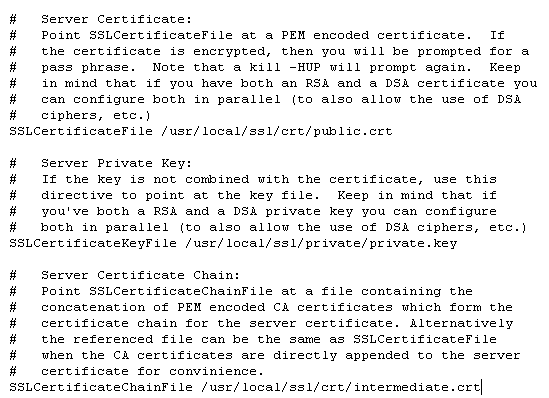
- SSLCertificateFile /usr/local/ssl/crt/public.crt
- Copy the three files located within these directories into one location.
- Using OpenSSL on the Apache system you will perform the following command line conversion.
Note: you will be prompted for a password.openssl
pkcs12 -export -in public.crt -inkey private.key -out mycert.p12 -name
tomcat -CAfile intermediate.crt -caname intermediate -chain - The exported keystore will be ‘mycert.p12‘ and will be ready for you to migrate to the Tomcat server.
Step 2: Configuring SSL in Tomcat with your keystore:
- On the Tomcat server search and open the Tomcat server.xml file.
- Open the server.xml config file using a text editor (ie. JAKARTA_HOME/conf/server.xml)
Search for the secure element in your config file (try searching
for SSL Connector). By default it should look something like this: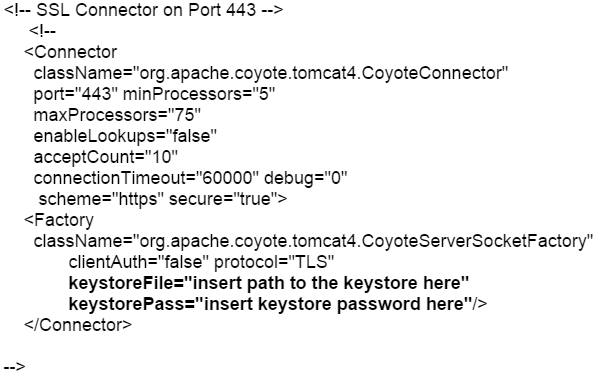
- Change the following attributes to reference the location, name, and password of your keystore.
- keystoreFile=”c:\PATH TO mycert.p12”
- keystorePass=”password of mycert.p12”
- Add The following line under KeystorePass=
- keystoreType=”PKCS12″
- Save the changes.
- Stop and Start Tomcat.Your SSL Certificate/Keystore is now installed, and the website is now configured.
Note: PKCS12 keystore type is only supported with Tomcat JDK 1.5.x+
If unsuccessful you will have to
convert your mycert.p12 file to a .jks file by performing the following
command line in Tomcat using keytool.
keytool -importkeystore -srckeystore mycert.p12 -srcstoretype PKCS12 -destkeystore mycert.jks
If this fails and you cannot get
Tomcat to use the Apache converted keystore you will need to generate a
new keystore and CSR from the Tomcat System and reissue your certificate
to be used on the Tomcat system.
Tomcat Support
For more information refer to Tomcat
How to Move SSL certificate from Apache to Tomcat的更多相关文章
- How To Create a SSL Certificate on Apache for CentOS 6
About Self-Signed Certificates 自签证书.一个SSL证书,是加密网站的信息,并创建更安全的链接的一种方式.附加地,证书可以给网站浏览者显示VPS的的身份证明信息.如果一个 ...
- How To Set Up Apache with a Free Signed SSL Certificate on a VPS
Prerequisites Before we get started, here are the web tools you need for this tutorial: Google Chrom ...
- SSL certificate problem unable to get local issuer certificate解决办法
SSL certificate problem unable to get local issuer certificate 解决办法: 下载:ca-bundle.crt 将它放在自己的wamp或者x ...
- Centos 64位 Install certificate on apache 即走https协议
Centos 64位 Install certificate on apache 即走https协议 一: 先要apache 请求ssl证书的csr 一下是步骤: 重要注意事项 An Importan ...
- Failed to connect to VMware Lookup Service……SSL certificate verification failed
今天登陆vsphere web-client时候,报错如下: Failed to connect to VMware Lookup Service https://vc-test.cebbank.co ...
- How to disable SSL certificate checking with Spring RestTemplate?(使用resttemplate访问https时禁用证书检查)
How to disable SSL certificate checking with Spring RestTemplate?(使用resttemplate访问https时禁用证书检查) **** ...
- 使用Letsencrypt做SSL certificate
为什么要使用Letsencrypt做SSL certificate? 最简单直接的原因是免费.但是免费存在是否靠谱的问题,尤其是对安全要求比较高的网站,需要考虑使用letsencrypt的安全性是否符 ...
- Configure custom SSL certificate for RDP on Windows Server 2012 in Remote Administration mode
Q: So the release of Windows Server 2012 has removed a lot of the old Remote Desktop related configu ...
- (转)How to renew your Apple Push Notification Push SSL Certificate
转自:https://blog.serverdensity.com/how-to-renew-your-apple-push-notification-push-ssl-certificate/ It ...
随机推荐
- TensorFlow 需注意的细节问题
1. 数据类型 不带小数点的数默认为 int32,带小数点的数默认为 float32:
- noip刷题记录 20170818
天天爱跑步 lca + 树上差分 #include<iostream> #include<cstdio> #include<cstdlib> #include< ...
- Linux下如何生成core dump 文件(解决segment fault段错误的问题)
Linux下的C程序常常会因为内存访问等原因造成segment fault(段错误),如果此时core dump 的功能是打开的,在运行我们的可执行程序时就会生成一个名为core的文件,然后我们就可以 ...
- 使用哈希加盐法来为密码加密(补充JAVA的实现)
使用哈希加盐法来为密码加密 转自:http://www.cnblogs.com/jfzhu/p/4023439.html 转载请注明出处 (一)为什么要用哈希函数来加密密码 如果你需要保存密码(比 ...
- ASP.NET Core 基础教程-约定 - ASP.NET Core 基础教程 - 简单教程,简单编程
原文:ASP.NET Core 基础教程-约定 - ASP.NET Core 基础教程 - 简单教程,简单编程 ASP.NET Core 基础教程-约定 因为 ASP.NET Core 是可以跨平台的 ...
- Atitit.软件button和仪表板(13)--全文索引操作--db数据库子系统mssql2008
Atitit.软件button和仪表板(13)--全文索引操作--db数据库子系统mssql2008 全文索引操作 4.全文索引和like语句比較 1 5.倒排索引 inverted index 1 ...
- 【Linux计划】XSI IPC
三种IPC这就是所谓的XSI IPC,每间: 消息队列 信号量 共享存储器 以下分别介绍三种IPC的使用方法. 1.消息队列 消息队列是消息的链接表,具有例如以下函数接口: msgget:创建一个新队 ...
- js仿黑客帝国文字数字雨效果
<!DOCTYPE html> <html> <head> <meta charset="utf-8"> <title> ...
- <PC>HP网络共享并创建一个热点问题
郁闷了一年多 你不能使用本地连接的开放热点 网上说的网卡驱动程序,系统设置等.,我们解决不了 原本BIOS节能设置错误 导致在连续主动对自己的有线无线功能被禁用 该LAN\WLAN Switchin ...
- WPF中样式和行为和触发器
原文:WPF中样式和行为和触发器 样式简介:样式(style)是组织和重用格式化选项的重要工具,不是使用重复的标记填充XAML,以便设置外边距.内边距.颜色以及字体等细节.而是创建一系列封装所有这些细 ...