
eclipse中 使用maven搭建ssh项目 思路复习(含有pom.xml)
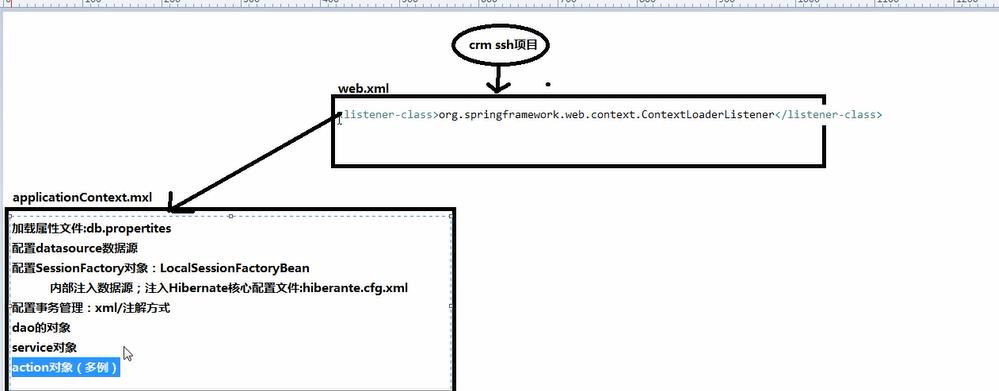
首先在web.xml中配置监听器
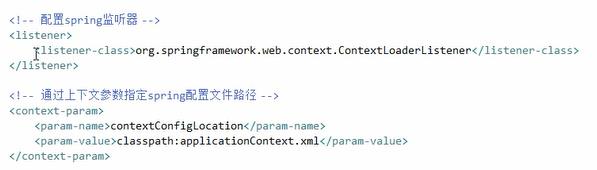
在服务器启动的时候 进行bean对象的创建(只会创建单例对象 dao service 多例对象action可不会创建 每个多例对象是不同的 创建了有什么意义呢 当使用的时候 才会创建)
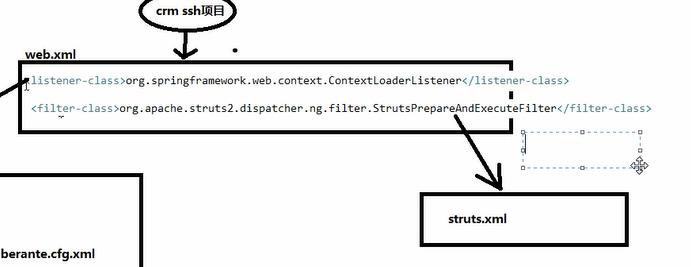
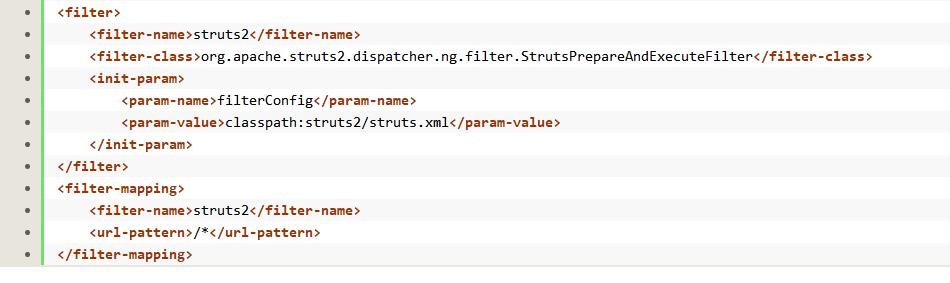
然后 在web.xml中还要配置一个过滤器 作用:处理用户的请求 加载struts.xml文件
(默认从classpath路径下)
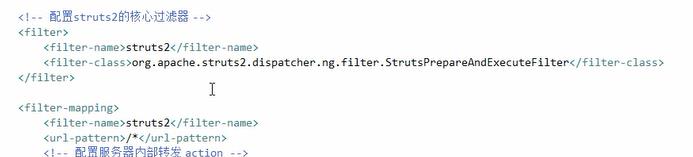
(也可手动指定 struts.xml位置可以改变)
 ------------------------------
----------------------------------------
pom.xml文件
<project xmlns="http://maven.apache.org/POM/4.0.0" xmlns:xsi="http://www.w3.org/2001/XMLSchema-instance"

    xsi:schemaLocation="http://maven.apache.org/POM/4.0.0 http://maven.apache.org/xsd/maven-4.0.0.xsd">

    <modelVersion>4.0.0</modelVersion>

    <groupId>cn.itcast.maven</groupId>

    <artifactId>maven-crm</artifactId>

    <version>0.0.1-SNAPSHOT</version>

    <packaging>war</packaging>

    <name>web工程,包括jsp、action等</name>

    <description>web工程,包括jsp、action等</description>

    <!-- 属性 -->

    <properties>

        <spring.version>4.2.4.RELEASE</spring.version>

        <hibernate.version>5.0.7.Final</hibernate.version>

        <struts.version>2.3.24</struts.version>

    </properties>

    <!-- 锁定版本,struts2-2.3.24、spring4.2.4、hibernate5.0.7 -->

    <dependencyManagement>

        <dependencies>

            <dependency>

                <groupId>org.springframework</groupId>

                <artifactId>spring-context</artifactId>

                <version>${spring.version}</version>

            </dependency>

            <dependency>

                <groupId>org.springframework</groupId>

                <artifactId>spring-aspects</artifactId>

                <version>${spring.version}</version>

            </dependency>

            <dependency>

                <groupId>org.springframework</groupId>

                <artifactId>spring-orm</artifactId>

                <version>${spring.version}</version>

            </dependency>

            <dependency>

                <groupId>org.springframework</groupId>

                <artifactId>spring-test</artifactId>

                <version>${spring.version}</version>

            </dependency>

            <dependency>

                <groupId>org.springframework</groupId>

                <artifactId>spring-web</artifactId>

                <version>${spring.version}</version>

            </dependency>

            <dependency>

                <groupId>org.hibernate</groupId>

                <artifactId>hibernate-core</artifactId>

                <version>${hibernate.version}</version>

            </dependency>

            <dependency>

                <groupId>org.apache.struts</groupId>

                <artifactId>struts2-core</artifactId>

                <version>${struts.version}</version>

            </dependency>

            <dependency>

                <groupId>org.apache.struts</groupId>

                <artifactId>struts2-spring-plugin</artifactId>

                <version>${struts.version}</version>

            </dependency>

        </dependencies>

    </dependencyManagement>

    <!-- 依赖管理 -->

    <dependencies>

        <!-- spring -->

        <dependency>

            <groupId>org.springframework</groupId>

            <artifactId>spring-context</artifactId>

        </dependency>

        <dependency>

            <groupId>org.springframework</groupId>

            <artifactId>spring-aspects</artifactId>

        </dependency>

        <dependency>

            <groupId>org.springframework</groupId>

            <artifactId>spring-orm</artifactId>

        </dependency>

        <dependency>

            <groupId>org.springframework</groupId>

            <artifactId>spring-test</artifactId>

        </dependency>

        <dependency>

            <groupId>org.springframework</groupId>

            <artifactId>spring-web</artifactId>

        </dependency>

        <!-- hibernate -->

        <dependency>

            <groupId>org.hibernate</groupId>

            <artifactId>hibernate-core</artifactId>

        </dependency>

        <!-- 数据库驱动 -->

        <dependency>

            <groupId>mysql</groupId>

            <artifactId>mysql-connector-java</artifactId>

            <version>5.1.6</version>

            <scope>runtime</scope>

        </dependency>

        <!-- c3p0 -->

        <dependency>

            <groupId>c3p0</groupId>

            <artifactId>c3p0</artifactId>

            <version>0.9.1.2</version>

        </dependency>

        <!-- 导入 struts2 -->

        <dependency>

            <groupId>org.apache.struts</groupId>

            <artifactId>struts2-core</artifactId>

        </dependency>

        <dependency>

            <groupId>org.apache.struts</groupId>

            <artifactId>struts2-spring-plugin</artifactId>

        </dependency>

        <!-- servlet jsp -->

        <dependency>

            <groupId>javax.servlet</groupId>

            <artifactId>servlet-api</artifactId>

            <version>2.5</version>

            <scope>provided</scope>

        </dependency>

        <dependency>

            <groupId>javax.servlet</groupId>

            <artifactId>jsp-api</artifactId>

            <version>2.0</version>

            <scope>provided</scope>

        </dependency>

        <!-- 日志 -->

        <dependency>

            <groupId>org.slf4j</groupId>

            <artifactId>slf4j-log4j12</artifactId>

            <version>1.7.2</version>

        </dependency>

        <!-- junit -->

        <dependency>

            <groupId>junit</groupId>

            <artifactId>junit</artifactId>

            <version>4.9</version>

            <scope>test</scope>

        </dependency>

        <!-- jstl -->

        <dependency>

            <groupId>javax.servlet</groupId>

            <artifactId>jstl</artifactId>

            <version>1.2</version>

        </dependency>

        <dependency>

            <groupId>com.alibaba</groupId>

            <artifactId>fastjson</artifactId>

            <version>1.1.15</version>

        </dependency>

        <!-- https://mvnrepository.com/artifact/org.apache.commons/commons-lang3 -->

        <dependency>

            <groupId>org.apache.commons</groupId>

            <artifactId>commons-lang3</artifactId>

            <version>3.4</version>

        </dependency>

    </dependencies>

    <build>

        <plugins>

            <!-- 设置编译版本为1.7 -->

            <plugin>

                <groupId>org.apache.maven.plugins</groupId>

                <artifactId>maven-compiler-plugin</artifactId>

                <configuration>

                    <source>1.7</source>

                    <target>1.7</target>

                    <encoding>UTF-8</encoding>

                </configuration>

            </plugin>

            <!-- maven内置 的tomcat6插件 -->

            <plugin>

                <groupId>org.codehaus.mojo</groupId>

                <artifactId>tomcat-maven-plugin</artifactId>

                <version>1.1</version>

                <configuration>

                    <!-- 可以灵活配置工程路径 -->

                    <path>/</path>

                    <!-- 可以灵活配置端口号 -->

                    <port>8080</port>

                </configuration>

            </plugin>

        </plugins>

    </build>

</project>
eclipse中 使用maven搭建ssh项目 思路复习(含有pom.xml)的更多相关文章
- Maven学习总结(七)——eclipse中使用Maven创建Web项目
一.创建Web项目 1.1 选择建立Maven Project 选择File -> New ->Project,如下图所示:
- Maven——eclipse中使用Maven创建Web项目
原文:http://www.cnblogs.com/xdp-gacl/p/4054814.html 一.创建Web项目 1.1 选择建立Maven Project 选择File -> New - ...
- 转】Maven学习总结(七)——eclipse中使用Maven创建Web项目
原博文出自于: http://www.cnblogs.com/xdp-gacl/p/4054814.html 感谢! 一.创建Web项目 1.1 选择建立Maven Project 选择File -& ...
- 利用Eclipse中的Maven构建Web项目(三)
利用Eclipse中的Maven构建Web项目 1.将Maven Project转换成动态Web项目,鼠标右键项目,输入"Project Facets" 2.依据Dynamic W ...
- 利用Eclipse中的Maven构建Web项目报错(二)
利用Eclipse中的Maven构建Web项目 1.错误描述 [INFO] Scanning for projects... [INFO] [INFO] Using the builder org.a ...
- 利用Eclipse中的Maven构建Web项目报错(一)
利用Eclipse中的Maven构建Web项目 1.在进行上述操作时,pom.xml一直报错 <project xmlns="http://maven.apache.org/POM/4 ...
- 利用Eclipse中的Maven构建Web项目(二)
利用Eclipse中的Maven构建Web项目 1.新建源文件夹,Java Resources鼠标右键,"New-->Source Folder" 2.新建src/main/ ...
- 利用Eclipse中的Maven构建Web项目(一)
利用Eclipse中的Maven构建Web项目 1.新建一个Maven Project,"New-->Other..." 2.选择"Maven Project&qu ...
- (转)Maven学习总结(七)——eclipse中使用Maven创建Web项目
孤傲苍狼只为成功找方法,不为失败找借口! Maven学习总结(七)——eclipse中使用Maven创建Web项目 一.创建Web项目 1.1 选择建立Maven Project 选择File -&g ...
随机推荐
- 修改android系统开机动画
本文转载自:http://blog.csdn.net/u012301841/article/details/51598115 修改android系统开机动画
- hdu 1242(BFS+优先队列)
Rescue Time Limit: 2000/1000 MS (Java/Others) Memory Limit: 65536/32768 K (Java/Others)Total Subm ...
- runC爆严重安全漏洞,主机可被攻击!使用容器的快打补丁
runC 是 Docker,Kubernetes 等依赖容器的应用程序的底层容器运行时.此次爆出的严重安全漏洞可使攻击者以 root 身份在主机上执行任何命令. 容器的安全性一直是容器技术的一个短板. ...
- CAS配置记录
CAS配置(1)之证书配置 CAS配置(2)之主配置 CAS配置(3)之restful-api接入接口
- CALayer(一)
CALayer CALayer和UIView CALayer和UIView相比--CALayer少了事件处理的功能,所以更加轻量级,性能更好一点,这就说明如果有一些和用户交互的东西是不建议用CALay ...
- myeclipse2014 破解步骤
1.打开破解文件夹Myeclipse 2014 patch,运行run.bat文件 2.在破解界面中,usercode随便输入, systemid 在右边的SystemId按钮处,点击. 将自动生成一 ...
- 7.union
联合结果集union 简单的结果集联合: select number,name,age from emp union select cardnumber,name,age from emp2 基本的原 ...
- .net core2.0 中使用log4net
一.nuget安装log4net 二.添加log4net.config配置文件 <?xml version="1.0" encoding="utf-8"? ...
- 设计模式之合成模式(Java语言描述)
<JAVA与模式>一书中开头是这样描述合成(Composite)模式的: 合成模式属于对象的结构模式,有时又叫做"部分--整体"模式.合成模式将对象组织到树结构中,可以 ...
- MyEclipse获取注册码
最近刚装上MyEclipse,一直弹窗提示注册码过期,开始还能接受,到最后,每发布一个项目便弹窗提醒,顿时感觉烦了,得治理治理这个烦人的注册码,下面是一段自动生成注册名和注册码的代码,只需要直接拿来用 ...