
kindeditor 4 上传下载文件
jsp代码
 1 <script type="text/javascript" src="${pageContext.request.contextPath}/kindeditor/lang/zh-CN.js"></script>

 2 <script type="text/javascript" src="${pageContext.request.contextPath}/kindeditor/kindeditor-all.js"></script>

 3 <script type="text/javascript" src="${pageContext.request.contextPath}/js/jquery.js"></script>

 4 <script type="text/javascript">

 5     var options = {

 6        items:['insertfile','image'],

 7         uploadJson:"${pageContext.request.contextPath}/UploadServlet"

 8         //uploadJson:"${pageContext.request.contextPath}/kindeditor/jsp/upload_json.jsp"

 9     //    fileManagerJson : "${pageContext.request.contextPath}/kindeditor/jsp/file_manager_json.jsp",

10     //    allowFileManager : true,

11    //     afterUpload: function(){this.sync();}

12     };

13

14      KindEditor.ready(function(k) {

15         window.editor = k.create("textarea[name='content1']",options);

16      });

17 </script>

18 </head>

19 <body>

20     <!-- 使用kindeditor上传文件 -->

21     <div style="text-align:center">

22     <form name="example" method="post" action="#">

23         <textarea name="content1" style="width:700px;height:200px;visibility:visible;">

24

25

26         </textarea>

27         <br />

28         <input type="submit" name="button" value="提交内容" /> (提交快捷键: Ctrl + Enter)

29     </form>

30

31      </textarea>

32    </div>

33

34 </body>

35 </html>
UploadServlet
 package cn.tele.servlet;

 import java.io.File;

 import java.io.IOException;

 import java.io.PrintWriter;

 import java.text.SimpleDateFormat;

 import java.util.Arrays;

 import java.util.Date;

 import java.util.HashMap;

 import java.util.Iterator;

 import java.util.List;

 import java.util.Random;

 import javax.servlet.ServletException;

 import javax.servlet.http.HttpServlet;

 import javax.servlet.http.HttpServletRequest;

 import javax.servlet.http.HttpServletResponse;

 import org.apache.commons.fileupload.FileItem;

 import org.apache.commons.fileupload.FileItemFactory;

 import org.apache.commons.fileupload.FileUploadException;

 import org.apache.commons.fileupload.disk.DiskFileItemFactory;

 import org.apache.commons.fileupload.servlet.ServletFileUpload;

 import org.json.simple.JSONObject;

 public class UploadServlet extends HttpServlet {

     public void doGet(HttpServletRequest request, HttpServletResponse response)

             throws ServletException, IOException {

         response.setContentType("text/html;charset = utf-8");

         //文件保存目录路径

         String savePath = request.getSession().getServletContext().getRealPath("/") + "WEB-INF/attached/";

         PrintWriter out = response.getWriter();

         //文件保存目录URL

         String saveUrl  = request.getContextPath() + "/WEB-INF/attached/";

         //定义允许上传的文件扩展名

         HashMap<String, String> extMap = new HashMap<String, String>();

         extMap.put("image", "gif,jpg,jpeg,png,bmp");

         extMap.put("flash", "swf,flv");

         extMap.put("media", "swf,flv,mp3,wav,wma,wmv,mid,avi,mpg,asf,rm,rmvb");

         extMap.put("file", "doc,docx,xls,xlsx,ppt,htm,html,txt,zip,rar,gz,bz2");

         //最大文件大小

         long maxSize = 1000000000;

         response.setContentType("text/html; charset=UTF-8");

         if(!ServletFileUpload.isMultipartContent(request)){

             out.println(getError("请选择文件。"));

             return;

         }

         //检查目录

         File uploadDir = new File(savePath);

         if(!uploadDir.isDirectory()){

             out.println(getError("上传目录不存在。"));

             return;

         }

         //检查目录写权限

         if(!uploadDir.canWrite()){

             out.println(getError("上传目录没有写权限。"));

             return;

         }

         //单独使用组件时要传递dirName,参考demo3.jsp

         String dirName = request.getParameter("dir");

         if (dirName == null) {

         //    dirName = "image";

         }

         System.out.println("dirName--------" + dirName);

         if(!extMap.containsKey(dirName)){

             out.println(getError("目录名不正确。"));

             return;

         }

         //创建文件夹

 //        savePath += dirName + "/";

 //        saveUrl += dirName + "/";

         File saveDirFile = new File(savePath);

         if (!saveDirFile.exists()) {

             saveDirFile.mkdirs();

         }

         SimpleDateFormat sdf = new SimpleDateFormat("yyyyMMdd");

         String ymd = sdf.format(new Date());

 //        savePath += ymd + "/";

 //        saveUrl += ymd + "/";

         File dirFile = new File(savePath);

         if (!dirFile.exists()) {

             dirFile.mkdirs();

         }

         FileItemFactory factory = new DiskFileItemFactory();

         ServletFileUpload upload = new ServletFileUpload(factory);

         upload.setHeaderEncoding("UTF-8");

         List items;

         try {

             items = upload.parseRequest(request);

             Iterator itr = items.iterator();

             while (itr.hasNext()) {

                 FileItem item = (FileItem) itr.next();

                 String fileName = item.getName();

                 String oldFileName = fileName;

                 long fileSize = item.getSize();

                 if (!item.isFormField()) {

                     //检查文件大小

                     if(item.getSize() > maxSize){

                         out.println(getError("上传文件大小超过限制。"));

                         return;

                     }

                     //检查扩展名

                     String fileExt = fileName.substring(fileName.lastIndexOf(".") + 1).toLowerCase();

                     if(!Arrays.<String>asList(extMap.get(dirName).split(",")).contains(fileExt)){

                         out.println(getError("上传文件扩展名是不允许的扩展名。\n只允许" + extMap.get(dirName) + "格式。"));

                         return;

                     }

                     SimpleDateFormat df = new SimpleDateFormat("yyyyMMddHHmmss");

                     String newFileName = df.format(new Date()) + new Random().nextInt(1000) + "." + fileExt;

                     File uploadedFile = new File(savePath, newFileName);

                     item.write(uploadedFile);

                     JSONObject obj = new JSONObject();

                     obj.put("error", 0);

                 //    obj.put("url", saveUrl + newFileName);

                     obj.put("url",oldFileName);//回显原文件名

                     out.println(obj.toJSONString());

          }

         }

       }catch (FileUploadException e1) {

         // TODO Auto-generated catch block

         e1.printStackTrace();

     } catch (Exception e) {

         // TODO Auto-generated catch block

         e.printStackTrace();

     }

     }

     public void doPost(HttpServletRequest request, HttpServletResponse response)

             throws ServletException, IOException {

         response.setContentType("text/html;charset = utf-8");

         doGet(request, response);

     }

     private String getError(String message) {

         JSONObject obj = new JSONObject();

         obj.put("error", 1);

         obj.put("message", message);

         return obj.toJSONString();

     }

 }
默认的uploadJson是一个jsp页面,我把其中的代码拷贝到了UploadServlet中,并进行了一些修改
1.修改文件夹的创建方式,默认的创建方式是/attached/fiile(或者是image等)/今天日期/,只保留/attached/

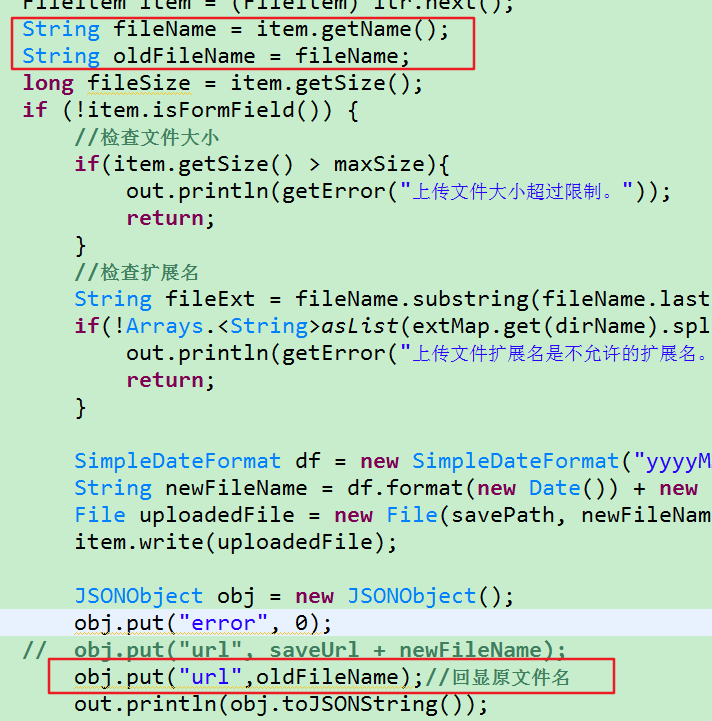
2.修改了上传文件的回显名称
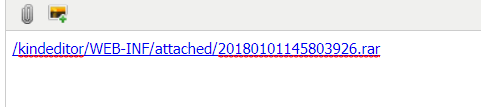
默认的回显路径是这种,非常难以辨认,想显示原来的上传文件名怎么办?
只需更改返回的json格式的url的值即可
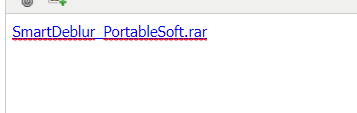
这样重新上传回显的文件名是这样的

你会发现这样多个/kindeditor(我的项目名),如果想要去除,可以到kindeditor.js中搜索insertfile,注释掉formaturl即可

重新上传,回显文件名
ps:如果操作之后没有变化,清理下浏览器缓存即可
3.关于中文乱码
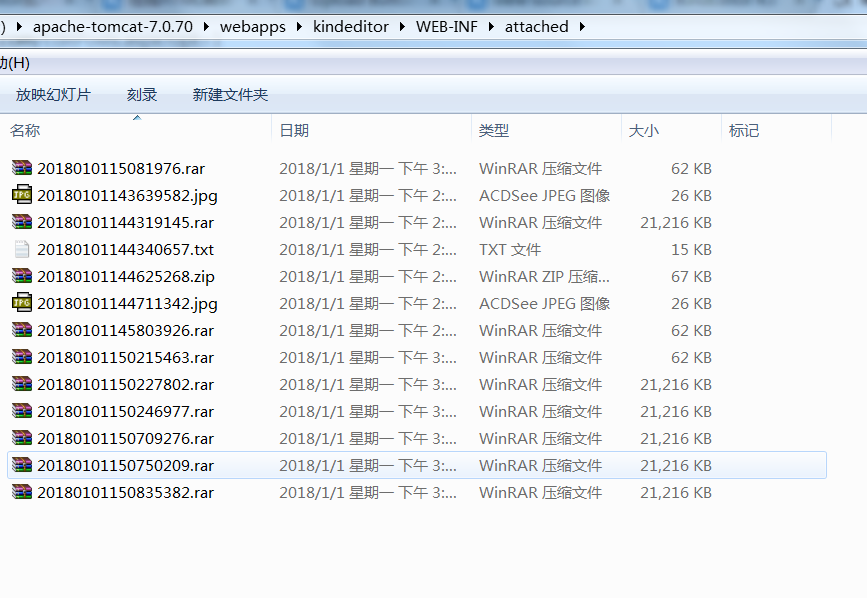
由于文件名已重新命名,避免文件名重复,所以没有中文编码的问题

测试结果:
至此文件上传已完成,接下来是文件下载
文件下载的思路很简单,在jsp页面显示文件列表,然后io下载即可
ListFileServlet此Servlet用于提供下载列表,将列表显示在jsp页面
 package cn.tele.servlet;

 import java.io.File;

 import java.io.IOException;

 import java.net.URI;

 import java.net.URL;

 import java.util.ArrayList;

 import java.util.HashMap;

 import java.util.List;

 import java.util.Map;

 import javax.servlet.ServletException;

 import javax.servlet.http.HttpServlet;

 import javax.servlet.http.HttpServletRequest;

 import javax.servlet.http.HttpServletResponse;

 /**

  * 显示可供下载的文件列表

  * @author Administrator

  *

  */

 public class ListFileServlet extends HttpServlet {

     public void doGet(HttpServletRequest request, HttpServletResponse response)

             throws ServletException, IOException {

         response.setContentType("text/html;charset = utf-8");

         //使用kindeditor上传的文件均被重命名为:yyyyMMddHHssmm+三位随机数的形式,所以文件名不需要编码转换

         String dirPath = this.getServletContext().getRealPath("/WEB-INF/attached/");

         Map<String,String> map = new HashMap<String, String>();

         File dir = new File(dirPath);

         if(dir.isDirectory()) {

             File[] files = dir.listFiles();

             for(File file : files) {

                 map.put(file.getName(),file.getAbsolutePath());

             }

         }

         request.setAttribute("map",map);

         request.getRequestDispatcher("/WEB-INF/jsp/listFile.jsp").forward(request, response);

     }

     public void doPost(HttpServletRequest request, HttpServletResponse response)

             throws ServletException, IOException {

         doGet(request, response);

     }

 }
DownLoadServlet,此Servlet用于提供下载功能,注意千万要设置响应头为content-disposition
注意:此程序没有判断文件是否存在
 package cn.tele.servlet;

 import java.io.BufferedInputStream;

 import java.io.BufferedOutputStream;

 import java.io.File;

 import java.io.FileInputStream;

 import java.io.IOException;

 import javax.servlet.ServletException;

 import javax.servlet.ServletOutputStream;

 import javax.servlet.http.HttpServlet;

 import javax.servlet.http.HttpServletRequest;

 import javax.servlet.http.HttpServletResponse;

 import javax.swing.filechooser.FileNameExtensionFilter;

 /**

  * 文件下载

  * @author Administrator

  *

  */

 public class DownloadServlet extends HttpServlet {

     public void doGet(HttpServletRequest request, HttpServletResponse response)

             throws ServletException, IOException {

         response.setContentType("text/html;charset = utf-8");

         String fileName  = request.getParameter("fileName");

         BufferedInputStream bis = new BufferedInputStream(new FileInputStream(new File(fileName)));

         byte[] buff = new byte[1024];

         ServletOutputStream outputStream = response.getOutputStream();

         fileName = fileName.replace("\\","_");

         //设置响应头

         response.setHeader("content-disposition","attachment;filename="+fileName.substring(fileName.lastIndexOf("_")+1));

         BufferedOutputStream bos = new BufferedOutputStream(outputStream);

         int count = 0;

         while((count=bis.read(buff)) != -1) {

             bos.write(buff,0,count);

         }

         bos.flush();

         bos.close();

         bis.close();

     }

     public void doPost(HttpServletRequest request, HttpServletResponse response)

             throws ServletException, IOException {

         doGet(request, response);

     }

 }
测试结果:
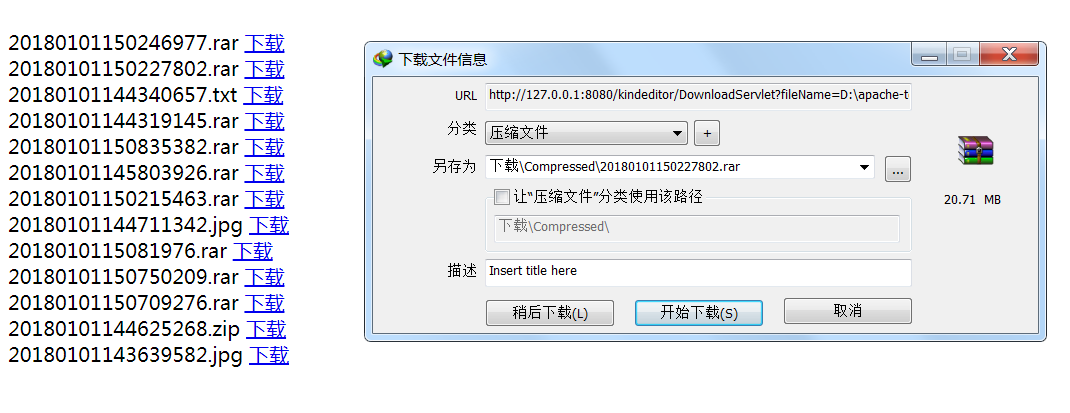
上传图片与之想类似,需要注意的是如果使用了默认的upload_json.jsp和file_manager_json.jsp,要根据你的需要修改其中的代码,比如上传的路径尽量放在WEB-INF下,
使用file_manager_json.jsp.浏览图片空间时会生成一个mage文件夹,可以根据需要修改
kindeditor 4 上传下载文件的更多相关文章
- rz和sz上传下载文件工具lrzsz
######################### rz和sz上传下载文件工具lrzsz ####################################################### ...
- linux上很方便的上传下载文件工具rz和sz
linux上很方便的上传下载文件工具rz和sz(本文适合linux入门的朋友) ##########################################################&l ...
- shell通过ftp实现上传/下载文件
直接代码,shell文件名为testFtptool.sh: #!/bin/bash ########################################################## ...
- SFTP远程连接服务器上传下载文件-qt4.8.0-vs2010编译器-项目实例
本项目仅测试远程连接服务器,支持上传,下载文件,更多功能开发请看API自行开发. 环境:win7系统,Qt4.8.0版本,vs2010编译器 qt4.8.0-vs2010编译器项目实例下载地址:CSD ...
- linux下常用FTP命令 上传下载文件【转】
1. 连接ftp服务器 格式:ftp [hostname| ip-address]a)在linux命令行下输入: ftp 192.168.1.1 b)服务器询问你用户名和密码,分别输入用户名和相应密码 ...
- C#实现http协议支持上传下载文件的GET、POST请求
C#实现http协议支持上传下载文件的GET.POST请求using System; using System.Collections.Generic; using System.Text; usin ...
- HttpClient上传下载文件
HttpClient上传下载文件 java HttpClient Maven依赖 <dependency> <groupId>org.apache.httpcomponents ...
- 初级版python登录验证,上传下载文件加MD5文件校验
服务器端程序 import socket import json import struct import hashlib import os def md5_code(usr, pwd): ret ...
- 如何利用京东云的对象存储(OSS)上传下载文件
作者:刘冀 在公有云厂商里都有对象存储,京东云也不例外,而且也兼容S3的标准因此可以利用相关的工具去上传下载文件,本文主要记录一下利用CloudBerry Explorer for Amazon S3 ...
随机推荐
- oled的一套stm32实验2(自己的实验)
stm32与OLED屏接口的引脚介绍: CS————GPIOD3: RST————GPIOD4: DC—————GPIOD5: D0——————GPIOD6: D1——————GPIOD7; 上是我参 ...
- JS实现动画方向切换效果(包括:撞墙反弹,暂停继续左右运动等)
<!DOCTYPE html> <html> <head lang="en"> <meta charset="UTF-8&quo ...
- 常用的Windows命令
常用的Windows命令 explorer-------打开资源管理器 logoff---------注销命令 shutdown-------关机命令 lusrmgr.msc----本机用户和组 se ...
- POJ 3061 Subsequence 二分或者尺取法
http://poj.org/problem?id=3061 题目大意: 给定长度为n的整列整数a[0],a[1],--a[n-1],以及整数S,求出总和不小于S的连续子序列的长度的最小值. 思路: ...
- (转) 25个必须记住的SSH命令
转自:http://www.cnblogs.com/weafer/archive/2011/06/10/2077852.html OpenSSH是SSH连接工具的免费版本.telnet,rlogin和 ...
- gvim不能直接打开360压缩打开的文件
1. 压缩文件a.rar 2. 默认使用360压缩打开 3.用gvim打开对应的a.c文件,提示permission denied 4.用gvim跟踪目录,发现360管理的缓冲目录无法打开 原因未分析 ...
- linux内核头文件 cdev.h 解析
遇到一个内核API--cdev_init 就找到这里来了. #ifndef _LINUX_CDEV_H #define _LINUX_CDEV_H #include <linux/kobject ...
- 通过 Microsoft iSCSI Software Target 提供存储服务
软件下载地址: Microsoft iSCSI Software Target 3.3 下载完后成解压软件包如下: 安装官方的描述Target 端也就是服务端 只支持Windows Server 20 ...
- 【习题5-3 UVA-10935】Throwing cards away I
[链接] 我是链接,点我呀:) [题意] 在这里输入题意 [题解] 用STL的queue写 [代码] #include <bits/stdc++.h> using namespace st ...
- 快速理解Java中的五种单例模式(转)
解法一:只适合单线程环境(不好) package test; /** * @author xiaoping * */ public class Singleton { private static S ...