
Can't create/write to file '/tmp/MLjnvU95' (Errcode: 13 - Permission denied)
今天一个同事反馈往一个MySQL数据库导入数据时,报“ERROR 1 (HY000): Can't create/write to file '/tmp/MLjnvU95' (Errcode: 13 - Permission denied)”这样的错误,如下所示:
uery OK, 0 rows affected (0.03 sec)
ERROR 1 (HY000): Can't create/write to file '/tmp/MLjnvU95' (Errcode: 13 - Permission denied)
ERROR 1 (HY000): Can't create/write to file '/tmp/MLPzmIbJ' (Errcode: 13 - Permission denied)
ERROR 1 (HY000): Can't create/write to file '/tmp/MLdpJwKm' (Errcode: 13 - Permission denied)
ERROR 1 (HY000): Can't create/write to file '/tmp/MLB7FTT0' (Errcode: 13 - Permission denied)
ERROR 1 (HY000): Can't create/write to file '/tmp/ML1wcUAF' (Errcode: 13 - Permission denied)
ERROR 1 (HY000): Can't create/write to file '/tmp/MLYjOzPk' (Errcode: 13 - Permission denied)
ERROR 1 (HY000): Can't create/write to file '/tmp/ML7gi9z0' (Errcode: 13 - Permission denied)
ERROR 1 (HY000): Can't create/write to file '/tmp/ML6nezQG' (Errcode: 13 - Permission denied)
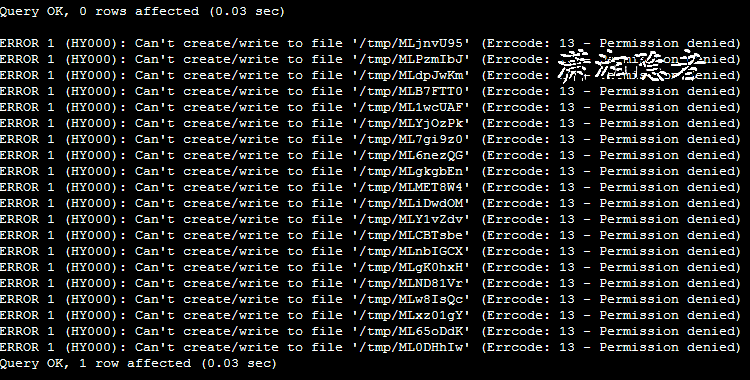
个人使用source script.sql导入数据时,也是遇到这个错误,如上截图所示。从这个错误提示,可以明显看出是MySQL没有权限对/tmp进行操作,
查看系统变量tmpdir,如下所示,tmpdir变量指定路径为/tmp
mysql> show variables like 'tmpdir';
+---------------+-------+
| Variable_name | Value |
+---------------+-------+
| tmpdir | /tmp |
+---------------+-------+
1 row in set (0.00 sec)
[root@mylx01 ~]# ls -lh /tmp
total 20M
-rw-rw-r--. 1 root root 20M Nov 7 12:04 cccc_user.sql
-rw-r--r--. 1 root root 57 Nov 7 02:00 percona-version-check
-rw-------. 1 root root 2.0K Nov 2 21:38 tmpP4BN3H
-rw-------. 1 root root 2.0K Oct 31 21:40 tmpusdOhs
-rw-------. 1 root root 2.0K Oct 30 21:36 tmp_WBZNO
-rw-------. 1 root root 2.1K Oct 29 21:38 tmpXcXptG
-rw-------. 1 root root 2.0K Nov 5 21:40 tmpyqSR0U
-rw-------. 1 root root 2.1K Oct 28 21:42 tmpZjNjtu
我们可以修改/tmp目录的权限; 或者修改数据库的临时目录来解决这个问题:
1:在配置文件my.cnf中修改数据库的临时目录,然后需要重启MySQL数据库
tmpdir = /var/lib/mysql
2:修改/tmp目录权限
chmod 1777 /tmp
或
chmod 777 /tmp
那么MySQL使用tmpdir来做什么呢?tmpdir是MySQL存临时文件的目录的路径名。如果未设置变量tmpdir,MySQL将使用系统的默认值,通常为/tmp、/var/tmp或/usr/tmp。更多详细信息,可以参考官方文档Where MySQL Stores Temporary Files的详细介绍:
MySQL arranges that temporary files are removed if mysqld is terminated. On platforms that support it (such as Unix), this is done by unlinking the file after opening it. The disadvantage of this is that the name does not appear in directory listings and you do not see a big temporary file that fills up the file system in which the temporary file directory is located. (In such cases, lsof +L1 may be helpful in identifying large files associated with mysqld.)
When sorting (ORDER BY or GROUP BY), MySQL normally uses one or two temporary files. The maximum disk space required is determined by the following expression:
(length of what is sorted + sizeof(row pointer))* number of matched rows
* 2
The row pointer size is usually four bytes, but may grow in the future for really big tables.
For some SELECT queries, MySQL also creates temporary SQL tables. These are not hidden and have names of the form SQL_*.
DDL operations that rebuild the table and are not performed online using the ALGORITHM=INPLACE technique create a temporary copy of the original table in the same directory as the original table.
Online DDL operations may use temporary log files for recording concurrent DML, temporary sort files when creating an index, and temporary intermediate tables files when rebuilding the table. For more information, see Section 15.12.3, “Online DDL Space Requirements”.
InnoDB user-created temporary tables and on-disk internal temporary tables are created in a temporary tablespace file named ibtmp1 in the MySQL data directory. For more information, see Section 15.6.3.5, “Temporary Tablespaces”.
MySQL会以隐含方式创建所有的临时文件。这样,就能确保中止mysqld时会删除所有临时文件。使用隐含文件的缺点在于,在临时文件目录所在的位置中,看不到占用了文件系统的大临时文件。
进行排序时(ORDER BY或GROUP BY),MySQL通常会使用1个或多个临时文件。所需的最大磁盘空间由下述表达式决定:
(length of what is sorted + sizeof(row pointer))
* number of matched rows
* 2
“row pointer”(行指针)的大小通常是4字节,但在以后,对于大的表,该值可能会增加。
对于某些SELECT查询,MySQL还会创建临时SQL表。它们不是隐含表,并具有SQL_*形式的名称。
ALTER TABLE会在与原始表目录相同的目录下创建临时表。
如果内存临时表超出了限制,MySQL就会自动地把它转化为基于磁盘的MyISAM表,存储在指定的tmpdir目录下。
参考资料:
https://dev.mysql.com/doc/refman/8.0/en/temporary-files.html
Can't create/write to file '/tmp/MLjnvU95' (Errcode: 13 - Permission denied)的更多相关文章
- Mysql 错误 ERROR 1 (HY000) at line 1: Can't create/write to file '/home/kaizenly/cfg_dict.csv' (Errcode: 13 - Permission denied)
[1]问题描述 (1)执行SQL语句: use billing; select * from cfg_dict into outfile '/home/kaizenly/cfg_dict.csv' f ...
- 【docker】python: can't open file 'helloworld.py': [Errno 13] Permission denied
运行容器提示权限问题 docker run -v $PWD/myapp:/usr/src/myapp -w /usr/src/myapp python:3.5 python helloworld. ...
- Can't create/write to file '/tmp/#sql_887d_0.MYD' (Errcode: 17)
lsof |grep "#sql_887d_0.MYD" 如果没有被占用就可以删掉 . https://wordpress.org/support/topic/cant-creat ...
- ERROR 1 (HY000): Can't create/write to file '/tmp/#sql_909_0.MYI' (Errcode: 13)
mysql> desc tablename; ERROR 1 (HY000): Can't create/write to file '/tmp/#sql_909_0.MYI' (Errcode ...
- Can't create/write to file '/tmp/#sql_3105_0.MYI' (Errcode: 13)
最近的项目中由于临时存储空间太大了.索性把tmp目录删除了.结果访问出现 Can't create/write to file '/tmp/#sql_3105_0.MYI' (Errcode: 13) ...
- mysql执行SQL语句时报错:[Err] 3 - Error writing file '/tmp/MYP0G1B8' (Errcode: 28 - No space left on device)
问题描述: 今天一同事在mysql中执行SQL语句的时候,报了/tmp空间不足的问题,报错如下: [SQL] SELECT f.prov as 字段1, MAX( CASE f.flag_name W ...
- docker pull报错failed to register layer: Error processing tar file(exit status 1): open permission denied
近来在一个云主机上操作docker pull,报错如下: failed to register layer: Error processing ): open /etc/init.d/hwclock. ...
- 报错:/usr/sbin/mysqld: Can't find file: './performance_schema/events_waits_summary_by_account_by_event_name.frm' (errno: 13 - Permission denied)
报错背景: Linux环境下安装MySQL数据库. 安装完成,数据库初始化,启动数据库时报错. 报错现象: -- :: [ERROR] Native table 'performance_schema ...
- Jupyter运行时出现下面的错误:Unexpected error while saving file: arma/Untitled.ipynb [Errno 13] Permission denied:
运行环境:Ubuntu16.04+Python2.7执行如下代码修改Jupyter的一部分文件的权限(执行完之后重新启动即可): sudo chmod ~/.local/share/jupyter/ ...
随机推荐
- Linux如何配置想要的JDK
首先我声明下,对于linux系统我到现在学习不到一个星期,所以说很多地方不熟悉,还在学习当中,本文章中有什么技术错误请勿怪哈(PS:我第一次发表博客). 关于linux安装配置jdk,首先我用的是De ...
- iOS学习——核心动画
iOS学习——核心动画 1.什么是核心动画 Core Animation(核心动画)是一组功能强大.效果华丽的动画API,无论在iOS系统或者在你开发的App中,都有大量应用.核心动画所在的位置如下图 ...
- 如何更简单方便地执行SQL操作?
现在公司使用mybatis作为DAL层的框架. 使用起来比较简单,使用xml进行SQL的书写,java代码使用接口执行. 但在写一些简单SQL的时候会显得非常繁琐: xml和java分离(设计上为了解 ...
- 【快速入门ORM框架之Dapper】大牛勿进系列
前言:dapper是什么?Dapper是.NET下一个micro的ORM,它和Entity Framework或Nhibnate不同,属于轻量级的,并且是半自动的.也就是说实体类都要自己写.它没有复杂 ...
- python转义字符——重点解释:\b,\n和\r区别
放在最前面: 有时我们并不想让转义字符生效,我们只想显示字符串原来的意思,这就要用r和R来定义原始字符串.如:print r'\t\r' 实际输出为“\t\r”. 主要参考:AllenW的博客 转义字 ...
- 前端笔记之HTML5&CSS3(中)选择器&伪类伪元素&CSS3效果&渐变背景&过渡
一.CSS3选择器 CSS3是CSS的第三代版本,新增了很多功能,例如:强大的选择器.盒模型.圆角.渐变.动画.2D/3D转换.文字特效等. CSS3和HTML5没有任何关系!HTML5骨架中,可以用 ...
- [开源]快速构建一个WebApi项目
项目代码:MasterChief.DotNet.ProjectTemplate.WebApi 示例代码:https://github.com/YanZhiwei/MasterChief.Project ...
- GraphQL 的前世今生
GraphQL是什么 GraphQL是一种新的API标准,它提供了一种更高效.强大和灵活的数据提供方式.它是由Facebook开发和开源,目前由来自世界各地的大公司和个人维护.GraphQL本质上是一 ...
- SVN就是这么简单
什么是SVN SVN全称:Subversion,是一个开放源代码的版本控制系统 Svn是一种集中式文件版本管理系统.集中式代码管理的核心是服务器,所有开发者在开始新一天的工作之前必须从服务器获取代码, ...
- Java开发知识之JavaIO操作缓存操作
目录 带缓存的输入/输出流 一丶简介 二丶BufferedInputStream 与 BufferedOutputString类. 2.BufferOutputStream类. 三丶BufferedR ...