
TNS-12560: TNS: 协议适配器错误同时伴有TNS-00584: 有效节点检查配置错误的解决方法
:修改/home/oracle/app/product/11.2.0/db_1/network/admin/sqlnet.ora(与listener.ora同一目录)
增加白名单:
tcp.validnode_checking = yes
tcp.invited_nodes = (10.204.250.11,10.204.250.12,10.204.250.13)
重启listener时报错:

https://blog.csdn.net/langkeziju/article/details/12652247
oracle 提供了lsnrctl reload 命令,在下面两种情况
1. 修改listener.ora
2 .修改sqlnet.ora
之后又不想停止监听,可以考虑lsnrctl reload命令!
reload命令会重新读取listener.ora的内容,这个命令让用户不停止监听器的情况下,改变监听器的配置。
但是对于sqlnet.ora的修改考虑以下情况:
1. 如果之前sqlnet.ora没有被当前的监听器使用,这时必须关闭然后重启监听!
2. 如果之前正在使用sqlnet.ora,那么lsnrctl reload 是比较快的方式。当前已经建立的连接不会受到影响,动态监听服务完成的非常快,也几乎不受影响。
官方对于lsnrctl reload的解释:
In addition, the database services, instances, service handlers, and listening endpoints that were dynamically registered with the listener will be unregistered and
subsequently registered again.
意思和上面解释的差不多,在生产环境中对于sqlnet.ora文件的修改,保持必要的谨慎。
之前做实验进行lsnrctl reload 并未达到理想的效果。在生产库上执行的时候是选择了lsnrctl start/stop.
这两步操作的时间是很短的,3-4秒完成关闭和重启操作。
开始认为是listener.ora中的HOST配置有误,原来是别名,改成本机IP地址,测试也不行。

查了许多资料:
最后查到对于TNS-00584错误的解释:
Oracle Error :: TNS-00584
Valid node checking configuration error
Cause
Valid node checking specific Oracle Net configuration is invalid.
Action
Ensure the hosts specified in the "invited_nodes" and "excluded_nodes" are valid. For further details, turn on tracing and reexecute the operation.
http://www.itpub.net/thread-1019492-1-1.html
明确是添加invited_nodes的内容有问题,又看到一篇文章:
https://blog.csdn.net/klzs1/article/details/5964653?utm_source=blogxgwz6
检查了/oracle/11.1.0/network/admin/listener.ora没问题。
打开/oracle/11.1.0/network/admin/sqlnet.ora, 发现
SQLNET.INBOUND_CONNECT_TIMEOUT=6
tcp.validnode_checking=yes
tcp.invited_nodes=(ODB,ODB1,CLUDB)
中,ODB1 这个alias并没有在/etc/hosts中定义, 实际上ODB 和ODB1都是此机器的别名。将invited_nodes中的ODB1去掉,再启动,正常。或者在/etc/hosts 中加入这个定义也是可以的。
---------------------
作者:klzs1
来源:CSDN
原文:https://blog.csdn.net/klzs1/article/details/5964653
版权声明:本文为博主原创文章,转载请附上博文链接!
要求必须在/etc/hosts中配置别名。
修改sqlnet.ora,将ip改成alias别名:
tcp.validnode_checking = yes
tcp.invited_nodes = (lnnanodomcrbak,lnnanodomcr,lnnanodomcr1,lnnanodwg,lnnanodwg1,localhost)
同时配置/etc/hosts:
[root@lnnanodomcrbak ~]# cd /etc/
[root@lnnanodomcrbak etc]# vi hosts
127.0.0.1 localhost localhost.localdomain localhost4 localhost4.localdomain4
::1 localhost localhost.localdomain localhost6 localhost6.localdomain6
10.204.250.13 lnnanodomcrbak
10.204.250.12 lnnanodomcr
10.204.250.14 lnnanodomcr1
193.169.0.8 lnnanodwgbak
193.169.0.7 lnnanodwg
193.169.0.9 lnnanodwg1
10.204.195.129 edoctor2
10.204.197.129 edoctor1

再启动listener,成功了:


但是,其他ORACLE数据库sqlnet.ora又可以写IP:
在/home/oracle/app/product/11.2.0/db_1/network/admin目录下面的sqlnet.ora文件末尾加上
tcp.validnode_checking = yes
tcp.invited_nodes = (10.227.232.5,10.227.232.6,10.227.232.7,10.227.232.8,10.227.232.9,10.227.232.10,10.227.232.11,10.227.232.12,10.227.232.13,10.227.232.14,10.227.232.15,10.227.232.16,10.227.232.17,10.227.232.18,10.227.232.19,10.227.232
.20,10.227.232.21,10.227.232.22,10.227.232.23,10.227.232.24,10.227.232.33,10.227.232.34,10.227.232.35,10.227.232.36,10.227.232.37,10.227.232.38,10.227.232.39,10.227.232.40,10.227.232.41,10.227.232.42,10.227.232.43,10.227.232.44,10.227.2
32.45,10.192.192.171,10.190.23.138,10.190.23.158,10.190.23.162,10.190.23.163,10.190.23.166,10.190.23.168,10.190.23.169,10.190.23.170,10.190.145.244,10.190.145.243,10.190.26.206)
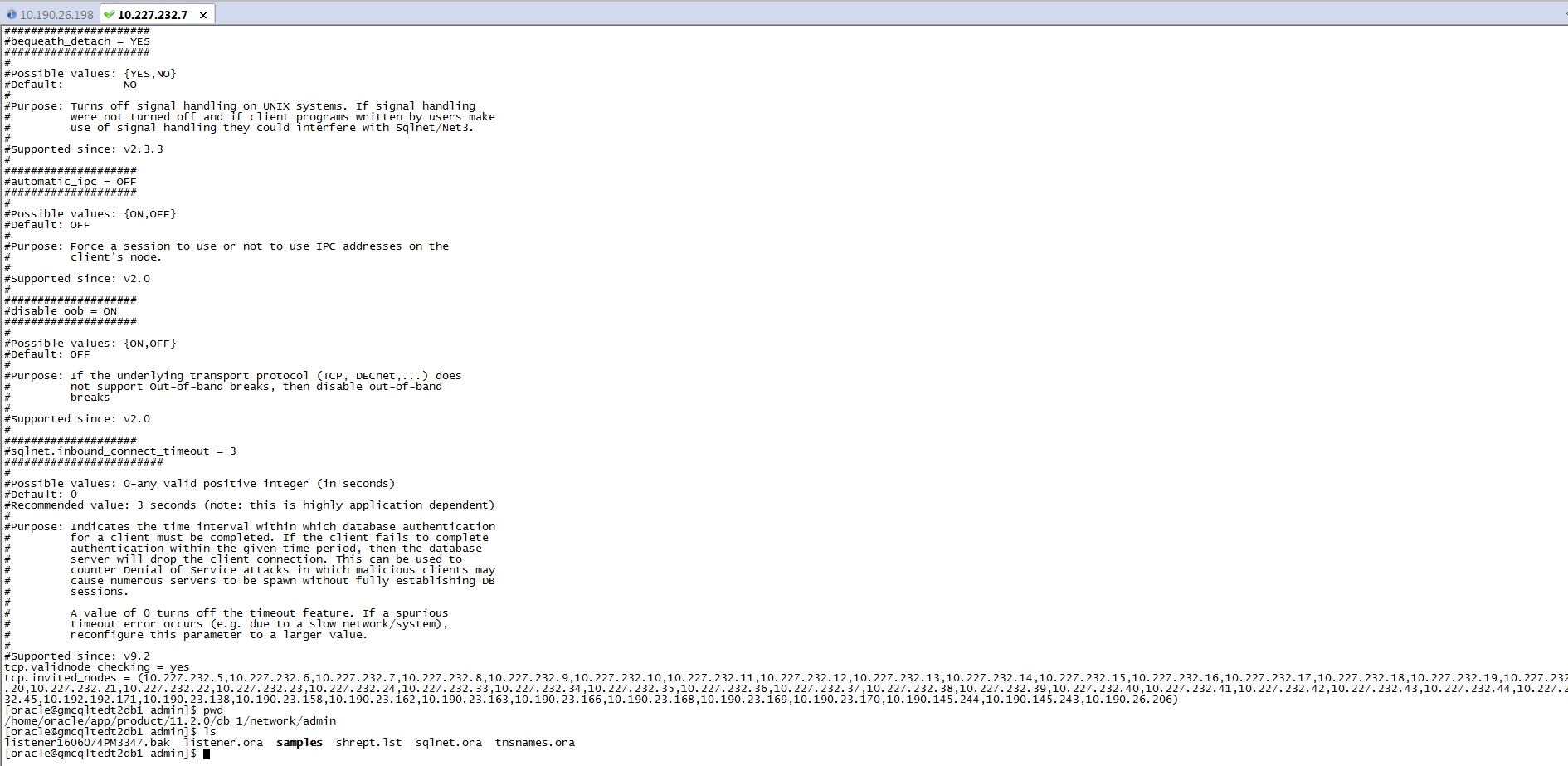
这是问什么呢?
有谁懂解答一下。
TNS-12560: TNS: 协议适配器错误同时伴有TNS-00584: 有效节点检查配置错误的解决方法的更多相关文章
- PHP错误Warning: Cannot modify header information - headers already sent by解决方法
这篇文章主要介绍了PHP错误Warning: Cannot modify header information - headers already sent by解决方法,需要的朋友可以参考下 今天在 ...
- 错误“Unexpected namespace prefix "xmlns" found for tag LinearLayout”的解决方法(转)
(转自:http://blog.csdn.net/bombzhang/article/details/12676789) 有一次升级开发工具后发现xml脚本出现错误“Unexpected namesp ...
- ubuntu下安装jdk(rpm版)错误: 找不到或无法加载主类 解决方法
1.官网下载jdk,linux64位,rpm格式的. 2.提取下载的文件,提取到一个目录下,我的是提取到了usr目录下了 3.终端输入:sudo gedit ~/.bashrc 会打开一个文本,在文本 ...
- win10连接宽带,拨号提示错误720:不能建立到远程计算机的连接,解决方法
使用账号密码登录时,一直报720错误.解决方法是卸载以下IP驱动.卸载之后重新连接就正常了.亲测有效
- MDK错误 Error: L6218E: Undefined symbol SystemInit (referred from startup_stm32f10x_hd.o). 解决方法
此错误产生的位置在STM32工程所包含的汇编启动代码文件,如下图 熟悉ARM汇编的朋友一定可以看出,这是一个子程序调用语句,而调用的子程序正是SystemInit.出现错误的原因就是汇编器没有在代码之 ...
- 编译boost程序出现如下错误fatal error LNK1104: cannot open file 'libboost_system-vc100-mt-gd-1_54.lib'的解决方法
对于如下程序: #include <iostream> #include <boost/asio.hpp> #include <boost/date_time/posix ...
- [ORACLE错误]ORA-00054:resource busy and acquire with nowait specified解决方法
当某个数据库用户在数据库中插入.更新.删除一个表的数据,或者增加一个表的主键时或者表的索引时,常常会出现ora-00054:resource busy and acquire with nowait ...
- 错误“Unexpected namespace prefix "xmlns" found for tag LinearLayout”的解决方法
编写布局代码时发现xml脚本出现错误“Unexpected namespace prefix "xmlns" found for tag LinearLayout”,原来是一个na ...
- IIS自定义404错误页显示“系统找不到指定的文件”解决方法
在IIS站点属性里面设置了自定义的404错误页面为一个文件之后,有时一直不生效,总是提示这样一句话:“系统找不到指定的文件”. 其实这种错误也只是在某些网站程序中出现,其实解决办法很简单.这是由于II ...
随机推荐
- linux服务器安装Mysql后,只能看到information_schema/test这两个库,无法修改密码
参考链接:https://www.cnblogs.com/ThinkVenus/p/7670722.html 问题背景:登录mysql失败,密码错误,由此想到需要更改密码 然而,进入数据库后,只能看到 ...
- 游记-WC2019
Day0 报道.开幕式 一大早起来吃了个老北京炸酱面,然而一点都不北京,发现店子墙壁上"这9是--"(cy语) 一路辗转到了二中,报到时在签字版爷稳稳名字下写了cgz ak ioi ...
- yum安装软件报错Segmentation fault处理
yum安装软件报错Segmentation fault处理 在使用yum 更新软件时提示:Segmentation fault 中文错误提示: 段错误 [root@CMS-BAK:/usr/local ...
- 资本寒冬下的android面经
在2018年10月初,公司倒闭,无奈走上找工作的道路,不想自己平时图安逸,不思进取,再次找工作才发现,android行业也不是站在风口上,猪也能吹上天的世道了.作为技术小菜的我,再找工作那几个月真是战 ...
- iOS -- Effective Objective-C 阅读笔记 (4)
1: 在 对象内部 尽量 直接访问 实例变量 在对象之外访问实例变量时, 总是应该通过属性来访问, 然而在对象内部, 在读取实例变量的时候尽量采用 直接访问的形式, 而在设置实例变量的时候通过属性来做 ...
- Mac下mongodb connect failed 连接错误解决方法
查看elm 后台node 代码 一直连不上mongodb,报错 MongoDB shell version v3.6.0 connecting to: mongodb://127.0.0.1:2701 ...
- ionic3 国际化 转义 html
<div [innerHTML]="assembleHTML(detail)"> import { DomSanitizer } from '@angular/plat ...
- oAuth2授权协议 & 微信授权登陆和绑定 & 多环境共用一个微信开发平台回调设置
OAuth2(open Auth)开放授权协议 授权码模式流程: 1.浏览器(客户端)点击一个比如使用微信登陆按钮 2.会跳到认证服务器页面,让用户选择是否授权 3.如果用户点击授权,那么会跳转到开始 ...
- Linux-CentOS 重置root密码
1. 重启服务器,在读秒的时候按任意键,就会出现如下界面 2.接着按下e就会进入到如下界面. 将光标移动到kernel那一行,然后再一次按‘e’,进入kernel该行的编辑界面 3.这就是kernel ...
- mysql group by 过滤字段 只能在SELECT 后面出现,不能写其他字段 报错解决 关键字 sql_mode=only_full_group_by
1:报错 关键字 sql_mode=only_full_group_bymysql> select uuid,ip,count(*) from dbname_report.t_client_i ...