
java项目---用java实现二叉平衡树(AVL树)并打印结果(详)(3星)
 package Demo;

 public class AVLtree  {

     private Node root;                      //首先定义根节点

     private static class Node{                              //定义Node指针参数

         private int key;                //节点

         private int balance;                    //平衡值

         private int height;             //树的高度

         private Node left;                      //左节点

         private Node right;             //右节点

         private Node parent;                    //父母节点

     Node(int key, Node parent){             //构造器中引用该构造器正在初始化的对象

         this.key = key;

         this.parent = parent;

         }

     }

     public boolean insert(int key){             //判断这里是否能插入新的节点

         if(root == null){

             root = new Node(key,null);

             return true;

         }

         Node n = root;

         while (true){                           //如果根节点下的子节点和新插进来的子节点相同

             if(n.key == key)

                 return false;                   //则不进行插入操作

             Node parent = n;

             boolean goLeft = n.key > key;           //判断新的节点插入父母节点的左边or右边

             n = goLeft ? n.left : n.right;             //小的话插左边,大的话插右边

             if(n == null){

                 if(goLeft){

                     parent.left = new Node (key,parent);

                 }else{

                     parent.right = new Node(key,parent);

                 }

                 rebalance(parent);

                 break;

             }

         }

         return true;

     }

     private void delete(Node node){                     //删除节点

         if(node.left == null && node.right == null){

             if(node.parent == null){

                 root = null;

             }else{

                 Node parent = node.parent;

                 if(parent.left == node){            //如果父母节点的左孩子节点和根节点一样

                     parent.left = null;             //则左节点为空

                 }else{

                     parent.right = null;            //反之右节点为空

                 }

                 rebalance(parent);

             }

             return ;

         }

         if(node.left != null){              //如果左节点不空

             Node child = node.left;

             while(child.right != null)child = child.right;

             node.key = child.key;

             delete(child);

         }else{

             Node child = node.right;

             while (child.left != null)child = child.left;

             node.key = child.key;

             delete(child);

             }

         }

         public void Delete(int delKey){

         if(root == null)

             return;

         Node child = root;

         while (child != null){

             Node node = child;                           //交换根节点给node , 再判断新的孩子节点插在哪里

             child = delKey >= node.key ? node.right : node.left;

             if(delKey == node.key){

                 delete(node);

                 return;

             }

         }

     }

     private void setBalance(Node... nodes){

         for(Node n : nodes){

             reheight(n);

             n.balance = height(n.right) - height(n.left);           //平衡因子,任意节点左右子树高度差

         }

     }

     private void rebalance (Node n){

         setBalance(n);

         if(n.balance == -2){

             if(height(n.left.left) >= height(n.left.right))

                 n = rotateRight(n);

             else

                 n = rotateLeftThenRight(n) ;

         }else if(n.balance == 2){                                   //等于2和-2都是不平衡的,需要重新调整

             if(height(n.right.right) >= height(n.right.left))

                 n = rotateLeft(n);

             else

                 n = rotateRightThenLeft(n);

         }

         if(n.parent != null){

             rebalance(n.parent);

         }else{

             root = n;

         }

     }

     private Node rotateLeft(Node a){

         Node b = a.right;

         b.parent = a.parent;

         a.right = b.left;

         if(a.right != null)

             a.right.parent = a;

         b.left = a;

         a.parent = b;

         if(b.parent != null){

             if(b.parent.right == a){

                 b.parent.right = b;

             }else{

                 b.parent.left = b;

             }

         }

         setBalance(a, b);

         return b;

     }

     private Node rotateRight(Node a){

         Node b = a.left;

         b.parent = a.parent;

         a.left = b.right;

         if(a.left != null){

             a.left.parent = a;

             b.right = a;

             a.parent = b;

             if(b.parent.right == a){

                 b.parent.right = b;

             }else{

                 b.parent.left = b;

             }

         }

         setBalance(a, b);

         return b;

     }

     private Node rotateLeftThenRight(Node n){

         n.left = rotateLeft(n.left);

         return rotateRight(n);

     }

     private Node rotateRightThenLeft(Node n){

         n.right = rotateRight(n.right);

         return rotateLeft(n);

     }

     private int height (Node n){

         if(n == null)

             return -1;

         return n.height;

     }

     public void printBalance(){

         printBalance(root);

     }

     private void printBalance(Node n){

         if(n != null){

             printBalance(n.left);

             System.out.printf("%s ",n.balance);

             printBalance(n.right);

         }

     }

     private void reheight(Node node){

         if(node != null){

             node.height = 1 + Math.max(height(node.left),height(node.right));           //新的二叉平衡树高度为:

         }

     }

     public static void main(String[] args) {

         AVLtree tree = new AVLtree();

         System.out.println("Inserting values 1 to 10");     //最后输出的结果代表平衡因子,0为左右子树高度相等,1为左右子树高度相差1层

         for (int i = 1; i < 10; i++)

             tree.insert(i);

         System.out.println("Print balance : ");

         tree.printBalance();

     }

 }
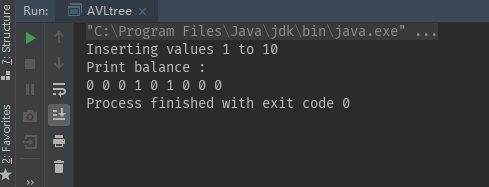 可以动手画一下生成的AVL树,亲测算法符合结果。
java项目---用java实现二叉平衡树(AVL树)并打印结果(详)(3星)的更多相关文章
- (4) 二叉平衡树, AVL树
1.为什么要有平衡二叉树? 上一节我们讲了一般的二叉查找树, 其期望深度为O(log2n), 其各操作的时间复杂度O(log2n)同时也是由此决定的.但是在某些情况下(如在插入的序列是有序的时候), ...
- Algorithms: 二叉平衡树(AVL)
二叉平衡树(AVL): 这个数据结构我在三月份学数据结构结构的时候遇到过.但当时没调通.也就没写下来.前几天要用的时候给调好了!详细AVL是什么,我就不介绍了,维基百科都有. 后面两月又要忙了. ...
- 树-二叉搜索树-AVL树
树-二叉搜索树-AVL树 树 树的基本概念 节点的度:节点的儿子数 树的度:Max{节点的度} 节点的高度:节点到各叶节点的最大路径长度 树的高度:根节点的高度 节点的深度(层数):根节点到该节点的路 ...
- 二叉平衡树AVL的插入与删除(java实现)
二叉平衡树 全图基础解释参考链接:http://btechsmartclass.com/data_structures/avl-trees.html 二叉平衡树:https://www.cnblogs ...
- 高度平衡的二叉搜索树(AVL树)
AVL树的基本概念 AVL树是一种高度平衡的(height balanced)二叉搜索树:对每一个结点x,x的左子树与右子树的高度差(平衡因子)至多为1. 有人也许要问:为什么要有AVL树呢?它有什么 ...
- 树-二叉平衡树AVL
基本概念 AVL树:树中任何节点的两个子树的高度最大差别为1. AVL树的查找.插入和删除在平均和最坏情况下都是O(logn). AVL实现 AVL树的节点包括的几个组成对象: (01) key -- ...
- 各种查找算法的选用分析(顺序查找、二分查找、二叉平衡树、B树、红黑树、B+树)
目录 顺序查找 二分查找 二叉平衡树 B树 红黑树 B+树 参考文档 顺序查找 给你一组数,最自然的效率最低的查找算法是顺序查找--从头到尾挨个挨个遍历查找,它的时间复杂度为O(n). 二分查找 而另 ...
- AVL树(二叉平衡树)详解与实现
AVL树概念 前面学习二叉查找树和二叉树的各种遍历,但是其查找效率不稳定(斜树),而二叉平衡树的用途更多.查找相比稳定很多.(欢迎关注数据结构专栏) AVL树是带有平衡条件的二叉查找树.这个平衡条件必 ...
- 判断一颗二叉树是否为二叉平衡树 python 代码
输入一颗二叉树,判断这棵树是否为二叉平衡树.首先来看一下二叉平衡树的概念:它是一 棵空树或它的左右两个子树的高度差的绝对值不超过1,并且左右两个子树都是一棵平衡二叉树.因此判断一颗二叉平衡树的关键在于 ...
随机推荐
- 图像转化成TFrecords格式并回转
import os import tensorflow as tf from PIL import Image import numpy as np cat_image_path='D:/软件/pyc ...
- 如何用ESP8266/8285做一个WIFI广告机(虚拟WiFi)
准备工作 准备一个深圳四博智联科技有限公司的ESP-F 模组.或者四博智联科技的NODEMCU 当我们拿到ESP-F模块后,可以按照以下接线进行测试: 即 VCC.EN 接 3.3v.GPIO15 G ...
- clusterware启动顺序——OHASD
Clusterware启动顺序 [root@ebsdb1 etc]# crsctl check crs CRS-4638: Oracle High Availability Services is ...
- Leet Code 3. Longest Substring Without Repeating Characters
Given a string, find the length of the longest substring without repeating characters. Examples: Giv ...
- 常忽略的css技巧
1.利用 CSS 的伪类中的content属性获取attr中的信息 效果图:鼠标放上去出现提示 css代码: .box{position:relative;display:inline-block;m ...
- L362 When to Bring up Salary During the Job Interview Process
Money is an awkward topic of conversation for many professionals—even more so when you’re busy tryin ...
- Jmeter安装web socket协议插件
jmeter本身不支持websocket协议,需要安装第三方插件才能支持 1. 首先需要第三方插件: JMeterWebSocketSampler-1.0.2-SNAPSHOT.jar 2. 该插件依 ...
- dos脚本》
如上图,我们只要在dos界面中输入各种dos命令,即可实现相应的命令,下面分享下dos命令大全:net use ipipc$ " " /user:" " 建立I ...
- CSS3 正方体
<!DOCTYPE html><html lang="en"><head> <meta charset="UTF-8" ...
- 再见了,我最爱的OI~~~
唔,迟到了三个月的感言呢. 我就这样离开OI了,成为了一个退役的OIer,当年高一的时候还觉得自己有很多时间,没想转眼间自己就退役了.呵呵,来到OI 从没有在这个世界带起一丝风浪,也没有拿到一个满意的 ...