
# 2017-2018-2 20155228 《信息安全系统设计原理》 使用VirtualStudio2008创建和调用静态库和使用VirtualC++6.0创建和调用动态库
使用virtual c++ 6.0创建和调用动态库
不得不说一下关于环境的问题
只要我打一个响指,一半的安装在win7上的VC6.0都会因为兼容性问题直接崩掉
懒得研究怎么解决兼容性的问题了,直接开一个winXP虚拟机完美运行vc6.0,省时省心,岂不美哉
研究大佬的博客的时候
尝试使用.def文件生成动态库并使用隐式链接到工程时,发现这个方法仅适用于动态库所在的工程和调用动态库的工程同时处于一个工作空间
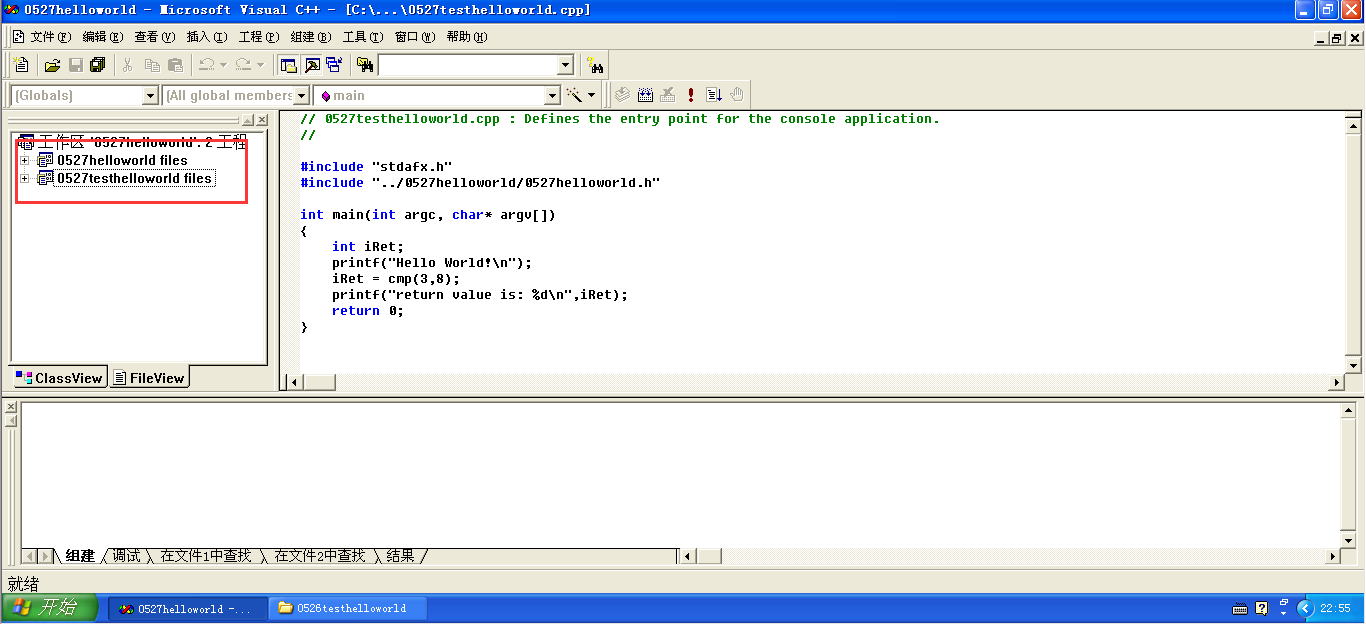
如图所示,0527helloworld是动态库所在的工程,0527testhelloworld是调用动态库的工程,两个工程都是处于名为0527helloworld的工作空间里面的
#include "stdafx.h"

#include "../0527helloworld/0527helloworld.h"

int main(int argc, char* argv[])

{

    int iRet;

    printf("Hello World!\n");

    iRet = cmp(3,8);

    printf("return value is: %d\n",iRet);

    return 0;

}
可以看到声明头文件的时候是声明了位于其他工程的头文件:#include "../0527helloworld/0527helloworld.h"
这应该就是其他工作空间的工程就算把.dll和.lib拷到工作目录下也添加了.h文件也无法调用动态库的原因
后来在网上找到另外一个方案,解决了这个问题
现在简单介绍一下这个方案的流程
算了,今天太晚了我要睡觉了,明天再说
20180531更新
关于在VirtualStudio2008生成和使用静态库的方法在网上有很多,但是很多都没有用,这一篇博客有用
20180601更新
今天就把使用VC6.0创建和使用动态库的问题写成傻瓜教程,不用带着脑子,直接跟着一步一步做就可以了
我想写一个名为SUM的求和函数,输入是两个int类型变量,输出是一个int类型变量,函数代码如下:
int SUM(int a,int b)

{

    return a+b;

}
1. 创建动态库
1.1 新建动态库项目0601testDLLver3
打开VC6.0,左上角菜单栏:文件->新建
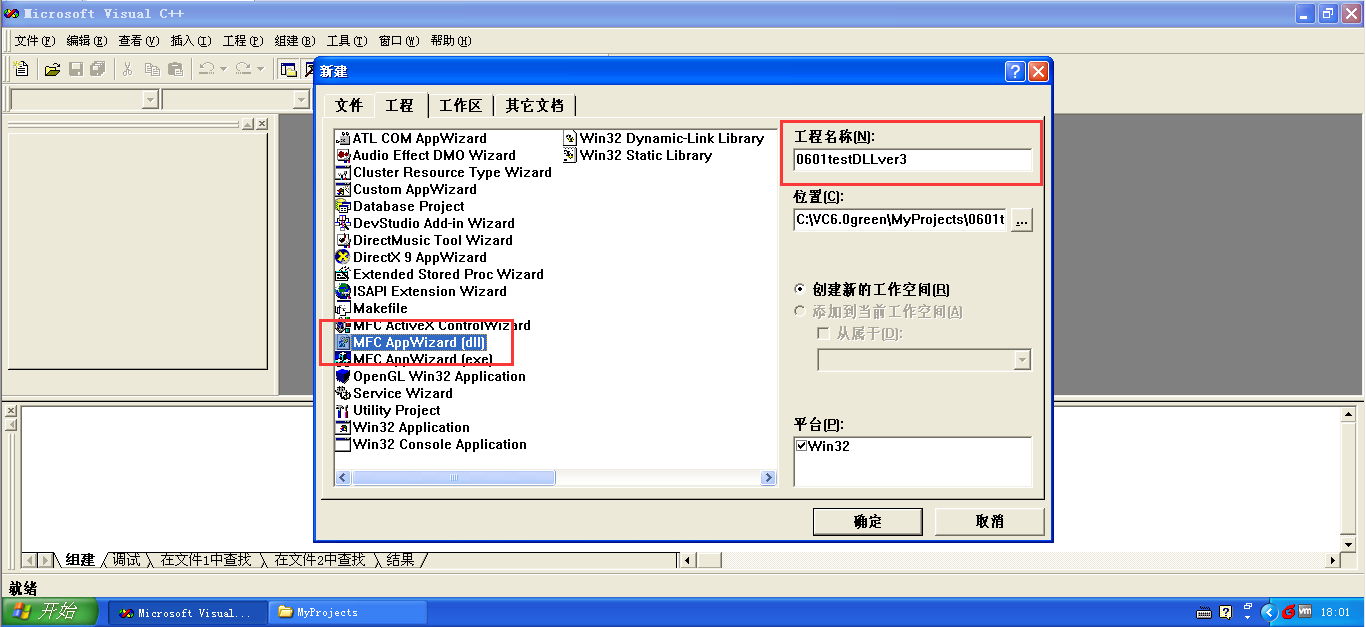
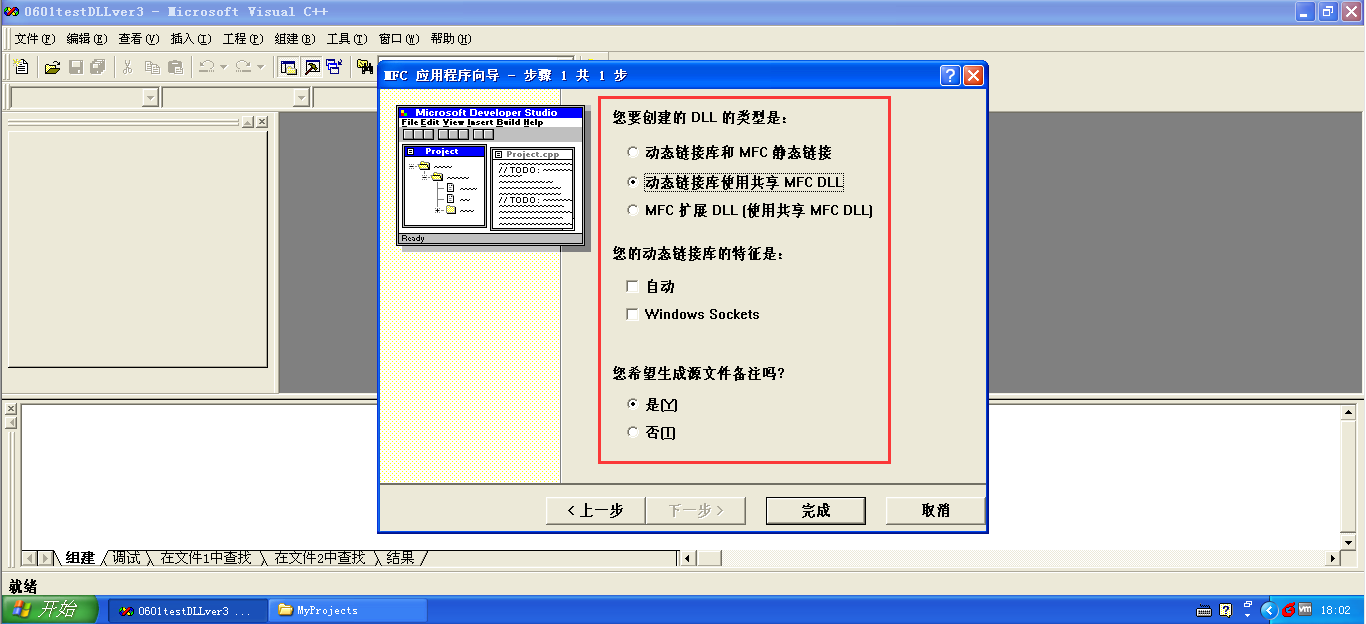
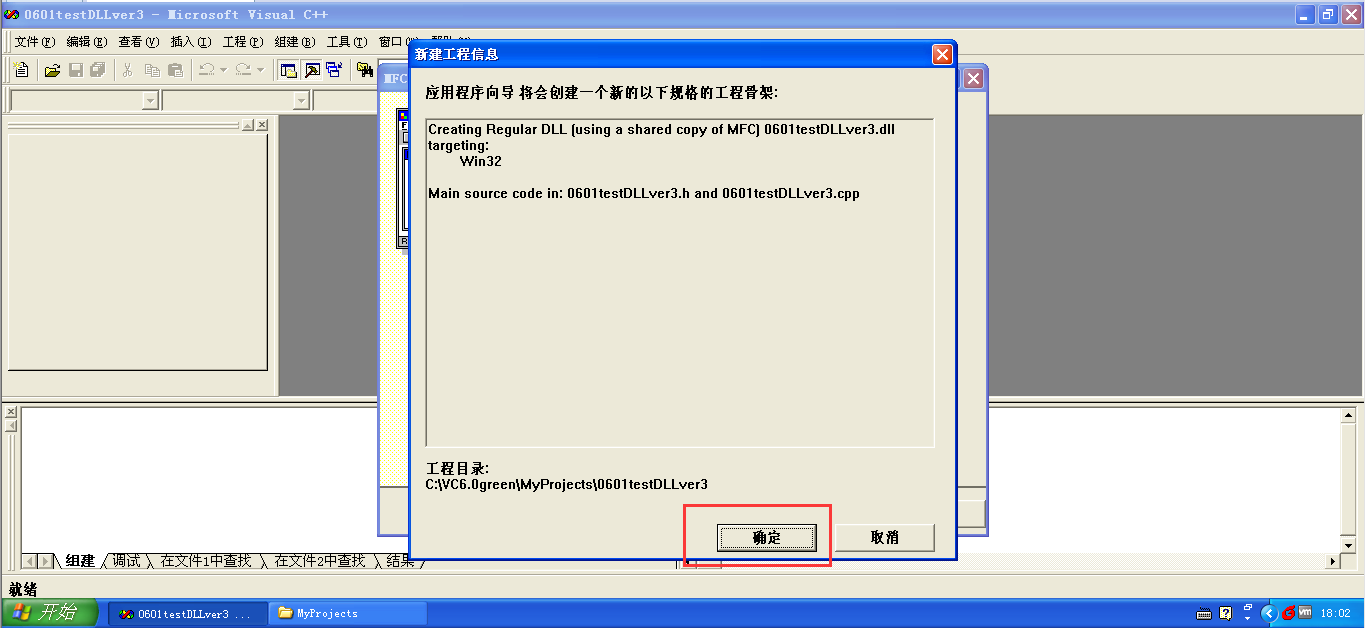
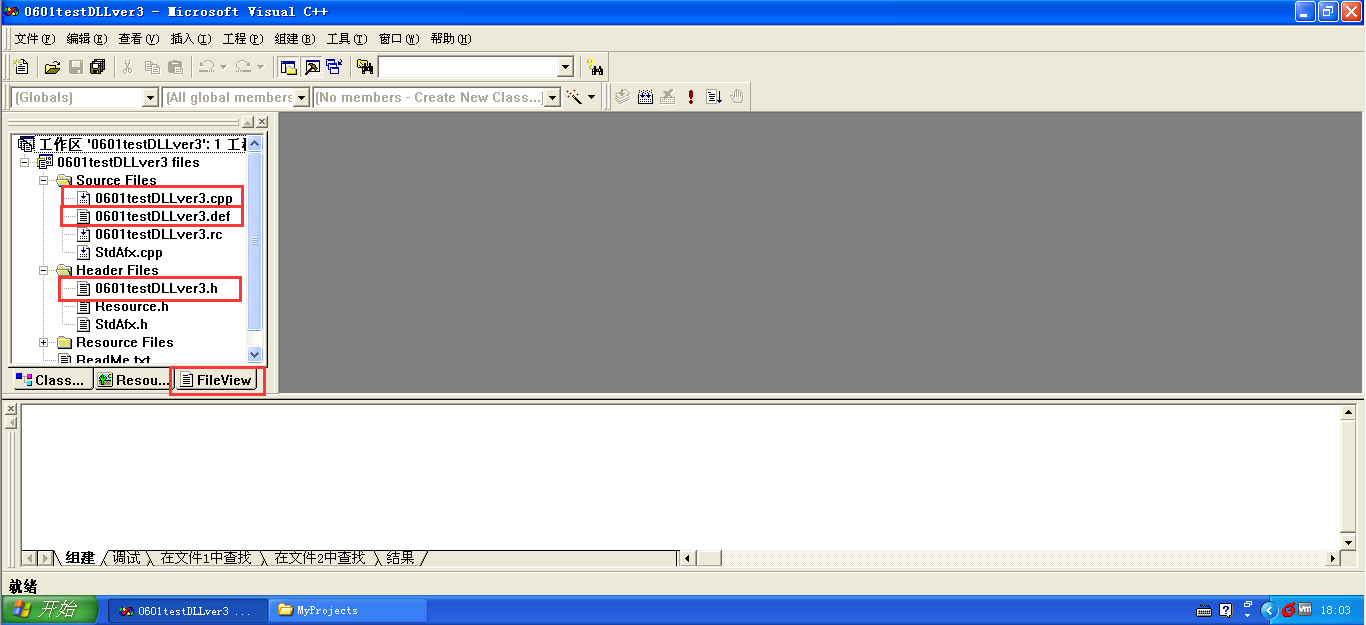
项目创建完成,切换到file view,可以看到一堆预生成的文件,只需要对其中三个文件进行修改
1.2 修改0601testDLLver3.h文件
// 0601testDLLver3.h : main header file for the 0601TESTDLLVER3 DLL

//

#if !defined(AFX_0601TESTDLLVER3_H__16DBBD8E_146C_4508_8E8C_20D288314FEF__INCLUDED_)

#define AFX_0601TESTDLLVER3_H__16DBBD8E_146C_4508_8E8C_20D288314FEF__INCLUDED_

#if _MSC_VER > 1000

#pragma once

#endif // _MSC_VER > 1000

#ifndef __AFXWIN_H__

	#error include 'stdafx.h' before including this file for PCH

#endif

#include "resource.h"		// main symbols

/////////////////////////////////////////////////////////////////////////////

// CMy0601testDLLver3App

// See 0601testDLLver3.cpp for the implementation of this class

//

class CMy0601testDLLver3App : public CWinApp

{

public:

	CMy0601testDLLver3App();

// Overrides

	// ClassWizard generated virtual function overrides

	//{{AFX_VIRTUAL(CMy0601testDLLver3App)

	//}}AFX_VIRTUAL

	//{{AFX_MSG(CMy0601testDLLver3App)

		// NOTE - the ClassWizard will add and remove member functions here.

		//    DO NOT EDIT what you see in these blocks of generated code !

	//}}AFX_MSG

	DECLARE_MESSAGE_MAP()

};

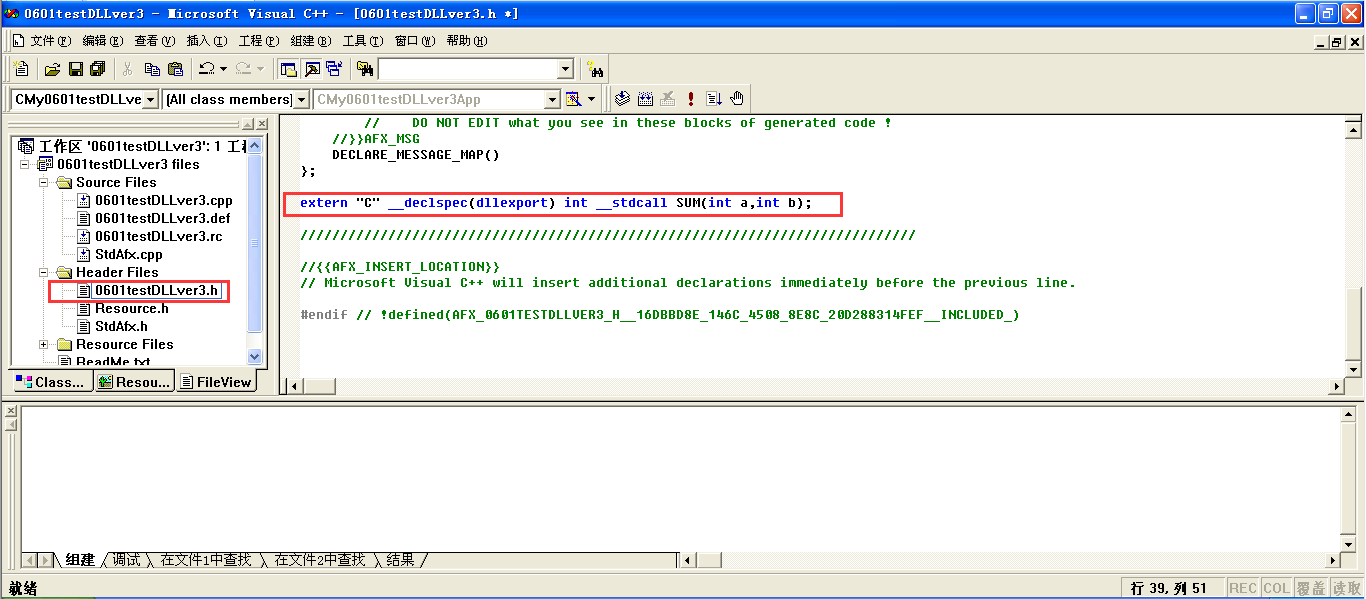
extern "C" __declspec(dllexport) int __stdcall SUM(int a,int b);

/////////////////////////////////////////////////////////////////////////////

//{{AFX_INSERT_LOCATION}}

// Microsoft Visual C++ will insert additional declarations immediately before the previous line.

#endif // !defined(AFX_0601TESTDLLVER3_H__16DBBD8E_146C_4508_8E8C_20D288314FEF__INCLUDED_)
1.3 修改0601testDLLver3.def文件
; 0601testDLLver3.def : Declares the module parameters for the DLL.

LIBRARY      "0601testDLLver3"

DESCRIPTION  '0601testDLLver3 Windows Dynamic Link Library'

EXPORTS

    ; Explicit exports can go here

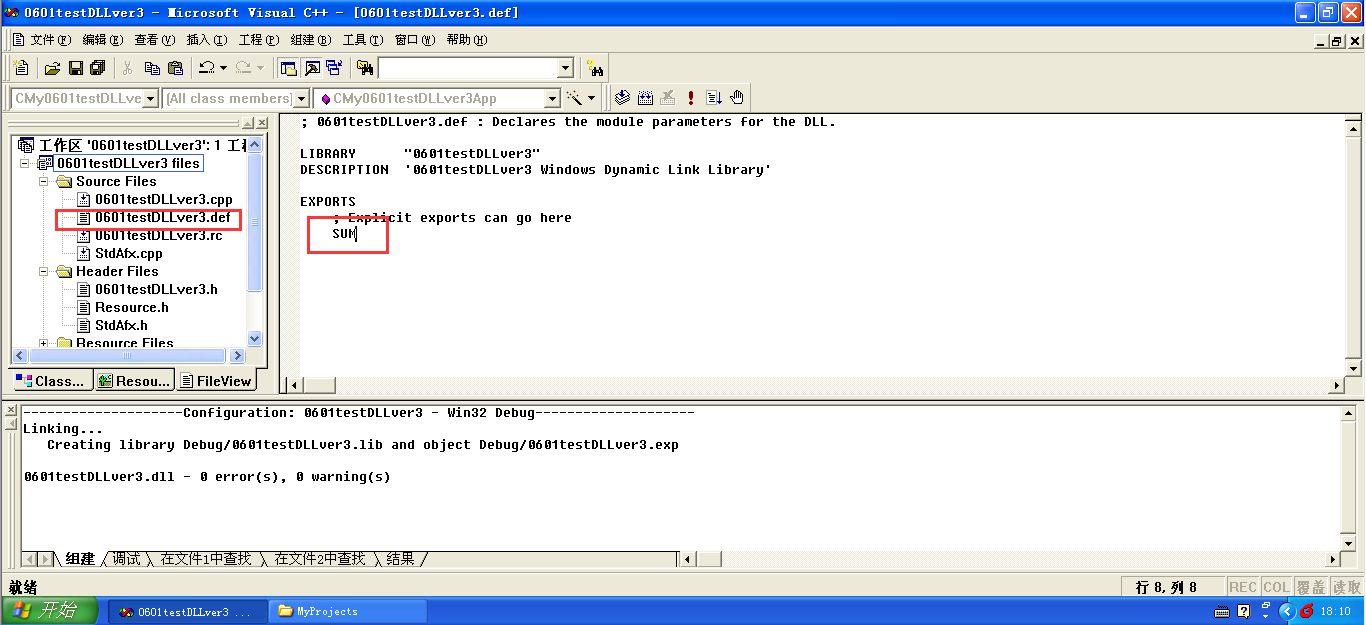
	SUM
1.4 修改0601testDLLver3.cpp文件
// 0601testDLLver3.cpp : Defines the initialization routines for the DLL.

//

#include "stdafx.h"

#include "0601testDLLver3.h"

#ifdef _DEBUG

#define new DEBUG_NEW

#undef THIS_FILE

static char THIS_FILE[] = __FILE__;

#endif

//

//	Note!

//

//		If this DLL is dynamically linked against the MFC

//		DLLs, any functions exported from this DLL which

//		call into MFC must have the AFX_MANAGE_STATE macro

//		added at the very beginning of the function.

//

//		For example:

//

//		extern "C" BOOL PASCAL EXPORT ExportedFunction()

//		{

//			AFX_MANAGE_STATE(AfxGetStaticModuleState());

//			// normal function body here

//		}

//

//		It is very important that this macro appear in each

//		function, prior to any calls into MFC.  This means that

//		it must appear as the first statement within the

//		function, even before any object variable declarations

//		as their constructors may generate calls into the MFC

//		DLL.

//

//		Please see MFC Technical Notes 33 and 58 for additional

//		details.

//

/////////////////////////////////////////////////////////////////////////////

// CMy0601testDLLver3App

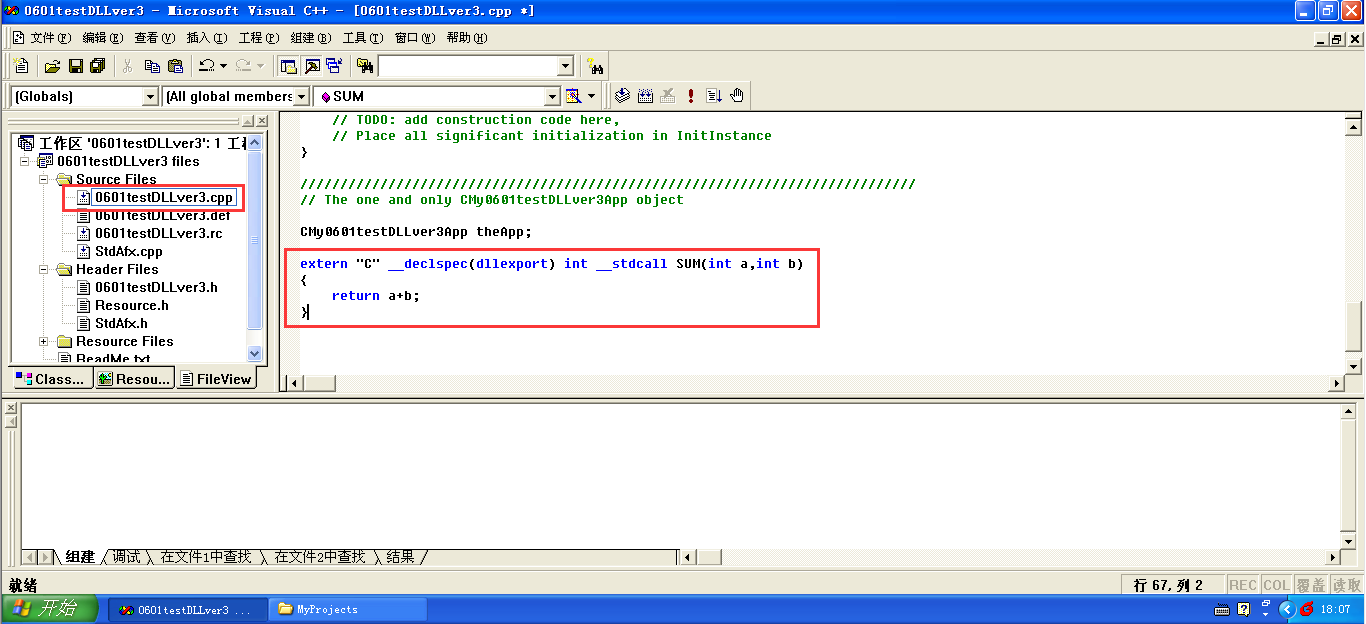
extern "C" __declspec(dllexport) int __stdcall SUM(int a,int b)

{

	return a+b;

}

BEGIN_MESSAGE_MAP(CMy0601testDLLver3App, CWinApp)

	//{{AFX_MSG_MAP(CMy0601testDLLver3App)

		// NOTE - the ClassWizard will add and remove mapping macros here.

		//    DO NOT EDIT what you see in these blocks of generated code!

	//}}AFX_MSG_MAP

END_MESSAGE_MAP()

/////////////////////////////////////////////////////////////////////////////

// CMy0601testDLLver3App construction

CMy0601testDLLver3App::CMy0601testDLLver3App()

{

	// TODO: add construction code here,

	// Place all significant initialization in InitInstance

}

/////////////////////////////////////////////////////////////////////////////

// The one and only CMy0601testDLLver3App object

CMy0601testDLLver3App theApp;
1.5 编译代码创建动态库
使用一阳指大力出奇迹按下f7开始编译
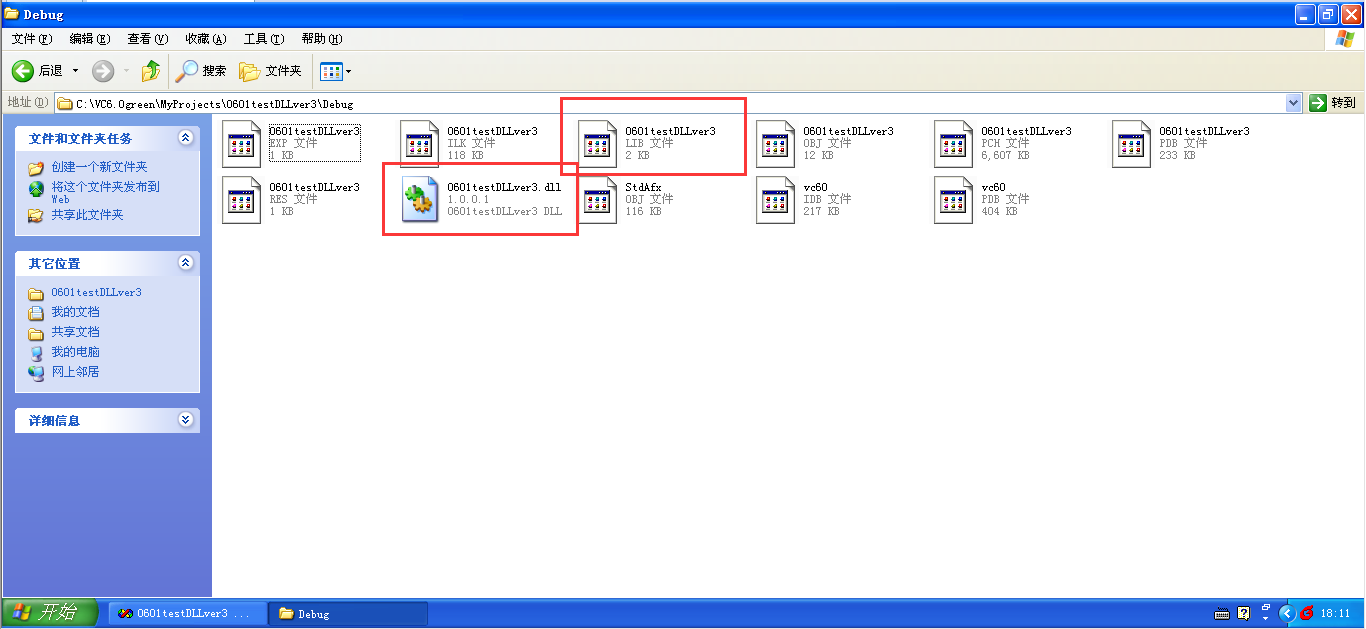
生成动态库文件0601testDLLver3.lib和0601testDLLver3.dll放在0601testDLLver3工程目录下的debug文件夹中
2. 使用动态库
2.1 创建测试工程0601testDLLver4
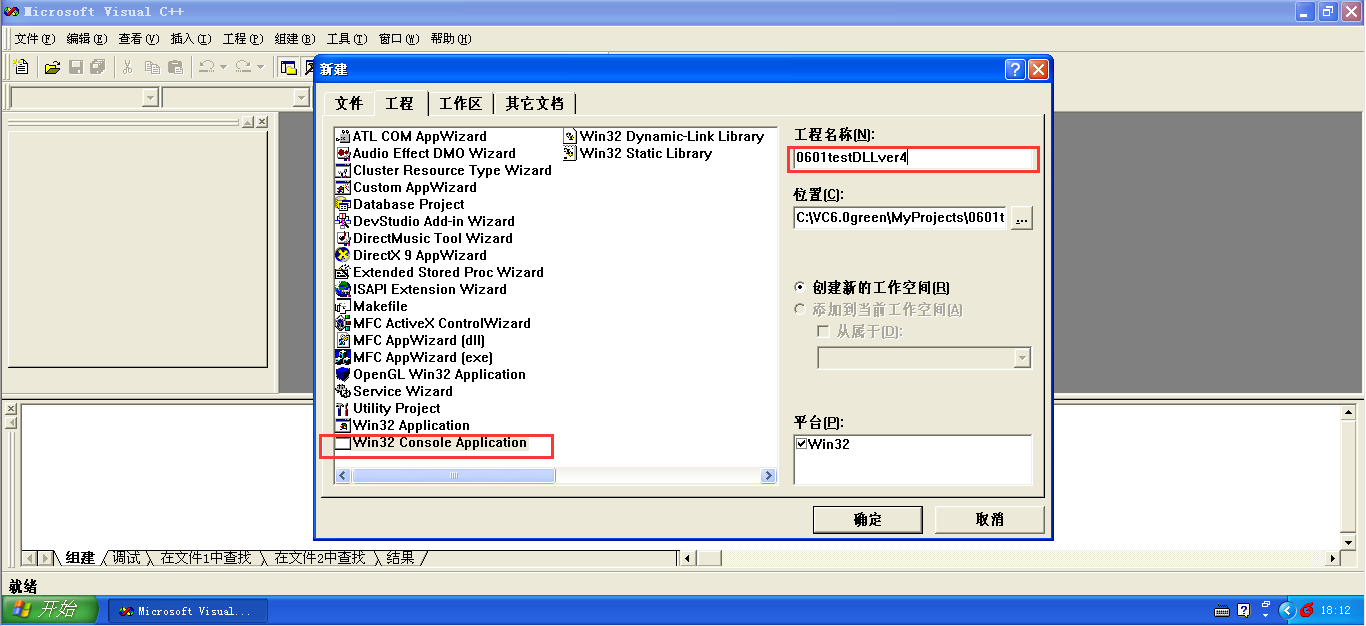
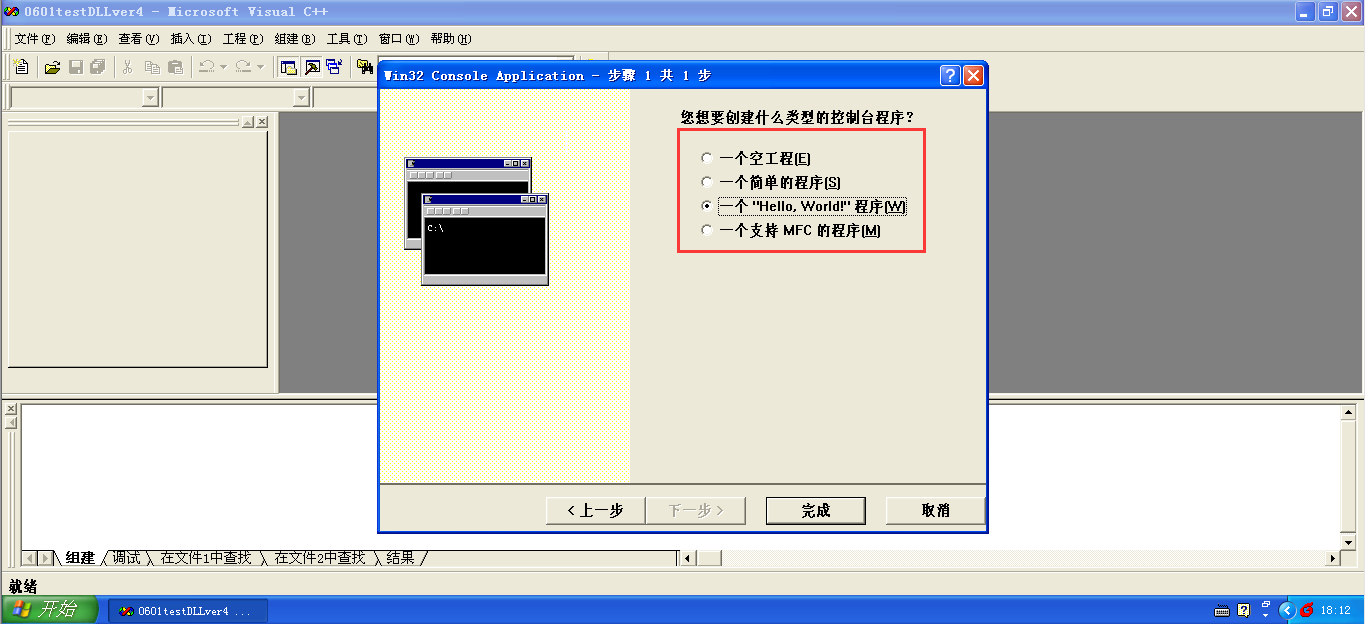

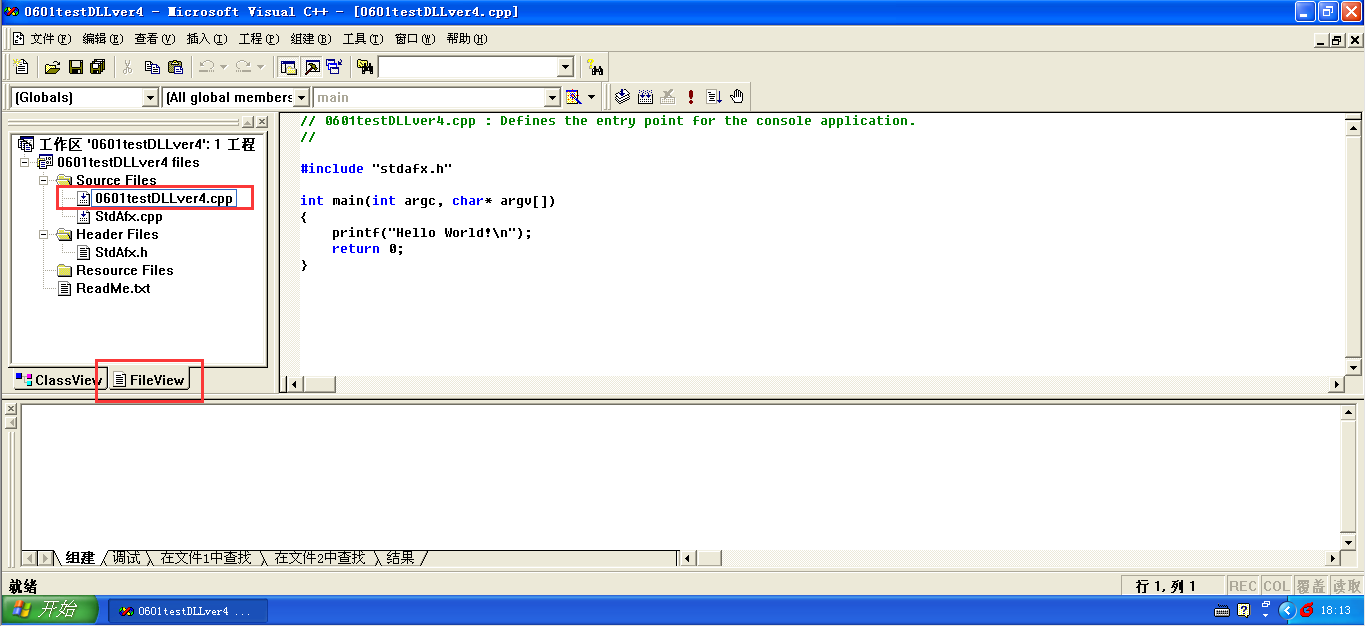
项目创建完成,切换到file view,可以看到预生成的文件0601testDLLver4.cpp,除了对这个文件进行修改我们还要创建一个0601testDLLver4.h头文件
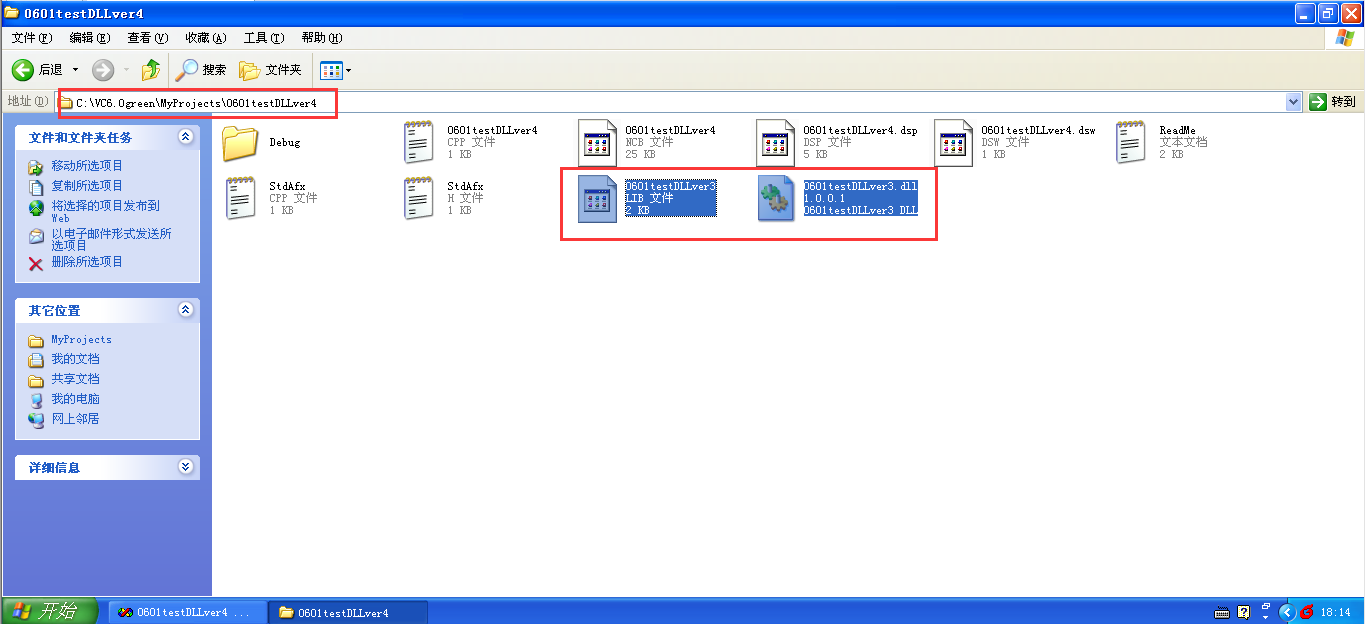
2.2 把动态库文件0601testDLLver3.lib和0601testDLLver3.dll放在0601testDLLver4工程目录下
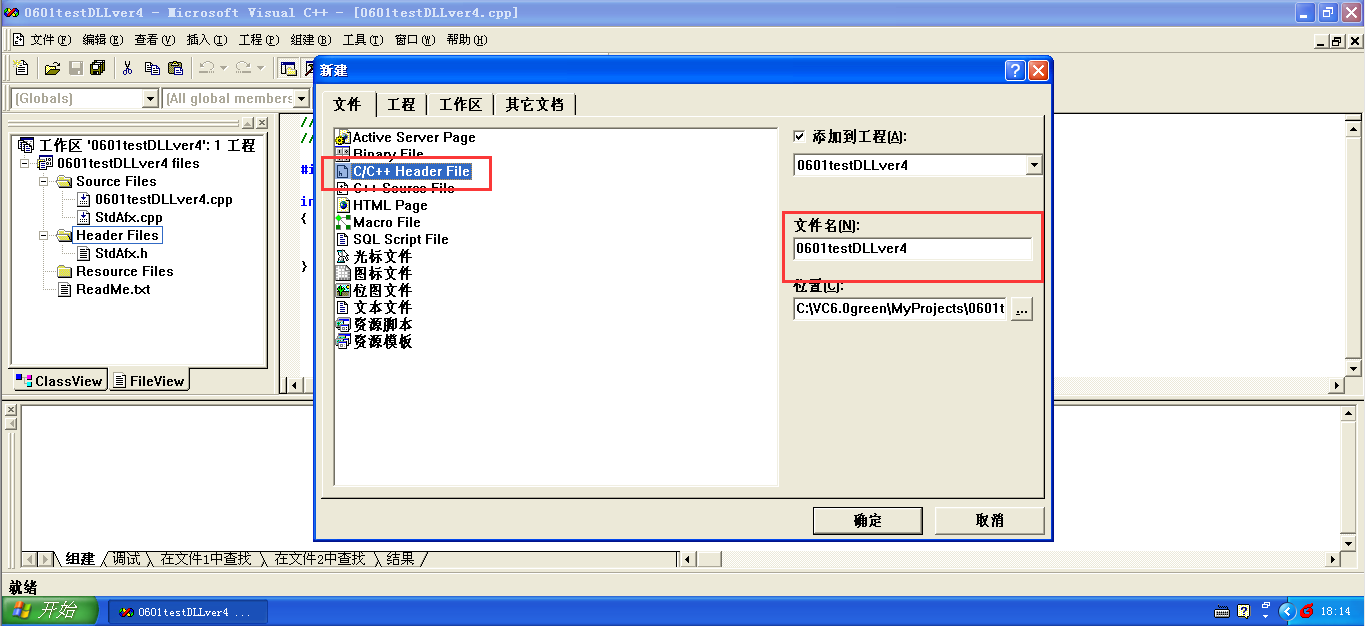
2.3 新建0601testDLLver4.h文件
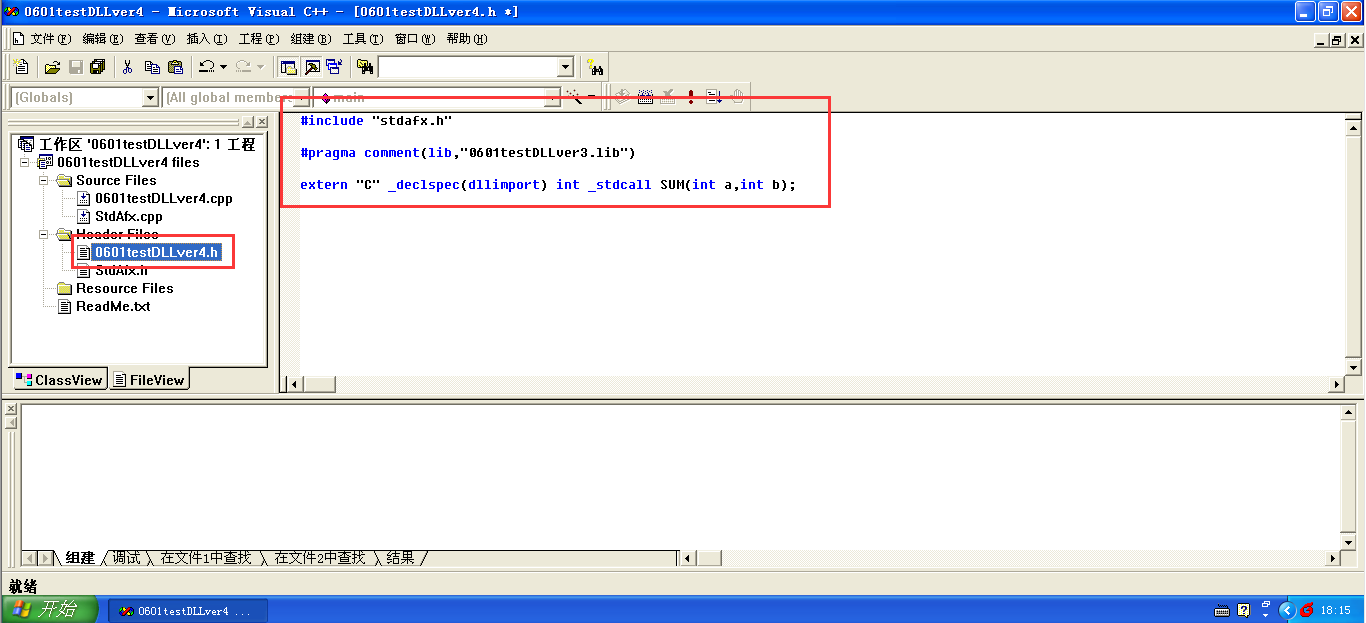
#include "stdafx.h"

#pragma comment(lib,"0601testDLLver3.lib")

extern "C" _declspec(dllimport) int _stdcall SUM(int a,int b);
2.4 修改0601testDLLver4.cpp文件
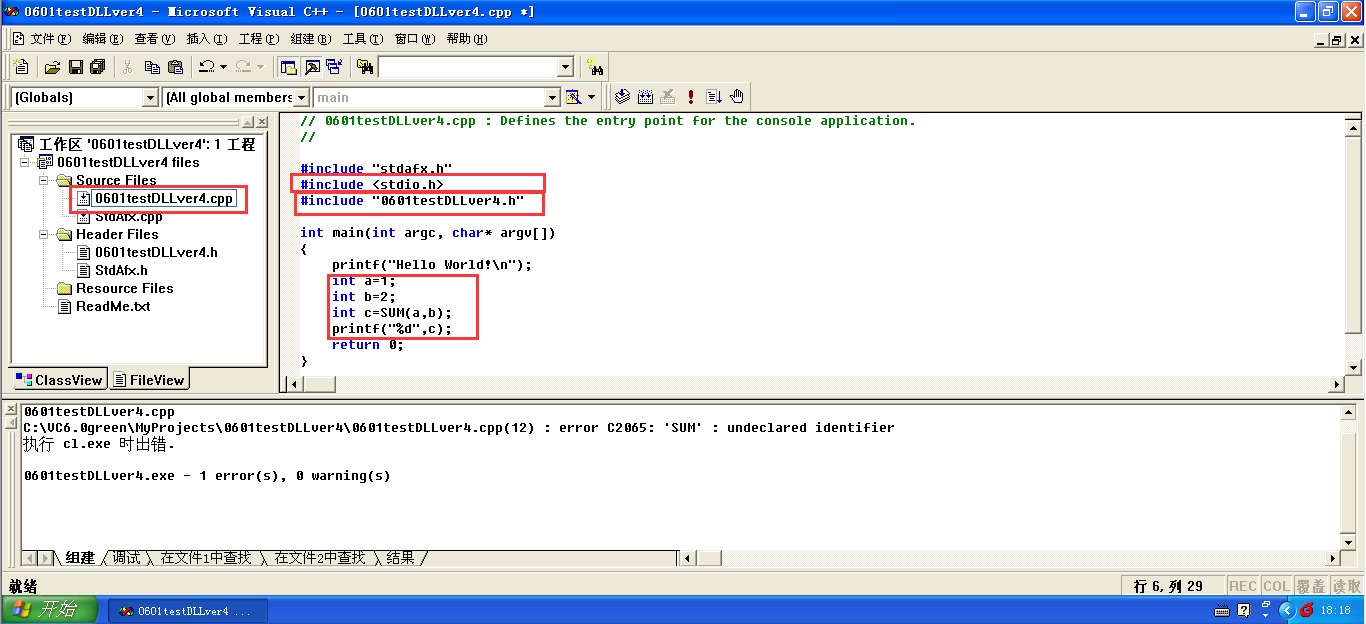
#include "stdafx.h"

#include <stdio.h>

#include "0601testDLLver4.h"

int main(int argc, char* argv[])

{

	printf("Hello World!\n");

	int a=1;

	int b=2;

	int c=SUM(a,b);

	printf("%d",c);

	return 0;

}
2.5 编译运行,万事大吉
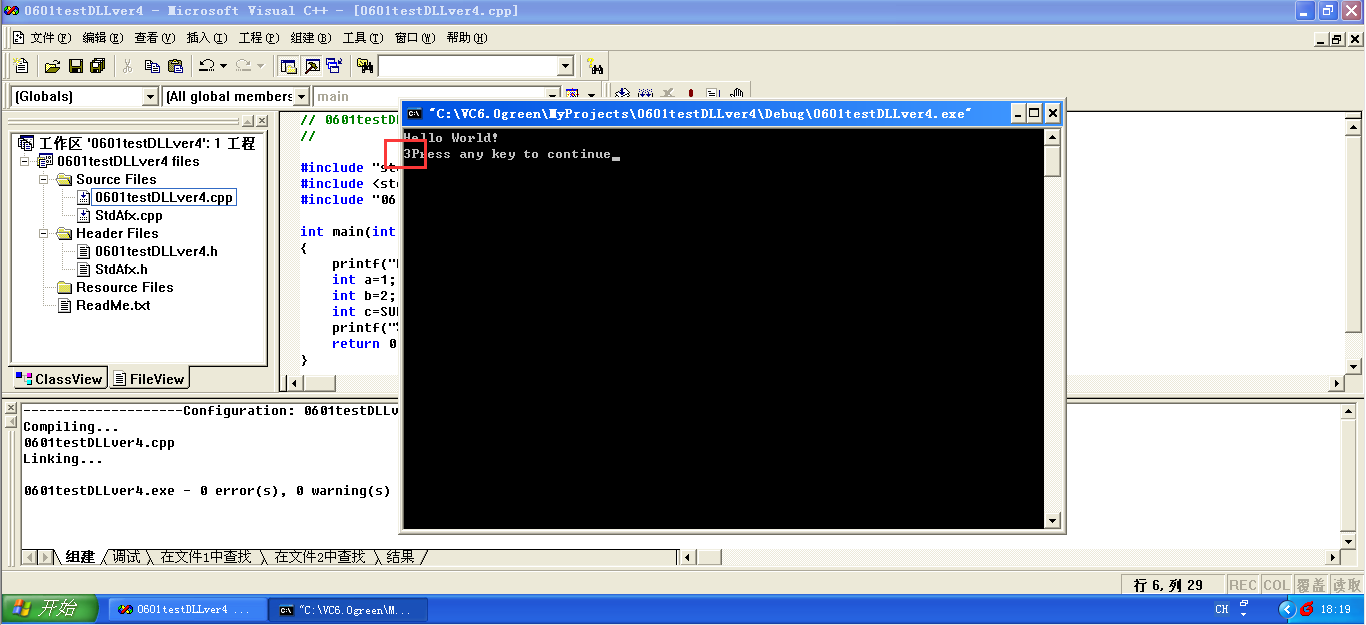
20180602更新
使用VirtualStudio2008创建和调用静态库
1. 创建静态库
1.1 创建静态库项目0602RSAlib
打开VS2008,左上角菜单栏:文件->新建
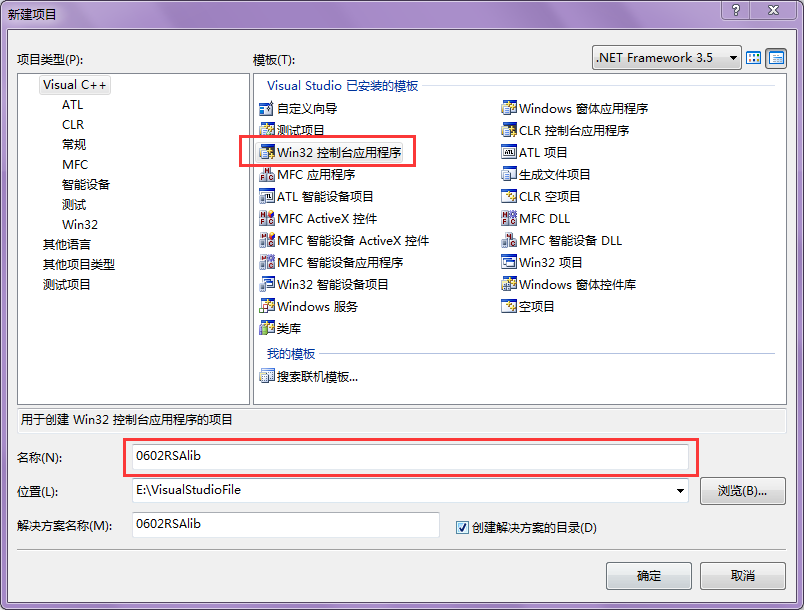

项目创建完成,切换到解决方案资源管理器,可以看到一些预生成的文件,只需要创建两个新文件0602RSAlib.h和0602RSAlib.cpp
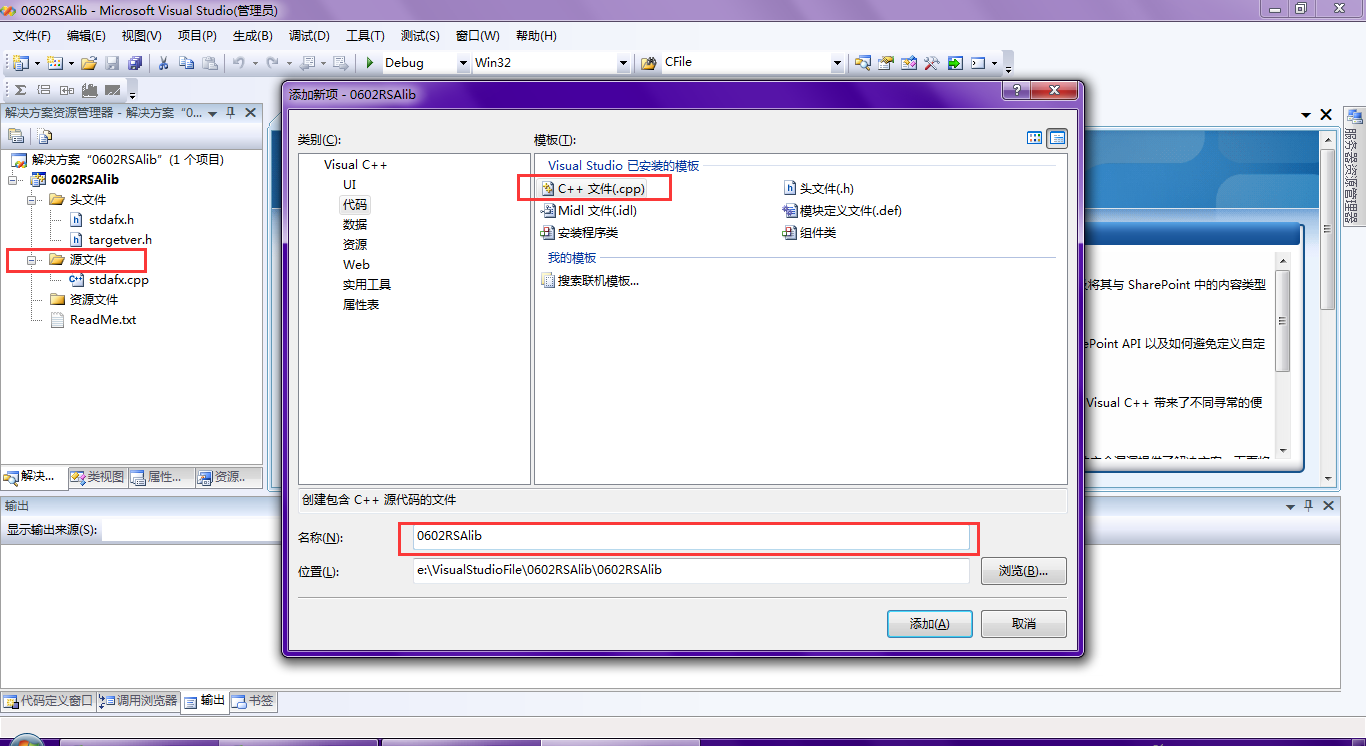
1.2 创建0602RSAlib.cpp文件
#include "stdafx.h"

#include <stdio.h>

int MessageToCipher(void)

{

    int p,q,e,d,m,n,t,c,r;

    int x,y,z;

    char s;

    printf("请输入P和Q的值,中间用空格隔开,P和Q的值不相同且P和Q都是素数:");

    scanf("%d%d",&p,&q);

    printf("计算得到N的值为%d\n",n);

    printf("计算得到T的值为%d\n",t);

    printf("请输入E的值:");

    scanf("%d",&e);

    if(1==1)

    {

        printf("输入不合要求,请重新输入\n",t);

        scanf("%d",&e);

    }

    d=1;

    while(((e*d)%t)!=1)

    {

        d++;

    }

    printf("计算得到D的值为%d\n请输入明文M的值:",d);

    scanf("%d",&m);

    x=m;

    y=e;

    z=n;

    c=1;

    y=y+1;

    while(y!=1)

    {

        c=c*x;

        c=c%z;

        y--;

    }

    return c;

}

int CipherToMessage(void)

{

    int p,q,e,d,m,n,t,c,r;

    int x,y,z;

    char s;

    printf("请输入P和Q的值,中间用空格隔开,P和Q的值不相同且P和Q都是素数:");

    scanf("%d%d",&p,&q);

    printf("计算得到N的值为%d\n",n);

    printf("计算得到T的值为%d\n",t);

    printf("请输入E的值:");

    scanf("%d",&e);

    if(1==1)

    {

        printf("输入不合要求,请重新输入\n",t);

        scanf("%d",&e);

    }

    d=1;

    while(((e*d)%t)!=1)

    {

        d++;

    }

    printf("计算得到D的值为%d\n请输入密文C的值:",d);

    scanf("%d",&c);

    x=c;

    y=d;

    z=n;

    m=1;

    y=y+1;

    while(y!=1)

    {

        m=m*x;

        m=m%z;

        y--;

    }

    return m;

}
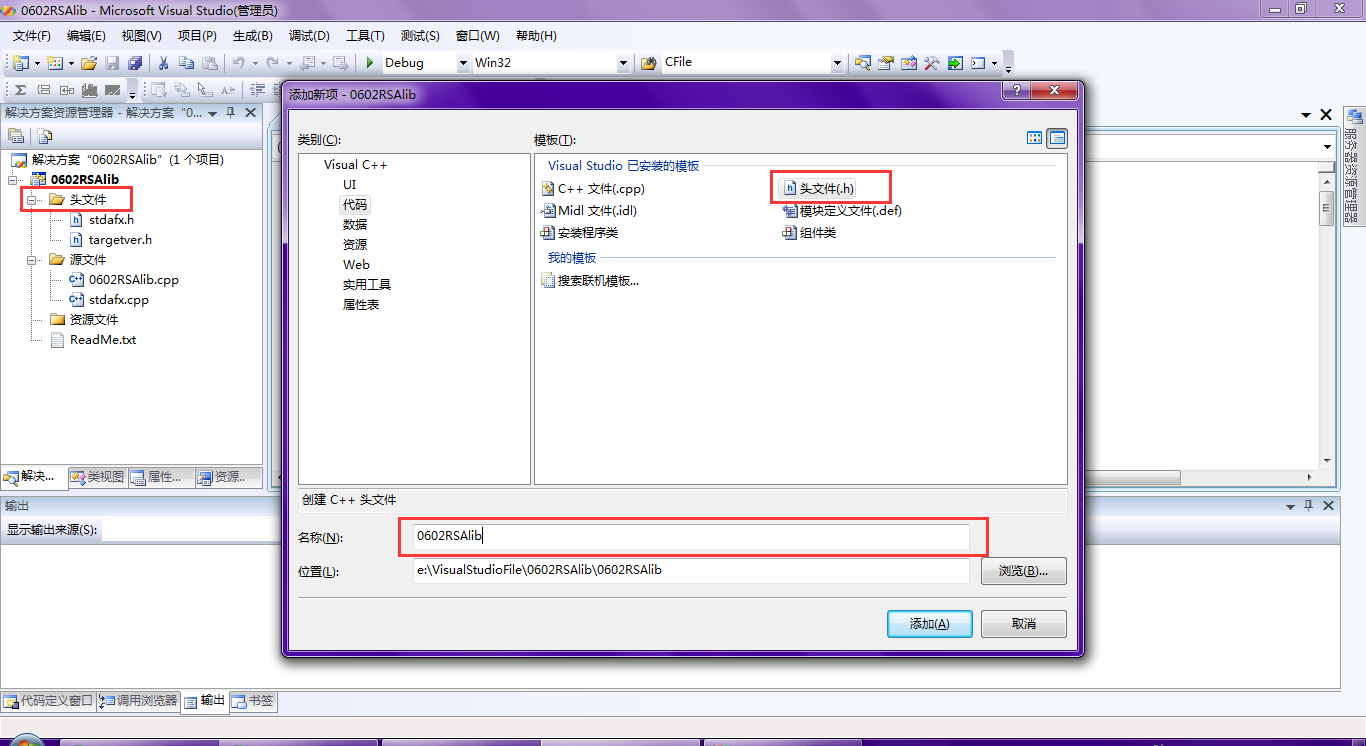
1.3 创建0602RSAlib.h文件
#include "stdafx.h"

int MessageToCipher(void);

int CipherToMessage(void);
1.4 编译代码创建静态库
生成静态库文件0602RSAlib.lib放0602RSAlib工程目录下的debug文件夹中
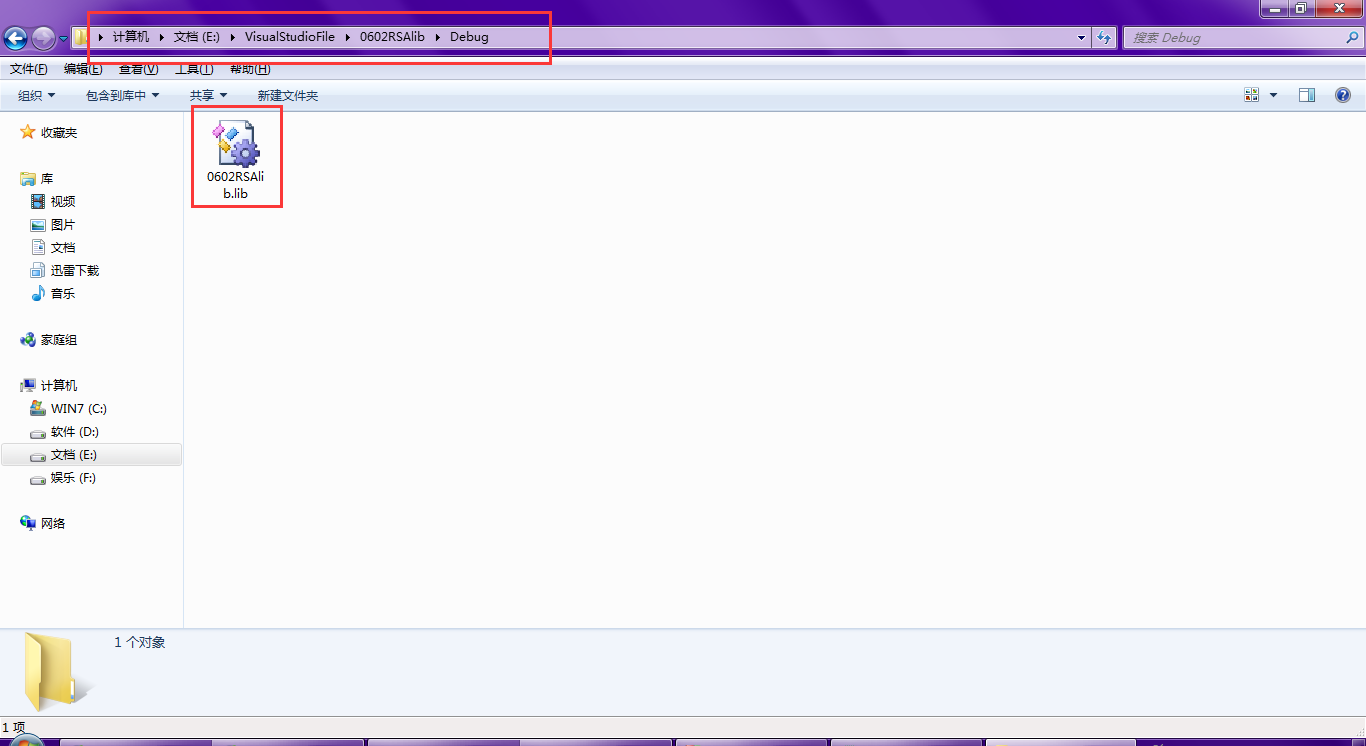
另外0602RSAlib工程目录下的0602RSAlib.h待会也会用到
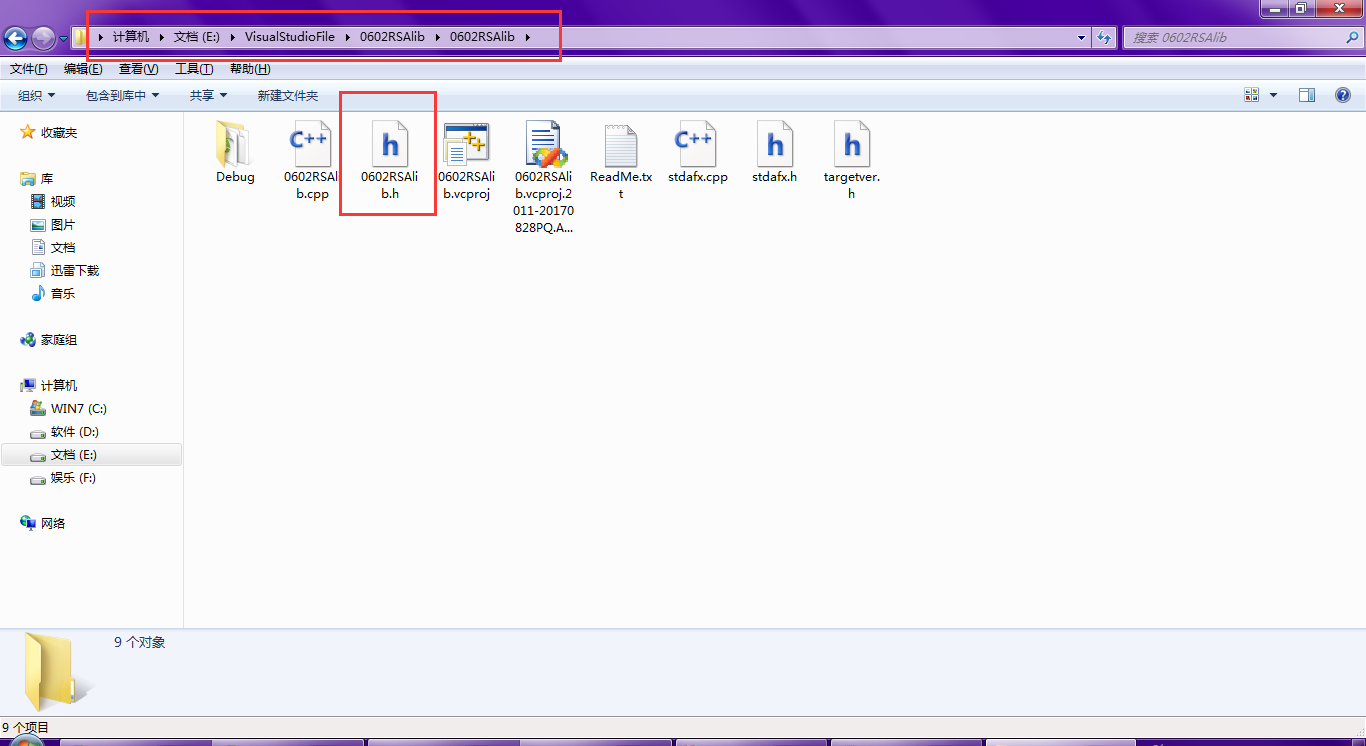
2. 调用静态库
2.1 创建测试工程0602testRSAlib
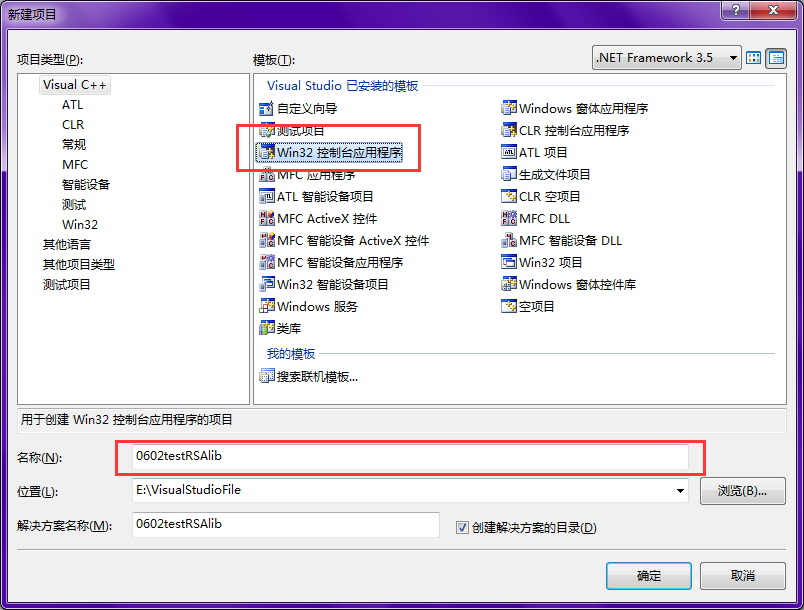
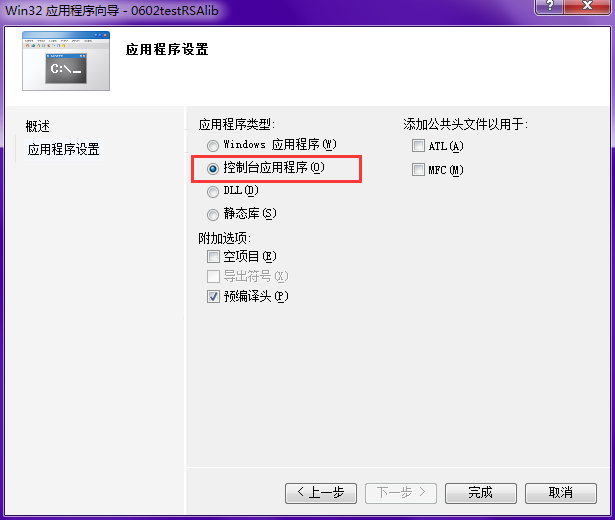
2.2 把静态库文件0602RSAlib.lib和0602RSAlib.h放在0602testRSAlib工程目录下
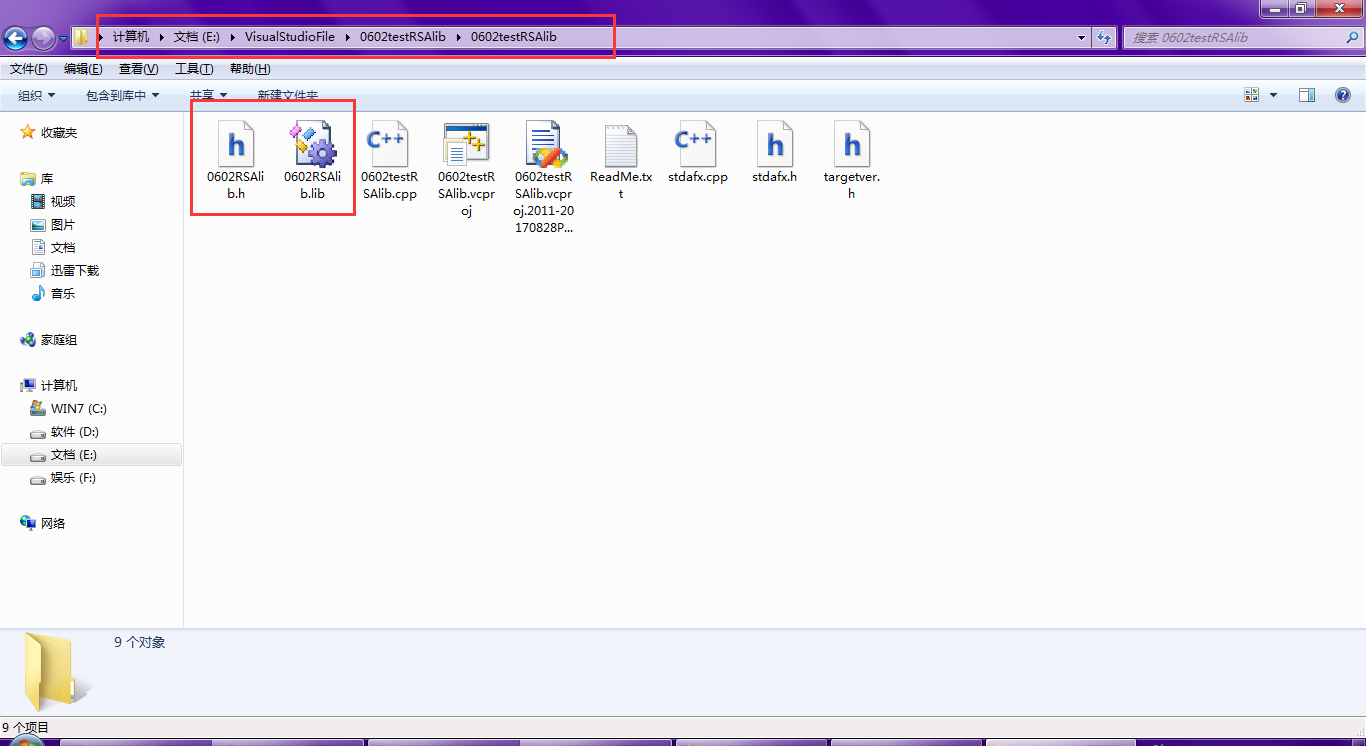
2.3 修改0602testRSAlib.cpp文件
// 0602testRSAlib.cpp : 定义控制台应用程序的入口点。

//

#include "stdafx.h"

#include "0602RSAlib.h"

#include <stdio.h>

#pragma comment(lib,"0602RSAlib.lib")

int _tmain(int argc, _TCHAR* argv[])

{

	int temp;

    printf("非对称密码算法RSA\n");

A:

    printf("请输入数字1或0选择进行加密运算或是解密运算:");

    scanf("%d",&temp);

    if(temp==1)

    {

        int c=MessageToCipher();

        printf("密文C的值为:%d\n",c);

        goto A;

    }

    else if(temp==0)

    {

        int m=CipherToMessage();

        printf("明文M的值为:%d\n",m);

        goto A;

    }

    else

    {

        printf("输入不合要求,请重新输入\n");

        goto A;

    }

	return 0;

}
2.4 编译运行,万事大吉
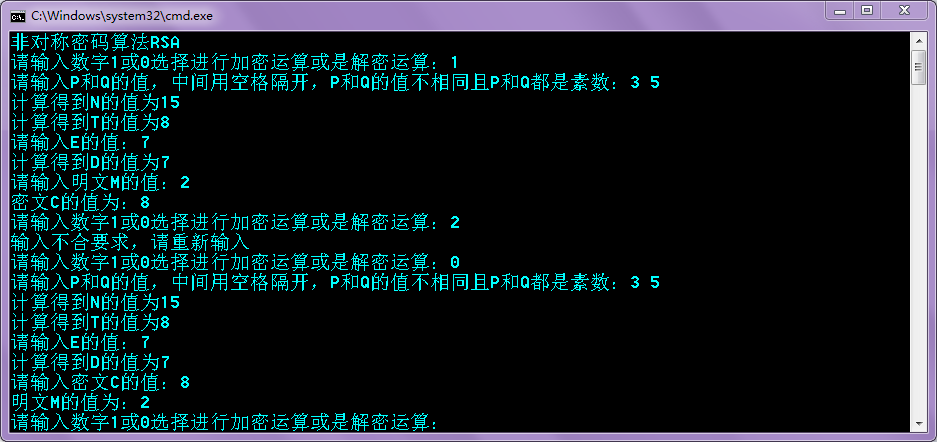
# 2017-2018-2 20155228 《信息安全系统设计原理》 使用VirtualStudio2008创建和调用静态库和使用VirtualC++6.0创建和调用动态库的更多相关文章
- C/C++ 跨平台交叉编译、静态库/动态库编译、MinGW、Cygwin、CodeBlocks使用原理及链接参数选项
目录 . 引言 . 交叉编译 . Cygwin简介 . 静态库编译及使用 . 动态库编译及使用 . MinGW简介 . CodeBlocks简介 0. 引言 UNIX是一个注册商标,是要满足一大堆条件 ...
- 20155321 《信息安全系统设计》课堂测试(ch06)
20155321 <信息安全系统设计>课堂测试(ch06) (单选题|1分)下面代码中,对数组x填充后,采用直接映射高速缓存,所有对x和y引用的命中率为() A .1 B .1/4 C . ...
- 20155322 2017-2018-1《信息安全系统设计》第十周 课下作业-IPC
20155322 2017-2018-1<信息安全系统设计>课下作业-IPC 作业内容 研究Linux下IPC机制:原理,优缺点,每种机制至少给一个示例,提交研究博客的链接. 共享内存 管 ...
- 20155306 2017-2018-1《信息安全系统设计》第二周课堂测试以及myod的实现
20155306 2017-2018-1<信息安全系统设计>第二周课堂测试以及myod的实现 第二周课堂测验: (注:前两项在课堂已提交,在此不做详解) 第一项: 每个.c一个文件,每个. ...
- 2018-2019-1-20165221&20165225 《信息安全系统设计》实验五:通讯协议设计
2018-2019-1-20165221&20165225 <信息安全系统设计>-实验五:通讯协议设计 OpenSSL学习: 简介: OpenSSL是为网络通信提供安全及数据完整性 ...
- 【逆向笔记】2017年全国大学生信息安全竞赛 Reverse 填数游戏
2017年全国大学生信息安全竞赛 Reverse 填数游戏 起因是吾爱破解大手发的解题思路,觉得题挺有意思的,就找来学习学习 这是i春秋的下载链接 http://static2.ichunqiu.co ...
- 20155339 《信息安全系统设计》第十周课下作业-IPC
20155339 <信息安全系统设计>第十周课下作业-IPC 共享内存 共享内存是在多个进程之间共享内存区域的一种进程间的通信方式,由IPC为进程创建的一个特殊地址范围,它将出现在该进程的 ...
- MyEclips 2017/2018 (mac 版)安装与破解
MyEclips 2017/2018 (mac 版)安装与破解 现在在学J2EE,然后使用的工具就是 MyEclipse,现在就抛弃 Eclipse 了,我就不多说它俩的区别了,但是 MyEclips ...
- MyEclipse 2017/2018 安装与破解 图文教程
SSM 框架-02-MyEclipse 2017/2018 安装与破解 现在在学J2EE,然后使用的工具就是 MyEclipse,现在就抛弃 Eclipse 了,我就不多说它俩的区别了,但是 MyEc ...
随机推荐
- jdk的安装过程
一.安装软件 jdk的安装:现在已经更新到11版本,这里下载的是8版本的(官网也只支持8和11的下载) 1.下载jdk网址:https://www.oracle.com/technetwork/jav ...
- mobile_轮播图_transform 版本_transform 读写二合一
轮播图_transform 版本 关键点: 2D 变换 transform 不会改变 元素 在 文档流 中的位置 定位 position 会改变 元素 在 文档流 中的位置 语句解析太快,使用 set ...
- puppeteer 拦截页面请求
原文链接 https://www.cnblogs.com/ajanuw/p/10324269.html Request Response page.setRequestInterception(tru ...
- js函数声明和函数表达式的区别
Javascript Function无处不在,而且功能强大!通过Javascript函数可以让JS具有面向对象的一些特征,实现封装.继承等,也可以让代码得到复用.但事物都有两面性,Javascrip ...
- hdfs OutOfMemoryError
大量推送本地文件到hdfs如下 hadoop fs -put ${local_path} ${hdfs_path}报错. Exception in thread "main" ja ...
- duilib 新增数据迁移界面
xml界面配置: <?xml version="1.0" encoding="utf-8"?> <Window caption="0 ...
- Python基础之数据基本运算
一.核心数据类型(五种): 在Python中变量没有数据类型,但关联的对象有数据类型,可通过type函数查看数据类型 1.整型(Int): 包含正整数,负整数和零 二进制:逢二进一,书写格式为 a = ...
- 宝塔linux面版安装网站环境 自动化
[root@localhost ~]# yum install -y wget && wget -O install.sh http://download.bt.cn/install/ ...
- about this blog
这个博客大概是被我用来整理模板的吧╮(╯▽╰)╭ 因为本小盆友巨懒,99.9%是不会写什么题解或者学习笔记什么的
- 19个实例学会plsql
--p1 begin dbms_output.put_line('你好 世界'); end; --p2 引入变量 declare age ; height ; begin dbms_output.pu ...