
python入门之小栗子
1 点球小游戏:
from random import choice
score=[0,0]
direction=['left','center','right']
def kick():
print '=====You Kick!====='
print 'Choose one side to shoot'
print 'left center right'
you=input()
print 'You kicked '+you
com=choice(direction)
print 'Computer saved '+com
if you!=com:
print 'Goal!'
score[0] += 1
else:
print 'Oops...'
print 'Score:%d(you) - %d(com)\n'%(score[0],score[1])
print '=====You Save====='
print 'Choose one side to save!'
print 'left center right'
you=input()
print 'You saved '+you
com=choice(direction)
print 'Computer kickde '+com
if you==com:
print 'Saved!'
else:
print 'Oops...'
score[1]+=1
print 'score:%d(you) - %d(com)\n'%(score[0],score[1])
for i in range(5):
print '====== Round %d ======='%(i+1)
kick()
while(score[0]==score[1]):
i+=1
print '====== Round %d ======='%(i+1)
kick()
if score[0]>score[1]:
print 'You Win!'
else:
print 'You lose.'
2,处理文件中的数据(学生成绩的汇总):
f=file('data.txt')
lines=f.readlines()
print lines
results=[]
for line in lines:
data=line.split()
sum=0
for score in data[1:]:
sum+=int(score)
result='%s\t:%d\n'%(data[0],sum)
results.append(result)
output=file('result.txt','w')
output.writelines(results)
output.close()
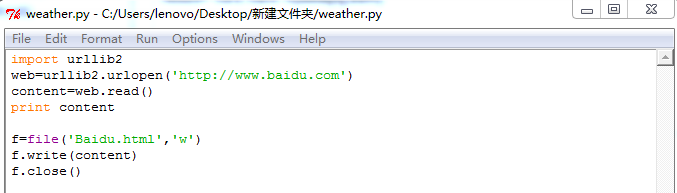
3(#),抓取百度首页的代码 保存成html文件,
4,
python入门之小栗子的更多相关文章
- Python入门 来点栗子
查天气(1) http://wthrcdn.etouch.cn/weather_mini?citykey=101280804 http://wthrcdn.etouch.cn/WeatherApi?c ...
- Python open 读写小栗子
1.样本内容 A.txt 2.上代码: f=open(r'E:\A.txt','r') boyA=[] boyB=[] count = for each_line in f: ]!='======': ...
- python入门pk小游戏
import time import random flag = True while flag: player_win = 0 enemy_win = 0 for i in range(1, 4): ...
- 40个Python入门小程序
有不少同学学完Python后仍然很难将其灵活运用.我整理 37 个Python入门的小程序.在实践中应用Python会有事半功倍的效果. 分享 Github 项目,里面收集了 Python 学习资料 ...
- SpringBoot+Shiro入门小栗子
写一个不花里胡哨的纯粹的Springboot+Shiro的入门小栗子 效果如图: 首页:有登录注册 先注册一个,然后登陆 登录,成功自动跳转到home页 home页:通过认证之后才可以进 代码部分: ...
- 简述Python入门小知识
如今的Python开发工程师很受企业和朋友们的青睐,现在学习Python开发的小伙伴也很多,本篇文章就和大家探讨一下Python入门小知识都有哪些. 扣丁学堂简述Python入门小知识Python培训 ...
- 【Python教程】《零基础入门学习Python》(小甲鱼)
[Python教程]<零基础入门学习Python>(小甲鱼) 讲解通俗易懂,诙谐. 哈哈哈. https://www.bilibili.com/video/av27789609
- Python入门小练习
Python入门小练习 001 备份文件 Python入门小练习 002 批量下载网页链接中的图片 Python入门小练习 003 利用cookielib模拟登录获取账户信息
- Python 入门之代码块、小数据池 与 深浅拷贝
Python 入门之代码块.小数据池 与 深浅拷贝 1.代码块 (1)一个py文件,一个函数,一个模块,终端中的每一行都是代码块 (代码块是防止我们频繁的开空间降低效率设计的,当我们定一个变量需要开辟 ...
随机推荐
- pycharm使用selenium之前
2.python安装好后,查看你的pycharm输出控制台,第一行就写了你所使用的python.exe的路径,如下图箭头处所示: 检查python使用的是不是你刚刚安装的,如果不是,换成你刚刚安装的p ...
- Java 连接 MySQL 数据库
最近想学习一下 Java 连接 MySQL 数据库,于是有了这样的一些问题&解决办法. 首先是解决 JDBC(Java Data Base Connectivity)驱动问题,因为默认安装的J ...
- springboot(一)
@Configuration:声明当前类是一个配置类==等同于 spring的xml文件,如果使用了改注解意味着该类里可能有0个或者多个@bean注解,此处没有使用包扫描,是因为所有的@bean 都在 ...
- getter unddfined
今天用vue.js写代码 报错: getter unddfined 错误原因:没有在main.js中注册store
- Linux Mint 18.1 MAME 成功运行
折腾了一个下午,终于成功可以用手柄接着chromebook 来玩街机游戏了(灌篮高手.拳皇.突击骑兵) 在http://sdlmame.wallyweek.org/download/ 下载对应的mam ...
- 小程序批量获取input的输入值,监听输入框,数据同步
在使用小程序时,跟vue的数据绑定不一样,没有v-model这个属性了,官网也只是给了一些事件监听. 但是我们如果有多个表单时,需要写多个事件来同步数据.这样做很麻烦.下面的方法可以解决,只需要一个方 ...
- element-ui <el-date-picker> 回显格式 yyyy-MM-dd 传值格式 yyyyMMddHHmmss
<template> <!-- 需求:使用 <el-date-picker> 日期插件 前端显示2018-10-22 后台需要传时间戳,对这个日期插件不熟悉,当时搞了好长 ...
- JeasyUI,导出Excel
这个是客户端表格导出伪Excel文档. 不知道为啥,超过200条,不能导出,显示网络错误 $.extend($.fn.datagrid.methods, { //超过200条,不能导出,显示网络错误? ...
- unity室内外VR漫游
这是一个用Unity 做的VR漫游小场景.
- windows异步通知I/O模型
回声服务器端: #include <stdio.h> #include <stdlib.h> #include <WinSock2.h> #define BUF_S ...