
R12.1.3 & R12.2.X 注册客户化应用
R12.2 官方出了运行补丁脚本就可以自动创建客户化应用,所以也把此补丁应用在 R12.1.3上验证一下其可行性,做出以下实验。
1、创建客户化应用账号CUX
--login user system
--创建cux用户
CREATE USER CUX IDENTIFIED BY CUX
DEFAULT TABLESPACE APPS_TS_TX_DATA
TEMPORARY TABLESPACE TEMP1
PROFILE DEFAULT
ACCOUNT UNLOCK;
--给出现用户授权
GRANT CONNECT, RESOURCE TO CUX;
GRANT CREATE ANY CONTEXT TO CUX;
GRANT CREATE ANY TYPE TO CUX;
GRANT CREATE CLUSTER TO CUX;
GRANT CREATE DATABASE LINK TO CUX;
GRANT CREATE DIMENSION TO CUX;
GRANT CREATE INDEXTYPE TO CUX;
GRANT CREATE LIBRARY TO CUX;
GRANT CREATE MATERIALIZED VIEW TO CUX;
GRANT CREATE OPERATOR TO CUX;
GRANT CREATE PROCEDURE TO CUX;
GRANT CREATE PUBLIC SYNONYM TO CUX;
GRANT CREATE SEQUENCE TO CUX;
GRANT CREATE SYNONYM TO CUX;
GRANT CREATE TABLE TO CUX;
GRANT CREATE TRIGGER TO CUX;
GRANT CREATE TYPE TO CUX;
GRANT CREATE VIEW TO CUX;
2、从metalink下载客户化应用程序补丁 p3636980_R12_GENERIC.zip
<<p3636980_R12_GENERIC.zip>>
将其中的文件名和内容由 izu 改为 cux
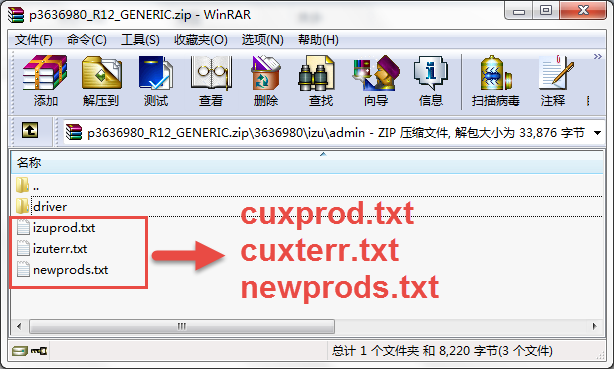
|
<<cuxprod.txt>> |
<<cuxterr.txt>> |
<<newprods.txt>> |
3、将改好的三个文件上载到EBS服务器的 $APPL_TOP/admin
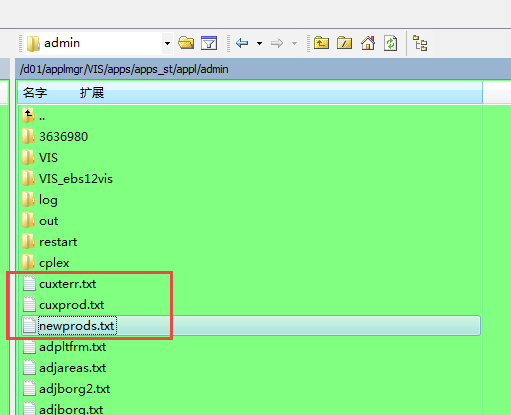
4、切换至 $APPL_TOP/admin 并执行 adsplice
[root@ebs12vis ~]# su - applmgr
[applmgr@ebs12vis ~]$ cd $APPL_TOP/admin
[applmgr@ebs12vis admin]$ adsplice
Copyright (c) 2002 Oracle Corporation
Redwood Shores, California, USA
AD Splicer
Version 12.0.0
NOTE: You may not use this utility for custom development
unless you have written permission from Oracle Corporation.
Your default directory is '/d01/applmgr/VIS/apps/apps_st/appl'.
Is this the correct APPL_TOP [Yes] ?
AD Splicer records your AD Splicer session in a text file
you specify. Enter your AD Splicer log file name or press [Return]
to accept the default file name shown in brackets.
Filename [adsplice.log] :
************* Start of AD Splicer session *************
AD Splicer version: 12.0.0
AD Splicer started at: Sat Jun 02 2018 10:10:40
APPL_TOP is set to /d01/applmgr/VIS/apps/apps_st/appl
Change DB = YES.
Please enter the name of the Oracle Applications System that this
APPL_TOP belongs to.
The Applications System name must be unique across all Oracle
Applications Systems at your site, must be from 1 to 30 characters
long, may only contain alphanumeric and underscore characters,
and must start with a letter.
Sample Applications System names are: "prod", "test", "demo" and
"Development_2".
Applications System Name [VIS] : VIS *
NOTE: If you do not currently have certain types of files installed
in this APPL_TOP, you may not be able to perform certain tasks.
Example 1: If you don't have files used for installing or upgrading
the database installed in this area, you cannot install or upgrade
the database from this APPL_TOP.
Example 2: If you don't have forms files installed in this area, you cannot
generate them or run them from this APPL_TOP.
Example 3: If you don't have concurrent program files installed in this area,
you cannot relink concurrent programs or generate reports from this APPL_TOP.
Do you currently have or want to install files used for installing or upgrading
the database in this APPL_TOP [YES] ? YES *
Do you currently have or want to install Java and HTML files for HTML-based
functionality in this APPL_TOP [YES] ? YES *
Do you currently have or want to install Oracle Applications forms files
in this APPL_TOP [YES] ? YES *
Do you currently have or want to install concurrent program files
in this APPL_TOP [YES] ? YES *
Please enter the name Oracle Applications will use to identify this APPL_TOP.
The APPL_TOP name you select must be unique within an Oracle Applications
System, must be from 1 to 30 characters long, may only contain
alphanumeric and underscore characters, and must start with a letter.
Sample APPL_TOP Names are: "prod_all", "demo3_forms2", and "forms1".
APPL_TOP Name [ebs12vis] : ebs12vis *
You are about to install or upgrade Oracle Applications product tables
in your ORACLE database 'VIS'
using ORACLE executables in '/d01/applmgr/VIS/apps/tech_st/10.1.2'.
Is this the correct database [Yes] ?
AD Splicer needs the password for your 'SYSTEM' ORACLE schema
in order to determine your installation configuration.
Enter the password for your 'SYSTEM' ORACLE schema:
The ORACLE username specified below for Application Object Library
uniquely identifies your existing product group: APPLSYS
Enter the ORACLE password of Application Object Library [APPS] :
AD Splicer is verifying your username/password.
The status of various features in this run of AD Splicer is:
<-Feature version in->
Feature Active? APPLTOP Data model Flags
------------------------------ ------- -------- ----------- -----------
CHECKFILE Yes 1 1 Y N N Y N Y
PREREQ Yes 6 6 Y N N Y N Y
CONCURRENT_SESSIONS No 2 2 Y Y N Y Y N
PATCH_TIMING Yes 2 2 Y N N Y N Y
PATCH_HIST_IN_DB Yes 6 6 Y N N Y N Y
SCHEMA_SWAP Yes 1 1 Y N N Y Y Y
JAVA_WORKER Yes 1 1 Y N N Y N Y
CODELEVEL Yes 1 1 Y N N Y N Y
Reading product information from file...
Reading language and territory information from file...
Reading language information from applUS.txt ...
AD Splicer warning:
Product Data File
/d01/applmgr/VIS/apps/apps_st/appl/admin/zfaprod.txt
does not exist for product "zfa".
This product is registered in the database but the
above file does not exist in APPL_TOP. The product
will be ignored without error.
AD Splicer warning:
Product Data File
/d01/applmgr/VIS/apps/apps_st/appl/admin/zsaprod.txt
does not exist for product "zsa".
This product is registered in the database but the
above file does not exist in APPL_TOP. The product
will be ignored without error.
AD Splicer warning:
Product Data File
/d01/applmgr/VIS/apps/apps_st/appl/admin/jtsprod.txt
does not exist for product "jts".
This product is registered in the database but the
above file does not exist in APPL_TOP. The product
will be ignored without error.
Reading database to see what industry is currently installed.
Reading FND_LANGUAGES to see what is currently installed.
Currently, the following languages are installed:
Code Language Status
---- --------------------------------------- ---------
US American English Base
ZHS Simplified Chinese Install
Reading language information from applZHS.txt ...
Your base language will be AMERICAN.
Your other languages to install are: SIMPLIFIED CHINESE
Setting up module information.
Reading database for information about the modules.
Saving module information.
Reading database for information about the products.
Reading database for information about how products depend on each other.
Reading topfile.txt ...
Saving product information.
Please enter the directory where your AD Splicer control file is located.
The default directory is [/d01/applmgr/VIS/apps/apps_st/appl/admin] :
Please enter the name of your AD Splicer control file [newprods.txt] :
Processing file /d01/applmgr/VIS/apps/apps_st/appl/admin/newprods.txt...
Loading information for product 'cux'...
AD Splicer error:
Incorrect syntax in file:
/d01/applmgr/VIS/apps/apps_st/appl/admin/cuxterr.txt
Line = 'c cux Custom Application'
Correct syntax is:
<industry> <product abbreviation> <product name in this language>
AD Splicer error:
Error at line 8:
Error reading Territory Data File:
/d01/applmgr/VIS/apps/apps_st/appl/admin/cuxterr.txt
You should check the file
/d01/applmgr/VIS/apps/apps_st/appl/admin/VIS/log/adsplice.log
for errors.
[applmgr@ebs12vis admin]$ adsplice
Copyright (c) 2002 Oracle Corporation
Redwood Shores, California, USA
AD Splicer
Version 12.0.0
NOTE: You may not use this utility for custom development
unless you have written permission from Oracle Corporation.
Your default directory is '/d01/applmgr/VIS/apps/apps_st/appl'.
Is this the correct APPL_TOP [Yes] ?
AD Splicer records your AD Splicer session in a text file
you specify. Enter your AD Splicer log file name or press [Return]
to accept the default file name shown in brackets.
Filename [adsplice.log] :
************* Start of AD Splicer session *************
AD Splicer version: 12.0.0
AD Splicer started at: Sat Jun 02 2018 10:17:07
APPL_TOP is set to /d01/applmgr/VIS/apps/apps_st/appl
Change DB = YES.
Backing up restart files, if any......Done.
Your previous AD Splicer session did not run to completion.
Do you wish to continue with your previous AD Splicer session [Yes] ?
You are about to install or upgrade Oracle Applications product tables
in your ORACLE database 'VIS'
using ORACLE executables in '/d01/applmgr/VIS/apps/tech_st/10.1.2'.
Is this the correct database [Yes] ?
Already asked for the ORACLE username and password
of Application Object Library.
(The given username/password was: APPLSYS/*****)
The status of various features in this run of AD Splicer is:
<-Feature version in->
Feature Active? APPLTOP Data model Flags
------------------------------ ------- -------- ----------- -----------
CHECKFILE Yes 1 1 Y N N Y N Y
PREREQ Yes 6 6 Y N N Y N Y
CONCURRENT_SESSIONS No 2 2 Y Y N Y Y N
PATCH_TIMING Yes 2 2 Y N N Y N Y
PATCH_HIST_IN_DB Yes 6 6 Y N N Y N Y
SCHEMA_SWAP Yes 1 1 Y N N Y Y Y
JAVA_WORKER Yes 1 1 Y N N Y N Y
CODELEVEL Yes 1 1 Y N N Y N Y
Reading product information from file...
Reading language and territory information from file...
Reading language information from applUS.txt ...
AD Splicer warning:
Product Data File
/d01/applmgr/VIS/apps/apps_st/appl/admin/zfaprod.txt
does not exist for product "zfa".
This product is registered in the database but the
above file does not exist in APPL_TOP. The product
will be ignored without error.
AD Splicer warning:
Product Data File
/d01/applmgr/VIS/apps/apps_st/appl/admin/zsaprod.txt
does not exist for product "zsa".
This product is registered in the database but the
above file does not exist in APPL_TOP. The product
will be ignored without error.
AD Splicer warning:
Product Data File
/d01/applmgr/VIS/apps/apps_st/appl/admin/jtsprod.txt
does not exist for product "jts".
This product is registered in the database but the
above file does not exist in APPL_TOP. The product
will be ignored without error.
Currently, the following languages are installed:
Code Language Status
---- --------------------------------------- ---------
US American English Base
ZHS Simplified Chinese Install
Reading language information from applZHS.txt ...
Your base language will be AMERICAN.
Your other languages to install are: SIMPLIFIED CHINESE
Setting up module information.
Reading database for information about the modules.
Saving module information.
Already asked for the name of the data file directory.
(The answer was: /d01/applmgr/VIS/apps/apps_st/appl/admin)
Already asked for the name of the control file.
(The answer was: /d01/applmgr/VIS/apps/apps_st/appl/admin/newprods.txt)
Processing file /d01/applmgr/VIS/apps/apps_st/appl/admin/newprods.txt...
Loading information for product 'cux'...
Warning: Because the database is in new tablespace mode, AD Splicer is ignoring the tablespace settings in your control file!
Successfully read file /d01/applmgr/VIS/apps/apps_st/appl/admin/newprods.txt.
Verifying localizations...
Validating inter-product dependency information...
Re-organizing product information lists...
Adding new languages into FND_LANGUAGES...
Creating ORACLE usernames for products...
AD Splicer is creating or updating the ORACLE username CUX
with password ***** for Custom Application tables.
Granting privileges for tablespaces...
Granting required system privileges and creating APPS*DDL packages...
sqlplus -s CUX/***** @/d01/applmgr/VIS/apps/apps_st/appl/ad/12.0.0/patch/115/sql/adaddls.pls ***** CUX *****
Done running adaddls.pls for CUX
sqlplus -s CUX/***** @/d01/applmgr/VIS/apps/apps_st/appl/ad/12.0.0/patch/115/sql/adaaddls.pls ***** CUX *****
Done running adaaddls.pls for CUX
sqlplus -s CUX/***** @/d01/applmgr/VIS/apps/apps_st/appl/ad/12.0.0/patch/115/sql/adaddlb.pls ***** CUX *****
Done running adaddlb.pls for CUX
sqlplus -s CUX/***** @/d01/applmgr/VIS/apps/apps_st/appl/ad/12.0.0/patch/115/sql/adaaddlb.pls ***** CUX *****
Done running adaaddlb.pls for CUX
Registering ORACLE usernames/passwords.
**
**Inserting application information for new products...
**
Running fnd_application_pkg.add_language ...
**
**Updating product information for new products...
**
Populating INSTALL_GROUP_NUM column to FND_ORACLE_USERID table.
**
**Updating product dependency information...
**
Recording modules in the database...done.
**
**Updating Data Groups...
**
Reading existing data groups from database.
Registering any new data groups.
Registering any new data group units.
Updating Data Group "Standard" to point to
APPS #1 Account (ORACLE ID = 900)
Updating Patch Advisor tables to include new product information ..
sqlplus -s APPS/***** @/d01/applmgr/VIS/apps/apps_st/appl/ad/12.0.0/sql/adpaseed.sql *****
Done.
Saving module actions...done.
Saving product actions...done.
Making product top directory for product "cux"...
Directory will be /d01/applmgr/VIS/apps/apps_st/appl/cux/12.0.0
Making directory "log" for product "cux"...
Making directory "out" for product "cux"...
Making directory "mesg" for product "cux"...
Making directory "sql" for product "cux"...
Creating stub file "sql/CUXNLINS.sql" for product "cux"...
Making directory "admin/sql" for product "cux"...
Creating stub file "admin/sql/CUXNLADD.sql" for product "cux"...
Making directory "admin/driver" for product "cux"...
Do you wish to regenerate your environment file [Yes] ?
Checking if AutoConfig is enabled....
Running AutoConfig on : All products ...
The log file is located at:
/d01/applmgr/VIS/apps/apps_st/appl/admin/VIS/log/autoconfig_1.log
Please check the log file for more details about the run of AutoConfig.
AD Splicer is complete.
Errors and warnings are listed in the log file
/d01/applmgr/VIS/apps/apps_st/appl/admin/VIS/log/adsplice.log
and in other log files in the same directory.
5、检查 adsplice 和 autoconfig 执行了补丁后的结果
SELECT *
FROM fnd_application
WHERE application_short_name = 'CUX';
SELECT *
FROM fnd_product_installations p
WHERE EXISTS
(SELECT 1
FROM fnd_application a
WHERE a.application_short_name = 'CUX'
AND a.application_id = p.application_id);
SELECT *
FROM dba_users
WHERE username = 'CUX';
6、检查在 APPL_TOP 下生成的客户化目录 CUX
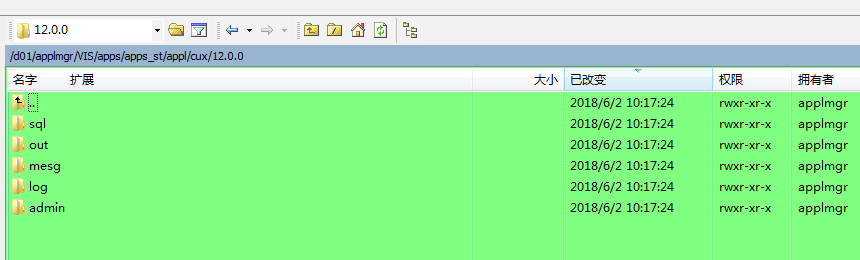
脚本创建的只是基础目录,还需要做form report开发类的目录,克隆inv目录结构到cux
[applmgr@ebs12vis admin]$ cd $APPL_TOP/inv
[applmgr@ebs12vis inv]$ find . -type d -exec mkdir -p $APPL_TOP/cux/{} \;
[applmgr@ebs12vis inv]$ cd $APPL_TOP/cux
[applmgr@ebs12vis cux]$ du
8 ./12.0.0/help/US
8 ./12.0.0/help/ZHS
24 ./12.0.0/help
8 ./12.0.0/html
8 ./12.0.0/reports/US
8 ./12.0.0/reports/ZHS
24 ./12.0.0/reports
8 ./12.0.0/log
8 ./12.0.0/lib
8 ./12.0.0/out
8 ./12.0.0/patch/115/import/US
8 ./12.0.0/patch/115/import/ZHS
24 ./12.0.0/patch/115/import
8 ./12.0.0/patch/115/odf
8 ./12.0.0/patch/115/xdf
8 ./12.0.0/patch/115/irep/patch/115/import/US
16 ./12.0.0/patch/115/irep/patch/115/import
8 ./12.0.0/patch/115/irep/patch/115/odf
8 ./12.0.0/patch/115/irep/patch/115/sql
40 ./12.0.0/patch/115/irep/patch/115
48 ./12.0.0/patch/115/irep/patch
8 ./12.0.0/patch/115/irep/java/services/invitsnu
8 ./12.0.0/patch/115/irep/java/services/invrsvf1
8 ./12.0.0/patch/115/irep/java/services/inviditm
8 ./12.0.0/patch/115/irep/java/services/invtdilt
40 ./12.0.0/patch/115/irep/java/services
8 ./12.0.0/patch/115/irep/java/ebi/item/server
16 ./12.0.0/patch/115/irep/java/ebi/item
24 ./12.0.0/patch/115/irep/java/ebi
72 ./12.0.0/patch/115/irep/java
128 ./12.0.0/patch/115/irep
8 ./12.0.0/patch/115/xml/US
8 ./12.0.0/patch/115/xml/ZHS
24 ./12.0.0/patch/115/xml
8 ./12.0.0/patch/115/driver
8 ./12.0.0/patch/115/publisher/templates/US
8 ./12.0.0/patch/115/publisher/templates/ZHS
24 ./12.0.0/patch/115/publisher/templates
8 ./12.0.0/patch/115/publisher/defs
40 ./12.0.0/patch/115/publisher
8 ./12.0.0/patch/115/sql
256 ./12.0.0/patch/115
264 ./12.0.0/patch
8 ./12.0.0/java/make
8 ./12.0.0/java/jar
24 ./12.0.0/java
8 ./12.0.0/xml/orc115
8 ./12.0.0/xml/oag7211
8 ./12.0.0/xml/oag7212
32 ./12.0.0/xml
8 ./12.0.0/forms/US
8 ./12.0.0/forms/ZHS
24 ./12.0.0/forms
8 ./12.0.0/mds/lov/webui/ZHS
16 ./12.0.0/mds/lov/webui
8 ./12.0.0/mds/lov/consign/webui/ZHS
16 ./12.0.0/mds/lov/consign/webui
24 ./12.0.0/mds/lov/consign
48 ./12.0.0/mds/lov
8 ./12.0.0/mds/wshtxn/server/ZHS
16 ./12.0.0/mds/wshtxn/server
24 ./12.0.0/mds/wshtxn
8 ./12.0.0/mds/consign/webui/ZHS
16 ./12.0.0/mds/consign/webui
24 ./12.0.0/mds/consign
8 ./12.0.0/mds/rcv/server/ZHS
16 ./12.0.0/mds/rcv/server
24 ./12.0.0/mds/rcv
8 ./12.0.0/mds/attributesets/ZHS
16 ./12.0.0/mds/attributesets
8 ./12.0.0/mds/txnui/webui/ZHS
16 ./12.0.0/mds/txnui/webui
8 ./12.0.0/mds/txnui/lotDetails/webui/ZHS
16 ./12.0.0/mds/txnui/lotDetails/webui
24 ./12.0.0/mds/txnui/lotDetails
8 ./12.0.0/mds/txnui/serialDetails/webui/ZHS
16 ./12.0.0/mds/txnui/serialDetails/webui
24 ./12.0.0/mds/txnui/serialDetails
72 ./12.0.0/mds/txnui
216 ./12.0.0/mds
8 ./12.0.0/bin
8 ./12.0.0/mesg
16 ./12.0.0/admin/driver
16 ./12.0.0/admin/sql
40 ./12.0.0/admin
16 ./12.0.0/sql
720 ./12.0.0
728 .

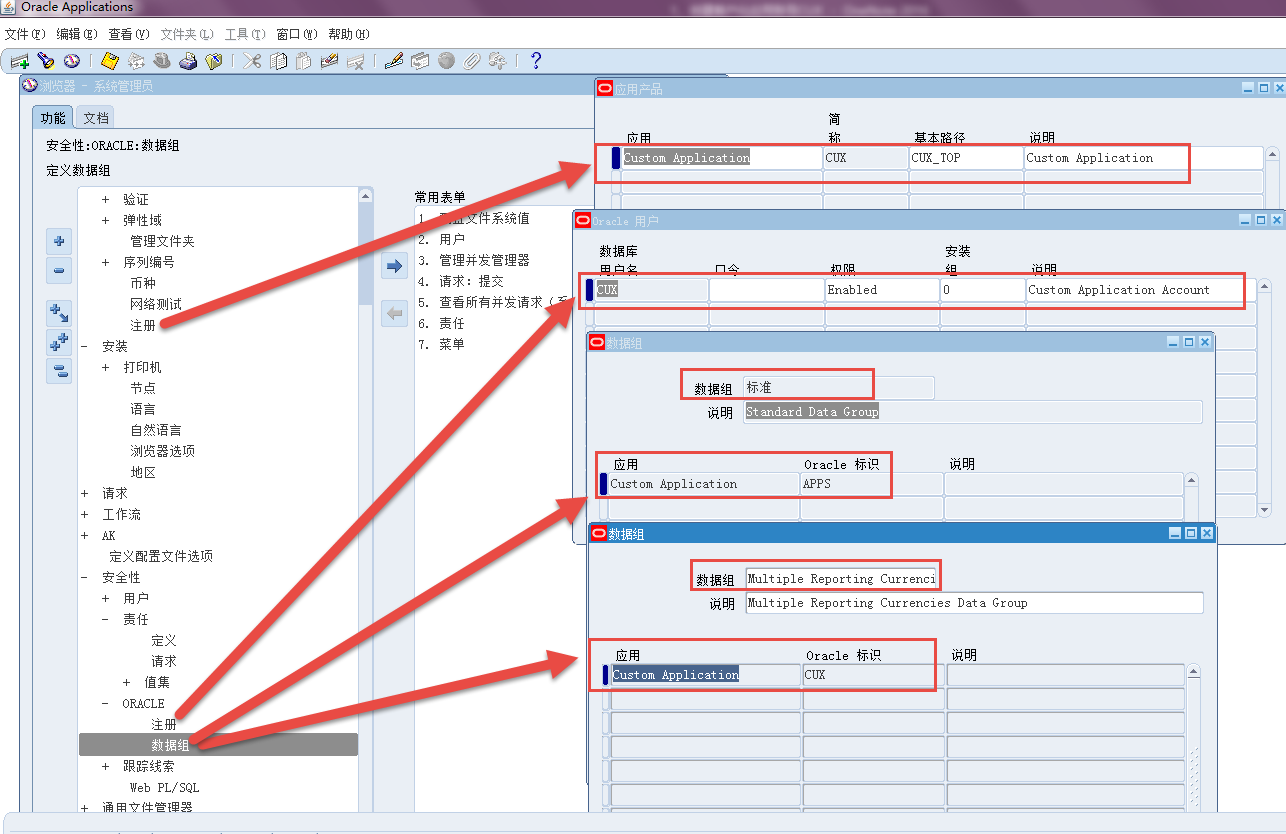
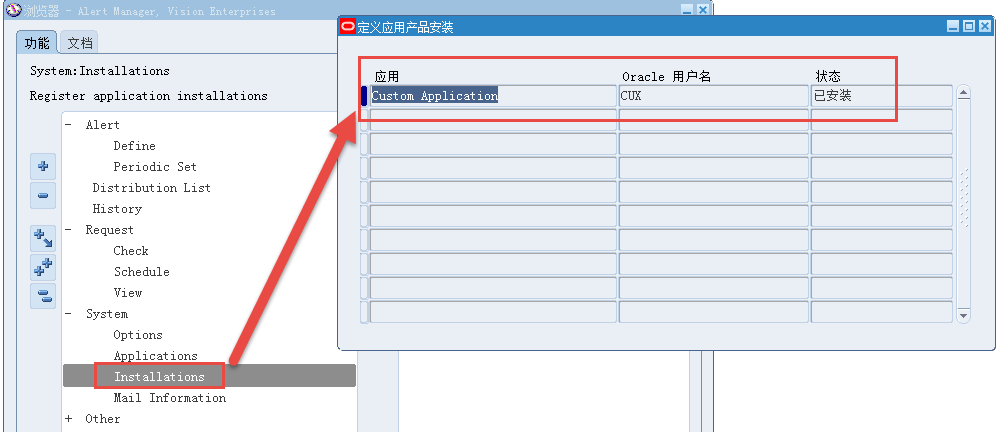
7、检查前端应用的注册信息(应用产品注册、ORACLE用户、标准数据组、多币种报告数据组、预警应用产品安装)
R12.1.3 & R12.2.X 注册客户化应用的更多相关文章
- R12中注册客户化应用为多组织应用
Oralce EBS R12中引入了MOAC的控制,所有多OU的表对象都添加了数据库VPD的控制策略,需要访问这些对象中的数据,首先需要进行多组织环境的初始化,但是如果客户化的应用中也需要具备多OU的 ...
- EBS 11i升级R12
http://blog.csdn.net/y657356105/article/details/8181081 概述 从EBS 11i升级至R12,总的来说更变较大的就是多OU访问(MOAC)和表视 ...
- EBS R12安装升级(FRESH)(五)
7.4.5 用DBUA升级 Database Upgrade Assistant提供图形界面进行升级. 将zysong.ttf复制到 /u01/oracle/TEST/db/tech_st/11.2. ...
- EBS R12安装升级(FRESH)(三)
5 EBS R12.1.1安装后配置 5.1 新建patch文件夹 1 2 3 su - root mkdir /stage/patch chmod 777 /stage/patch 打补丁说明:随便 ...
- Oracle Apps DBA R12.2 Syllabus
1. What is Oracle R12.2 R12.2 Definition Architecture Advantages of R12.2 Limitations of R12.2 What ...
- Oracle EBS APP-FND-02938 多组织例程初始化产品报错
Oralce EBS R12中引入了MOAC的控制,所有多OU的表对象都添加了数据库VPD的控制策略,需要访问这些对象中的数据,首先需要进行多组织环境的初始化,但是如果客户化的应用中也需要具备多OU的 ...
- runtime——消息机制
本文授权转载,作者:Sindri的小巢(简书) 从异常说起 我们都知道,在iOS中存在这么一个通用类类型id,它可以用来表示任何对象的类型 —— 这意味着我们使用id类型的对象调用任何一个方法,编译器 ...
- Oracle Applications DBA 基础(一)
1.引子 2014年9月13日 20:33 <oracle Applications DBA 基础>介绍Oracle Applications R12的系统架构, 数据库后台及应用系统的基 ...
- SEH分析笔记(X64篇)
SEH分析笔记(X64篇) v1.0.0 boxcounter 历史: v1.0.0, 2011-11-4:最初版本. [不介意转载,但请注明出处 www.boxcounter.com 附件里有本文 ...
随机推荐
- 【hadoop】python通过hdfs模块读hdfs数据
hdfs官网:http://hdfscli.readthedocs.io/en/latest/api.html 一个非常好的博客:http://blog.csdn.net/gamer_gyt/arti ...
- django----对model查询扩展
基于对象关联查询 一对多查询(Book--Publish): 正向查询,按字段: (从关联的表中查询) book_obj.publish : 与这本书关联的出版社对象 book_obj.publish ...
- Python 列表推导、迭代器与生成器
1.列表推导 1 2 3 4 5 6 7 8 9 10 11 numbers = [i for i in range(10) if i % 2 == 0] print(numbers) seq = ...
- python接口自动化测试二十四:上传多个附件,参数化
# 添加多个附件参数化files = [("1.png", "1.png") ("2.png", "2.png") ]d ...
- python 全栈开发,Day104(DRF用户认证,结算中心,django-redis)
考试第二部分:MySQL数据库 6. MySQL中char和varchar的区别(1分) char是定长,varchar是变长. char的查询速度比varchar要快. 7. MySQL中va ...
- oracle中游标详细用法
转自:http://blog.csdn.net/liyong199012/article/details/8948952 游标的概念: 游标是SQL的一个内存工作区,由系统或用户以变量的形式定 ...
- Ubuntu安装VirtualBox以及CentOS7.5联网设置
一.virtualBox的安装 官方Liunx版本下载地址: https://www.virtualbox.org/wiki/Linux_Downloads 这里选择下载ubuntu 16.04 ...
- php特别值
if(!isset($lichi)){ echo'未定义'; if(empty($lichi)){ echo '未定义的显示为空的';//最终会走到这来 } } 手册类型比较表 empty为真$x = ...
- hdu 2063 过山车【匈牙利算法】(经典)
<题目链接> RPG girls今天和大家一起去游乐场玩,终于可以坐上梦寐以求的过山车了.可是,过山车的每一排只有两个座位,而且还有条不成文的规矩,就是每个女生必须找个个男生做partne ...
- Android入门笔记
Android项目的目录结构(Eclipse版) src:项目源代码文件夹 R.java:存放项目中所有资源文件的资源id,永远不要修改 Android.jar:Android的jar包,导入此包方可 ...