
[转]ubuntu安装skype
Skype 4.3 Released, How to Install it in Ubuntu 14.04/12.04

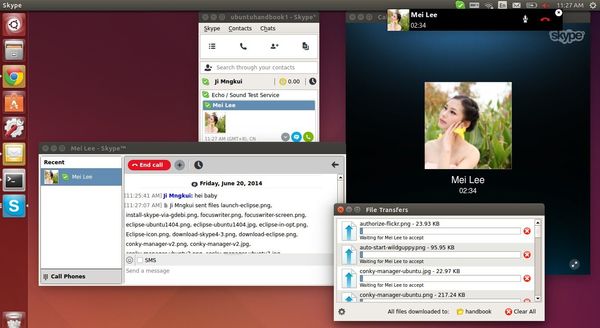
Skype for Linux has been updated to version 4.3.0.37 with updated UI, new cloud-based Group chat experience, and more.
Microsoft finally announced Skype for Linux 4.3 on June 18, 2014. The new release dropped support for direct Alsa support, now it uses PulseAudio for better calling experience. Also Skype 4.3 contains below changes:
- An updated UI
- Our new cloud-based Group Chat experience
- More reliable file transfer support when using multiple devices at once
- Greater accessibility by blind and visually impaired users
- PulseAudio 3.0 and 4.0 support
- Lot of bug fixes
- Skype 4.3 release note.
Install Skype 4.3 in Ubuntu or Linux Mint:
At the moment, Skype for Linux 4.3 is not available in any Linux repository. Below steps will tell you how to install the official .deb package in Ubuntu 14.04, Ubuntu 12.04, and their derivatives.
1. Install required libraries (for 64-bit system)
Skype website only provides 32-bit package for Ubuntu 12.04 and higher. You’re unable to install it directly on 64-bit system due to dependencies issue.
However, install the old skype from Canonical partners repository will also install the required libraries we need for NEW skype.
a.) Press Ctrl+Alt+T on keyboard to open terminal. When it opens, run commands one by one to remove old skype and .skype folder:
sudo apt-get remove skype skype-bin

rm -rf ~/.skype
b.) Open “Software & Updates” and enable Canonical partners repository under Other Software tab.
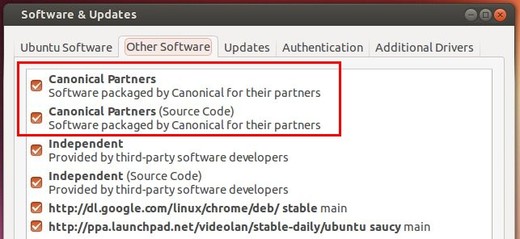
c.) Press Ctrl+Alt+T on keyboard to open terminal. When it opens, run the commands below to install old skype:
sudo apt-get update; sudo apt-get install skype
UPDATE: Below steps are no longer required! Just do the above step a.), b.) and c.) will install Skype 4.3 in your system.
c.) Once installed, remove the old skype package:
sudo apt-get remove skype skype-bin
2. Download & install Skype 4.3
Download the “Ubuntu 12.04 (multiarch)” package from: www.skype.com/go/linux
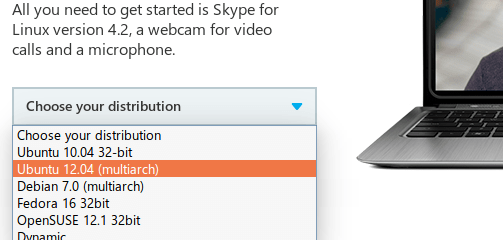
Click to install the package via Ubuntu Software Center. Or run command below in terminal (Ctrl+Alt+T):
cd ~/Downloads/ && sudo dpkg -i skype-ubuntu-precise_*.deb
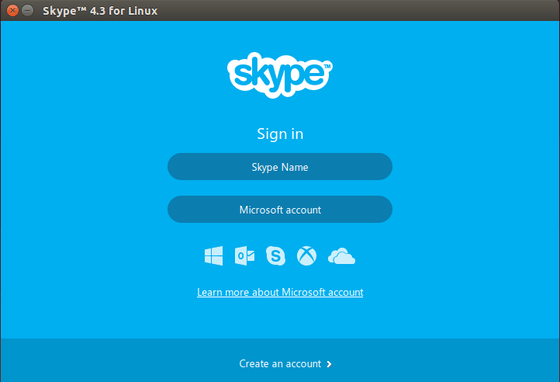
Once installed, you’re able to open Skype 4.3 from Unity Dash result:
http://ubuntuhandbook.org/index.php/2014/06/skype-4-3-install-in-ubuntu-1404/
[转]ubuntu安装skype的更多相关文章
- ubuntu安装skype
1.添加源 sudo add-apt-repository "deb http://archive.canonical.com/ $(lsb_release -sc) partner&quo ...
- ubuntu安装Skype 4.3
Install Skype 4.3 Step 1: Remove previous version sudo apt-get remove skype skype-bin:i386 skype:i38 ...
- Ubuntu 14 安装Skype 4.3
Ubuntu 14 安装Skype 4.3Step 1: 删除老版本sudo apt-get remove skype skype-bin:i386 skype:i386 sudo apt-get i ...
- Ubuntu 14.04 下安装Skype
操作1: Ubuntu 14.04 下安装Skype,使用 Ctr+Alt+T组合键打开终端Terminal,输入如下即可: wget -O skype.deb http://download.sky ...
- 如何在 ubuntu 12.04 上安装 skype(转载)
转自:http://blog.51osos.com/linux/how-to-install-skype-in-ubuntu-12-04/ 添加Canonical Partner Repository ...
- Debian系列Linux/Ubuntu 安装软件
wps(http://community.wps.cn/download/) 优客天气(https://launchpad.net/indicator-china-weather/+download) ...
- ubuntu16.04安装skype
ubuntu16.04安装skype 一句命令搞定 wget https://repo.skype.com/latest/skypeforlinux-64.deb && sudo dp ...
- Mac OS、Ubuntu 安装及使用 Consul
Consul 概念(摘录): Consul 是 HashiCorp 公司推出的开源工具,用于实现分布式系统的服务发现与配置.与其他分布式服务注册与发现的方案,比如 Airbnb 的 SmartStac ...
- ubuntu安装mysql
好记性不如烂笔头,记录一下,ubuntu安装mysql的指令. 安装MySQL: sudo apt-get install mysql-server sudo apt-get install mysq ...
随机推荐
- Cmder-控制台模拟器
Cmder是一个软件包,由于在Windows上缺少漂亮的控制台模拟器而纯粹受挫. 它基于令人惊叹的软件,并采用Monokai配色方案和自定义快速布局,从一开始就看起来很性感. 首先,展示一下界面,和W ...
- 用ajax传递json,返回前台的中文乱码问题
java项目中用ajax传递json,返回前台时中文出现问号(乱码问题)的解决办法 首先看一下没有解决前的状态: 我用的框架是ssm,在springMVC中我配置了编码格式为utf-8,每个jsp页面 ...
- 工控安全入门之Modbus(转载)
工控安全这个领域比较封闭,公开的资料很少.我在读<Hacking Exposed Industrial Control Systems>,一本16年的书,选了的部分章节进行翻译,以其抛砖引 ...
- luogu P2480 [SDOI2010]古代猪文
M_sea:这道题你分析完后就是一堆板子 废话 理解完题意后,我们要求的东西是\(G^s(s=\sum_{d|n} \binom{n}{d})\) 但是这个指数\(s\)算出来非常大,,, 我们可以利 ...
- Python字符串解析方法汇总
Python字符串方法解析 1.capitalize 将首字母大写,其余的变成小写 print('text'.capitalize()) print('tExt'.capitalize()) 结果: ...
- vue pc端网站项目开发坑点与难度记录
背景 在一pc端的web项目里,由于某些特性需要由动态语言处理,所以只在有需要使用vue来处理数据的页面,直接引入vue.js来处理.由于刚开始并没有打算使用前端来渲染数据和处理交互,所以使用了一些非 ...
- PHP - CentOS下开发运行环境搭建(Apache+PHP+MySQL+FTP)
本文介绍如何在 Linux下搭建一个 PHP 环境.其中 Linux 系统使用是 CentOS 7.3,部署在阿里云服务器上. 1,连接登录服务器 拿到服务器的 ip.初始密码以后.我们先通过远程 ...
- Linux用户组相关指令
⒈增加用户组 ①groupadd 用户组名 ⒉删除用户组 ①groupdel 用户组名 ⒊修改用户所在的用户组 ①usermod -g 用户组 用户名 ★用户和用户组的相关文件 ①/etc/passw ...
- 转载CSDN博客步骤
在参考“如何快速转载CSDN中的博客”后,由于自己不懂html以及markdown相关知识,所以花了一些时间来弄明白怎么转载博客,以下为转载CSDN博客步骤和一些知识小笔记. 参考博客原址:http: ...
- Linux内存管理2---段机制
1.前言 本文所述关于内存管理的系列文章主要是对陈莉君老师所讲述的内存管理知识讲座的整理. 本讲座主要分三个主题展开对内存管理进行讲解:内存管理的硬件基础.虚拟地址空间的管理.物理地址空间的管理. 本 ...