
[转]ubuntu安装skype
Skype 4.3 Released, How to Install it in Ubuntu 14.04/12.04

Skype for Linux has been updated to version 4.3.0.37 with updated UI, new cloud-based Group chat experience, and more.
Microsoft finally announced Skype for Linux 4.3 on June 18, 2014. The new release dropped support for direct Alsa support, now it uses PulseAudio for better calling experience. Also Skype 4.3 contains below changes:
- An updated UI
- Our new cloud-based Group Chat experience
- More reliable file transfer support when using multiple devices at once
- Greater accessibility by blind and visually impaired users
- PulseAudio 3.0 and 4.0 support
- Lot of bug fixes
- Skype 4.3 release note.
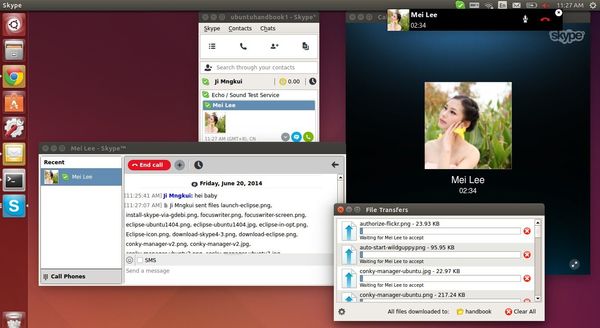
Install Skype 4.3 in Ubuntu or Linux Mint:
At the moment, Skype for Linux 4.3 is not available in any Linux repository. Below steps will tell you how to install the official .deb package in Ubuntu 14.04, Ubuntu 12.04, and their derivatives.
1. Install required libraries (for 64-bit system)
Skype website only provides 32-bit package for Ubuntu 12.04 and higher. You’re unable to install it directly on 64-bit system due to dependencies issue.
However, install the old skype from Canonical partners repository will also install the required libraries we need for NEW skype.
a.) Press Ctrl+Alt+T on keyboard to open terminal. When it opens, run commands one by one to remove old skype and .skype folder:
sudo apt-get remove skype skype-bin

rm -rf ~/.skype
b.) Open “Software & Updates” and enable Canonical partners repository under Other Software tab.
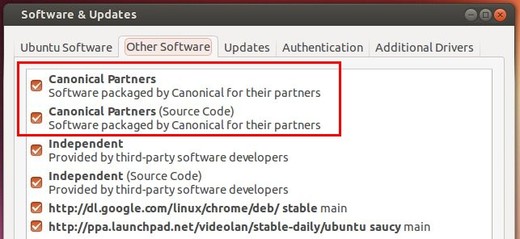
c.) Press Ctrl+Alt+T on keyboard to open terminal. When it opens, run the commands below to install old skype:
sudo apt-get update; sudo apt-get install skype
UPDATE: Below steps are no longer required! Just do the above step a.), b.) and c.) will install Skype 4.3 in your system.
c.) Once installed, remove the old skype package:
sudo apt-get remove skype skype-bin
2. Download & install Skype 4.3
Download the “Ubuntu 12.04 (multiarch)” package from: www.skype.com/go/linux
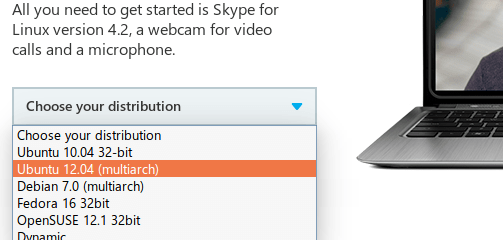
Click to install the package via Ubuntu Software Center. Or run command below in terminal (Ctrl+Alt+T):
cd ~/Downloads/ && sudo dpkg -i skype-ubuntu-precise_*.deb
Once installed, you’re able to open Skype 4.3 from Unity Dash result:
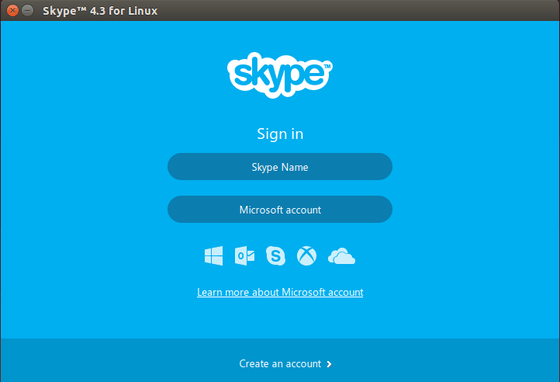
http://ubuntuhandbook.org/index.php/2014/06/skype-4-3-install-in-ubuntu-1404/
[转]ubuntu安装skype的更多相关文章
- ubuntu安装skype
1.添加源 sudo add-apt-repository "deb http://archive.canonical.com/ $(lsb_release -sc) partner&quo ...
- ubuntu安装Skype 4.3
Install Skype 4.3 Step 1: Remove previous version sudo apt-get remove skype skype-bin:i386 skype:i38 ...
- Ubuntu 14 安装Skype 4.3
Ubuntu 14 安装Skype 4.3Step 1: 删除老版本sudo apt-get remove skype skype-bin:i386 skype:i386 sudo apt-get i ...
- Ubuntu 14.04 下安装Skype
操作1: Ubuntu 14.04 下安装Skype,使用 Ctr+Alt+T组合键打开终端Terminal,输入如下即可: wget -O skype.deb http://download.sky ...
- 如何在 ubuntu 12.04 上安装 skype(转载)
转自:http://blog.51osos.com/linux/how-to-install-skype-in-ubuntu-12-04/ 添加Canonical Partner Repository ...
- Debian系列Linux/Ubuntu 安装软件
wps(http://community.wps.cn/download/) 优客天气(https://launchpad.net/indicator-china-weather/+download) ...
- ubuntu16.04安装skype
ubuntu16.04安装skype 一句命令搞定 wget https://repo.skype.com/latest/skypeforlinux-64.deb && sudo dp ...
- Mac OS、Ubuntu 安装及使用 Consul
Consul 概念(摘录): Consul 是 HashiCorp 公司推出的开源工具,用于实现分布式系统的服务发现与配置.与其他分布式服务注册与发现的方案,比如 Airbnb 的 SmartStac ...
- ubuntu安装mysql
好记性不如烂笔头,记录一下,ubuntu安装mysql的指令. 安装MySQL: sudo apt-get install mysql-server sudo apt-get install mysq ...
随机推荐
- PHP7 学习笔记(五)安装event扩展(libevent)
一.描述:有效安排I/O,时间和信号的扩展 使用可用于特定平台的最佳I/O通知机制的事件,是PHP基础设施的libevent端口. 二.下载地址:http://pecl.php.net/package ...
- centos文件与权限
切换目录 cd:切换目录. 当我们需要进入到别的目录的时候,就需要使用到cd这个命令. ‘ cd这个命令主要有以下几种使用方式; cd [~]:进入当前用户的家目录,比如我是fuwh这个用户登陆的,则 ...
- Nginx 虚拟主机示例
Nginx server 模块 server { // 标识虚拟主机开始 listen ; ## // 指定虚拟主机服务器端口 server_name localhost; // 指定 IP地址或者域 ...
- 有关Linux的.a、.so和.o文件(转)【原文章有些错误,自己已更改】
gcc 生成 .a静态库和 .so动态库 我们通常把一些公用函数制作成函数库,供其它程序使用.函数库分为静态库和动态库两种.静态库在程序编译时会被连接到目标代码中,程序运行时将不再需要该静态库.动态库 ...
- mysql中把一个表的数据批量导入另一个表中
mysql中把一个表的数据批量导入另一个表中 不管是在网站开发还是在应用程序开发中,我们经常会碰到需要将MySQL或MS SQLServer某个表的数据批量导入到另一个表的情况,甚至有时还需要指定 ...
- retrofit 使用解析
retrofit 基础入门:https://www.jianshu.com/p/b64a2de066c3 retrofit 使用详解:https://blog.csdn.net/carson_ho/a ...
- log4j日志日记记录使用教程
注意:每次引入Logger的时候注意引入的jar包,因为有Logger的包太多了...... Logger必须作为类的静态变量使用.原因如下: 1 使用static修饰的属性是归这个类使用的2 也就是 ...
- 为什么用pycharm在同目录下import,pycharm会报错,但是实际可以运行?
问题已经找到了,pycharm不会将当前文件目录自动加入自己的sourse_path.右键make_directory as-->sources path将当前工作的文件夹加入source_pa ...
- Docker容器命令
★根本前提:本地主机有镜像才能创建容器 ⒈docker run [Options] 镜像名称或镜像ID [Command] [Arg...] 用途:利用镜像创建容器实例 Options说明(常用):注 ...
- java中不同类型的数值占用字节数
在Java中一共有8种基本数据类型,其中有4种整型,2种浮点类型,1种用于表示Unicode编码的字符单元的字符类型和1种用于表示真值的boolean类型.(一个字节等于8个bit) 1.整型 类型 ...