
jquery zTree搜索高亮的例子
思路:
搜索的时候发请求到后台,后台根据关键字找到匹配的节点,并将这些节点添加一个标志light;
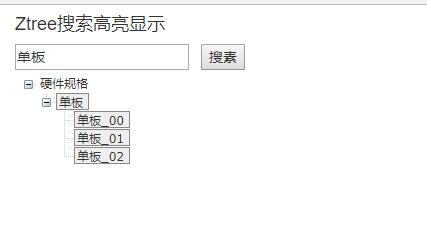
后面就根据这个light为true就高亮,false就不高亮;
后台将这些节点返回到前台,前台展示;
我这边后台处理的多,因为感觉后台用关键字来搜索,然后添加light标志,返回前台;感觉快些;
当然,仅仅前端处理也可以。
代码:
<%@ page language="java" contentType="text/html; charset=UTF-8" pageEncoding="UTF-8"%>
<!DOCTYPE html PUBLIC "-//W3C//DTD HTML 4.01 Transitional//EN" "http://www.w3.org/TR/html4/loose.dtd">
<html>
<head>
<meta http-equiv="Content-Type" content="text/html; charset=UTF-8">
<link rel="stylesheet" href="resources/zTreeStyle/zTreeStyle.css" type="text/css">
<link rel="stylesheet" type="text/css" href="resources/bootstrap/bootstrap.min.css">
<title>Ztree搜索高亮显示</title>
</head>
<body>
<div class="container">
<h4>Ztree搜索高亮显示</h4>
<input type="text" id="search" /> <input type="button" id="btn" value="搜素" onclick="search()"/>
<ul id="zTree" class="ztree"></ul>
</div>
</body>
<script src="resources/js/jquery.min.js"></script>
<script type="text/javascript" src="resources/js/jquery.ztree.all.min.js"></script>
<script type="text/javascript" src="resources/js/jquery.ztree.exhide.min.js"></script>
<script type="text/javascript">
var setting = {
data:{
simpleData:{
enable: true,
idKey:'id',
pIdKey:'pid',
rootPId: 0
}
},
view:{
selectedMulti:false, //不允许同时选中多个节点
showIcon: false,
fontCss:null
},
callback: { }
};
$(document).ready(function(){
initZTree();
}); /*搜索的时候设置返回的treeNode,添加light属性为true
*初始化treeNode的light为false
*根据light属性来设置高亮,如果true就高亮
*/
function setFontCss(treeId, treeNode){
return !!treeNode.light?{background: '#eee',border: '1px solid #888'}:{};
} //初始化树
function initZTree(){
setting.view.fontCss=null; $.ajax({
url:"getAllNodes",
type:"post",
dataType: "json",
success: function(data){
console.log(data);
var zTreeObj = $.fn.zTree.init($("#zTree"),setting, data);
}
});
} /**
* 搜索方法
*/
function search(){
var treeObj = $.fn.zTree.getZTreeObj('zTree');
var value = $.trim($('#search').val()); //如果输入为空直接初始化;
if(value == ""){
initZTree();
return;
} //查找节点
var nodes = treeObj.getNodesByParamFuzzy('name', value);
if(nodes.length==0){
alert('未搜索到数据!');
return;
}else{
searchNodesByName(value);
}
}
function searchNodesByName(name){
setting.view.fontCss=setFontCss; $.ajax({
url:"searchNodesByName",
type:"post",
dataType: "json",
success: function(data){
console.log(data);
var zTreeObj = $.fn.zTree.init($("#zTree"),setting, data);
}
});
} </script>
</html>
后台代码:
仅仅是模拟,很简单。实际根据业务查询nodelist即可;
Controller:
package com.cy.controller;

import java.util.ArrayList;

import java.util.List;

import org.springframework.stereotype.Controller;

import org.springframework.web.bind.annotation.RequestMapping;

import org.springframework.web.bind.annotation.ResponseBody;

import com.alibaba.fastjson.JSON;

import com.test.model.Node;

@Controller

public class ZtreeController {

    @RequestMapping("/getAllNodes")

    @ResponseBody

    public List<Node> getAllNodes() throws Exception{

        //初始化的时候不高亮,所以light为false

        List<Node> nodeList = new ArrayList<Node>();

        nodeList.add(new Node("1","0","硬件规格","true","true",false));

        nodeList.add(new Node("2","0","软件规格","true","true",false));

        nodeList.add(new Node("10","1","单板","true","true",false));

        nodeList.add(new Node("11","1","子卡","false","false",false));

        nodeList.add(new Node("12","1","设备","false","false",false));

        nodeList.add(new Node("20","2","java","false","false",false));

        nodeList.add(new Node("21","2","jscript","false","false",false));

        nodeList.add(new Node("22","2","php","false","false",false));

        nodeList.add(new Node("100","10","单板_00","false","false",false));

        nodeList.add(new Node("101","10","单板_02","false","false",false));

        nodeList.add(new Node("102","10","单板_03","false","false",false));

        Thread.sleep(1000);

        return nodeList;

    }

    @RequestMapping("/searchNodesByName")

    @ResponseBody

    public List<Node> searchNodesByName(String id, String pid, String name) throws Exception{

        //假设搜索单板,将这些nodes返回

        List<Node> nodeList = new ArrayList<Node>();

        //搜索的时候,对于包含"单板"这个关键字的,设置light为true,添加高亮标识

        nodeList.add(new Node("1","0","硬件规格","true","true",false));

        nodeList.add(new Node("10","1","单板","true","true",true));

        nodeList.add(new Node("100","10","单板_00","false","false",true));

        nodeList.add(new Node("101","10","单板_01","false","false",true));

        nodeList.add(new Node("102","10","单板_02","false","false",true));

        Thread.sleep(1000);

        return nodeList;

    }

}
Model:Node:
package com.test.model;

public class Node {

    private String id;

    private String pid;

    private String name;

    private String open;

    private String isParent;

    private boolean light;        //标识是不是要高亮

    public Node(String id, String pid, String name, String open, String isParent,boolean light) {

        super();

        this.id = id;

        this.pid = pid;

        this.name = name;

        this.open = open;

        this.isParent = isParent;

        this.light = light;

    }

    public String getId() {

        return id;

    }

    public void setId(String id) {

        this.id = id;

    }

    public String getPid() {

        return pid;

    }

    public void setPid(String pid) {

        this.pid = pid;

    }

    public String getName() {

        return name;

    }

    public void setName(String name) {

        this.name = name;

    }

    public String getOpen() {

        return open;

    }

    public void setOpen(String open) {

        this.open = open;

    }

    public String getIsParent() {

        return isParent;

    }

    public void setIsParent(String isParent) {

        this.isParent = isParent;

    }

    public boolean isLight() {

        return light;

    }

    public void setLight(boolean light) {

        this.light = light;

    }

}
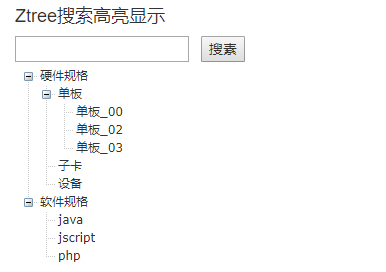
效果:
1.搜全部的时候、初始化的时候
2.搜索的时候:
jquery zTree搜索高亮的例子的更多相关文章
- jquery zTree异步搜索的例子--搜全部节点
参考博客: https://segmentfault.com/a/1190000004657854 https://blog.csdn.net/houpengfei111/article/detail ...
- jquery zTree异步搜索的例子--搜叶子节点
参考博客:https://www.cnblogs.com/henuyuxiang/p/6677397.html 前台代码 <%@ page language="java" c ...
- jquery zTree异步加载的例子
下面是使用zTree异步加载的一个例子: 1)初始化树的时候是ajax请求,返回nodes列表来初始化树的:如果一开始就异步的话,$.fn.zTree.init($("#zTree" ...
- jquery ztree异步搜索
一.初始异步加载树 初始化默认给出一个根结点,再结合异步加载的方式手动触发默认加载第一层,如图: 代码如下: var treeSetting = { async: { enable: true, ur ...
- 【zTree】 zTree使用的 小例子
使用zTree树不是第一次了 但是 还是翻阅着之前做的 对照着 使用起来比较方便 这里就把小例子列出来 总结一下使用步骤 这样方便下次使用起来方便一点 使用zTree树的步骤: 1.首先 在 ...
- Jquery zTree结合Asp.net实现异步加载数据
zTree结合Asp.net实现异步加载数据 实现简单操作 zTree 下载 api 访问 :http://www.ztree.me/v3/main.php 例子中用到json数据转化 newtons ...
- 自写 zTree搜索功能 -- 关键字查询 -- 递归无限层
唠叨一哈 前两天朋友跟我说要一个ztree的搜索功能,我劈头就是一巴掌:这种方法难道无数前辈还做少了?自己去找,我很忙~然后我默默地蹲着写zTree的搜索方法去了.为什么呢?因为我说了句“找不到是不可 ...
- zTree搜索
自写 zTree搜索功能 -- 关键字查询 -- 递归无限层 唠叨一哈 前两天朋友跟我说要一个ztree的搜索功能,我劈头就是一巴掌:这种方法难道无数前辈还做少了?自己去找,我很忙~然后我默默地蹲着写 ...
- jQuery+zTree
0 zTree简介 树形控件的使用是应用开发过程中必不可少的.zTree 是一个依靠 jQuery 实现的多功能 “树插件”.优异的性能.灵活的配置.多种功能的组合是 zTree 最大优点. 0.0 ...
随机推荐
- [zoj4045][思维+dfs]
http://acm.zju.edu.cn/onlinejudge/showProblem.do?problemCode=4045 题意:给一棵树.这棵树有n个节点,问你这个图能不能分成k个分块.这个 ...
- 《DSP using MATLAB》Problem5.23
代码: %% ++++++++++++++++++++++++++++++++++++++++++++++++++++++++++++++++++++++++++++++++++++++++ %% O ...
- Two Sum II - Input array is sorted
Given an array of integers that is already sorted in ascending order, find two numbers such that the ...
- 访问 iframe 内部控件方法
方法虽然简单,但是经常忘记,网上一查,很多方法兼容性都有问题,这段代码至少兼容IE和Chrome setInterval(function(){ document.getElementById('ma ...
- golang 内存占用测量
web服务中加入如下 import ( "runtime" "time" "fmt" ) go func() { for { var m r ...
- Bow & Arrow 学习
using UnityEngine; using System.Collections; using System.Collections.Generic; using UnityEngine.UI; ...
- Git安装和TortoiseGit详细使用教程【基础篇】
标签:tortoisegit 环境:win8.1 64bit 安装准备: 首先你得安装windows下的git msysgit1.9.5 安装版本控制器客户端tortoisegit tortoise ...
- Python列表生成器
本篇将介绍python生成器,更多内容请参考:python学习指南 前言 通过列表生成式,我们可以直接创建一个列表.但是,受到内存限制,列表容量肯定是有限的.而且,创建一个包含100万个元素的列表,不 ...
- 自动化部署--shell脚本--3
登录gitlab第一次登录gitlab,需要为root用户修改密码,root用户也是gitlab的超级管理员.http://192.168.58.11设置密码是gitlab 密码不够长,重新设置下,设 ...
- 原码,反码与补码的概念以及Java中数的存储方式
*原码,反码,补码必须满8位,不足在前填0: 1,原码:用符号位和数值位表示一个带符号的数 + -> 0 - -> 1 表示数的范围-127~ ...