
Lab 3-4
Analyze the malware found in the file Lab03-04.exe using basic dynamic analysis tools. (This program is analyzed further in the Chapter 9 labs.)
Questions and Short Answers
What happens when you run this file?
A: When you run this malware by double-clicking it, the program immediately deletes itself.
What is causing the roadblock in dynamic analysis?
A: We suspect that we may need to provide a command-line argument or a missing component to the program.
Are there other ways to run this program?
A: We try using the command-line parameters shown in the strings listing (like
-in), but doing so is not fruitful. More in-depth analysis is required. (We’ll analyze this malware further in the labs for Chapter 9.)
Detailed Analysis
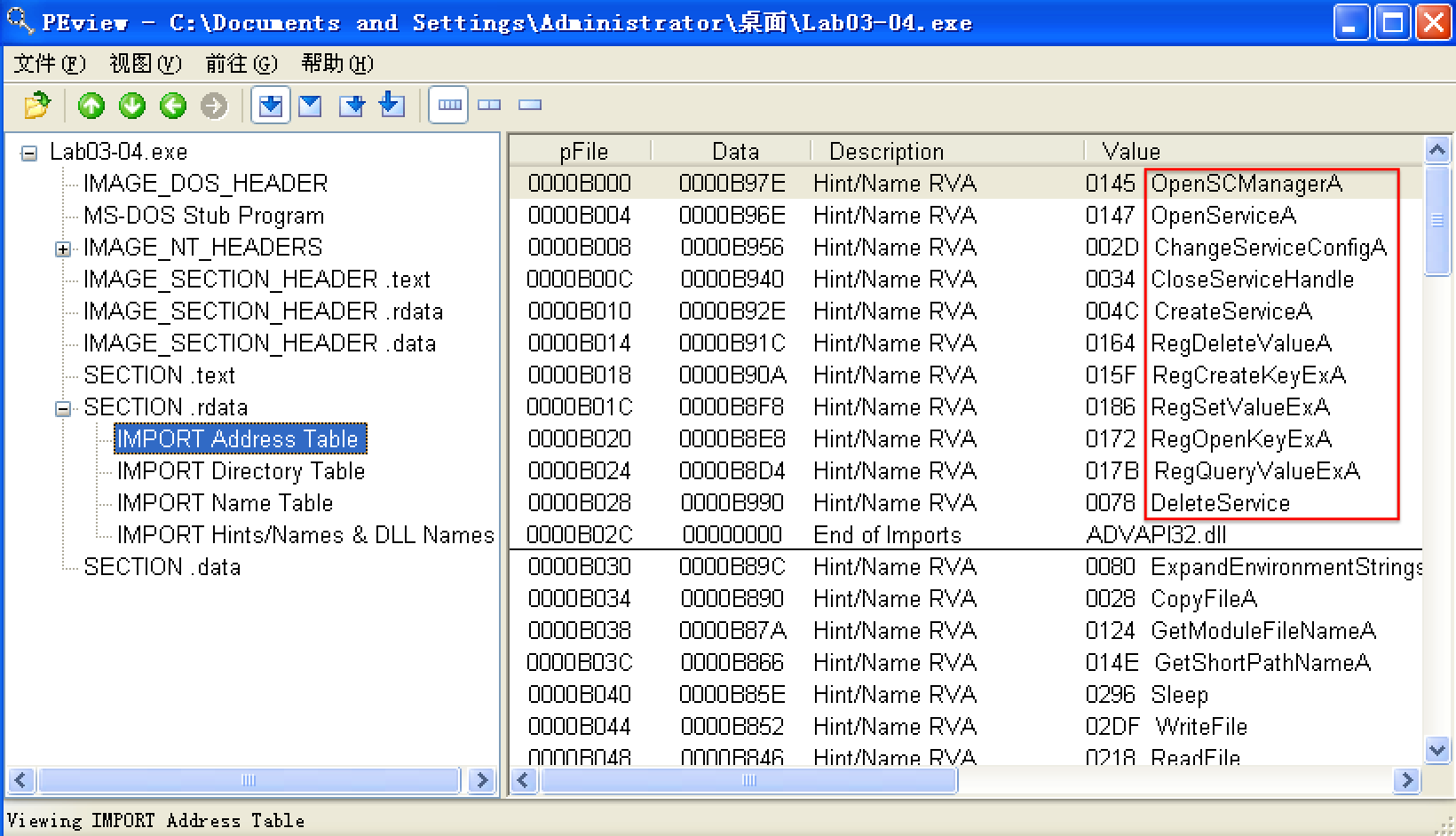
We begin with basic static analysis, examining the PE file structure and strings. We see that this malware imports networking functionality, service-manipulation functions, and registry-manipulation functions. In the following listing, we notice a number of interesting strings.
PEview
翻译版书1.3 查找字符串(英文版书,Part 1: Basic Analysis -> Finding Strings)
步骤:
下载Strings(英文原版书提供的链接好使,翻译版失效。)
cmd -> 进入下载的strings.exe可执行文件所在文件夹 -> 使用 strings 命令查看
C:\Documents and Settings\Administrator\桌面\杂\Strings>strings.exe "C:\Documents and Settings\Administrator\桌面\Lab03-04.exe"
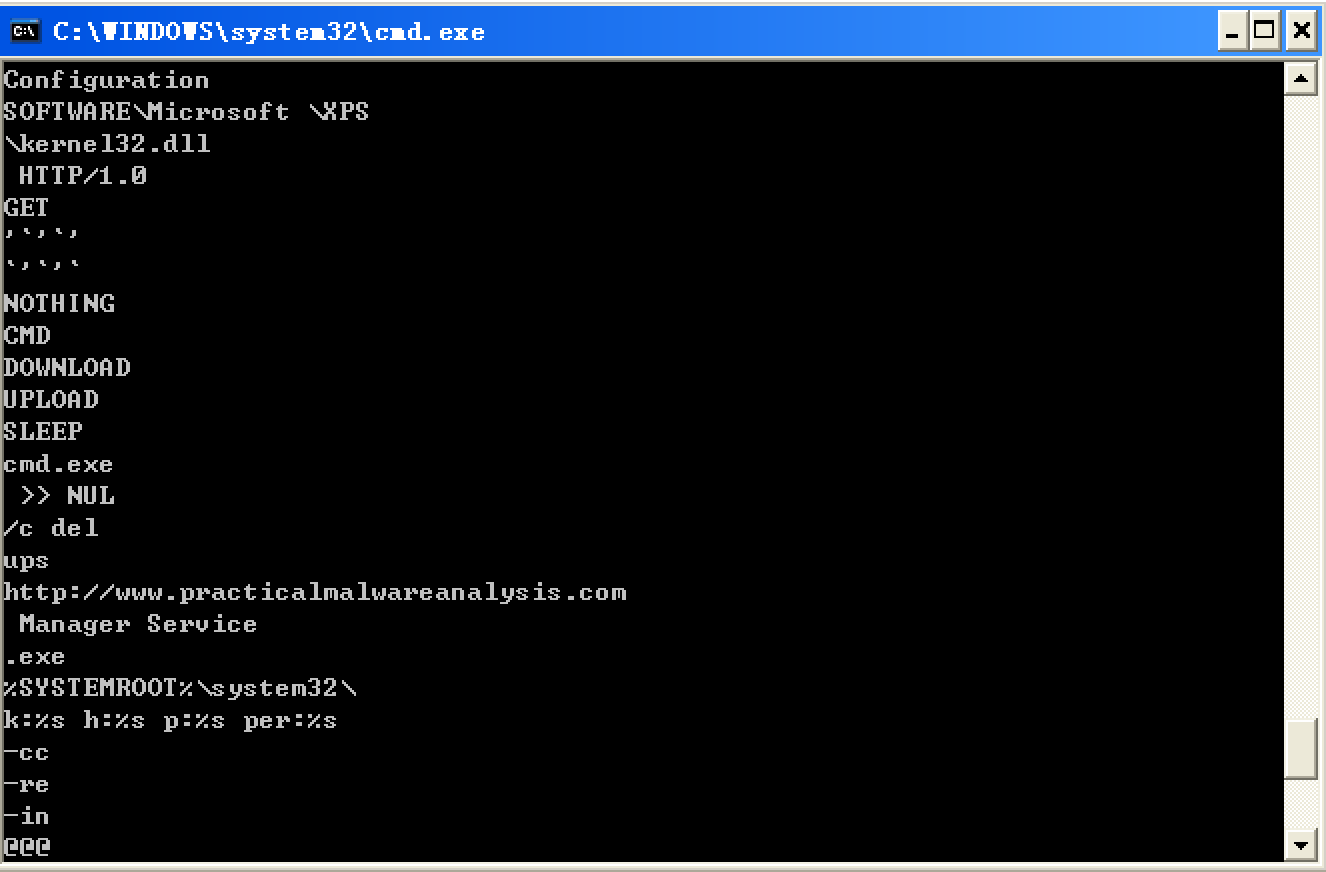
We see strings such as a domain name and the registry location SOFTWARE Microsoft \XPS. Strings like DOWNLOAD and UPLOAD, combined with the HTTP/1.0 string, suggest that this malware is an HTTP backdoor. The strings -cc, -re, and -in could be command-line parameters (for example -in may stand for install). Let’s see if basic dynamic techniques show us how these strings are used.
Before we run the malware, we run procmon and clear out all events, start Process Explorer, and set up a virtual network. When we run the malware, it appears to immediately delete itself, and we see nothing else of interest while watching with Process Explorer.
Next, we use procmon with a filter on the process name Lab03-04.exe. There aren’t any interesting WriteFile or RegSetValue entries, but upon further digging, we find an entry for Process Create. Double-clicking this entry brings up the dialog shown in Figure 3-11L, and we see that the malware is deleting itself from the system using "C:\WINDOWS\system32\cmd.exe" /c del Z: Lab03-04.exe >> NUL, as seen at \({\color{red}1}\).
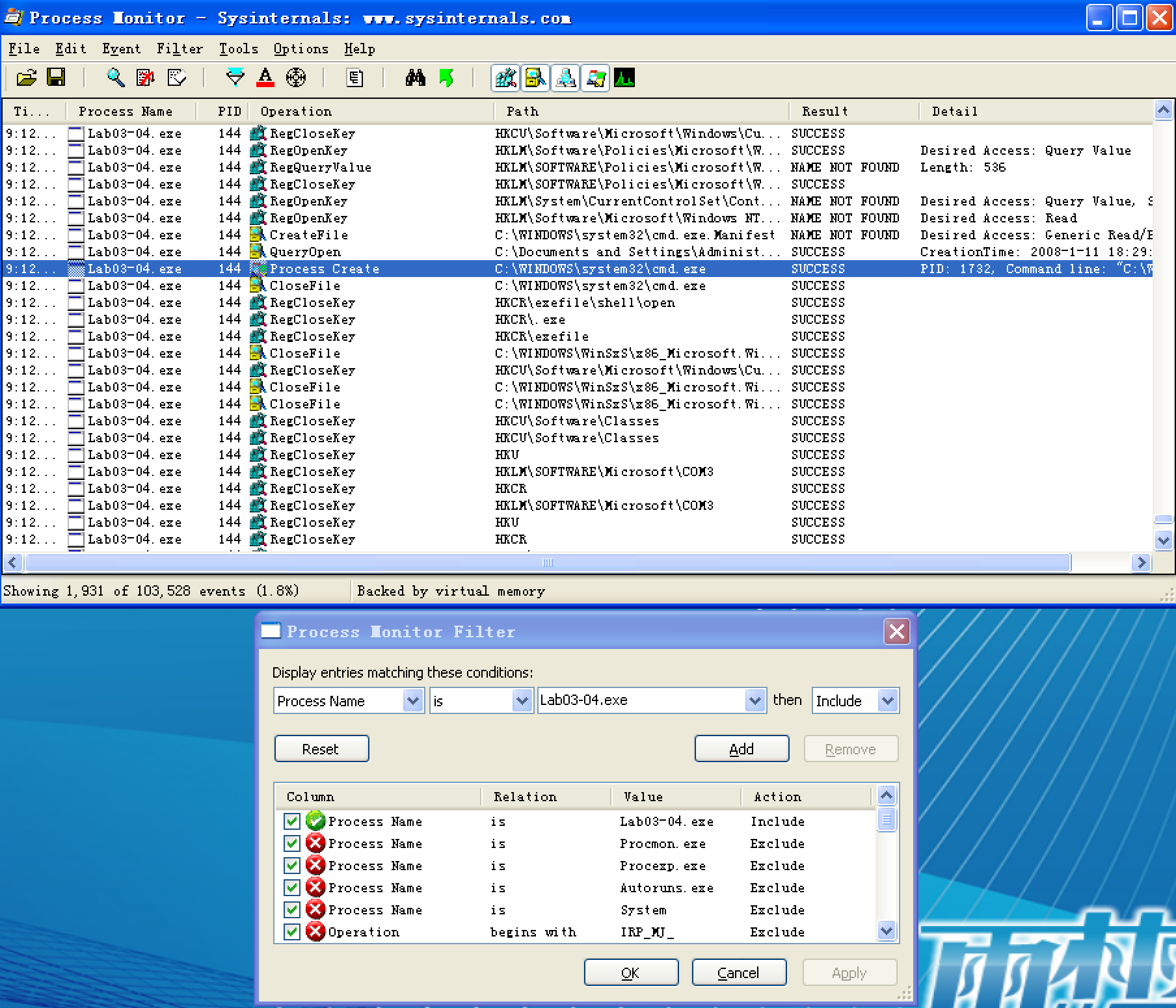
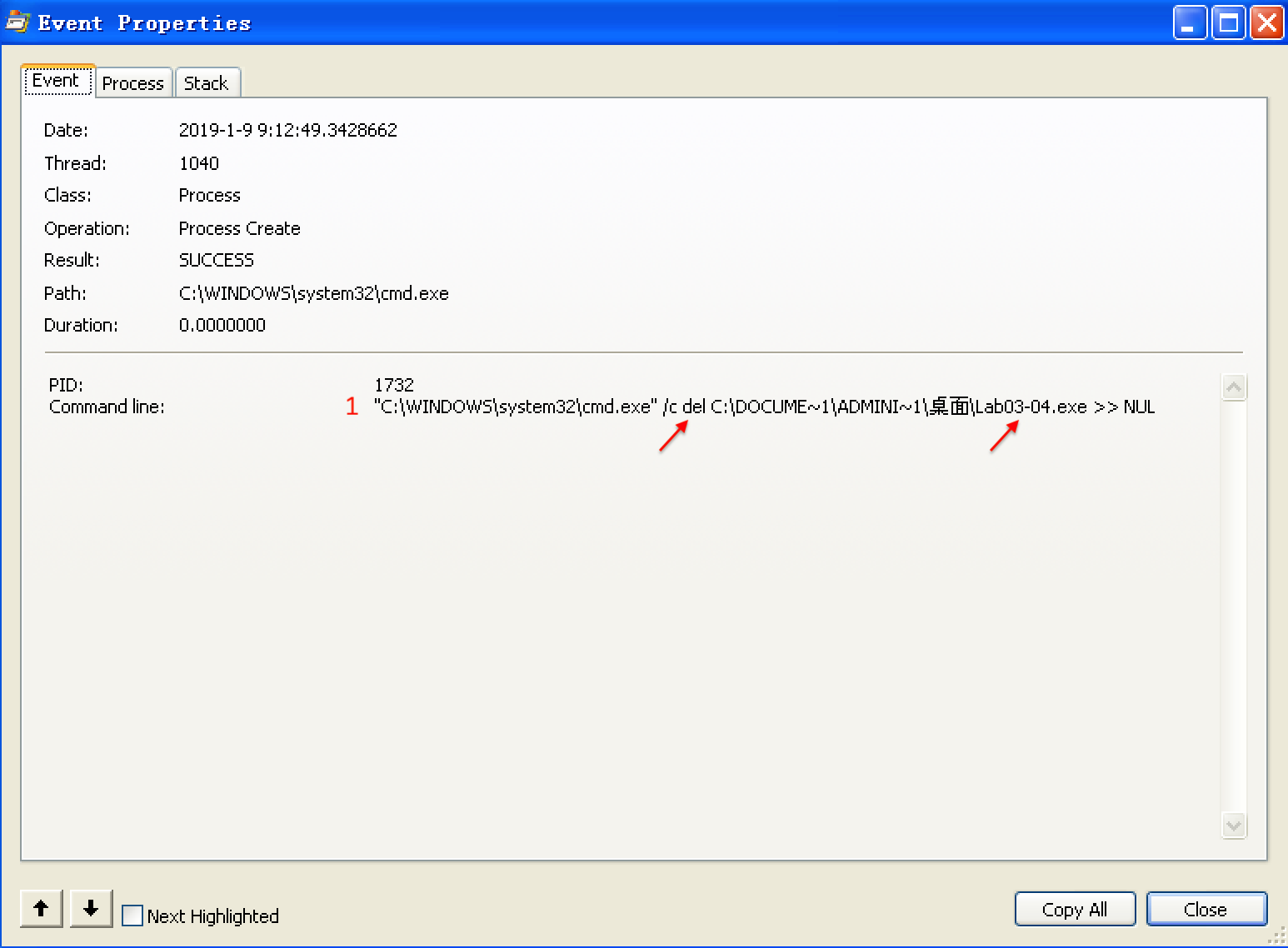
Figure 3-11L: Procmon view of the Process Create performed for self-deletion
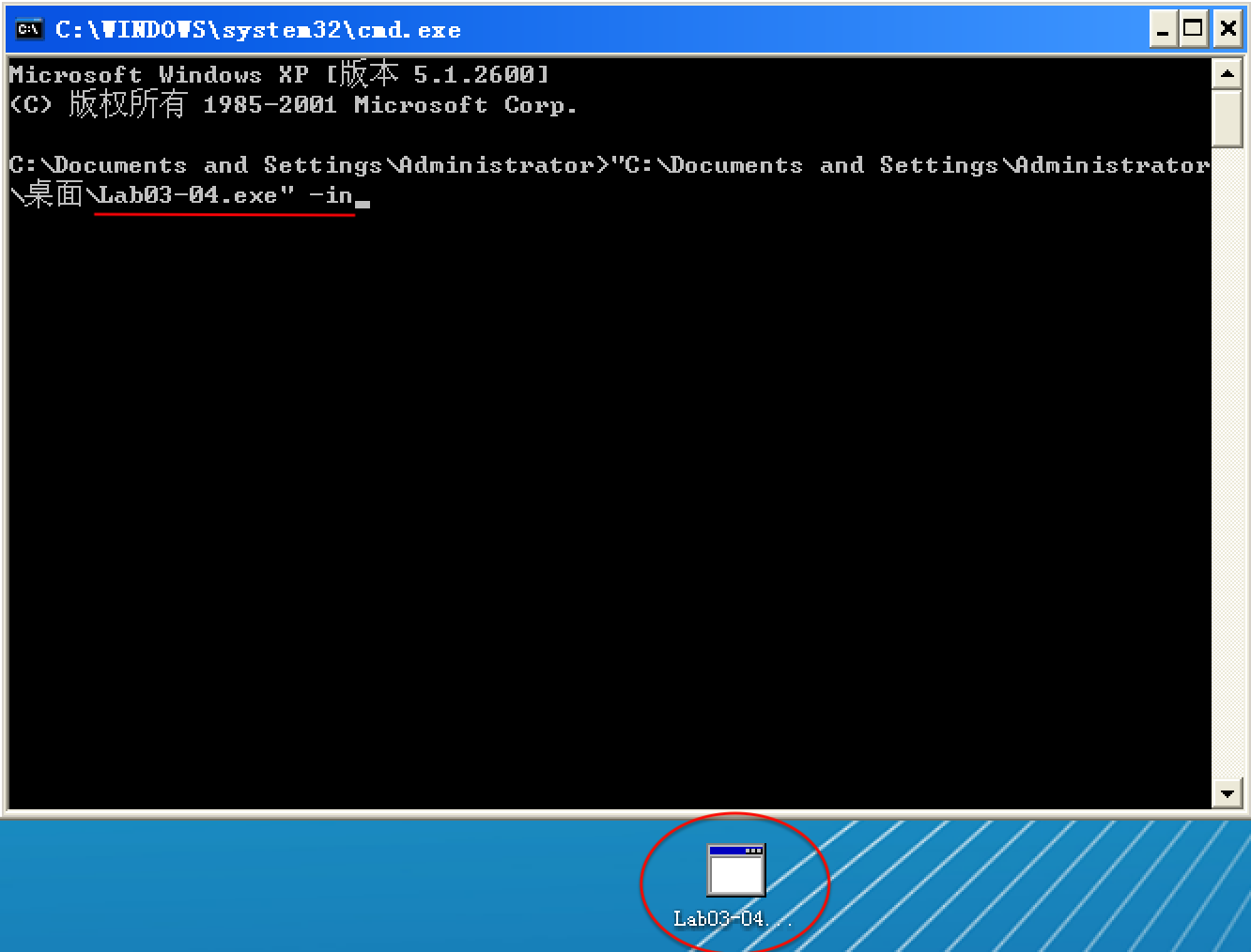
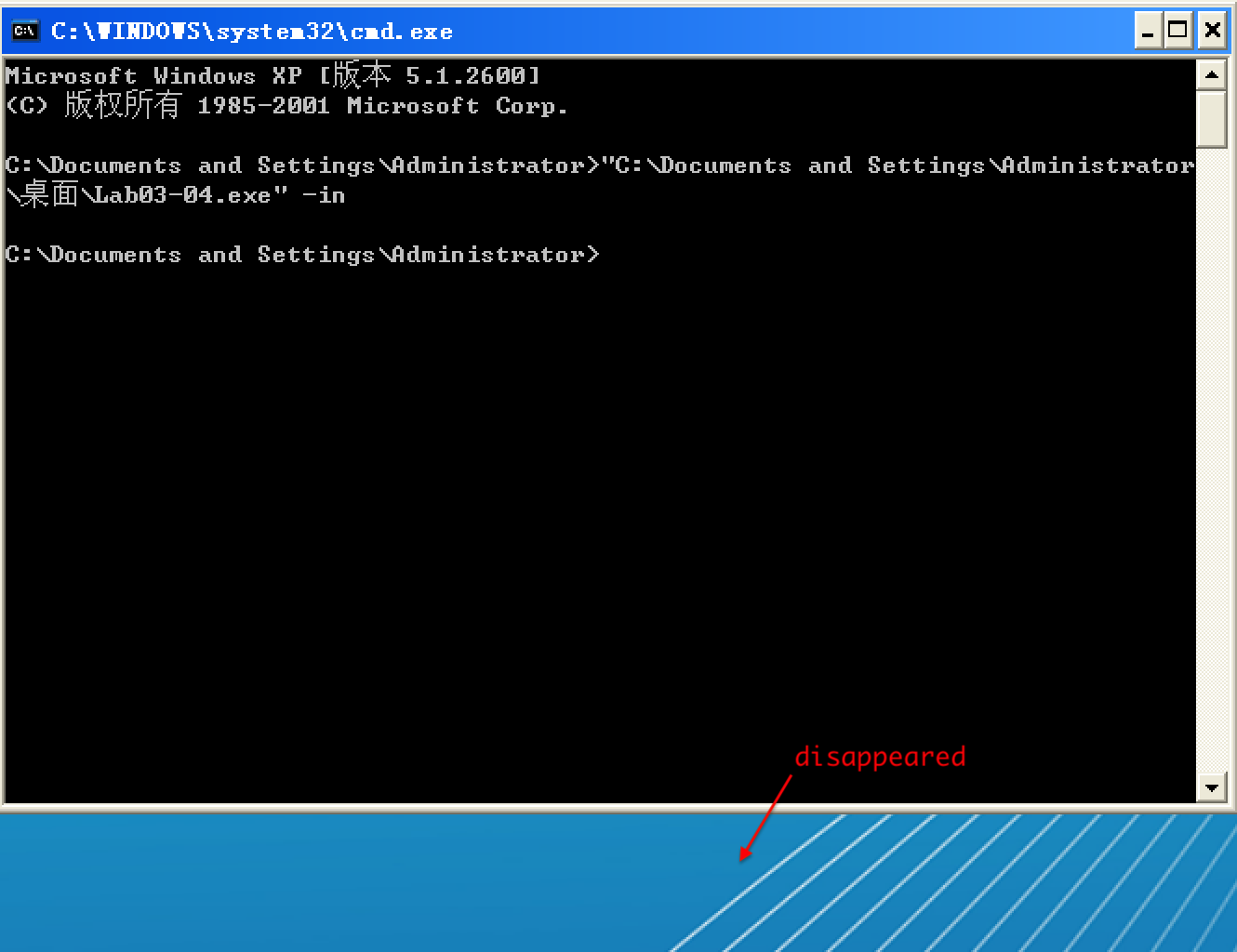
We can try to run the malware from the command line using the command-line options we saw in the strings listing (-in, -re, and –cc), but all of them fail and result in the program deleting itself. There isn’t much more we can do with basic dynamic techniques at this point, until we dig deeper into the malware. (We will revisit this malware in the Chapter 9 labs.)
以选项 -in 试验,Lab03-04.exe 执行前:
以选项 -in 试验,Lab03-04.exe 执行后:
Preference
Lab 3-4的更多相关文章
- MIT 6.828 JOS学习笔记18. Lab 3.2 Part B: Page Faults, Breakpoints Exceptions, and System Calls
现在你的操作系统内核已经具备一定的异常处理能力了,在这部分实验中,我们将会进一步完善它,使它能够处理不同类型的中断/异常. Handling Page Fault 缺页中断是一个非常重要的中断,因为我 ...
- MIT 6.828 JOS学习笔记17. Lab 3.1 Part A User Environments
Introduction 在这个实验中,我们将实现操作系统的一些基本功能,来实现用户环境下的进程的正常运行.你将会加强JOS内核的功能,为它增添一些重要的数据结构,用来记录用户进程环境的一些信息:创建 ...
- MIT 6.828 JOS学习笔记16. Lab 2.2
Part 3 Kernel Address Space JOS把32位线性地址虚拟空间划分成两个部分.其中用户环境(进程运行环境)通常占据低地址的那部分,叫用户地址空间.而操作系统内核总是占据高地址的 ...
- MIT 6.828 JOS学习笔记15. Lab 2.1
Lab 2: Memory Management lab2中多出来的几个文件: inc/memlayout.h kern/pmap.c kern/pmap.h kern/kclock.h kern/k ...
- MIT 6.828 JOS学习笔记10. Lab 1 Part 3: The kernel
Lab 1 Part 3: The kernel 现在我们将开始具体讨论一下JOS内核了.就像boot loader一样,内核开始的时候也是一些汇编语句,用于设置一些东西,来保证C语言的程序能够正确的 ...
- MIT 6.828 JOS学习笔记7. Lab 1 Part 2.2: The Boot Loader
Lab 1 Part 2 The Boot Loader Loading the Kernel 我们现在可以进一步的讨论一下boot loader中的C语言的部分,即boot/main.c.但是在我们 ...
- python opencv 利用Lab空间把春天的场景改为秋天
前一段时间实现了Reinhard颜色迁移算法,感觉挺有意思的,然后在代码上随意做了一些更改,有了一些发现,把Lab通道的a通道值改为127左右,可以将绿色改为黄色,而对其他颜色的改动非常小,因此可以将 ...
- Acadia Lab 228 + Lab 222
又是一对串烧实验,布好线后非常方便就可以一起完成. 连线方案一模一样: Lab 228 数码管骰子 核心代码如下: def loop() : global cnt global btn_read,se ...
- Acadia Lab 203 + Lab 231
在做完 Lab 6 之后,惊觉选做实验缺口很大,于是遍历了一遍夏任务,找到了一条最省力的路线. 做完 Lab 6 的连线不用拆,可以接下来做以下两个实验: Lab 203 网络时钟 核心代码如下: v ...
- GJM : 【技术干货】给The Lab Renderer for Unity中地形添加阴影
感谢您的阅读.喜欢的.有用的就请大哥大嫂们高抬贵手"推荐一下"吧!你的精神支持是博主强大的写作动力以及转载收藏动力.欢迎转载! 版权声明:本文原创发表于 [请点击连接前往] ,未经 ...
随机推荐
- \n和\r区别
转载:https://www.cnblogs.com/hq233/p/6389234.html 符号 ASCII码 意义\n 10 换行NL\r ...
- onsaveInstanceState有关问题
在学习活动回收时,遇到当活动回收时开始在onresume状态的活动转为onpause时,活动的数据可能会丢失(取决于手机内存)只有在这时onsaveInstanceState方法才会有用武之地,这个方 ...
- Python3基础 list pop(含参) 取出列表中的指定索引的元素
Python : 3.7.0 OS : Ubuntu 18.04.1 LTS IDE : PyCharm 2018.2.4 Conda ...
- HDU 1689 Just a Hook (线段树区间更新+求和)
Just a Hook Problem Description In the game of DotA, Pudge's meat hook is actually the most horrible ...
- 题解——牛客网Wannafly挑战赛23 B-游戏 (SG函数)
前言 比赛的时候没学过SG函数的蒟蒻以为是道结论题,但是不是QwQ 和dummyummy巨佬一起推了快三个小时的规律 最后去问了真正的巨佬__stdcall __stdcall面带微笑的告诉我们,这是 ...
- HBase与列存储
传统的行存储和(HBase)列存储的区别 1.为什么要按列存储 列式存储(Columnar or column-based)是相对于传统关系型数据库的行式存储(Row-basedstorage)来说的 ...
- ZooKeeper分布式过程协同技术详解2——了解ZooKeeper
这个服务如何实现这些协作方面的原语? ZooKeeper基础
- Ubuntu14.04下 升级 cmake
参考: How to install cmake 3.2 on ubuntu 14.04? Ubuntu14.04下升级cmake 1.通过PPA安装: $ sudo apt-get install ...
- 程序设计第二次作业<2>
我所找到的C++相关课程列表: (2016/1/27)(部分) 1. 慕课网 http://www.imooc.com/learn/342 <c++远征之起航篇> 授课人:james_yu ...
- C#题目及答案(1)
1. 简述 private. protected. public. internal 修饰符的访问权限. 答 . private : 私有成员, 在类的内部才可以访问. protected : 保护成 ...