
ubuntu 客户机安装VMware tools时出现编译错误,无法与主机共享文件(转)
主机:win7旗舰版
vmware workstation 10.0.7 (其他10.x版本也有这个问题)
客户机:Ubuntu14.04.4-16.x
安装vmware tools时出现下列编译错误,共享文件夹的功能不能实现,剪贴板等正常。
下面是部分错误代码:
- <span style="font-size:14px;">/tmp/modconfig-O5xscq/vmhgfs-only/dir.c: In function ‘HgfsPackDirOpenRequest’:
- /tmp/modconfig-O5xscq/vmhgfs-only/dir.c:417:26: error: ‘struct file’ has no member named ‘f_dentry’
- file->f_dentry) < 0) {
- ^
- /tmp/modconfig-O5xscq/vmhgfs-only/dir.c: In function ‘HgfsDirLlseek’:
- /tmp/modconfig-O5xscq/vmhgfs-only/dir.c:707:32: error: ‘struct file’ has no member named ‘f_dentry’
- struct dentry *dentry = file->f_dentry;
- ^
- In file included from /tmp/modconfig-O5xscq/vmhgfs-only/dir.c:39:0:
- /tmp/modconfig-O5xscq/vmhgfs-only/dir.c: In function ‘HgfsReaddirNextEntry’:
- /tmp/modconfig-O5xscq/vmhgfs-only/dir.c:993:31: error: ‘struct file’ has no member named ‘f_dentry’
- si = HGFS_SB_TO_COMMON(file->f_dentry->d_inode->i_sb);
- ^
- /tmp/modconfig-O5xscq/vmhgfs-only/module.h:89:62: note: in definition of macro ‘HGFS_SB_TO_COMMON’
- #define HGFS_SB_TO_COMMON(sb) ((HgfsSuperInfo *)(sb)->s_fs_info)
- ^
- /tmp/modconfig-O5xscq/vmhgfs-only/dir.c:1082:26: error: ‘struct file’ has no member named ‘f_dentry’
- *entryIno = file->f_dentry->d_inode->i_ino;
- ^
- In file included from /tmp/modconfig-O5xscq/vmhgfs-only/dir.c:30:0:
- /tmp/modconfig-O5xscq/vmhgfs-only/dir.c:1088:44: error: ‘struct file’ has no member named ‘f_dentry’
- *entryIno = compat_parent_ino(file->f_dentry);
- ^
- /tmp/modconfig-O5xscq/vmhgfs-only/./shared/compat_fs.h:120:46: note: in definition of macro ‘compat_parent_ino’
- #define compat_parent_ino(dentry) parent_ino(dentry)
- ^
- /tmp/modconfig-O5xscq/vmhgfs-only/dir.c:1093:52: error: ‘struct file’ has no member named ‘f_dentry’
- *entryIno = HgfsGetFileInode(&entryAttrs, file->f_dentry->d_inode->i_sb);
- ^
- /tmp/modconfig-O5xscq/vmhgfs-only/dir.c: In function ‘HgfsDoReaddir’:
- /tmp/modconfig-O5xscq/vmhgfs-only/dir.c:1173:13: error: ‘struct file’ has no member named ‘f_dentry’
- !(file->f_dentry) ||
- ^
- /tmp/modconfig-O5xscq/vmhgfs-only/dir.c:1174:13: error: ‘struct file’ has no member named ‘f_dentry’
- !(file->f_dentry->d_inode)) {
- ^
- scripts/Makefile.build:257: recipe for target '/tmp/modconfig-O5xscq/vmhgfs-only/dir.o' failed
- make[2]: *** [/tmp/modconfig-O5xscq/vmhgfs-only/dir.o] Error 1
- make[2]: ** Esperando que outros processos terminem.
- Makefile:1394: recipe for target '_module_/tmp/modconfig-O5xscq/vmhgfs-only' failed
- make[1]: *** [_module_/tmp/modconfig-O5xscq/vmhgfs-only] Error 2
- make[1]: Leaving directory '/usr/src/linux-headers-3.19.0-15-generic'
- Makefile:120: recipe for target 'vmhgfs.ko' failed
- make: *** [vmhgfs.ko] Error 2
- make: Leaving directory '/tmp/modconfig-O5xscq/vmhgfs-only'
- </span>
解决方法:
1. 确保 open-vm-tools没有安装。
sudo apt-get remove open-vm-tools
2.确保完成更新
sudo apt-get update
3.安装了git
sudo apt-get install git
4.运行命令从库中获取工具.
sudo git clone https://github.com/rasa/vmware-tools-patches.git
或者
sudo git clone https://github.com/rasa/vmware-tools-patches
5.进入vmware-tools-folder目录
cd vmware-tools-patches
6.运行补丁下载工具
sudo ./download-tools.sh
下载所有的补丁,或者
sudo ./download-tools.sh latest
下载最新的补丁
7.解压并打补丁
sudo ./untar-and-patch.sh
8.运行 complie.sh file
sudo ./compile.sh
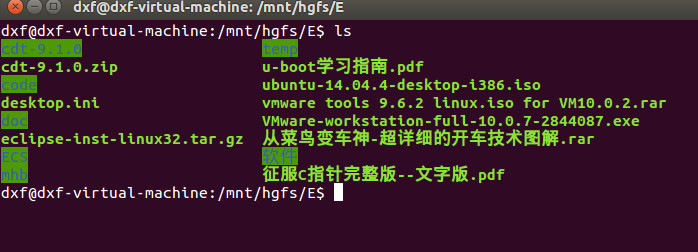
下面的图片就是我打完补丁后的共享文件夹截图:
本文转自:https://communities.vmware.com/thread/509898?start=0&tstart=0
原文中是在vmware workstation 11中安装Ubuntu 15.04,但是经过测试,在vmware 10中安装Ubuntu 14.04也可以使用同样的解决方法
ubuntu 客户机安装VMware tools时出现编译错误,无法与主机共享文件(转)的更多相关文章
- vmware 中ubuntu客户机 安装vmware tool vmhgfs 共享文件夹失败处理
vmware版本:10.0.0 build-1295980 ubuntu版本:3.13.0-62-generic 先安装的vmware workstation自带光盘中vmare tools包,安装完 ...
- 无法安装 VMware Tools。尝试访问安装 VMware Tools 所需的图像文件“/usr/lib/vmware/isoimages/linuxPreGlibc25.iso”时出错: 2 (No such file or directory)。请参考产品文档或知识库文章 2129825,了解关于如何获取该客户机操作系统的 VMware Tools 软件包的详细信息。
无法安装 VMware Tools.尝试访问安装 VMware Tools 所需的图像文件"/usr/lib/vmware/isoimages/linuxPreGlibc25.iso&quo ...
- vmware workstation12在安装VMware tools时出现问题:A previous installation of VMware Tools has been detected 解决
win10安装的vmware workstation12在安装VMware tools时出现问题: root@lc:/root/vmware-tools-distrib# ./vmware-insta ...
- Ubuntu 16.04 安装 VMware Tools(解决windows和Ubuntu之间不能互相复制粘贴文件的问题)
Ubuntu 16.04安装虚拟工具VMware Tools,指的是在虚拟机VMWare安装Ubuntu 16.04后再安装VMware Tools的过程.很多人接触Linux都是从虚拟机开始,而安装 ...
- vmware下ubuntu虚拟机如何安装vmware tools
依次点击-->虚拟机-->安装VMware Tools 窗口下方会弹出安装提示 系统会加载安装驱动至光盘 双击--VMwareTools-****.tar.gz--的压缩包 ...
- vmware 8下ubuntu 13.04安装vmware tools
在虚拟机vmware 8.0里安装了ubuntu 13.04.为了方便与主机交互,安装vmware tools. 解压后直接运行 ./vmware-install.pl 一路默认路径安装下来,到&qu ...
- ubuntu(centos) server安装vmware tools
Ubuntu: root登录ubutun $ sudo su vmware中选择菜单虚拟机->安装VMware Tools 命令行如下 // 将cdrom挂载到mnt $ mount -t is ...
- Ubuntu下手动安装VMware Tools步骤
To mount the CD image and extract the contents: Power on the virtual machine. Log in to the virtual ...
- CentOS 65 安装vmware tools 杂记
CentOS 65中安装vmware tools时出现如下错误, centos vmware tools install failure ,no default label for /tmp/vmwa ...
随机推荐
- mysql cast
之前讲到了orcale的字符串与日期等类型的转换,现在我们来看看Mysql是怎么转换的.比起orcale,MySQL相比之下就简单得多了,只需要一个Cast()函数就能搞定.其语法为:Cast(字段名 ...
- 【Python】socket编程-1
一.什么是socket编程:网络上的两个程序通过一个双向的通信连接实现数据的交换,这个连接的一端称为一个socket,编程传输层,socket本质是编程接口(API) 二.网络七层协议:物里层 数据链 ...
- tomcat多实例的端口设置
需要改4个端口 8080 8009 8005 8443 8080改成8081 8005改成8105 8009改成8109 8443 改成8543
- BF字符串匹配算法
Brute Force算法是普通的模式匹配算法,BF算法的思想就是将目标串S的第一个字符与模式串T的第一个字符进行匹配,若相等,则继续比较S的第二个字符和 T的第二个字符: 若不相等,则比较S的第二个 ...
- 【c++】函数默认参数
c++ Prime Plus sixth edition page274 如何设置默认值呢?必须通过函数原型. 只有原型指定了默认值.函数定义与没有默认参数时完全相同. 参考 1. http://ww ...
- selenium 定位无标签的元素
转载需注明出处. 如: ::before 伪元素xpath css_selector. id. class_name各种定位失效,可以选择用, .get_attribute('innerHTML')方 ...
- Mariadb-10.1.22配置项
## These groups are read by MariaDB server.# Use it for options that only the server (but not client ...
- 获取Linux服务器基本信息的shell脚本
测试运行环境: SLES12SP2 #!/bin/bash #系统名称:os_type=$(uname -o | awk '{print " | "$0}') #系统位数:32/6 ...
- Angular 插值字符串
<!DOCTYPE html> <html> <head> <meta charset="utf-8"> <title> ...
- 20155219 2016-2017-2 《Java程序设计》第7周学习总结
20155219 2016-2017-2 <Java程序设计>第7周学习总结 教材学习内容总结 认识时间与日期 时间的度量 1.格林威治时间(GMT):通过观察太阳而得,因为地球公转轨道为 ...