
SpringBoot中关于Excel的导入和导出
前言
由于在最近的项目中使用Excel导入和导出较为频繁,以此篇博客作为记录,方便日后查阅。本文前台页面将使用layui,来演示对Excel文件导入和导出的效果。本文代码已上传至我的gitHub,欢迎访问,地址:https://github.com/rename123/excel-demo
准备工作
1. 添加操作Excel的有关依赖,如下:
        <dependency>

            <groupId>org.apache.poi</groupId>

            <artifactId>poi</artifactId>

            <version>3.13</version>

        </dependency>

        <dependency>

            <groupId>org.apache.poi</groupId>

            <artifactId>poi-ooxml</artifactId>

            <version>3.13</version>

        </dependency>
说明:由于我的项目是使用的maven管理,所以通过如上方式添加依赖,如果是通过gradle构建的项目,请按如下方式导入项目依赖:
implementation group: 'org.apache.poi', name: 'poi-ooxml', version: '3.17'
2. 自定义注解,用来表示实体类中的属性在Excel中的标题、位置等
package com.reminis.exceldemo.annotation;

import java.lang.annotation.*;

/**

 * 自定义实体类所需要的bean(Excel属性标题、位置等)

 */

@Target({ElementType.FIELD})

@Retention(RetentionPolicy.RUNTIME)

@Documented

public @interface ExcelColumn {

    /**

     * Excel标题

     * @return

     */

    String value() default "";

    /**

     * Excel从左往右排列位置

     * @return

     */

    int col() default 0;

}
3. 编写ExcelUtils工具类
package com.reminis.exceldemo.util;
import java.io.File;
import java.io.FileOutputStream;
import java.io.IOException;
import java.io.InputStream;
import java.lang.reflect.Constructor;
import java.lang.reflect.Field;
import java.math.BigDecimal;
import java.net.URLEncoder;
import java.time.LocalDateTime;
import java.time.format.DateTimeFormatter;
import java.util.ArrayList;
import java.util.Arrays;
import java.util.Comparator;
import java.util.Date;
import java.util.HashMap;
import java.util.List;
import java.util.Map;
import java.util.concurrent.atomic.AtomicInteger;
import java.util.stream.Collectors;
import java.util.stream.Stream;
import com.reminis.exceldemo.annotation.ExcelColumn;
import org.apache.commons.collections.CollectionUtils;
import org.apache.commons.lang.BooleanUtils;
import org.apache.commons.lang.CharUtils;
import org.apache.commons.lang.StringUtils;
import org.apache.commons.lang.math.NumberUtils;
import org.apache.poi.hssf.usermodel.HSSFDateUtil;
import org.apache.poi.hssf.usermodel.HSSFWorkbook;
import org.apache.poi.ss.usermodel.Cell;
import org.apache.poi.ss.usermodel.CellStyle;
import org.apache.poi.ss.usermodel.Font;
import org.apache.poi.ss.usermodel.IndexedColors;
import org.apache.poi.ss.usermodel.Row;
import org.apache.poi.ss.usermodel.Sheet;
import org.apache.poi.ss.usermodel.Workbook;
import org.apache.poi.xssf.usermodel.XSSFWorkbook;
import org.slf4j.Logger;
import org.slf4j.LoggerFactory;
import org.springframework.http.MediaType;
import org.springframework.web.multipart.MultipartFile;
import javax.servlet.ServletOutputStream;
import javax.servlet.http.HttpServletRequest;
import javax.servlet.http.HttpServletResponse;
public class ExcelUtils {
private final static Logger log = LoggerFactory.getLogger(ExcelUtils.class);
private final static String EXCEL2003 = "xls";
private final static String EXCEL2007 = "xlsx";
public static <T> List<T> readExcel(String path, Class<T> cls, MultipartFile file){
String fileName = file.getOriginalFilename();
if (!fileName.matches("^.+\\.(?i)(xls)$") && !fileName.matches("^.+\\.(?i)(xlsx)$")) {
log.error("上传文件格式不正确");
}
List<T> dataList = new ArrayList<>();
Workbook workbook = null;
try {
InputStream is = file.getInputStream();
if (fileName.endsWith(EXCEL2007)) {
// FileInputStream is = new FileInputStream(new File(path));
workbook = new XSSFWorkbook(is);
}
if (fileName.endsWith(EXCEL2003)) {
// FileInputStream is = new FileInputStream(new File(path));
workbook = new HSSFWorkbook(is);
}
if (workbook != null) {
//类映射 注解 value-->bean columns
Map<String, List<Field>> classMap = new HashMap<>();
List<Field> fields = Stream.of(cls.getDeclaredFields()).collect(Collectors.toList());
fields.forEach(
field -> {
ExcelColumn annotation = field.getAnnotation(ExcelColumn.class);
if (annotation != null) {
String value = annotation.value();
if (StringUtils.isBlank(value)) {
return;//return起到的作用和continue是相同的 语法
}
if (!classMap.containsKey(value)) {
classMap.put(value, new ArrayList<>());
}
field.setAccessible(true);
classMap.get(value).add(field);
}
}
);
//索引-->columns
Map<Integer, List<Field>> reflectionMap = new HashMap<>(16);
//默认读取第一个sheet
Sheet sheet = workbook.getSheetAt(0);
boolean firstRow = true;
for (int i = sheet.getFirstRowNum(); i <= sheet.getLastRowNum(); i++) {
Row row = sheet.getRow(i);
//首行 提取注解
if (firstRow) {
for (int j = row.getFirstCellNum(); j <= row.getLastCellNum(); j++) {
Cell cell = row.getCell(j);
String cellValue = getCellValue(cell);
if (classMap.containsKey(cellValue)) {
reflectionMap.put(j, classMap.get(cellValue));
}
}
firstRow = false;
} else {
//忽略空白行
if (row == null) {
continue;
}
try {
T t = cls.newInstance();
//判断是否为空白行
boolean allBlank = true;
for (int j = row.getFirstCellNum(); j <= row.getLastCellNum(); j++) {
if (reflectionMap.containsKey(j)) {
Cell cell = row.getCell(j);
String cellValue = getCellValue(cell);
if (StringUtils.isNotBlank(cellValue)) {
allBlank = false;
}
List<Field> fieldList = reflectionMap.get(j);
fieldList.forEach(
x -> {
try {
handleField(t, cellValue, x);
} catch (Exception e) {
log.error(String.format("reflect field:%s value:%s exception!", x.getName(), cellValue), e);
}
}
);
}
}
if (!allBlank) {
dataList.add(t);
} else {
log.warn(String.format("row:%s is blank ignore!", i));
}
} catch (Exception e) {
log.error(String.format("parse row:%s exception!", i), e);
}
}
}
}
} catch (Exception e) {
log.error(String.format("parse excel exception!"), e);
} finally {
if (workbook != null) {
try {
workbook.close();
} catch (Exception e) {
log.error(String.format("parse excel exception!"), e);
}
}
}
return dataList;
}
private static <T> void handleField(T t, String value, Field field) throws Exception {
Class<?> type = field.getType();
if (type == null || type == void.class || StringUtils.isBlank(value)) {
return;
}
if (type == Object.class) {
field.set(t, value);
//数字类型
} else if (type.getSuperclass() == null || type.getSuperclass() == Number.class) {
if (type == int.class || type == Integer.class) {
field.set(t, NumberUtils.toInt(value));
} else if (type == long.class || type == Long.class) {
field.set(t, NumberUtils.toLong(value));
} else if (type == byte.class || type == Byte.class) {
field.set(t, NumberUtils.toByte(value));
} else if (type == short.class || type == Short.class) {
field.set(t, NumberUtils.toShort(value));
} else if (type == double.class || type == Double.class) {
field.set(t, NumberUtils.toDouble(value));
} else if (type == float.class || type == Float.class) {
field.set(t, NumberUtils.toFloat(value));
} else if (type == char.class || type == Character.class) {
field.set(t, CharUtils.toChar(value));
} else if (type == boolean.class) {
field.set(t, BooleanUtils.toBoolean(value));
} else if (type == BigDecimal.class) {
field.set(t, new BigDecimal(value));
}
} else if (type == Boolean.class) {
field.set(t, BooleanUtils.toBoolean(value));
} else if (type == Date.class) {
//
field.set(t, value);
} else if (type == String.class) {
field.set(t, value);
} else if (type == LocalDateTime.class) {
//String 转 LocalDateTime
DateTimeFormatter df = DateTimeFormatter.ofPattern("yyyy-MM-dd HH:mm:ss");
LocalDateTime dt = LocalDateTime.parse(value, df);
field.set(t, dt);
} else {
Constructor<?> constructor = type.getConstructor(String.class);
field.set(t, constructor.newInstance(value));
}
}
private static String getCellValue(Cell cell) {
if (cell == null) {
return "";
}
if (cell.getCellType() == Cell.CELL_TYPE_NUMERIC) {
if (HSSFDateUtil.isCellDateFormatted(cell)) {
return HSSFDateUtil.getJavaDate(cell.getNumericCellValue()).toString();
} else {
return new BigDecimal(cell.getNumericCellValue()).toString();
}
} else if (cell.getCellType() == Cell.CELL_TYPE_STRING) {
return StringUtils.trimToEmpty(cell.getStringCellValue());
} else if (cell.getCellType() == Cell.CELL_TYPE_FORMULA) {
return StringUtils.trimToEmpty(cell.getCellFormula());
} else if (cell.getCellType() == Cell.CELL_TYPE_BLANK) {
return "";
} else if (cell.getCellType() == Cell.CELL_TYPE_BOOLEAN) {
return String.valueOf(cell.getBooleanCellValue());
} else if (cell.getCellType() == Cell.CELL_TYPE_ERROR) {
return "ERROR";
} else {
return cell.toString().trim();
}
}
public static <T> void writeExcel(HttpServletRequest request, HttpServletResponse response, List<T> dataList, Class<T> cls){
Field[] fields = cls.getDeclaredFields();
List<Field> fieldList = Arrays.stream(fields)
.filter(field -> {
ExcelColumn annotation = field.getAnnotation(ExcelColumn.class);
if (annotation != null && annotation.col() > 0) {
field.setAccessible(true);
return true;
}
return false;
}).sorted(Comparator.comparing(field -> {
int col = 0;
ExcelColumn annotation = field.getAnnotation(ExcelColumn.class);
if (annotation != null) {
col = annotation.col();
}
return col;
})).collect(Collectors.toList());
Workbook wb = new XSSFWorkbook();
Sheet sheet = wb.createSheet("Sheet1");
AtomicInteger ai = new AtomicInteger();
{
Row row = sheet.createRow(ai.getAndIncrement());
AtomicInteger aj = new AtomicInteger();
//写入头部
fieldList.forEach(field -> {
ExcelColumn annotation = field.getAnnotation(ExcelColumn.class);
String columnName = "";
if (annotation != null) {
columnName = annotation.value();
}
Cell cell = row.createCell(aj.getAndIncrement());
CellStyle cellStyle = wb.createCellStyle();
cellStyle.setFillForegroundColor(IndexedColors.WHITE.getIndex());
cellStyle.setFillPattern(CellStyle.SOLID_FOREGROUND);
cellStyle.setAlignment(CellStyle.ALIGN_CENTER);
Font font = wb.createFont();
font.setBoldweight(Font.BOLDWEIGHT_NORMAL);
cellStyle.setFont(font);
cell.setCellStyle(cellStyle);
cell.setCellValue(columnName);
});
}
if (CollectionUtils.isNotEmpty(dataList)) {
dataList.forEach(t -> {
Row row1 = sheet.createRow(ai.getAndIncrement());
AtomicInteger aj = new AtomicInteger();
fieldList.forEach(field -> {
Class<?> type = field.getType();
Object value = "";
try {
value = field.get(t);
} catch (Exception e) {
e.printStackTrace();
}
Cell cell = row1.createCell(aj.getAndIncrement());
if (value != null) {
if (type == Date.class) {
cell.setCellValue(value.toString());
} else if (type == LocalDateTime.class){
DateTimeFormatter df = DateTimeFormatter.ofPattern("yyyy-MM-dd HH:mm:ss");
cell.setCellValue(df.format((LocalDateTime) value));
} else {
cell.setCellValue(value.toString());
}
}
});
});
}
//冻结窗格
wb.getSheet("Sheet1").createFreezePane(0, 1, 0, 1);
//浏览器下载excel
buildExcelDocument(request.getParameter("fileName"),wb,response);
//生成excel文件
// buildExcelFile(".\\default.xlsx",wb);
}
/**
* 浏览器下载excel
* @param fileName
* @param wb
* @param response
*/
private static void buildExcelDocument(String fileName, Workbook wb, HttpServletResponse response){
try {
response.setContentType(MediaType.APPLICATION_OCTET_STREAM_VALUE);
response.setHeader("Content-Disposition", "attachment;filename="+URLEncoder.encode(fileName, "utf-8"));
response.flushBuffer();
ServletOutputStream outputStream = response.getOutputStream();
wb.write(outputStream);
} catch (IOException e) {
e.printStackTrace();
}
}
/**
* 生成excel文件
* @param path 生成excel路径
* @param wb
*/
private static void buildExcelFile(String path, Workbook wb){
File file = new File(path);
if (file.exists()) {
file.delete();
}
try {
wb.write(new FileOutputStream(file));
} catch (Exception e) {
e.printStackTrace();
}
}
}
4. 定义需要导出的实体类
package com.reminis.exceldemo.entity;

import com.reminis.exceldemo.annotation.ExcelColumn;

import lombok.Data;

import org.springframework.format.annotation.DateTimeFormat;

import java.math.BigDecimal;

import java.time.LocalDateTime;

import java.util.Date;

@Data

public class Emp {

    @ExcelColumn(value = "员工主键id", col = 1)

    private Integer id;

    @ExcelColumn(value = "员工编号",col = 2)

    private String empNo;

    @ExcelColumn(value = "员工名称",col = 3)

    private String empName;

    @ExcelColumn(value = "员工薪资",col = 4)

    private BigDecimal salary;

    @ExcelColumn(value = "员工职称",col = 5)

    private String job;

    @ExcelColumn(value = "入职时间",col = 6)

    private LocalDateTime entryTime;

}
Controller层编写
在我们做完准备工作后,就可以在我们的Controller层编写访问接口了,由于我们没有连接数据库,所以我准备了一些测试数据,具体代码如下:
package com.reminis.exceldemo.web;

import com.alibaba.fastjson.JSON;

import com.reminis.exceldemo.entity.Emp;

import com.reminis.exceldemo.util.ExcelUtils;

import com.reminis.exceldemo.util.Result;

import org.apache.logging.log4j.LogManager;

import org.apache.logging.log4j.Logger;

import org.springframework.web.bind.annotation.*;

import org.springframework.web.multipart.MultipartFile;

import javax.servlet.http.HttpServletRequest;

import javax.servlet.http.HttpServletResponse;

import java.math.BigDecimal;

import java.time.LocalDateTime;

import java.util.ArrayList;

import java.util.List;

@CrossOrigin("*")

@RestController

@RequestMapping("/api/test")

public class ExcelController {

    private static final Logger log = LogManager.getLogger(ExcelController.class);

    /**

     * Excel导出

     * @param response

     */

    @GetMapping("/exportExcel")

    public void exportExcel(HttpServletRequest request,HttpServletResponse response){

        //使用假数据代替从数据库查出来的需要导出的数据

        List<Emp> empList = handleRepositoryData();

        long t1 = System.currentTimeMillis();

        ExcelUtils.writeExcel(request,response, empList, Emp.class);

        long t2 = System.currentTimeMillis();

        System.out.println(String.format("write over! cost:%sms", (t2 - t1)));

    }

    /**

     * Excel导入

     * @param file

     */

    @PostMapping("/readExcel")

    public Result<String> readExcel(@RequestBody MultipartFile file){

        long t1 = System.currentTimeMillis();

        log.info("上传的文件:"+file);

        List<Emp> list = ExcelUtils.readExcel("", Emp.class, file);

        long t2 = System.currentTimeMillis();

        System.out.println(String.format("read over! cost:%sms", (t2 - t1)));

        list.forEach(

                b -> System.out.println(JSON.toJSONString(b))

        );

        return new Result<>();

    }

    public List<Emp> handleRepositoryData() {

        List<Emp> empList = new ArrayList<>();

        Emp emp;

        for (int i = 1; i<= 10; i++) {

            emp = new Emp();

            emp.setId(i);

            emp.setEmpName("员工" + i);

            emp.setEmpNo((1000 + i) + "");

            emp.setJob("JY" + i);

            emp.setSalary(new BigDecimal(i * 1000 + ""));

            emp.setEntryTime(LocalDateTime.now().minusHours(Long.valueOf(i)));

            empList.add(emp);

        }

        return empList;

    }

    /**

     * 前台页面的数据列表

     * @return

     */

    @GetMapping("/getList")

    public Result getList(){

        Result<List<Emp>> result = new Result<>();

        List<Emp> empList = handleRepositoryData();

        result.setData(empList);

        return result;

    }

}
关于Excel导入导出功能的后台接口,到这里就写好了。由于本文示例代码中使用了Java8中的新时间,所以在将数据返回给前台页面时,我们需要对时间格式进行处理,如下:
package com.reminis.exceldemo.config;

import java.time.LocalDateTime;

import java.time.format.DateTimeFormatter;

import org.springframework.beans.factory.annotation.Value;

import org.springframework.boot.autoconfigure.jackson.Jackson2ObjectMapperBuilderCustomizer;

import org.springframework.context.annotation.Bean;

import org.springframework.context.annotation.Configuration;

import com.fasterxml.jackson.datatype.jsr310.ser.LocalDateTimeSerializer;

@Configuration

public class LocalDateTimeSerializerConfig {

    @Value("${spring.jackson.date-format:yyyy-MM-dd HH:mm:ss}")

    private String pattern;

    @Bean

    public LocalDateTimeSerializer localDateTimeDeserializer() {

        return new LocalDateTimeSerializer(DateTimeFormatter.ofPattern(pattern));

    }

    @Bean

    public Jackson2ObjectMapperBuilderCustomizer jackson2ObjectMapperBuilderCustomizer() {

        return builder -> builder.serializerByType(LocalDateTime.class, localDateTimeDeserializer());

    }

}
最后就是layui展示页面了,是一个很简单上传下载的列表页面,代码如下:
<!DOCTYPE html>
<html>
<head>
<meta charset="utf-8">
<meta name="viewport" content="width=device-width, initial-scale=1, maximum-scale=1">
<title>Excel文件的导入导出测试</title>
<link rel="stylesheet" href="../layui/css/layui.css">
</head>
<body>
<fieldset class="layui-elem-field layui-field-title" style="margin-top: 30px;">
<legend style="text-align: center">Excel文件的导入导出测试</legend>
</fieldset>
 <button type="button" class="layui-btn" id="test3"><i class="layui-icon"></i>导入Excel</button> 
<button type="button" class="layui-btn" id="test4"><i class="layui-icon"></i>后台接口导出Excel</button>
<button type="button" class="layui-btn" id="test5"><i class="layui-icon"></i>layui导出选中行的数据</button>
<!-- 你的HTML代码 -->
<table class="layui-hide" id="test"></table>
<script src="../layui/layui.js"></script>
<script>
//一般直接写在一个js文件中
layui.use(['table', 'layer','upload'], function(){
var table = layui.table
,$ = layui.$
,layer = layui.layer
,upload = layui.upload;
// layer.msg('Hello World');
var ins1 = table.render({
elem: '#test'
,url:'http://localhost:8080/api/test/getList'
,cols: [[
{type:'checkbox'}
,{field:'id', title: 'ID', sort: true}
,{field:'empNo',title: '员工编号'}
,{field:'empName',title: '员工名称'}
,{field:'salary', title: '薪资'}
,{field:'job', title: '职称'} //minWidth:局部定义当前单元格的最小宽度,layui 2.2.1 新增
,{field:'entryTime', title: '入职时间'}
]]
});
//指定允许上传的文件类型
upload.render({
elem: '#test3'
,url: 'http://localhost:8080/api/test/readExcel' //改成您自己的上传接口
,accept: 'file' //普通文件
,done: function(res){
layer.msg('上传成功');
console.log(res);
}
});
//Excel后台导出
$("#test4").click(function () {
// 文件名称可以根据自己需要进行设置
window.open('http://localhost:8080/api/test/exportExcel?fileName=员工表导出测试.xlsx')
})
//Excel通过layui导出
$("#test5").click(function () {
// console.log("123")
var checkStatus = table.checkStatus('test'); //test 即为table绑定的id
//获取选中行的数据
var data = checkStatus.data;
//将上述表格示例中的指定数据导出为 Excel 文件
table.exportFile(ins1.config.id, data); //data 为该实例中的任意数量的数据
})
});
</script>
</body>
</html>
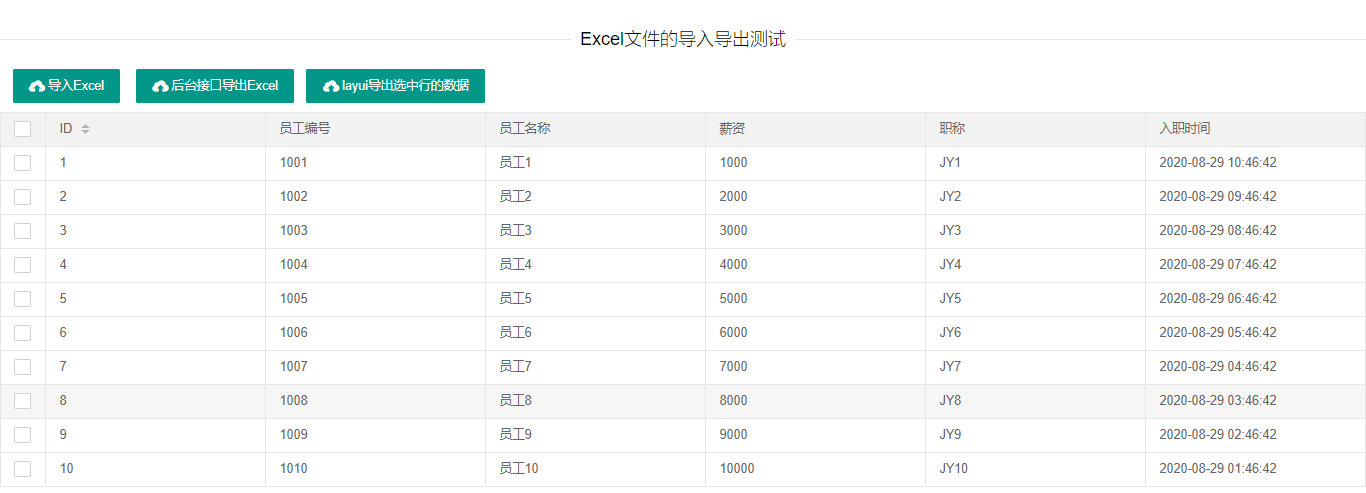
由于博客园还不支持上传视频,我就放几张运行的效果图吧,本文代码也已经上传至gitHub,本文有些代码没有写出来,可以到gitHub上把代码拉下来进行测试:
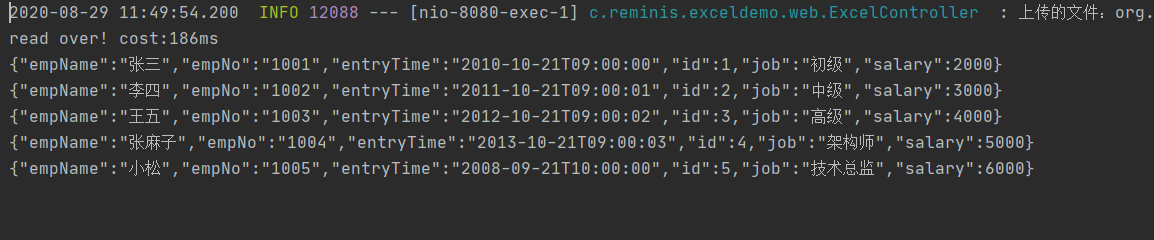
因为本文只是对excel的导入和导出进行测试,并没有来连接数据进行入库操作,但在导入Excel这个接口中,我已经获取到了导入的数据,并在控制台打印了出来,如下:
SpringBoot中关于Excel的导入和导出的更多相关文章
- 在C#中关于excel的导入和导出操作
一.先来看看最常见的导入操作吧! private void Import() { //打开excel选择框 OpenFileDialog frm = new OpenFileDialog(); frm ...
- 前端必读3.0:如何在 Angular 中使用SpreadJS实现导入和导出 Excel 文件
在之前的文章中,我们为大家分别详细介绍了在JavaScript.React中使用SpreadJS导入和导出Excel文件的方法,作为带给广大前端开发者的"三部曲",本文我们将为大家 ...
- excel的导入与导出---通用版
excel的导入与导出---通用版 web项目关于导入导出的业务场景很常见,最近我就又遇到了这个业务场景.这次将最近半个月做的导入导出总结一下 使用的pom如下,主要还是阿里巴巴的easyexcel依 ...
- .net数据库实现Excel的导入与导出
.net数据库实现Excel的导入与导出 参考路径:https://www.cnblogs.com/splendidme/archive/2012/01/05/2313314.html 1.defau ...
- SpringBoot整合easyexcel实现Excel的导入与导出
导出 在一般不管大的或者小的系统中,各家的产品都一样,闲的无聊的时候都喜欢让我们这些程序员导出一些数据出来供他观赏,非说这是必须需求,非做不可,那么我们就只能苦逼的哼哧哼哧的写bug喽. 之前使用PO ...
- C#中Excel的导入和导出的几种基本方式
在上一篇(http://www.cnblogs.com/fengchengjushi/p/3369386.html)介绍过,Excel也是数据持久化的一种实现方式.在C#中.我们常常会与Excel文件 ...
- java实现Excel的导入、导出
一.Excel的导入 导入可采用两种方式,一种是JXL,另一种是POI,但前者不能读取高版本的Excel(07以上),后者更具兼容性.由于对两种方式都进行了尝试,就都贴出来分享(若有错误,请给予指正) ...
- vue中excal表格的导入和导出
注意:vue中要实现表格的导入与导出,首先要install两个依赖, npm install -S file-saver xlsx 和 npm install -D script-loader.其 ...
- Excel报表开发(主要讲Excel的导入和导出)
一.Excel数据导入 连接字符串Excel2003版: OleDbConnection conn = new OleDbConnection("provider=Microsoft.Jet ...
随机推荐
- PHP fread() 函数
定义和用法 fread() 函数读取打开的文件. 函数会在到达指定长度或读到文件末尾(EOF)时(以先到者为准),停止运行. 该函数返回读取的字符串,如果失败则返回 FALSE. 语法 string ...
- Python创建一个爬虫项目===从零开始哟!想说的下次 要不要出一期关于pycharm与Python之间的合作
当然,不用爬虫框架,也是可以的 比如说 beauitfulsoup xml http 就可以完美的得到一个爬虫的解决方案! 个人的意思是,新手或者刚入门的可以考虑以上的方式进行练习后 在使用框架 首先 ...
- Jenkins总结2-部署maven项目
1. 部署Maven项目 1.1 新建项目 选择新建任务 输入任务名称,并选择构建一个Maven项目.如果你的页面没有看到“构建一个maven项目”,则需要安装Maven Integration插件. ...
- 细说selenium的等待条件
selenium的显示等待 在进行UI自动化测试的时候,我们为了保持用例的稳定性,往往要设置显示等待,显示等待就是说明确的要等到某个元素的出现或者元素的某些条件出现,比如可点击.可见等条件,如果在规定 ...
- Requests接口测试库-官网快速上手
Requests 一个发送HTTP请求的库基于urllib3,相比自带的库,提供了更高效简洁的可用方法,测试从业者用来做接口测试的一个好工具 文章内容均来自官网:https://requests.re ...
- 当面试官问我ArrayList和LinkedList哪个更占空间时,我这么答让他眼前一亮
前言 今天介绍一下Java的两个集合类,ArrayList和LinkedList,这两个集合的知识点几乎可以说面试必问的. 对于这两个集合类,相信大家都不陌生,ArrayList可以说是日常开发中用的 ...
- 用python写网路爬虫 PDF高清完整版免费下载 Python基础教程免费电子书 python入门书籍免费下载
<用python写网路爬虫PDF免费下载>PDF书籍下载 内容简介 作为一种便捷地收集网上信息并从中抽取出可用信息的方式,网络爬虫技术变得越来越有用.使用Python这样的简单编程语言,你 ...
- Spring Cloud 系列之 ZooKeeper 注册中心
什么是注册中心 服务注册中心是服务实现服务化管理的核心组件,类似于目录服务的作用,主要用来存储服务信息,譬如提供者 url 串.路由信息等.服务注册中心是微服务架构中最基础的设施之一. 注册中心可以说 ...
- JS学习第八天
DOM访问列表框.下拉菜单的常用属性: form返回列表框.下拉菜单所在的表单对象; length返回列表框.下拉菜单的选项个数; options返回列表框.下拉菜单里所有选项组成的数组; defau ...
- Escalate_my_privilege 靶机
1:扫描主机ip 2:扫描端口发现 22 80 111 3:目录扫描,发现一些平常的页面 4:进入robots.txt发现一个类型命令行的界面,查看是个低权限,但是在home目录下的armour发现密 ...