
使用maven将代码到私服
在上一节中,我们讲述了maven私服搭建 ,那么本章,我们讲述如何使用maven将代码打包并上传到maven私服上。
一、maven pom.xml关键配置信息。
   <distributionManagement>

 	 <repository>

        <id>releases</id>

        <name>Nexus Release Repository</name>

        <url>http://192.9.104.17:8081/nexus/content/repositories/releases/</url>

    </repository>

    <snapshotRepository>

        <id>snapshots</id>

        <name>Nexus Snapshot Repository</name>

        <url>http://192.9.104.17:8081/nexus/content/repositories/snapshots/</url>

    </snapshotRepository>

 </distributionManagement>
二、maven 代码编译、打包、生成java doc相关配置
 <build>

	<plugins>

	    <plugin>

                <groupId>org.codehaus.mojo</groupId>

                <artifactId>tomcat-maven-plugin</artifactId>

                <configuration>

                    <url>http://192.9.104.116:8090/manager</url>

                    <server>tomcat-remote-deploy</server>

                    <path>/search-web</path>

                </configuration>

        </plugin>

      <plugin>

        <groupId>org.mortbay.jetty</groupId>

        <artifactId>maven-jetty-plugin</artifactId>

        <version>6.1.7</version>

        <configuration>

          <connectors>

            <connector implementation="org.mortbay.jetty.nio.SelectChannelConnector">

              <port>8888</port>

              <maxIdleTime>30000</maxIdleTime>

            </connector>

          </connectors>

          <!--

          <webAppSourceDirectory>${project.build.directory}/${pom.artifactId}-${pom.version}</webAppSourceDirectory> -->

           <webApp>

              <contextPath>/search</contextPath>

           </webApp>

        </configuration>

      </plugin>

		  <plugin>

                <groupId>org.apache.maven.plugins</groupId>

                <artifactId>maven-resources-plugin</artifactId>

                <version>${plugin.version}</version>

          </plugin>

  		  <plugin>

                <groupId>org.apache.maven.plugins</groupId>

                <artifactId>maven-clean-plugin</artifactId>

                <version>${plugin.version}</version>

            </plugin>

	       <plugin>

			 <groupId>org.apache.maven.plugins</groupId>

			 <artifactId>maven-source-plugin</artifactId>

			 <version>${plugin.version}</version>

			 <executions>

				 <execution>

				 <id>attach-sources</id>

				 <phase>verify</phase>

				 <goals>

					 <goal>jar-no-fork</goal>

				 </goals>

				 </execution>

			 </executions>

		 </plugin>

		  <plugin>

			 <groupId>org.apache.maven.plugins</groupId>

			 <artifactId>maven-compiler-plugin</artifactId>

			 <version>${plugin.version}</version>

<!-- 			 <version>2.1.2</version> -->

			 <configuration>

			 	<source>1.6</source>

			 	<target>1.6</target>

			 	<complianceLevel>1.6</complianceLevel>

			 </configuration>

		 </plugin>

		  <plugin>

			 <groupId>org.apache.maven.plugins</groupId>

			 <artifactId>maven-javadoc-plugin</artifactId>

			 <version>${java.doc.version}</version>

			 <executions>

				 <execution>

				 <id>attach-javadocs</id>

				 <goals>

				 <goal>jar</goal>

				 </goals>

				 </execution>

			 </executions>

		 </plugin>

     </plugins>

 </build>
其中:
maven-clean-plugin 执行mvn clean 命令相关插件
maven-resources-plugin 执行mvn 工程resources打包管理
maven-source-plugin 执行maven 代码源码打包的工具
maven-compiler-plugin maven代码编译的工具
maven-javadoc-plugin 生成javadoc的maven工具
tomcat-maven-plugin 进行tomcat远程部署的工具,主要配置的信息<server>tomcat-remote-deploy</server>就是setting.xml中servers中的配置信息,用户名和密码配置以后,就可以远程部署。
三、maven上传jar包到nexus私服。
1、创建maven执行命令。
点击Debug>>Debug configurations>>
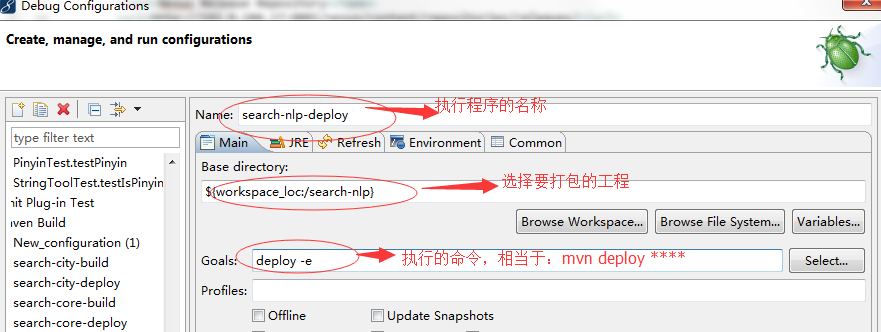
点击执行按钮:

查看执行情况(见eclipse console):
[INFO] Error stacktraces are turned on.

[INFO] Scanning for projects...

[WARNING]

[WARNING] Some problems were encountered while building the effective model for com.tianditu.search:search-nlp:jar:0.1

[WARNING] 'build.plugins.plugin.version' for org.codehaus.mojo:tomcat-maven-plugin is missing. @ com.tianditu.search:tianditu-search:0.8, P:\ts_search\tianditu-search\pom.xml, line 62, column 14

[WARNING]

[WARNING] It is highly recommended to fix these problems because they threaten the stability of your build.

[WARNING]

[WARNING] For this reason, future Maven versions might no longer support building such malformed projects.

[WARNING]

[INFO]

[INFO] ------------------------------------------------------------------------

[INFO] Building search-nlp 0.1

[INFO] ------------------------------------------------------------------------

[INFO]

[INFO] --- maven-resources-plugin:2.4:resources (default-resources) @ search-nlp ---

[INFO] Using 'UTF-8' encoding to copy filtered resources.

[INFO] Copying 0 resource

[INFO]

[INFO] --- maven-compiler-plugin:2.4:compile (default-compile) @ search-nlp ---

[INFO] Nothing to compile - all classes are up to date

[INFO]

[INFO] --- maven-resources-plugin:2.4:testResources (default-testResources) @ search-nlp ---

[INFO] Using 'UTF-8' encoding to copy filtered resources.

[INFO] skip non existing resourceDirectory P:\ts_search\tianditu-search\search-nlp\src\test\resources

[INFO]

[INFO] --- maven-compiler-plugin:2.4:testCompile (default-testCompile) @ search-nlp ---

[INFO] No sources to compile

[INFO]

[INFO] --- maven-surefire-plugin:2.7.1:test (default-test) @ search-nlp ---

[INFO] No tests to run.

[INFO] Surefire report directory: P:\ts_search\tianditu-search\search-nlp\target\surefire-reports

-------------------------------------------------------

 T E S T S

-------------------------------------------------------

There are no tests to run.

Results :

Tests run: 0, Failures: 0, Errors: 0, Skipped: 0

[INFO]

[INFO] --- maven-jar-plugin:2.3.1:jar (default-jar) @ search-nlp ---

[INFO] Building jar: P:\ts_search\tianditu-search\search-nlp\target\search-nlp-0.1.jar

[INFO]

[INFO] --- maven-javadoc-plugin:2.7:jar (attach-javadocs) @ search-nlp ---

[ERROR] Error fetching link: http://java.sun.com/javase/6/docs/api/package-list. Ignored it.

[INFO]

正在加载程序包com.tianditu.search.nlp的源文件...

正在构造 Javadoc 信息...

标准 Doclet 版本 1.7.0_45

正在构建所有程序包和类的树...

正在生成P:\ts_search\tianditu-search\search-nlp\target\apidocs\com\tianditu\search\nlp\BCConvert.html...

正在生成P:\ts_search\tianditu-search\search-nlp\target\apidocs\com\tianditu\search\nlp\Pinyin.html...

正在生成P:\ts_search\tianditu-search\search-nlp\target\apidocs\com\tianditu\search\nlp\StringTool.html...

正在生成P:\ts_search\tianditu-search\search-nlp\target\apidocs\com\tianditu\search\nlp\package-frame.html...

正在生成P:\ts_search\tianditu-search\search-nlp\target\apidocs\com\tianditu\search\nlp\package-summary.html...

正在生成P:\ts_search\tianditu-search\search-nlp\target\apidocs\com\tianditu\search\nlp\package-tree.html...

正在生成P:\ts_search\tianditu-search\search-nlp\target\apidocs\constant-values.html...

正在生成P:\ts_search\tianditu-search\search-nlp\target\apidocs\com\tianditu\search\nlp\class-use\StringTool.html...

正在生成P:\ts_search\tianditu-search\search-nlp\target\apidocs\com\tianditu\search\nlp\class-use\Pinyin.html...

正在生成P:\ts_search\tianditu-search\search-nlp\target\apidocs\com\tianditu\search\nlp\class-use\BCConvert.html...

正在生成P:\ts_search\tianditu-search\search-nlp\target\apidocs\com\tianditu\search\nlp\package-use.html...

正在构建所有程序包和类的索引...

正在生成P:\ts_search\tianditu-search\search-nlp\target\apidocs\overview-tree.html...

正在生成P:\ts_search\tianditu-search\search-nlp\target\apidocs\index-all.html...

正在生成P:\ts_search\tianditu-search\search-nlp\target\apidocs\deprecated-list.html...

正在构建所有类的索引...

正在生成P:\ts_search\tianditu-search\search-nlp\target\apidocs\allclasses-frame.html...

正在生成P:\ts_search\tianditu-search\search-nlp\target\apidocs\allclasses-noframe.html...

正在生成P:\ts_search\tianditu-search\search-nlp\target\apidocs\index.html...

正在生成P:\ts_search\tianditu-search\search-nlp\target\apidocs\help-doc.html...

7 个警告

[WARNING] Javadoc Warnings

[WARNING] P:\ts_search\tianditu-search\search-nlp\src\main\java\com\tianditu\search\nlp\StringTool.java:107: 警告 - @return 标记没有参数。

[WARNING] P:\ts_search\tianditu-search\search-nlp\src\main\java\com\tianditu\search\nlp\StringTool.java:127: 警告 - @return 标记没有参数。

[WARNING] P:\ts_search\tianditu-search\search-nlp\src\main\java\com\tianditu\search\nlp\StringTool.java:148: 警告 - @return 标记没有参数。

[WARNING] P:\ts_search\tianditu-search\search-nlp\src\main\java\com\tianditu\search\nlp\StringTool.java:171: 警告 - @return 标记没有参数。

[WARNING] P:\ts_search\tianditu-search\search-nlp\src\main\java\com\tianditu\search\nlp\StringTool.java:359: 警告 - @return 标记没有参数。

[WARNING] P:\ts_search\tianditu-search\search-nlp\src\main\java\com\tianditu\search\nlp\StringTool.java:73: 警告 - @note是未知标记。

[WARNING] P:\ts_search\tianditu-search\search-nlp\src\main\java\com\tianditu\search\nlp\StringTool.java:91: 警告 - @note是未知标记。

[INFO] Building jar: P:\ts_search\tianditu-search\search-nlp\target\search-nlp-0.1-javadoc.jar

[INFO]

[INFO] --- maven-source-plugin:2.4:jar-no-fork (attach-sources) @ search-nlp ---

[INFO] Building jar: P:\ts_search\tianditu-search\search-nlp\target\search-nlp-0.1-sources.jar

[INFO]

[INFO] --- maven-install-plugin:2.3.1:install (default-install) @ search-nlp ---

[INFO] Installing P:\ts_search\tianditu-search\search-nlp\target\search-nlp-0.1.jar to C:\Users\GCZX-016\.m2\repository\com\tianditu\search\search-nlp\0.1\search-nlp-0.1.jar

[INFO] Installing P:\ts_search\tianditu-search\search-nlp\pom.xml to C:\Users\GCZX-016\.m2\repository\com\tianditu\search\search-nlp\0.1\search-nlp-0.1.pom

[INFO] Installing P:\ts_search\tianditu-search\search-nlp\target\search-nlp-0.1-javadoc.jar to C:\Users\GCZX-016\.m2\repository\com\tianditu\search\search-nlp\0.1\search-nlp-0.1-javadoc.jar

[INFO] Installing P:\ts_search\tianditu-search\search-nlp\target\search-nlp-0.1-sources.jar to C:\Users\GCZX-016\.m2\repository\com\tianditu\search\search-nlp\0.1\search-nlp-0.1-sources.jar

[INFO]

[INFO] --- maven-deploy-plugin:2.5:deploy (default-deploy) @ search-nlp ---

SLF4J: Failed to load class "org.slf4j.impl.StaticLoggerBinder".

SLF4J: Defaulting to no-operation (NOP) logger implementation

SLF4J: See http://www.slf4j.org/codes.html#StaticLoggerBinder for further details.

Uploading: http://192.9.104.17:8081/nexus/content/repositories/releases/com/tianditu/search/search-nlp/0.1/search-nlp-0.1.jar

Uploading: http://192.9.104.17:8081/nexus/content/repositories/releases/com/tianditu/search/search-nlp/0.1/search-nlp-0.1.pom

Uploaded: http://192.9.104.17:8081/nexus/content/repositories/releases/com/tianditu/search/search-nlp/0.1/search-nlp-0.1.jar (30 KB at 137.9 KB/sec)

Uploaded: http://192.9.104.17:8081/nexus/content/repositories/releases/com/tianditu/search/search-nlp/0.1/search-nlp-0.1.pom (5 KB at 46.4 KB/sec)

Downloading: http://192.9.104.17:8081/nexus/content/repositories/releases/com/tianditu/search/search-nlp/maven-metadata.xml

Downloaded: http://192.9.104.17:8081/nexus/content/repositories/releases/com/tianditu/search/search-nlp/maven-metadata.xml (305 B at 8.1 KB/sec)

Uploading: http://192.9.104.17:8081/nexus/content/repositories/releases/com/tianditu/search/search-nlp/maven-metadata.xml

Uploaded: http://192.9.104.17:8081/nexus/content/repositories/releases/com/tianditu/search/search-nlp/maven-metadata.xml (305 B at 0.6 KB/sec)

Uploading: http://192.9.104.17:8081/nexus/content/repositories/releases/com/tianditu/search/search-nlp/0.1/search-nlp-0.1-javadoc.jar

Uploaded: http://192.9.104.17:8081/nexus/content/repositories/releases/com/tianditu/search/search-nlp/0.1/search-nlp-0.1-javadoc.jar (47 KB at 649.1 KB/sec)

Uploading: http://192.9.104.17:8081/nexus/content/repositories/releases/com/tianditu/search/search-nlp/0.1/search-nlp-0.1-sources.jar

Uploaded: http://192.9.104.17:8081/nexus/content/repositories/releases/com/tianditu/search/search-nlp/0.1/search-nlp-0.1-sources.jar (23 KB at 340.6 KB/sec)

[INFO] ------------------------------------------------------------------------

[INFO] BUILD SUCCESS

[INFO] ------------------------------------------------------------------------

[INFO] Total time: 8.709s

[INFO] Finished at: Thu Jun 04 17:26:55 CST 2015

[INFO] Final Memory: 18M/386M

[INFO] ------------------------------------------------------------------------
如有错误,然后定位并解决,主要错误就是用户没有权限,或者仓库地址没有配置等等。
使用maven将代码到私服的更多相关文章
- 07 Maven 使用Nexus创建私服
7. Maven 使用Nexus创建私服 私服不是 Maven 的核心概念,它仅仅是一种衍生出来的特殊的 Maven 仓库.通过建立自己的私服,就可以降低中央仓库负荷.节省外网带宽.加速 Maven ...
- maven项目如何从私服nexus中下载依赖包
maven项目如何从私服nexus中下载依赖包 解决方法: 1.打开maven的config目录中settings.xml文件 2.在<profile></profiles> ...
- maven发布项目到私服-snapshot快照库和release发布库的区别和作用及maven常用命令
maven发布项目到私服-snapshot快照库和release发布库的区别和作用及maven常用命令 在日常的工作中由于各种原因,会出现这样一种情况,某些项目并没有打包至mvnrepository. ...
- Linux安装配置maven以及搭建nexus私服(编写启动脚本)
2011年07月12日16:32 下面介绍在Linux操作系统下安装配置maven和搭建nexus私服. 一.安装前的准备 下载 jdk http://www.oracle.com/technetw ...
- 使用Maven部署构件至私服
--------------------siwuxie095 使用 Maven 部署构件至私服 1.部署构件到 Nexu ...
- Maven编译代码的时候跳过单元测试
Maven编译代码的时候跳过单元测试 <properties> <maven.test.skip>true</maven.test.skip> </prope ...
- MAVEN学习笔记之私服Nexus(2)
MAVEN学习笔记之私服Nexus(2) 私有服务器搭建 Nexus www.snatype.org下载 snatype-work 是默认nexus存储nexus a:将bin添加到环境中 Admin ...
- maven仓库--搭建局域网私服(windows版)
使用nexus搭建局域网私服 一. 认识maven仓库 1.1 maven仓库的作用 回想之前不用maven的时候,我们用eclipse原始的项目骨架构建项目时,在工程目录下往往有一个lib文件夹 ...
- 【Maven学习】Nexus私服代理其他第三方的Maven仓库
一.背景 [Maven学习]Nexus OSS私服仓库的安装和配置 http://blog.csdn.net/ouyang_peng/article/details/78793038 [Maven学习 ...
随机推荐
- Asp.net 面向接口可扩展框架之“Mvc扩展框架及DI”
标题“Mvc扩展框架及DI”有点绕口,我也想不出好的命名,因为这个内容很杂,涉及多个模块,但在日常开发又密不可分 首先说Mvc扩展框架,该Mvc扩展就是把以前的那个Mvc分区扩展框架迁移过来,并优化整 ...
- PostgreSQL保存文件到数据库
1.CREATE TABLE public.t_file ( id INTEGER PRIMARY KEY NOT NULL DEFAULT nextval('t_file_id_seq'::regc ...
- 第一弹:Java 中创建对象的4种方式
Java 是面向对象的语言,不可避免的,"对象"这个概念是 Java 语言的核心部分,这里来简单讨论一下在 Java 中创建一般对象的方法. 总结下来有以下4种创建对象的方法: 使 ...
- 如何用ORM支持SQL语句的CASE WHEN?
OQL如何支持CASE WHEN? 今天,一个朋友问我,OQL可否支持CASE WHEN语句?他给的示例SQL如下: then '启用' else '停用' from tb_User OQL是SOD框 ...
- MVC的增删改查
基本都要使用C控制器中的两个action来完成操作,一个用于从主界面跳转到新页面.同时将所需操作的数据传到新界面,另一个则对应新界面的按钮,用于完成操作.将数据传回主界面以及跳转回主界面.根据不同情况 ...
- 记jQuery.fn.show的一次踩坑和问题排查
最近很少已经很少用jQuery,因为主攻移动端,常用Zepto,其实很多细节和jQuery并不一样.最近又无意中接触到了PC的需求和IE6, 使用了jQuery,刚好踩坑了,特意记录一下. 本文内容如 ...
- iOS之数据持久化方案
概论 所谓的持久化,就是将数据保存到硬盘中,使得在应用程序或机器重启后可以继续访问之前保存的数据.在iOS开发中,有很多数据持久化的方案,接下来我将尝试着介绍一下5种方案: plist文件(属性列表) ...
- Android项目实战(二十八):Zxing二维码实现及优化
前言: 多年之前接触过zxing实现二维码,没想到今日项目中再此使用竟然使用的还是zxing,百度之,竟是如此牛的玩意. 当然,项目中我们也许只会用到二维码的扫描和生成两个功能,所以不必下载完整的ja ...
- iOS MJRefresh设置MJRefreshStateNoMoreData状态图片
MJRefresh地址 // 代码地址: https://github.com/CoderMJLee/MJRefresh// 代码地址: http://code4app.com/ios/%E5%B ...
- iOS 直播-实现后台录音并推流
iOS 直播-实现后台录音并推流 从一个月前开始开始接收公司的直播类app.到今天为止测试都已接近尾声,但是产品哥哥加了一个要求,就是在app进入后台后也实时保证录音并且推流. 刚听到这个的时候我也是 ...