
MVC查询
前言
最近没什么好写的,所以写个查询来巩固一下知识
HTML
@{
Layout = null;
}
<!DOCTYPE html>
<html>
<head>
<meta name="viewport" content="width=device-width" />
<title>瑰园美食</title>
<link rel="icon" href="~/Content/Images/Icon/Logo.png" />
<link href="~/Plugin/layui/css/layui.css" rel="stylesheet" />
<link href="~/Content/Css/IndexStyle.css" rel="stylesheet" />
</head>
<body>
<div style="width:100%;height:80px;"></div>
<header>
<div class="header_left">
<span><img src="~/Content/Images/Icon/Logo.png" /></span>
<h1>瑰园美食</h1>
</div>
<div class="header_right">
<p>未登录,<a onclick="window.location.href='/Main/Login'">点我登录</a></p>
</div>
</header>
<div class="Navigation"><p>菜品</p></div>
<div class="Greens_Menu">
<table>
@*<tbody tabindex="1">
<tr>
<td><div class="Show_D"><div><h2>青肉卷</h2><p>¥<span>21</span></p><i onclick="AddCard()"></i><i></i></div></div><img src="~/Content/Images/Greens/A_1.png" /></td>
<td><div class="Show_D"><div><h2>大盘菜</h2><p>¥<span>33</span></p><i onclick="AddCard()"></i><i></i></div></div><img src="~/Content/Images/Greens/A_2.png" /></td>
<td><div class="Show_D"><div><h2>鸡肉卷</h2><p>¥<span>56</span></p><i onclick="AddCard()"></i><i></i></div></div><img src="~/Content/Images/Greens/A_3.png" /></td>
<td><div class="Show_D"><div><h2>冰糖粥</h2><p>¥<span>32</span></p><i onclick="AddCard()"></i><i></i></div></div><img src="~/Content/Images/Greens/A_4.png" /></td>
<td><div class="Show_D"><div><h2>辣椒油</h2><p>¥<span>12</span></p><i onclick="AddCard()"></i><i></i></div></div><img src="~/Content/Images/Greens/A_5.png" /></td>
<td><div class="Show_D"><div><h2>特制豆腐</h2><p>¥<span>21</span></p><i onclick="AddCard()"></i><i></i></div></div><img src="~/Content/Images/Greens/A_6.png" /></td>
<td><div class="Show_D"><div><h2>大肉卷</h2><p>¥<span>35</span></p><i onclick="AddCard()"></i><i></i></div></div><img src="~/Content/Images/Greens/A_7.png" /></td>
<td><div class="Show_D"><div><h2>红烧肉</h2><p>¥<span>42</span></p><i onclick="AddCard()"></i><i></i></div></div><img src="~/Content/Images/Greens/A_8.png" /></td>
<td><div class="Show_D"><div><h2>小龙虾</h2><p>¥<span>69</span></p><i onclick="AddCard()"></i><i></i></div></div><img src="~/Content/Images/Greens/A_9.png" /></td>
<td><div class="Show_D"><div><h2>糯米卷</h2><p>¥<span>12</span></p><i onclick="AddCard()"></i><i></i></div></div><img src="~/Content/Images/Greens/A_10.png" /></td>
<td><div class="Show_D"><div><h2>牛腩面</h2><p>¥<span>13</span></p><i onclick="AddCard()"></i><i></i></div></div><img src="~/Content/Images/Greens/A_11.png" /></td>
<td><div class="Show_D"><div><h2>寿司套餐</h2><p>¥<span>60</span></p><i onclick="AddCard()"></i><i></i></div></div><img src="~/Content/Images/Greens/A_12.png" /></td>
</tr>
</tbody>
<tbody tabindex="2">
<tr>
<td>12</td>
<td>12</td>
</tr>
</tbody>*@
</table>
</div>
<div class="Paging">
<input type="button" value="上一页" />
<div>
<input class="PagingOn" type="button" value="1" />
</div>
<input type="button" value="下一页" />
</div>
<div class="Right_Menu">
<ul class="Menu_Ul">
<li class="Menu_Ul_Li"><i class="Menu_Ul_li_i" title="我的信息" style="background-image:url(../../Content/Images/Icon/Icon1.png)"></i></li>
<li class="Menu_Ul_Li" onclick="OpenCarts()"><i class="Menu_Ul_li_i" title="购物车" style="background-image:url(../../Content/Images/Icon/Icon2.png)"></i>
<ul class="Menu_Ul_Ul" hidden>
<li class="Menu_Ul_Ul_Li">
<ul class="Menu_Ul_Ul_Ul">
@*<li class="Menu_Ul_Ul_Ul_Li"><img src="~/Content/Images/Greens/A_1.png" /><p><label>青肉卷</label>¥<span>12</span></p><div class="KJ_PAM"><input type="button" class="KJ_PAM_M" value="-" /><input type="number" min="1" max="999" value="1" /><input type="button" class="KJ_PAM_P" value="+" /></div><i title="删除" class="Del_Greens_Button">X</i></li>
<li class="Menu_Ul_Ul_Ul_Li"><img src="~/Content/Images/Greens/A_1.png" /><p><label>青肉卷</label>¥<span>12</span></p><div class="KJ_PAM"><input type="button" class="KJ_PAM_M" value="-" /><input type="number" min="1" max="999" value="1" /><input type="button" class="KJ_PAM_P" value="+" /></div><i title="删除" class="Del_Greens_Button">X</i></li>
<li class="Menu_Ul_Ul_Ul_Li"><img src="~/Content/Images/Greens/A_1.png" /><p><label>青肉卷</label>¥<span>12</span></p><div class="KJ_PAM"><input type="button" class="KJ_PAM_M" value="-" /><input type="number" min="1" max="999" value="1" /><input type="button" class="KJ_PAM_P" value="+" /></div><i title="删除" class="Del_Greens_Button">X</i></li>
<li class="Menu_Ul_Ul_Ul_Li"><img src="~/Content/Images/Greens/A_1.png" /><p><label>青肉卷</label>¥<span>12</span></p><div class="KJ_PAM"><input type="button" class="KJ_PAM_M" value="-" /><input type="number" min="1" max="999" value="1" /><input type="button" class="KJ_PAM_P" value="+" /></div><i title="删除" class="Del_Greens_Button">X</i></li>
<li class="Menu_Ul_Ul_Ul_Li"><img src="~/Content/Images/Greens/A_1.png" /><p><label>青肉卷</label>¥<span>12</span></p><div class="KJ_PAM"><input type="button" class="KJ_PAM_M" value="-" /><input type="number" min="1" max="999" value="1" /><input type="button" class="KJ_PAM_P" value="+" /></div><i title="删除" class="Del_Greens_Button">X</i></li>
<li class="Menu_Ul_Ul_Ul_Li"><img src="~/Content/Images/Greens/A_1.png" /><p><label>青肉卷</label>¥<span>12</span></p><div class="KJ_PAM"><input type="button" class="KJ_PAM_M" value="-" /><input type="number" min="1" max="999" value="1" /><input type="button" class="KJ_PAM_P" value="+" /></div><i title="删除" class="Del_Greens_Button">X</i></li>*@
</ul>
</li>
<li class="SettleAccounts"><input type="button" value="结算" /></li>
</ul>
</li>
</ul>
</div>
<b id="UserName" hidden>@Session["UserName"]</b>
<b id="UserID" hidden>@Session["UserID"]</b>
<script src="~/Plugin/jquery-3.3.1.min.js"></script>
<script src="~/Plugin/layui/layui.all.js"></script>
<script src="~/Content/Js/KJ_PAM.js"></script>
<script>
var UserName = $("#UserName");
var UserID = $("#UserID");
var header_right_p = $("header .header_right p");
var Greens_Menu_Table = $(".Greens_Menu table");
var Menu_Ul_Ul_Ul = $(".Menu_Ul_Ul_Ul");
//指定多少数据进行分页处理
var GreensData = "";
var PagingNumber = 12;
var PagingSize = 0;
if (UserName.html() != "") {
header_right_p.html("欢迎您, "+ UserName.html());
}
//查询菜品
$.ajax({
type:"get",
url: "/Main/SelectGreens",
dataType: "json",
success: function (data) {
GreensData += "<tbody tabindex='1'><tr>"
$.each(data, function (i) {
GreensData+= "<td><div class='Show_D'><div><h2>" + data[i].GreensName + "</h2><p>¥<span>" + data[i].GreensMoney + "</span></p><i onclick='AddCard(" + data[i].GreensID + ")'></i><i></i></div></div><img src='" + data[i].GreensImg + "' /></td>";
})
GreensData += ("</tr></tbody>");
Greens_Menu_Table.append(GreensData);
}
})
//打开购物车
function OpenCarts() {
if ($(".Menu_Ul_Ul").attr("hidden") == "hidden") {
$(".Menu_Ul_Ul").attr("hidden", false);
} else {
$(".Menu_Ul_Ul").attr("hidden", true);
}
$.each(Menu_Ul_Ul_Ul.children(), function (i) {
this.remove();
})
if (UserID.html() != "") {
//查询购物车
$.ajax({
type: "get",
url: "/Main/SelectCarts",
dataType: "json",
data: { UserID: UserID.html()},
success: function (data) {
$.each(data, function (i) {
Menu_Ul_Ul_Ul.append('<li class="Menu_Ul_Ul_Ul_Li"><img src="' + data[i].tbGreens.GreensImg + '" /><p><label>' + data[i].tbGreens.GreensName + '</label>¥<span>' + data[i].tbGreens.GreensMoney + '</span></p><div class="KJ_PAM"><input type="button" class="KJ_PAM_M" value="-" /><input type="number" min="1" max="999" value="' + data[i].GreensNumber + '" /><input type="button" class="KJ_PAM_P" value="+" /></div><i title="删除" class="Del_Greens_Button">X</i></li>');
})
KJ_PAM_ClickF();
}
})
} else {
alert("请先登录!");
window.location.href = "/Main/Login";
}
}
$(".Menu_Ul_Ul").click(function (e) {
e.stopPropagation();
})
//加入购物车
function AddCard(GreensID) {
if (UserID.html() != "") {
$.ajax({
type: "get",
dataType: "json",
url: "/Main/InsertCarts",
data: { UserID: UserID.html(), GreensID: GreensID },
success: function (msg) {
alert(msg.MsgText);
}
})
} else {
alert("请先登录!");
window.location.href = "/Main/Login";
}
}
//修改购物车
function UpdateCarts() {
ZuiHouJiner = 0;
for (var i = 0; i < document.querySelectorAll(".Menu_Ul_Ul_Ul_Li").length; i++) {
ZuiHouJiner += parseInt(document.querySelectorAll(".Menu_Ul_Ul_Ul_Li")[i].querySelectorAll("p span")[0].innerHTML) * parseInt(document.querySelectorAll(".Menu_Ul_Ul_Ul_Li")[i].querySelectorAll(".KJ_PAM input[type='number']")[0].value);
}
document.querySelectorAll(".SettleAccounts input[type='button']")[0].value = "结算 ¥" + ZuiHouJiner;
}
//var ZuiHouJiner = 0;
//setInterval(function () {
// ZuiHouJiner = 0;
// for (var i = 0; i < document.querySelectorAll(".Menu_Ul_Ul_Ul_Li").length; i++) {
// ZuiHouJiner += parseInt(document.querySelectorAll(".Menu_Ul_Ul_Ul_Li")[i].querySelectorAll("p span")[0].innerHTML) * parseInt(document.querySelectorAll(".Menu_Ul_Ul_Ul_Li")[i].querySelectorAll(".KJ_PAM input[type='number']")[0].value);
// }
// document.querySelectorAll(".SettleAccounts input[type='button']")[0].value = "结算 ¥" + ZuiHouJiner;
//}, 500);
</script>
</body>
</html>
CSS
body {

    padding: 0;

    margin: 0;

}

::-webkit-scrollbar {

    background: rgba(0, 0, 0,.3);

    height: 10px;

    width: 10px;

}

::-webkit-scrollbar-thumb {

    background: #dbb900;

    border-radius: 50px;

}

header {

    box-shadow: 0px 1px 15px 0px rgba(0, 0, 0,.3);

    display: flex;

    position: fixed;

    top: 0px;

    left: 0px;

    width: 100%;

    background: #fff;

    z-index: 1;

}

    header:after {

        content: '';

        position: absolute;

        left: 0;

        bottom: 0;

        background: #67b968;

        width: 100%;

        height: 3px;

    }

    header div {

        width: 50%;

    }

.header_left {

}

    .header_left h1 {

        padding: 20px 0px 23px 80px;

        width: 75%;

    }

    .header_left span {

        float: left;

        padding: 15px;

        box-sizing: border-box;

    }

.header_right {

}

    .header_right p {

        line-height: 2.5em;

        height: 100%;

        text-align: right;

        padding: 15px;

        box-sizing: border-box;

    }

        .header_right p a:hover {

            cursor: pointer;

        }

.Navigation {

    padding: 10px 15px;

    box-sizing: border-box;

    background: rgba(0,0,0,.05);

    color: #67b968;

    font-size: 16px;

}

.Greens_Menu {

    width: 100%;

    height: 100%;

    max-height: 765px;

    overflow: auto;

    padding: 10px;

    box-sizing: border-box;

    background: rgba(0,0,0,0.05);

}

    .Greens_Menu table {

        width: 100%;

        height: 100%;

    }

        .Greens_Menu table tr {

            display: flex;

            flex-direction: row;

            flex-wrap: wrap;

            justify-content: left;

        }

        .Greens_Menu table tbody tr td {

            text-align: center;

            position: relative;

            padding: 0px 48px;

            transition:all linear 0.2s;

        }

            .Greens_Menu table tbody tr td .Show_D {

                position: absolute;

                top: 0px;

                left: 50%;

                transform: translateX(-50%);

                width: 360px;

                height: 254px;

                opacity: 0;

                border-radius: 5px;

                background: rgba(0,0,0,0.5);

                color: #fff;

                overflow: hidden;

                transition: all linear 0.2s;

            }

                .Greens_Menu table tbody tr td .Show_D:hover {

                    opacity: 1;

                }

                .Greens_Menu table tbody tr td .Show_D div {

                    position: absolute;

                    top: 40%;

                    left: 0%;

                    width: 100%;

                    height: 100%;

                }

                    .Greens_Menu table tbody tr td .Show_D div h2 {

                        padding-bottom: 3px;

                    }

                    .Greens_Menu table tbody tr td .Show_D div p {

                        padding-bottom: 30px;

                    }

                    .Greens_Menu table tbody tr td .Show_D div i {

                        width: 40px;

                        height: 40px;

                        display: inline-block;

                        padding: 0px 3px;

                    }

                        .Greens_Menu table tbody tr td .Show_D div i:hover {

                            cursor: pointer;

                        }

                        .Greens_Menu table tbody tr td .Show_D div i:nth-child(3) {

                            background-image: url('../Images/Icon/Icon2.png');

                            background-repeat: no-repeat;

                        }

                        .Greens_Menu table tbody tr td .Show_D div i:nth-child(4) {

                            background-image: url('../Images/Icon/Icon1.png');

                            background-repeat: no-repeat;

                        }

                    .Greens_Menu table tbody tr td .Show_D div h2 {

                        font-weight: bold;

                    }

            .Greens_Menu table tbody tr td img {

                border-radius: 5px;

                margin-bottom: 10px;

            }

.Paging {

    position: fixed;

    left: 0;

    bottom: 0;

    width: 100%;

    text-align: center;

    padding: 15px;

    box-sizing: border-box;

    box-shadow: 0px -1px 15px 0px rgba(0, 0, 0,.3);

    background: #fff;

}

    .Paging:after {

        content: '';

        position: absolute;

        left: 0;

        top: 0;

        background: #67b968;

        width: 100%;

        height: 3px;

    }

    .Paging input {

        background: #fff;

        border: 1px;

        border-style: solid;

        border-color: rgba(0, 0, 0,.3);

        height: 30px;

        padding: 0px 10px;

        border-radius: 5px;

    }

        .Paging input:hover {

            cursor: pointer;

        }

    .Paging input, .Paging div {

        display: inline-block;

    }

.PagingOn {

    background: #67b968 !important;

    color: #fff;

}

/*右菜单*/

.Right_Menu {

    position: fixed;

    top: 8.1%;

    right: 0px;

    background: #fff;

    width: 50px;

    height: 85.9%;

    z-index: 1;

}

    .Right_Menu::after {

        content: '';

        left: 0px;

        top: 0px;

        height: 100%;

        width: 3px;

        background: #67b968;

        position: absolute;

    }

    .Right_Menu .Menu_Ul .Menu_Ul_Li {

        position: relative;

    }

        .Right_Menu .Menu_Ul .Menu_Ul_Li:hover {

            background: rgba(0,0,0,0.3);

        }

        .Right_Menu .Menu_Ul .Menu_Ul_Li .Menu_Ul_li_i {

            display: block;

            width: 36px;

            height: 36px;

            background-repeat: no-repeat;

            background-position: center;

            background-size: 100%;

            margin: 10px 8px;

            padding: 7px 0px;

        }

        .Right_Menu .Menu_Ul .Menu_Ul_Li .Menu_Ul_Ul {

            position: absolute;

            right: 50px;

            top: 0px;

            max-height: 300px;

            height: 300px;

            background:#fff;

        }

            .Right_Menu .Menu_Ul .Menu_Ul_Li .Menu_Ul_Ul .Menu_Ul_Ul_Li {

                max-height: 270px;

            }

                .Right_Menu .Menu_Ul .Menu_Ul_Li .Menu_Ul_Ul .Menu_Ul_Ul_Li .Menu_Ul_Ul_Ul {

                    overflow: auto;

                    max-height: 270px;

                    background: #fff;

                    border: 3px solid #67b968;

                    border-right: none;

                    box-sizing: border-box;

                }

                    .Right_Menu .Menu_Ul .Menu_Ul_Li .Menu_Ul_Ul .Menu_Ul_Ul_Li .Menu_Ul_Ul_Ul .Menu_Ul_Ul_Ul_Li {

                        position: relative;

                        padding: 5px;

                        display: flex;

                        width: 280px;

                        height: 18%;

                        overflow: auto;

                    }

                        .Right_Menu .Menu_Ul .Menu_Ul_Li .Menu_Ul_Ul .Menu_Ul_Ul_Li .Menu_Ul_Ul_Ul .Menu_Ul_Ul_Ul_Li:after {

                            content: '';

                            position: absolute;

                            bottom: 0;

                            left: 50%;

                            width: 100%;

                            height: 1px;

                            background: #67b968;

                            transform: translateX(-50%);

                        }

                        .Right_Menu .Menu_Ul .Menu_Ul_Li .Menu_Ul_Ul .Menu_Ul_Ul_Li .Menu_Ul_Ul_Ul .Menu_Ul_Ul_Ul_Li img {

                            width: 100px;

                            height: 50px;

                        }

                        .Right_Menu .Menu_Ul .Menu_Ul_Li .Menu_Ul_Ul .Menu_Ul_Ul_Li .Menu_Ul_Ul_Ul .Menu_Ul_Ul_Ul_Li p {

                            display: block;

                            padding: 0 5px;

                            width: 70px;

                        }

                        .Right_Menu .Menu_Ul .Menu_Ul_Li .Menu_Ul_Ul .Menu_Ul_Ul_Li .Menu_Ul_Ul_Ul .Menu_Ul_Ul_Ul_Li label {

                            font-weight: bold;

                            display: block;

                            line-height: 2em;

                        }

.Del_Greens_Button {

    position: absolute;

    right: 5px;

    top: 0;

    cursor: pointer;

}

.SettleAccounts {

    position: absolute !important;

    bottom: 0px;

    left: 0px;

    width: 100%;

    padding: initial !important;

}

    .SettleAccounts input {

        display: block;

        width: 100%;

        height: 30px;

        color: #fff;

        background: #67b968;

        border: none;

    }

        .SettleAccounts input:hover {

            background: #559856;

        }

/*加减控件*/

.KJ_PAM {

    display: block;

    line-height: 3.5em;

}

    .KJ_PAM input {

        background: #fff;

        border: none;

        border: 1px solid #67b968;

        text-align: center;

        display: inline-block;

    }

        .KJ_PAM input[type=button] {

            width: 20px;

            height: 20px;

        }

            .KJ_PAM input[type=button]:hover {

                background: #67b968;

            }

        .KJ_PAM input[type=number] {

            height: 20px;

            width: 40px;

            box-sizing: border-box;

            -moz-appearance: textfield;

        }

            .KJ_PAM input[type=number]::-webkit-outer-spin-button, .KJ_PAM input[type=number]::-webkit-inner-spin-button {

                -webkit-appearance: none;

            }
控制器
public ActionResult SelectGreens()
{
var listGreens = (from tbGreens in MyModel.PW_Greens
select tbGreens).ToList();
return Json(listGreens, JsonRequestBehavior.AllowGet);
}
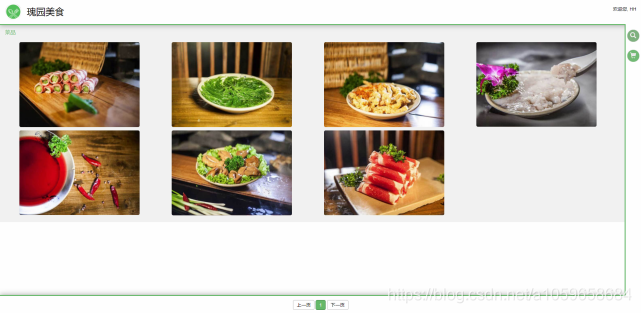
查询效果
后言
本文结束了,如果觉得本技术文章对你有帮助请给我点个赞,如果有什么不足的地方,给我提意见,让我加以改进
MVC查询的更多相关文章
- 学习ASP.NET MVC(七)——我的第一个ASP.NET MVC 查询页面
在本篇文章中,我将添加一个新的查询页面(SearchIndex),可以按书籍的种类或名称来进行查询.这个新页面的网址是http://localhost:36878/Book/ SearchIndex. ...
- MVC查询数据接收及校验
本来想写一篇aspx的TreeView控件绑值的文章的,在写案例的时候,写了一半,发现有些地方还得考虑以下,就留待下次了. 这一篇的话,是最近在开发一个项目的时候,有大量的页面和数据表,需要花式查询, ...
- 基于bootstrap和knockoutjs使用 mvc 查询
这是我摘抄的码 http://pan.baidu.com/s/1nvKWdsd
- ASP.NET MVC:Expression Trees 作为参数简化查询
ASP.NET MVC 引入了 ModelBinder 技术,让我们可以在 Action 中以强类型参数的形式接收 Request 中的数据,极大的方便了我们的编程,提高了生产力.在查询 Action ...
- 学习ASP.NET MVC(九)——“Code First Migrations ”工具使用示例
在上一篇文章中,我们学习了如何使用实体框架的“Code First Migrations ”工具,使用其中的“迁移”功能对模型类进行一些修改,同时同步更新对应数据库的表结构. 在本文章中,我们将使用“ ...
- 学习ASP.NET MVC(一)——我的第一个ASP.NET MVC应用程序
学习ASP.NET MVC系列: 学习ASP.NET MVC(一)——我的第一个ASP.NET MVC应用程序 学习ASP.NET MVC(二)——我的第一个ASP.NET MVC 控制器 学习ASP ...
- 学习ASP.NET MVC(十一)——分页
在这一篇文章中,我们将学习如何在MVC页面中实现分页的方法.分页功能是一个非常实用,常用的功能,当数据量过多的时候,必然要使用分页.在今天这篇文章中,我们学习如果在MVC页面中使用PagedList. ...
- Expression Trees 参数简化查询
ASP.NET MVC 引入了 ModelBinder 技术,让我们可以在 Action 中以强类型参数的形式接收 Request 中的数据,极大的方便了我们的编程,提高了生产力.在查询 Action ...
- 学习ASP.NET MVC系列 - 还有比这更简炼的吗?把复杂的事情变简单了,贡献啊!
转自
随机推荐
- Python爬虫之反爬虫---使用随机User-Agent
在编写爬虫时,大多数情况下,需要设置请求头.而在请求头中,随机更换User-Agent可以避免触发相应的反爬机制. 使用第三方库fake-useragent便可轻松生成随机User-Agent. 使用 ...
- JAVA简单上传图片至七牛
utils package com.example.demo.utils; import com.alibaba.fastjson.JSONObject; import com.qiniu.commo ...
- django 的跨域配置
1.跨域原理 #1. 首先浏览器安全策略限制js ajax跨域访问服务器 #2. 如果服务器返回的头部信息中有当前域: // 允许 http://localhost:8080 这个网站打开的页面中的j ...
- Python-在不在判断 in 和 in判断协议- in __contains__
in 判断元素是否在序列中, 可以查看 in == is 区别 __contians__ 如果是对象则调用对象中的 __contains__方法 class BeiMenChuiXue: def __ ...
- Python-序列-str list tuple
序列 有序数列 str tupe list str tupe 不可变 list 可变 序列(str list tuple) 每个元素都会有个序号(0开始计数) 1. 知索引取单个确定类型 [index ...
- .Net Core 2.2 存取Cookie
第一步(注释代码):注释Startup.cs中 ConfigureServices 函数中的 options.CheckConsentNeeded = context => true; 第二步 ...
- STM32的CCM RAM
STM32F407ZGT6的Flash大小为1MB,SRAM大小为(128KB+64KB). 这里SRAM之所以分开表示是因为在芯片内部前面的128KB和后面的64KB地址不是连续的,后面的64KB在 ...
- 基础篇:深入解析JAVA注解机制
目录 java实现注解的底层原理和概念 五种元注解详解 使用动态代理机制处理注解 spring.AOP和注解机制 (题外)@FunctionalInterface原理介绍 欢迎指正文中错误 关注公众号 ...
- makefile从入门到入门
makefile文件是用来帮助编译和管理C++项目代码的,需要配合make命令使用.makefile里也可以执行shell操作,具备一部分.sh脚本的功能. makefile格式 makefile内容 ...
- 记录一下第一次写 50行 SQL代码
这 是一个电商项目,做的是报表的展示,我还以为要请求几次,结果,用一个SQL全部查完了 下面是目标效果图 这是我的SQL代码 SELECT product.NAME, product.price, p ...